2019 MASERATI QUATTROPORTE instrument panel
[x] Cancel search: instrument panelPage 43 of 396
Auto-On Comfort with Remote
Start The driver's heated and ventilated
seat and the heated steering wheel (if
equipped) can be programmed to
come on during a remote start. Refer
to “Auto-On Comfort & Remote Start”
function in chapter “MTC+ Settings”,
section “Dashboard Instruments and
Controls”, for further information.
Radio Frequency RKE
Transmitter - Regulatory
Information The “Regulatory Information” for all
the radio and radar frequency devices
can be consulted by accessing the
"Services" section on the website
www.maserati.com. Doors Locking WARNING!
• For personal security and safety,
always lock the vehicle doors before
you drive as well as when parking
and leaving the vehicle unattended.
• When leaving the vehicle, always
remove the key fob RKE transmitter
and lock your vehicle.
• Never leave children alone in a
vehicle, or with access to an
unlocked vehicle.
• Do not allow children to be in a
vehicle unattended. A child or
others could be seriously or fatally
injured. Children must not touch the
parking brake trigger, brake pedal or
the shift lever.
• Do not leave the key fob in or near
the vehicle, and do not leave
ignition switch in the ACC or RUN
mode.
Doors Manual Lock To lock each door, push the door lock
knob on each door trim panel
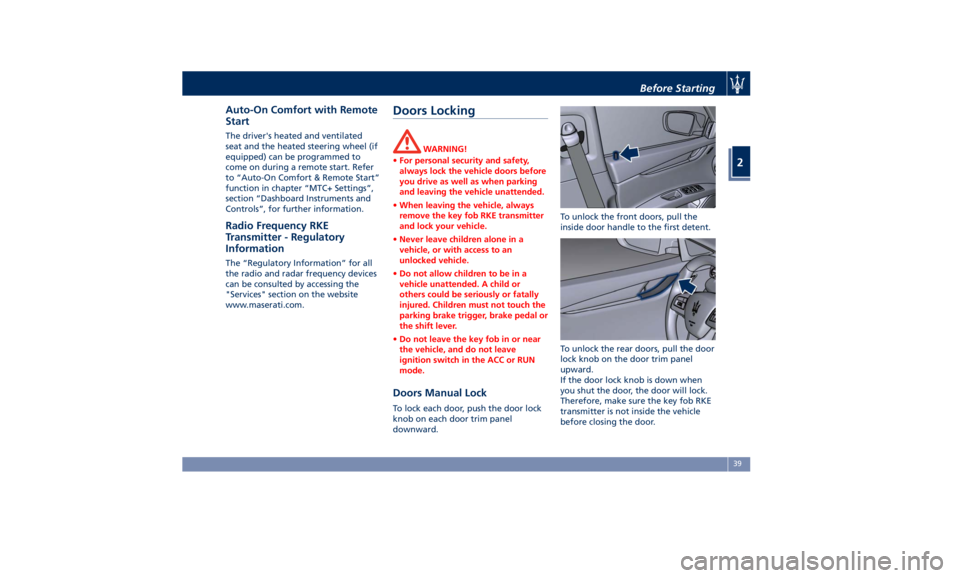
downward. To unlock the front doors, pull the
inside door handle to the first detent.
To unlock the rear doors, pull the door
lock knob on the door trim panel
upward.
If the door lock knob is down when
you shut the door, the door will lock.
Therefore, make sure the key fob RKE
transmitter is not inside the vehicle
before closing the door.Before Starting
2
39
Page 44 of 396
Power Doors Locking/
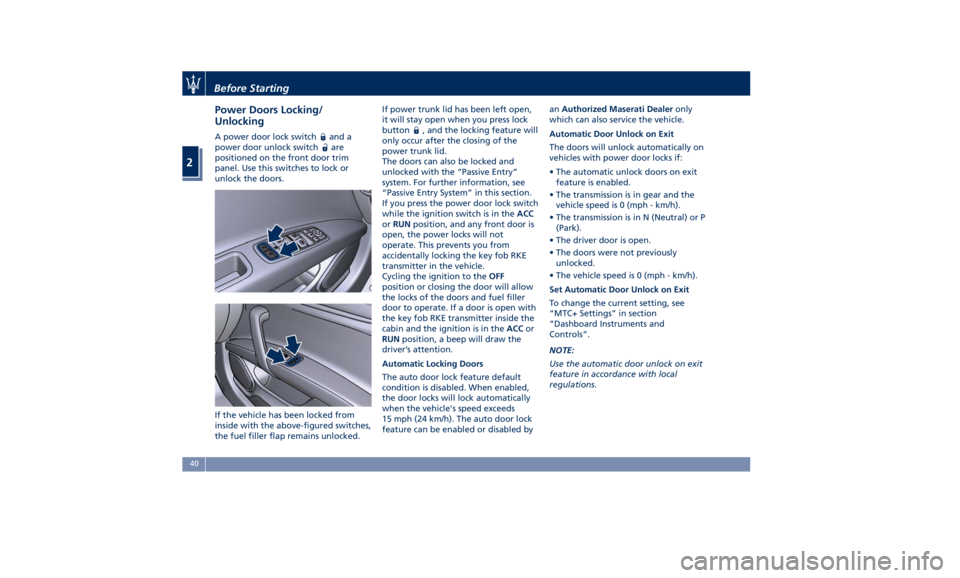
Unlocking A power door lock switch and a
power door unlock switch
are
positioned on the front door trim
panel. Use this switches to lock or
unlock the doors.
If the vehicle has been locked from
inside with the above-figured switches,
the fuel filler flap remains unlocked. If power trunk lid has been left open,
it will stay open when you press lock
button
, and the locking feature will
only occur after the closing of the
power trunk lid.
The doors can also be locked and
unlocked with the “Passive Entry”
system. For further information, see
“Passive Entry System” in this section.
If you press the power door lock switch
while the ignition switch is in the ACC
or RUN position, and any front door is
open, the power locks will not
operate. This prevents you from
accidentally locking the key fob RKE
transmitter in the vehicle.
Cycling the ignition to the OFF
position or closing the door will allow
the locks of the doors and fuel filler
door to operate. If a door is open with
the key fob RKE transmitter inside the
cabin and the ignition is in the ACC or
RUN position, a beep will draw the
driver’s attention.
Automatic Locking Doors
The auto door lock feature default
condition is disabled. When enabled,
the door locks will lock automatically
when the vehicle's speed exceeds
15 mph (24 km/h). The auto door lock
feature can be enabled or disabled by an Authorized Maserati Dealer only
which can also service the vehicle.
Automatic Door Unlock on Exit
The doors will unlock automatically on
vehicles with power door locks if:
• The automatic unlock doors on exit
feature is enabled.
• The transmission is in gear and the
vehicle speed is 0 (mph - km/h).
• The transmission is in N (Neutral) or P
(Park).
• The driver door is open.
• The doors were not previously
unlocked.
• The vehicle speed is 0 (mph - km/h).
Set Automatic Door Unlock on Exit
To change the current setting, see
“MTC+ Settings” in section
“Dashboard Instruments and
Controls”.
NOTE:
Use the automatic door unlock on exit
feature in accordance with local
regulations.Before Starting
2
40
Page 46 of 396

Passive Entry System The “Passive Entry” system is an
enhancement to the vehicle’s Remote
Keyless Entry (RKE) system. This
feature allows you to lock and unlock
the vehicle’s door(s) without having to
press the key fob RKE transmitter lock
or unlock buttons.
NOTE:
• “Passive Entry” may be programmed
to on/off; see “MTC+ Settings” in
section “Dashboard Instruments and
Controls” for further information.
• If wearing gloves, or if it has been
raining on the “Passive Entry” door
handle, the unlock sensitivity can be
affected, resulting in a slower
response time.
• Access to the vehicle using “Passive
Entry” system may not work properly
in case of interference caused by
external sources such as metal
objects, mobile phones, overhead
power lines, antennas, etc. In these
cases, use the buttons of the key fob
RKE transmitter to open and close
the vehicle or the emergency key,
inserting it into the driver side door
lock.
• The “Passive Entry” system does not
lock and unlock the doors directly and immediately but with a slight
delay (about 2 seconds).
Unlock Door from the Driver
Side With a valid key fob RKE transmitter
within 3.3 ft (1 m) of the driver's door
handle, grip the driver’s door outside
handle to unlock the door
automatically. The interior door panel
lock knob will rise when the door is
unlocked. NOTE:
If “1st Press of Key Fob Unlocks” is
selected, all doors will unlock when
you grip the front driver’s door handle.
To select between “Driver Door” and
“All Doors”, see “MTC+ Settings” in
section “Dashboard Instruments and
Controls”.
Unlock Door from the
Passenger Side With a valid key fob RKE transmitter
within 3.3 ft (1 m) of the passenger
door handle, grip the front passenger
outside door handle to unlock all four
doors automatically.
The interior door panel lock knob will
rise when the door is unlocked.Before Starting
2
42
Page 50 of 396
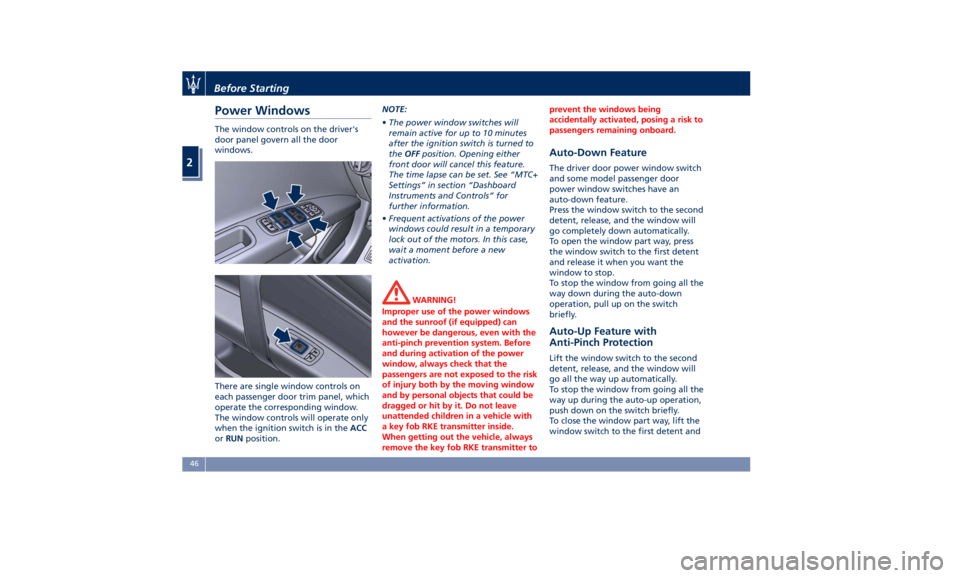
Power Windows The window controls on the driver's
door panel govern all the door
windows.
There are single window controls on
each passenger door trim panel, which
operate the corresponding window.
The window controls will operate only
when the ignition switch is in the ACC
or RUN position. NOTE:
• The power window switches will
remain active for up to 10 minutes
after the ignition switch is turned to
the OFF position. Opening either
front door will cancel this feature.
The time lapse can be set. See “MTC+
Settings” in section “Dashboard
Instruments and Controls” for
further information.
• Frequent activations of the power
windows could result in a temporary
lock out of the motors. In this case,
wait a moment before a new
activation.
WARNING!
Improper use of the power windows
and the sunroof (if equipped) can
however be dangerous, even with the
anti-pinch prevention system. Before
and during activation of the power
window, always check that the
passengers are not exposed to the risk
of injury both by the moving window
and by personal objects that could be
dragged or hit by it. Do not leave
unattended children in a vehicle with
a key fob RKE transmitter inside.
When getting out the vehicle, always
remove the key fob RKE transmitter to prevent the windows being
accidentally activated, posing a risk to
passengers remaining onboard.
Auto-Down Feature The driver door power window switch
and some model passenger door
power window switches have an
auto-down feature.
Press the window switch to the second
detent, release, and the window will
go completely down automatically.
To open the window part way, press
the window switch to the first detent
and release it when you want the
window to stop.
To stop the window from going all the
way down during the auto-down
operation, pull up on the switch
briefly.
Auto-Up Feature with
Anti-Pinch Protection Lift the window switch to the second
detent, release, and the window will
go all the way up automatically.
To stop the window from going all the
way up during the auto-up operation,
push down on the switch briefly.
To close the window part way, lift the
window switch to the first detent andBefore Starting
2
46
Page 54 of 396
C. Sunshade fully rolled down (DOWN
position) and Window completely
open (DOWN position)
• Pulling the control to 1 or 2 detent:
the window closes partially or
completely and the sunshade
remains rolled.
• Pressing the control to 1 or 2 detent:
no action (NOP).
Teaching Cycle
After battery disconnection, the
following teaching cycle is required to
store the limit positions the sunshades.
Use the controls on the rear doors to
move the sunshades.
• With glass closed, lift rear sunshade
control on driver side for a few
seconds. It is not necessary that the
sunshade reaches its upper limit.
• Reverse the sunshade movement by
pressing the control downwards.
Once the lower limit is reached, press
and hold the control for at least 10
seconds. This action allows setting
the control unit in initialisation
status.
• Release the movement command.
• Within maximum 15 seconds:
• Press once the control downwards
(first or second detent). In this way
the control unit stores the lower limit position. During this
operation a slight click of the
sunshade motor that switches to
mechanical lock condition can be
heard.
• Lift the control and hold it up until
the sunshade completes its
upstroke and reaches the car body
pillar, fully home. Once the upper
limit stop is reached, the sunshade
will move downwards for approx.
2-3 millimetres and the control unit
will store this height as the upper
limit. Now the teaching of the
driver side rear sunshade is
complete.
• Repeat the same operations for the
passenger side rear sunshade to
complete the teaching procedure.Rear Window Rear Window Defroster The rear window defroster button is
located on the climate control panel.
See “Air Conditioning Controls” in
section “Dashboard Instruments and
Controls”.
Power Sunshade (if equipped) Your vehicle can be equipped on
request with a power sunshade that
will reduce the amount of sunlight
that will enter through the rear
window.
The sunshade is rolled in and stored
inside the cover behind the rear seats;
when activated, it rolls out upwards.
The power sunshade can be operated
using the MTC+ System.
• Touch the “Controls” soft-key.
• Within 15 seconds, touch the “Rear
Sunshade” soft-key to raise the
power sunshade.
• Within 15 seconds, touch the “Rear
Sunshade” soft-key a second time to
lower the sunshade.Before Starting
2
50
Page 72 of 396

(Continued)
– Seat Track Position Sensors
– Pyrotechnical charge to cut the
power from the battery: it is
located on the positive battery
terminal
• The electronic control unit provides
for the activation of the
pretensioners, front air bags or side
air bags (front and rear) based on
different criteria, according to the
type of impact. Failure of one or
more systems to activate is not
indicative of a system malfunction.
• The front and/or lateral air bags may
inflate if the vehicle suffers a violent
impact involving the underbody
area, for example in case of violent
impacts against steps, sidewalks,
speed bumps, or when the vehicle
falls into potholes, or similar.
WARNING!
• No objects should be placed over or
near the air bag on the instrument
panel or steering wheel because any
such objects could cause harm if the
vehicle is in a collision severe
enough to cause the air bag to
inflate. • Do not place anything on or around
the air bag covers or attempt to
open them manually. You may
damage the air bags and you could
be injured because the air bags may
no longer be functional. The
protective covers for the air bag are
designed to open only when the air
bags are inflating.
• Always drive with your hands on the
steering wheel rim, so that the air
bag can inflate freely if required.
During the drive your back must be
as upright as comfort allows and be
against the seat back with the seat
belt properly fastened.
• Do not apply stickers or other
objects on the steering wheel, on
the dashboard in the passenger’s
side air bag area, on roof side trims
or on the seats.
• Do not travel with objects in your
lap, in front of your chest or
especially with a pipe, pencil or
other objects in your mouth. In the
event of a collision, the intervention
of the air bag could result in serious
injury.
• EXTREME HAZARD! Do not place a
rearward-facing infant seat onto the
front seat (see warning plate on the
dashboard and above and behind the sun visors). Deployment of the
air bag in an accident could cause
fatal injuries to the baby regardless
of the severity of the collision.
Before Starting
2
68
Page 99 of 396

1 Adjustable side air outlets.
2 Engine START/STOP button.
3 Light switch.
4 Light dimmer controls.
5 Steering wheel controls.
6 Instrument cluster.
7* Right shift paddle +.
8* Left shift paddle –.
9 Hood release.
10 Adjustable central air outlets.
11 Analog clock.
12 MTC+ display.
13 Multifuction lever (windshield
wipers, headlight selection and
turn signals).
14 Climate controls.
15 Dashboard glove box handle.
16 Dashboard glove box.
17 Cover for compartment with
AUX, USB, SD memory card
port and slide phone drawer.
18 Storage compartment handle.
19 Storage compartment.
20 Vehicle security light and solar
sensor.
21 Internal rear view mirror. 22 Auto-dimming on/off button.
23 Front dome console.
(*) If equipped.
Central Console Components 1 Automatic transmission shift
lever.
2 Hazard lights switch.
3 Drive mode switches.
4 Electric Parking Brake lever.
5 Glove compartment.
6 Unlock button for central
console with cupholder and
power outlet.
7 Rotary selectors and buttons
foe the multimedia navigation.
8 Cover for cupholder and power
socket compartment.
9 Central console covers with
armrest function.
10 Air outlets (adjustable).
11 Rear power sunshade and rear
seats comfort controls panel.
12 Storage compartment.
13 Rear climate controls panel for
four-zone air conditioner
(optional).A/C Dual – zone
A/C Four – zone Understanding the Vehicle
3
95
Page 106 of 396

• Check on the instrument cluster for
the positive response of the actions
“Memory 1 (or 2) profile set”.
After these steps, the profile set will
be memorized in the selected position.
NOTE:
Memory profiles can be set without
the vehicle in P (Park), but the vehicle
must be in P (Park) to recall a memory
profile.
Pairing Remote Keyless Entry
Transmitter to Seats Memory Your key fob with RKE transmitters can
be programmed to recall one of two
programmed memory profiles by
pressing the
button on the RKE
transmitter.
NOTE:
This feature can be enabled or
disabled using the MTC+ System, refer
to “MTC+ Settings” in section
“Dashboard Instruments and Controls”
for further information.
To program your key fobs RKE
transmitter, perform the following
actions:
• Cycle the ignition device to the RUN
position. • Move the seat and/or the other
adjustable devices in the position
that you wish to memorize, or recall
a previously memorized profile,
pressing the corresponding memory
button “1” or “2”.
• Cycle the ignition device to the OFF
position.
• Press and release the “S” button.
• Within 5 seconds, press and release
the memory button “1” or “2”.
• Press and release the
button on
key fob RKE transmitter.
• Within 3 seconds, press and release
the
button on the key fob RKE
transmitter.
To check if the system has memorized
the correct profile, you can move the
seat and press the
button: the seat
will move to the memorized position.
NOTE:
Your key fobs RKE transmitter can be
unlinked to your memory settings by
pressing the “S” button followed by
the
button on the key fob RKE
transmitter. Memory Position Recall NOTE:
The vehicle must be in P (Park) to recall
memory positions. If a recall is
attempted when the vehicle is not in P
(Park), a message will display in the
instrument cluster.
To recall the memory settings for
driver, press memory button number
“1” or “2” on the driver's door trim
panel or the
button on the RKE
transmitter linked to memory position
“1” or “2” with ignition device in the
RUN position.
A recall can be canceled by pressing
any of the buttons (“S”, “1”, or “2”)
during a recall. When a recall is
canceled, the driver seat, external side
mirrors, adjustable pedals (optional),
and power tilt and telescopic steering
column stop moving.
A delay of at least one second will
occur before selecting a new recall.Understanding the Vehicle
3
102