2019 MASERATI LEVANTE snow
[x] Cancel search: snowPage 58 of 436

Apart from activating indicators
blinking when power liftgate is
operated, it is also possible to activate
a sound warning by selecting the
relevant function within MTC+ user
settings (see “MTC+ Settings” in
section “Dashboard Instruments and
Controls”).
When power liftgate edge reaches the
car body, the motor locking the latch is
activated automatically.
If necessary, the power liftgate can
also be opened or closed manually
using the handles indicated in the
picture. This operation could be
required when the liftgate remains
open for a long period of time. NOTE:
Frequent activations of the anti-pinch
protection function may disable the
automatic movement of the power
liftgate. To reactivate this function,
perform a reset cycle by carrying out a
complete opening/closing sequence,
after manually closing the power
liftgate.
WARNING!
• Activate power liftgate only when
vehicle is at a standstill.
• Always pay utmost attention when
opening and closing the tailgate. If
for any reason the protection system
might fail to respond, it could cause
injury to anyone within the
operating area.
• After the closing command, always
make sure that power liftgate is
completely closed.
CAUTION!
• Under extreme weather conditions,
liftgate seal could freeze and
compromise power liftgate
automatic opening and closing. • Before opening power liftgate, make
sure that no objects or snow are set
on liftgate or might jam or prevent
its opening.
Hands Free Power Liftgate Release
and Closing
This mode is
controlled by the “Passive
Entry” system (see paragraph “Passive
Entry System” in this section), which
automatically releases and closes the
power liftgate when you place your
foot in the area under the rear
bumper.
The system will only operate if the
system acknowledges the presence of
the key fob RKE transmitter within 3.3
ft (1 m) of the power liftgate.
The range of the sensors that detect
your foot movement extends along
and underneath the central portion of
the rear bumper.
To activate the power liftgate, stand
behind the vehicle, near the liftgate,
and move your foot under the bumper
as if to kick something. Do not place
your foot too close to the bumper or
touch the underbody.
WARNING!
• Pay careful attention to the exhaustBefore Starting
2
54
Page 87 of 436

Enabling and Disabling Park
Assist By accessing the submenu “Safety &
Driving Assistant” from MTC+ System,
the “Park Assist” can be disabled
(option “Off”). The available options
regarding the warning alerts are:
“Sound” or “Sound + Display”. Refer
to “MTC+ Settings” in section
“Dashboard Instruments and
Controls” for further information.
The front sensors can be enabled or
disabled at any time by pressing the
button on the front dome console.
After pressing the button the
instrument cluster will display the
state of front parking sensors for
approximately five seconds. The
button LED will be on when the front
sensors are disabled. The button LED
will be off when the front sensors are
enabled. If the button is pressed and the system requires service, the LED
will blink momentarily, and then the
LED will be on.
When the shift lever is moved to R
(Reverse) or to D (Drive) at a speed of
7 mph (11 km/h) or below and the
system is disabled, the instrument
cluster will display the “PARK ASSIST
Off” message for 5 seconds until the
shift lever remains in R (Reverse) or
when the shift lever is moved in D
(Drive).
Service the Park Assist System In case of malfunction of the Park
Assist system, the instrument cluster
will actuate a single sound, once per
ignition cycle. The instrument cluster
will display a message when any of
the rear or front sensor(s) are blocked
by snow, mud, or ice and the vehicle is
shifted into R (Reverse) or D (Drive).
The instrument cluster will display a
message when any of the rear or front
sensors are damaged and require
service.
When the shift lever is moved to R
(Reverse) or D (Drive) and the system
has detected a faulted condition, the
instrument cluster will display the
corresponding message for the time
lapse the vehicle is in R (Reverse) or D
(Drive) at speeds less than 7 mph (11 km/h). Under this condition Park
Assist will not operate. See
“Instrument Cluster” in section
“Dashboard Instruments and
Controls” for further information.
If the instrument cluster displays a
message prompting you to clean the
sensors, make sure the outer surface
and the underside of the rear bumper
and/or front bumper is clean and clear
of snow, ice, mud, dirt or other
obstruction and then cycle the ignition
switch. If the message continues to
appear contact the Authorized
Maserati Dealer .
If a failure message is displayed on the
instrument cluster, contact the
Authorized Maserati Dealer .Before Starting
2
83
Page 90 of 436
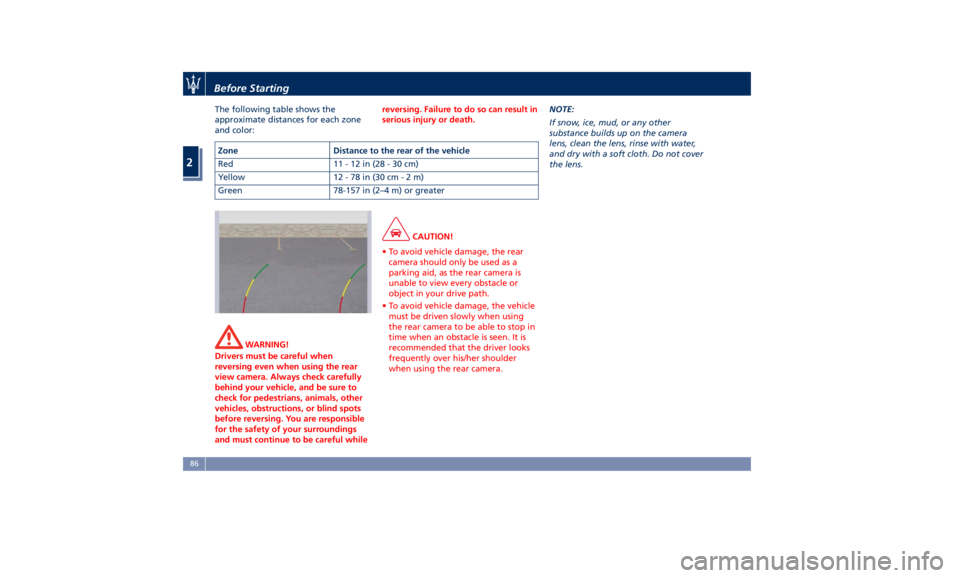
The following table shows the
approximate distances for each zone
and color:
WARNING!
Drivers must be careful when
reversing even when using the rear
view camera. Always check carefully
behind your vehicle, and be sure to
check for pedestrians, animals, other
vehicles, obstructions, or blind spots
before reversing. You are responsible
for the safety of your surroundings
and must continue to be careful while reversing. Failure to do so can result in
serious injury or death.
CAUTION!
• To avoid vehicle damage, the rear
camera should only be used as a
parking aid, as the rear camera is
unable to view every obstacle or
object in your drive path.
• To avoid vehicle damage, the vehicle
must be driven slowly when using
the rear camera to be able to stop in
time when an obstacle is seen. It is
recommended that the driver looks
frequently over his/her shoulder
when using the rear camera. NOTE:
If
snow, ice,
mud, or any other
substance builds up on the camera
lens, clean the lens, rinse with water,
and dry with a soft cloth. Do not cover
the lens.Zone Distance to the rear of the vehicle
Red 11-12in(28-30cm)
Yellow 12 - 78 in (30 c m-2m)
Green 78-157 in (2–4 m) or greaterBefore Starting
2
86
Page 93 of 436
cameras are unable to view every
obstacle or object in your drive path.
• To avoid vehicle damage, the vehicle
must be driven slowly when using
the camera system with surround
view, to be able to stop in time
when an obstacle is seen. It is
recommended that the driver looks
frequently over his/her shoulder
when using this system.
NOTE:
If
snow, ice, mud, or any other
substance builds up on the camera
lens, clean the lens, rinse with water,
and dry with a soft cloth. Do not cover
the lens.
WARNING!
California Proposition 65
Operating, servicing and maintaining
a passenger vehicle or off-road vehicle
can expose you to chemicals including
such as, engine exhaust, carbon
monoxide, phthalates and lead, that
which are known to the State of
California to cause cancer and birth
defects or other reproductive harm. To
minimize exposure, avoid breathing
exhaust, do not idle the engine except as necessary, service your vehicle in a
well-ventilated area and wear gloves
or wash your hands frequently when
servicing your vehicle. For more
information go to:
www.P65Warnings.ca.gov/passenger-
vehicle
Safety Tips Transporting Passengers WARNING!
• Do not leave children or animals
inside parked vehicles in hot
weather. Interior heat build-up may
cause serious injury.
• Never ride in a cargo area, inside of
a vehicle.
• Do not allow people to ride in any
area of your vehicle that is not
equipped with seats and seat belts.
• Be sure everyone in your vehicle is
in a seat and using a seat belt
properly.Before Starting
2
89
Page 120 of 436

SmartBeam™ System (for
versions/markets, where
provided) The SmartBeam™ system provides
increased forward lighting for a more
comfortable and secure driving
experience without resulting in glare
to other vehicles in certain traffic
situations. The SmartBeam™ system
uses a forward facing digital camera,
located on the windshield behind the
internal rear-view mirror, and an
electronical headlights controller in
order to dynamically adapt the front
light distribution according to the
traffic scenario.
The digital camera works like a human
eye, it is able to see which is the traffic
context while the headlight electronic
controller works like a human brain,
using information from the camera to
command an headlight reaction that
gives to the driver the “best” light
distribution (best is always in reference
to the specific traffic environment).
The camera gives information to the
electronical headlight controller about
environmental brightness, traffic
participants vehicle and obstacles
lights, distances and velocities. Using a
proper combination of all these data
the smart beam system is able to dynamically modify the light shape
produced by the dipped beam and by
the full beam as well, to make the
driver visibility as much comfortable as
possible in every condition without
glaring other traffic participants.
System Limitations
There are some cases in which the
SmartBeam TM
system may not function
properly temporarily, and cause
glaring for other vehicles especially
with “Auto High Beam Assist” feature
activated on MTC+ “Controls” page
(see “MTC+ “Controls” Screen” in
section "Dashboard Instruments and
Controls").
These cases could be related to:
• Vehicles headlight and/or rear light
(one or both of them) not visible in
the field of view of the camera.
• Heavy rainy weather.
• Heavy foggy weather.
• Snowing weather.
• Windshield dirt or impurities in
camera lens zone.
• Camera lens obstruction or logging.
In all these cases, it will be the driver’s
responsibility to avoid this glaring by
acting manually on the system,
switching off the high beam by means
of steering wheel multifunction lever. Daytime Running Lights (DRL) The lighting system uses the same high
or low intensity headlamps LED,
respectively, for the DRL lights and
front position lights.
DRL lights will turn on when the
twilight sensor is in “DAY” mode, the
engine is running and the light switch
is in
or “AUTO” position.
If a turn signal is activated, the DRL
LED on the same side of the vehicle
will turn off for the duration of the
turn signal activation. Once the turn
signal is deactivated, the DRL LED will
light up again.
NOTE:
On Canadian vehicles DRL are always
on. On USA vehicles the DRL lights can
be turned on and off using the MTC+
System, see “MTC+ Settings” in section
“Dashboard Instruments and Controls”
for further information.Understanding the Vehicle
3
116
Page 133 of 436
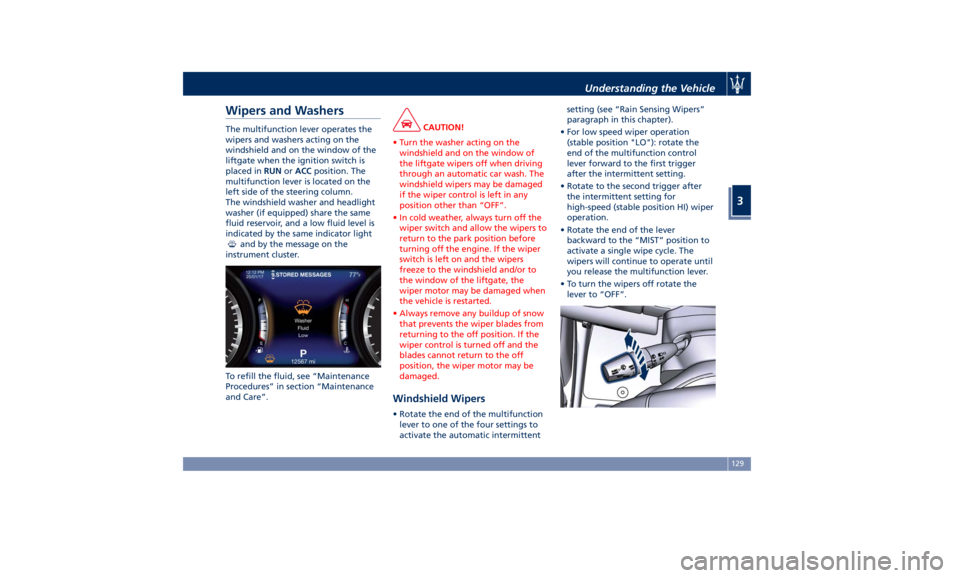
Wipers and Washers The multifunction lever operates the
wipers and washers acting on the
windshield and on the window of the
liftgate when the ignition switch is
placed in RUN or ACC position. The
multifunction lever is located on the
left side of the steering column.
The windshield washer and headlight
washer (if equipped) share the same
fluid reservoir, and a low fluid level is
indicated by the same indicator light
and by the message on the
instrument cluster.
To refill the fluid, see “Maintenance
Procedures” in section “Maintenance
and Care”. CAUTION!
• Turn the washer acting on the
windshield and on the window of
the liftgate wipers off when driving
through an automatic car wash. The
windshield wipers may be damaged
if the wiper control is left in any
position other than “OFF”.
• In cold weather, always turn off the
wiper switch and allow the wipers to
return to the park position before
turning off the engine. If the wiper
switch is left on and the wipers
freeze to the windshield and/or to
the window of the liftgate, the
wiper motor may be damaged when
the vehicle is restarted.
• Always remove any buildup of snow
that prevents the wiper blades from
returning to the off position. If the
wiper control is turned off and the
blades cannot return to the off
position, the wiper motor may be
damaged.
Windshield Wipers • Rotate the end of the multifunction
lever to one of the four settings to
activate the automatic intermittent setting (see “Rain Sensing Wipers”
paragraph in this chapter).
• For low speed wiper operation
(stable position "LO"): rotate the
end of the multifunction control
lever forward to the first trigger
after the intermittent setting.
• Rotate to the second trigger after
the intermittent setting for
high-speed (stable position HI) wiper
operation.
• Rotate the end of the lever
backward to the “MIST” position to
activate a single wipe cycle. The
wipers will continue to operate until
you release the multifunction lever.
• To turn the wipers off rotate the
lever to “OFF”.Understanding the Vehicle
3
129
Page 145 of 436
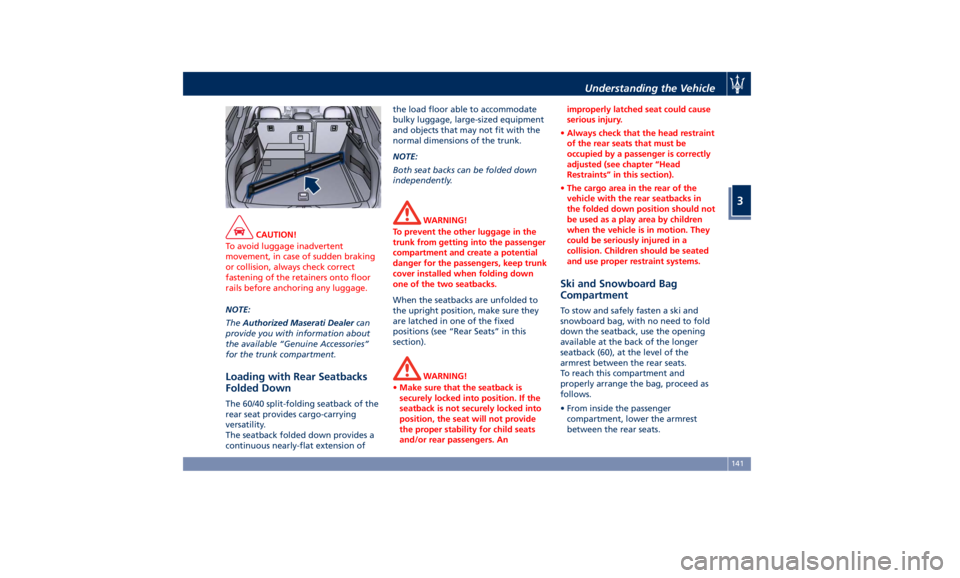
CAUTION!
To avoid luggage inadvertent
movement, in case of sudden braking
or collision, always check correct
fastening of the retainers onto floor
rails before anchoring any luggage.
NOTE:
The Authorized
Maserati Dealer can
provide you with information about
the available “Genuine Accessories”
for the trunk compartment.
Loading with Rear Seatbacks
Folded Down The 60/40 split-folding seatback of the
rear seat provides cargo-carrying
versatility.
The seatback folded down provides a
continuous nearly-flat extension of the load floor able to accommodate
bulky luggage, large-sized equipment
and objects that may not fit with the
normal dimensions of the trunk.
NOTE:
Both seat backs can be folded down
independently.
WARNING!
To prevent the other luggage in the
trunk from getting into the passenger
compartment and create a potential
danger for the passengers, keep trunk
cover installed when folding down
one of the two seatbacks.
When the seatbacks are unfolded to
the
upright position, make
sure they
are latched in one of the fixed
positions (see “Rear Seats” in this
section).
WARNING!
• Make sure that the seatback is
securely locked into position. If the
seatback is not securely locked into
position, the seat will not provide
the proper stability for child seats
and/or rear passengers. An improperly latched seat could cause
serious injury.
• Always check that the head restraint
of the rear seats that must be
occupied by a passenger is correctly
adjusted (see chapter “Head
Restraints” in this section).
• The cargo area in the rear of the
vehicle with the rear seatbacks in
the folded down position should not
be used as a play area by children
when the vehicle is in motion. They
could be seriously injured in a
collision. Children should be seated
and use proper restraint systems.
Ski and Snowboard Bag
Compartment To stow and safely fasten a ski and
snowboard bag, with no need to fold
down the seatback, use the opening
available at the back of the longer
seatback (60), at the level of the
armrest between the rear seats.
To reach this compartment and
properly arrange the bag, proceed as
follows.
• From inside the passenger
compartment, lower the armrest
between the rear seats.Understanding the Vehicle
3
141
Page 146 of 436
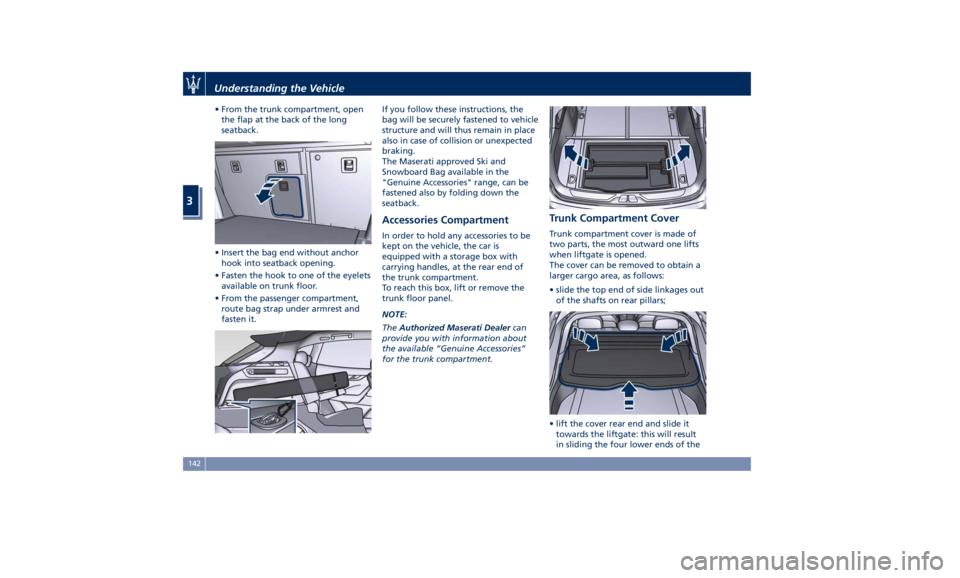
• From the trunk compartment, open
the flap at the back of the long
seatback.
• Insert the bag end without anchor
hook into seatback opening.
• Fasten the hook to one of the eyelets
available on trunk floor.
• From the passenger compartment,
route bag strap under armrest and
fasten it. If you follow these instructions, the
bag will be securely fastened to vehicle
structure and will thus remain in place
also in case of collision or unexpected
braking.
The Maserati approved Ski and
Snowboard Bag available in the
"Genuine Accessories" range, can be
fastened also by folding down the
seatback.
Accessories Compartment In order to hold any accessories to be
kept on the vehicle, the car is
equipped with a storage box with
carrying handles, at the rear end of
the trunk compartment.
To reach this box, lift or remove the
trunk floor panel.
NOTE:
The Authorized Maserati Dealer can
provide you with information about
the available “Genuine Accessories”
for the trunk compartment. Trunk Compartment Cover Trunk compartment cover is made of
two parts, the most outward one lifts
when liftgate is opened.
The cover can be removed to obtain a
larger cargo area, as follows:
• slide the top end of side linkages out
of the shafts on rear pillars;
• lift the cover rear end and slide it
towards the liftgate: this will result
in sliding the four lower ends of theUnderstanding the Vehicle
3
142