2019 MASERATI LEVANTE change wheel
[x] Cancel search: change wheelPage 305 of 436
Lane Keeping Assist - LKA
(optional, with ACC only) This system was designed especially
for highway or freeway driving, to
reduce the risk that the vehicle, under
particular circumstances, accidentally
departs from the lane in use. When
this happens, graphic instructions on
instrument cluster display together
with steering torque application and
steering wheel vibration (depending
on the distance to the line) warn the
driver that the vehicle is going out of
the lane and initiate a steering
maneuver to try to prevent the lane
exit.
To detect lane lines, the system uses
the forward-facing camera behind of
the rear-view mirror, which is the same
one used also by the lighting system
to manage the automatic high beams.
The logic core is in the front radar.
LKA system remembers the condition
it was in before turning off the
vehicle.
Refer to “MTC+ "Controls" Screen” in
section “Dashboard Instruments and
Controls” for further information. NOTE:
In case of wet road or raining
conditions the function could be
disabled by the system in order to
minimize the risks.
Speed Range of Use Speed mph (km/h)
Minimum 37 (60)
Engaged/activated 37 (60)
Maximum 112 (180)
Customized Settings LKA is configurable by the driver in
order to maximize its efficiency based
on the driver driving style and the
expectation of the system, reducing at
the same time the possible
invasiveness.
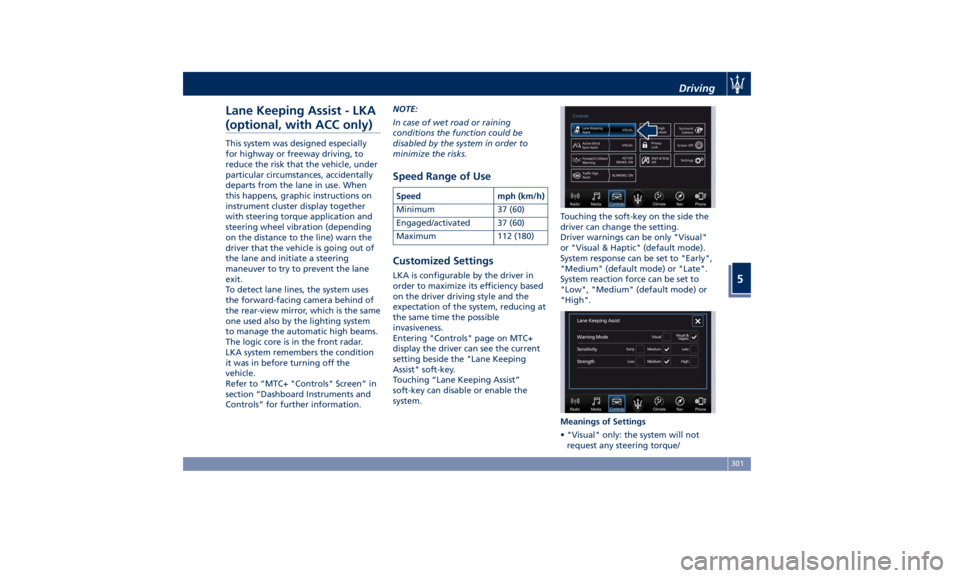
Entering "Controls" page on MTC+
display the driver can see the current
setting beside the "Lane Keeping
Assist" soft-key.
Touching “Lane Keeping Assist”
soft-key can disable or enable the
system. Touching the soft-key on the side the
driver can change the setting.
Driver warnings can be only "Visual"
or "Visual & Haptic" (default mode).
System response can be set to "Early",
"Medium" (default mode) or "Late".
System reaction force can be set to
"Low", "Medium" (default mode) or
"High".
Meanings of Settings
• "Visual" only: the system will not
request any steering torque/Driving
5
301
Page 306 of 436

vibration to correct the car trajectory.
The system will only show on the TFT
display when the vehicle is passing
the lane.
• "Visual & Haptic": the system will
apply steering torque when lane
departure is detected while showing
at the same time the proper cluster
indication, adding to this steering
vibration when the departure is very
imminent.
When "Visual & Haptic" is selected and
LKA is enabled then the following
menu will be used by the system.
• "LKA Sensitivity": it tunes the
distance to the lane boundary where
the system will start to apply steering
torque.
• "LKA Strength": it tunes the steering
torque value to have a stronger or
weaker trajectory correction/
deviation.
WARNING!
In rare cases, Lane Keeping Assist
(LKA) may make an inappropriate
steering torque application. LKA may
be interrupted at any time counter
steering. Lack of attention may lead to
serious injury or death. System Availability The ADAS systems (LKA, CC, ACC, FCW
and HAS) help the driver while driving.
These systems can be set and
monitored simultaneously on the
display, after opening “Driver Assist”
menu (see paragraph “TFT Display:
Menus and Settings” under
“Instrument Cluster” in section
“Dashboard Instruments and
Controls”).
LKA is designed for an attentive driver;
therefore the system is available only
when his/her hands are on the steering
wheel or with hands off only for a very
limited amount of time. When the
system is enabled it will trigger cluster
warning in case at least one hand is
not detected on the steering wheel.
The torque application as well as the
vibration are suppressed/inhibited in
case of: high driver torque in the
steering wheel, high lateral
acceleration, trailer connected to the
proper control module, hands not on
the steering wheel detected for more
than a certain time.
High dynamic driving behaviors,
driving on the lane boundary or
driving off course will prevent the
function from working. FCW braking
and stability system interventions (ESC, ABS) will also prevent the system from
operating. Changing lane results in
system inhibition for a certain time. In
addition, the driver must respect some
road characteristics such as
minimum-maximum width, lanes
clearly defined by two lane boundaries
and for a limited time, the presence of
at least one lane boundary.
NOTE:
• In case of wet road or raining
conditions the function could be
disabled by the system in order to
minimize the risks.
• With lane boundaries it is mainly
referred to painted lines,
nevertheless the system in good
conditions might properly recognize
as valid lane boundaries also other
types (for example road edges, curbs,
etc..).
Being this function used to prevent
unintentional lane change/lane drift, it
will be temporary suppressed/inhibited
by a turn indicator activation,
therefore, graphic warning, steering
torque application and vibration will
be terminated. In this condition in case
of a vehicle detected by the Blind Spot
Assist (BSA) system in the covered area
on the proper side, there can be theDriving
5
302
Page 308 of 436

The icons that represent the status of
the ADAS systems remain displayed
even when you exit the “Driver Assist”
screen.
System Limitations Because of physical limits, in order to
properly operate, the system needs
good visibility (it might not work or
not properly operate in case of heavy rain, snow, wet roads, fog, direct sun
on the camera, etc.).
NOTE:
• The presence of the hands on the
steering wheel is detected by a logic
combination of a capacitive sensor
installed in the steering wheel and
the measured applied torque at the
steering column. This leads to a more
robust hands detection when hands
are actually on the steering wheel (at
least one).
• The sensors are not able to detect
the presence of the hands on the
steering wheel areas covered in
wood, plastic bezels or carbon inserts
(where present).
Sharp turns, slopes and change in
slopes, poor lane boundaries, as well
as construction areas and all the
scenario described in this paragraph
may challenge the system, therefore
be always ready to prevent any
unexpected behaviour of the car.
Damaged front bumper, windshield
replaced without proper technical
intervention may also lead to system
malfunction or system unavailability.
Other conditions such as fault, but not
explicitly indicated here may also prevent/interrupt the system
intervention.
WARNING!
If the driver fails to adapt his/her
driving style, Lane Keeping Assist
(LKA) can neither reduce the risk of an
accident nor override the laws of
physics. It cannot take into account
road, weather or traffic conditions.
Active LKA is only an aid. Driver is
always responsible for the distance to
the vehicle in front, for vehicle speed,
for braking in good time and for
staying in lane.
System in Fault When the LKA cannot properly
operate due to a fault of its
components or because the windshield
in front of the forward facing camera
is dirty, the amber light and/or the
corresponding message will be
displayed.Non-Driver Assist PageDriving
5
304
Page 314 of 436

System is Faulty
The BSA system cannot properly
operate due to a fault of its
components, or because the area on
the rear bumper fascia where the
radar sensors are located is dirty. In
these cases the amber warning light
and the related message will be
displayed on the instrument cluster.
In these cases avoid using the system
and have the vehicle inspected at an
Authorized Maserati Dealer .
Radar Device - Regulatory
Information The “Regulatory Information” for all
the radio frequency and radar devices
can be consulted by accessing the
"Services" section on the website
www.maserati.com. Active Blind Spot Assist -
ABSA (optional, with ACC
only) ABSA system is only available on
vehicles equipped with ACC system
and represents an addition to the BSA
previously described (see chapter
"Blind Spot Assist - BSA" of this
section).
ABSA adds to the BSA the possibility in
certain circumstances to avoid and or
mitigate side collisions with vehicles
proceeding in the adjacent lanes by
changing the car trajectory in order to
try to keep it inside the detected/
estimated lane. A steering wheel
vibration is used as further feedback to
warn the driver that the lane change is
not safe.
The main logic core is the front radar,
whereas the sense inputs are the
radars on the rear bumper fascia used
for sensing the presence of vehicle in
the blind spot areas and the forward
facing camera placed behind the
internal rear-view mirror that instead
is used for lane detection and
estimation.
ABSA is designed to help the driver to
avoid mitigate a collision. Torque and
vibration application is however available in the 37 - 112 mph (60 -
180 km/h) speed interval. All the speed
thresholds related to the BSA remain
still valid, since ABSA as mentioned is
BSA extension.
ABSA is intended as a “hands-on”
function meaning that the driver is
required to stay engaged in the
driving all the time with his/her hands
on the steering wheel, in case hands
are not on the steering wheel for a
certain time there cannot be any
steering torque application vibration
included.
System Availability ABSA is designed for an attentive
driver therefore the system is available
only when his/her hands are on the
steering wheel or with hands off for a
very limited amount of time. When the
system is enabled, it will trigger cluster
warning in case at least one hand is
not detected on the steering wheel.
The torque application as well as the
vibration are suppressed/inhibited in
case of: high driver torque in the
steering wheel, high lateral
acceleration, hands not on the steering
wheel detected for more than a
certain time.
Highly dynamic behaviours, driving on
the lane boundary, off course willDriving
5
310
Page 316 of 436

System sensitivity can be set to “Early”,
“Medium” (default mode) or “Late”.
System strength can be set to "Low",
"Medium" (default mode) or "High".
NOTE:
The ABSA system will store the current
operating mode when the vehicle is
shut off. Each time the vehicle is
started, the previously-stored mode
will be recalled and used.
Meanings of Settings
When "Visual & Haptic" is selected and
of course ABSA is enabled, then two
following menus will be used by the
system.
• ABSA "Sensitivity": it tunes the
distance to the lane boundary where
the system will start to apply steering
torque. • ABSA “Strength": it tunes the
steering torque value to have a
stronger or weaker trajectory
correction/deviation.
Blind Spot Assist in "Visual & Haptic"
Mode
When the system is on and configured
“Visual & Haptic” then the ABSA is
enabled and to the conventional visual
warnings is added the steering torque
and vibration.
When operating in this mode, the
system will provide a visual alert in the
appropriate outside rear-view mirror
when it detects a vehicle or an object
in the detection areas monitored by its
sensors. In case of turn indicator
activation on the appropriate side, the
system will react with a torque on the
steering wheel to try to prevent the
lane change and therefore to
avoid/mitigate the collision. The
torque on the steering is applied when
the car is very close to the lane
boundary as a further feedback to
warn the driver of the unsafe
maneuver.
NOTE:
• The steering torque is not supplied if
the system is not able to estimate a
lane and if the turn indicator from
the appropriate side is not inserted. • The presence of the hands on the
steering wheel is detected by a logic
combination of a capacitive sensor
installed in the steering wheel and
the measured applied torque at the
steering column. This leads to a more
robust hands detection.
WARNING!
• Risk of accident despite steering
torque application of Active Blind
Spot Assist (ABSA).
• A course-correcting steering torque
application cannot always prevent a
collision.
• The driver is always required to
steer, brake or accelerate themself,
especially if ABSA warns or makes a
course correcting steer intervention.
• Always maintain a safe distance at
the sides.
• Steering torque application may be
interrupted at any time by counter
steering by the driver.
RCP - Rear Cross Path
Operation RCP operation is the same as described
in chapter "Blind Spot Assist - BSA".Driving
5
312
Page 320 of 436

When exiting the “Driver Assist” page,
the attention level colour will always
be displayed until the system is
disabled by pressing the
button on
the steering wheel.
The HAS system uses sensors in the
steering wheel outer crown to detect
if the driver’s hands are on the
steering wheel. If the driver’s hands
are not detected on the steering wheel, the instrument cluster will
display a series of warnings to alert the
driver to return their hands to the
steering wheel. There will also be
audible chimes. After a set amount of
time, HAS will cancel if the driver’s
hands are not returned to the steering
wheel.
When the system does not sense the
hands on the steering wheel for a few
seconds (3 – 5 seconds) or more (up to
10 seconds), it tries to draw the
attention of the driver by showing,
even when the display is not in the
"Driver Assist" page, the
symbol
with the figure of the hands in the
centre of the display. According to
such time frames, the system will
change the attention level colour,
silence the audio in the vehicle (if it is
active) and emit audible chimes to
invite the driver to take the control of
the vehicle again. This is the only way
to reengage the system.
Hands Detection on Steering
Wheel The sensors in the steering wheel
outer crown are able to detect the
presence of the hands on the steering
wheel. In order to be able to use the HAS
system, place your hands around the
steering wheel outer crown.
NOTE:
• The sensors are not able to detect
the presence of the hands on the
steering wheel areas covered in
wood, plastic bezels or carbon inserts
(where present).
HAS is deactivated if the steering
wheel is no longer being touched.
System Statuses The active status of the HAS system is
indicated by the green attention level
colour which is maintained even if the
driver releases his/her grip from the
steering wheel up to 3 seconds.
The yellow attention level colour
appears when the driver removes
his/her hands from the steering wheelDriver Assist Page
Non-Driver Assist PageDriving
5
316
Page 331 of 436

When the tread is worn to one of the
tread wear indicators, the tire should
be replaced.
WARNING!
The wet performance (aquaplaning
resistance) will decrease
proportionally to the thickness of the
tread.
Tires Durability The service life of a tire depends on
various factors including, but not
limited to:
• driving style;
• tire pressure;
• distance driven.
WARNING!
Tires and the spare tire (if equipped)
should be replaced after six years,
regardless of the remaining tread.
Failure to follow this warning could
result in tire failure. Replacement Tires NOTE:
In order to maintain high performance
and safety level under all driving
conditions, Maserati strongly
recommends to use tires equivalent to
the originals in size, quality and
performance when replacement is
needed.
For the size designation of your tire
see the label on the driver's side rear
door pillar or see table “Wheels” in
section “Features and Specifications”.
The “Load Index” and “Speed
Symbol” for your tire will be found on
the original equipment tire sidewall.
NOTE:
Maserati recommends Maserati
Genuine Tires marked with “MGT”
logo specifically designed for its
models.
It is recommended to replace the two
front tires or two rear tires as a pair.
Replacing just one tire can seriously
affect your vehicle’s handling.
If you ever replace a wheel assembly,
make sure that the wheel’s
specifications (valve, TPMS sensor and
tire) match those of the original
wheels. Failure to use equivalent replacement tires may adversely affect
the safety, handling, and ride of your
vehicle.
Your Authorized Maserati Dealer is
available to provide suggestions as to
the types of tires most suited to the
use foreseen by the Customer.
WARNING!
• Do not use a tire, wheel size or
rating other than that specified for
your vehicle. Some combinations of
unapproved tires and wheels may
change suspension dimensions and
performance characteristics,
resulting in altered steering,
handling, and braking operations of
the vehicle. This can cause
unpredictable handling and stress to
steering and suspension
components. Use only the tire and
wheel sizes with load ratings
appointed for your vehicle.
• Never use a tire with a smaller load
index or capacity, other than what
was originally equipped on your
vehicle. Using a tire with a smaller
load index could result in tire
overloading and failure.
• Always check the maximum speed
(Continued)Driving
5
327
Page 333 of 436
• Avoid holes in the road, do not drive
over steps or sidewalks and do not
drive on long stretches without
snow. This will prevent damage to
the vehicle and the roadbed.
NOTE:
The Authorized Maserati Dealer can
provide you
with all information
about the Maserati Snow Chains,
available in the "Genuine Accessories"
range.
Pneumatic Suspension Mode
for Wheel Change The pneumatic suspension system is
equipped with a specific mode to be
used when vehicle must be lifted to
change one or several wheels/tires.
This mode temporarily disables
pneumatic suspension automatic
leveling.
To activate this mode, scroll user
settings on MTC+ and select “Wheel
Replacement Mode” in submenu
“Suspension”. The tick next to
selected item will indicate that this
mode is active and system is disabled
(for further details, refer to chapter
“MTC+ Settings” in section
“Dashboard Instruments and
Controls”). After servicing, restore original
conditions and eliminate the tick next
to selected mode: in this way the
pneumatic suspension system will go
back to normal operation.
Compact Spare Tire The limited-use spare tire, or compact
spare tire, is for temporary emergency
use only.
This tire is identified by a label
indicating the driving speed
limitations to comply with when using
the spare tire.
Inflate the spare tire to the cold
inflation pressure listed on the table
“Tire Inflation Pressure” in section
“Features and Specifications”.
Mounting the spare tire affects vehicle
handling. Replace (or repair) as soon
as possible the original equipment tire
and reinstall it on the vehicle. Do not
install more than one compact spare
tire and wheel on the vehicle at a
time.
WARNING!
With these compact spare tires, do not
drive more than 50 mph (80 km/h).
Temporary use spares have limited
tread life.Tire Pressure Monitoring
System (TPMS) The Tire Pressure Monitoring System
(TPMS) will warn the driver of a low
tire pressure according to the vehicle
recommended cold pressure indicated
on the table “Tire Inflation Pressure”
in section “Features and
Specifications” and on the label
applied on the driver's side rear door
pillar.
Tire pressure should always be set
based on cold inflation tire pressure.
The cold tire inflation pressure must
not exceed the maximum inflation
pressure molded into the tire sidewall.
Check “Tires – General Information” in
section “Driving” for information on
how to properly inflate the tires.
The tire pressure will also increase as
the vehicle is driven - this is normal
and there is no adjustment required
when this occurs.
The TPMS will warn the driver of a low
tire pressure if the tire pressure falls
below the low-pressure warning limit
for any reason, including low
temperature effects and natural
pressure loss of the tire.
The TPMS will continue to warn the
driver of low tire pressure as long as
the condition persists and will not turnDriving
5
329