2019 MASERATI LEVANTE ignition
[x] Cancel search: ignitionPage 43 of 436

15-minute cycle, press and release the
START/STOP button.
NOTE:
The message “Remote Start Active
Push Start Button” will display in the
instrument cluster until you push the
START/STOP button.
Auto-On Comfort with Remote
Start The driver's heated and ventilated
seat and the heated steering wheel (if
equipped) can be programmed to
come on during a remote start. Refer
to “Auto-On Comfort & Remote Start”
function in chapter “MTC+ Settings”,
section “Dashboard Instruments and
Controls”, for further information.
Radio Frequency RKE
Transmitter - Regulatory
Information The “Regulatory Information” for all
the radio frequency and radar devices
can be consulted by accessing the
"Services" section on the website
www.maserati.com. Doors Locking WARNING!
• For personal security and safety lock
the vehicle doors before you drive
as well as when parking and leaving
the vehicle unattended.
• When leaving the vehicle, always
remove the key fob RKE transmitter
and lock your vehicle.
• Never leave children alone in a
vehicle, or with access to an
unlocked vehicle.
• Do not allow children to be in a
vehicle unattended. A child or
others could be seriously or fatally
injured. Children must not touch the
parking brake trigger, brake pedal or
the shift lever.
• Do not leave the key fob in or near
the vehicle, and do not leave
ignition switch in the ACC or RUN
mode.
Doors Manual Lock To lock each door, push the door lock
knob on each door trim panel
downward. To unlock the front doors, pull the
inside door handle to the first detent.
To unlock the rear doors, pull the door
lock knob on the door trim panel
upward.
If the door lock knob is down when
you shut the door, the door will lock.
Therefore, make sure the key fob RKE
transmitter is not inside the vehicle
before closing the door.Before Starting
2
39
Page 44 of 436
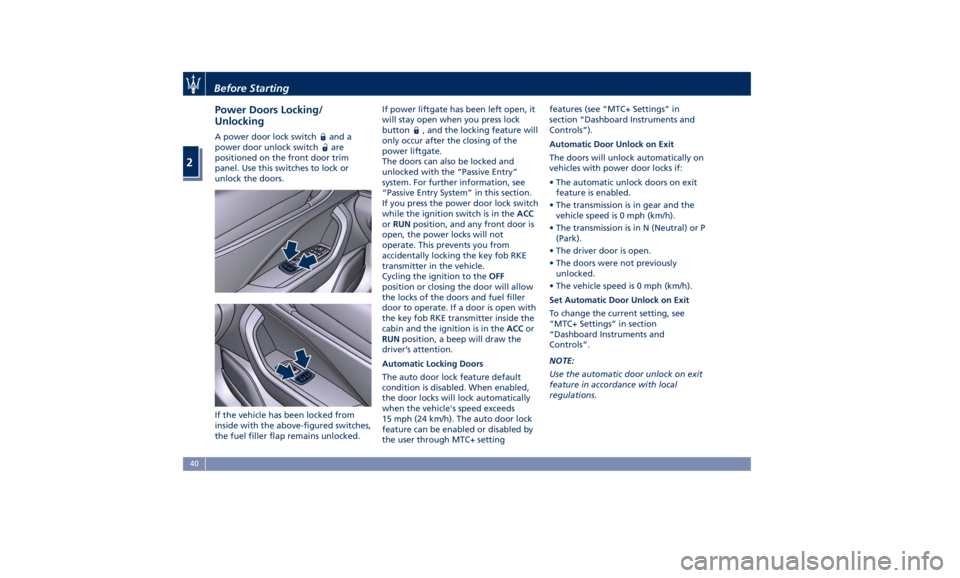
Power Doors Locking/
Unlocking A power door lock switch and a
power door unlock switch
are
positioned on the front door trim
panel. Use this switches to lock or
unlock the doors.
If the vehicle has been locked from
inside with the above-figured switches,
the fuel filler flap remains unlocked. If power liftgate has been left open, it
will stay open when you press lock
button
, and the locking feature will
only occur after the closing of the
power liftgate.
The doors can also be locked and
unlocked with the “Passive Entry”
system. For further information, see
“Passive Entry System” in this section.
If you press the power door lock switch
while the ignition switch is in the ACC
or RUN position, and any front door is
open, the power locks will not
operate. This prevents you from
accidentally locking the key fob RKE
transmitter in the vehicle.
Cycling the ignition to the OFF
position or closing the door will allow
the locks of the doors and fuel filler
door to operate. If a door is open with
the key fob RKE transmitter inside the
cabin and the ignition is in the ACC or
RUN position, a beep will draw the
driver’s attention.
Automatic Locking Doors
The auto door lock feature default
condition is disabled. When enabled,
the door locks will lock automatically
when the vehicle's speed exceeds
15 mph (24 km/h). The auto door lock
feature can be enabled or disabled by
the user through MTC+ setting features (see “MTC+ Settings” in
section “Dashboard Instruments and
Controls”).
Automatic Door Unlock on Exit
The doors will unlock automatically on
vehicles with power door locks if:
• The automatic unlock doors on exit
feature is enabled.
• The transmission is in gear and the
vehicle speed is 0 mph (km/h).
• The transmission is in N (Neutral) or P
(Park).
• The driver door is open.
• The doors were not previously
unlocked.
• The vehicle speed is 0 mph (km/h).
Set Automatic Door Unlock on Exit
To change the current setting, see
“MTC+ Settings” in section
“Dashboard Instruments and
Controls”.
NOTE:
Use the automatic door unlock on exit
feature in accordance with local
regulations.Before Starting
2
40
Page 47 of 436
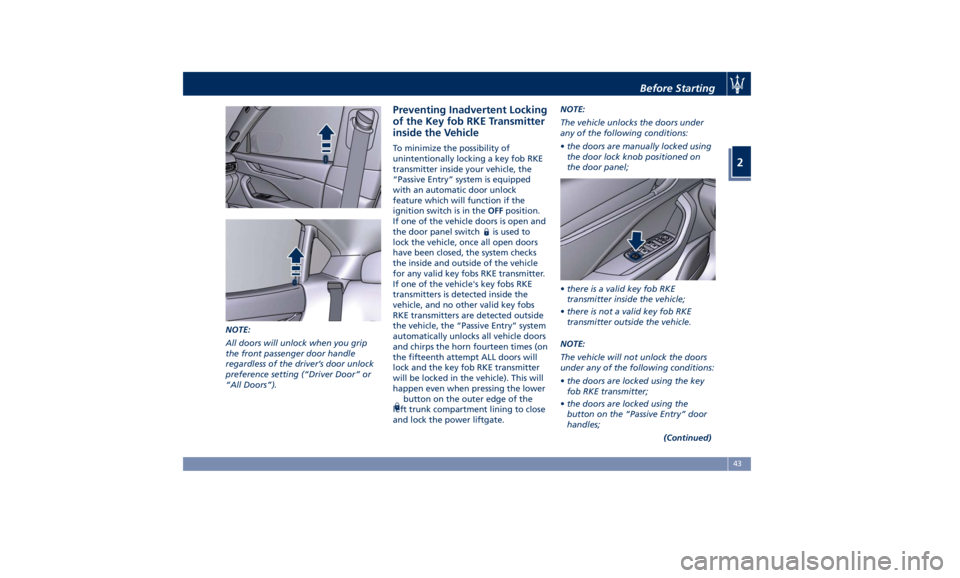
NOTE:
All doors will unlock when you grip
the front passenger door handle
regardless of the driver’s door unlock
preference setting (“Driver Door” or
“All Doors”). Preventing Inadvertent Locking
of the Key fob RKE Transmitter
inside the Vehicle To minimize the possibility of
unintentionally locking a key fob RKE
transmitter inside your vehicle, the
“Passive Entry” system is equipped
with an automatic door unlock
feature which will function if the
ignition switch is in the OFF position.
If one of the vehicle doors is open and
the door panel switch
is used to
lock the vehicle, once all open doors
have been closed, the system checks
the inside and outside of the vehicle
for any valid key fobs RKE transmitter.
If one of the vehicle's key fobs RKE
transmitters is detected inside the
vehicle, and no other valid key fobs
RKE transmitters are detected outside
the vehicle, the “Passive Entry” system
automatically unlocks all vehicle doors
and chirps the horn fourteen times (on
the fifteenth attempt ALL doors will
lock and the key fob RKE transmitter
will be locked in the vehicle). This will
happen even when pressing the lower
button on the outer edge of the
left trunk compartment lining to close
and lock the power liftgate. NOTE:
The vehicle unlocks the doors under
any of the following conditions:
• the doors are manually locked using
the door lock knob positioned on
the door panel;
• there is a valid key fob RKE
transmitter inside the vehicle;
• there is not a valid key fob RKE
transmitter outside the vehicle.
NOTE:
The vehicle will not unlock the doors
under any of the following conditions:
• the doors are locked using the key
fob RKE transmitter;
• the doors are locked using the
button on the “Passive Entry” door
handles;
(Continued)Before Starting
2
43
Page 50 of 436

Power Windows The window controls on the driver's
door panel govern all the door
windows.
There are single window controls on
each passenger door trim panel, which
operate the corresponding window.
The window controls will operate only
when the ignition switch is in the ACC
or RUN position. NOTE:
• The power window switches will
remain active for up to 10 minutes
after the ignition switch is turned to
the OFF position. Opening either
front door will cancel this feature.
The time lapse can be set. See “MTC+
Settings” in section “Dashboard
Instruments and Controls” for
further information.
• Frequent activations of the power
windows could result in a temporary
lock out of the motors. In this case,
wait a moment before a new
activation.
WARNING!
Improper use of the power windows
and the sunroof (if equipped) can
however be dangerous, even with the
anti-pinch prevention system. Before
and during activation of the power
window, always check that the
passengers are not exposed to the risk
of injury both by the moving window
and by personal objects that could be
dragged or hit by it. Do not leave
unattended children in a vehicle with
a key fob RKE transmitter inside.
When getting out the vehicle, always
remove the key fob RKE transmitter to prevent the windows being
accidentally activated, posing a risk to
passengers remaining onboard.
Auto-Down Feature The driver door power window switch
and some model passenger door
power window switches have an
auto-down feature.
Press the window switch to the second
detent, release, and the window will
go completely down automatically.
To open the window part way, press
the window switch to the first detent
and release it when you want the
window to stop.
To stop the window from going all the
way down during the auto-down
operation, pull up on the switch
briefly.
Auto-Up Feature with
Anti-Pinch Protection Lift the window switch to the second
detent, release, and the window will
go all the way up automatically.
To stop the window from going all the
way up during the auto-up operation,
push down on the switch briefly.
To close the window part way, lift the
window switch to the first detent andBefore Starting
2
46
Page 51 of 436
release it when you want the window
to stop.
NOTE:
• If the window runs into any obstacle
during auto-closure, it will reverse
direction and then go back down.
Remove the obstacle and use the
window switch again to close the
window.
• Any impact due to rough road
conditions may trigger the auto
reverse function unexpectedly
during auto-closure. If this happens,
pull the switch lightly to the first
detent and hold to close the window
manually.
• Frequent activations of the
anti-pinch function could disable the
auto-down and auto-up function of
the windows. In order to re-activate
this function proceed with a reset
cycle as described in the next
paragraph.
WARNING!
There is no anti-pinch protection
when the window is almost closed. Be
sure to clear all objects from the area
before closing the window. Reset Auto-Up/Down Should the auto-up/down feature stop
working, the window probably needs
to be reset.
To reset auto-up/down, pull the
window switch up to close the
window completely and push the
window switch down to open the
window completely.
Open the Windows with RKE
Transmitter and Ignition Off When the ignition switch is in OFF
position, windows can be opened by
pressing the
button on the RKE
transmitter.
• Press the button and release it;
• Press a second time the
button
and keep it pressed until complete
opening of the windows, if they
were closed.
Rear Window and Sunshade
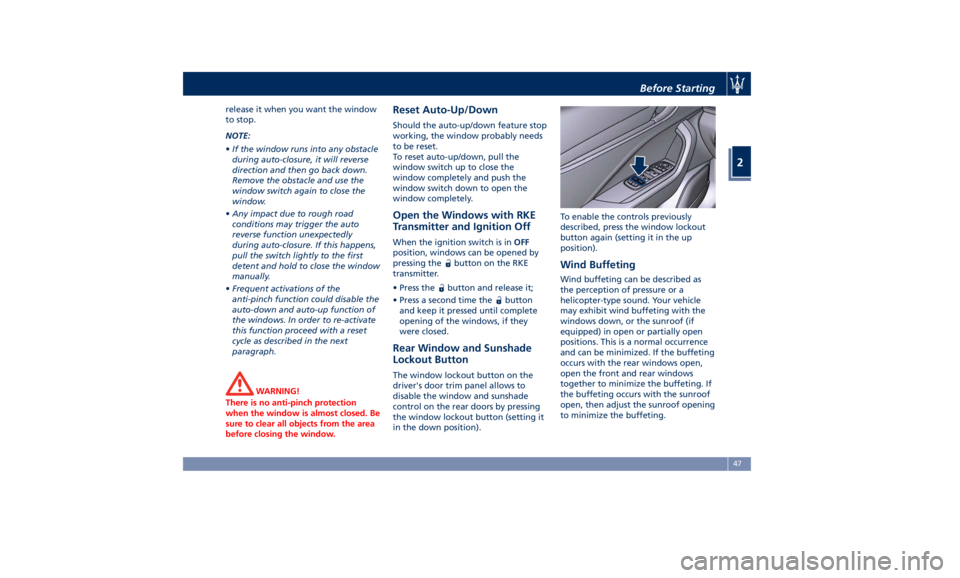
Lockout Button The window lockout button on the
driver's door trim panel allows to
disable the window and sunshade
control on the rear doors by pressing
the window lockout button (setting it
in the down position). To enable the controls previously
described, press the window lockout
button again (setting it in the up
position).
Wind Buffeting Wind buffeting can be described as
the perception of pressure or a
helicopter-type sound. Your vehicle
may exhibit wind buffeting with the
windows down, or the sunroof (if
equipped) in open or partially open
positions. This is a normal occurrence
and can be minimized. If the buffeting
occurs with the rear windows open,
open the front and rear windows
together to minimize the buffeting. If
the buffeting occurs with the sunroof
open, then adjust the sunroof opening
to minimize the buffeting.Before Starting
2
47
Page 52 of 436
Power Sunshades on Rear
Door Windows (for
versions/markets, where
provided) NOTE:
• On vehicles provided with power
sunshades on the rear windows, the
window switches also operate the
sunshades.
• The rear windows lock button
operates the rear power sunshades
as well.
• The window and sunshades controls
will operate only if the ignition
switch is in ACC or RUN position.
Operation of the rear windows and
related sunshades is done by pressing
or pulling the window switch and
depends on the position of the
windows prior to the command
operation.
As described for the opening and
closing functions of the power
windows (see chapter “Power
Windows” in this section), the
windows switch has two functioning
modes: press and release the switch to
the first detent to partially move the
window; press and release the switch to the second detent to move the
window all the way up or down.
Operations WARNING!
Rear seat passengers must be careful
when operating the sunshades, since
there is the risk of being pinched
between the top of the sunshade and
the head lining, during raising, and
between the top edge of the
sunshade and the door panel, during
lowering.
CAUTION!
Before activating the sunshade, make
sure that no objects can interfere with
its travel.
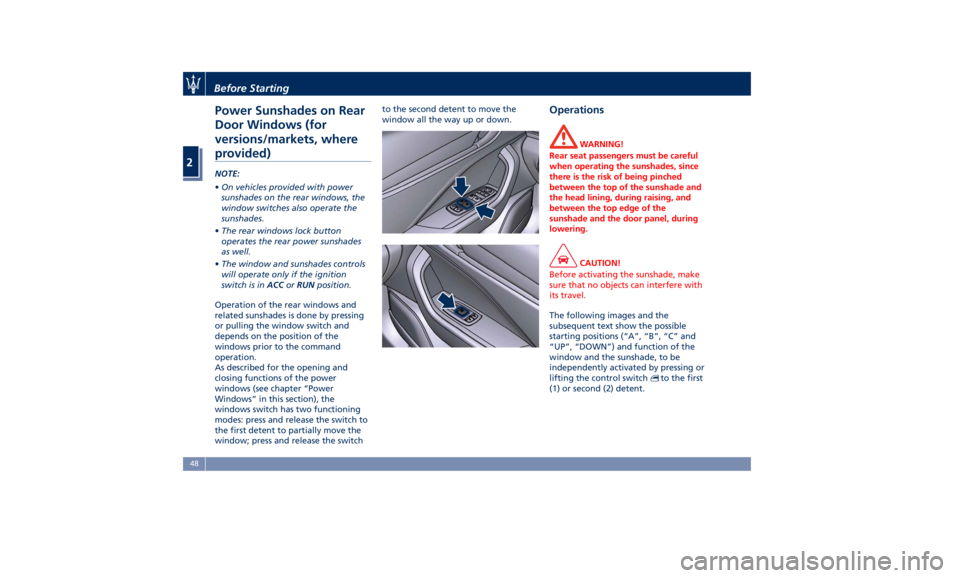
The following images and the
subsequent
text show the
possible
starting positions (“A”, “B”, “C” and
“UP”, “DOWN”) and function of the
window and the sunshade, to be
independently activated by pressing or
lifting the control switch
to the first
(1) or second (2) detent.Before Starting
2
48
Page 55 of 436

plate lights, when the vehicle has
been unlocked using the key fob or
the “Passive Entry” system.
When the button
on the key fob is
pressed twice within five seconds, the
direction indicators flash twice to
indicate the opening or closing of the
power liftgate, if the light flashing
function at closing is activated on
MTC+ (for more information, see the
chapter "MTC+ Settings" in section “Dashboard Instruments and
Controls”).
With the ignition switch in RUN
position, the red symbol
will be
displayed on the instrument cluster. If
the vehicle is in motion, in addition to
the symbol
will also appear a
message indicating that the power
liftgate is open. Once the power
liftgate is closed the symbol or the
symbol and message will disappear
from the display.
With the ignition device in the OFF
position, only the power liftgate open
symbol will display until closure.
See “Passive Entry System” in this
section for more information on
power liftgate operation with the
“Passive Entry” feature. Automatic Opening and
Closing Movement of the
Power Liftgate Automatic opening and closing
movement of the liftgate is driven by
electric actuators and a motorized
latch ensuring lid locking upon
closing.
The
button on key fob and button
on front dome console not only allow
user to completely open the power
liftgate, but also to stop it at any
intermediate position by pressing the
button again whenever you wish to
stop and resume the opening process.
In addition to these commands, it is
possible to open and close the power
liftgate, or stop its movement, by
simply moving your foot under the
rear bumper, if the vehicle is so
equipped with the kick sensor option.
In this latter case, the power liftgate
will be opened and closed only if the
“Passive Entry” system acknowledges
the presence of the key fob RKE
transmitter within 3.3 ft (1 m) of the
power liftgate.
Power liftgate uses the button
in-between the license plate lights,
indicated in figure, to activate the
opening once the car has beenBefore Starting
2
51
Page 60 of 436
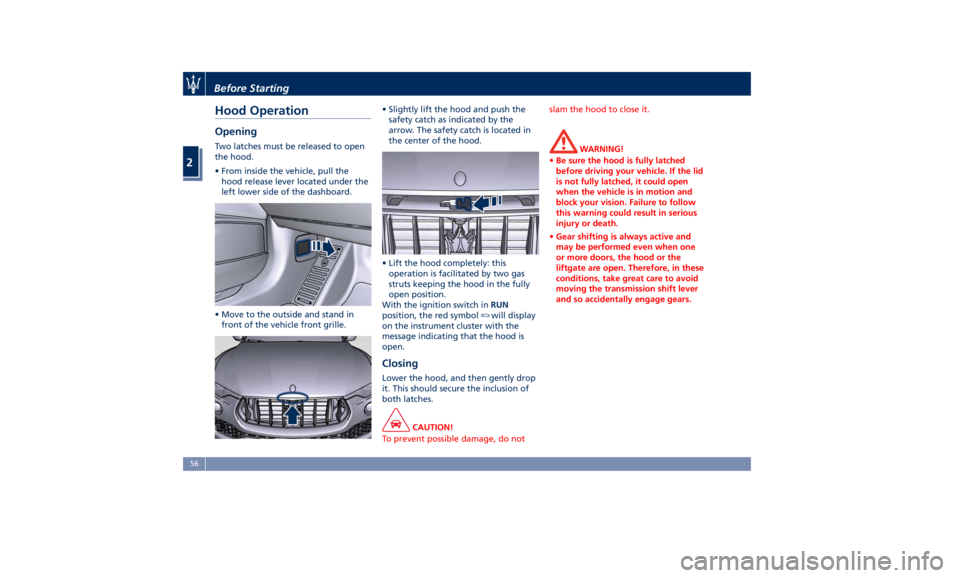
Hood Operation Opening Two latches must be released to open
the hood.
• From inside the vehicle, pull the
hood release lever located under the
left lower side of the dashboard.
• Move to the outside and stand in
front of the vehicle front grille. • Slightly lift the hood and push the
safety catch as indicated by the
arrow. The safety catch is located in
the center of the hood.
• Lift the hood completely: this
operation is facilitated by two gas
struts keeping the hood in the fully
open position.
With the ignition switch in RUN
position, the red symbol
will display
on the instrument cluster with the
message indicating that the hood is
open.
Closing Lower the hood, and then gently drop
it. This should secure the inclusion of
both latches.
CAUTION!
To prevent possible damage, do not slam the hood to close it.
WARNING!
• Be sure the hood is fully latched
before driving your vehicle. If the lid
is not fully latched, it could open
when the vehicle is in motion and
block your vision. Failure to follow
this warning could result in serious
injury or death.
• Gear shifting is always active and
may be performed even when one
or more doors, the hood or the
liftgate are open. Therefore, in these
conditions, take great care to avoid
moving the transmission shift lever
and so accidentally engage gears.Before Starting
2
56