2019 MASERATI GHIBLI reset
[x] Cancel search: resetPage 237 of 384

Active Alternator To improve overall efficiency by
reducing the auxiliary loads on the
engine, the vehicle is equipped with a
smart alternator that is mainly active
in the latter energy balance phases
(for example, during braking, coasting
and overloading).
The alternator becomes active when
the battery charge is insufficient and
when the vehicle exits from the
braking and overload situations.
Active Alternator Feature (if feature is
available)
In the I.C.E. screen, the user can
display in the form of dynamic bars
some informative parameters on the
state of battery charge ("CHARGE"),
efficiency of drive style ("EFFICIENCY")
and the matured economy (
bonus
range) expressed in miles (mi) or
kilometres (km). The bonus range (about 37 mi/60 km
for each full of fuel) is automatically
reset every time the vehicle is
refueled.
Parking Brake The vehicle is equipped with an
electric automatic parking brake, also
called EPB (Electric Parking Brake).
The EPB braking action on model with
“Base” braking system (equipped with
rear floating calliper) is ensured by a
power actuator directly working on
the brake pad inside each calliper of
the rear brake system.
All other modes with “Dual Cast”
braking system are equipped with a
dedicated calliper which acts on each
rear brake disc.
It can be automatically engaged when
the engine is turned off and
disengaged with engine running,
driver seatbelt latched and driver door
closed, while pressing the brake pedal
and operating the shift lever.
Furthermore, EPB can be automatically
engaged above a slope threshold with
the gearshift in P (Park) to avoid
damage to the vehicle. EPB can be
disengaged before turning off the
vehicle.
When the parking brake is applied,
the warning light
lights up on
the tachometer display and the
related message is displayed on the
instrument cluster for 5 seconds (see
“Instrument Cluster” in sectionDriving
5
233
Page 240 of 384

(Continued)
• In case of repetitive requests to reset
the EPB through the messages shown
on the TFT display, please contact an
Authorized Maserati Dealer .
Failure Indication In the event of electric parking brake
system failure, the warning light
on the display will light up and the
related message will show for 5
seconds.
WARNING!
In the event of an EPB failure, take
your vehicle to the nearest Authorized
Maserati Dealer as soon as possible.
Initialize the EPB System after
Re-connecting
the vehicle battery After the detachment and the
subsequent connection of the battery,
on the instrument cluster display the
warning light
will be illuminated.
To initialize the EPB system, lift,
release and lift again the lever located
behind the shift lever.
Emergency Disengagement
In case of brake lock with complete
electrical system failure, it is necessary
to force the electric actuator on the
rear calipers (see “Emergency Release
of the Parking Brake” chapter in
section “In an Emergency”).
EPB Operation with
Overheated Brakes Driving on mountain roads with steep
slopes or a sports use of the vehicle
could overheat the brake system
components. In these conditions, the
parking brake must not be used since
the push of the power actuator might
not be sufficient to ensure vehicle
braking, especially on a slope.
Drive normally without braking to
allow the brakes to cool down a few
minutes before stopping. In this way,
the automatic or manual activation of
the parking brake will ensure vehicle
braking.Parking Before leaving the vehicle, make sure
that the parking brake is fully applied
and place the shift lever in the P (Park)
position.
WARNING!
• Always check that the vehicle is
locked before leaving it.
• Never leave children unattended in
the vehicle.
• Do not park the vehicle on paper,
grass, dry leaves or other flammable
materials.
• Do not leave the engine running
while the vehicle is unattended.
CAUTION!
When you need to park the vehicle on
a steep slope, both with the engine on
or off, it is recommended not only to
engage the parking brake, but also to
shift the gearshift lever to P (Park)
before leaving the vehicle.
When parking on hill roads, it is
important
to turn
the front wheels
toward the curb on a downhill gradeDriving
5
236
Page 249 of 384

Shared by All Configurations
Multifunction switch:
• Press up (indication RES
+): increase speed, set
current speed or resume
previously set speed
when system is in
“cancelled” status;
• Pushed (indication
CANC): deletes the set
speed;
• Press down (indication
SET -): set speed/decrease
speed.
NOTE:
• The figures only show the Standard
Configuration.
• In order to ensure proper operation,
the CC system has been designed to
shut down if multiple systems are
operated at the same time (example:
ACC and FCW). When conditions so
allow, the CC system can be
reactivated by pushing the CC
“ON/OFF” button or the ACC Gap
button (in the Optional
Configuration) and resetting the
desired vehicle set speed. Displayed Information CC conditions are displayed on the
instrument cluster after selecting
“Driver Assist” menu (see paragraph
“TFT Display: Menus and Settings"
under “Instrument Cluster” in section
“Dashboard Instruments and
Controls”).
Displayed information depends on
system status: ready, disabled,
cancelled or set.
Apart from the pop-up messages at
the centre of the display, CC system
status is represented by icons at the
top left. These icons remain displayed
even when you exit the "Driver Assist"
screen.
The CC screen can be displayed any
time the driver changes system status
or settings. After 5 seconds of CC
inactivity, the display goes back to last
screen.
Activation To turn the system on, push the
ON/OFF button or the ACC Gap
button for 2 seconds (in the Optional
Configuration). The
white light
with below 3 dashes on the
instrument cluster display will
illuminate. To turn the system off, push the
ON/OFF button a second time or
the ACC button (in the Optional
Configuration). The
white light will
turn off.
NOTE:
The CC system must be turned off
when not in use.Driving
5
245
Page 254 of 384

NOTE:
Any change made to tire dimensions
affects performance of Adaptive Cruise
Control and Front Collision Warning
(FCW), if equipped.
The ACC is not activated in the
following conditions:
• When braking.
• When parking brake is activated.
• When automatic transmission is in P
(Park), R (Reverse) or N (Neutral).
• When vehicle speed is out of preset
speed range
• When brakes are overheated.
• When driver door is open.
• When the driver’s seat belt is
unbuckled.
• When the road is particularly steep
(both uphill and downhill) at low
speed.
• When drive mode
(ESC OFF) is
selected.
• When the door is opened at low
speed.
• When there has been an ESC event in
the last 5 seconds, or is still active.
• When there is an object too close in
front of the vehicle.
It is possible that more than one
system is active at the same time such as ACC and ABSA just to mention
some.
While activation of ACC and CC at the
same time is impossible.
Speed Range of Use Speed mph (km/h)
Minimum 0 (0)
Engaged/activated 18 (30)
Maximum 130 (210)
Activation/Deactivation NOTE:
Pictures show status of ACC and LKA
systems.
Press and release
ON/OFF button to
activate the ACC. The display will show
the
white symbol with below 3
dashes will illuminate indicating that
system is ready to be set.
If a vehicle is detected as being too
close, the display will show a message
for 5 seconds and trigger a signal to
warn the driver that current conditions
do not allow enabling of the ACC. At
any rate, system will remain in the
ready status. Driver Assist Page
Non-Driver Assist PageDriving
5
250
Page 282 of 384
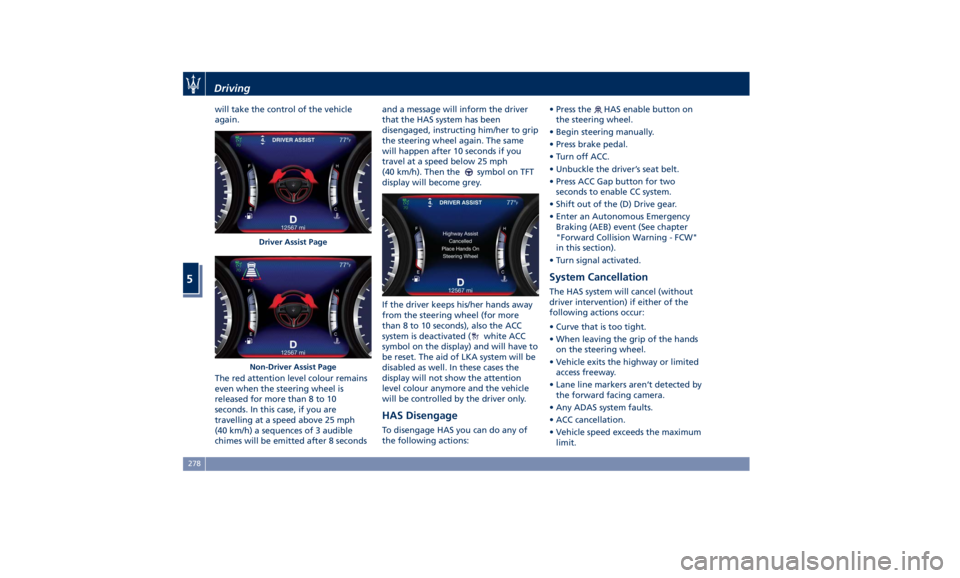
will take the control of the vehicle
again.
The red attention level colour remains
even when the steering wheel is
released for more than 8 to 10
seconds. In this case, if you are
travelling at a speed above 25 mph
(40 km/h) a sequences of 3 audible
chimes will be emitted after 8 seconds and a message will inform the driver
that the HAS system has been
disengaged, instructing him/her to grip
the steering wheel again. The same
will happen after 10 seconds if you
travel at a speed below 25 mph
(40 km/h). Then the
symbol on TFT
display will become grey.
If the driver keeps his/her hands away
from the steering wheel (for more
than 8 to 10 seconds), also the ACC
system is deactivated (
white ACC
symbol on the display) and will have to
be reset. The aid of LKA system will be
disabled as well. In these cases the
display will not show the attention
level colour anymore and the vehicle
will be controlled by the driver only.
HAS Disengage To disengage HAS you can do any of
the following actions: • Press the
HAS enable button on
the steering wheel.
• Begin steering manually.
• Press brake pedal.
• Turn off ACC.
• Unbuckle the driver’s seat belt.
• Press ACC Gap button for two
seconds to enable CC system.
• Shift out of the (D) Drive gear.
• Enter an Autonomous Emergency
Braking (AEB) event (See chapter
"Forward Collision Warning - FCW"
in this section).
• Turn signal activated.
System Cancellation The HAS system will cancel (without
driver intervention) if either of the
following actions occur:
• Curve that is too tight.
• When leaving the grip of the hands
on the steering wheel.
• Vehicle exits the highway or limited
access freeway.
• Lane line markers aren’t detected by
the forward facing camera.
• Any ADAS system faults.
• ACC cancellation.
• Vehicle speed exceeds the maximum
limit.Driver Assist Page
Non-Driver Assist PageDriving
5
278
Page 320 of 384

(Continued)
ignition switch is in the OFF position. If
this is not observed, when the ESC is
active, the ECU will store a
malfunction and the relative warning
light
will illuminate on the
instrument cluster display. This
requires the intervention of an
Authorized Maserati Dealer to reset
the system.
Towing an AWD Vehicle
WARNING!
Single axle towing or use of a tow
dolly is not allowed since it will
severely damage components of an
AWD vehicle.
WARNING!
Use of a tow dolly on front wheels is
strictly forbidden since front wheels
may still receive a residual amount of
torque and disengage the vehicle from
the tow dolly and affect safety of
both rescuers and other road users. Use the Tow Hook of the Tool
Kit CAUTION!
The tow hook should only be used for
towing the car on flat roads. Do not
use the tow hook to remove the car
that is stuck on off road stretches.
The tow hook is also used to tow the
vehicle
on the
platform of a tow truck.
The tow hook is contained in the tool
kit (see “Tool Kit” in this section) and
must be screwed in its seat accessible
behind the front grille, right-hand
side, after removing the protective
cap.
• Carefully clean the threaded seat
before screwing the hook.
• Screw the tow hook into its seat for
at least 11 turns. NOTE:
Maximum work angle of towing cable:
15°.
In an Emergency
6
316
Page 323 of 384

When the scheduled maintenance has
overdue, the indicator light
and
message will be displayed on the
instrument cluster.
The service indicator and message will
illuminate approximately from 620 mi
(1000 km) or 30 days to the next
scheduled maintenance.
Have your vehicle serviced as soon as
possible.
NOTE:
The service indicator will not monitor
the time elapsed from the last
scheduled maintenance.
To check the km/mi and the days that
remain at the inspiration of the next
scheduled maintenance, consult the
“Maintenance” submenu of “VEHICLE
INFO” main menu (see paragraph ”TFT
Dispaly : Warning/Indicator Lights of
the Set Modes/ Functions” in chapter “Instrument Cluster” of section
“Dashboard Instruments and
Controls” for more details).
An Authorized Maserati Dealer will
reset the service indicator message
after completing the scheduled
maintenance operations.
Scheduled Service Plan The Scheduled Maintenance services
listed in this manual must be done at
the times or mileages specified to
protect your vehicle warranty and
ensure the best vehicle performance
and reliability.
More frequent maintenance may be
needed for vehicles in operating
conditions, such as dusty areas and
very short trip driving.
Inspection and service should also be
done anytime a malfunction is
suspected.
Maserati recommends that these
maintenance intervals be performed
at an Authorized Maserati Dealer . The
technicians at your dealership know
your vehicle best, and have access to
factory-approved information,
genuine Maserati parts, and specially
designed electronic and mechanical
tools that can help prevent future
costly repairs.Maintenance and Care
7
319
Page 381 of 384

Warranty ...................10
Accessories ................10
Warranty Information .........12
Wheels ................... .349
Wheels Maintenance ....... .349
Windows ...................45
Auto Down/Auto Up Feature ....46
Defroster .................47
Open the Windows with RKE
Transmitter and Ignition Off ....47
Rear Window ..............47
Reset Auto-Up/Down .........47
Window and Sunshade Lockout
Button ...................47
Wipers and Washers .......... .122
Headlight On with Windshield
Wipers ................. .124
Rain Sensing Windshield Wipers .123
Windshield Washers ........ .125
Windshield Wipers ......... .122
Wipers Blades Maintenance . . . .124 Index
9 377