2019 MASERATI GHIBLI warning
[x] Cancel search: warningPage 135 of 384
Removable Ashtray and Lighter
(optional) The removable ashtray with cover for
front seats passengers can be inserted
inside the front cupholder.
The rear seat passengers can use the
removable ashtray by inserting it into
the rear door pocket.
Cigarette Lighter Use
Pressing the central button activates
the cigarette lighter. After about 20
seconds the button returns
automatically to the initial position
and stops the heating: now the
cigarette lighter is ready for use.
CAUTION!
After use, always make sure that the
cigarette lighter is switched off.
WARNING!
• The cigarette lighter reaches high
temperatures. Handle it carefully
and do not allow children to use it.
• The cigarette lighter may not be
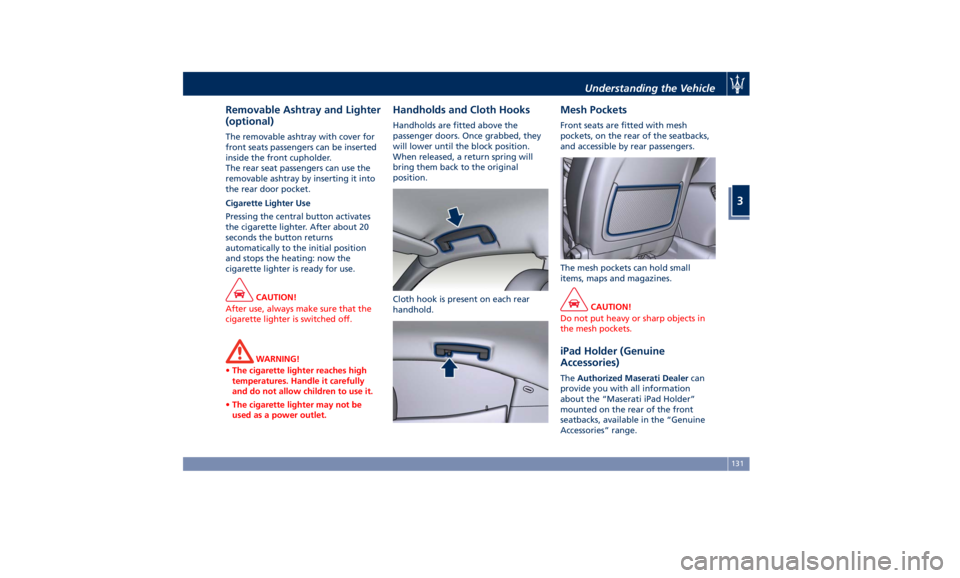
used as a power outlet. Handholds and Cloth Hooks Handholds are fitted above the
passenger doors. Once grabbed, they
will lower until the block position.
When released, a return spring will
bring them back to the original
position.
Cloth hook is present on each rear
handhold. Mesh Pockets Front seats are fitted with mesh
pockets, on the rear of the seatbacks,
and accessible by rear passengers.
The mesh pockets can hold small
items, maps and magazines.
CAUTION!
Do not put heavy or sharp objects in
the mesh pockets.
iPad Holder (Genuine
Accessories) The Authorized Maserati Dealer can
provide you with all information
about the “Maserati iPad Holder”
mounted on the rear of the front
seatbacks, available in the “Genuine
Accessories” range.Understanding the Vehicle
3
131
Page 136 of 384

Wi-fi Connection (optional) It is possible to install a control unit
with router function to access a wi-fi
high speed internet connection on
board. This enables web navigation
and the possibility to connect several
devices at the same time.
WARNING!
Mobile internet connection is intended
for passenger use only. Use of
handheld electronic devices while
driving can cause an accident due to
distraction, resulting in death or
injury.
With this active connection, passengers
using
smartphone, tablet
or pc can
navigate the internet, check their
emails, download music and films and share their status major social
networks.
In order to activate the wi-fi control
unit, please provide to your
Authorized Maserati Dealer your SIM,
the relative PIN and the access points
(APN) of your provider.
CAUTION!
Refer to your Authorized Maserati
Dealer to activate the wi-fi control unit
and, if necessary, remove or replace it
or the SIM card.
NOTE:
T
o speed up operations of installation
and activation, in addition to the
above, you’ll need to create a new
account by accessing the following
website of the manufacturer of the
system that Maserati has chosen for its
models:
https://signup.autonetmobile.com/.
Wi-fi connectivity covers an area of ca.
100 ft (30 m), in order to avoid
intrusions, the router is supplied with
WEP or WPA2 cryptography.
During activation, to be performed by
your dealer, it is recommended to
enable the security options available
by selecting the cryptographic version (WPA2 is recommended) and inserting
the password. From now on, in order
to connect to the wi-fi control unit, it
will be necessary to insert this
password on each device you intend to
use.
After that, you shall complete the
authentication process and enable
Wireless Security to avoid that
not-authorized users can improperly
access the wi-fi and cause extra costs
charged by the provider on the SIM.
To navigate the internet it is now
necessary to pair the device you intend
to use in the vehicle to the active wi-fi
connection; you can do that by
searching the available wireless
Networks from the "Setting" menu.
Select the wireless Network linked to
your SIM and select "Connect" to start
the connection.
If the auto-search is active for wireless
Networks, every time the device will
be used inside the vehicle or close to it,
it will connect to the set connection.
NOTE:
• For futher information about the
pairing procedure, refer to the
instructions given with your mobile
device.
• For further information about wi-fi
connectivity and the control unit,Understanding the Vehicle
3
132
Page 137 of 384

please contact Client Service at
1-800-977.2107 or write to:
[email protected].
CAUTION!
When selling the vehicle, you should
contact the above mentioned Client
Service to have your device removed
from the list of activated devices
registered in your name. Do not
simply give your control unit password
to a new owner. To avoid improper
internet access in your name and
allow new owner registration you
must de-register with the service
provider. A new owner will not be
able to register the device if it still
appears registered in the prior
owner's name. If you are a subsequent
owner, the unit could be improperly
monitored (usage and location), if it is
still registered to a prior owner. Cargo Area WARNING!
To help protect against personal
injury, passengers must not be seated
in the rear cargo area. The rear cargo
space is intended for load carrying
purposes only, not for passengers,
who should sit in seats and use seat
belts.
Vehicle Load Carrying Capacity The load carrying capacity of your
vehicle is shown on the vehicle
emission control label positioned on
the rear driver door's ledge.
The information indicated on the label
concerns passengers and luggage
loading operations. Do not exceed the specified Gross
Vehicle Weight Rating (GVWR) or the
Gross Axle Weight Rating (GAWR),
both front and rear.
The GVWR is the total allowable
weight of your vehicle. This includes
driver, passengers, and cargo.
The total load must be limited so that
you do not exceed the GVWR
indicated on the label.
Vehicle Loading WARNING!
• After loading the vehicle, before
driving, adjust the headlight beam
leveling using the specific regulator
(if available) as described in chapter
“Lights” in this section.
• Improper weight distribution can
have an adverse effect on the way
the vehicle steers, handles and the
way the brakes operate.
• Never drive with the trunk lid open.
Exhaust gases can enter the
passenger compartment.
• Do not pile luggage or cargo higher
than the top of the seatback. This
could impair visibility or become
dangerous in a sudden stop orUnderstanding the Vehicle
3
133
Page 140 of 384

pulling on the top of the seatback
above the seat strap.
NOTE:
When the seatback is tilted to the
upright position, reassemble the head
restraint of the center seat (see “Head
Restraints” in this section) make sure
the seatbelt of the rear central
position is in the proper condition for
use.
WARNING!
• Make sure that the seatback is
securely locked into position. If the
seatback is not securely locked into
position, the seat will not provide
the proper stability for child seats
and/or passengers. An improperly
latched seat could cause serious
injury.
• The cargo area in the rear of the
vehicle with the rear seatbacks in
the folded down position should not
be used as a play area by children
when the vehicle is in motion. They
could be seriously injured in a
collision. Children should be seated
and use proper restraint system. Power Sunroof with
Sunshade The sunroof is power controlled and
can only be operated with the ignition
switch in RUN position.
It can slide lengthways and be raised
at the rear (tilting).
By opening the sunroof a front flap
rises automatically in order to deviate
the air flow.
The power sunroof controls are
located between the sun visors on the
overhead console.
The right two buttons controls the
sunroof movement, whereas the left
button controls the lifting of the
sunroof for venting. The sunshade can be opened manually.
However, the sunshade will open
automatically as the sunroof opens.
The sunshade cannot be closed if the
sunroof is open.
WARNING!
• Improper use of the sunroof can be
dangerous, even if it features a
finger-trap prevention system.
Before and during the sunroof
operation, always make sure that
passengers are not exposed to the
risk of injuries caused by the moving
sunroof or by personal objects
dragged or hit by the moving
sunroof.
• Never leave children in a vehicle
with the key fob RKE transmitter in
the passenger compartment.Understanding the Vehicle
3
136
Page 142 of 384

in OFF position. Opening either front
door will cancel this feature. The
ignition system timing can be set using
the MTC+ System (see “MTC+ Settings”
in section “Dashboard Instruments and
Controls”).
Sunroof Maintenance Use only a nonabrasive cleaner and a
soft cloth to clean the glass panel.
HomeLink ®
(optional) HomeLink ®
replaces up to three
hand-held transmitters operating the
automatic devices that open garage
doors and gates, enable/disable the
lighting or security systems. The
HomeLink ®
unit is powered by your
vehicle's 12 Volt battery. The
HomeLink ®
buttons that are located in
the overhead console designate the
three different HomeLink ®
channels.
The HomeLink ®
indicator light is
located behind the buttons.
NOTE:
HomeLink ®
is disabled when the
vehicle security alarm is active (see
“Vehicle security alarm” in section
“Before Starting”). WARNING!
• Your motorized door or gate will
open and close while you are
programming the universal
transceiver. Do not program the
transceiver if people, pets or other
objects are in the path of the door or
gate. Only use this transceiver with a
garage door opener that has a “stop
and reverse” feature as required by
Federal safety standards. This
includes most garage door opener
models manufactured after 1982. Do
not use a garage door opener
without these safety features. Call
toll-free 1–800–355–3515 or, on the
Internet at www.HomeLink.com for
safety information or assistance.
• Vehicle exhaust contains carbon
monoxide, a dangerous gas. Do not
run your vehicle in the garage while
programming the transceiver.
Exhaust gas can cause serious injury
or death.
Radio Frequency Transmitter -
Regulatory Information The “Regulatory Information” for all
the radio and radar frequency devices
can be consulted by accessing theUnderstanding the Vehicle
3
138
Page 150 of 384

Instrument Cluster The instrument cluster is divided into
three main areas displaying
information, signs and text and/or icon
messages.
A Analogue speedometer. It
indicates the vehicle speed.
B Rev Counter.
C TFT display. In this area the
odometer display shows the
total distance covered by the
vehicle.
U.S. Federal Regulations requires that
upon transfer of vehicle ownership,
the seller certify to the purchaser the
correct mileage that the vehicle has
been driven.
If your odometer needs to be repaired
or serviced, the repair technician
should leave the odometer reading the
same as it was before the repair or
service. This repair should be
performed by an Authorized Maserati
Dealer .
The odometer setting should be
maintained following the repair or
service.
Keep a record of the odometer
mileage before any repair or service to ensure that the odometer is properly
reset.
Speedometer and Rev Counter display
the main warning lights (see “Warning
and Indicator Lights on Analogue
Instruments” in this chapter).
The other warning and indicator lights
are displayed on the TFT display
together with mode and drive
function indicators (see “TFT Display:
Warning/Indicator Lights of Set
Modes/Functions” in this chapter).
NOTE:
The image shows the instrument
cluster before starting the engine. Warning and Indicator Lights
on Analog Instruments Telltales on Speedometer
The following telltales are displayed
on the speedometer, and related
messages are visible for 5 seconds on
the central sector of the display, unless
otherwise indicated (see “TFT Display”
paragraph in this chapter).Dashboard Instruments and Controls
4
146
Page 151 of 384

Malfunction Indicator Light (MIL)
The Malfunction Indicator
Light (MIL) is part of an
onboard diagnostic system
that monitors engine and
automatic transmission control
systems.
Under normal conditions, this
indicator light should switch on when
the ignition switch is in RUN position
and switch off soon after the engine is
started (the MIL does not shut off
immediately).
This is a sign of the indicator light
working properly. If the indicator
remains lit or switches on while
driving, there is a failure in the fuel
supply/ignition and emission control
systems.
The failure could cause high exhaust
emissions, loss of performance, poor
vehicle handling and high
consumption levels.
Should this occur, proceed with
caution to your Authorized Maserati
Dealer without heavy throttle
application or driving at high speeds.
Obey all applicable local traffic
regulations.
The indicator light will go out if the
problem is no longer present.
The error will be registered by the
system in any case. CAUTION!
• When the ignition switch is in the
RUN position and if the indicator
light does not switch on or if it
switches on while driving, contact an
Authorized Maserati Dealer as soon
as possible.
• Prolonged driving with the MIL on
could cause damage to the engine
control system. It also could affect
fuel economy and drivability. If the
MIL is flashing, severe catalytic
converter damage and power loss
will soon occur. Immediate service is
required. In addition, the OBDII
system incorporates a diagnostic
connector that can be interfaced
using diagnostic equipment. This
makes it possible to read the error
codes stored in the control unit,
together with a set of specific
parameters for the engine operation
diagnostic cycle, for compliance with
CARB & EPA OBDII regulations.
Left Turn Signal Indicator Light
The
indicator lights
up when
the left turn signals or the
hazard flashers are turned on. The indicator light will flash at the
same frequency of the turn signals
and is controlled by the stalk switch
lever.
If the vehicle electronics sense that the
vehicle drives for more than 1 mile
(1.6 km) with either turn signal on, a
continuous sound will alert the driver
to turn the signal off.
If the indicator flashes at a rapid rate,
check for a defective exterior light
bulb.
Tire Pressure Monitoring Light
This warning light is
connected to the Tire Pressure
Monitoring System (TPMS).
Under normal conditions, the
warning light should illuminate when
the ignition switch is in RUN and
should go off once the engine is
started.
If the warning light remains lit or
illuminates while driving, the pressure
of one or more tires is too low and a
message will be displayed.
The TPMS malfunction warning light is
connected to the low tire pressure
monitoring light.
When the system detects a
malfunction, the monitoring light and
the related message will flash forDashboard Instruments and Controls
4
147
Page 152 of 384

approximately one minute and then
remain lit.
This sequence will continue upon
subsequent vehicle startups as long as
the malfunction lasts.
When the malfunction warning lights
up, the system may not be able to
detect or signal low tire pressure
correctly.
Please refer to “Tire Pressure
Monitoring System (TPMS)” in section
“Driving” for further information.
Anti-Lock Braking System (ABS)
Malfunction Warning Light
This light, and its related
message, indicate possible
malfunctions of the Anti-Lock
Brake System (ABS).
The light will turn on when the
ignition switch is in RUN position and
may stay on for 4 seconds. If the ABS
light remains lit or turns on while
driving, the Anti-Lock portion of the
brake system is not functioning and
requires service. However, the
conventional brake system will
continue to operate normally if the
warning light is switched off. If
the ABS light turns on while driving, or
if it does not switch on when the
ignition switch is in RUN position,
please visit an Authorized Maserati Dealer as soon as possible to restore
the Anti-Lock brake function.
Electronic Stability Control (ESC)
Activation/Malfunction Indicator Light
The ESC activation/malfunction
indicator light on the
instrument cluster will display
when the ignition switch is in
RUN position.
It should switch off by starting the
engine.
If the light stays on with the engine
running, there is a malfunction in the
ESC system.
If the light still stays on after several
ignition cycles, and the vehicle has
been driven for several miles at more
than 30 mph (48 km/h) speed, visit an
Authorized Maserati Dealer as soon as
possible to have the problem
diagnosed and serviced.
NOTE:
Each time the ignition switch is in RUN :
• The ESC OFF indicator light
and
the ESC activation/malfunction
indicator light illuminates
temporarily.
• When the ESC is functioning, the
system will make buzzing or clicking
sounds. This is normal. The sounds
will stop once ESC becomes inactive and the road conditions that caused
the ESC activation no longer persist.
Electronic Stability Control (ESC) OFF
Indicator Light
This indicator notifies that the
Electronic Stability Control
(ESC) is disabled; the linked
message will be displayed.
Telltales on Tachometer
Following telltales are displayed on
the tachometer and related messages
are visible for 5 seconds on the central
sector of the display, unless otherwise
indicated (see “TFT Display” in this
chapter).
Start&Stop Active Indicator
This telltale indicates that the
engine has been switched off
automatically by the
Start&Stop system.Dashboard Instruments and Controls
4
148