2019 LINCOLN MKT engine
[x] Cancel search: enginePage 297 of 575

2. Remove the cap and dipstick and wipeit with a clean, lint-free cloth.
3. Add fluid that meets the Fordspecifications. See Capacities andSpecifications (page 349). Pour the fluiddirectly into the automatic transmissionfluid cap and dipstick hole.
4.Replace the cap and dipstick and removeit again to check the fluid level.
5.Make sure that the fluid level is betweenthe MIN and the MAX marks.
6.Replace the automatic transmission fluidcap and dipstick. Turn it clockwise untilyou feel a strong resistance.
*Vehicles With Turbocharged Engines
WARNING: Do not start the enginewith the air filter removed. This can causedamage not covered by the vehicleWarranty and can result in serious injury.
1. Loosen the clamp holding the air filterassembly to the rubber hose.
2. Remove the air filter assembly securingbolts.
3. Lift the air filter assembly to disengagethe locating pins.
4.Rotate the air filter assembly slightly in acounterclockwise direction.
5. Check the transmission fluid level.
6. Install the air filter assembly in reverseorder. Tighten the air filter assemblysecuring bolts until you feel a strongresistance.
BRAKE FLUID CHECK
WARNING: Do not use any fluid otherthan the recommended brake fluid as thiswill reduce brake efficiency. Use ofincorrect fluid could result in the loss ofvehicle control, serious personal injury ordeath.
WARNING: Only use brake fluid froma sealed container. Contamination with dirt,water, petroleum products or othermaterials may result in brake systemdamage or failure. Failure to adhere to thiswarning could result in the loss of vehiclecontrol, serious personal injury or death.
WARNING: Do not allow the fluid totouch your skin or eyes. If this happens,rinse the affected areas immediately withplenty of water and contact your physician.
WARNING: A fluid level between theMAX and MIN lines is within the normaloperating range and there is no need toadd fluid. A fluid level not in the normaloperating range could compromise theperformance of the system. Have yourvehicle checked immediately.
294
MKT (TP4) , enUSA, Edition date: 201803, Second-Printing
Maintenance
Page 299 of 575

WARNING: When lifting aplastic-cased battery, excessive pressureon the end walls could cause acid to flowthrough the vent caps, resulting in personalinjury and damage to the vehicle or battery.Lift the battery with a battery carrier or withyour hands on opposite corners.
WARNING: Keep batteries out ofreach of children. Batteries contain sulfuricacid. Avoid contact with skin, eyes orclothing. Shield your eyes when workingnear the battery to protect against possiblesplashing of acid solution. In case of acidcontact with skin or eyes, flush immediatelywith water for a minimum of 15 minutes andget prompt medical attention. If acid isswallowed, call a physician immediately.
WARNING: Battery posts, terminalsand related accessories contain lead andlead compounds. Wash hands afterhandling.
WARNING: For vehicles withAuto-Start-Stop the battery requirement isdifferent. You must replace the battery withone of exactly the same specification.
Your vehicle is fitted with a Motorcraftmaintenance-free battery which normallydoes not require additional water.
When a battery replacement is required, youmust use a recommended replacementbattery that matches the electricalrequirements of the vehicle.
Note:If your vehicle has a battery cover,after cleaning or replacing the battery, makesure you reinstall it.
Note:See an authorized dealer for batteryaccess, testing, or replacement.
To make sure the battery managementsystem works correctly, do not connect anelectrical device ground connection directlyto the battery negative post. This can causeinaccurate measurements of the batterycondition and potential incorrect systemoperation.
Note:If you add electrical accessories orcomponents to the vehicle, it may adverselyaffect battery performance and durability.This may also affect the performance ofother electrical systems in the vehicle.
If you see any corrosion on the battery orterminals, remove the cables from theterminals and clean with a wire brush. Youcan neutralize the acid with a solution ofbaking soda and water.
Because your vehicle’s engine iselectronically-controlled by a computer,some engine control settings are maintainedby power from the battery. Some enginecomputer settings, like the idle trim and fueltrim strategy, optimize the driveability andperformance of the engine. The clock andradio station presets are also maintained inmemory by power from the low-voltagebattery. These settings are erased when atechnician disconnects and connects thelow-voltage battery.
To restore the settings, do the following:
296
MKT (TP4) , enUSA, Edition date: 201803, Second-Printing
Maintenance
Page 300 of 575
Note:Until you switch the ignition to the onposition, you will receive a message in yourinformation display stating that your vehicleis not in park.
1. Apply the parking brake.
2. Shift into park (P) or neutral (N).
3. Switch off all accessories.
4. Press the brake pedal and start yourvehicle.
5. Run the engine until it reaches normaloperating temperature. While the engineis warming up, complete the following:Reset the clock. See Audio Unit (page366). Reset the power windowsbounce-back feature. See PowerWindows (page 94). Reset the radiostation presets. See Audio Unit (page366).
6. Allow the engine to idle for at least oneminute.
7.Drive the vehicle at least 10 mi (16 km) tocompletely relearn the idle trim and fueltrim strategy.
Note:If you do not allow the engine torelearn the idle and fuel trim strategy, theidle quality of your vehicle may be adverselyaffected until the engine computereventually relearns the idle trim and fuel trimstrategy.
Note:Certain features may not operate ifthe battery monitor system is not reset witha scan tool following a jump start or batteryreplacement. Normal electrical accessoryoperation should resume after your vehicleis left undisturbed for 8 hours.
Make sure that you dispose of old batteriesin an environmentally friendly way. Seekadvice from your local authority aboutrecycling old batteries.
If storing your vehicle for more than 30 dayswithout recharging the battery, werecommend that you disconnect the batterycables to maintain battery charge for quickstarting.
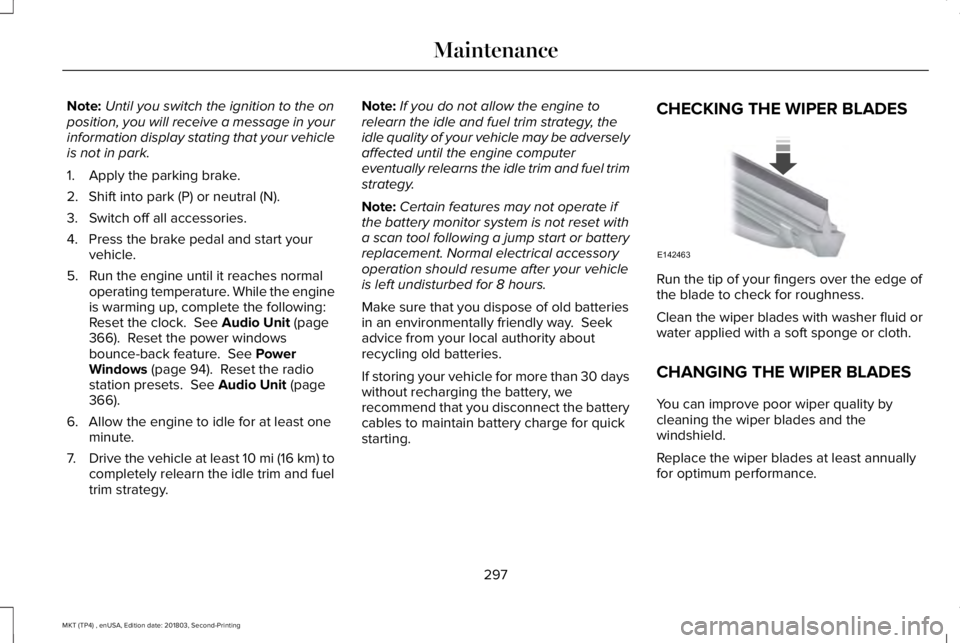
CHECKING THE WIPER BLADES
Run the tip of your fingers over the edge ofthe blade to check for roughness.
Clean the wiper blades with washer fluid orwater applied with a soft sponge or cloth.
CHANGING THE WIPER BLADES
You can improve poor wiper quality bycleaning the wiper blades and thewindshield.
Replace the wiper blades at least annuallyfor optimum performance.
297
MKT (TP4) , enUSA, Edition date: 201803, Second-Printing
MaintenanceE142463
Page 304 of 575

Front Direction Indicator Lamp
If a front direction indicator lamp fails, seean authorized dealer.
LED Lamps
LED lamps are not serviceable items. Seean authorized dealer if they fail.
The following lamps are LED:
•Side direction indicators.
•Approach lamp.
•Brake and rear lamps.
•Rear direction indicators.
•Rear side marker lamps.
•Reversing lamps.
•Central high mounted brake lamp.
•Front side marker lamps.
•Front parking lamps.
License Plate Lamp
1. Switch all of the lamps and the ignitionoff.
2.Remove the screws that secure the lensto the lamp housing.
3. Remove the lamp lens.
4.Remove the bulb by pulling it straight out.
CHANGING THE ENGINE AIR
FILTER
WARNING: To reduce the risk ofvehicle damage and personal burn injuries,do not start your engine with the aircleaner removed and do not remove itwhile the engine is running.
When changing the engine air filter, do notallow debris or foreign material to enter theair induction system. Engine components aresusceptible to damage not covered by thevehicle Warranty.
Change the air filter element at the correctinterval. See Scheduled Maintenance (page479).
Incorrect component use can cause damagenot covered by the vehicle Warranty. SeeMotorcraft Parts (page 345).
To replace the air filter element do thefollowing:
301
MKT (TP4) , enUSA, Edition date: 201803, Second-Printing
MaintenanceE2206171
2
3
Page 305 of 575

1.Remove the clips that secure the air filterhousing cover.
2. Carefully lift the air filter housing cover.
3.Remove the air filter element from the airfilter housing.
4. Wipe any dirt or debris from the air filterhousing and cover to make sure no dirtgets in the engine and that you have agood seal.
5.Install a new air filter element. Be carefulnot to crimp the filter element edgesbetween the air filter housing and cover. This could cause filter damage and allowunfiltered air to enter the engine if it isnot properly seated.
6. Install the air filter housing cover.
7. Engage the clips to secure the air filterhousing cover to the air filter housing.
302
MKT (TP4) , enUSA, Edition date: 201803, Second-Printing
MaintenanceE200522
Page 306 of 575

GENERAL INFORMATION
Your dealer has many quality productsavailable to clean your vehicle and protectits finishes.
CLEANING PRODUCTS
Materials
For best results, use the following productsor products of equivalent quality:
SpecificationName
Motorcraft® Bug and Tar Remover, ZC-42 (U.S. & Canada)
ESR-M5B194-BMotorcraft® Custom Bright Metal Cleaner, ZC-15 (U.S. & Canada)
ESR-M14P4-AMotorcraft® Detail Wash, ZC-3-A (U.S. & Canada)
ESR-M14P3-AMotorcraft® Engine Shampoo and Degreaser, ZC-20 (U.S.)
Motorcraft® Engine Shampoo, CXC-66-A (Canada)
Motorcraft® Premium Leather and Vinyl Cleaner, ZC-56 (U.S. & Canada)
Motorcraft® Multi-Purpose Cleaner, CXC-101 (Canada)
WSS-M14P19-AMotorcraft® Premium Windshield Wash Concentrate with Bitterant, ZC-32-B2 (U.S.)
WSS-M14P19-AMotorcraft® Premium Quality Windshield Washer Fluid, CXC-37-A/B/D/F (Canada)
Motorcraft® Professional Strength Carpet & Upholstery Cleaner, ZC-54 (U.S. & Canada)
ESR-M14P5-AMotorcraft® Premium Glass Cleaner, CXC-100 (Canada)
303
MKT (TP4) , enUSA, Edition date: 201803, Second-Printing
Vehicle Care
Page 309 of 575

•Do not allow wax to come in contact withany non-body (low-gloss black) coloredtrim. The wax will discolor or stain theparts over time.
•Roof racks.
•Bumpers.
•Grained door handles.
•Side moldings.
•Mirror housings.
•Windshield cowl area.
•Do not apply wax to glass areas.
•After waxing, your car's paint should feelsmooth, and be free of streaks andsmudges.
CLEANING THE ENGINE
Engines are more efficient when they areclean because grease and dirt buildup keepthe engine warmer than normal.
When washing:
•Take care when using a power washerto clean the engine. The high-pressurefluid could penetrate the sealed partsand cause damage.
•Do not spray a hot engine with cold waterto avoid cracking the engine block orother engine components.
•Spray Motorcraft Engine Shampoo andDegreaser on all parts that requirecleaning and pressure rinse clean. InCanada, use Motorcraft Engine Shampoo.
•Never wash or rinse the engine while itis hot or running; water in the runningengine may cause internal damage.
•Never wash or rinse any ignition coil,spark plug wire or spark plug well, or thearea in and around these locations.
•Cover the battery, power distribution box,and air filter assembly to prevent waterdamage when cleaning the engine.
CLEANING THE WINDOWS AND
WIPER BLADES
Car wash chemicals and environmentalfallout can result in windshield and wiperblade contamination. Dirty windshield andwipers will result in poor windshield wiperoperation. Keep the windshield and wiperblades clean to maintain windshield wiperperformance.
To clean the windshield and wiper blades:
•Clean the windshield with a non-abrasiveglass cleaner. When cleaning the interiorof the windshield, avoid getting any glasscleaner on the instrument panel or doorpanels. Wipe any glass cleaner off thesesurfaces immediately.
•For windshields contaminated with treesap, chemicals, wax or bugs, clean theentire windshield using steel wool (nogreater than 0000 grade) in a circularmotion and rinse with water.
•Clean the wiper blades with isopropylrubbing alcohol or windshield washerconcentrate.
306
MKT (TP4) , enUSA, Edition date: 201803, Second-Printing
Vehicle Care
Page 314 of 575

VEHICLE STORAGE
If you plan on storing your vehicle for 30days or more, read the followingmaintenance recommendations to make sureyour vehicle stays in good operatingcondition.
We engineer and test all motor vehicles andtheir components for reliable, regular driving.Under various conditions, long-term storagemay lead to degraded engine performanceor failure unless you use specific precautionsto preserve engine components.
General
•Store all vehicles in a dry, ventilatedplace.
•Protect from sunlight, if possible.
•If vehicles are stored outside, theyrequire regular maintenance to protectagainst rust and damage.
Body
•Wash your vehicle thoroughly to removedirt, grease, oil, tar or mud from exteriorsurfaces, rear-wheel housing and theunderside of front fenders.
•Periodically wash your vehicle if it isstored in exposed locations.
•Touch-up exposed or primed metal toprevent rust.
•Cover chrome and stainless steel partswith a thick coat of auto wax to preventdiscoloration. Re-wax as necessary whenyou wash your vehicle.
•Lubricate all hood, door and luggagecompartment hinges and latches with alight grade oil.
•Cover interior trim to prevent fading.
•Keep all rubber parts free from oil andsolvents.
Engine
•Change the engine oil and filter prior tostorage because used engine oil containscontaminates which may cause enginedamage.
•Start the engine every 15 days for aminimum of 15 minutes. Run at fast idlewith the climate controls set to defrostuntil the engine reaches normaloperating temperature.
•With your foot on the brake, shift throughall the gears while the engine is running.
•We recommend that you change theengine oil before you use your vehicleagain.
Fuel system
•Fill the fuel tank with high-quality fueluntil the first automatic shutoff of the fuelpump nozzle.
311
MKT (TP4) , enUSA, Edition date: 201803, Second-Printing
Vehicle Care