2019 LINCOLN CONTINENTAL speedometer
[x] Cancel search: speedometerPage 109 of 627
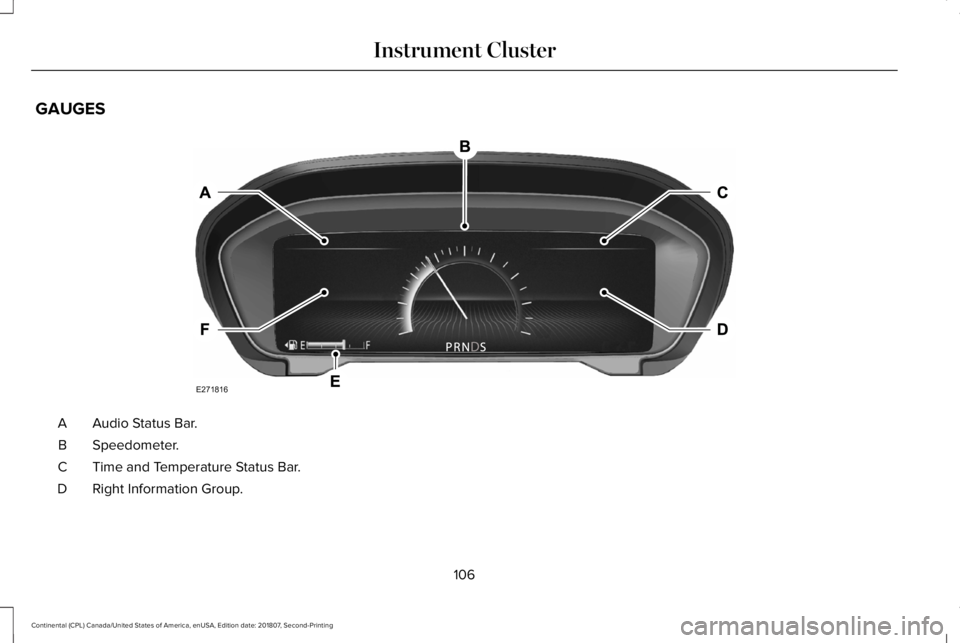
GAUGES
Audio Status Bar.
A
Speedometer.
B
Time and Temperature Status Bar.
C
Right Information Group.
D
106
Continental (CPL) Canada/United States of America, enUSA, Edition date: 201807, Second-Printing Instrument ClusterE271816
Page 115 of 627
GENERAL INFORMATION
WARNING: Driving while distracted
can result in loss of vehicle control, crash
and injury. We strongly recommend that
you use extreme caution when using any
device that may take your focus off the
road. Your primary responsibility is the safe
operation of your vehicle. We recommend
against the use of any hand-held device
while driving and encourage the use of
voice-operated systems when possible.
Make sure you are aware of all applicable
local laws that may affect the use of
electronic devices while driving.
You can control various systems on your
vehicle using the quick action menu (QAM)
buttons on the right-hand side of the steering
wheel. The information display provides the
corresponding information.
Note: Some options may appear slightly
different or not at all if the items are optional. Note:
Some MyKey menu options only
appear if MyKey is enabled and at least one
MyKey is programmed.
Note: Speedometer, driving aid information,
and distance to empty information (if
enabled) moves to the left information group
when a menu is opened. This icon gives you the ability to
switch a feature on or off. A check
in the box indicates the feature is
enabled, and unchecked indicates the
feature is disabled.
112
Continental (CPL) Canada/United States of America, enUSA, Edition date: 201807, Second-Printing Information DisplaysE204495
Page 118 of 627
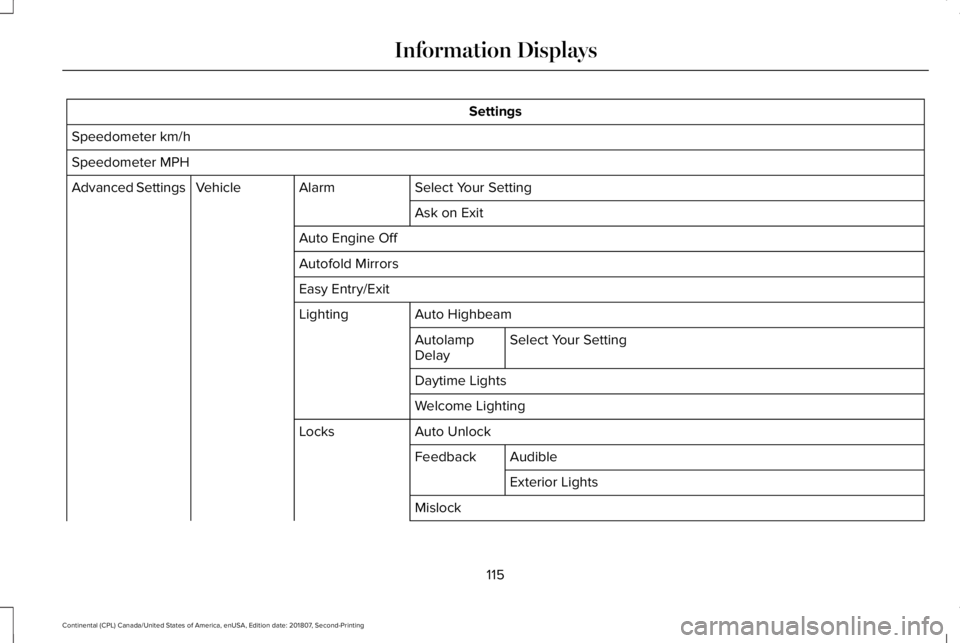
Settings
Speedometer km/h
Speedometer MPH Select Your Setting
Alarm
Vehicle
Advanced Settings
Ask on Exit
Auto Engine Off
Autofold Mirrors
Easy Entry/Exit Auto Highbeam
Lighting
Select Your Setting
Autolamp
Delay
Daytime Lights
Welcome Lighting
Auto Unlock
Locks
Audible
Feedback
Exterior Lights
Mislock
115
Continental (CPL) Canada/United States of America, enUSA, Edition date: 201807, Second-Printing Information Displays
Page 122 of 627
Gauges
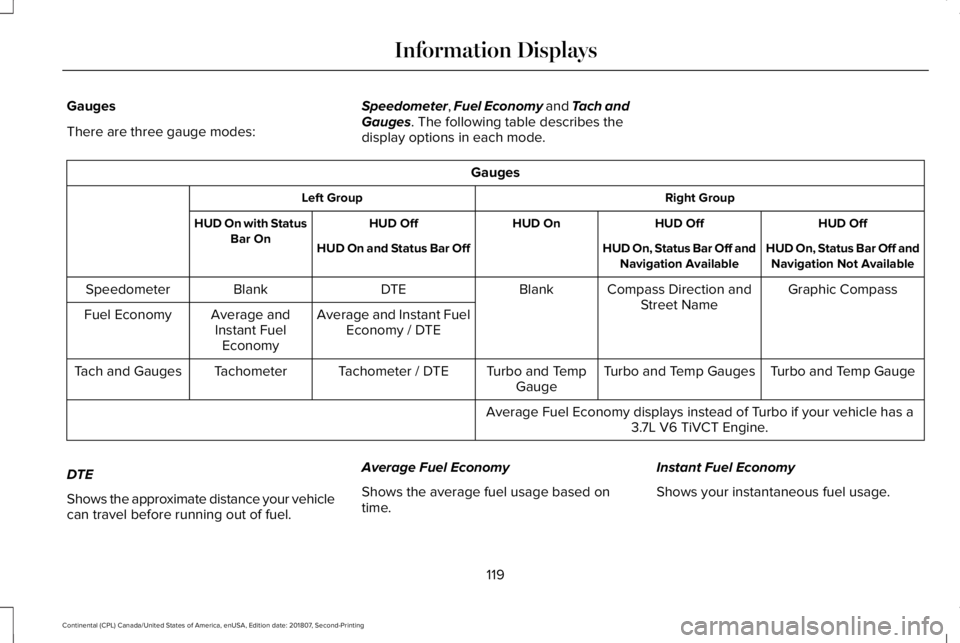
There are three gauge modes:
Speedometer, Fuel Economy and Tach and
Gauges. The following table describes the
display options in each mode. Gauges
Right Group
Left Group
HUD Off
HUD Off
HUD On
HUD Off
HUD On with Status
Bar On HUD On, Status Bar Off and
Navigation Not Available
HUD On, Status Bar Off and
Navigation Available
HUD On and Status Bar Off
Graphic Compass
Compass Direction and
Street Name
Blank
DTE
Blank
Speedometer
Average and Instant FuelEconomy / DTE
Average and
Instant Fuel Economy
Fuel Economy
Turbo and Temp Gauge
Turbo and Temp Gauges
Turbo and Temp
Gauge
Tachometer / DTE
Tachometer
Tach and Gauges
Average Fuel Economy displays instead of Turbo if your vehicle has a3.7L V6 TiVCT Engine.
DTE
Shows the approximate distance your vehicle
can travel before running out of fuel. Average Fuel Economy
Shows the average fuel usage based on
time.
Instant Fuel Economy
Shows your instantaneous fuel usage.
119
Continental (CPL) Canada/United States of America, enUSA, Edition date: 201807, Second-Printing Information Displays
Page 143 of 627

Navigation Display Area.
D
Status Bar.
E
Speedometer Display Area.
F
Signaling and Traffic Indication
Displays direction indicators, blind spot
information (if direction indicators are active)
and cross traffic alert.
Left Information Group
Displays incoming call information.
ADAS Display Area
Displays ACC and lane keeping system
status and warnings.
Navigation Display Area
Displays navigation next turn instructions. Status Bar
Displays distance to empty (DTE), time and
outside air temperature. Next to DTE, the
fuel gauge fill color changes to yellow in low
fuel conditions. You can switch off the status
bar in the HUD settings menu.
Speedometer Display Area
Displays current vehicle speed, speed limit
(if available in the map database) and your
transmission gear selection.
Configuring The Head Up Display
You can control the system's options through
the information display by using the HUD,
OK and arrow buttons on the right-hand side
of your steering wheel.
See General
Information (page 112). You can adjust the
display according to your height to make
viewing the content easier. You can also
adjust what content displays and the
brightness of the content. The system's
options appear in the instrument cluster
while the updates happen in the HUD. Note:
If HUD On is unchecked, other options
of the system are hidden.
Note: The HUD menu automatically closes
after a certain period of inactivity.
Note: The HUD image brightness
automatically adjusts to the brightness of
the ambient environment. You have the
ability to adjust the brightness further
according to your preference.
Note: In some instances, sunlight can cause
some reflections in and around the HUD
image.
140
Continental (CPL) Canada/United States of America, enUSA, Edition date: 201807, Second-Printing Information Displays
Page 238 of 627
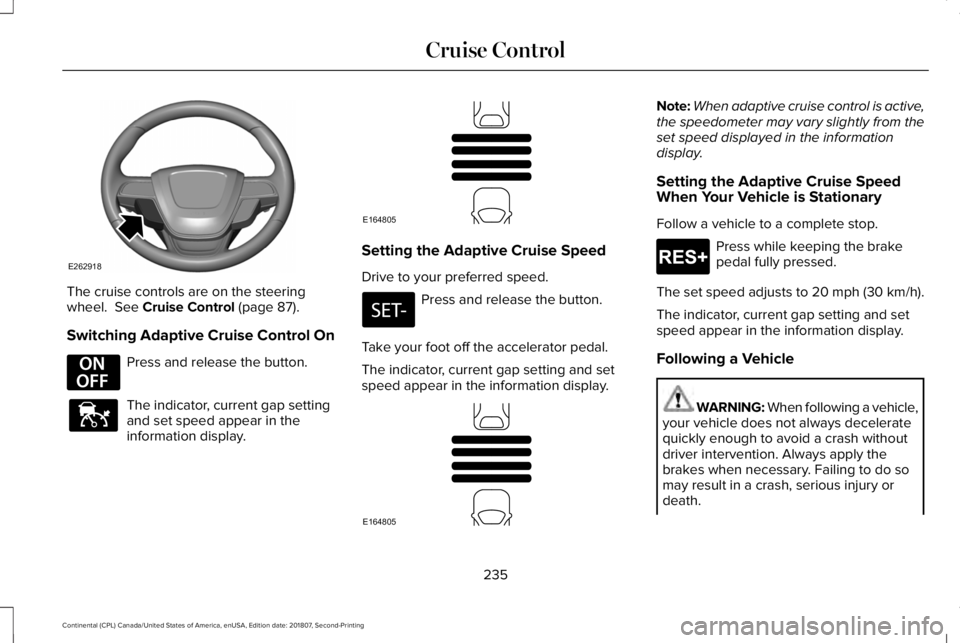
The cruise controls are on the steering
wheel. See Cruise Control (page 87).
Switching Adaptive Cruise Control On Press and release the button.
The indicator, current gap setting
and set speed appear in the
information display. Setting the Adaptive Cruise Speed
Drive to your preferred speed.
Press and release the button.
Take your foot off the accelerator pedal.
The indicator, current gap setting and set
speed appear in the information display. Note:
When adaptive cruise control is active,
the speedometer may vary slightly from the
set speed displayed in the information
display.
Setting the Adaptive Cruise Speed
When Your Vehicle is Stationary
Follow a vehicle to a complete stop. Press while keeping the brake
pedal fully pressed.
The set speed adjusts to 20 mph (30 km/h).
The indicator, current gap setting and set
speed appear in the information display.
Following a Vehicle WARNING:
When following a vehicle,
your vehicle does not always decelerate
quickly enough to avoid a crash without
driver intervention. Always apply the
brakes when necessary. Failing to do so
may result in a crash, serious injury or
death.
235
Continental (CPL) Canada/United States of America, enUSA, Edition date: 201807, Second-Printing Cruise ControlE262918 E294678 E144529 E164805 E164805 E265299
Page 345 of 627

GENERAL INFORMATION
The recommended tire inflation pressures
are on the tire information label on the driver
side B-pillar.
Check and set the tire pressure at the
ambient temperature in which you are
intending to drive your vehicle and when the
tires are cold. See Technical Specifications
(page 371).
Note: Check your tire pressures regularly to
optimize fuel economy.
Only use approved wheel and tire sizes.
Using other sizes could damage your vehicle
and could make the National Type Approval
invalid.
Installation of any tires that are not the
original equipment tire size can cause the
speedometer to display incorrect vehicle
speed. TIRE CARE
Important Information About Low-
Profile Tires
If your vehicle is equipped with
245/40R20 tires, they are low-profile
tires. These tires and wheels are
designed to give your vehicle a sport
appearance. With low-profile tires, you
may notice an increase in road noise
and faster tire wear, depending on road
conditions and driving styles. Due to
their design, low-profile tires and wheels
are more prone to road damage from
potholes, rough or unpaved roads, car
wash rails and curb contact than
standard tires and wheels.
Note:
Your vehicle's warranty does not
cover these types of damages. Extra
caution should be taken when operating
on rough roads to avoid impacts that
could cause wheel and tire damage. Information About Uniform Tire Quality
Grading
Tire Quality Grades apply to new
pneumatic passenger car tires. The
Quality grades can be found where
applicable on the tire sidewall between
tread shoulder and maximum section
width. For example:
Treadwear 200
Traction AA Temperature A.
These Tire Quality Grades are
determined by standards that the United
States Department of Transportation has
set.
342
Continental (CPL) Canada/United States of America, enUSA, Edition date: 201807, Second-Printing Wheels and TiresE142542
Page 474 of 627

To return to SYNC 3, select the speedometer
icon in the Android Auto menu bar at the
bottom of the touchscreen, and then touch
the option to return to SYNC.
Note:
Contact Google for Android Auto
support.
NAVIGATION (IF EQUIPPED)
Your navigation system is comprised of two
main features, destination mode and map
mode.
Map Mode
Map mode shows advanced viewing
comprised of 2D city maps, 3D landmarks
and 3D city models (when available). 2D city
maps show detailed outlines of buildings,
visible land use, landscape features, and
detailed railroad infrastructure for the most
essential cities around the globe.
3D landmarks appear as clear, visible objects
that are typically recognizable and have a
certain tourism value. 3D city models are complete 3D models of
entire city areas including navigable roads,
parks, rivers and rendered buildings. 3D
landmarks and city models appear in 3D map
mode only. Coverage of these varies and
improves with updated map releases. Select the zoom in icon to see a
closer view of the map.
Select the zoom out icon to see a
farther away view of the map.
You can adjust the view in preset increments.
You can also pinch to zoom in or out of the
map.
The information bar tells you the names of
streets, cities or landmarks as you hover over
them with the crosshair curser.
You can change your view of the map by
tapping on the location indicator icon on the
right hand side of the screen. You can
choose from the following options: Heading up (2D map)
This always
shows the direction of forward
travel to be upward on the screen.
This view is available for map
scales up to
3 mi (5 km). North up (2D map)
always shows
the northern direction to be
upward on the screen. 3D map mode
provides an
elevated perspective of the map.
Adjust this viewing angle and
rotate the map 180 degrees by
touching the map twice, and then dragging
your finger along the shaded bar with arrows
at the bottom of the map. Re-center the map by pressing this
icon whenever you scroll the map
away from your vehicle
’s current
location.
471
Continental (CPL) Canada/United States of America, enUSA, Edition date: 201807, Second-Printing SYNC™ 3E207752 E207753 E207750 E207749 E207748 E207751