2019 LINCOLN CONTINENTAL instrument panel
[x] Cancel search: instrument panelPage 383 of 627
VEHICLE IDENTIFICATION
NUMBER
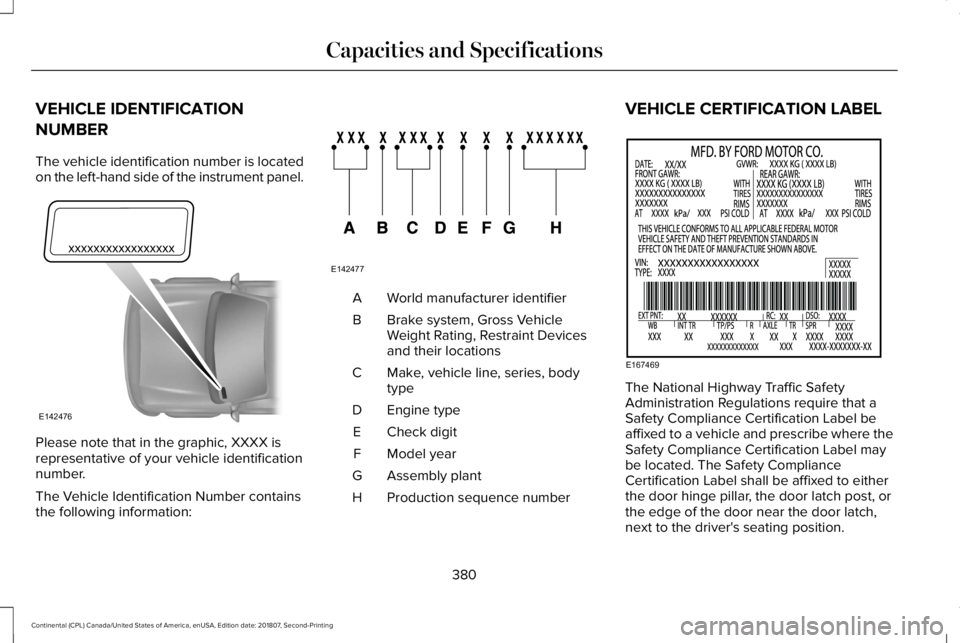
The vehicle identification number is located
on the left-hand side of the instrument panel.
Please note that in the graphic, XXXX is
representative of your vehicle identification
number.
The Vehicle Identification Number contains
the following information: World manufacturer identifier
A
Brake system, Gross Vehicle
Weight Rating, Restraint Devices
and their locations
B
Make, vehicle line, series, body
type
C
Engine type
D
Check digit
E
Model year
F
Assembly plant
G
Production sequence number
H VEHICLE CERTIFICATION LABEL
The National Highway Traffic Safety
Administration Regulations require that a
Safety Compliance Certification Label be
affixed to a vehicle and prescribe where the
Safety Compliance Certification Label may
be located. The Safety Compliance
Certification Label shall be affixed to either
the door hinge pillar, the door latch post, or
the edge of the door near the door latch,
next to the driver's seating position.
380
Continental (CPL) Canada/United States of America, enUSA, Edition date: 201807, Second-Printing Capacities and SpecificationsE142476 E142477 E167469
Page 407 of 627
Trade Number
Function
LED.
Backup lamp. 1
LED.
License plate lamp. 1
LED.
High-mount brake lamp. 1
LED.
Interior lamps. 1
1 To replace these lamps, see an authorized dealer.
Note: To replace instrument panel lights, see an authorized dealer.
404
Continental (CPL) Canada/United States of America, enUSA, Edition date: 201807, Second-Printing Capacities and Specifications
Page 420 of 627

The media hub may be on the instrument
panel or center console.
The media hub may contain one or more of
the following inputs:
See USB Port (page 416).
417
Continental (CPL) Canada/United States of America, enUSA, Edition date: 201807, Second-Printing Audio System
Page 429 of 627

Note:
If your vehicle is not equipped with
navigation, compass appears in the display
instead of navigation. If you press the right
arrow to go into the compass menu, you can
see the compass graphic. The compass
displays the direction in which the vehicle is
traveling, not true direction (for example, if
the vehicle is traveling west, the middle of
the compass graphic displays west; north
displays to the left of west though its true
direction is to the right of west).
Using the Controls on the Steering
Wheel
Depending on your vehicle and option
package, you can use different controls on
your steering wheel to interact with the
touchscreen system in different ways.
VOL: Control the volume of audio output.
Mute:
Mute the audio output.
Voice:
Press to start a voice session. Press
again to stop the voice prompt and
immediately begin speaking. Press and hold
to end a voice session. SEEK NEXT:
•
While in radio mode, press to seek
between memory presets.
• While in USB, Bluetooth Audio or CD
mode, press to seek between songs or
press and hold to fast seek.
SEEK PREVIOUS:
• While in radio mode, press to seek
between memory presets.
• While in USB, Bluetooth Audio or CD
mode, press to seek between songs or
press and hold to fast seek.
PHONE ACCEPT:
Press to answer a call or
switch between calls.
PHONE REJECT: Press to end a call or reject
an incoming call.
Note: On some models, SEEK NEXT may be
combined with
PHONE REJECT and SEEK
PREVIOUS may be combined with PHONE
ACCEPT.
M:
Touch the control repeatedly to switch
between media sources (modes).
See
Steering Wheel (page 86). Using Your Bezel Controls
Depending on your vehicle and option
package, you may also have these controls
on your instrument panel:
•
Power:
Switch the audio system on and
off.
• VOL:
Control the volume of playing
audio.
• Seek
and Tune: Use as you normally
would in audio modes.
• Eject:
Eject a CD from the audio system.
• SOURCE
or MEDIA: Press repeatedly to
advance through available media modes.
• SOUND:
Press to access the Sound
menu where you can adjust sound and
other audio settings.
• 1-6:
Press and hold to store or press to
select an AM, FM or SIRIUS memory
preset.
See Audio System (page 406).
426
Continental (CPL) Canada/United States of America, enUSA, Edition date: 201807, Second-Printing SYNC™ 3
Page 462 of 627
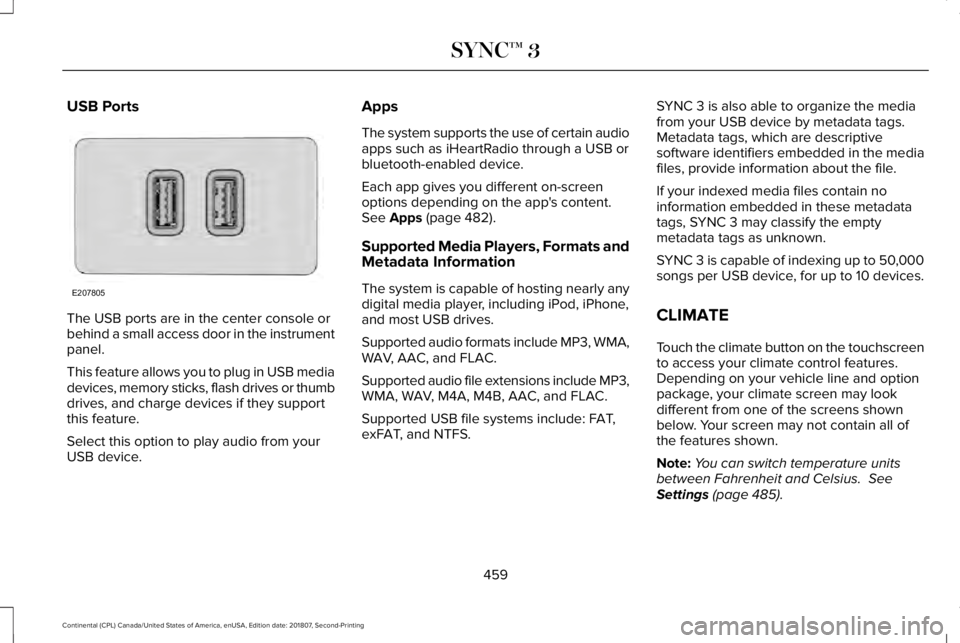
USB Ports
The USB ports are in the center console or
behind a small access door in the instrument
panel.
This feature allows you to plug in USB media
devices, memory sticks, flash drives or thumb
drives, and charge devices if they support
this feature.
Select this option to play audio from your
USB device. Apps
The system supports the use of certain audio
apps such as iHeartRadio through a USB or
bluetooth-enabled device.
Each app gives you different on-screen
options depending on the app's content.
See Apps (page 482).
Supported Media Players, Formats and
Metadata Information
The system is capable of hosting nearly any
digital media player, including iPod, iPhone,
and most USB drives.
Supported audio formats include MP3, WMA,
WAV, AAC, and FLAC.
Supported audio file extensions include MP3,
WMA, WAV, M4A, M4B, AAC, and FLAC.
Supported USB file systems include: FAT,
exFAT, and NTFS. SYNC 3 is also able to organize the media
from your USB device by metadata tags.
Metadata tags, which are descriptive
software identifiers embedded in the media
files, provide information about the file.
If your indexed media files contain no
information embedded in these metadata
tags, SYNC 3 may classify the empty
metadata tags as unknown.
SYNC 3 is capable of indexing up to 50,000
songs per USB device, for up to 10 devices.
CLIMATE
Touch the climate button on the touchscreen
to access your climate control features.
Depending on your vehicle line and option
package, your climate screen may look
different from one of the screens shown
below. Your screen may not contain all of
the features shown.
Note:
You can switch temperature units
between Fahrenheit and Celsius.
See
Settings (page 485).
459
Continental (CPL) Canada/United States of America, enUSA, Edition date: 201807, Second-Printing SYNC™ 3E207805
Page 465 of 627
Note: You cannot adjust the fan speed when the system is set to AUTO or MAX A/C.
Rear:
A pop-up appears on the screen to display the rear control options.
F
Touch the power icon to switch the rear climate control functions off and\
on.
Touch
Rear Control to allow the rear seat passengers to adjust the rear climate settings. \
Touch it again to prevent the rear seat
passengers from adjusting the settings. Rear Control automatically turns off when you use the touchscreen to adjust the rear\
climate
settings.
If your vehicle has automatic climate controls, select
Auto to connect the rear climate settings to the Auto settings of the driver\
.
Touch the up and down arrows to adjust the temperature.
To adjust fan speed, touch the up and down arrows above and below the fan\
icon.
Touch
Close to close the rear controls. Closing the rear climate control functions \
does not affect their current settings.
A/C:
Touch this and a pop-up appears on the screen to display the air conditio\
ning options.
G
MAX A/C:
Touch the button to activate and maximize cooling. The driver and passeng\
er temperatures are set to LO, recirculated
air flows through the instrument panel vents, air conditioning automatic\
ally turns on and the fan automatically adjusts to the highest
speed.
A/C:
Touch to switch the air conditioning on or off. Use A/C with recirculated air to improve cooling performance and effic\
iency.
Note:
In certain conditions (for example, Max Defrost), the air conditioning compressor may continue to operate\
even after you
touch the A/C icon to switch it off.
Recirculated air:
Touch to switch the recirculated air on or off. When recirculated air is on, it may reduce the amount of time needed
to cool down the interior (when used with A/C) and help reduce odors f\
rom reaching the interior.
Note:
Recirculated air may turn off automatically (or the system may prevent i\
t from turning on) in all airflow modes except MAX
A/C to reduce the risk of fogging. It may also turn on and off automatic\
ally in Panel or Panel/Floor airflow modes during hot weather
in order to improve cooling efficiency.
462
Continental (CPL) Canada/United States of America, enUSA, Edition date: 201807, Second-Printing SYNC™ 3
Page 466 of 627

Manual airflow distribution controls:
H
Defrost: A pop-up appears on the screen to display the defrost options.
MAX Defrost: Touch the button to maximize defrosting. Air flows through the windshield\
vents, the fan automatically adjusts to the
highest speed and the driver and passenger temperatures are set to HI. Y\
ou can use this setting to defog or clear a thin covering
of ice from the windshield. The heated rear window also automatically tu\
rns on when you select MAX Defrost.
Defrost:
Distributes air through the windshield defroster vents and demister vent\
s.
Heated rear window:
Turns the heated rear window on and off. See Heated Rear Window (page 147).
Panel:
Distributes air through the instrument panel vents.
Floor:
Distributes air through the demister vents, floor vents and rear seat f\
loor vents.
Driver temperature:
Touch up or down to adjust the temperature.
I
PHONE WARNING:
Driving while distracted
can result in loss of vehicle control, crash
and injury. We strongly recommend that
you use extreme caution when using any
device that may take your focus off the
road. Your primary responsibility is the safe
operation of your vehicle. We recommend against the use of any hand-held device
while driving and encourage the use of
voice-operated systems when possible.
Make sure you are aware of all applicable
local laws that may affect the use of
electronic devices while driving.
Hands-free calling is one of the main features
of the system. Once you pair your cell phone,
you can access many options using the
touchscreen or voice commands. While the
system supports a variety of features, many
are dependent on your cell phone
’s
functionality.
Pairing Your Cell Phone for the First
Time
Pair your Bluetooth enabled phone with the
system before using the functions in
hands-free mode.
463
Continental (CPL) Canada/United States of America, enUSA, Edition date: 201807, Second-Printing SYNC™ 3
Page 615 of 627
Directing Air to the Instrument Panel Air
Vents..................................................................143
Setting the Blower Motor Speed.....................143
Setting the Temperature....................................143
Switching Auto Mode On and Off...................143
Switching Defrost On and Off..........................144
Switching Maximum Air Conditioning On and Off
.......................................................................144
Switching Maximum Defrost On and Off.......144
Switching Recirculated Air On and Off..........144
Switching the Air Conditioning On and Off.......................................................................144
Switching the Climate Control On and Off.......................................................................144
Switching the Heated Seats On and Off.......144
Switching the V
entilated Seats On and
Off.......................................................................145
Automatic High Beam Control
....................94
Automatic High Beam Indicator........................95
Switching the S
ystem On and Off....................95
Automatic Transmission...............................191 Automatic Transmission Adaptive
Learning............................................................196
Brake-Shift Interlock Override.........................195
If Your Vehicle Gets Stuck In Mud or Snow..................................................................196
Push Button Shift Transmission........................191
SelectShift™
Automatic Transmission.............193 Understanding the Shift Positions of your
Automatic Transmission.................................191
Automatic Transmission Fluid Check............................................................323
Autowipers
.......................................................89
Autowipers Settings.............................................89
Low Temperature Wipe Inhibit..........................89
Auxiliary Power Points
...................................171
AC Power Point.....................................................171
DC Power Point.....................................................171
Locations.................................................................171
AWD See: All-Wheel Drive...........................................197
B
Battery See: Changing the 12V Battery.......................325
Blind Spot Information System.................250 Switching the System Off and On...................251
System Errors.......................................................251
Using the Blind Spot Information
System..............................................................250
BLIS See: Blind Spot Information System.............250
Body Styling Kits
............................................341
Bonnet Lock See: Opening and Closing the Hood.............310 Booster Seats...................................................31
Types of Booster Seats.......................................32
Brake Fluid Check........................................323
Brakes.............................................................206 General Information..........................................206
Breaking-In.....................................................273
Bulb Specification Chart.............................403
C
Cabin Air Filter
...............................................148
Capacities and Specifications - 2.7L.......382 Alternative Engine Oil for Extremely Cold
Climates............................................................388
Specifications......................................................383
Capacities and Specifications - 3.0L.......389 Alternative Engine Oil for Extremely Cold
Climates............................................................394
Specifications......................................................390
Capacities and Specifications - 3.7L
.......396
Alternative Engine Oil for Extremely Cold
Climates...........................................................402
Specifications......................................................397
Capacities and Specifications...................373
Car Wash See: Cleaning the Exterior...............................333
Catalytic Converter
.......................................188
On-Board Diagnostics (OBD-II)........................189
612
Continental (CPL) Canada/United States of America, enUSA, Edition date: 201807, Second-Printing Index