2019 LEXUS UX250H check
[x] Cancel search: checkPage 171 of 476

1714-2. Driving procedures
4
Driving
■Downshifting restriction warning
buzzer
To help ensure safety and driving perfor-
mance, downshifting operation may some-
times be restricted. In some circumstances,
downshifting may not be possible even
when the shift lever or paddle shift switch (if
equipped) is operated. (A buzzer will sound
twice.)
The turn signal lever can be used to
show the following intentions of the
driver.
1 Right turn
2 Lane change to the right (move the
lever partway and release it)
The right hand signals will flash 3 times.
3Lane change to the left (move the
lever partway and release it)
The left hand signals will flash 3 times.
4Left turn
■Turn signals can be operated when
The power switch is in ON.
■If the indicator flashes faster than usual
Check that a light bulb in the front or rear
turn signal lights has not burned out.
Turn signal lever
Operating instructions
Page 174 of 476
1744-2. Driving procedures
■If “Parking Brake Unavailable” or “EPB
Unavailable” is displayed on the multi-
information display
Operate the parking brake switch. If the
message does not disappear after operat-
ing the switch several times, the system may
be malfunctioning. Have the vehicle
inspected by your Lexus dealer.
■Parking brake operation sound
When the parking brake operates, a motor
sound (whirring sound) may be heard. This
does not indicate a malfunction.
■Parking brake indicator light
●Depending on the power switch mode,
the parking brake indi cator light will turn
on and stay on as described below:
ON: Comes on until the parking brake is
released.
Not in ON: Stays on for approximately 15
seconds.
●When the power switch is turned off with
the parking brake set, the parking brake
indicator light will stay on for about 15
seconds. This does not indicate a mal-
function.
■When the parking brake switch mal-
functions
Automatic mode (automatic brake setting
and releasing) will be turned on automati-
cally.
■Parking the vehicle
P.152
■Parking brake engaged warning buzzer
A buzzer will sound if the vehicle is driven
with the parking brake engaged. “EPB
Applied” is displayed on the multi-informa-
tion display (with the vehicle reached a
speed of 3 mph [5 km/h]).
■If the brake system warning light comes
on
P.386
■Usage in winter time
P.263
WARNING
■When parking the vehicle
Do not leave a child in the vehicle alone.
The parking brake may be released unin-
tentionally and there is the danger of the
vehicle moving that may lead to an acci-
dent resulting in death or serious injury.
NOTICE
■When parking the vehicle
Before you leave the vehicle, shift the
shift lever to P, set the parking brake and
make sure that the vehicle does not
move.
■When the system malfunctions
Stop the vehicle in a safe place and
check the warning messages.
■When the parking brake cannot be
released due to a malfunction
Driving the vehicle with the parking
brake set will lead to brake components
overheating, which may affect braking
performance and increase brake wear.
Have the vehicle inspected by your
Lexus dealer immediately if this occurs.
Page 186 of 476

1864-3. Operating the lights and wipers
time the lever is pulled.
■The windshield wipers and washer can
be operated when
The power switch is in ON.
■Effects of vehicle speed on wiper opera-
tion (vehicles with rain-sensing wind-
shield wipers)
Vehicle speed affects the Intermittent wiper
interval.
■Raindrop sensor (vehicles with rain-
sensing windshield wipers)
●The raindrop sensor judges the amount
of raindrops.
An optical sensor is adopted. It may not
operate properly when sunlight from the
rising or setting of the sun intermittently
strikes the windshield, or if bugs, etc. are
present on the windshield.
●If the wiper switch is turned to the AUTO
position while the power switch is in ON,
the wipers will operate once to show that
AUTO mode is activated.
●If the temperature of the raindrop sensor
is 194°F (90°C) or higher, or 5°F (-15°C)
or lower, automatic operation may not
occur. In this case, operate the wipers in
any mode other than AUTO mode.
■If no windshield washer fluid sprays
Check that the washer nozzles are not
blocked, if there is washer fluid in the
washer fluid tank.
When the windshield wipers are not
being used, they retract to below the
hood. To enable the windshield wipers
to be lifted when parking in cold condi-
tions or when replacing a windshield
wiper insert, change the rest position of
WARNING
■Caution regarding the use of wind-
shield wipers in AUTO mode (vehi-
cles with rain-sensing windshield
wipers)
The windshield wipers may operate
unexpectedly if the sensor is touched or
the windshield is subject to vibration in
AUTO mode. Take care that your fingers,
etc. do not become caught in the wind-
shield wipers.
■Caution regarding the use of washer
fluid
When it is cold, do not use the washer
fluid until the windshield becomes warm.
The fluid may freeze on the windshield
and cause low visibility. This may lead to
an accident, resulting in death or serious
injury.
NOTICE
■When the washer fluid tank is empty
Do not operate the switch continually as
the washer fluid pump may overheat.
■When a nozzle becomes blocked
In this case, contact your Lexus dealer.
Do not try to clear it with a pin or other
object. The nozzle will be damaged.
■To prevent 12-volt battery discharge
Do not leave the wipers on longer than
necessary when the hy brid system is off.
Changing the windshield wiper
rest position/Lifting the wind-
shield wipers
Page 188 of 476

1884-3. Operating the lights and wipers
Operating the switch operates
the rear wiper as follows:
1
or Off
2
or Intermittent opera-
tion
3
or Normal operation 4
Washer/wiper dual opera-
tion
Pushing the lever oper ates the wiper and
washer.
The wipers will automatically operate a
couple of times after the washer squirts.
■The rear window wiper and washer can
be operated when
The power switch is in ON.
■If no windshield washer fluid sprays
Check that the washer nozzles are not
blocked, if there is washer fluid in the
washer fluid tank.
■Reverse-linked rear window wiper func-
tion
When the shift lever is shifted to R when the
front wipers are operating, the rear window
wiper will operate once.
■Back door opening linked rear window
wiper stop function
When the rear window wi per is operating, if
the back door is opened while the vehicle is
stopped, operation of the rear window
wiper will be stopped to prevent anyone
near the vehicle from being sprayed by
water from the wiper. When the back door
is closed, wiper operation will resume.
*
*
: The setting must be customized at your Lexus dealer.
■Customization
Setting of the reverse-linked function can
be changed. (Customizable fea-
tures: P.441
Rear window wiper and
w
asher
The rear window wiper and washer
can be used by operating the lever.
NOTICE
■When the rear window is dry
Do not use the wiper, as it may damage
the rear window.
Operating the wiper lever
Page 207 of 476
2074-5. Using the driving support systems
4
Driving
WARNING
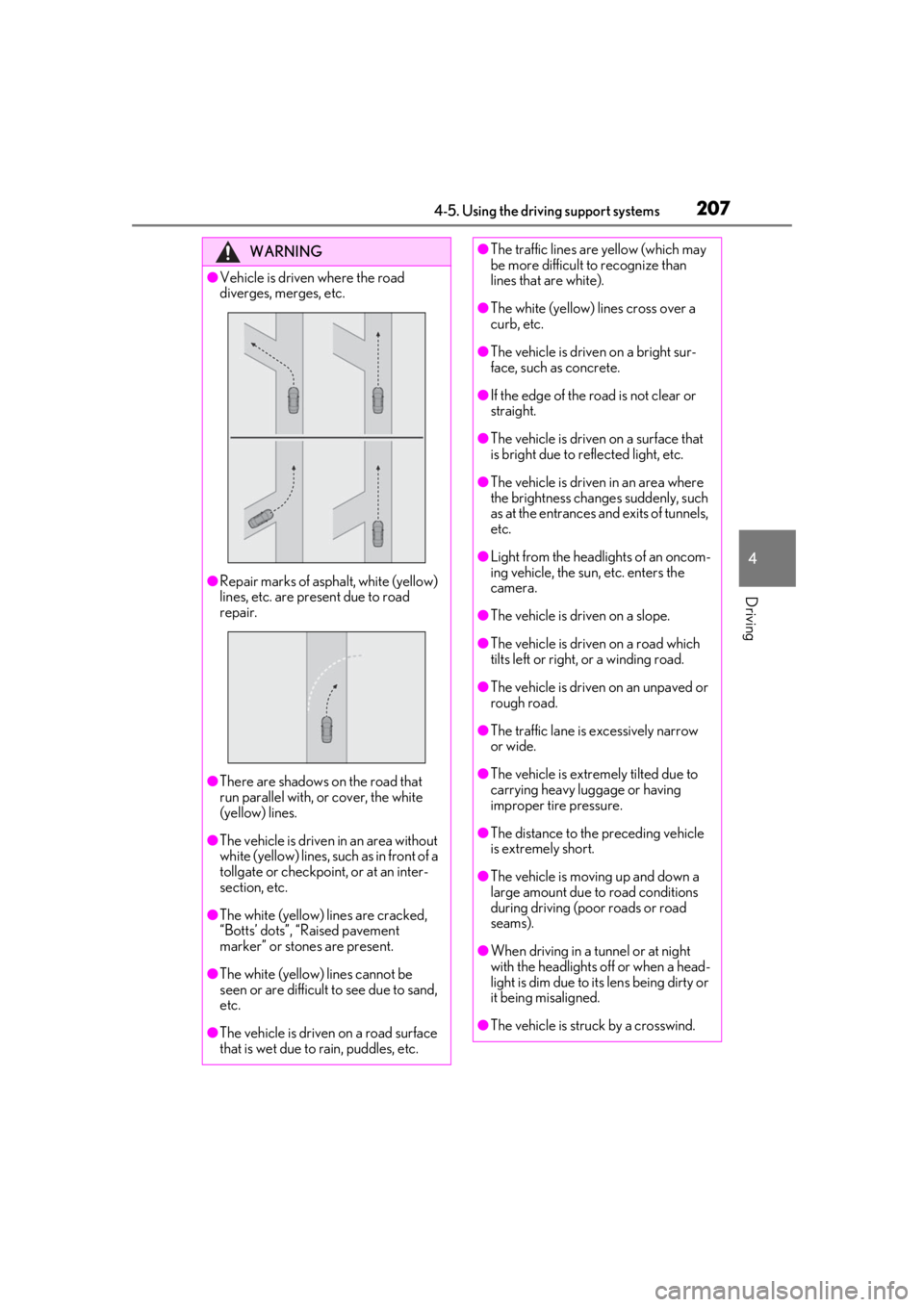
●Vehicle is driven where the road
diverges, merges, etc.
●Repair marks of asphalt, white (yellow)
lines, etc. are present due to road
repair.
●There are shadows on the road that
run parallel with, or cover, the white
(yellow) lines.
●The vehicle is driven in an area without
white (yellow) lines, su ch as in front of a
tollgate or checkpoint, or at an inter-
section, etc.
●The white (yellow) lines are cracked,
“Botts’ dots”, “Raised pavement
marker” or stones are present.
●The white (yellow) lines cannot be
seen or are difficult to see due to sand,
etc.
●The vehicle is driven on a road surface
that is wet due to rain, puddles, etc.
●The traffic lines are yellow (which may
be more difficult to recognize than
lines that are white).
●The white (yellow) lines cross over a
curb, etc.
●The vehicle is driven on a bright sur-
face, such as concrete.
●If the edge of the road is not clear or
straight.
●The vehicle is driven on a surface that
is bright due to reflected light, etc.
●The vehicle is driven in an area where
the brightness change s suddenly, such
as at the entrances and exits of tunnels,
etc.
●Light from the headlights of an oncom-
ing vehicle, the sun, etc. enters the
camera.
●The vehicle is driven on a slope.
●The vehicle is driven on a road which
tilts left or right, or a winding road.
●The vehicle is driven on an unpaved or
rough road.
●The traffic lane is excessively narrow
or wide.
●The vehicle is extremely tilted due to
carrying heavy luggage or having
improper tire pressure.
●The distance to the preceding vehicle
is extremely short.
●The vehicle is moving up and down a
large amount due to road conditions
during driving (poor roads or road
seams).
●When driving in a tunnel or at night
with the headlights off or when a head-
light is dim due to its lens being dirty or
it being misaligned.
●The vehicle is struck by a crosswind.
Page 208 of 476

2084-5. Using the driving support systems
■Lane departure alert function
When the system determines that the
vehicle might depart from its lane or
course
*, a warning is displayed on the
multi-information display, and either a
warning buzzer will sound or the steer-
ing wheel will vibrate to alert the driver.
When the warning buzzer sounds or the
steering wheel vibrates, check the area
around your vehicle and carefully operate
the steering wheel to move the vehicle
back to the center of the lane.
Vehicles with Blind Spot Monitor: When
the system determines that the vehicle
might depart from its lane and that the pos-
sibility of a collision with an overtaking
vehicle in the adjacent lane is high, the lane
departure alert will operate even if the turn
signals are operating.
*: Boundary between asphalt and the side of the road, such as grass, soil, or a curb
■Steering assist function
When the system determines that the
vehicle might depart from its lane or
course
*, the system provides assis-
tance as necessary by operating the
steering wheel in small amounts for a
short period of time to keep the vehicle
in its lane.
If the system detects that the steering
wheel has not been operated for a fixed
amount of time or the steering wheel is not
being firmly gripped, a warning is displayed
on the multi-informat ion display and the
function is temporarily canceled.
Vehicles with Blind Spot Monitor: When
the system determines that the vehicle
might depart from its lane and that the pos-
sibility of a collision with an overtaking
vehicle in the adjacent lane is high, the
steering assist function will operate even if
the turn signals are operating.
*: Boundary between asphalt and the side of the road, such as grass, soil, or a curb
WARNING
●The vehicle is affected by wind from a
vehicle driven in a nearby lane.
●The vehicle has just changed lanes or
crossed an intersection.
●Tires which differ by structure, manu-
facturer, brand or tread pattern are
used.
●Snow tires, etc. are equipped.
●The vehicle is being driven at
extremely high speeds.
Functions included in LTA system
Page 217 of 476

2174-5. Using the driving support systems
4
Driving
■Operation switchesVehicle-to-vehicle distance switch
“+RES” switch
Cruise control main switch
Cancel switch
“-SET” switch
WARNING
■Before using dynamic radar cruise
control with full-speed range
●Driving safely is the sole responsibility
of the driver. Do not rely solely on the
system, and drive safely by always pay-
ing careful attention to your surround-
ings.
●The dynamic radar cruise control with
full-speed range pr ovides driving
assistance to reduce the driver’s bur-
den. However, there are limitations to
the assistance provided.
Read the following co nditions carefully.
Do not overly rely on this system and
always drive carefully.
• When the sensor ma y not be correctly
detecting the vehicle ahead: P.224
• Conditions under which the vehicle- to-vehicle distance control mode may
not function correctly: P.225
A
B
C
D
E
●Set the speed appropriately depend-
ing on the speed limit, traffic flow, road
conditions, weather conditions, etc.
The driver is responsible for checking
the set speed.
●Even when the system is functioning
normally, the condition of the preced-
ing vehicle as detected by the system
may differ from the condition
observed by the driver. Therefore, the
driver must always remain alert, assess
the danger of each situation and drive
safely. Relying solely on this system or
assuming the system ensures safety
while driving can lead to an accident,
resulting in death or serious injury.
●Switch the dynamic radar cruise con-
trol with full-speed range setting to off,
using the cruise control main switch
when not in use.
■Cautions regarding the driving assist
systems
Observe the following precautions, as
there are limitations to the assistance
provided by the system.
Failure to do so may cause an accident
resulting in death or serious injury.
●Assisting the driver to measure follow-
ing distance
The dynamic radar cruise control with
full-speed range is only intended to help
the driver in determining the following
distance between the driver’s own vehi-
cle and a designated vehicle traveling
ahead. It is not a mechanism that allows
careless or inattentive driving, and it is
not a system that can assist the driver in
low-visibility conditions.
It is still necessary for driver to pay close
attention to the vehicle’s surroundings.
Page 232 of 476

2324-5. Using the driving support systems
3Press or to select and
then press “OK”.
Each time the switch is pressed, the volume
level will change between 1, 2, and 3.
■Muting a buzzer temporarily
A mute button will be displayed on the
multi-information display when an
object or pedestrian is detected. To
mute the buzzer, press “OK”.
The buzzers for the intuitive parking
assist and RCTA function will be muted
simultaneously.
Mute will be canceled automatically in
the following situations:
When the shift lever is changed.
When there is a malfunction in a
sensor or the system is temporarily
unavailable.
When the operating function is dis-
abled manually.
When the power switch is turned
off.
*: If equipped
■Types of sensors
Front corner sensors
Front center sensors
Rear corner sensors
Rear center sensors
■Display
When the sensors detect an object,
such as a wall, a graphic is shown on
the multi-information display, head-up
display (if equipped) and Center Dis-
play (vehicles with 10.3-inch display
model) depending on the position and
distance to the object.
Intuitive parking assist*
The distance from your vehicle to
objects, such as a wall, when paral-
lel parking or maneuvering into a
garage is measured by the sensors
and communicated via the multi-
information display, head-up dis-
play (if equipped), Center Display
and a buzzer. Always check the sur-
rounding area when using this sys-
tem.
System components
A
B
C
D