2019 LEXUS UX250H remote control
[x] Cancel search: remote controlPage 312 of 476

3125-6. Using the other interior features
nected.
●If learning failed when registering a dif-
ferent code to a HomeLink® button that already has a code registered to it, the
already registered code will not be
erased.
■Certification for the garage door opener
■When support is necessary
Visit on the web at
www.homelink.com/lexus
or call 1-800-355-3515.
■Before programming HomeLink®
During programming, it is possible
WARNING
■When programming a garage door or
other remote control device
The garage door or other device may
operate, so ensure people and objects
are out of danger to prevent potential
harm.
■Conforming to federal safety stan-
dards
Do not use the HomeLink
® compatible
transceiver with any garage door opener
or device that lacks safety stop and
reverse features as required by federal
safety standards.
This includes any garage door that can-
not detect an interf ering object. A door
or device without these features
increases the risk of death or serious
injury.
■When operating or programming
HomeLink®
Never allow a child to operate or play
with the HomeLink® buttons.
Programming the HomeLink®
Page 313 of 476

3135-6. Using the other interior features
5
Interior features
that garage doors, gates, or other
devices may operate. For this rea-
son, make sure that people and
objects are clear of the garage door
or other devices to prevent injury or
other potential harm.
It is recommended that a new bat-
tery be placed in the remote control
transmitter for more accurate pro-
gramming.
Garage door opener motors manu-
factured after 1995 may be
equipped with rolling code protec-
tion. If this is the case, you may need
a stepladder or other sturdy, safe
device to reach the “Learn” or
“Smart” button on the garage door
opener motor.
■Programming HomeLink®
Steps 1 through 3 must be performed
within 60 seconds, otherwise the indi-
cator light will stop flashing and pro-
gramming will not be able to be
completed.
1 Press and release the HomeLink
®
button you want to program and
check that the HomeLink
® indica-
tor light flashes (orange).
2 Point the remote control transmit-
ter for the device at the rear view
mirror, 1 to 3 in. (25 to 75 mm)
from the HomeLink
® buttons.
Keep the HomeLink® indicator light in view while programming.
3
Program a device.
Programming a device other than
an entry gate (for U.S.A. owners)
Press and hold the remote control
transmitter button until the Home-
Link
® indicator light changes from
slowly flashing orange to rapidly flash-
ing green (rolling code) or continu-
ously lit green (fixed code), then
release the button.
Programming an entry gate (for
U.S.A. owners)/Programming a
device in the Canadian market
Press and release the remote control
transmitter button at 2 second inter-
vals, repeatedly, until the HomeLink
®
indicator light changes from slowly
flashing (orange) to rapidly flashing
(green) (rolling code) or continuously
lit (green) (fixed code).
Page 342 of 476
3426-3. Do-it-yourself maintenance
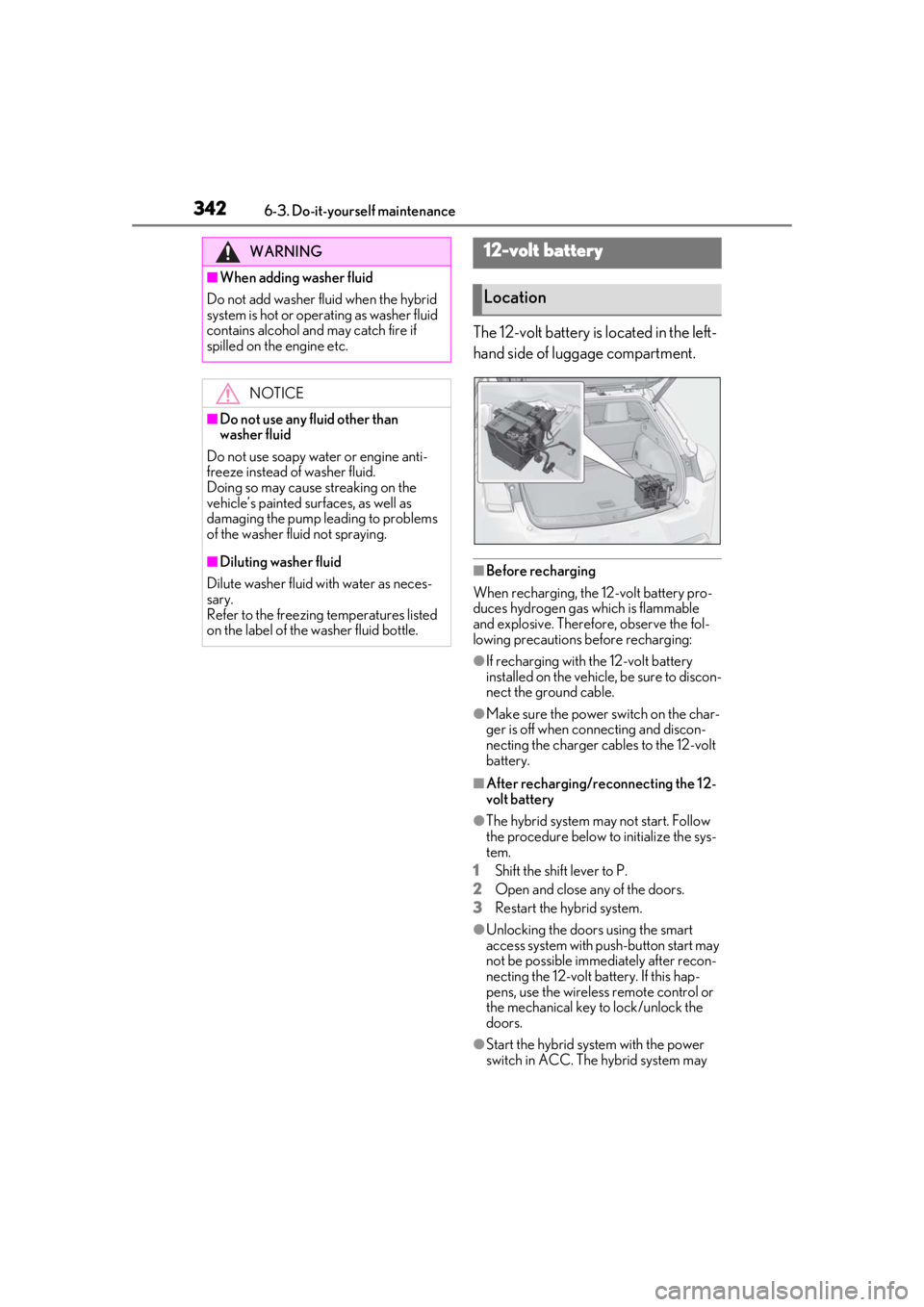
The 12-volt battery is located in the left-
hand side of luggage compartment.
■Before recharging
When recharging, the 12-volt battery pro-
duces hydrogen gas which is flammable
and explosive. Therefore, observe the fol-
lowing precautions before recharging:
●If recharging with the 12-volt battery
installed on the vehicle, be sure to discon-
nect the ground cable.
●Make sure the power switch on the char-
ger is off when connecting and discon-
necting the charger cables to the 12-volt
battery.
■After recharging/reconnecting the 12-
volt battery
●The hybrid system may not start. Follow
the procedure below to initialize the sys-
tem.
1
Shift the shift lever to P.
2
Open and close any of the doors.
3
Restart the hybrid system.
●Unlocking the doors using the smart
access system with pu sh-button start may
not be possible immediately after recon-
necting the 12-volt battery. If this hap-
pens, use the wireless remote control or
the mechanical key to lock/unlock the
doors.
●Start the hybrid system with the power
switch in ACC. The hybrid system may
WARNING
■When adding washer fluid
Do not add washer fluid when the hybrid
system is hot or operating as washer fluid
contains alcohol and may catch fire if
spilled on the engine etc.
NOTICE
■Do not use any fluid other than
washer fluid
Do not use soapy water or engine anti-
freeze instead of washer fluid.
Doing so may cause streaking on the
vehicle’s painted surfaces, as well as
damaging the pump leading to problems
of the washer fluid not spraying.
■Diluting washer fluid
Dilute washer fluid with water as neces-
sary.
Refer to the freezing temperatures listed
on the label of the washer fluid bottle.
12-volt battery
Location
Page 368 of 476
3686-3. Do-it-yourself maintenance
■If the electronic key battery is depleted
The following symptoms may occur:
●The smart access system with push-but-
ton start and wireless remote control will
not function properly.
●The operational range will be reduced.
■When the card key battery needs to be
replaced (if equipped)
The battery for the card key is available only
at Lexus dealers. Your Lexus dealer can
replace the battery for you.
Prepare the following before replacing
the battery:
Flathead screwdriver
Small flathead screwdriver
Lithium battery CR2032
■Use a CR2032 lithium battery
●Batteries can be purchased at your Lexus
dealer, local electrical appliance shops or
camera stores.
●Replace only with the same or equivalent
type recommended by the manufacturer.
●Dispose of used batteries according to
the local laws.
NOTICE
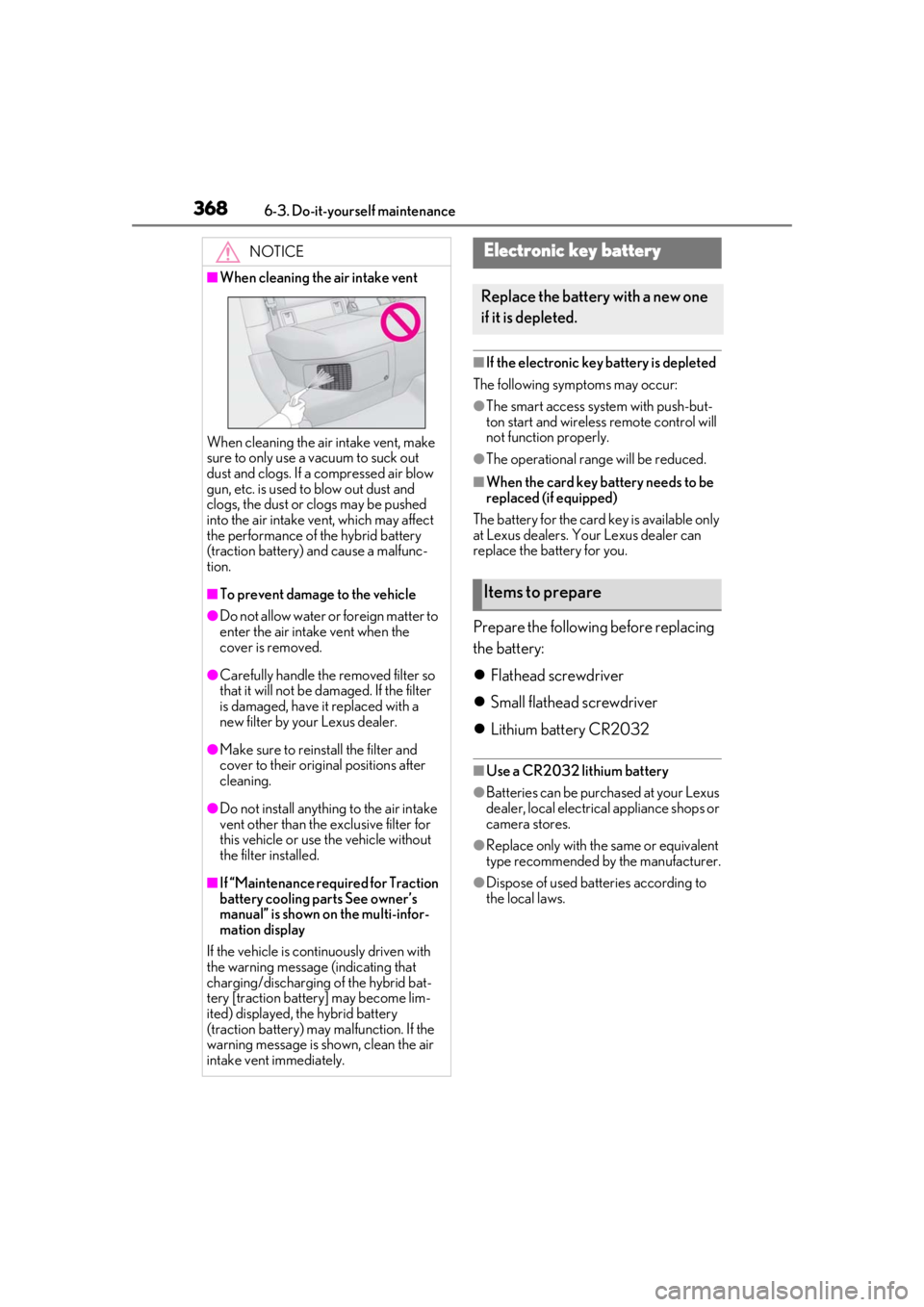
■When cleaning the air intake vent
When cleaning the air intake vent, make
sure to only use a vacuum to suck out
dust and clogs. If a compressed air blow
gun, etc. is used to blow out dust and
clogs, the dust or clogs may be pushed
into the air intake ve nt, which may affect
the performance of the hybrid battery
(traction battery) and cause a malfunc-
tion.
■To prevent damage to the vehicle
●Do not allow water or foreign matter to
enter the air intake vent when the
cover is removed.
●Carefully handle the removed filter so
that it will not be damaged. If the filter
is damaged, have it replaced with a
new filter by your Lexus dealer.
●Make sure to reinstall the filter and
cover to their original positions after
cleaning.
●Do not install anything to the air intake
vent other than the exclusive filter for
this vehicle or use the vehicle without
the filter installed.
■If “Maintenance required for Traction
battery cooling parts See owner’s
manual” is shown on the multi-infor-
mation display
If the vehicle is continuously driven with
the warning message (indicating that
charging/discharging of the hybrid bat-
tery [traction battery] may become lim-
ited) displayed, the hybrid battery
(traction battery) may malfunction. If the
warning message is shown, clean the air
intake vent immediately.
Electronic key battery
Replace the battery with a new one
if it is depleted.
Items to prepare
Page 369 of 476
3696-3. Do-it-yourself maintenance
6
Maintenance and care
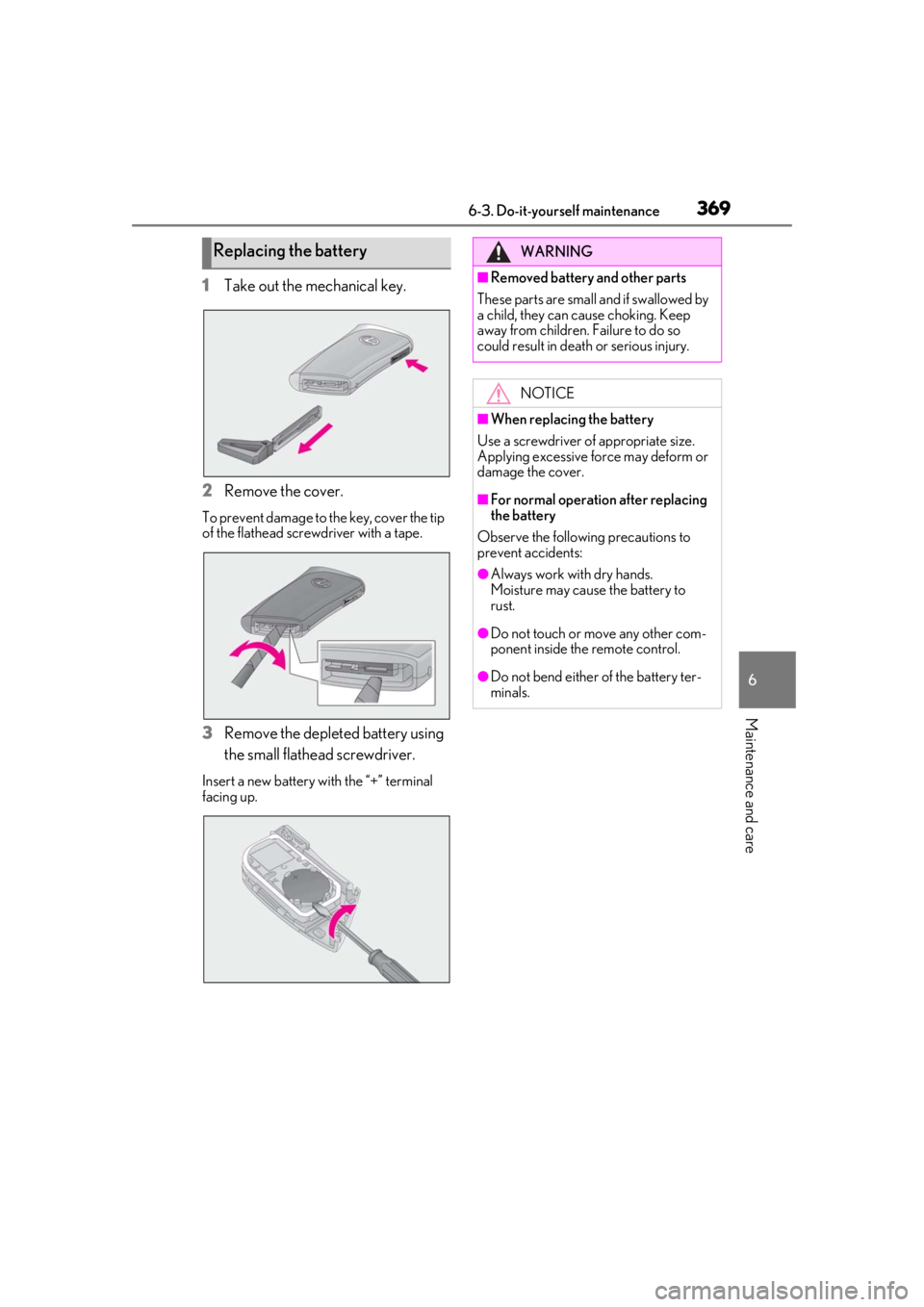
1Take out the mechanical key.
2
Remove the cover.
To prevent damage to the key, cover the tip
of the flathead screwdriver with a tape.
3Remove the depleted battery using
the small flathead screwdriver.
Insert a new battery with the “+” terminal
facing up.
Replacing the batteryWARNING
■Removed battery and other parts
These parts are small and if swallowed by
a child, they can cause choking. Keep
away from children. Failure to do so
could result in death or serious injury.
NOTICE
■When replacing the battery
Use a screwdriver of appropriate size.
Applying excessive force may deform or
damage the cover.
■For normal operation after replacing
the battery
Observe the following precautions to
prevent accidents:
●Always work with dry hands.
Moisture may cause the battery to
rust.
●Do not touch or move any other com-
ponent inside the remote control.
●Do not bend either of the battery ter-
minals.
Page 403 of 476
4037-2. Steps to take in an emergency
7
When trouble arises
reduction in fuel tank pressure before
refueling. To prevent fuel from spilling
out, turn the cap slowly when removing
it. During refueling, fuel may spill out
from the filler opening due to air being
discharged from inside the fuel tank.
Therefore, fill the fuel tank carefully and
slowly.
■When the electronic key does not work
properly
●Make sure that the smart access system
with push-button start has not been deac-
tivated using the Remote Touch or at your
Lexus dealer. If it is off, turn the function
on.
●Check if battery-saving mode is set. If it is
set, cancel the function. (P.125)
■Unlocking the door
Use the mechanical key ( P.106) to
perform the following operations.
If the electronic key does not
o
perate properly
If communication between the
electronic key and vehicle is inter-
rupted ( P.125) or the electronic
key cannot be used because the
battery is depleted, the smart
access system with push-button
start and wireless remote control
cannot be used. In such cases, the
doors can be opened and the hybrid
system can be started by following
the procedure below.
NOTICE
■In case of a smart access system with
push-button start malfunction or
other key-related problems
Take your vehicle with all the electronic
keys provided with your vehicle, includ-
ing the card key, to your Lexus dealer.
Locking and unlocking the doors
Page 408 of 476

4087-2. Steps to take in an emergency
■Starting the hybrid system when the 12-
volt battery is discharged
The hybrid system cannot be started by
push-starting.
■To prevent 12-volt battery discharge
●Turn off the headlight s, the air condition-
ing system, the audio system, etc. while
the hybrid system is off.
●Turn off any unnecessary electrical com-
ponents when the vehicle is running at a
low speed for an extended period, such
as in heavy traffic.
■Charging the 12-volt battery
The electricity stored in the 12-volt battery
will discharge gradua lly even when the
vehicle is not in use, due to natural dis-
charge and the draining effects of certain
electrical appliances. If the vehicle is left for
a long time, the 12-volt battery may dis-
charge, and the hybrid system may be
unable to start. (The 12-volt battery
recharges automatically while the hybrid
system is operating.)
■When the 12-volt battery is removed or
discharged
●Information stored in the ECU is cleared.
When the 12-volt battery is depleted,
have the vehicle inspected at your Lexus
dealer.
●In some cases, it may not be possible to
unlock the doors using the smart access
system with push-button start when the
12-volt battery is discharged. Use the
wireless remote control or the mechani-
cal key to lock or unlock the doors.
●The hybrid system may not start on the
first attempt after the 12-volt battery has
recharged but will start normally after the
second attempt. This is not a malfunction.
●The power switch mode is memorized by
the vehicle. When the 12-volt battery is
reconnected, the system will return to the
mode it was in before the 12-volt battery
was discharged. Before disconnecting
the 12-volt battery, turn the power switch
off.
If you are unsure what mode the power
switch was in before the 12-volt battery discharged, be especially careful when
reconnecting the 12-volt battery.
●The power back door must be initialized.
(
P.119)
■When replacing the 12-volt battery
●Use a Central Degassing type 12-volt
battery (European Regulations).
●Use a 12-volt battery that the case size is
same as the previous one (LN1), 20 hour
rate capacity (20HR) is equivalent
(45Ah) or greater, and performance rat-
ing (CCA) is equivalent (286A) or
greater.
• If the sizes differ, the 12-volt battery can- not be properly secured.
• If an improper 12-volt battery is used, bat-
tery performance may decrease and the
hybrid system may not be able to restart.
• If the 20 hour rate capacity is low, even if
the time period where the vehicle is not
used is a short time, the 12-volt battery
may discharge and hybrid system may
not be able to start.
●Use a 12-volt battery with a handle. If a
12-volt battery without a handle is used,
removal is more difficult.
●After exchanging, firmly attach the fol-
lowing items to the exhaust hole of the 12-
volt battery.
• Confirm that the elbow is securely attached to the exhaust hose and exhaust
hole.
• Confirm that the exhaust hole plug is securely attached to the exhaust hole that
the elbow is not attached to.
• Use the elbow/exhaust hole plug included with the 12-volt battery
exchanged or the on e installed on the
battery prior to the exchange. (Depend-
ing on the 12-volt battery to be
exchanged, the exhaust hole may be
plugged.)
Page 434 of 476
4348-2. Customization
8-2.Customization
■Changing using the meter control
switches
1
Press or of the meter con-
trol switches, and select .
2
Press or of the meter con-
trol switches, select the item, and
press “OK”.
3
Press or of the meter con-
trol switches, select the desired set-
ting, and press “OK”.
To go back to the previous screen or
exit the customize mode, press .
■Changing using the Remote Touch
1
Press the “MENU” button on the
Remote Touch.
2
Select “Setup” on the menu screen
and select “Vehicle”. 3
Select “Vehicle Customization”.
Various setting can be changed. Refer to
the list of settings th
at can be changed for
details.
For details on the Remote Touch, refer
to the “NAVIGATION AND MULTI-
MEDIA SYSTEM OWNER’S MAN-
UAL”.
■When customizing using the Remote
Touch
Stop the vehicle in a safe place, apply the
parking brake, and shift the shift lever to P.
Also, to prevent 12-volt battery discharge,
leave the hybrid system operating while
customizing the features.
Some function settings are changed simultaneously with other functions being cus-
tomized. Contact your Lexus dealer for further details.
Settings that can be changed using the Remote Touch
Settings that can be changed using the meter control switches
Customizable features
Your vehicle includes a variety of
electronic features that can be per-
sonalized to your preferences. The
settings of these features can be
changed by using the meter control
switches, the Remote Touch or at
your Lexus dealer.
Customizing vehicle features
WARNING
■Cautions during customization
As the hybrid system needs to be operat-
ing during customizatio n, ensure that the
vehicle is parked in a place with ade-
quate ventilation. In a closed area such as
a garage, exhaust gases including harm-
ful carbon monoxide (CO) may collect
and enter the vehicle. This may lead to
death or a serious health hazard.
NOTICE
■During customization
To prevent 12-volt battery discharge,
ensure that the hybrid system is operat-
ing while customizing features.
Customizable features
A
B