2019 LEXUS UX250H rack
[x] Cancel search: rackPage 54 of 476
541-2. Child safety
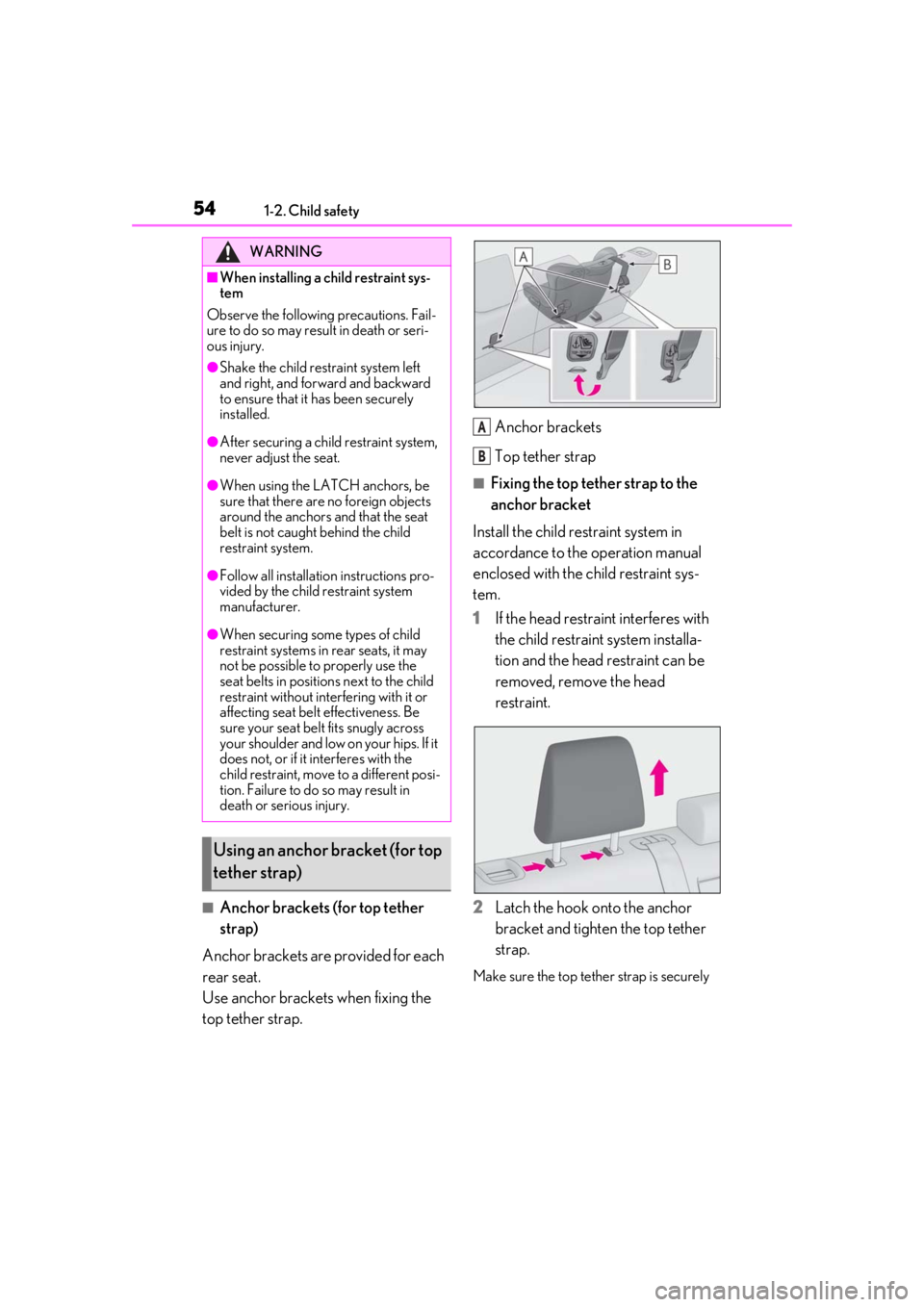
■Anchor brackets (for top tether
strap)
Anchor brackets are provided for each
rear seat.
Use anchor brackets when fixing the
top tether strap. Anchor brackets
Top tether strap
■Fixing the top tether strap to the
anchor bracket
Install the child restraint system in
accordance to the operation manual
enclosed with the child restraint sys-
tem.
1
If the head restraint interferes with
the child restraint system installa-
tion and the head restraint can be
removed, remove the head
restraint.
2
Latch the hook onto the anchor
bracket and tighten the top tether
strap.
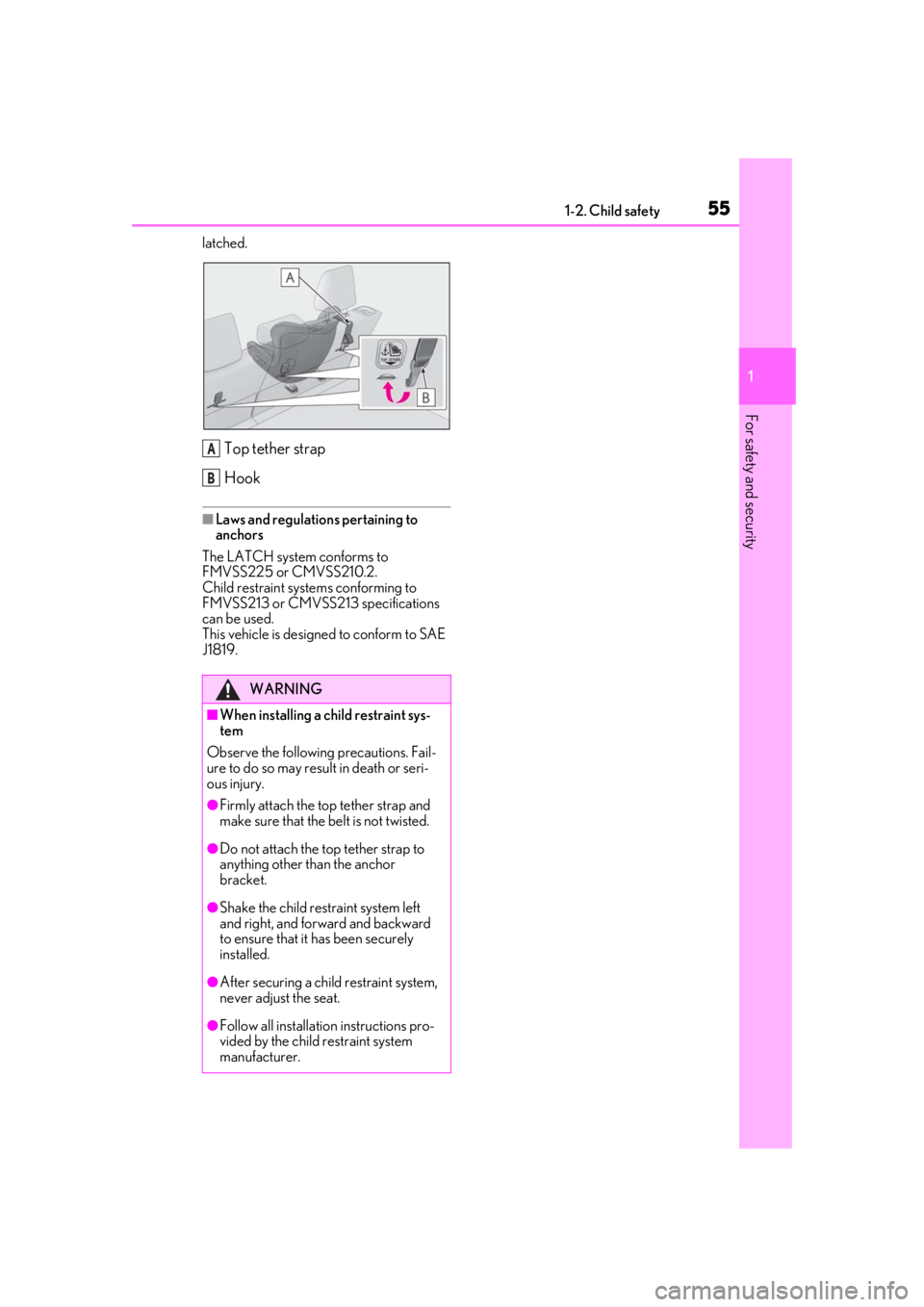
Make sure the top tether strap is securely
WARNING
■When installing a child restraint sys-
tem
Observe the following precautions. Fail-
ure to do so may result in death or seri-
ous injury.
●Shake the child restraint system left
and right, and forward and backward
to ensure that it has been securely
installed.
●After securing a child restraint system,
never adjust the seat.
●When using the LATCH anchors, be
sure that there are no foreign objects
around the anchors and that the seat
belt is not caught behind the child
restraint system.
●Follow all installation instructions pro-
vided by the child restraint system
manufacturer.
●When securing some types of child
restraint systems in rear seats, it may
not be possible to properly use the
seat belts in positions next to the child
restraint without inte rfering with it or
affecting seat belt effectiveness. Be
sure your seat belt fits snugly across
your shoulder and low on your hips. If it
does not, or if it interferes with the
child restraint, move to a different posi-
tion. Failure to do so may result in
death or serious injury.
Using an anchor bracket (for top
tether strap)
A
B
Page 55 of 476
551-2. Child safety
1
For safety and security
latched.
Top tether strap
Hook
■Laws and regulations pertaining to
anchors
The LATCH system conforms to
FMVSS225 or CMVSS210.2.
Child restraint systems conforming to
FMVSS213 or CMVSS213 specifications
can be used.
This vehicle is designed to conform to SAE
J1819.
WARNING
■When installing a child restraint sys-
tem
Observe the following precautions. Fail-
ure to do so may result in death or seri-
ous injury.
●Firmly attach the top tether strap and
make sure that the belt is not twisted.
●Do not attach the top tether strap to
anything other than the anchor
bracket.
●Shake the child restraint system left
and right, and forward and backward
to ensure that it has been securely
installed.
●After securing a child restraint system,
never adjust the seat.
●Follow all installation instructions pro-
vided by the child restraint system
manufacturer.
A
B
Page 90 of 476

902-1. Instrument cluster
may not be updated.
■G-force (F SPORT models)
Displays lateral G-forces on the vehi-
cle.
Acceleration G-force on the vehi-
cle
Current G-force value (analyzed
value of front/rear and left/right G-
forces)
Record of the maximum G-forces
This display is intended for use as a guide-
line. Depending on factors such as the road
surface condition, temperature and vehicle
speed, the display may not show the actual
condition of the vehicle.
Resetting the record of maximum
G-forces
Press and hold “OK” of the meter control
switches to reset the record.
Peak hold function
If lateral G-forces of 0.5 G or greater are
generated, the G-forc e value display will
turn amber and be held for 2 seconds.
■Tire pressure
P.348
■Units (F SPORT models)
The units of measure used can be
changed while driving.
Unlike the units sett ing performed on the
settings display, th e units setting per-
formed on the drive information display
can be changed while driving.
■Display OFF
Displays a blank screen.
Select to display the following naviga-
tion system-linked information.
Route guidance to destination
Compass display
■Route guidance to destination display
When the route guidance to destination
display is enabled on th e head-up display, it
will not be displayed on the multi-informa-
tion display. ( P.93)
Select to enable se lection of an audio
source or track on the meter using the
meter control switches.
Select to display the operational status
of the following systems:
LTA (Lane Tracing Assist)
( P.205)
Dynamic radar cruise control with
full-speed range ( P.216)
RSA (Road Sign Assist) (if
equipped) ( P.214)
A
B
C
Navigation system-linked dis-
play (if equipped)
Audio system-linked display
Driving support system informa-
tion display
Page 155 of 476

1554-1. Before driving
4
Driving
WARNING
●Do not shift the shift lever to a driving
position while the vehicle is moving
backward.
Doing so can damage the hybrid trans-
mission and may result in a loss of vehi-
cle control.
●Shifting the shift lever to N while the
vehicle is moving will disengage the
hybrid system. Engine braking is not
available with the hybrid system disen-
gaged.
●Be careful not to shift the shift lever
with the accelerator pedal depressed.
Shifting the shift lever to any position
other than P or N may lead to unex-
pected rapid acceleration of the vehi-
cle that may cause an accident and
result in death or serious injury.
■If you hear a squealing or scraping
noise (brake pad wear limit indica-
tors)
Have the brake pads checked and
replaced by your Lexus dealer as soon as
possible. Rotor damage may result if the
pads are not replaced when needed.
It is dangerous to drive the vehicle when
the wear limits of the brake pads and/or
those of the brake discs are exceeded.
■When the vehicle is stopped
●Do not depress the accelerator pedal
unnecessarily.
If the shift lever is in any position other
than P or N, the vehicle may acceler-
ate suddenly and unexpectedly, caus-
ing an accident.
●In order to prevent accidents due to
the vehicle rolling away, always keep
depressing the brake pedal while
stopped with the “READY” indicator is
illuminated, and apply the parking
brake as necessary.
●If the vehicle is stopped on an incline,
in order to prevent accidents caused
by the vehicle rolling forward or back-
ward, always depress the brake pedal
and securely apply the parking brake
as needed.
●Avoid revving or racing the engine.
Running the engine at high speed
while the vehicle is stopped may cause
the exhaust system to overheat, which
could result in a fire if combustible
material is nearby.
■When the vehicle is parked
●Do not leave glasses, cigarette lighters,
spray cans, or soft drink cans in the
vehicle when it is in the sun.
Doing so may result in the following:
• Gas may leak from a cigarette lighter or spray can, and may lead to a fire.
• The temperature inside the vehicle may cause the plastic lenses and plas-
tic material of glasses to deform or
crack.
• Soft drink cans may fracture, causing the contents to spray over the interior
of the vehicle, and may also cause a
short circuit in the vehicle’s electrical
components.
●Do not leave cigarette lighters in the
vehicle. If a cigare tte lighter is in a
place such as the glove box or on the
floor, it may be lit accidentally when
luggage is loaded or the seat is
adjusted, causing a fire.
●Do not attach adhesive discs to the
windshield or windows. Do not place
containers such as air fresheners on
the instrument panel or dashboard.
Adhesive discs or containers may act
as lenses, causing a fire in the vehicle.
●Do not leave a door or window open if
the curved glass is coated with a met-
allized film such as a silver-colored
one. Reflected sunlight may cause the
glass to act as a lens, causing a fire.
Page 181 of 476

1814-3. Operating the lights and wipers
4
Driving
out its headlights turned on is detected.
●House lights, street lights, traffic signals,
and illuminated billboards or signs and
other reflective objects may cause the
high beams to change to the low beams,
or the low beams to remain on.
●The following factors may affect the
amount of time taken for the high beams
to turn on or off:
• The brightness of the headlights, fog
lights, and tail lights of vehicles ahead
• The movement and direction of vehicles ahead
• When a vehicle ahead only has opera- tional lights on one side
• When a vehicle ahead is a two-wheeled
vehicle
• The condition of the road (gradient, curve, condition of th e road surface, etc.)
• The number of passengers and amount of luggage in the vehicle
●The high beams may turn on or off unex-
pectedly.
●Bicycles or similar vehicles may not be
detected.
●In the following situations the system may
not be able to correctly detect the sur-
rounding brightness le vel. This may cause
the low beams to remain on or the high
beams to flash or dazzle pedestrians or
vehicles ahead. In such a case, it is neces-
sary to manually switch between the high
and low beams.
• When driving in inclement weather
(heavy rain, snow, fog, sandstorms, etc.)
• When the windshield is obscured by fog, mist, ice, dirt, etc.
• When the windshield is cracked or dam- aged
• When the front camera is deformed or
dirty
• When the temperature of the front cam- era is extremely high
• When the surrounding brightness level is equal to that of head lights, tail lights or
fog lights
• When headlights or tail lights of vehicles
ahead are turned off, dirty, changing
color, or not aimed properly
• When the vehicle is hit by water, snow,
dust, etc. from a preceding vehicle
• When driving through an area of inter-mittently changing brightness and dark-
ness
• When frequently and repeatedly driving
ascending/descending roads, or roads
with rough, bumpy or uneven surfaces
(such as stone-paved roads, gravel roads,
etc.)
• When frequently and repeatedly taking curves or driving on a winding road
• When there is a highly reflective object ahead of the vehicle, such as a sign or
mirror
• When the back of a preceding vehicle is highly reflective, such as a container on a
truck
• When the vehicle’s headlights are dam- aged or dirty, or are not aimed properly
• When the vehicle is listing or titling due to
a flat tire, a trailer being towed, etc.
• When the headlights are changed between the high beams and low beams
repeatedly in an abnormal manner
• When the driver believes that the high beams may be flashing or dazzling
pedestrians or other drivers
■Temporarily lowering sensor sensitivity
The sensitivity of the sensor can be tempo-
rarily lowered.
1 Turn the power switch on while the fol-
lowing conditions are met.
●The headlight switch is in or
position.
●The headlight switch lever is in high beam
position.
●Automatic High Beam switch is on.
2 Turn the power switch to ON.
3 Within 30 seconds after step 2, repeat
pulling the headlight switch lever to the
original position then pushing it to the
high beam position quickly 10 times,
then leave the lever in high beam posi-
tion.
4 If the sensitivity is changed, the Auto-
matic High Beam indicator is turn on
and off 3 times.
Automatic High Beam (headlights) may
turn on even when the vehicle is stopped.
Page 194 of 476
1944-5. Using the driving support systems
WARNING
●If the part of the windshield in front of
the front camera is fogged up or cov-
ered with condensation, or ice, use the
windshield defogger to remove the
fog, condensation, or ice. (P.277)
●If water droplets cannot be properly
removed from the area of the wind-
shield in front of the front camera by
the windshield wipers, replace the
wiper insert or wiper blade.
If the wiper inserts or wiper blades
need to be replaced, contact your
Lexus dealer.
●Do not attach window tint to the wind-
shield.
●Replace the windshield if it is damaged
or cracked.
If the windshield needs to be replaced,
contact your Lexus dealer.
●Do not allow liquids to contact the
front camera.
●Do not allow bright lights to shine into
the front camera.
●Do not dirty or damage the front cam-
era.
When cleaning the inside of the wind-
shield, do not allow glass cleaner to
contact the lens of the front camera.
Also, do not touch the lens.
If the lens is dirty or damaged, contact
your Lexus dealer.
●Do not subject the front camera to a
strong impact.
●Do not change the installation position
or direction of the front camera or
remove it.
●Do not disassemble the front camera.
●Do not modify any components of the
vehicle around the front camera
(inside rear view mirror, etc.) or ceiling.
●Do not attach any accessories to the
hood, front grille or front bumper that
may obstruct the front camera. Con-
tact your Lexus dealer for details.
●If a surfboard or other long object is to
be mounted on the roof, make sure
that it will not obstruct the front cam-
era.
●Do not modify the headlights or other
lights.
Page 207 of 476
2074-5. Using the driving support systems
4
Driving
WARNING
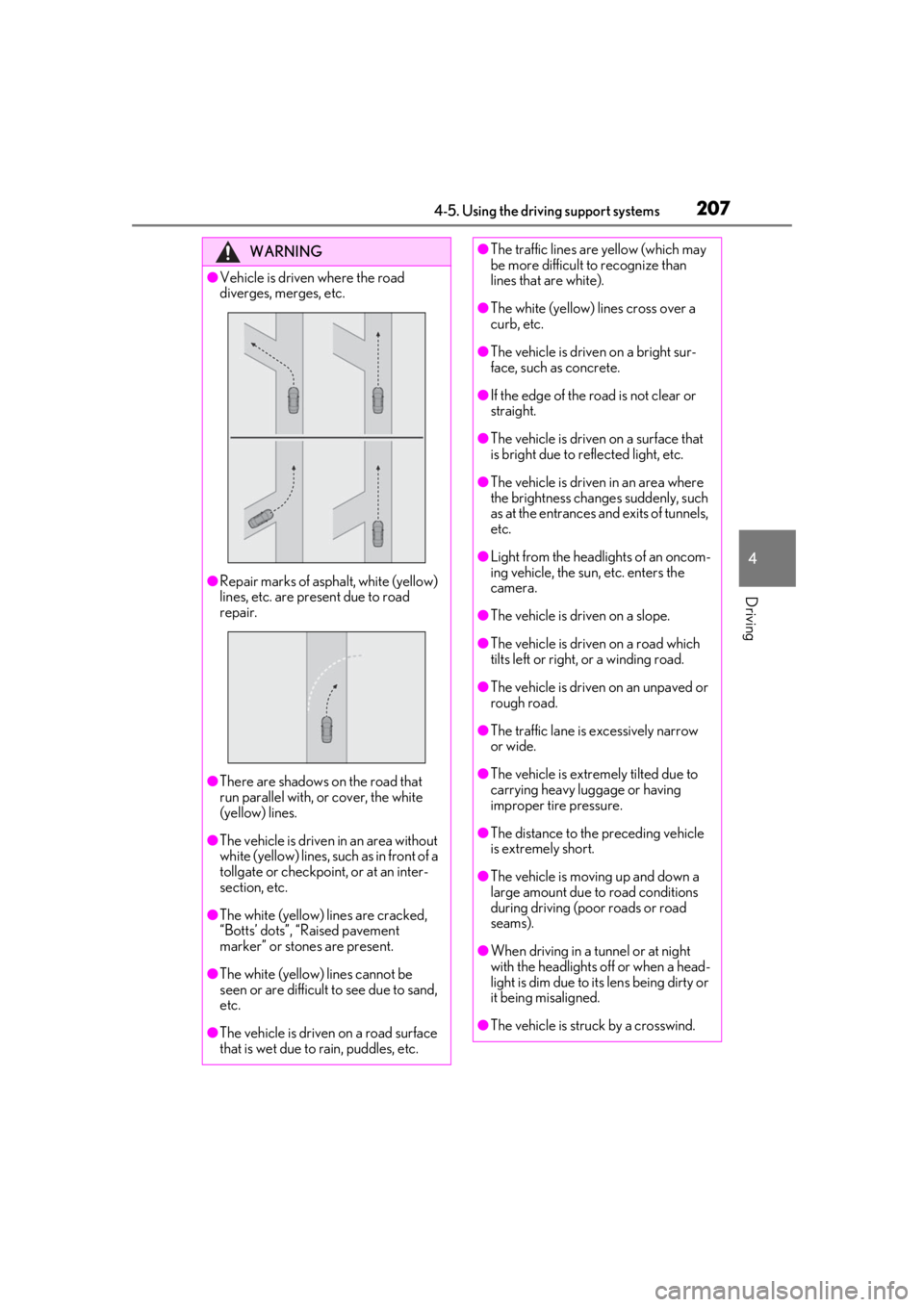
●Vehicle is driven where the road
diverges, merges, etc.
●Repair marks of asphalt, white (yellow)
lines, etc. are present due to road
repair.
●There are shadows on the road that
run parallel with, or cover, the white
(yellow) lines.
●The vehicle is driven in an area without
white (yellow) lines, su ch as in front of a
tollgate or checkpoint, or at an inter-
section, etc.
●The white (yellow) lines are cracked,
“Botts’ dots”, “Raised pavement
marker” or stones are present.
●The white (yellow) lines cannot be
seen or are difficult to see due to sand,
etc.
●The vehicle is driven on a road surface
that is wet due to rain, puddles, etc.
●The traffic lines are yellow (which may
be more difficult to recognize than
lines that are white).
●The white (yellow) lines cross over a
curb, etc.
●The vehicle is driven on a bright sur-
face, such as concrete.
●If the edge of the road is not clear or
straight.
●The vehicle is driven on a surface that
is bright due to reflected light, etc.
●The vehicle is driven in an area where
the brightness change s suddenly, such
as at the entrances and exits of tunnels,
etc.
●Light from the headlights of an oncom-
ing vehicle, the sun, etc. enters the
camera.
●The vehicle is driven on a slope.
●The vehicle is driven on a road which
tilts left or right, or a winding road.
●The vehicle is driven on an unpaved or
rough road.
●The traffic lane is excessively narrow
or wide.
●The vehicle is extremely tilted due to
carrying heavy luggage or having
improper tire pressure.
●The distance to the preceding vehicle
is extremely short.
●The vehicle is moving up and down a
large amount due to road conditions
during driving (poor roads or road
seams).
●When driving in a tunnel or at night
with the headlights off or when a head-
light is dim due to its lens being dirty or
it being misaligned.
●The vehicle is struck by a crosswind.
Page 262 of 476

2624-6. Driving tips
Control and maintain the vehicle at a
constant speed. Before stopping at a
toll booth or similar, allow plenty of
time to release the accelerator and
gently apply the brakes. A greater
amount of electrical energy can be
regenerated when slowing down.
Use the air conditioning only when
necessary. Doing so can help reduce
excessive gasoline consumption.
In summer: When the ambient tem-
perature is high, use the recirculated
air mode. Doing so will help to reduce
the burden on the air conditioning sys-
tem and reduce fuel consumption as
well.
In winter: Because the gasoline engine
will not automatically cut out until it and
the interior of the vehicle are warm, it
will consume fuel. Also, fuel consump-
tion can be improved by avoiding over-
use of the heater.
Make sure to check the tire inflation
pressure frequently. Improper tire infla-
tion pressure can cause poor fuel
economy.
Also, as snow tires can cause large
amounts of friction, their use on dry
roads can lead to poor fuel economy.
Use tires that are appropriate for the
season. Carrying heavy luggage will lead to
poor fuel economy. Avoid carrying
unnecessary luggage.
Installing a large
roof rack will also cause poor fuel
economy.
Since the gasoline engine starts up and
cuts out automatically when cold,
warming up the engine is unnecessary.
Moreover, frequently driving short dis-
tances will cause the engine to repeat-
edly warm up, which can lead to excess
fuel consumption.
Highway driving
Air conditioning
Checking tire inflation pressure
Luggage
Warming up before driving