2019 LEXUS UX250H interior lights
[x] Cancel search: interior lightsPage 301 of 476

3015-6. Using the other interior features
5
Interior features
5-6.Using the other interior features
1To set the visor in the forward posi-
tion, flip it down.
2
To set the visor in the side position,
flip down, unhook, and swing it to
the side.
3
To use the side extender, place the
visor in the side position, then slide
it backward.
■When adjusting the inside rear view mir-
ror
Adjust the inside rear view mirror to enable
sufficient confirmation of the rear view with-
out interfering with the sun visor.
Slide the cover to open.
The light turns on when the cover is
opened.
■Vanity lights
If the vanity lights remain on when the
power switch is turned off, the lights will go
off automatically after 20 minutes.
The GPS clock’s time is automatically
adjusted by utilizing GPS time infor-
mation.
For details, refer to the “NAVIGA-
TION AND MULTIMEDIA SYSTEM
OWNER’S MANUAL”.
Other interior features
Sun visors
NOTICE
■To prevent damage to the sun visors
When using the side extender, do not
swing the visor to the front.
Vanity mirrors
NOTICE
■To prevent 12-volt battery discharge
Do not leave the vanity lights on for
extended periods while the hybrid sys-
tem is off.
Clock
Page 302 of 476

3025-6. Using the other interior features
Please use a power supply for elec-
tronic goods that use less than 12
VDC/10 A (power consumption of
120 W).
When using electronic goods, make
sure that the power consumption of all
the connected power outlets is less
than 120 W.
Front
Press down the lid to open it.
Rear
Open the lid.
■The power outlet can be used when
The power switch is in ACC or ON.
The USB charging ports are used to
supply 2.1 A of electricity at 5 V to
external devices.
The USB charging ports are for
Power outlet
NOTICE
■When power outlet is not in use
To avoid damaging the power outlet,
close the power outlet lid when the
power outlet is not in use.
Foreign objects or li quids that enter the
power outlet may cause a short circuit.
■To prevent 12-volt battery discharge
Do not use the power outlet longer than
necessary when the hy brid system is off.
■To prevent incorrect operation of the
vehicle
When turning the powe r switch off, make
sure to disconnect accessories designed
for charging, such as portable chargers,
power banks, etc. from the power outlets.
If such an accessory is left connected, the
following may occur:
●The doors will not be able to be locked.
●The opening screen will be displayed
on the multi-information display.
●The interior lights, instrument panel
lights, etc. will illuminate.
USB charging ports
Page 305 of 476
3055-6. Using the other interior features
5
Interior features
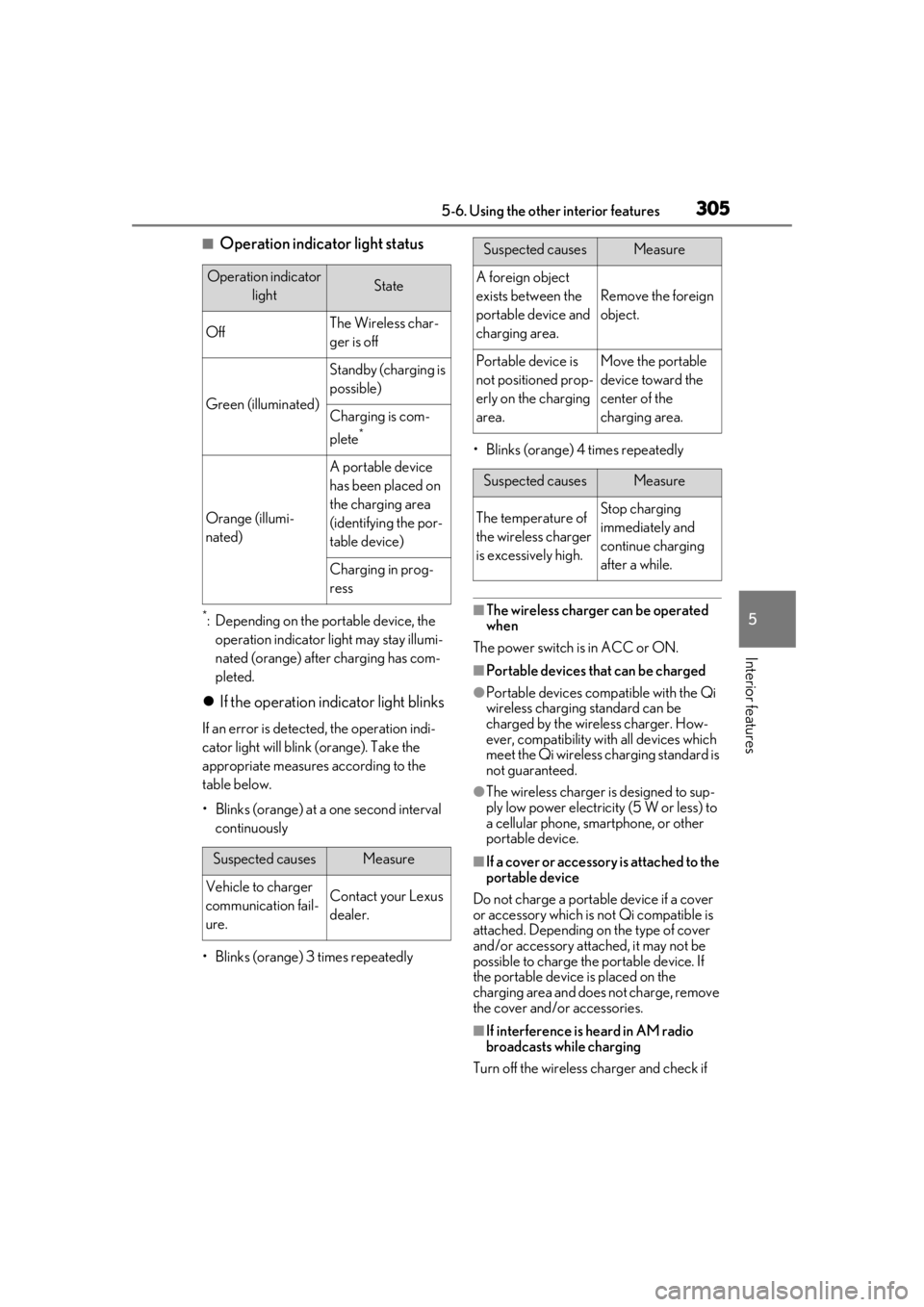
■Operation indicator light status
*: Depending on the portable device, the operation indicator light may stay illumi-
nated (orange) after charging has com-
pleted.
If the operation indicator light blinks
If an error is detected, the operation indi-
cator light will blink (orange). Take the
appropriate measures according to the
table below.
• Blinks (orange) at a one second interval continuously
• Blinks (orange) 3 times repeatedly • Blinks (orange) 4 times repeatedly
■The wireless charger can be operated
when
The power switch is in ACC or ON.
■Portable devices that can be charged
●Portable devices compatible with the Qi
wireless charging standard can be
charged by the wireless charger. How-
ever, compatibility with all devices which
meet the Qi wireless charging standard is
not guaranteed.
●The wireless charger is designed to sup-
ply low power electricity (5 W or less) to
a cellular phone, smartphone, or other
portable device.
■If a cover or accessory is attached to the
portable device
Do not charge a portable device if a cover
or accessory which is not Qi compatible is
attached. Depending on the type of cover
and/or accessory attached, it may not be
possible to charge the portable device. If
the portable device is placed on the
charging area and does not charge, remove
the cover and/or accessories.
■If interference is heard in AM radio
broadcasts while charging
Turn off the wireless charger and check if
Operation indicator lightState
OffThe Wireless char-
ger is off
Green (illuminated)
Standby (charging is
possible)
Charging is com-
plete
*
Orange (illumi-
nated)
A portable device
has been placed on
the charging area
(identifying the por-
table device)
Charging in prog-
ress
Suspected causesMeasure
Vehicle to charger
communication fail-
ure.Contact your Lexus
dealer.
Suspected causesMeasure
A foreign object
exists between the
portable device and
charging area.
Remove the foreign
object.
Portable device is
not positioned prop-
erly on the charging
area.Move the portable
device toward the
center of the
charging area.
Suspected causesMeasure
The temperature of
the wireless charger
is excessively high.Stop charging
immediately and
continue charging
after a while.
Page 330 of 476

3306-2. Maintenance
Luggage compartment
ItemsCheck points
12-volt batteryCheck the connections.
( P.342)
Vehicle interior
ItemsCheck points
Accelerator
pedal
• The accelerator pedal
should move smoothly
(without uneven pedal
effort or catching).
Brake pedal
• Does the brake pedal move smoothly?
• Does the brake pedal have appropriate clear-
ance from the floor?
• Does the brake pedal have the correct amount
of free play?
Brakes
•The vehicle should not pull to one side when the
brakes are applied.
• The brakes should work effectively.
• The brake pedal should not feel spongy.
• The brake pedal should not get too close to the
floor when the brakes
are applied.
Head
restraints• Do the head restraints move smoothly and lock
securely?
Hybrid trans-
mission “Park”
mechanism• When parked on a slope and the shift lever is in P,
is the vehicle securely
stopped?
Indica-
tors/buzzers• Do the indicators and buzzers function prop-
erly?
Lights
• Do all the lights come on?
• Are the headlights aimed correctly?
Parking brake
• Does the parking brake switch operate nor-
mally?
• When parked on a slope and the parking brake is
on, is the vehicle
securely stopped?
Seat belts
• Do the seat belts oper-ate smoothly?
• The seat belts should not be damaged.
Seats• Do the seat controls operate properly?
Steering
wheel
• Does the steering wheel rotate smoothly?
• Does the steering wheel have the correct amount
of free play?
• There should not be any strange sounds coming
from the steering wheel.
Vehicle exterior
ItemsCheck points
Doors• Do the doors operate smoothly?
Engine hood
• Does the engine hood lock system work prop-
erly?
ItemsCheck points
Page 400 of 476

4007-2. Steps to take in an emergency
One of the following may be the cause
of the problem:
The electronic key may not be func-
tioning properly. ( P.403)
There may not be sufficient fuel in
the vehicle’s tank.
Refuel the vehicle. ( P.190)
There may be a malfunction in the
immobilizer system. ( P.69)
There may be a malfunction in the
steering lock system.
The hybrid system may be malfunc-
tioning due to an electrical problem
such as electronic key battery
depletion or a blown fuse. However,
depending on the type of malfunc-
tion, an interim measure is available
to start the hybrid system.
One of the following may be the cause
NOTICE
■When replacing the tires
When removing or fitting the wheels,
tires or the tire pressure warning valve
and transmitter, contact your Lexus
dealer as the tire pr essure warning valve
and transmitter may be damaged if not
handled correctly.
■When driving over bumps
If a vehicle has a flat tire, the vehicle
height will be lower than usual. Ensure
that nothing strikes the bottom of the
vehicle.
■To avoid damaging the tire pressure
warning valves and transmitters
When a tire is repaired with liquid seal-
ants, the tire pressure warning valve and
transmitter may not operate properly. If a
liquid sealant is used , contact your Lexus
dealer or other qualified service shop as
soon as possible. Make sure to replace
the tire pressure warning valve and trans-
mitter when replacing the tire. ( P.350)
If the hybrid system will not
s
tart
Reasons for the hybrid system not
starting vary depending on the situ-
ation. Check the following and per-
form the appropriate procedure:
The hybrid system will not start
even though the correct starting
procedure is being followed.
( P.162)
The interior lights and head-
lights are dim, or the horn does
not sound or sounds at a low vol-
ume.
Page 401 of 476
4017-2. Steps to take in an emergency
7
When trouble arises
of the problem:
The 12-volt battery may be dis-
charged. ( P.405)
The 12-volt battery terminal con-
nections may be loose or corroded.
( P.342)
One of the following may be the cause
of the problem:
The 12-volt battery may be dis-
charged. ( P.405)
One or both of the 12-volt battery
terminals may be disconnected.
( P.342)
Contact your Lexus dealer if the problem
cannot be repaired, or if repair procedures
are unknown.
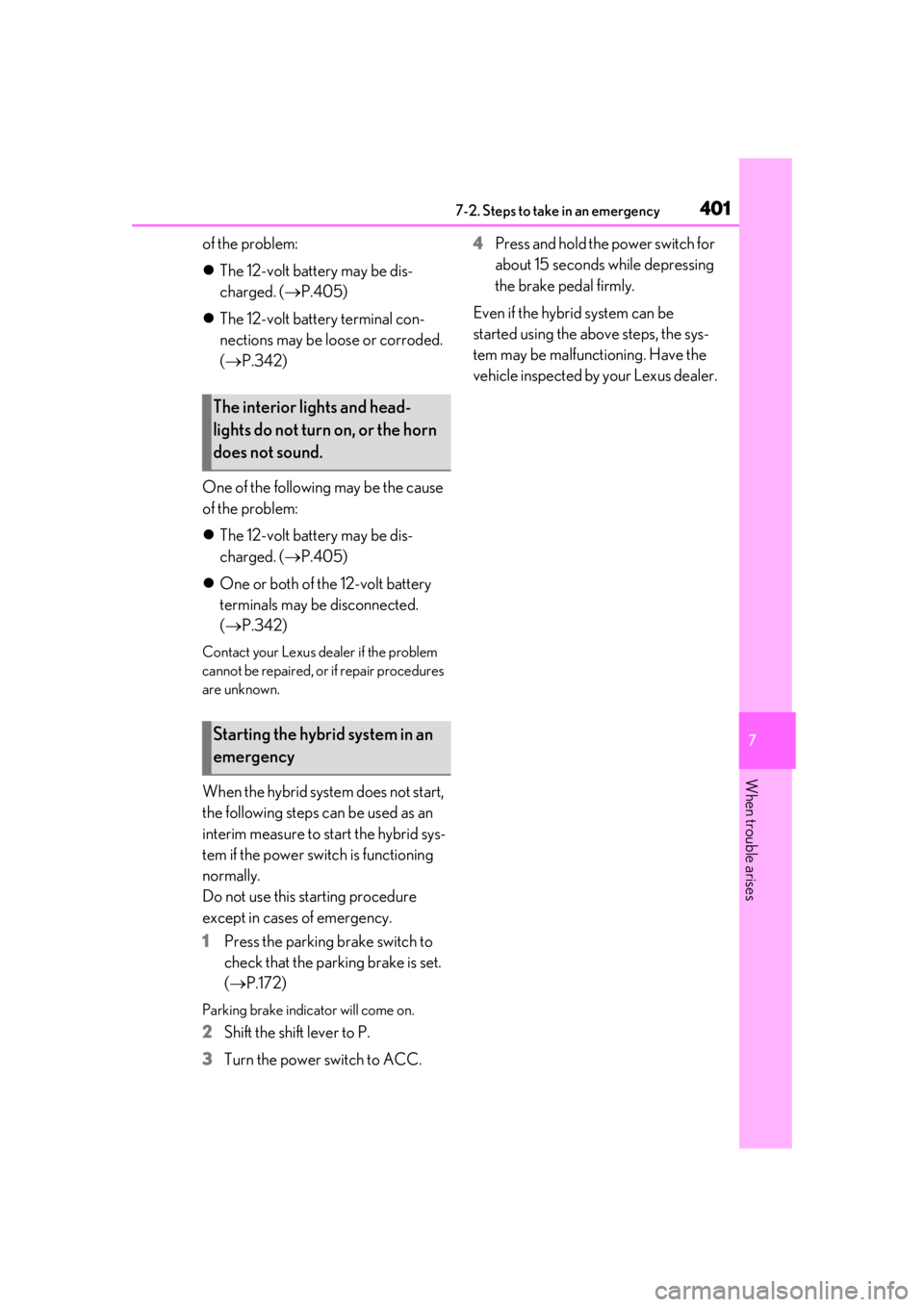
When the hybrid system does not start,
the following steps can be used as an
interim measure to start the hybrid sys-
tem if the power switch is functioning
normally.
Do not use this starting procedure
except in cases of emergency.
1 Press the parking brake switch to
check that the parking brake is set.
(P.172)
Parking brake indicator will come on.
2 Shift the shift lever to P.
3 Turn the power switch to ACC. 4
Press and hold the power switch for
about 15 seconds while depressing
the brake pedal firmly.
Even if the hybrid system can be
started using the above steps, the sys-
tem may be malfunctioning. Have the
vehicle inspected by your Lexus dealer.
The interior lights and head-
lights do not turn on, or the horn
does not sound.
Starting the hybrid system in an
emergency
Page 422 of 476

4228-1. Specifications
A: Wedge base bulbs (amber)
B: Wedge base bulbs (clear)
Tires and wheels
Tire size225/50RF18 95V
Tire inflation pressure
(Recommended cold tire inflation
pressure)Front: 33 psi (230 kPa, 2.3 kgf/cm2 or bar)
Rear: 33 psi (230 kPa, 2.3 kgf/cm
2 or bar)
Wheel size18 7 J
Wheel nut torque76 ft•lbf (103 N•m, 10.5 kgf•m)
Light bulbs
Light bulbsBulb No.WType
ExteriorFront turn signal lights (vehicles
with single-beam headlights)WY21W21A
InteriorVanity lights8B
Page 444 of 476
4448-2. Customization
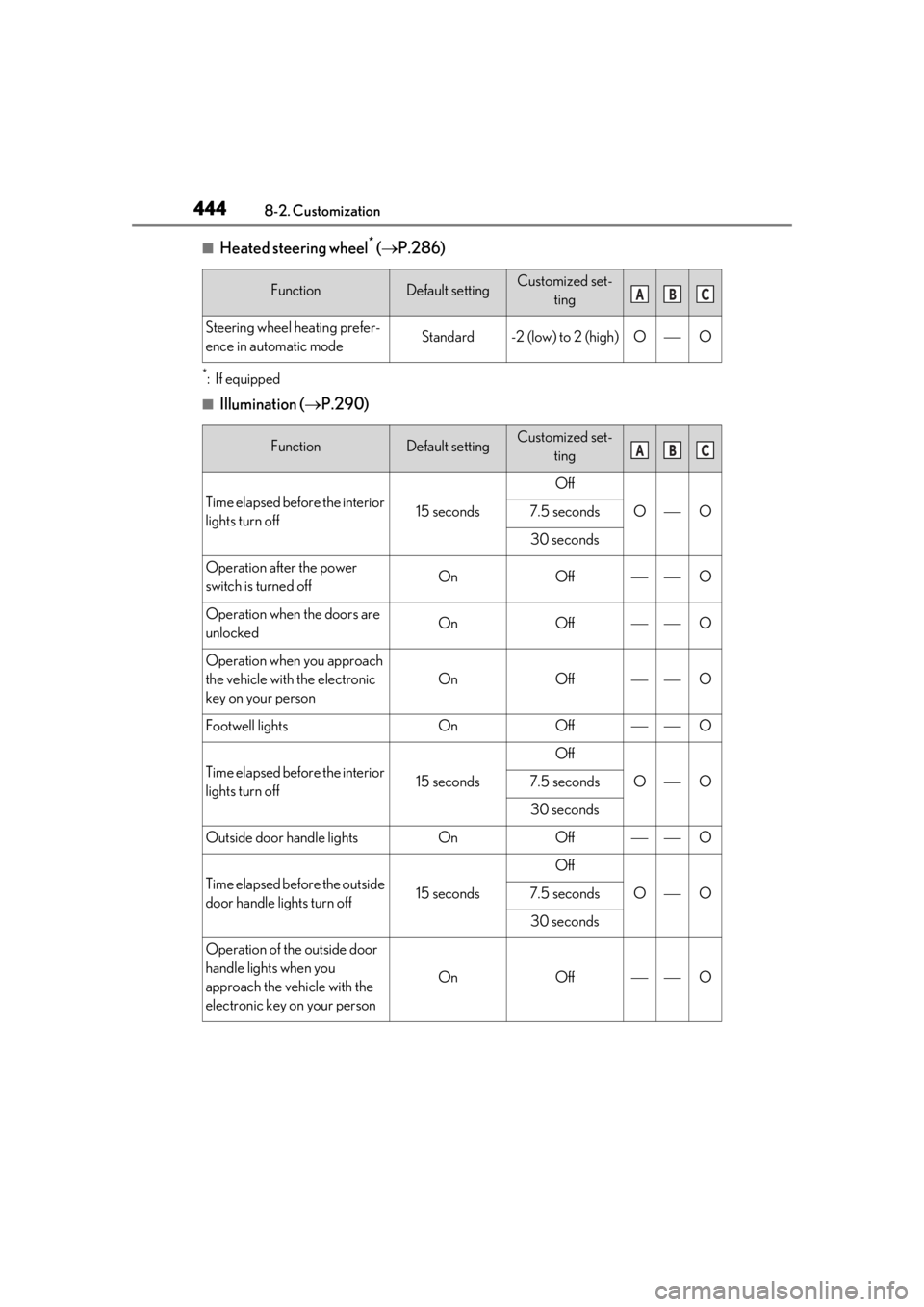
■Heated steering wheel* ( P.286)
*:If equipped
■Illumination ( P.290)
FunctionDefault settingCustomized set-
ting
Steering wheel heating prefer-
ence in automatic modeStandard-2 (low) to 2 (high)OO
FunctionDefault settingCustomized set-ting
Time elapsed before the interior
lights turn off15 seconds
Off
OO7.5 seconds
30 seconds
Operation after the power
switch is turned offOnOffO
Operation when the doors are
unlockedOnOffO
Operation when you approach
the vehicle with the electronic
key on your person
OnOffO
Footwell lightsOnOffO
Time elapsed before the interior
lights turn off15 seconds
Off
OO7.5 seconds
30 seconds
Outside door handle lightsOnOffO
Time elapsed before the outside
door handle lights turn off15 seconds
Off
OO7.5 seconds
30 seconds
Operation of the outside door
handle lights when you
approach the vehicle with the
electronic key on your person
OnOffO
ABC
ABC