2019 LEXUS UX200 ECO
[x] Cancel search: ECOPage 101 of 452

1013-2. Opening, closing and locking the doors
3
Before driving
When the door is unlocked, the inside lock
button will pop up.
■If a symbol indicating one or more doors
are open is shown on the multi-informa-
tion display
The hood or one or more of the doors are
not fully closed. The system also indicates
which doors are not fully closed. If the vehi-
cle reaches a speed of 3 mph (5 km/h), a
buzzer sounds to indicate that the door(s)
are not yet fully closed.
Make sure that the hood and all the doors
are closed.
The door cannot be opened from
inside the vehicle when the lock is set.
1 Unlock
2 Lock
These locks can be set to prevent children
from opening the rear doors. Push down
on each rear door switch to lock both rear
doors.
The following functions can be set or
canceled:
For instructions on customizing, refer to
P.408.
Rear door child-protector lock
Automatic door locking and
unlocking systems
FunctionOperation
Speed linked door
locking function
All doors are auto-
matically locked
when vehicle speed
is approximately 12
mph (20 km/h) or
higher.
Shift position linked
door locking func-
tionAll doors are auto-
matically locked
when shifting the
shift lever out of P.
Shift position linked
door unlocking
functionAll doors are auto-
matically unlocked
when shifting the
shift lever to P.
Driver’s door linked
door unlocking
function
All doors are auto-
matically unlocked
when driver’s door is
opened within
approximately 45
seconds after turn-
ing the engine switch
off.
Page 103 of 452

1033-2. Opening, closing and locking the doors
3
Before driving
■Smart access system with push-
button start
Carry the electronic key to enable this
function.
1
Locks all the doors
Check that the door is securely locked.
2Unlocks all the doors
The doors cannot be unlocked for 3 sec-
onds after the doors are locked.
■Wireless remote control
P.96
■Door lock switch
P.100
■Open
Raise the back door while pressing up
the back door opener switch.
WARNING
●Vehicles with power back door: The
back door may suddenly shut if it is not
opened fully, while on a steep incline.
Make sure that the back door is
secured before using the luggage
compartment.
●When closing the back door, take
extra care to prevent your fingers, etc.,
from being caught.
●When closing the back door, make
sure to press it lightly on its outer sur-
face. If the back door handle is used to
fully close the back door, it may result
in hands or arms being caught.
●Do not pull on the back door damper
stay (vehicles without power back
door) ( P.104) or back door spindle
(vehicles with power back door)
( P.111) to close the back door, and do
not hang on the back door damper
stay (vehicles without power back
door) or back door spindle (vehicles
with power back door).
Doing so may cause hands to be
caught or the back door damper stay
(vehicles without power back door) or
back door spindle (vehicles with
power back door) to break, causing an
accident.
●If a bicycle carrier or similar heavy
object is attached to the back door, it
may suddenly shut again after being
opened, causing someone’s hands,
arms, head or neck to be caught and
injured. When installing an accessory
part to the back door, using a genuine
Lexus part is recommended.
Unlocking and locking the back
door from the outside
Unlocking and locking the back
door from the inside
Opening/closing the back door
(vehicles without power back
door)
Page 105 of 452
1053-2. Opening, closing and locking the doors
3
Before driving
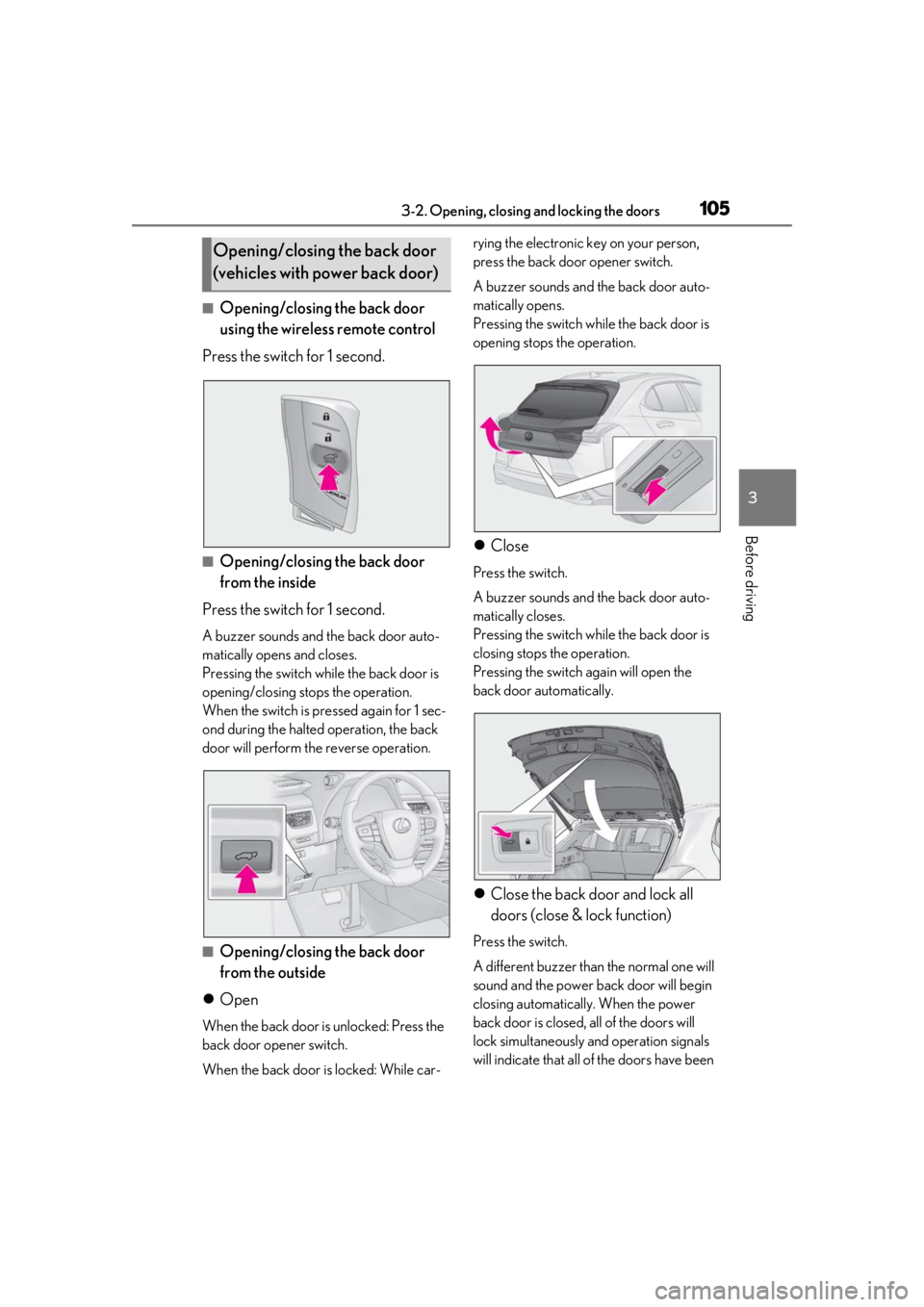
■Opening/closing the back door
using the wireless remote control
Press the switch for 1 second.
■Opening/closing the back door
from the inside
Press the switch for 1 second.
A buzzer sounds and the back door auto-
matically opens and closes.
Pressing the switch while the back door is
opening/closing stops the operation.
When the switch is pressed again for 1 sec-
ond during the halted operation, the back
door will perform th e reverse operation.
■Opening/closing the back door
from the outside
Open
When the back door is unlocked: Press the
back door opener switch.
When the back door is locked: While car- rying the electronic key on your person,
press the back door opener switch.
A buzzer sounds and the back door auto-
matically opens.
Pressing the switch while the back door is
opening stops the operation.
Close
Press the switch.
A buzzer sounds and the back door auto-
matically closes.
Pressing the switch while the back door is
closing stops the operation.
Pressing the switch again will open the
back door automatically.
Close the back door and lock all
doors (close & lock function)
Press the switch.
A different buzzer than the normal one will
sound and the power back door will begin
closing automatically. When the power
back door is closed, all of the doors will
lock simultaneously and operation signals
will indicate that all of the doors have been
Opening/closing the back door
(vehicles with power back door)
Page 106 of 452

1063-2. Opening, closing and locking the doors
locked.
If the switch is pressed while the power
back door is closing, the operation will
stop.
Pressing the switch again will close the
power back door automatically.
■Closing the back door using the
back door handle
Lower the back door using the back
door handle, then a buzzer sounds and
the back door automatically closes.
■Hands Free Power Back Door
1 While carrying an electronic key,
stand within the smart access sys-
tem with push-button start opera-
tion range, approximately 19.7 to 27.6 in. (50 to 70 cm) from the rear
bumper.
Hands Free Power Back Door sen-
sor
Hands Free Power Back Door
operation detection area
Smart access system with push-
button start operation detection
area (
P.114)
2 Perform a kick operation by mov-
ing your foot to within approxi-
mately 3.9 in. (10 cm) of the rear
bumper and then pulling it back.
• Perform the entire kick operation within 1 second.
• The Hands Free Power Back Door will not start operating while a foot is
detected under the rear bumper.
• Operate the Hands Free Power Back Door without contacting the
rear bumper with your foot.
• If another electronic key is in the cabin or luggage compartment, it
may take slightly longer than normal
A
B
C
Page 109 of 452

1093-2. Opening, closing and locking the doors
3
Before driving
■Preventing unintentional operation of
the Hands Free Power Back Door
When an electronic ke y is in the operation
range, the Hands Free Power Back Door
may operate unintentiona lly, so be careful in
the following situations.
●When a large amount of water is applied
to the rear bumper, such as when the
vehicle is being washed or in heavy rain
●When dirt is wiped off the rear bumper
●When a small animal or small object, such
as a ball, moves under the rear bumper
●When an object is moved from under the
rear bumper
●If someone is swinging their legs while sit-
ting on the rear bumper
●If the legs or another part of someone’s
body contacts the rear bumper while
passing by the vehicle
●When the vehicle is parked near an elec-
trical noise source which affects the sen-
sitivity of the Hands Free Power Back
Door, such as a pay parking spot, gas sta-
tion, electrically heated road, or fluores-
cent light
●When the vehicle is near a TV tower,
electric power plant, radio station, large
display, airport or other facility that gen-
erates strong radio waves or electrical
noise
●When the vehicle is parked in a place
where objects such as plants are near the
rear bumper
●If luggage, etc. is set near the rear
bumper
●If accessories or a vehicle cover is
installed/removed near the rear bumper
●When the vehicle is being towed
To prevent unintentional operation, turn the
Hands Free Power Back Door operation
setting off.
■When reconnecting the battery
To enable the power back door to operate
properly, close the back door manually.
■Jam protection function
Sensors are installed in the right and left sides of the power back door. When the
door is automatically closing and the sen-
sors are pushed due to an object being
clamped, etc., the jam protection function
operates.
From that position the door automatically
moves a little in the opposite direction and
then the function stops.
■If the back door opener is inoperative
The back door can be unlocked from the
inside.
1 Remove the cover.
To protect the cover, place a rag between
the flathead screwdri ver and the cover as
shown in the illustration.
2 Move the lever.
■Customization
Some functions can be customized. (Cus-
tomizable features: P.412)
Page 110 of 452

1103-2. Opening, closing and locking the doors
WARNING
■Back door closer
●In the event that the back door is left
slightly open, the back door closer will
automatically close it to the fully closed
position. It takes several seconds
before the back door closer begins to
operate. Be careful not to catch fingers
or anything else in the back door, as
this may cause bone fractures or other
serious injuries.
●Be careful not to catch fingers or any-
thing else when using the back door
closer as it still operates when the
power back door system is canceled.
■Power back door
Observe the following precautions when
operating the power back door.
Failure to do so may cause death or seri-
ous injury.
●Check the safety of the surrounding
area to make sure there are no obsta-
cles or anything that could cause any
of your belongings to get caught.
●If anyone is in the vicinity, make sure
they are safe and let them know that
the back door is about to open or
close.
●If the power back door system is dis-
abled, while the back door is operating
automatically, the automatic operation
is stopped. The back door then has to
be operated manually. Take extra care
in this situation, as the back door may
open or close suddenly.
●If the operating conditions of the
power back door ( P.107) are no lon-
ger met, a buzzer may sound and the
back door may stop opening or clos-
ing. The back door then has to be
operated manually. Take extra care
when on an incline, as the back door
may open or close abruptly.
●On an incline, the back door may sud-
denly shut after it opens. Make sure
the back door is fully open and secure.
●In the following situations, the power
back door may detect an abnormality
and automatic operation may be
stopped. In this case, the back door
has to be operated manually. Take
extra care in this situation, as the back
door may open or close suddenly.
• When the back door contacts an obstacle
• When the battery voltage suddenly drops, such as when the engine switch
is turned to ON or the engine is
started during automatic operation
●If a bicycle carrier or similar heavy
object is attached to the back door, the
power back door may not operate,
causing itself to malfunction, or the
back door may suddenly shut again
after being opened, causing some-
one’s hands, arms, head or neck to be
caught and injured. When installing an
accessory part to the back door, using
a genuine Lexus part is recommended.
■Jam protection function
Observe the following precautions.
Failure to do so may cause death or seri-
ous injury.
●Never use any part of your body to
intentionally activa te the jam protec-
tion function.
●The jam protection function may not
work if something gets caught just
before the back door fully closes. Be
careful not to get fingers caught or
anything else.
Page 111 of 452

1113-2. Opening, closing and locking the doors
3
Before driving
WARNING
●The jam protection function may not
work depending on the shape of the
object that is caught. Be careful not to
catch fingers or anything else.
■Hands Free Power Back Door
Observe the following precautions.
Failure to do so may cause death or seri-
ous injury.
●Check the safety of the surrounding
area to make sure there are no obsta-
cles or anything that could cause any
of your belongings to get caught.
●Exhaust gases cause the exhaust pipes
to become quite hot. When operating
the Hands Free Power Back Door, be
careful not to touch the exhaust pipe.
●Do not operate the Hands Free Power
Back Door if there is little space under
the rear bumper.
NOTICE
■Back door spindles
The back door is equipped with spindles
that hold the ba ck door in place.
Observe the following precautions.
Failure to do so may cause damage to
the back door spindle , resulting in
malfunction.
●Do not attach any foreign objects, such
as stickers, plastic sheets, or adhesives
to the spindle rod.
●Do not touch the spindle rod with
gloves or other fabric items.
A
A
●Do not attach any accessories other
than genuine Lexus parts to the power
back door.
●Do not place your hand on the spindle
or apply lateral forces to it.
■To prevent back door closer malfunc-
tion
Do not apply excessive force to the back
door while the back door closer is oper-
ating. Applying excessive force may
cause the back door closer to malfunc-
tion.
■To prevent damage to the power back
door
●Make sure that there is no ice between
the back door and frame that would
prevent movement of the back door.
Operating the power back door when
excessive load is present on the back
door may cause a malfunction.
●Do not apply excessive force to the
back door while the power back door
is operating.
●Take care not to damage the sensors
(installed on the right and left edges of
the power back door) ( P.109) with a
knife or other sharp object. If the sen-
sor is disconnected, the power back
door will not close automatically.
■Close & lock function
When closing the power back door using
the close & lock function, a different
buzzer than the normal one will sound
before the operation begins.
To check that the operation has started
correctly, check that a different buzzer
than the normal one has sounded.
Additionally, when the power back door
is fully closed and locked, operation sig-
nals will indicate that all of the doors have
been locked.
Before leaving the vehicle, make sure
that the operation signals have operated
and that all of the doors are locked.
Page 113 of 452

1133-2. Opening, closing and locking the doors
3
Before driving
5ON and OFF will be switched over
with presses of “OK” on the meter
control switches.
If the Hands Free Power Back Door is dis-
abled, it will remain disabled unless it is
enabled on the multi-information display.
(It will not be enabled even when the
engine switch is turned off and then back to
ON.)
The open position of the power back
door can be adjusted.
1 Stop the back door in the desirable
position. ( P.105)
2 Press and hold the power back
door switch on the back door for 2
seconds.
• When the settings are completed, the buzzer sounds 4 times.
• When opening the back door the next time, the back door will stop at
that position.
■Returning the back door automatic stop
position to the initial settings
Press and hold the power back door switch
on the back door for 7 seconds.
After the buzzer sounds 4 times, it sounds twice more. When the power back door
does the opening operation the next time,
the door will open to th
e initial settings posi-
tion.
■Customization
The opening position can be set with the
navigation system or multimedia system.
( P.412)
Priority for the stop position is given to the
last position set by either the switch,
navigation system or multimedia system.
Adjusting the open position of
the back door (vehicles with
power back door)