2019 LEXUS UX200 load
[x] Cancel search: loadPage 237 of 452

2374-5. Using the driving support systems
4
Driving
■The Parking Support Brake function
(static object) will operate when
The function will operate when the PKSB
OFF indicator is not illuminated or flashing
( P.69, 70) and all of the following condi-
tions are met:
●Engine output restriction control
• The Parking Support Brake is enabled.
• The vehicle speed is 10 mph (15 km/h) or less.
• There is a static object in the traveling direction of the vehicle and 6 to 13 ft. (2
to 4 m) away.
• The Parking Support Brake determines that a stronger-than-normal brake opera-
tion is necessary to avoid a collision.
●Brake control
• Engine output restriction control is oper-
ating.
• The Parking Support Brake determines that an immediate brake operation is nec-
essary to avoid a collision.
■The Parking Support Brake function
(static objects) will stop operating when
The function will stop operating if any of the
following conditions are met:
●Engine output restriction control
• The Parking Support Brake is disabled.
• The system determines that the collision has become avoidable with normal brake
operation.
• The static object is no longer 6 to 13 ft. (2
to 4 m) away from the vehicle or in the
WARNING
■Handling the suspension
Do not modify the suspension, as
changes to the height or inclination of the
vehicle may prevent the sensors from
detecting objects correctly or cause the
system to not operate or operate unnec-
essarily.
■If the Parking Support Brake function
(static objects) operates unnecessar-
ily, such as at a railroad crossing
In the event that the Parking Support
Brake function (static objects) operates
unnecessarily, such as at a railroad cross-
ing, brake control w ill be canceled after
approximately 2 seconds, allowing you
to proceed forward and leave the area,
brake control can also be canceled by
depressing the brake pedal. Depressing
the accelerator pedal after brake control
is canceled will allow you to proceed for-
ward and leave the area.
■Notes when washing the vehicle
Do not apply intensive bursts of water or
steam to the sensor area.
Doing so may result in the sensor mal-
functioning.
●When using a high pressure washer to
wash the vehicle, do not spray the sen-
sors directly, as doing so may cause a
sensor to malfunction.
●When using steam to clean the vehicle,
do not direct steam too close to the
sensors as doing so may cause a sen-
sor to malfunction.
■When to disable the Parking Support
Brake (static objects)
In the following situations, disable the
Parking Support Brake (static objects) as
the system may operate even though
there is no possibility of a collision.
●When inspecting the vehicle using a
chassis roller, chassis dynamo or free
roller
●When loading the vehicle onto a boat,
truck or other transport vessel
●If the suspension has been modified or
tires of a size other than specified are
installed
●If the front of the vehicle is raised or
lowered due to the carried load
●When equipment that may obstruct a
sensor is installed, such as a towing
eyelet, bumper protector (an addi-
tional trim strip, etc.), bicycle carrier, or
snow plow
●When using an automatic car wash
Page 239 of 452

2394-5. Using the driving support systems
4
Driving
●Weather
• If a sensor is covered with ice, snow, dirt, etc. (when cleared, the system will return
to normal)
• If heavy rain or water strikes a sensor
• When driving in incl ement weather such
as fog, snow or a sandstorm
●Other ultrasonic wave sources
• When vehicle horns, vehicle detectors, motorcycle engines, air brakes of large
vehicles, the clearance sonar of other
vehicles or other devices which produce
ultrasonic waves are near the vehicle
• If a sticker or an el ectronic component,
such as a backlit license plate (especially
fluorescent type), fog lights, fender pole
or wireless antenna is installed near a
sensor
●Changes in the vehicle posture
• If the vehicle is significantly tilted
• If the front of the vehicle is raised or low- ered due to the carried load
• If the orientation of a sensor has been changed due to a collision or other
impact
■Situations in which the Parking Support
Brake function (stati c objects) may not
operate properly
In some situations, such as the following, this
function may not operate properly.
●Weather
• When a sensor or the area around a sen- sor is extremely hot or cold
• When strong winds are blowing • If a sensor is covered with ice, snow, dirt,
etc. (when cleared, the system will return
to normal)
• If heavy rain or water strikes a sensor
• When driving in incl ement weather such
as fog, snow or a sandstorm
●Vehicle surroundings
• When an object that cannot be detected
is between the vehicle and a detected
object
• If an object such as a vehicle, motorcycle,
bicycle or pedestrian cuts in front of the
vehicle or runs out from the side of the
vehicle
●Other ultrasonic waves sources
• When vehicle horns, vehicle detectors,
motorcycle engines, air brakes of large
vehicles, the clearance sonar of other
vehicles or other de vices which produce
ultrasonic waves are near the vehicle
• If a sticker or an electronic component, such as a backlit license plate (especially
fluorescent type), fog lights, fender pole
or wireless antenna is installed near a
sensor
●Changes in the vehicle posture
• If the vehicle is significantly tilted
• If the front of the vehicle is raised or low-
ered due to the carried load
• If the orientation of a sensor has been
changed due to a collision or other
impact
Page 242 of 452

2424-5. Using the driving support systems
and vehicles are being driven on the
street
●When a detected vehicle turns while
approaching the vehicle
●When a vehicle passes by the side of your
vehicle
●When the distance between your vehicle
and metal objects, such as a guardrail,
wall, sign, or parked vehicle, which may
reflect electrical waves toward the rear of
the vehicle, is short
●When there are spinning objects near
your vehicle such as the fan of an air con-
ditioning unit
●When water is splashed or sprayed toward the rear bumper, such as from a
sprinkler
■Situations in which the Parking Support
Brake function (rear-crossing vehicles)
may not operate properly
In some situations, such as the following, the
radar sensors may not detect an object and
this function may not operate properly
●Stationary objects
●When a sensor or the area around a sen-
sor is extremely hot or cold
●If the rear bumper is covered with ice,
snow, dirt, etc.
●When it is raining he avily or water strikes
the vehicle
●When the detection area of a radar sen-
sor is obstructed by an adjacent vehicle
●If the vehicle is significantly tilted
●When equipment that may obstruct a
sensor is installed, such as a towing eye-
let, bumper protector (an additional trim
strip, etc.), bicycle carrier, or snow plow
●If the suspension has been modified or
tires of a size othe r than specified are
installed
●If the front of the vehicle is raised or low-
ered due to the carried load
●If a sticker or an el ectronic component,
such as a backlit license plate (especially
fluorescent type), fog lights, fender pole
or wireless antenna is installed near a
radar sensor
●If the orientation of a radar sensor has
been changed
●When multiple vehicl es are approaching
with only a small gap between each vehi-
cle
●If a vehicle is approaching the rear of
your vehicle rapidly
●Situations in which the radar sensor may
not detect a vehicle
• When a vehicle approaches from the right or left at the rear of the vehicle while
you are turning while backing up
• When turning while backing up
Page 248 of 452
2484-5. Using the driving support systems
WARNING
■Secondary Collision Brake
Do not overly rely on the Secondary Col-
lision Brake. This system is designed to
help reduce the possibility of further
damage due to a secondary collision,
however, that effect changes according
to various conditions. Overly relying on
the system may result in death or serious
injury.
■Replacing tires
Make sure that all ti res are of the speci-
fied size, brand, tread pattern and total
load capacity. In addition, make sure that
the tires are inflated to the recom-
mended tire inflation pressure level.
The ABS, TRAC and VSC systems will
not function correctly if different tires are
installed on the vehicle.
Contact your Lexus dealer for further
information when replacing tires or
wheels.
■Handling of tires and the suspension
Using tires with any kind of problem or
modifying the suspension will affect the
driving assist systems, and may cause a
system to malfunction.
Page 252 of 452
2524-6. Driving tips
Specific design characteristics give
it a higher center of gravity than
ordinary passenger cars. This vehi-
cle design feature causes this type
of vehicle to be more likely to roll-
over. Utility vehicles have a signifi-
cantly higher rollover rate than
other types of vehicles.
An advantage of the higher ground
clearance is a better view of the
road allowing you to anticipate
problems.
It is not designed for cornering at
the same speeds as ordinary pas-
senger cars any more than low-
slung sports cars designed to per-
form satisfactorily under off-road
conditions. Therefore, sharp turns at
excessive speeds may cause roll-
over.
Your vehicle is not designed to be
driven off-road. However, in the event
that off-road driving cannot be
avoided, please observe the following
precautions to help avoid the areas
prohibited to vehicles.
Utility vehicle precautions
This vehicle belongs to the utility
vehicle class, which has higher
ground clearance and narrower
tread in relation to the height of its
center of gravity.
Utility vehicle feature
WARNING
■Utility vehicle precautions
Always observe the following precau-
tions to minimize the risk of death or seri-
ous injury or damage to your vehicle:
●In a rollover crash, an unbelted person
is significantly more likely to die than a
person wearing a seat belt. Therefore,
the driver and all passengers should
always fasten their seat belts.
●Avoid sharp turns or abrupt maneu-
vers, if at all possible.
Failure to operate this vehicle correctly
may result in loss of control or vehicle
rollover causing death or serious
injury.
●Loading cargo on the roof luggage
carrier will make the center of the
vehicle gravity higher. Avoid high
speeds, sudden starts, sharp turns,
sudden braking or abrupt maneuvers,
otherwise it may result in loss of con-
trol or vehicle rollover due to failure to
operate this vehicle correctly.
●Always slow down in gusty crosswinds.
Because of its profile and higher cen-
ter of gravity, your vehicle is more sen-
sitive to side winds than an ordinary
passenger car. Slowing down will allow
you to have better control.
●Do not drive horizontally across steep
slopes. Driving straight up or straight
down is preferred. Your vehicle (or any
similar off-road vehicle) can tip over
sideways much more easily than for-
ward or backward.
Off-road driving
Page 294 of 452

2945-6. Using the other interior features
Fold down the armrest for use.
The coat hooks are provided with the
rear assist grips.
NOTICE
●When a portable device is not cen-
tered on the charging area
●When the vehicle is near a TV tower,
electric power plant, gas station, radio
station, large display, airport or other
facility that generates strong radio
waves or electrical noise
●When the portable device is in contact
with, or is covered by any of the follow-
ing metallic objects
• Cards to which aluminum foil is attached
• Cigarette boxes that have aluminum foil inside
• Metallic wallets or bags
• Coins
• Metal hand warmers
• Media such as CDs and DVDs
●When wireless keys (that emit radio
waves) other than those of your vehicle
are being used nearby.
If in situations other than above the wire-
less charger does not operate properly
or the operation indicator light is blink-
ing, the wireless charger may be mal-
functioning. Contact your Lexus dealer.
■To prevent failure or damage to data
●Do not bring magnetic cards, such as a
credit card, or magnetic recording
media, close to the wireless charger
while charging. Otherwise, data may
be erased due to the influence of mag-
netism.
Additionally, do not bring precision
instruments such as wrist watches,
close to the wireless charger, as such
objects may malfunction.
●Do not leave portab le devices in the
cabin. The temperature inside the
cabin may become high when parked
in the sun, and cause damage to the
device.
■To prevent battery discharge
Do not use the wireless charger for a
long period of time with the engine is
stopped.
Armrest
NOTICE
■To prevent damage to the armrest
Do not apply too much load on the arm-
rest.
Coat hooks
Page 295 of 452
2955-6. Using the other interior features
5
Interior features
An assist grip installed on the ceiling
can be used to support your body
while sitting on the seat.
*: If equipped
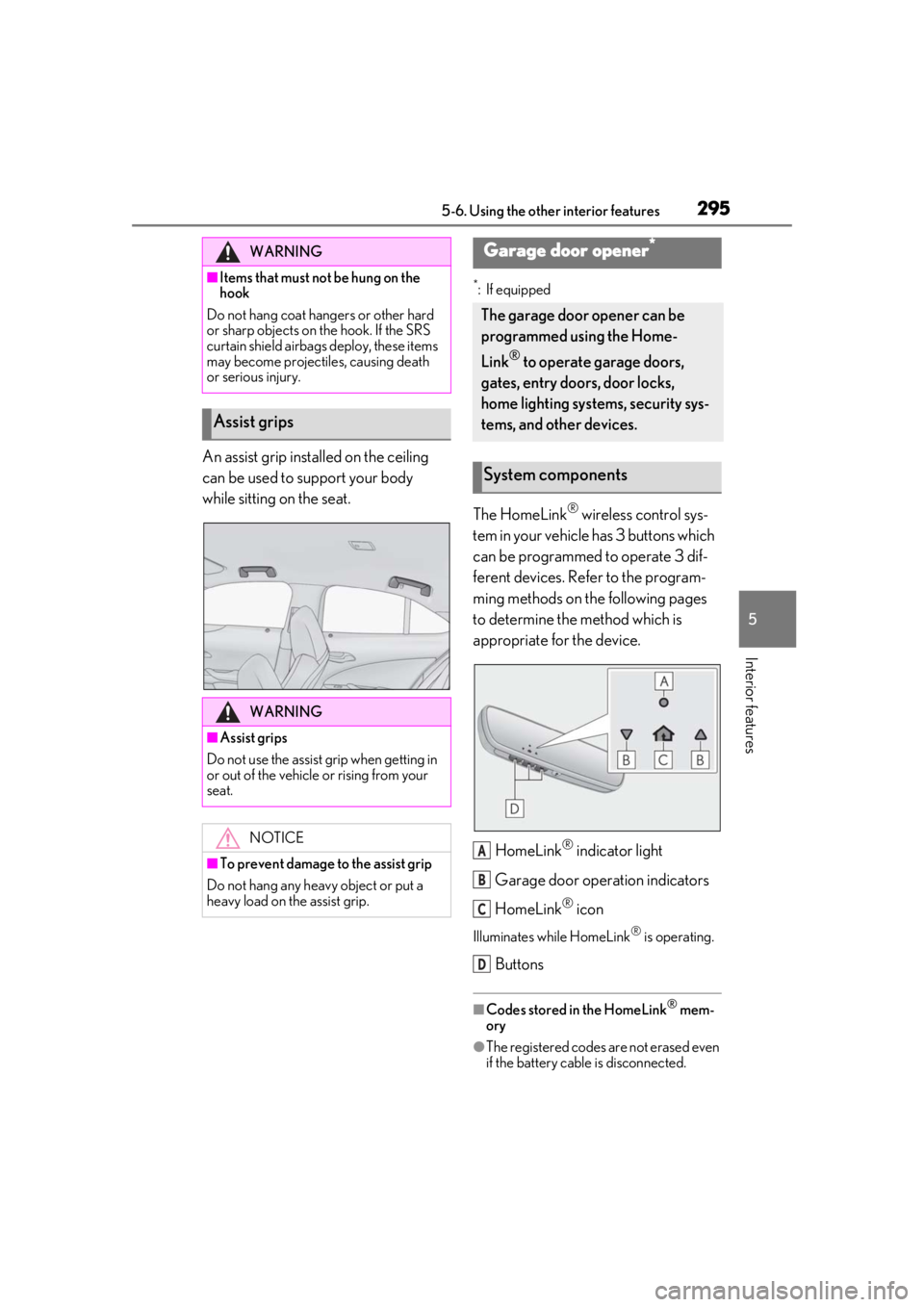
The HomeLink® wireless control sys-
tem in your vehicle has 3 buttons which
can be programmed to operate 3 dif-
ferent devices. Refer to the program-
ming methods on the following pages
to determine the method which is
appropriate for the device.
HomeLink
® indicator light
Garage door operation indicators
HomeLink
® icon
Illuminates while HomeLink® is operating.
Buttons
■Codes stored in the HomeLink® mem-
ory
●The registered codes are not erased even
if the battery cable is disconnected.
WARNING
■Items that must not be hung on the
hook
Do not hang coat hangers or other hard
or sharp objects on the hook. If the SRS
curtain shield airbags deploy, these items
may become projectiles, causing death
or serious injury.
Assist grips
WARNING
■Assist grips
Do not use the assist grip when getting in
or out of the vehicle or rising from your
seat.
NOTICE
■To prevent damage to the assist grip
Do not hang any heavy object or put a
heavy load on th e assist grip.
Garage door opener*
The garage door opener can be
programmed using the Home-
Link
® to operate garage doors,
gates, entry doors, door locks,
home lighting systems, security sys-
tems, and other devices.
System components
A
B
C
D
Page 322 of 452

3226-3. Do-it-yourself maintenance
turning off the engine, wait more
than 5 minutes for the oil to drain
back into the bottom of the engine.
2 Holding a rag under the end, pull
the dipstick out.
3 Wipe the dipstick clean.
4 Reinsert the dipstick fully.
5 Holding a rag under the end, pull
the dipstick out and check the oil
level.
Low
Normal
Excessive
6 Wipe the dipstick and reinsert it
fully.
■Checking the oil type and prepar-
ing the items needed
Make sure to check the oil type and
prepare the items needed before add-
ing oil.
Engine oil selection
P.392
Oil quantity (Low Full)
1.6 qt. (1.5 L, 1.3 Imp.qt.)
Items
Clean funnel
■Adding engine oil
If the oil level is below or near the low
level mark, add engine oil of the same
type as that already in the engine.
1 Remove the oil filler cap by turning
it counterclockwise.
2 Add engine oil slowly, checking the
dipstick.
3 Install the oil filler cap by turning it
clockwise.
■Engine oil consumption
A certain amount of engine oil will be con-
sumed while driving. In the following situa-
tions, oil consumption may increase, and
engine oil may need to be refilled in
between oil maintenance intervals.
●When the engine is new, for example
directly after purchasing the vehicle or
after replacing the engine
●If low quality oil or oil of an inappropriate
viscosity is used
●When driving at high engine speeds or
with a heavy load, when towing, or when
driving while accelerating or decelerat-
A
B
C