2019 LEXUS UX200 door
[x] Cancel search: doorPage 48 of 452
481-2. Child safety
A child restraint system for a small
child or baby must itself be properly
restrained on the seat with the lap por-
tion of the lap/shoulder belt.
■Installing child restraint system
using a seat belt (child restraint
lock function belt)
Install the child restraint system in
accordance to the operation manual
enclosed with the child restraint sys-
tem.
■Rear-facing Infant seat/con-
vertible seat
1
Adjust the seatback
If there is a gap between the child seat and
the seatback, adjust the seatback until
good contact is achieved.
WARNING
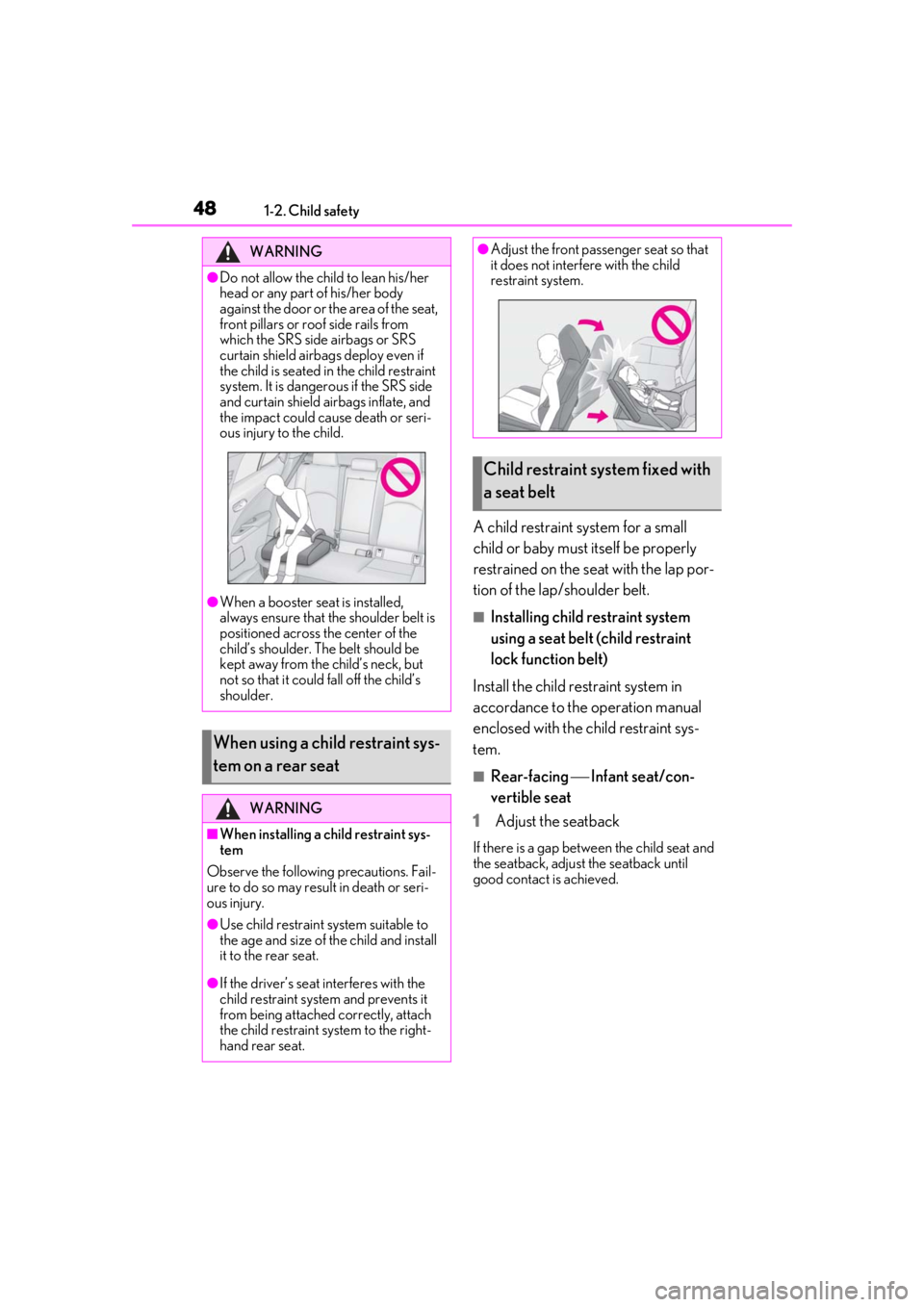
●Do not allow the child to lean his/her
head or any part of his/her body
against the door or the area of the seat,
front pillars or roof side rails from
which the SRS side airbags or SRS
curtain shield airbags deploy even if
the child is seated in the child restraint
system. It is dangerous if the SRS side
and curtain shield airbags inflate, and
the impact could cause death or seri-
ous injury to the child.
●When a booster seat is installed,
always ensure that th e shoulder belt is
positioned across the center of the
child’s shoulder. The belt should be
kept away from the child’s neck, but
not so that it could fall off the child’s
shoulder.
When using a child restraint sys-
tem on a rear seat
WARNING
■When installing a child restraint sys-
tem
Observe the following precautions. Fail-
ure to do so may result in death or seri-
ous injury.
●Use child restraint system suitable to
the age and size of the child and install
it to the rear seat.
●If the driver’s seat interferes with the
child restraint system and prevents it
from being attached correctly, attach
the child restraint system to the right-
hand rear seat.
●Adjust the front passe nger seat so that
it does not interfere with the child
restraint system.
Child restraint system fixed with
a seat belt
Page 64 of 452

641-4. Theft deterrent system
■Items to check before locking the
vehicle
To prevent unexpected triggering of
the alarm and vehicle theft, make sure
of the following:
Nobody is in the vehicle.
The windows and moon roof (if
equipped) are closed before the
alarm is set.
No valuables or other personal
items are left in the vehicle.
■Setting
Close the doors and hood, and lock all
the doors. The system will be set auto-
matically after 30 seconds.
The security indicator changes from being
on to flashing when the system is set.
■Canceling or stopping
Do one of the following to deactivate
or stop the alarms:
Unlock the doors.
Turn the engine switch to ACC or
ON, or start the engine. (The alarm
will be deactivated or stopped after
a few seconds.)
■System maintenance
The vehicle has a maintenance-free type
alarm system.
■Triggering of the alarm
The alarm may be triggered in the following
situations:
(Stopping the alarm deactivates the alarm
system.)
●A person inside the vehicle opens a door
or hood, or unlocks the vehicle using an
inside lock button.
●The battery is recharged or replaced
when the vehicle is locked. ( P.384)
Alarm
The alarm uses light and sound to
give an alert when an intrusion is
detected.
The alarm is triggered in the follow-
ing situations when the alarm is set:
A locked door is unlocked or
opened in any way other than
using the entry function, wireless
remote control or mechanical
key. (The doors will lock again
automatically.)
The hood is opened.
Setting/canceling/stopping the
alarm system
Page 65 of 452
651-4. Theft deterrent system
1
For safety and security
■Alarm-operated door lock
In the following cases, depending on the sit-
uation, the door may automatically lock to
prevent improper entry into the vehicle:
●When a person remaining in the vehicle
unlocks the door and the alarm is acti-
vated.
●While the alarm is activated, a person
remaining in the vehicle unlocks the door.
●When recharging or replacing the bat-
tery.
NOTICE
■To ensure the system operates cor-
rectly
Do not modify or remove the system. If
modified or removed, the proper opera-
tion of the system cannot be guaranteed.
Theft prevention labels (for
t
he U.S.A.)
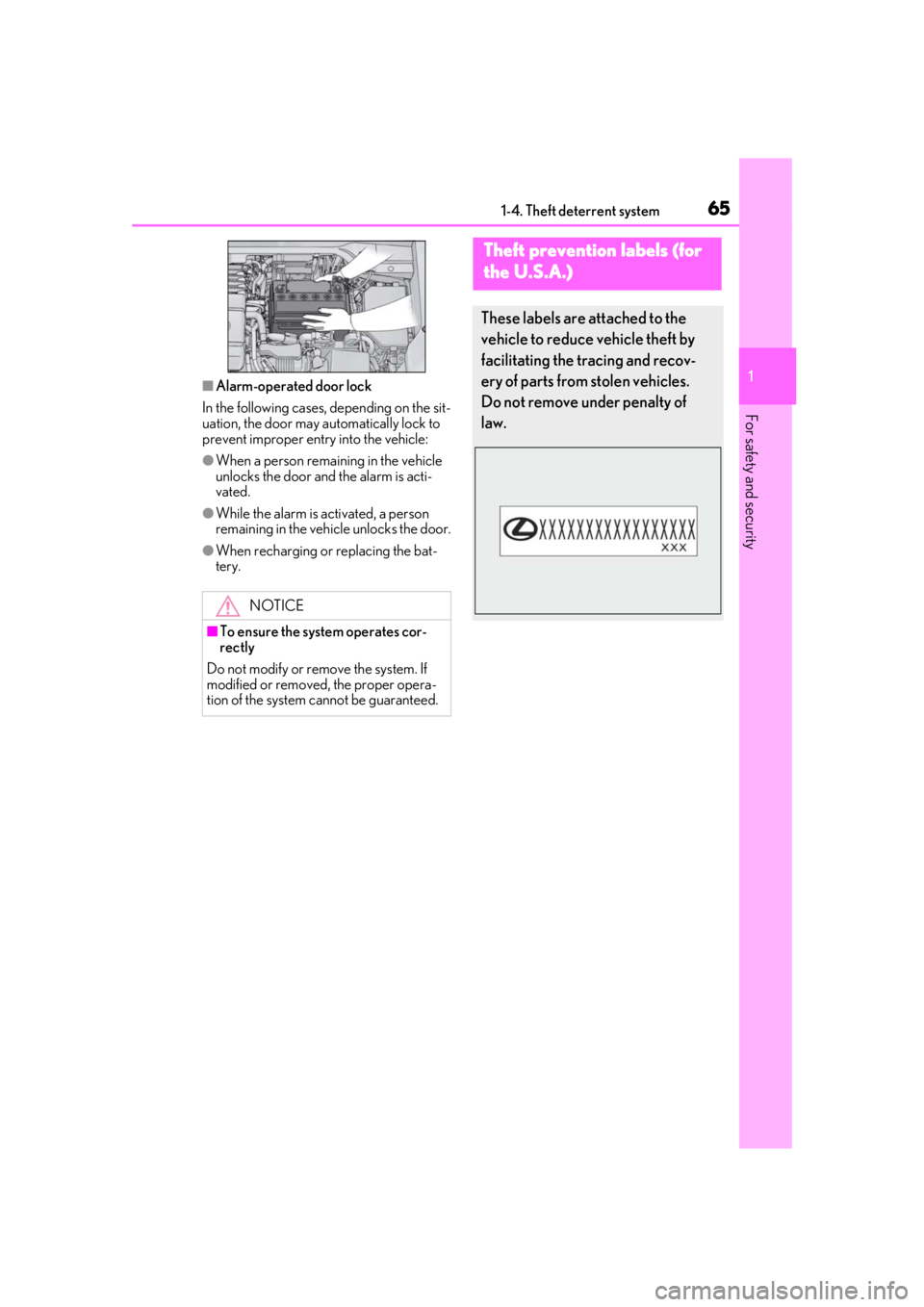
These labels are attached to the
vehicle to reduce vehicle theft by
facilitating the tracing and recov-
ery of parts from stolen vehicles.
Do not remove under penalty of
law.
Page 85 of 452

852-1. Instrument cluster
2
Vehicle status information and indicators
Displays suggestions to the driver in
the following situations. To select a
response to a displayed suggestion,
use the meter control switches.
■Suggestion to enable the power
back door
If the power back door system is dis-
abled on of the multi-information
display ( P.80) and the power back
door switch on the instrument panel is
operated, a suggestion message will be
displayed asking if you wish to enable
the power back door system. To enable
the power back door system, select
“Yes”.
After enabling the power back door
system, press the power back door
switch again to open or close the
power back door.
■Suggestion to turn on the head-
lights
If the headlight switch is in other than
or position, and the vehicle
speed is 3 mph (5 km/h) or higher for
a certain amount of time when the sur-
roundings are dark, a suggestion mes-
sage will be displayed.
■Suggestion to turn off the head-
lights
If the headlights are left on for a certain
amount of time with the headlight
switch in or position after the
engine switch has been turned off, a
suggestion message will be displayed
asking if you wish to turn the headlights
off.
To turn the headlight s off, select “Yes”.
If a front door is opened after the engine
switch is turned off, this suggestion mes-
sage will not be displayed.
■Customization
Some functions can be customized.
( P.409)
NOTICE
■During setting up the display
To prevent battery discharge, ensure that
the engine is running while setting up the
display features.
Suggestion function
Page 93 of 452
93
3
3
Before driving
Before driving
3-1. Key informationKeys ................................................... 94
3-2. Opening, closing and locking the doors
Side doors ....................................... 98
Back door ...................................... 102
Smart access system with push- button start .................................. 114
3-3. Adjusting the seats Front seats ...................................... 121
Rear seats ...................................... 122
Driving position memory ........ 123
Head restraints............................ 126
3-4. Adjusting the steering wheel and mirrors
Steering wheel............................. 129
Inside rear view mirror............. 130
Outside rear view mirrors ...... 132
3-5. Opening, closing the windows and moon roof
Power windows........................... 135
Moon roof ..................................... 137
Page 95 of 452

953-1. Key information
3
Before driving
( P.341). However, as there is a danger
that the electronic key may be damaged, it
is recommended that replacement be car-
ried out by your Lexus dealer.
●To avoid serious deterioration, do not
leave the electronic key within 3 ft. (1 m)
of the following electr ical appliances that
produce a magnetic field:
• TVs
• Personal computers
• Cellular phones, cordless phones and battery chargers
• Recharging cellular phones or cordless phones
• Table lamps
• Induction cookers
■Replacing the battery
P.341
■Confirmation of the registered key
number
The number of keys already registered to
the vehicle can be confirmed. Ask your
Lexus dealer for details.
■If “A New Key has been Registered
Contact Your Dealer for Details” is
shown on the multi-information display
This message will be displayed each time
the driver’s door is opened when the doors
are unlocked from the outside for approxi-
mately 10 days after a new electronic key
has been registered. If this message is dis-
played but you have not had a new elec-
tronic key registered, ask your Lexus dealer
to check if an unknown electronic key
(other than those in your possession) has
been registered.
NOTICE
■To prevent key damage
●Do not drop the keys, subject them to
strong shocks or bend them.
●Do not expose the keys to high tem-
peratures for long periods of time.
●Do not get the keys wet or wash them
in an ultrasonic washer, etc.
●Do not attach metallic or magnetic
materials to the keys or place the keys
close to such materials.
●Do not disassemble the keys.
●Do not attach a sticker or anything else
to the surface of the electronic key.
●Do not place the keys near objects that
produce magnetic fields, such as TVs,
audio systems and induction cookers,
or medical electrical equipment, such
as low-frequency therapy equipment.
■Carrying the electronic key on your
person
Carry the electronic key 3.9 in. (10 cm)
or more away from electric appliances
that are turned on. Radio waves emitted
from electric applianc es within 3.9 in. (10
cm) of the electronic key may interfere
with the key, causing the key to not func-
tion properly.
■In case of a smart access system with
push-button start malfunction or
other key-related problems
P.380
■When an electronic key is lost
P.379
■Handling the card key
●If the battery or card key terminals get
wet, the battery may corrode and the
card key may stop working.
If the key is dropped into water, or if
drinking water, etc., is spilled on the
key, immediately remove the battery
cover and wipe the battery and termi-
nals. (To remove the battery cover,
lightly grasp and pull it.) If the battery is
corroded, have your Lexus dealer
replace the battery.
●Do not crush the battery cover or use
a screwdriver to remove the battery
cover.
Forcibly removing the battery cover
may bend or damage the key.
Page 96 of 452
963-1. Key information
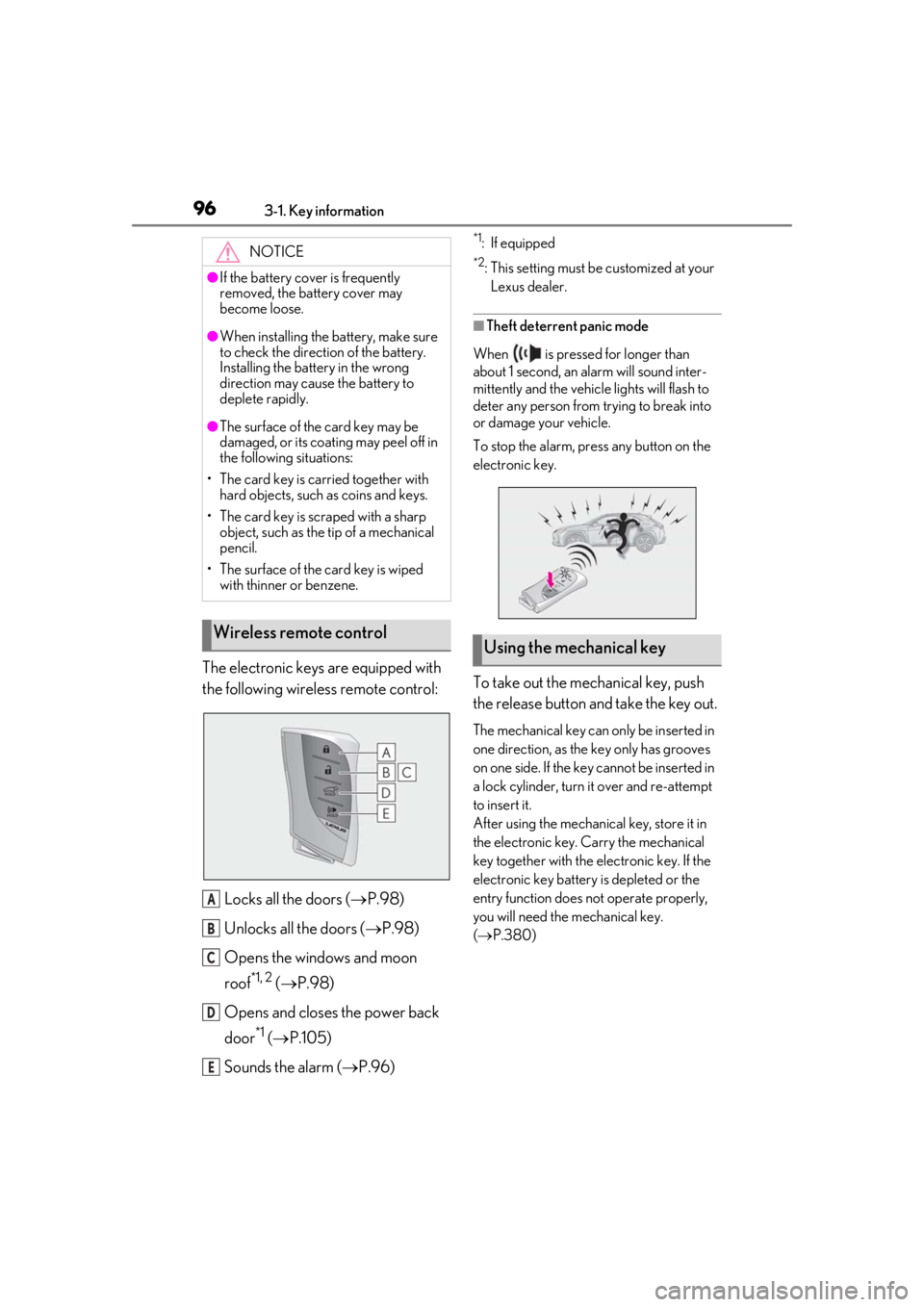
The electronic keys are equipped with
the following wireless remote control:Locks all the doors ( P.98)
Unlocks all the doors ( P.98)
Opens the windows and moon
roof
*1, 2 ( P.98)
Opens and closes the power back
door
*1 ( P.105)
Sounds the alarm ( P.96)
*1: If equipped
*2: This setting must be customized at your
Lexus dealer.
■Theft deterrent panic mode
When is pressed for longer than
about 1 second, an alarm will sound inter-
mittently and the vehicle lights will flash to
deter any person from trying to break into
or damage your vehicle.
To stop the alarm, press any button on the
electronic key.
To take out the mechanical key, push
the release button and take the key out.
The mechanical key can only be inserted in
one direction, as the key only has grooves
on one side. If the key cannot be inserted in
a lock cylinder, turn it over and re-attempt
to insert it.
After using the mechanical key, store it in
the electronic key. Carry the mechanical
key together with the electronic key. If the
electronic key battery is depleted or the
entry function does not operate properly,
you will need the mechanical key.
( P.380)
NOTICE
●If the battery cover is frequently
removed, the battery cover may
become loose.
●When installing the ba
ttery, make sure
to check the direction of the battery.
Installing the battery in the wrong
direction may cause the battery to
deplete rapidly.
●The surface of the card key may be
damaged, or its coating may peel off in
the following situations:
• The card key is carried together with hard objects, such as coins and keys.
• The card key is scraped with a sharp object, such as the tip of a mechanical
pencil.
• The surface of the card key is wiped with thinner or benzene.
Wireless remote control
A
B
C
D
E
Using the mechanical key
Page 98 of 452

983-2. Opening, closing and locking the doors
3-2.Opening, closing and locking the doors
■Smart access system with push-
button start
Carry the electronic key to enable this
function.
1 Grip the driver’s door handle to
unlock the door. Holding the
driver’s door ha ndle for approxi-
mately 2 seconds unlocks all the
doors. Grip the front passenger
door handle to unlock all the
doors.
*
Make sure to touch the sensor on the back
of the handle.
The doors cannot be unlocked for 3 sec-
onds after the doors are locked.
*: The door unlock settings can be changed.
2 Touch the lock sensor (the indenta-
tion on the upper part of the front
door handle) to lock all the doors.
Check that the door is securely locked.
■Wireless remote control
1 Locks all the doors
Check that the door is securely locked.
2Unlocks all the doors
Pressing the button unlocks the driver’s
door. Pressing the button again within 3
seconds unlocks the other doors.
Press and hold to open the windows and
moon roof
*1, 2
*1
: If equipped
*2: This setting must be customized at your
Lexus dealer.
■Switching the door unlock function
It is possible to set which doors the entry
function unlocks using the wireless remote
control.
1 Turn the engine switch off.
2 When the indicator light on the key sur-
face is not on, press and hold ,
or for approximately 5
seconds while pre ssing and holding
.
The setting changes each time an operation
is performed, as shown below. (When
changing the setting continuously, release
the buttons, wait for at least 5 seconds, and
repeat step 2 .)
Side doors
Unlocking and locking the doors
from the outside