2019 LEXUS UX200 brake
[x] Cancel search: brakePage 71 of 452

712-1. Instrument cluster
2
Vehicle status information and indicators
Drive mode indicators
Except F SPORT models
F SPORT models
*1: These lights come on when the engine
switch is turned to ON to indicate that a
system check is being performed. They
will go off after the en gine is on, or after
a few seconds. There may be a malfunc-
tion in a system if the lights do not come
on, or go off. Have the vehicle inspected
by your Lexus dealer.
*2: This light comes on when the system is turned off.
*3: This light illuminates on the multi-infor-
mation display.
*4: This light flashes to indicate that the sys- tem is operating.
*5: This light illuminates on the outside rear view mirrors.
*6: Except F SPORT models: This light illu- minates on the multi-information dis-
play.
*7: When the outside temperature is approximately 37°F (3°C) or lower, this
indicator will flash for approximately 10
seconds, then stay on.
*8: This light illuminates on the center panel.
Brake hold operated indicator
*1
( P.163)
Eco Driving Indicator Light
*1, 6
( P.82)
Low outside temperature indi-
cator
*3, 7 ( P.72, 75)
Security indicator
*8 ( P.62,
64)
(U.S.A.)
“AIR BAG ON/OFF” indica-
tor
*8 ( P.39)
(Canada)
“AIR BAG ON/OFF” indica-
tor
*8 ( P.39)
Eco drive mode indicator
( P.243)
Sport mode indicator
( P.243)
Eco drive mode indicator
( P.243)
Sport mode indicator
( P.243)
Page 88 of 452

882-1. Instrument cluster
Select to adjust the angle of the head-up
display.
■Enabling/disabling of the head-up dis-
play
If the head-up display is disabled, it will
remain disabled when the engine switch is
turned off then back to ON.
■Display brightness
The brightness of the head-up display can
be adjusted on of the multi-information
display. Also, it is automatically adjusted
according to the ambient brightness.
■Head-up display automatic position
adjustment (vehicles with driving posi-
tion memory)
If the display position is recorded into mem-
ory, the head-up display will be automati-
cally adjusted to the desired position.
( P.123)
■When the battery is disconnected
The customize settings of the head-up dis-
play will be reset.
Displays the operational status of the
following systems:
LTA (Lane Tracing Assist) ( P.193)
Dynamic radar cruise control with
full-speed range ( P.204)
Details of content displayed on the head-
up display may differ from that displayed
on the multi-inform ation display. For
details, refer to the explanation of each sys-
tem.
Pop-up displays for the following sys-
tems will be displayed when necessary.
■Driving support systems
Displays a warning/suggestion/advice
message or the operating state of a rel-
evant system.
PCS (Pre-Collision System)
( P.186)
Intuitive parking assist (if equipped)
( P.220)
Parking Support Brake function (for
static objects) (if equipped)
( P.235)
Brake Override System ( P.143)
Drive-Start Control ( P.143)
Details of content displayed on the head-
up display may differ from that displayed
on the multi-inform ation display. For
details, refer to the explanation of each sys-
tem.
WARNING
■Caution for changing settings of the
head-up display
As the engine needs to be running while
changing the settings of the head-up dis-
play, ensure that the vehicle is parked in a
place with adequate ventilation. In a
closed area such as a garage, exhaust
gases including harmful carbon monox-
ide (CO) may collect and enter the vehi-
cle. This may lead to death or a serious
health hazard.
NOTICE
■When changing the settings of the
head-up display
To prevent battery discharge, ensure that
the engine is running while changing the
settings of the head-up display.
Driving support system display
area
Pop-up display
Page 107 of 452

1073-2. Opening, closing and locking the doors
3
Before driving
for the operation to occur.
Hands Free Power Back Door sen-
sor
Hands Free Power Back Door
operation detection area
3 When the sensor detects that your
foot is pulled back, a buzzer will
sound and the back door will auto-
matically fully open/close.
If a foot is moved under the rear bumper
while the back door is opening, the back
door will stop moving.
If a foot is moved under the rear bumper
while the back door is closing, the back
door will open.
■Luggage compartment light
●The luggage compartment light turns on
when the back door is opened.
●If the luggage compartm ent light is left on
when the engine switch is turned off, the
light will go off automatically after 20
minutes.
■Power back door operating conditions
With the power back door operations set to
ON, it can automatically open and close for
the following conditions:
●The power back door is unlocked. How-
ever, the power back door will operate if
it is locked, in the following situations:
• When the electronic key is being carried
and the power back door opener switch
is pressed
• When the wireless remote control is
used
*
●When the engine switch is in ON, in addi-
tion to the above for the opening opera-
tions, the back door operates for any of
the following conditions:
• Parking brake is engaged
• The brake pedal is depressed
• The shift lever is in P
*: When configured with the customization
function so that it can be operated after
being unlocked, operate the back door
after it has been unlocked.
■Hands Free Power Back Door operating
conditions
●When the Hands Free Power Back Door
operation setting is turned on
●When an electronic key is carried within
the operation range
■Back door closer
In the event that the back door is left slightly
open, the back door closer will automati-
cally close it to the fully closed position.
Whatever the state of the engine switch, the
back door closer operates.
■Operation of the power back door
●A buzzer sounds and the emergency
flashers flash twice to indicate that the
back door is opening/closing.
●When the power back door operations
are OFF, the power back door does not
operate but it can be opened and closed
by hand.
●When the power back door automati-
cally opens, if an abnormality due to peo-
ple or objects is de tected, operation will
stop.
■Back door reserve lock function
This function reserves locking of all doors
beforehand, when the power back door is
open.
When the following procedure is per-
formed, all the doors except the power
back door are locked and then power back
door will also be locked at the same time it
is closed.
1 Close all doors, except the back door.
2 During the power back door closing
operation, lock the doors using the
A
B
Page 122 of 452
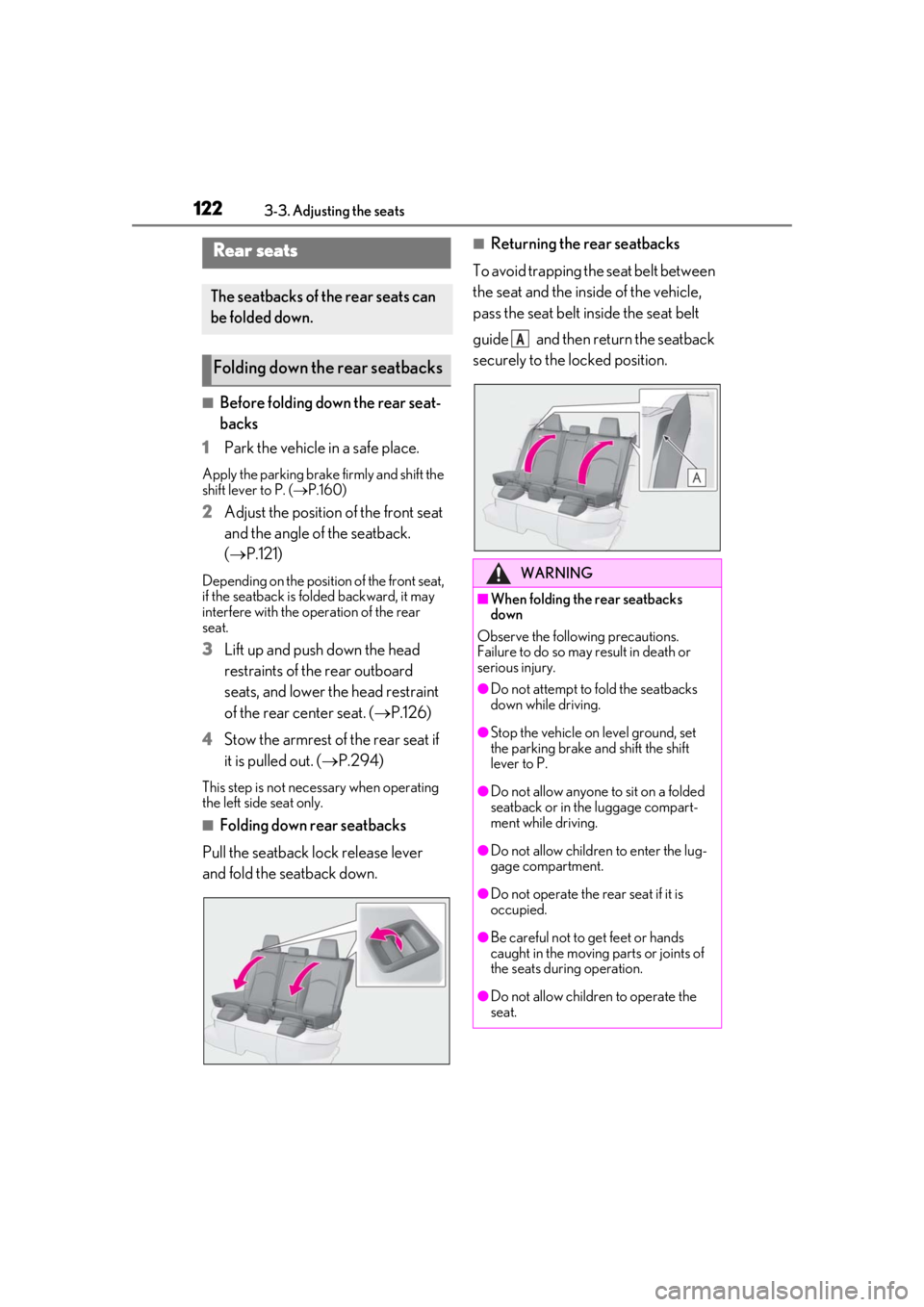
1223-3. Adjusting the seats
■Before folding down the rear seat-
backs
1
Park the vehicle in a safe place.
Apply the parking brake firmly and shift the
shift lever to P. ( P.160)
2Adjust the position of the front seat
and the angle of the seatback.
( P.121)
Depending on the position of the front seat,
if the seatback is fo lded backward, it may
interfere with the operation of the rear
seat.
3Lift up and push down the head
restraints of the rear outboard
seats, and lower the head restraint
of the rear center seat. ( P.126)
4
Stow the armrest of the rear seat if
it is pulled out. ( P.294)
This step is not necessary when operating
the left side seat only.
■Folding down rear seatbacks
Pull the seatback lock release lever
and fold the seatback down.
■Returning the rear seatbacks
To avoid trapping the seat belt between
the seat and the inside of the vehicle,
pass the seat belt inside the seat belt
guide and then return the seatback
securely to the locked position.Rear seats
The seatbacks of the rear seats can
be folded down.
Folding down the rear seatbacks
WARNING
■When folding the rear seatbacks
down
Observe the following precautions.
Failure to do so may result in death or
serious injury.
●Do not attempt to fold the seatbacks
down while driving.
●Stop the vehicle on level ground, set
the parking brake and shift the shift
lever to P.
●Do not allow anyone to sit on a folded
seatback or in the luggage compart-
ment while driving.
●Do not allow childre n to enter the lug-
gage compartment.
●Do not operate the rear seat if it is
occupied.
●Be careful not to get feet or hands
caught in the moving parts or joints of
the seats during operation.
●Do not allow children to operate the
seat.
A
Page 141 of 452

141
4
4
Driving
Driving
4-1. Before drivingDriving the vehicle ..................... 142
Cargo and luggage ................... 147
Vehicle load limits ...................... 150
Trailer towing ............................... 150
Dinghy towing .............................. 151
4-2. Driving procedures Engine (ignition) switch ........... 152
Continuously variable transmis- sion ................................................ 155
Turn signal lever.......................... 159
Parking brake .............................. 160
Brake Hold.................................... 163
ASC (Active Sound Control) 164
4-3. Operating the lights and wipers Headlight switch ......................... 165
Automatic High Beam ............. 168
Fog light switch ............................ 171
Windshield wipers and washer ......................................................... 172
Rear window wiper and washer ......................................................... 176
4-4. Refueling Opening the fuel tank cap...... 178
4-5. Using the driving support sys- tems
Lexus Safety System+2.0 ....... 180
PCS (Pre-Collision System).. 186
LTA (Lane Tracing Assist)...... 193
RSA (Road Sign Assist) .......... 202Dynamic radar cruise control with
full-speed range...................... 204
BSM (Blind Spot Monitor) ...... 214
PKSA (Parking Support Alert) ........................................................ 219
Intuitive parking assist ............. 220
RCTA (Rear Cross Traffic Alert) function........................................ 227
PKSB (Parking Support Brake) ........................................................ 231
Parking Support Brake function (static objects) ......................... 235
Parking Support Brake function (rear-crossing vehicles) ...... 240
Driving mode select switch .. 243
Driving assist systems.............. 244
4-6. Driving tips Winter driving tips .................... 249
Utility vehicle precautions..... 252
Page 142 of 452

1424-1. Before driving
4-1.Before driving
■Starting the engine
P.152
■Driving
1 With the brake pedal depressed,
shift the shift lever to D. ( P.155)
2 If the parking brake is in manual
mode, release the parking brake.
(P.160)
3 Gradually release the brake pedal
and gently depress the accelerator
pedal to accelerate the vehicle.
■Stopping
1 With the shift lever in D, depress the
brake pedal.
2 If necessary, set the parking brake.
(P.160)
If the vehicle is to be stopped for an
extended period of time, shift the shift lever
to P. ( P.155)
■Parking the vehicle
1 With the shift lever in D, depress the
brake pedal.
2 If the parking brake is in manual
mode, set the parking brake
(P.160), and shift the shift lever to
P ( P.155).
3 Press the engine switch to stop the
engine. 4
Lock the door, making sure that you
have the electronic key on your
person.
If parking on a hill, block the wheels as
needed.
■Starting off on a steep uphill
1 Make sure that the parking brake is
set with the brake pedal depressed,
and then shift the shift lever to D.
2 Release the brake pedal and gently
depress the accelerator pedal.
3 Release the parking brake.
■When starting off on a uphill
The hill-start assist control will be activated.
( P.245)
■Driving in the rain
●Drive carefully when it is raining, because
visibility will be reduced, the windows
may become fogged-up, and the road
will be slippery.
●Drive carefully when it starts to rain,
because the road surface will be espe-
cially slippery.
●Refrain from high speeds when driving on
an expressway in the rain, because there
may be a layer of wa ter between the tires
and the road surface, preventing the
steering and brakes from operating prop-
erly.
■Engine speed while driving
In the following conditions, the engine
speed may become high while driving. This
is due to automatic up-shifting control or
down-shifting implementation to meet driv-
ing conditions. It does not indicate sudden
acceleration.
●The vehicle is judged to be driving uphill
or downhill
●When the accelerato r pedal is released
●When the brake pedal is depressed while
Sport mode is selected
Driving the vehicle
The specified procedures should be
observed to ensure safe driving:
Driving procedure
Page 143 of 452

1434-1. Before driving
4
Driving
■Restraining the engine output (Brake
Override System)
●When the accelerator and brake pedals
are depressed at the same time, the
engine output may be restrained.
●A warning message is displayed on the
multi-information display and head-up
display (if equipped) while the system is
operating. ( P.363)
■Restraining sudden start (Drive-Start
Control)
●When the following unusual operation is
performed, the engine output may be
restrained.
• When the shift lever is shifted from R to D, D to R, N to R, P to D, or P to R (D
includes M) with the accelerator pedal
depressed, a warning message appears
on the multi-information display and
head-up display (if equipped). If a warn-
ing message is shown on the multi-infor-
mation display and head-up display, read
the message and follow the instructions.
• When the accelerator pedal is depressed
too much while the vehicle is in reverse.
●While Drive-Start Control is being acti-
vated, your vehicle may have trouble
escaping from the mud or fresh snow. In
such case, deactivate TRAC ( P.245)
to cancel Drive- Start Control so that the
vehicle may become able to escape from
the mud or fresh snow.
■Breaking in your new Lexus
To extend the life of the vehicle, observing
the following precautions is recommended:
●For the first 200 miles (300 km):
Avoid sudden stops.
●For the first 1000 miles (1600 km):
• Do not drive at extremely high speeds.
• Avoid sudden acceleration.
• Do not drive continuously in low gears.
• Do not drive at a constant speed for extended periods.
■Operating your vehicle in a foreign
country
Comply with the relevant vehicle registra-
tion laws and confirm the availability of the
correct fuel. ( P.391)
WARNING
Observe the-following precautions.
Failure to do so may result in death or
serious injury.
■When starting the vehicle
Always keep your foot on the brake
pedal while stopped with the engine run-
ning. This prevents the vehicle from
creeping.
■When driving the vehicle
●Do not drive if you are unfamiliar with
the location of the brake and accelera-
tor pedals to avoid depressing the
wrong pedal.
• Accidentally depressing the accelera- tor pedal instead of the brake pedal
will result in sudden acceleration that
may lead to an accident.
• When backing up, you may twist your body around, leading to difficulty in
operating the pedals. Make sure to
operate the pedals properly.
• Make sure to keep a correct driving posture even when moving the vehicle
only slightly. This allows you to depress
the brake and accelerator pedals
properly.
• Depress the brake pedal using your right foot. Depressing the brake pedal
using your left foot may delay
response in an emergency, resulting in
an accident.
●Do not drive the vehicle over or stop
the vehicle near flammable materials.
The exhaust system and exhaust gases
can be extremely hot. These hot parts
may cause a fire if there is any flamma-
ble material nearby.
Page 144 of 452

1444-1. Before driving
WARNING
●During normal driving, do not turn off
the engine. Turning the engine off
while driving will not cause loss of
steering or braking control, but the
power assist to these systems will be
lost. This will make it more difficult to
steer and brake, so you should pull
over and stop the vehicle as soon as it
is safe to do so.
However, in the event of an emer-
gency, such as if it becomes impossible
to stop the vehicle in the normal way:
P.350
●Use engine braking (downshift) to
maintain a safe speed when driving
down a steep hill.
Using the brakes continuously may
cause the brakes to overheat and lose
effectiveness. ( P.155)
●Do not adjust the positions of the
steering wheel, the seat, or the inside
or outside rear view mirrors while driv-
ing.
Doing so may result in a loss of vehicle
control.
●Always check that all passengers’
arms, heads or other parts of their
body are not outside the vehicle.
●Do not drive in excess of the speed
limit. Even if the legal speed limit per-
mits it, do not drive over 85 mph (140
km/h) unless your vehicle has high-
speed capability tires.
Driving over 85 mph (140 km/h) may
result in tire failure, loss of control and
possible injury. Be sure to consult a tire
dealer to determine whether the tires
on your vehicle are high-speed capa-
bility tires or not before driving at such
speeds.
■When driving on slippery road sur-
faces
●Sudden braking, acceleration and
steering may cause tire slippage and
reduce your ability to control the vehi-
cle.
●Sudden acceleration, engine braking
due to shifting, or changes in engine
speed could cause the vehicle to skid,
resulting in an accident.
●After driving through a puddle, lightly
depress the brake pedal to make sure
that the brakes are functioning prop-
erly. Wet brake pads may prevent the
brakes from functioning properly. If the
brakes on only one side are wet and
not functioning properly, steering con-
trol may be affected.
■When shifting the shift lever
●Do not let the vehicle roll backward
while the shift lever is in a driving posi-
tion, or roll forward while the shift lever
is in R.
Doing so may cause the engine to stall
or lead to poor brake and steering
performance, resulting in an accident
or damage to the vehicle.
●Do not shift the shif t lever to P while
the vehicle is moving.
Doing so can damage the transmission
and may result in a loss of vehicle con-
trol.
●Do not shift the shift lever to R while
the vehicle is moving forward.
Doing so can damage the transmission
and may result in a loss of vehicle con-
trol.
●Do not shift the shift lever to a driving
position while the vehicle is moving
backward.
Doing so can damage the transmission
and may result in a loss of vehicle con-
trol.
●Shifting the shift lever to N while the
vehicle is moving will disengage the
engine. Engine braking is not available
when N is selected.