Page 99 of 792

992. Instrument cluster
2
Instrument cluster
RX450h_RX450hL_U
■The meters and display illuminate when
The power switch is in ON mode.
■Hybrid System IndicatorCharge area
Shows regenerative charging.
Hybrid Eco area
Shows that gasoline en gine power is not being used very often.
The gasoline engine will automatically stop and restart under various conditions.
Eco area
Shows that the vehicle is being dr iven in an Eco-friendly manner.
Power area
Shows that an Eco-friendly driving range is being exceeded (during full power driving
etc.)
●Depending on the selected driving mode, th e Hybrid System Indicator or tachometer
will be displayed. The Hybrid System Indica tor or tachometer can be set to always be
displayed on of the mult i-information display. (P. 108)
●The Hybrid System Indicator is disp layed in the following situations:
• When the tachometer setting is set to ch ange according to the driving mode and a
driving mode other than sport mode is selected
• When the tachometer setting is set to al ways display the Hybrid System Indicator
●By keeping the indicator needle (except F SPORT models) or bar display (F SPORT
models) within the Eco area, more Eco-friendly driving can be achieved.
●Charge area indicates “regeneration”* status. Regenerated energy will be used to
charge the hybrid battery (traction battery).
*: When used in this manual, re generation refers to the conversion of energy created by
the movement of the vehicle into electrical energy.
Except F SPORT modelsF SPORT models
1
2
3
4
Page 100 of 792

1002. Instrument cluster
RX450h_RX450hL_U
■Tachometer
Hybrid System Indicator switches to the tachometer when driving mode is in sport mode.
The settings of the tachometer display can be changed on of the multi-information
display. ( P. 108)
■Engine speed
On hybrid vehicles, engine speed is precisel y controlled in order to help improve fuel
efficiency and reduce exhaust emissions etc.
There are times when the engine speed that is displayed may differ even when vehicle
operation and driving conditions are the same.
■Brightness of the meters (d ay mode and night mode)
The brightness of the meters is changed between day mode and night mode.
●Day mode: When the tail lights are off or when the tail lights are on but the surrounding
area is bright
●Night mode: When the tail lights are on and the surrounding area is dark
■Outside temperature display
●In the following situations, the correct outside temperature may not be displayed, or the
display may take longer than normal to change:
• When stopped, or driving at low speeds (less than 12 mph [20 km/h])
• When the outside temperature has changed suddenly (at the entrance/exit of a garage, tunnel, etc.)
●When “ ” or “E” is displayed, the sy stem may be malfunctioning.
Take your vehicle to your Lexus dealer.
■Clock settings screen (vehicles with a navigation system only)
If the clock adjustment screen is displayed continuously when attempting to change the
clock settings, the system may be malfunctioning.
Have the vehicle inspected by your Lexus dealer.
■Customization
Some functions can be customized. ( P. 108)
NOTICE
■To prevent damage to the engine and its components
●Do not let the indicator needle of the tachometer enter the red zone, which indicates
the maximum engine speed.
●The engine may be overheating if the engine coolant temperature gauge is in the red
zone (H). In this case, immediately stop the vehicle in a safe place, and check the
engine after it has cooled completely. ( P. 702)
Page 101 of 792
1012. Instrument cluster
2
Instrument cluster
RX450h_RX450hL_U
The multi-information display presents the driver with a variety of driving-related
data, such as the current outside temperature. The multi-information display can
also be used to change the display settings and other settings.
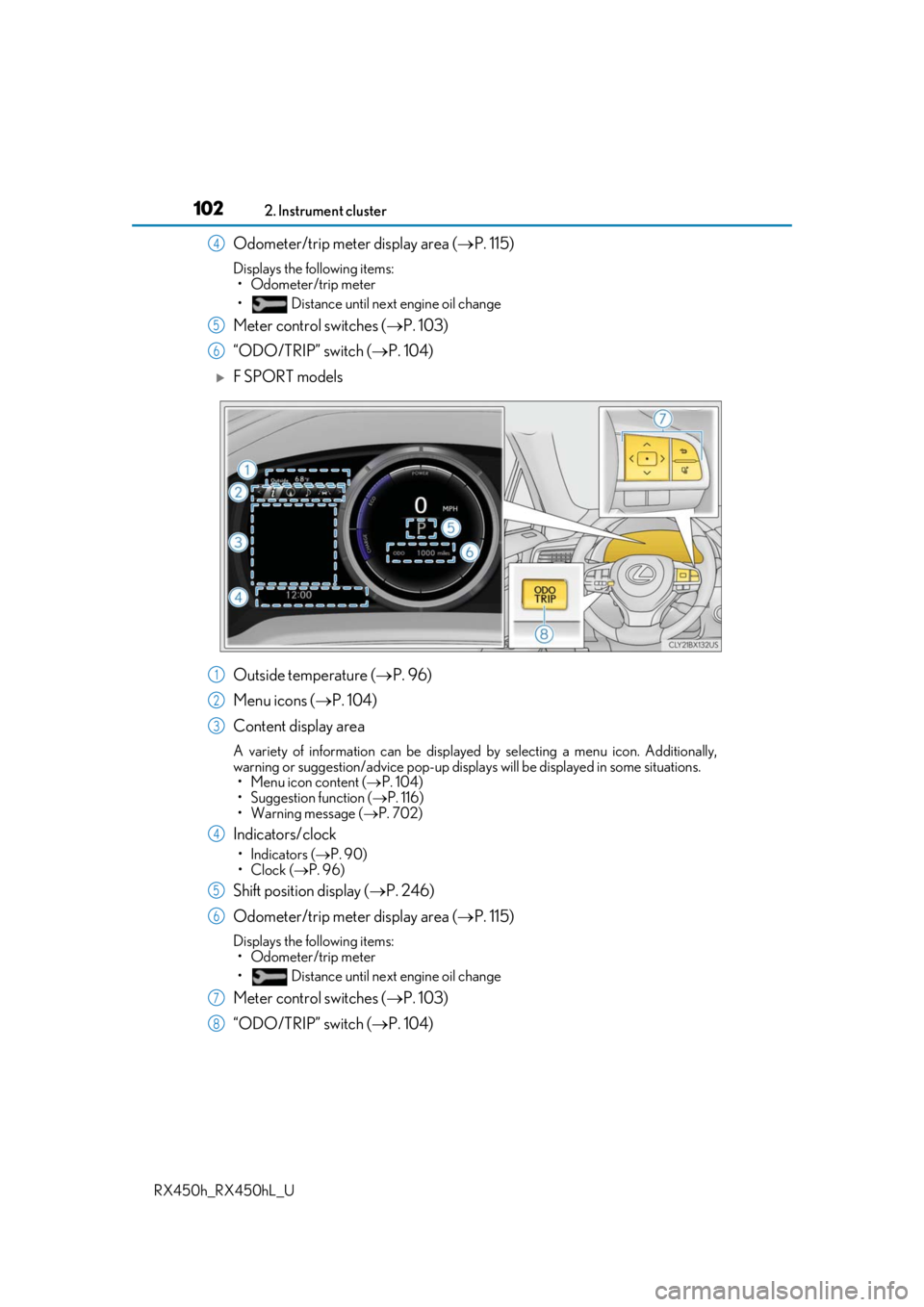
Except F SPORT models
Menu icon display area
Displays the following items.
When a menu icon is not selected, the outside temperature and clock are displayed. •Menu icons ( P. 104)
• Outside temperature ( P. 96)
•Clock ( P. 96)
Content display area
A variety of information can be displayed by selecting a menu icon. Additionally,
warning or suggestion/advice pop-up displa ys will be displayed in some situations.
• Menu icon content ( P. 104)
• Suggestion function ( P. 116)
• Warning message ( P. 702)
Indicator/shift position display area
Displays the following items:
•Indicators ( P. 90)
• Shift position display ( P. 246)
Multi-information display
Summary of functions
1
2
3
Page 102 of 792
1022. Instrument cluster
RX450h_RX450hL_U
Odometer/trip meter display area ( P. 115)
Displays the following items:
• Odometer/trip meter
• Distance until next engine oil change
Meter control switches ( P. 103)
“ODO/TRIP” switch ( P. 104)
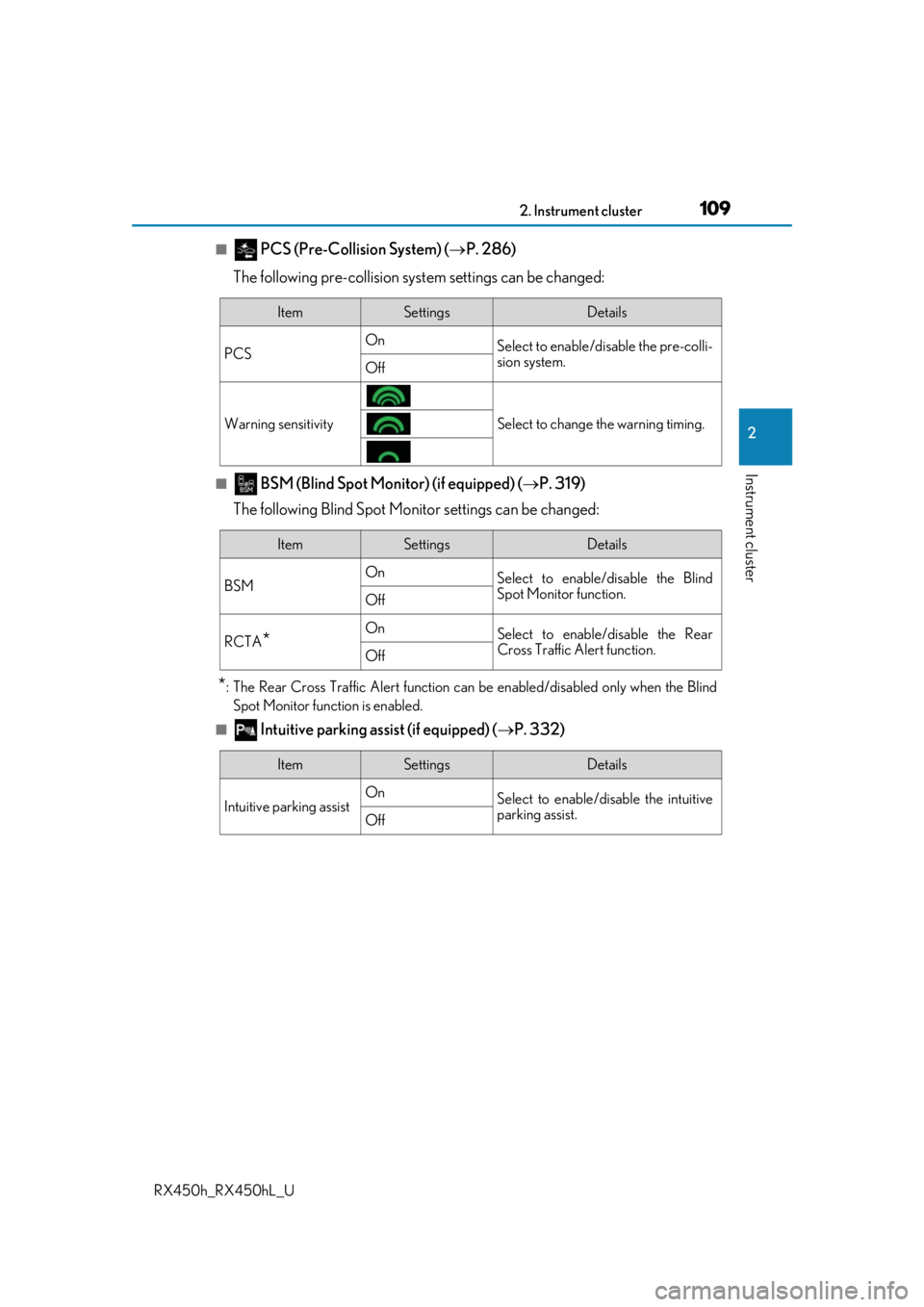
F SPORT models
Outside temperature ( P. 96)
Menu icons ( P. 104)
Content display area
A variety of information can be displayed by selecting a menu icon. Additionally,
warning or suggestion/advice pop-up displa ys will be displayed in some situations.
• Menu icon content ( P. 104)
• Suggestion function ( P. 116)
• Warning message ( P. 702)
Indicators/clock
•Indicators ( P. 90)
•Clock ( P. 96)
Shift position display ( P. 246)
Odometer/trip meter display area ( P. 115)
Displays the following items:
• Odometer/trip meter
• Distance until next engine oil change
Meter control switches ( P. 103)
“ODO/TRIP” switch ( P. 104)
4
5
6
1
2
3
4
5
6
7
8
Page 104 of 792

1042. Instrument cluster
RX450h_RX450hL_U
◆Using the odometer/trip meter display area
Items in this area are operated using the “ODO/TRIP” switch.
Press: Change displayed item
Each time the switch is pressed, the
displayed item will be changed.
Press and hold: Reset
Display the desired trip meter and
press and hold the switch to reset the
trip meter.
Select a menu icon to display its content.
Drive information ( P. 105)
Select to display various drive data.
Navigation system-linked display (if equipped)
Select to display the following na vigation system-linked information.
•Route guidance
• Compass display (heading-up display)
Audio system-linked display
Select to enable selection of an audio source or track on the meter using the meter
control switches.
Driving assist system information
Select to display the operational status of the following systems: • Dynamic radar cruise control with full-speed range ( P. 306)
• LKA (Lane-Keeping Assist) ( P. 297)
Warning message display ( P. 702)
Select to display warning messages and me asures to be taken if a malfunction is
detected.
Settings display ( P. 108)
Select to change the meter display settings and other settings.
Menu icons
Page 105 of 792
1052. Instrument cluster
2
Instrument cluster
RX450h_RX450hL_U
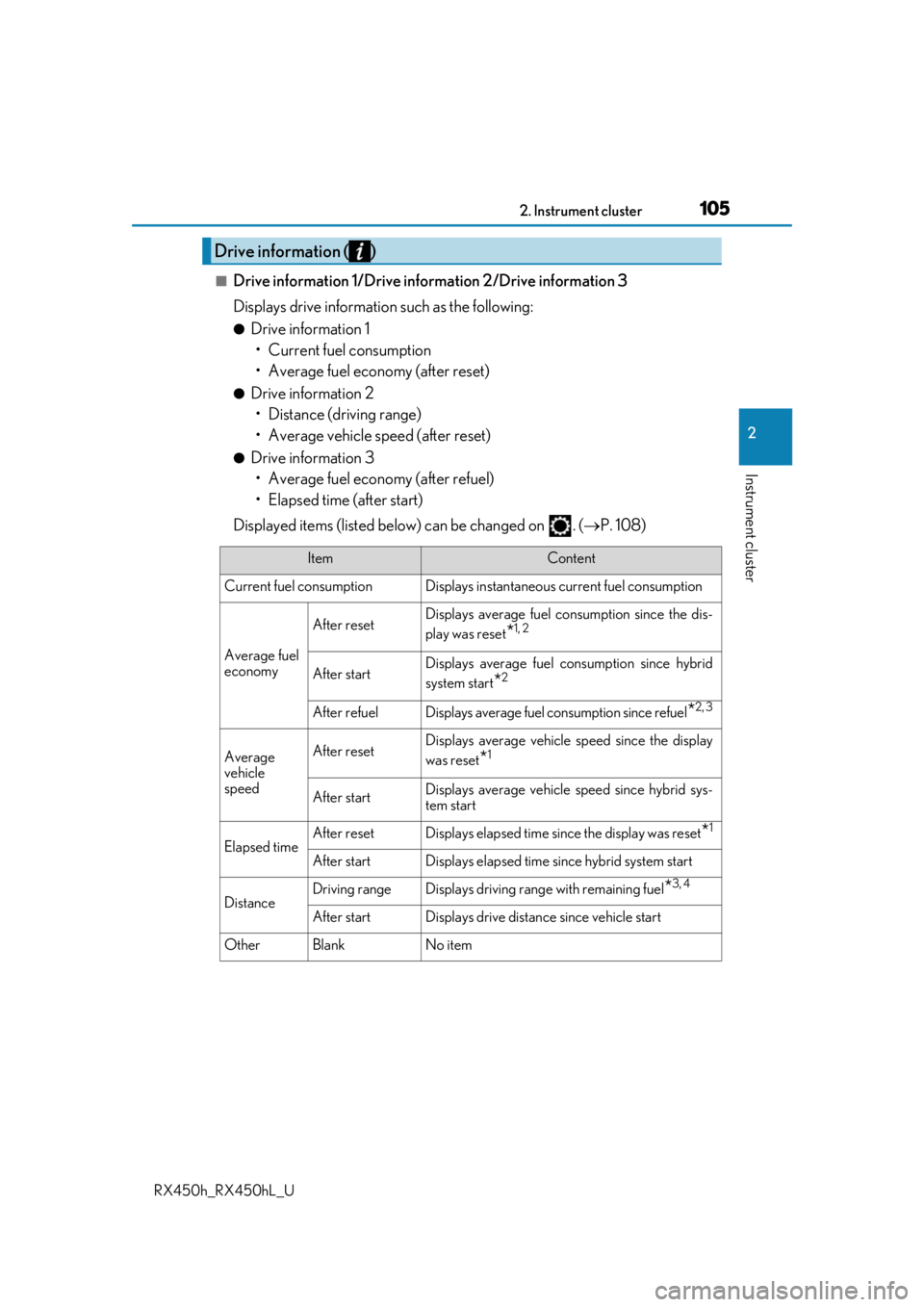
■Drive information 1/Drive information 2/Drive information 3
Displays drive information such as the following:
●Drive information 1
• Current fuel consumption
• Average fuel economy (after reset)
●Drive information 2• Distance (driving range)
• Average vehicle speed (after reset)
●Drive information 3• Average fuel economy (after refuel)
• Elapsed time (after start)
Displayed items (listed below) can be changed on . ( P. 108)
Drive information ( )
ItemContent
Current fuel consumption Displays in stantaneous current fuel consumption
Average fuel
economy
After resetDisplays average fuel consumption since the dis-
play was reset
*1, 2
After startDisplays average fuel consumption since hybrid
system start
*2
After refuelDisplays average fuel consumption since refuel*2, 3
Average
vehicle
speedAfter resetDisplays average vehicle speed since the display
was reset
*1
After startDisplays average vehicle speed since hybrid sys-
tem start
Elapsed timeAfter resetDisplays elapsed time since the display was reset*1
After startDisplays elapsed time since hybrid system start
DistanceDriving rangeDisplays driving range with remaining fuel*3, 4
After startDisplays drive distance since vehicle start
OtherBlankNo item
Page 108 of 792
1082. Instrument cluster
RX450h_RX450hL_U
◆Changing settings
Use the meter control switches on th e steering wheel to change settings.
Press or to select .
Operate the switches to select a desired item.
Change the setting by referring to the message displayed on the screen.
◆Setting items
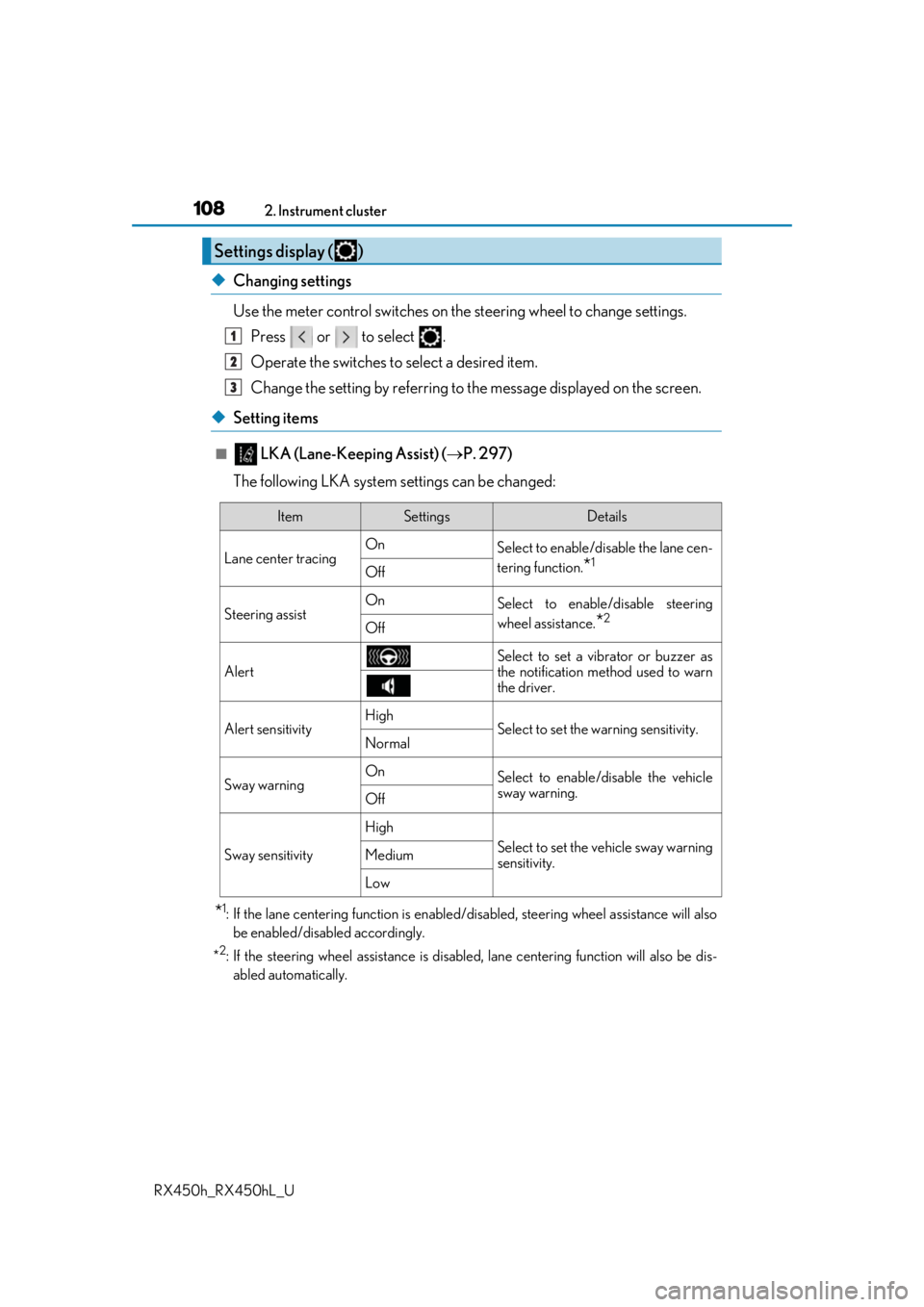
■ LKA (Lane-Keeping Assist) ( P. 297)
The following LKA system settings can be changed:
*1: If the lane centering function is enabled/ disabled, steering wheel assistance will also
be enabled/disabled accordingly.
*
2: If the steering wheel assistance is disabled, lane cent ering function will also be dis-
abled automatically.
Settings display ( )
1
2
3
ItemSettingsDetails
Lane center tracing On
Select to enable/disable the lane cen-
tering function.
*1Off
Steering assistOnSelect to enable/disable steering
wheel assistance.
*2Off
Alert
Select to set a vibrator or buzzer as
the notification method used to warn
the driver.
Alert sensitivityHighSelect to set the warning sensitivity.Normal
Sway warningOnSelect to enable/disable the vehicle
sway warning.
Off
Sway sensitivity
High
Select to set the vehicle sway warning
sensitivity.Medium
Low
Page 109 of 792
1092. Instrument cluster
2
Instrument cluster
RX450h_RX450hL_U
■ PCS (Pre-Collision System) (P. 286)
The following pre-collision syst em settings can be changed:
■ BSM (Blind Spot Monitor) (if equipped) ( P. 319)
The following Blind Spot Monitor settings can be changed:
*: The Rear Cross Traffic Alert function can be enabled/disabled only when the Blind Spot Monitor function is enabled.
■ Intuitive parking assist (if equipped) ( P. 332)
ItemSettingsDetails
PCS On
Select to enable/disable the pre-colli-
sion system.
Off
Warning sensitivitySelect to change the warning timing.
ItemSettingsDetails
BSM On
Select to enable/disable the Blind
Spot Monitor function.
Off
RCTA*OnSelect to enable/disable the Rear
Cross Traffic Alert function.
Off
ItemSettingsDetails
Intuitive parking assist On
Select to enable/disable the intuitive
parking assist.
Off