Page 121 of 792

1212. Instrument cluster
2
Instrument cluster
RX450h_RX450hL_U
Displays the following items which are linked to the navigation system:
■Street name
The name of the street that the vehicle is currently driving on is displayed on
the bottom of the display area.
When the navigation system is performing route guidance, the name of the
next street will be displayed on the top of the display area.
■Route guidance to destination
Displayed when the navigation system is performing route guidance. When
approaching an intersection, an arrow will be displayed to indicate the sug-
gested direction of travel.
■Compass
Displays the direction of travel.
■Hybrid System Indicator
Charge area
Hybrid Eco area
Eco area
Power area
Displayed content is the same as that
displayed on the meter (Hybrid Sys-
tem Indicator). For details, refer to
P. 99.
■Tachometer
Displays the engine speed in revolutions per minute.
Navigation system-linked display area (if equipped)
Hybrid System Indicator/Tachometer
1
2
3
4
Page 122 of 792

1222. Instrument cluster
RX450h_RX450hL_U
■Head-up display
The head-up display may seem dark or hard to see when viewed through sunglasses,
especially pola rized sunglasses.
Adjust the brightness of the head-up display or remove your sunglasses.
■When the 12-volt battery is disconnected
The customize settings of the head-up display will be reset.
■Display brightness
The brightness of the head-up display can be adjusted on of the multi-information
display. Also, it is automatically adju sted according to the ambient brightness.
■Enabling/disabling of the head-up display
If the head-up display is disabled, it will remain disabled when the power switch is turned
off then back to ON mode.
■Automatic adjustment of the head-up display position
A desired head-up display position can be entered to memory and recalled automati-
cally by the driving position memory system. ( P. 181)
■Street name display (vehicle s with a navigation system)
Only street names which are included in the map data will be displayed.
WARNING
■Before using the head-up display
●Check that the position and brightness of the head-up display image does not inter-
fere with safe driving. Inco rrect adjustment of the image’s position or brightness may
obstruct the driver’s view and lead to an acc ident, resulting in death or serious injury.
●Do not continuously look at the head-up di splay while driving as you may fail to see
pedestrians, objects on the road, etc. ahead of the vehicle.
■Caution for changing settings of the head-up display
As the hybrid system needs to be operating while changing the settings of the head-up
display, ensure that the vehicle is parked in a place with adequate ventilation. In a
closed area such as a garage, exhaust gases including harmful carbon monoxide (CO)
may collect and enter the vehicle. This may lead to death or a serious health hazard.
Page 125 of 792
1252. Instrument cluster
2
Instrument cluster
RX450h_RX450hL_U
Lexus Display Audio screen
Press the “MENU” button on the Lexus
Display Audio controller, then select
“Info” on the “Menu” screen, and then
select “Fuel Consumption”.
If the “Energy Monitor” screen does not
appear, move the controller to the right
and select “Energy”.
Navigation system screen
Press the “MENU” button on the
Remote Touch, then select on the
“Menu” screen, and then select “Fuel
Consumption”.
If the “Trip Information” or “Past Record”
screen is displayed, select “Energy”.
Multi-information display
Press the “ ” or “” of the meter control switches and select , and then press
the “ ” or “ ” to select the energy monitor display.
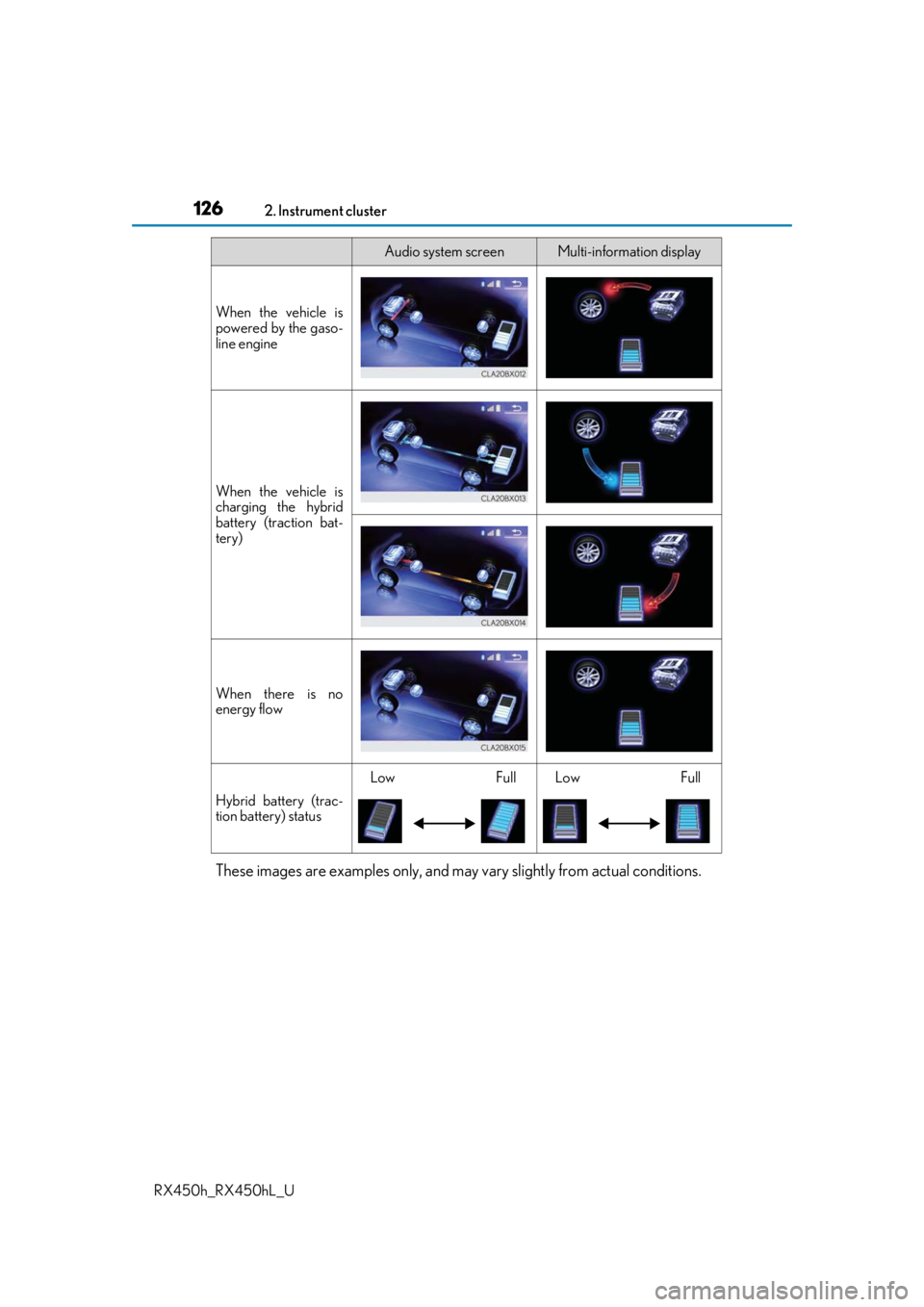
Energy monitor
Audio system screenMulti-information display
When the vehicle is
powered by the elec-
tric motor (traction
motor)
When the vehicle is
powered by both the
gasoline engine and
the electric motor
(traction motor)
Page 126 of 792
1262. Instrument cluster
RX450h_RX450hL_U
These images are examples only, and may vary slightly from actual conditions.
When the vehicle is
powered by the gaso-
line engine
When the vehicle is
charging the hybrid
battery (traction bat-
tery)
When there is no
energy flow
Hybrid battery (trac-
tion battery) status
LowFullLowFull
Audio system screenMulti-information display
Page 128 of 792

1282. Instrument cluster
RX450h_RX450hL_U
Average fuel consumption for the past 15 minutes is divided by color into past
averages and averages atta ined since the power switch was last turned to ON
mode. Use the displayed average fuel consumption as a reference.
The image is an example only.
■Past record
Lexus Display Audio screen
Press the “MENU” button on the Lexus Display Audio controller, then select
“Info” on the “Menu” screen, and then select “Fuel Consumption”.
If the “Past Record” screen does not appear, move the controller to the right and
select “Past Record”.
Previous fuel consumption record
Current fuel consumption
Best recorded fuel consumption
Navigation system screen
Press the “MENU” button on the Remo te Touch, then select on the
“Menu” screen, and then select “Fuel Consumption”.
If the “Energy Monitor” or “Trip Informat ion” screen is displayed, select “Past
Record”.
Resetting the past record data
Best recorded fuel consumption
Average fuel consumption
Previous fuel consumption record
Updating the average fuel con-
sumption data
The average fuel consumption history is divided by color into past averages
and the average fuel consumption since the last updated. Use the displayed
average fuel consumption as a reference.
The image is an example only.
1
2
3
1
2
3
4
5
Page 131 of 792
131
3
Operation of
each component
RX450h_RX450hL_U
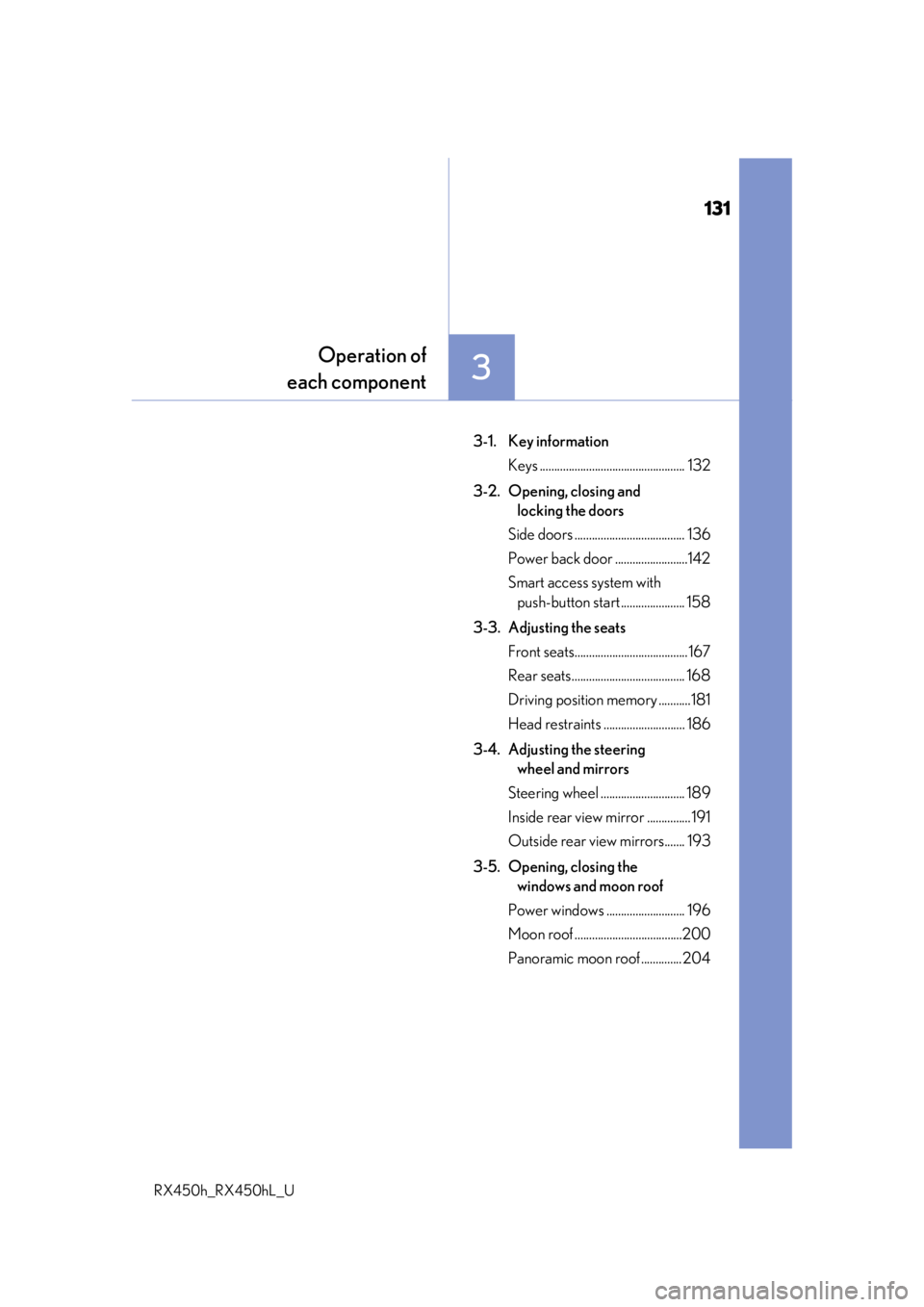
3-1. Key information
Keys .................................................. 132
3-2. Opening, closing and locking the doors
Side doors ...................................... 136
Power back door .........................142
Smart access system with push-button start ...................... 158
3-3. Adjusting the seats Front seats.......................................167
Rear seats....................................... 168
Driving position memory ...........181
Head restraints ............................ 186
3-4. Adjusting the steering wheel and mirrors
Steering wheel ............................. 189
Inside rear view mirror ............... 191
Outside rear view mirrors....... 193
3-5. Opening, closing the windows and moon roof
Power windows ........................... 196
Moon roof .....................................200
Panoramic moon roof .............. 204
Page 132 of 792
132
RX450h_RX450hL_U3-1. Key information
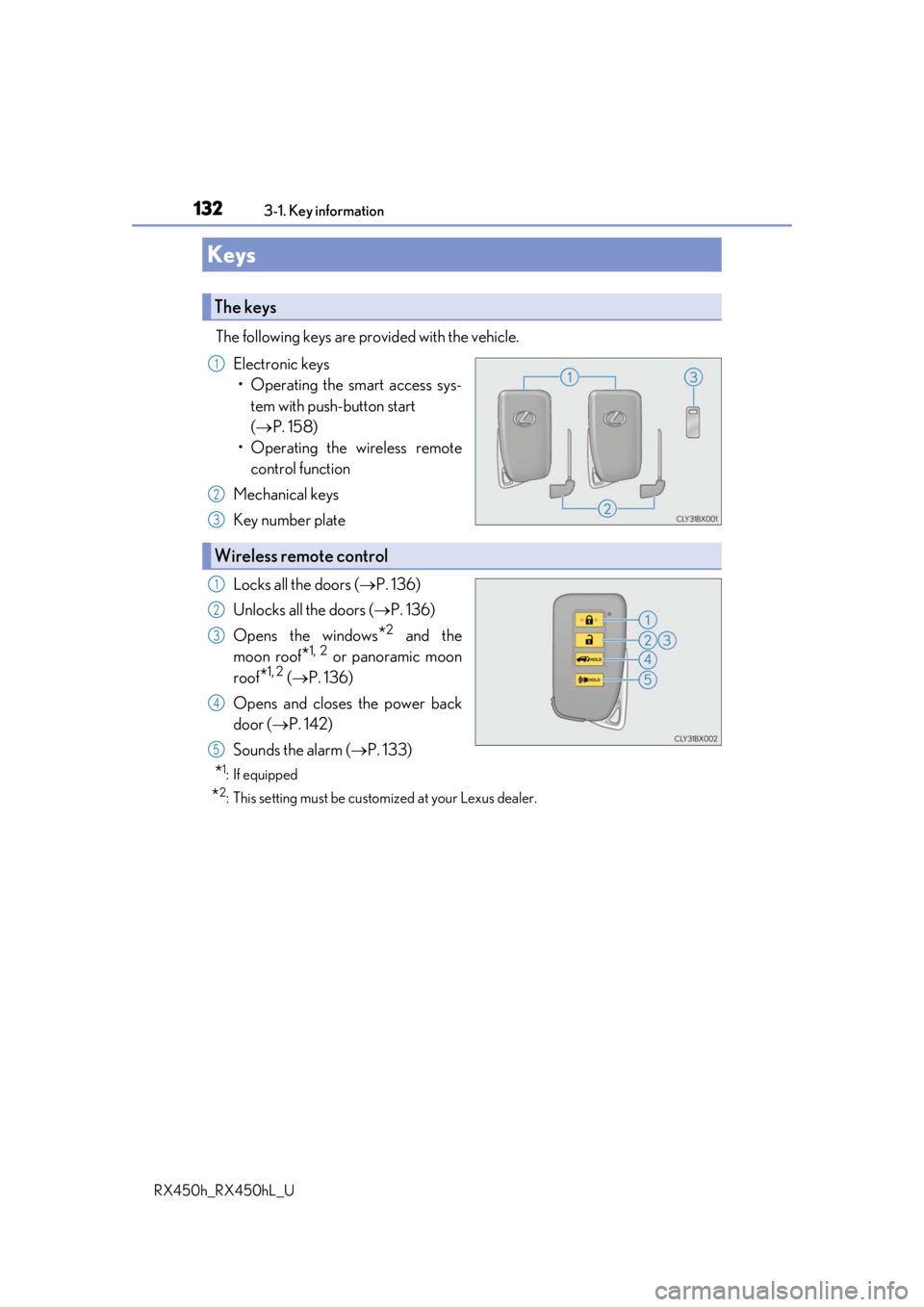
The following keys are provided with the vehicle.
Electronic keys• Operating the smart access sys- tem with push-button start
( P. 158)
• Operating the wireless remote control function
Mechanical keys
Key number plate
Locks all the doors ( P. 136)
Unlocks all the doors ( P. 136)
Opens the windows
*2 and the
moon roof
*1, 2 or panoramic moon
roof
*1, 2 ( P. 136)
Opens and closes the power back
door ( P. 142)
Sounds the alarm ( P. 133)
*1: If equipped
*2: This setting must be custom ized at your Lexus dealer.
Keys
The keys
1
2
3
Wireless remote control
1
2
3
4
5
Page 139 of 792
1393-2. Opening, closing and locking the doors
3
Operation of each component
RX450h_RX450hL_U
Push down the inside lock button.
Close the door.
The door cannot be locked if the power switch is in ACCESSORY or ON mode, or
the electronic key is left inside the vehicle. However, the key may not be detected cor-
rectly and the door may be locked.
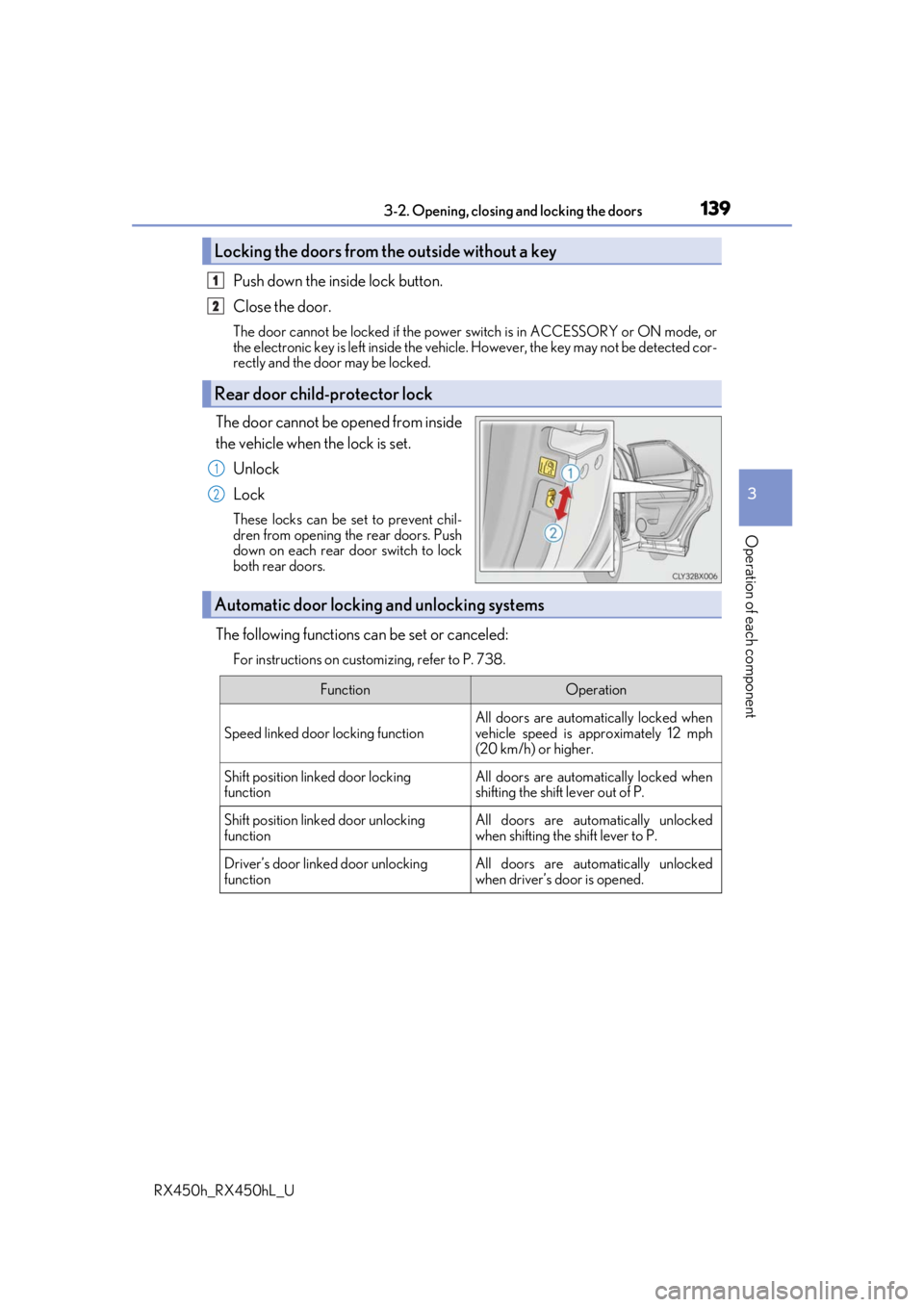
The door cannot be opened from inside
the vehicle when the lock is set.
Unlock
Lock
These locks can be set to prevent chil-
dren from opening the rear doors. Push
down on each rear door switch to lock
both rear doors.
The following functions can be set or canceled:
For instructions on customizing, refer to P. 738.
Locking the doors from the outside without a key
Rear door child-protector lock
1
2
1
2
Automatic door locking and unlocking systems
FunctionOperation
Speed linked door locking function
All doors are automatically locked when
vehicle speed is approximately 12 mph
(20 km/h) or higher.
Shift position linked door locking
functionAll doors are automatically locked when
shifting the shift lever out of P.
Shift position linked door unlocking
functionAll doors are automatically unlocked
when shifting the shift lever to P.
Driver’s door linked door unlocking
functionAll doors are automatically unlocked
when driver’s door is opened.