Page 703 of 792

7038-2. Steps to take in an emergency
8
When trouble arises
RX450h_RX450hL_U
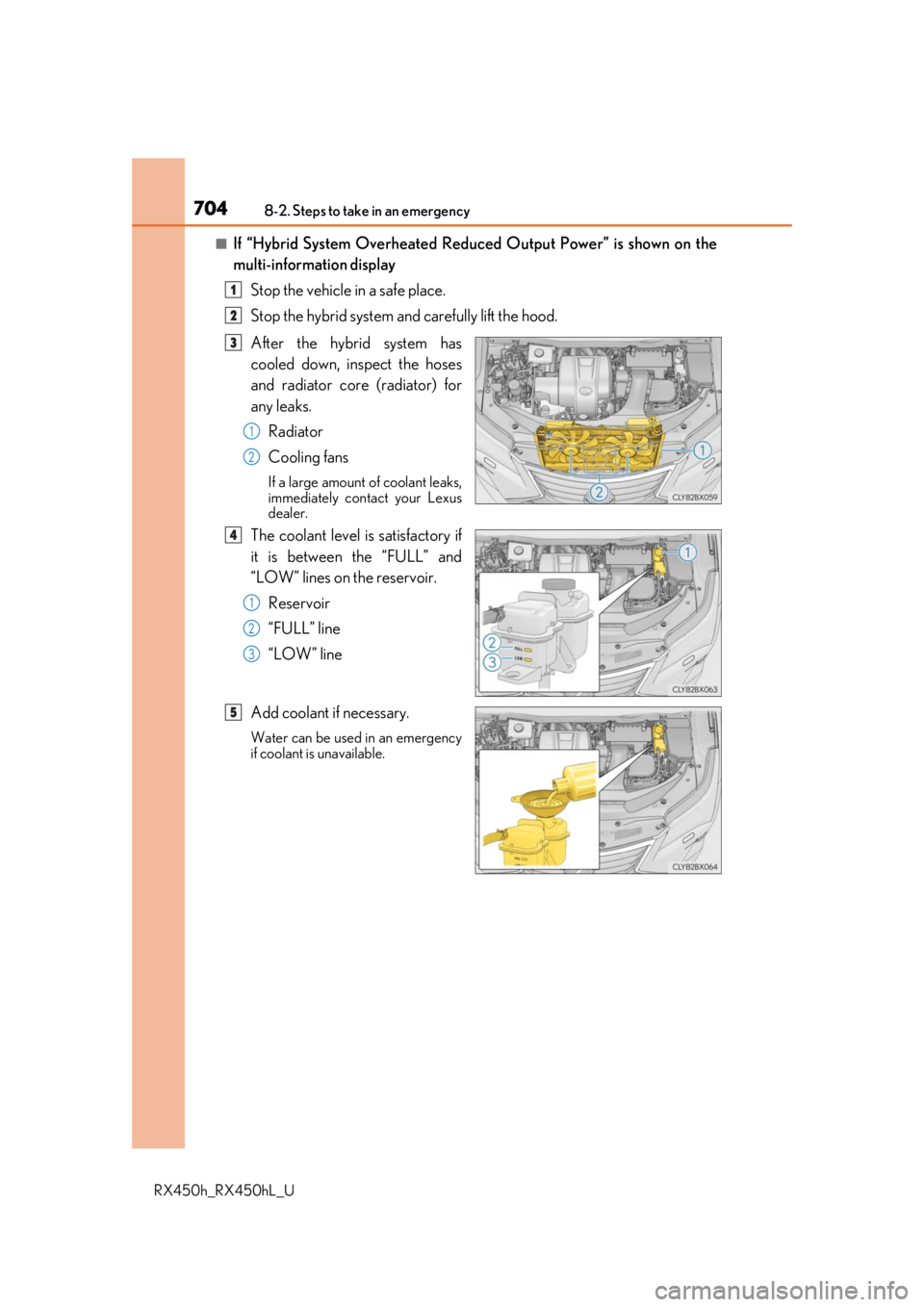
Add coolant if necessary.
Water can be used in an emergency
if coolant is unavailable.
Start the hybrid system and turn the air conditioning system on to check
that the radiator cooling fans operate and to check for coolant leaks from
the radiator or hoses.
The fans operate when the air conditioning system is turned on immediately after a
cold start. Confirm that the fans are operating by checking the fan sound and air
flow. If it is difficult to check these, tu rn the air conditioning system on and off
repeatedly. (The fans may not operate in freezing temperatures.)
If the fans are not operating:
Stop the hybrid system immediately and contact your Lexus dealer.
If the fans are operating:
Have the vehicle inspected at the nearest Lexus dealer.
Check if “Engine Coolant Temp High Stop in a Safe Place See Owner’s
Manual” is shown on the multi-information display.
If the message does not disappear:
Stop the hybrid system and contact your Lexus dealer.
If the message is not displayed:
Have the vehicle inspected at the nearest Lexus dealer.
5
6
7
8
Page 704 of 792
7048-2. Steps to take in an emergency
RX450h_RX450hL_U
■If “Hybrid System Overheated Reduced Output Power” is shown on the
multi-information displayStop the vehicle in a safe place.
Stop the hybrid system an d carefully lift the hood.
After the hybrid system has
cooled down, inspect the hoses
and radiator core (radiator) for
any leaks. Radiator
Cooling fans
If a large amount of coolant leaks,
immediately contact your Lexus
dealer.
The coolant level is satisfactory if
it is between the “FULL” and
“LOW” lines on the reservoir.Reservoir
“FULL” line
“LOW” line
Add coolant if necessary.
Water can be used in an emergency
if coolant is unavailable.
1
2
3
1
2
4
1
2
3
5
Page 705 of 792

7058-2. Steps to take in an emergency
8
When trouble arises
RX450h_RX450hL_U
Start the hybrid system and check if “Hybrid System Overheated Reduced
Output Power” is shown on the multi-information display.
If the message does not disappear:
Stop the hybrid system and contact your Lexus dealer.
If the message is not displayed:
Have the vehicle inspected at the nearest Lexus dealer.
WARNING
■To prevent an accident or injury when inspecting under the hood of your vehicle
Observe the following precautions.
Failure to do so may result in serious injury such as burns.
●If steam is seen coming from under the h ood, do not open the hood until the steam
has subsided. The engine compartment may be very hot.
●After the hybrid system has been turned off, check that the “READY” indicator is off.
When the hybrid system is operating, the gasoline engine may automatically start, or
the cooling fans may suddenly operate even if the gasoline engine stops. Do not
touch or approach rotating parts such as th e fans, which may lead to fingers or cloth-
ing (especially a tie, a scarf or a muffler) getting caught, resulting in serious injury.
●Do not loosen the radiator cap and the coolant reservoir caps wh ile the hybrid system
and radiator are hot.
High temperature steam or coolant could spray out.
NOTICE
■When adding engine/power control unit coolant
Add coolant slowly after the hybrid system has cooled down sufficiently. Adding cool
coolant to a hot hybrid system too quickly can cause damage to the hybrid system.
■To prevent damage to the cooling system
Observe the following precautions:
●Avoid contaminating the coolant with foreig n matter (such as sand or dust etc.).
●Do not use any coolant additive.
6
Page 736 of 792

736
RX450h_RX450hL_U9-2. Customization
When customizing vehicle features, ensure
that the vehicle is parked in a safe
place with the shift lever in P and the parking brake set.
■Changing on the audio system screen
Vehicles with a Lexus Display Audio system
Press the “MENU” button on the Lexus Display Audio controller.
Select “Setup” on the “Menu” screen and select “Vehicle”.
Various setting can be changed. Refer to the list of settings that can be
changed for details.
Vehicles with a navigation system
Press the “MENU” button on the Remote Touch.
Select on the “Menu” screen and select .
Various setting can be changed. Refer to the list of settings that can be
changed for details.
■Changing using the multi-information display
P. 108
Customizable features
Your vehicle includes a variety of elec tronic features that can be personalized
to suit your preferences. The settings of these features can be changed using
the multi-information display, on the audio system screen, or at your Lexus
dealer.
Customizing vehicle features
1
2
1
2
Page 737 of 792
7379-2. Customization
9
Vehicle specifications
RX450h_RX450hL_U
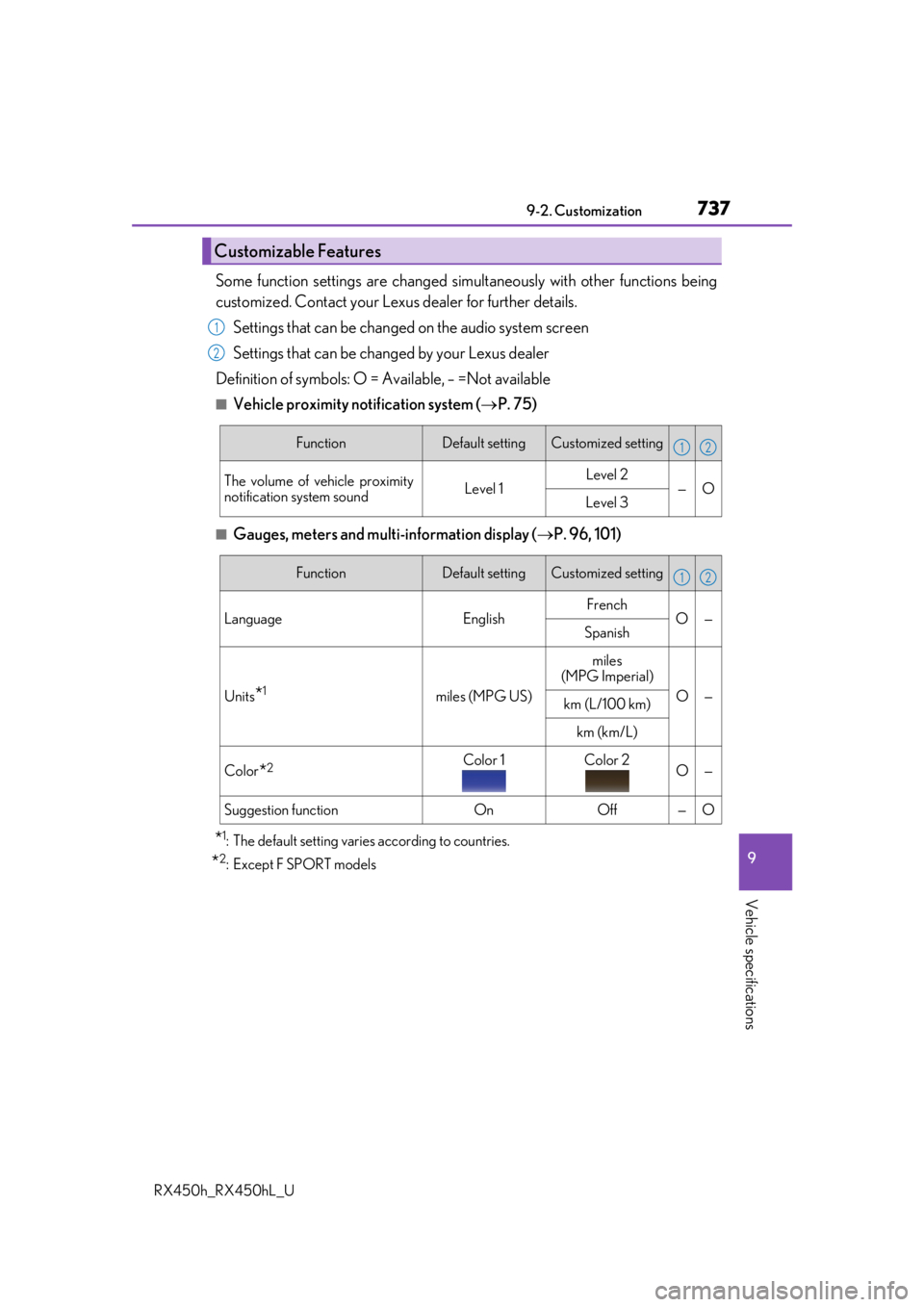
Some function settings are changed simultaneously with other functions being
customized. Contact your Lexus dealer for further details.
Settings that can be changed on the audio system screen
Settings that can be changed by your Lexus dealer
Definition of symbols: O = Available, – =Not available
■Vehicle proximity no tification system (P. 75)
■Gauges, meters and multi-information display ( P. 96, 101)
*1: The default setting varies according to countries.
*2:Except F SPORT models
Customizable Features
1
2
FunctionDefault settingCustomized setting
The volume of vehicle proximity
notification system soundLevel 1Level 2—OLevel 3
12
FunctionDefault settingCustomized setting
Language EnglishFrench
O—
Spanish
Units*1miles (MPG US)
miles
(MPG Imperial)
O—km (L/100 km)
km (km/L)
Color*2Color 1Color 2O—
Suggestion functionOnOff—O
12
Page 745 of 792
7459-2. Customization
9
Vehicle specifications
RX450h_RX450hL_U
■Intuitive parking assist (P. 332)
*: When intuitive parking assist is operating.
■BSM (Blind Spot Monitor) ( P. 319)
FunctionDefault settingCustomized setting
Detection distance of the front
center sensorFarNearOO
Detection distance of the rear
center sensorFarNearOO
Buzzer volume31 to 5OO
Display setting*All sensors dis-
playedDisplay offOO
12
FunctionDefault settingCustomized setting
Outside rear view mirror indica-
tor brightnessBrightDimOO
Alert timing for presence of
approaching vehicle (BSM func-
tion only)
Intermediate
Early
OOLate
Only when in blind spot
RCTA buzzer volumeLevel 2Level 1O—Level 3
12
Page 768 of 792

768What to do if... (Troubleshooting)
RX450h_RX450hL_U
●The seat belt reminder light is flashing
Are the driver and the passengers wearing the seat belts?
( P. 662, 662)
●The parking brake indicator is on
Is the parking brake released? ( P. 253)
Depending on the situation, other types of warning buzzer may also sound.
( P. 660, 667)
●Did anyone inside the vehicle open a door during setting the alarm?
The sensor detects it and the alarm sounds. ( P. 86)
Do one of the following to stop the alarms:
• Unlock the doors.
• Turn the power switch to ACCESSORY or ON mode, or start the hybrid system.
●Is the message displayed on the multi-information display?
Check the message on the multi-information display. ( P. 667)
●When a warning light turns on or a warning message is displayed, refer to
P. 660, 667.A warning buzzer sounds during driving
An alarm is activated and the horn sounds
A warning buzzer sounds when leaving the vehicle
A warning light turns on or a warning message is displayed
Page 771 of 792

771Alphabetical index
RX450h_RX450hL_U
Alarm ............................................................ 86
Anchor brackets ...................................... 57
AntennaRadio ........................................................429
Smart access system with push-button start ................... 158
Anti-lock Brake System (ABS)....... 382 Warning light ........................................ 661
Approach warning.................................314
Armrest ....................................................558
Assist grips .............................................. 559
Audio system (with Lexus Display Audio System) ...................400 Antenna ..................................................429
Audio input........................................... 409
AUX port.............................................. 409
Bluetooth
® audio ............................. 459
CD player ..............................................433
iPod .......................................................... 440
MP3/WMA disc ...............................433
Optimal use ........................................... 419
Portable music player ..................... 448
Radio ........................................................426
Setup menu .............................................412
Steering wheel audio switches .............................................. 406
USB memory ....................................... 444 Audio system
(with navigation system)
*
Automatic air conditioning system ......................................... 507, 522 Air conditioning filter ....................... 625
Rear automatic air conditioning system .................................................. 522
S-FLOW mode....................................514
Automatic headlight leveling system .................................................... 260
Automatic High Beam ........................262
Automatic light control system ...... 258
AUX port ................................................ 409
Auxiliary boxes .......................... 539, 544
*: Refer to the “NAVIGATION SYSTEM OWNER’S MANUAL”.