Page 60 of 792
601-2. Child safety
RX450h_RX450hL_U
WARNING
■When using a child restraint system
If the head restraint interferes with the installation of the child restraint system, and the
head restraint can be removed, remove the head restraint.
If the head restraint cannot be removed, raise it to the uppermost position.
●When a booster seat is installed, always en sure that the shoulder belt is positioned
across the center of the child’s shoulder. The belt should be kept away from the child’s
neck, but not so that it coul d fall off the child’s shoulder.
●Use child restraint system suitable to the age and size of the child and install it to the
rear seat.
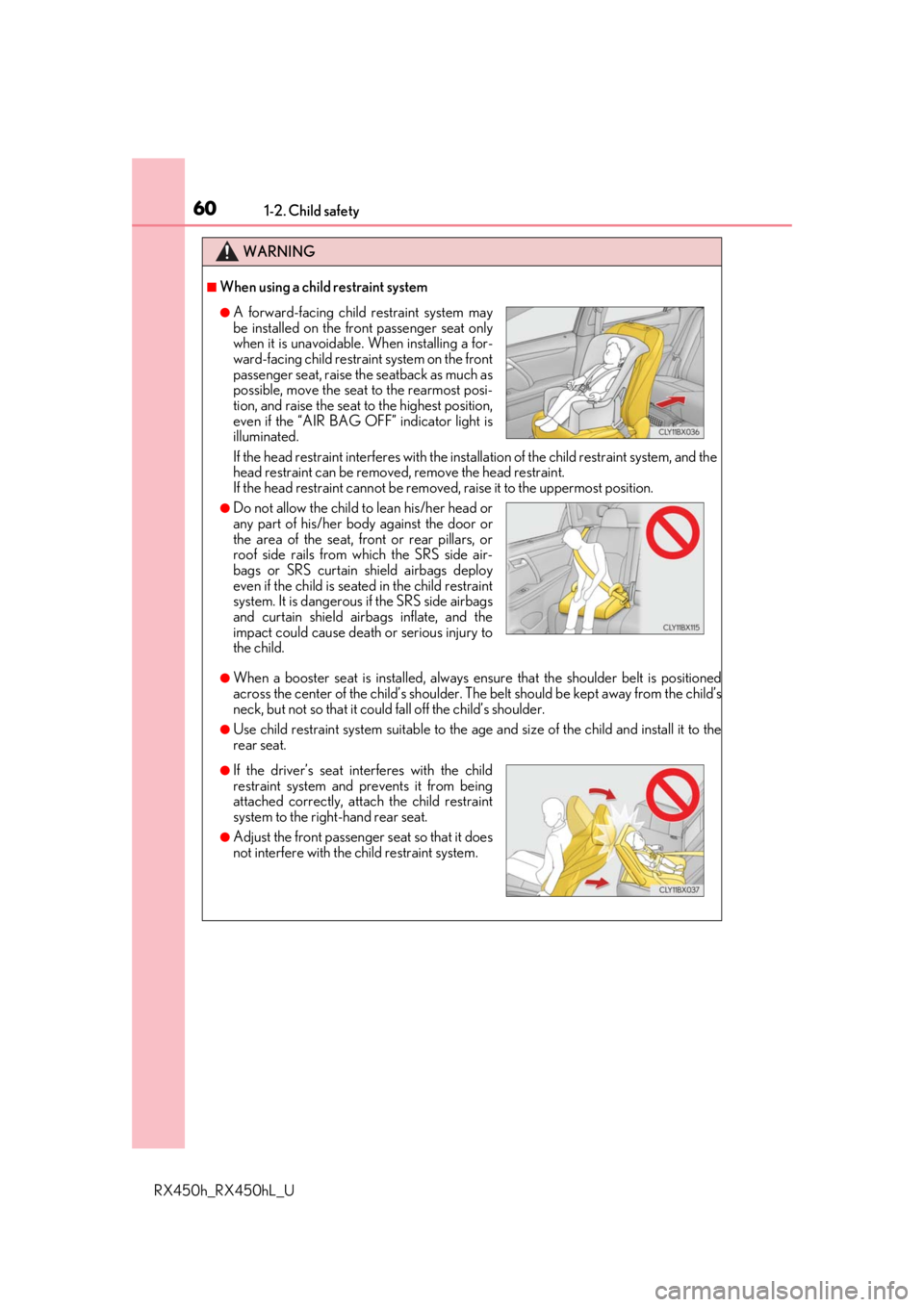
●A forward-facing child restraint system may
be installed on the front passenger seat only
when it is unavoidable. When installing a for-
ward-facing child restrain t system on the front
passenger seat, raise the seatback as much as
possible, move the seat to the rearmost posi-
tion, and raise the seat to the highest position,
even if the “AIR BAG OFF” indicator light is
illuminated.
●Do not allow the child to lean his/her head or
any part of his/her body against the door or
the area of the seat, front or rear pillars, or
roof side rails from which the SRS side air-
bags or SRS curtain shield airbags deploy
even if the child is seat ed in the child restraint
system. It is dangerous if the SRS side airbags
and curtain shield airbags inflate, and the
impact could cause death or serious injury to
the child.
●If the driver’s seat interferes with the child
restraint system and prevents it from being
attached correctly, atta ch the child restraint
system to the right-hand rear seat.
●Adjust the front passenger seat so that it does
not interfere with the child restraint system.
Page 77 of 792

771-3. Hybrid system
1
For safety and security
RX450h_RX450hL_U
■Sounds and vibrations specific to a hybrid vehicle
There may be no engine sound or vibration even though the vehicle is able to move with
the “READY” indicator is illuminated. For safety, make sure to shift the shift lever to P and
apply the parking brake when parked.
The following sounds or vibrations may occu r when the hybrid system is operating and
are not a malfunction:
●Motor sounds may be heard from the engine compartment.
●Sounds may be heard from the hybrid battery (traction battery) behind the rear seats
when the hybrid system starts or stops.
●Relay operating sounds such as a snap or so ft clank will be emitted from the hybrid bat-
tery (traction battery), behind the rear se ats, when the hybrid system is started or
stopped.
●Sounds from the hybrid system may be heard when the back door is open.
●Sounds may be heard from the transmission wh en the gasoline engine starts or stops,
when driving at low spee ds, or during idling.
●Engine sounds may be heard when accelerating sharply.
●Sounds may be heard due to regenerative braking when the brake pedal is depressed
or as the accelerator pedal is released.
●Vibration may be felt when the ga soline engine starts or stops.
●Cooling fan sounds may be heard from th e air intake vents under the rear seats.
■Vehicle proximity notification system
In the following cases, the vehicle proximity notification system may be difficult for sur-
rounding people to hear.
●In very noisy areas
●In the wind or the rain
Also, as the vehicle proximity notification system is installed on the front of the vehicle, it
may be more difficult to hear from the re ar of the vehicle compared to the front.
■Maintenance, repair, recycling, and disposal
Contact your Lexus dealer regarding mainte nance, repair, recycling and disposal. Do
not dispose of the vehicle yourself.
■Customization
Some functions can be customized. ( P. 736)
Page 86 of 792
861-4. Theft deterrent system
RX450h_RX450hL_U
The alarm uses light and sound to give an alert when an intrusion is detected.
The alarm is triggered in the following situations when the alarm is set:
●A locked door is unlocked or opened in any way other than using the entry
function, wireless remote control or mech anical key. (The doors will lock again
automatically.)
●The hood is opened.
Close the doors and hood, and lock all
the doors. The system will be set auto-
matically after 30 seconds.
The indicator light changes from being
on to flashing when the system is set.
Do one of the following to de activate or stop the alarms:
●Unlock the doors.
●Turn the power switch to ACCESSORY or ON mode, or start the hybrid sys-
tem. (The alarm will be deactivated or stopped after a few seconds.)
Alarm
The alarm
Setting the alarm system
Deactivating or stopping the alarm
Page 87 of 792
871-4. Theft deterrent system
1
For safety and security
RX450h_RX450hL_U
■System maintenance
The vehicle has a maintenance-free type alarm system.
■Items to check before locking the vehicle
To prevent unexpected triggering of the alarm and vehicle theft, make sure of the follow-
ing:
●Nobody is in the vehicle.
●The windows and moon roof or panoramic mo on roof are closed before the alarm is
set.
●No valuables or other personal items are left in the vehicle.
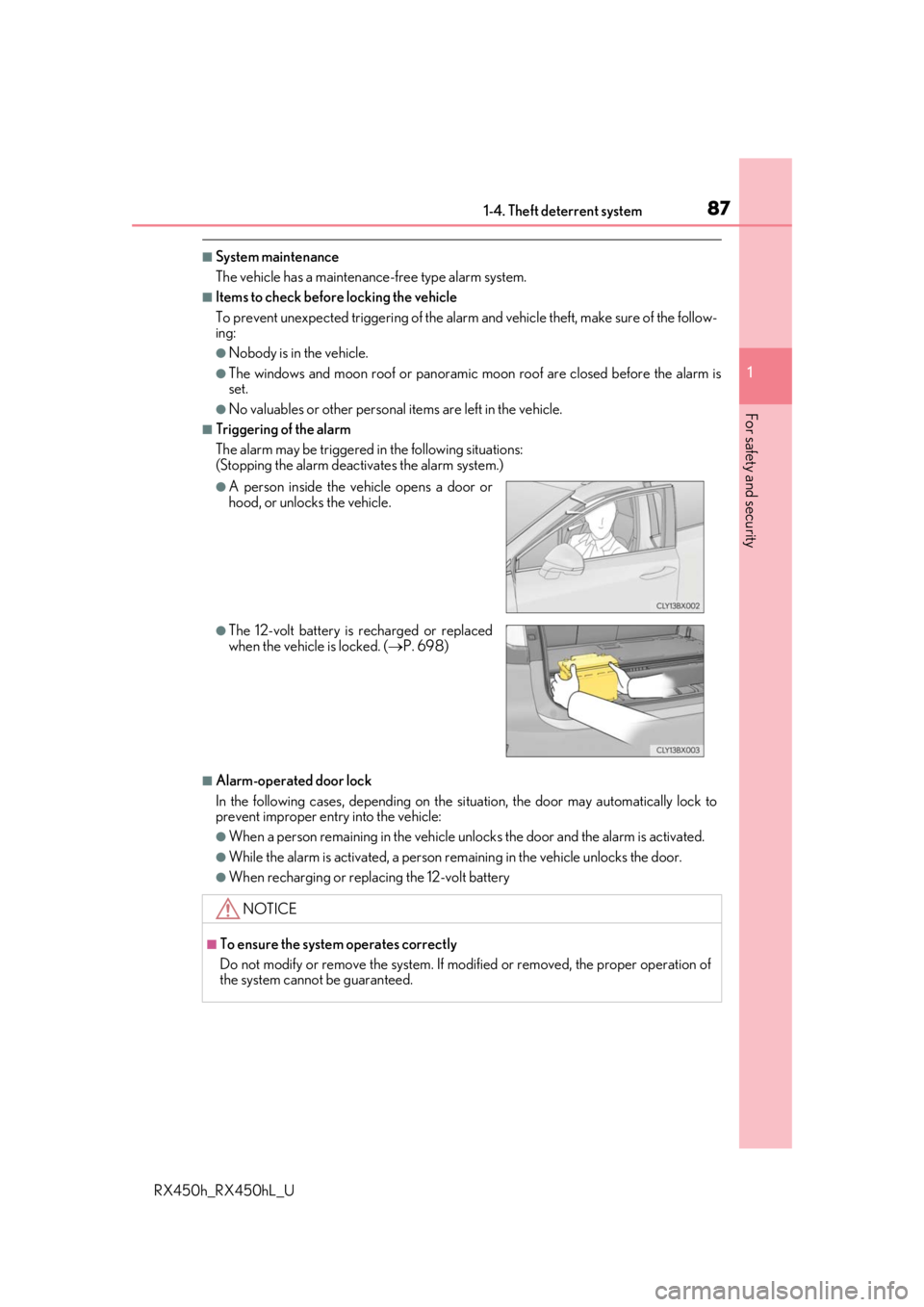
■Triggering of the alarm
The alarm may be triggered in the following situations:
(Stopping the alarm deactivates the alarm system.)
■Alarm-operated door lock
In the following cases, depending on the si tuation, the door may automatically lock to
prevent improper entry into the vehicle:
●When a person remaining in the vehicle un locks the door and the alarm is activated.
●While the alarm is activated, a person remaining in the vehicle unlocks the door.
●When recharging or replacing the 12-volt battery
●A person inside the vehicle opens a door or
hood, or unlocks the vehicle.
●The 12-volt battery is recharged or replaced
when the vehicle is locked. ( P. 698)
NOTICE
■To ensure the system operates correctly
Do not modify or remove the system. If mo dified or removed, the proper operation of
the system cannot be guaranteed.
Page 112 of 792
1122. Instrument cluster
RX450h_RX450hL_U
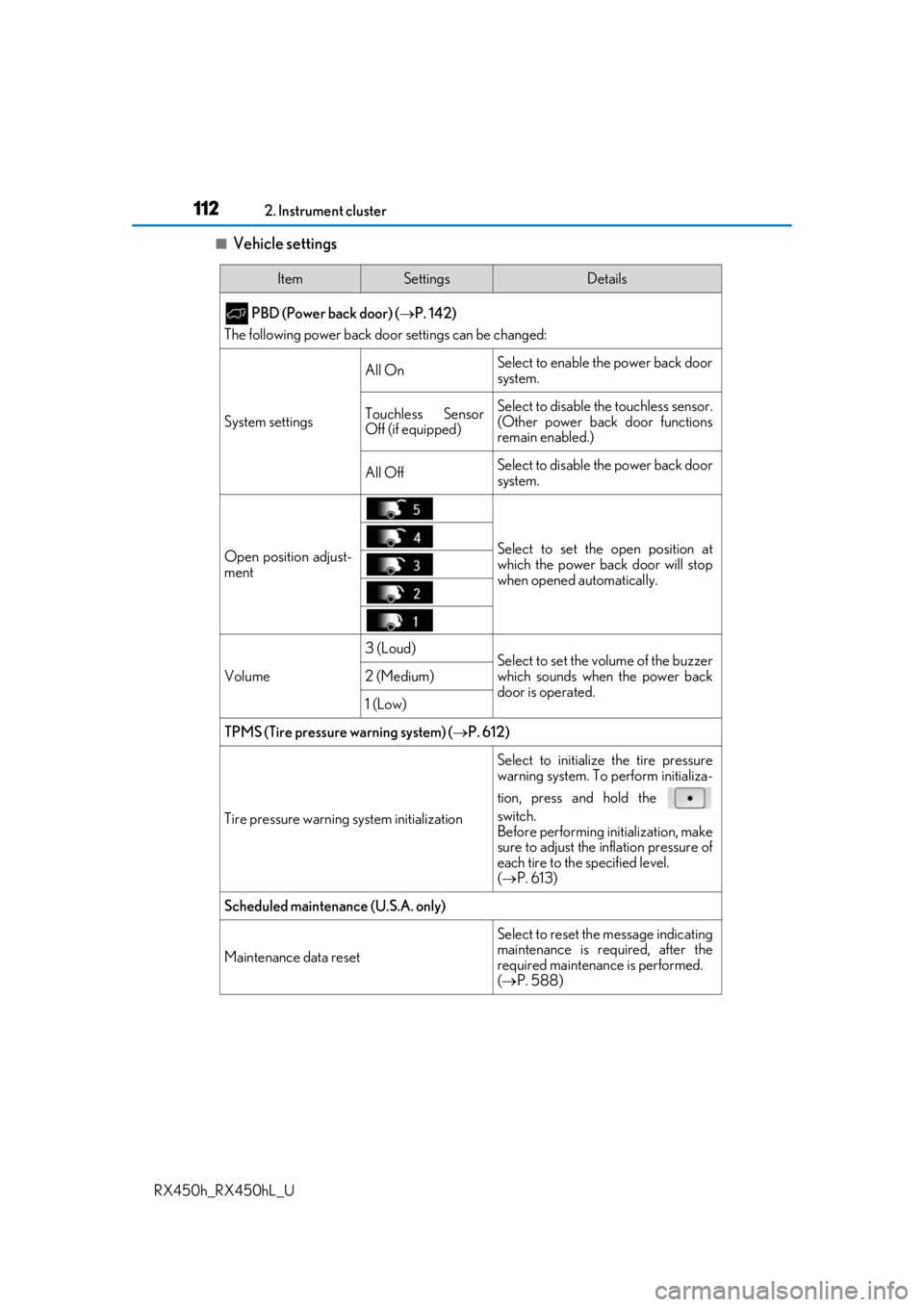
■Vehicle settings
ItemSettingsDetails
PBD (Power back door) ( P. 142)
The following power back door settings can be changed:
System settings
All OnSelect to enable the power back door
system.
Touchless Sensor
Off (if equipped)Select to disable the touchless sensor.
(Other power back door functions
remain enabled.)
All OffSelect to disable the power back door
system.
Open position adjust-
mentSelect to set the open position at
which the power back door will stop
when opened automatically.
Volume
3 (Loud)Select to set the volume of the buzzer
which sounds when the power back
door is operated.
2 (Medium)
1 (Low)
TPMS (Tire pressure warning system) (P. 612)
Tire pressure warning system initialization
Select to initialize the tire pressure
warning system. To perform initializa-
tion, press and hold the
switch.
Before performing initialization, make
sure to adjust the inflation pressure of
each tire to the specified level.
( P. 613)
Scheduled maintenance (U.S.A. only)
Maintenance data reset
Select to reset the message indicating
maintenance is re quired, after the
required maintenanc e is performed.
( P. 588)
Page 116 of 792
1162. Instrument cluster
RX450h_RX450hL_U
Displays suggestions to the driver in the following situations. To select a response
to a displayed suggestion, use the meter control switches.
The suggestion function can be turned on/off. (Customizable features: P. 737)
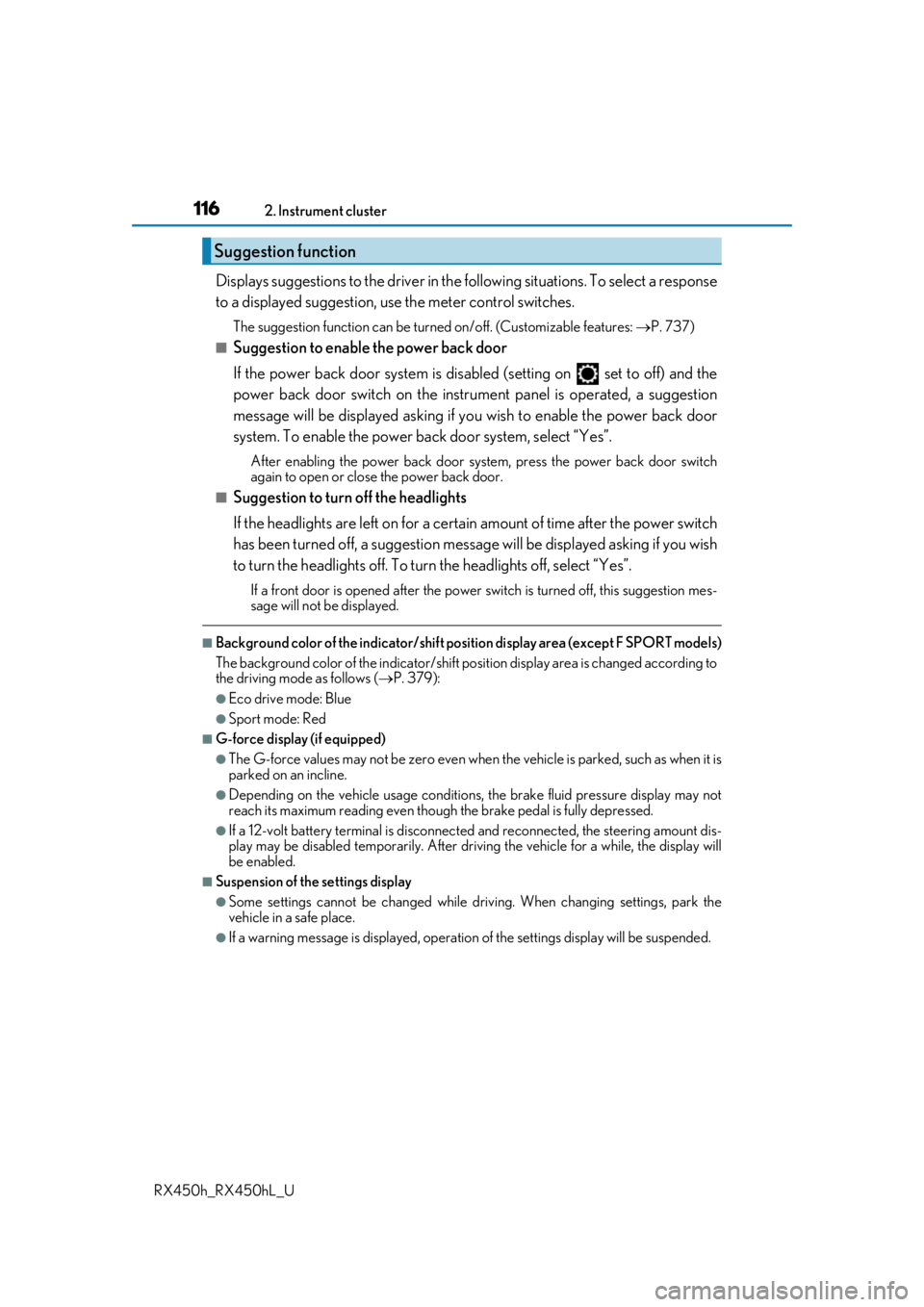
■Suggestion to enable the power back door
If the power back door system is disabled (setting on set to off) and the
power back door switch on the instru ment panel is operated, a suggestion
message will be displayed asking if yo u wish to enable the power back door
system. To enable the power back door system, select “Yes”.
After enabling the power back door syst em, press the power back door switch
again to open or close the power back door.
■Suggestion to turn off the headlights
If the headlights are left on for a certai n amount of time after the power switch
has been turned off, a su ggestion message will be displayed asking if you wish
to turn the headlights off. To turn the headlights off, select “Yes”.
If a front door is opened after the power switch is turned off, this suggestion mes-
sage will not be displayed.
■Background color of the indicator/shift posi tion display area (except F SPORT models)
The background color of the indicator/shift position display area is changed according to
the driving mode as follows ( P. 379):
●Eco drive mode: Blue
●Sport mode: Red
■G-force display (if equipped)
●The G-force values may not be zero even when the vehicle is parked, such as when it is
parked on an incline.
●Depending on the vehicle usage conditions, the brake fluid pressure display may not
reach its maximum reading even though the brake pedal is fully depressed.
●If a 12-volt battery terminal is disconnect ed and reconnected, the steering amount dis-
play may be disabled temporarily. After driv ing the vehicle for a while, the display will
be enabled.
■Suspension of the settings display
●Some settings cannot be changed while driv ing. When changing settings, park the
vehicle in a safe place.
●If a warning message is displa yed, operation of the settings display will be suspended.
Suggestion function
Page 131 of 792
131
3
Operation of
each component
RX450h_RX450hL_U
3-1. Key information
Keys .................................................. 132
3-2. Opening, closing and locking the doors
Side doors ...................................... 136
Power back door .........................142
Smart access system with push-button start ...................... 158
3-3. Adjusting the seats Front seats.......................................167
Rear seats....................................... 168
Driving position memory ...........181
Head restraints ............................ 186
3-4. Adjusting the steering wheel and mirrors
Steering wheel ............................. 189
Inside rear view mirror ............... 191
Outside rear view mirrors....... 193
3-5. Opening, closing the windows and moon roof
Power windows ........................... 196
Moon roof .....................................200
Panoramic moon roof .............. 204
Page 132 of 792
132
RX450h_RX450hL_U3-1. Key information
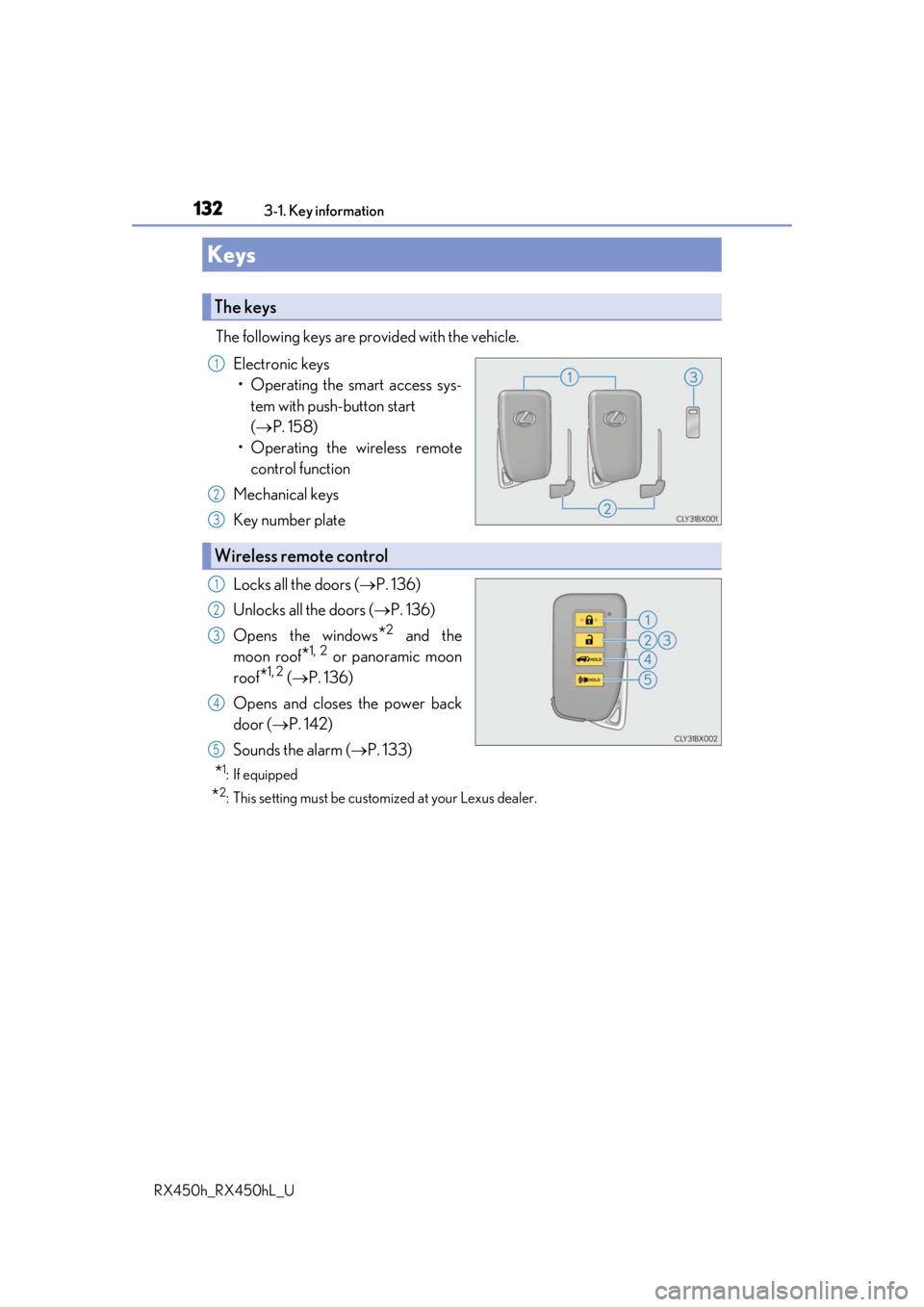
The following keys are provided with the vehicle.
Electronic keys• Operating the smart access sys- tem with push-button start
( P. 158)
• Operating the wireless remote control function
Mechanical keys
Key number plate
Locks all the doors ( P. 136)
Unlocks all the doors ( P. 136)
Opens the windows
*2 and the
moon roof
*1, 2 or panoramic moon
roof
*1, 2 ( P. 136)
Opens and closes the power back
door ( P. 142)
Sounds the alarm ( P. 133)
*1: If equipped
*2: This setting must be custom ized at your Lexus dealer.
Keys
The keys
1
2
3
Wireless remote control
1
2
3
4
5