Page 487 of 792

4875-11. Bluetooth®
5
Lexus Display Audio system
RX450h_RX450hL_U
WARNING
■While driving
Do not operate the portable audio player, cellular phone or connect a device to the
Bluetooth
® system.
■Caution regarding interference with electronic devices
●Your audio unit is fitted with Bluetooth® antennas. People with implantable cardiac
pacemakers, cardiac resynchronization ther apy-pacemakers or implantable cardio-
verter defibrillators should maintain a re asonable distance between themselves and
the Bluetooth
® antennas. The radio waves may affe ct the operation of such devices.
●Before using Bluetooth® devices, users of any electrical medical device other than
implantable cardiac pacemakers, cardiac resynchronization therapy-pacemakers or
implantable cardioverter defi brillators should consult the manufacturer of the device
for information about its operation under th e influence of radio waves. Radio waves
could have unexpected effects on the operation of such medical devices.
NOTICE
■When leaving the vehicle
Do not leave your portable au dio player or cellular phone in the vehicle. The inside of
the vehicle may become hot, causing damage to the portable audio player or cellular
phone.
Page 493 of 792
4935-12. Other function
5
Lexus Display Audio system
RX450h_RX450hL_U
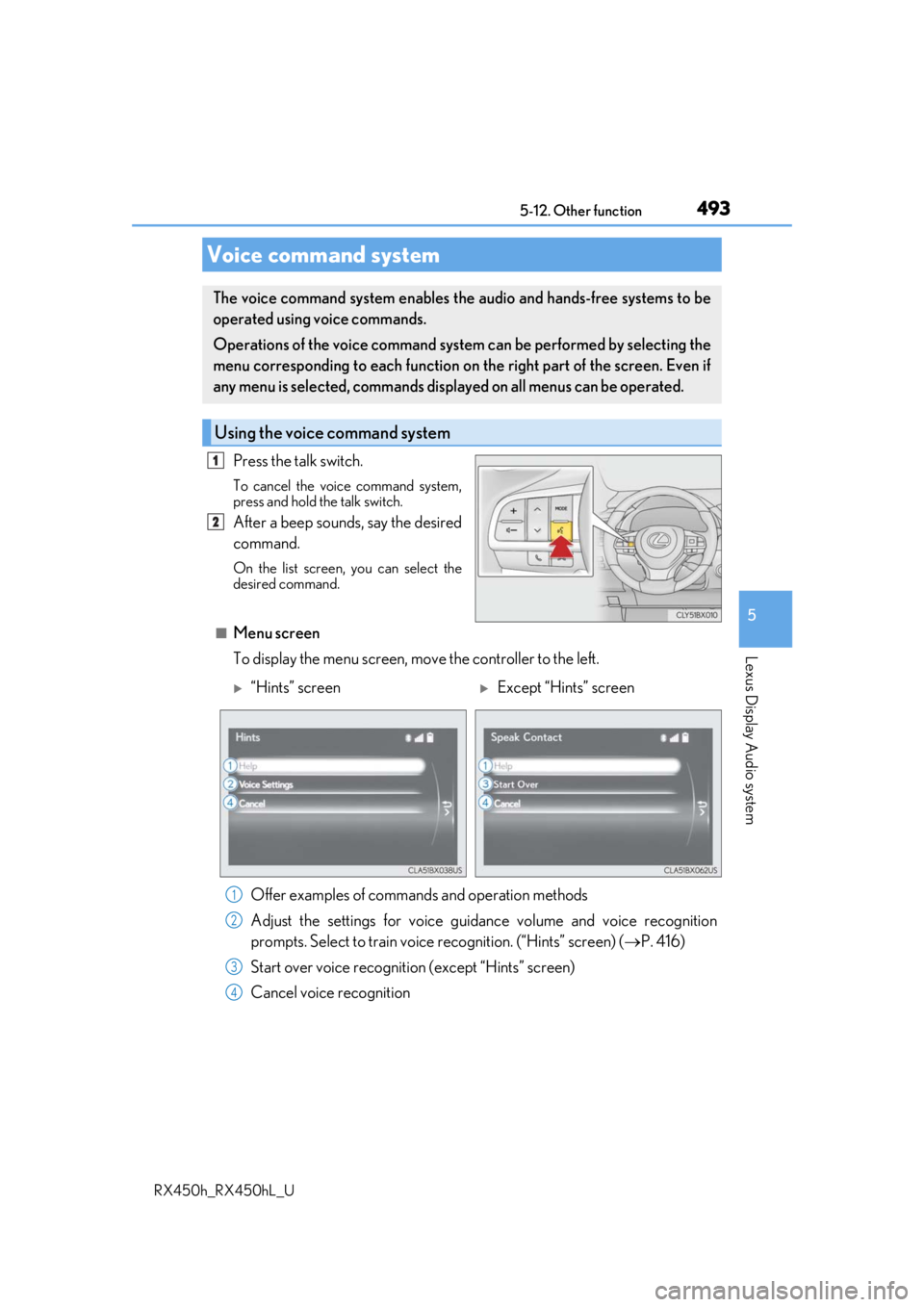
Press the talk switch.
To cancel the voice command system,
press and hold the talk switch.
After a beep sounds, say the desired
command.
On the list screen, you can select the
desired command.
■Menu screen
To display the menu screen, move the controller to the left.
Voice command system
The voice command system enables the audio and hands-free systems to be
operated using voice commands.
Operations of the voice command system can be performed by selecting the
menu corresponding to each function on the right part of the screen. Even if
any menu is selected, commands displayed on all menus can be operated.
Using the voice command system
1
2
“Hints” screenExcept “Hints” screen
Offer examples of commands and operation methods
Adjust the settings for voice guidance volume and voice recognition
prompts. Select to train voice recognition. (“Hints” screen) ( P. 416)
Start over voice recognition (except “Hints” screen)
Cancel voice recognition
1
2
3
4
Page 494 of 792
4945-12. Other function
RX450h_RX450hL_U
■Microphone
P. 462
■When using the microphone
●It is unnecessary to speak directly into the microphone when giving a command.
●Wait for the confirmation beep before speaking a command.
●Voice commands may not be recognized if:
• Spoken too quickly.
• Spoken at a low or high volume.
• The roof or windows are open.
• Passengers are talking while voice commands are spoken.
• The air conditioning speed is set high.
• The air conditioning vents are turned towards the microphone.
●In the following conditions, the system ma y not recognize the command properly and
using voice commands may not be possible:
• The command is incorrect or unclear. No te that certain words, accents or speech
patterns may be difficult for the system to recognize.
• There is excessive background noise, such as wind noise.
■When searching for a track
●A USB memory or iPod must be connected to enable track searching and playback.
( P. 409)
●When a USB memory or iPod is connected, recognition data is created so tracks can
be searched using voice commands.
●Recognition data is updated un der the following conditions:
• When the USB memory or iPod data has changed.
• When the voice recognition language is changed. ( P. 413)
●While the recognition data is being created or being updated, a track search cannot be
performed using a voice command.
■The Gracenote® media database
Page 496 of 792
4965-12. Other function
RX450h_RX450hL_U
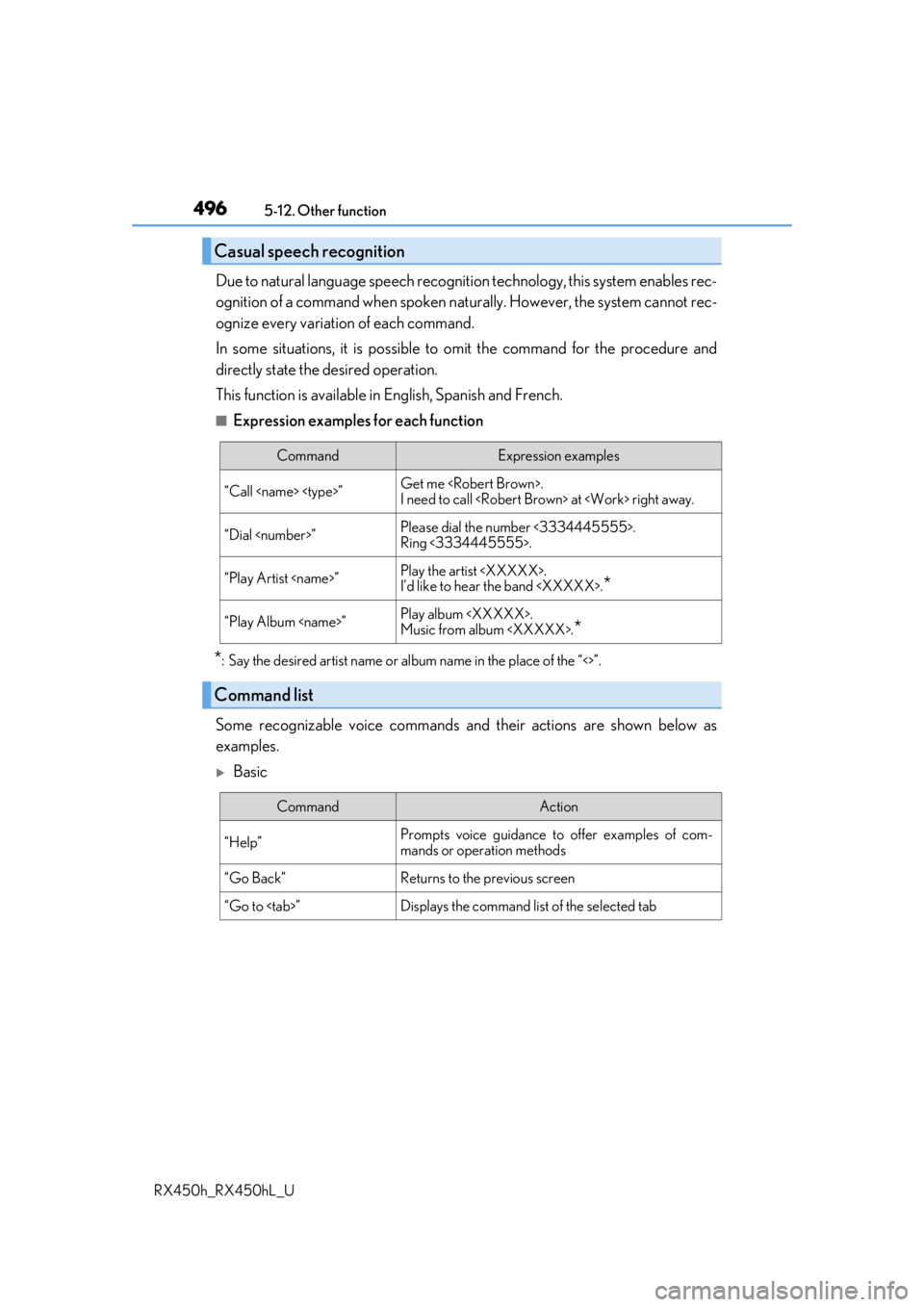
Due to natural language speech recognit ion technology, this system enables rec-
ognition of a command when spoken na turally. However, the system cannot rec-
ognize every variation of each command.
In some situations, it is possible to omit the command for the procedure and
directly state the desired operation.
This function is available in English, Spanish and French.
■Expression examples for each function
*: Say the desired artist name or al bum name in the place of the “<>”.
Some recognizable voice commands an d their actions are shown below as
examples.
Basic
Casual speech recognition
CommandExpression examples
“Call ”Get me .
I need to call at right away.
“Dial ”Please dial the number <3334445555>.
Ring <3334445555>.
“Play Artist ”Play the artist .
I’d like to hear the band .*
“Play Album ”Play album .
Music from album .
*
Command list
CommandAction
“Help”Prompts voice guidance to offer examples of com-
mands or operation methods
“Go Back”Returns to the previous screen
“Go to ”Displays the command lis t of the selected tab
Page 502 of 792
5026-1. Basic operation of the Remote Touch screen
RX450h_RX450hL_U
■Screen display during low temperatures
When the ambient temperature is extremely low, screen response may be delayed even
if the Remote Touch is operated.
WARNING
■When using the Remote Touch
●Do not allow fingers, fingernails or hair to become caught in the Remote Touch as this
may cause an injury.
●Be careful when selecting the Remote Touch in extreme temperatures as it may
become very hot or cold due to the temperature inside the vehicle.
NOTICE
■To prevent damage to the Remote Touch
●Do not allow the Remote Touch to come into contact with food, liquid, stickers or lit
cigarettes as doing so may cause it to change color, emit a strange odor or stop func-
tioning.
●Do not subject the Remote Touch to excessive pressure or strong impact as the knob
may bend or break off.
●Do not allow coins, contact lenses or ot her such items to become caught in the
Remote Touch as this may cause it to stop functioning.
●Items of clothing may rip if they become caught on the Remote Touch knob.
●If your hand or any object is on the Remo te Touch knob when the power switch is in
ACCESSORY mode, the Remote Touch knob may not operate properly.
Page 509 of 792

5096-2. Using the air conditioning system and defogger
RX450h_RX450hL_U
6
Interior features
Lexus Display Audio screen
Adjust the left-hand side tempera-
ture setting
Adjust the fan speed setting
Select to set auto mode on/off
Select to set eco mode on/off
( P. 519)
Select to set cooling and dehumidifi-
cation function on/off
If the indicator is turned off, the system will blow ambient temperature air
or heated air.
Display the option control screen ( P. 510)
Select the air flow mode
Adjust the right-hand side temperature setting
Navigation system screen
Adjust the left-hand side tempera-
ture setting
Adjust the fan speed setting
Select the air flow mode
Adjust the right-hand side tempera-
ture setting
Display the option control screen
( P. 510)
Select to set automatic mode on/off
Select to set cooling and dehumidification function on/off
If the indicator is turned off, the system will blow ambient temperature air
or heated air.
Select to set eco mode on/off ( P. 519)
Control screen (RX450h)
1
2
3
4
5
6
7
8
1
2
3
4
5
6
7
8
Page 511 of 792

5116-2. Using the air conditioning system and defogger
RX450h_RX450hL_U
6
Interior features
Lexus Display Audio screen
Adjust the left-hand side tempera-
ture setting
Adjust the fan speed setting
Select to set auto mode on/off
Select to set eco mode on/off
( P. 519)
Select to set cooling and dehumidifi-
cation function on/off
If the indicator is turned off, the system will blow ambient temperature air
or heated air.
Adjust the temperature for driver, passe nger and rear seats separately (“3-
ZONE” mode) ( P. 513)
Display the rear air condit ioning control screen (P. 515)
Display the option control screen ( P. 512)
Select the air flow mode
Adjust the right-hand side temperature setting
Navigation system screen
Adjust the left-hand side tempera-
ture setting
Adjust the fan speed setting
Select the air flow mode
Adjust the right-hand side tempera-
ture setting
Display the option control screen
( P. 512)
Select to set automatic mode on/off
Select to set cooling and dehumidification function on/off
If the indicator is turned off, the system will blow ambient temperature air
or heated air.
Adjust the temperature for driver, passe nger and rear seats separately (“3-
ZONE” mode) ( P. 513)
Select to set eco mode on/off ( P. 519)
Display the rear air condit ioning control screen (P. 515)
Control screen (RX450hL)
1
2
3
4
5
6
7
8
9
10
1
2
3
4
5
6
7
8
9
10
Page 519 of 792

5196-2. Using the air conditioning system and defogger
RX450h_RX450hL_U
6
Interior features
■When the outside temperature exceeds 75 F (24 C) and the air conditioning system
is on
●In order to reduce the air co nditioning power consumption, the air conditioning system
may switch to recirculated air mode automatically.
This may also reduce fuel consumption.
●Recirculated air mode is selected as a default mode when the power switch is turned to
ON mode.
●It is possible to switch to outside air mode at any time by pressing the outside/recircu-
lated air mode button.
■Automatic mode for air intake control
In automatic mode, the system detects exhaust gas and other pollutants and automati-
cally switches between outside air and recirculated air modes.
When the dehumidification function is off, and the fan is operating, turning automatic
mode on will activate the dehumidification function.
■Fogging up of the windows
●The windows will easily fog up when the humidity in the vehicle is high. Selecting “A/C”
will dehumidify the air from the outlets and defog the windshield effectively.
●If you turn “A/C” off, the windows may fog up more easily.
●The windows may fog up if the recirculated air mode is used.
■Windshield fog detection function
When automatic mode is set, the humidity sensor ( P. 521) detects fog on the wind-
shield and controls the air cond itioning system to prevent fog.
■Outside/recirculated air mode
●When driving on dusty roads such as tunnels or in heavy traffic, set the outside/recircu-
lated air mode button to the recirculated air mode. This is effective in preventing out-
side air from enteri ng the vehicle interior. During cooling operation, setting the
recirculated air mode will also cool the vehicle interior effectively.
●Outside/recirculated air mode may automa tically switch depending on the tempera-
ture setting or the inside temperature.
■When the outside temperature is low
The dehumidification function may not operate even when “A/C” is selected.
■Operation of the air conditioning system in Eco drive mode
●In the Eco drive mode, the air conditioning sy stem is controlled as follows to prioritize
fuel efficiency
• Engine speed and compressor operation controlled to restrict heating/cooling capacity
• Fan speed restricted when automatic mode is selected
●To improve air conditioning performance, perform the following operations:
• Adjust the fan speed
• Turn off Eco drive mode