Page 388 of 792

388
RX450h_RX450hL_U4-6. Driving tips
◆Using Eco drive mode
When using Eco drive mode, the torque corresponding to the accelerator
pedal depression amount can be generate
d more smoothly than it is in normal
conditions. In addition, the operation of the air conditioning system (heat-
ing/cooling) will be minimized, improving the fuel economy. (P. 379)
◆Use of Hybrid System Indicator
The Eco-friendly driving is possible by keeping the indicator needle (except F
SPORT models) or bar display (F SPOR T models) of Hybrid System Indicator
within Eco area. ( P. 99)
◆Shift lever operation
Shift the shift lever to D when stopped at a traffic light, or driving in heavy traf-
fic, etc. Shift the shift lever to P when parking. When using the N, there is no
positive effect on fuel consumption. In the N, the gasoline engine operates but
electricity cannot be generated. Also, wh en using the air conditioning system,
etc., the hybrid battery (tractio n battery) power is consumed.
◆Accelerator pedal/brake pedal operation
●Drive your vehicle smoothly. Avoid ab rupt acceleration and deceleration.
Gradual acceleration and deceleration will make more effective use of the
electric motor (traction motor) without having to use gasoline engine
power.
●Avoid repeated acceleration. Repeated acceleration consumes hybrid bat-
tery (traction battery) power, resulting in poor fuel consumption. Battery
power can be restored by driving with the accelerator pedal slightly
released.
◆When braking
Make sure to operate the brakes gently and in a timely manner. A greater
amount of electrical energy can be regenerated when slowing down.
Hybrid vehicle driving tips
For economical and ecological driving, pay attention to the following points:
Page 390 of 792

3904-6. Driving tips
RX450h_RX450hL_U
●Use fluids that are appropriate to the prevailing outside temperatures.
•Engine oil
• Engine/power cont rol unit coolant
• Washer fluid
●Have a service technician inspect the condition of the 12-volt battery.
●Have the vehicle fitted with four snow tires or purchase a set of tire chains for
the front tires.
Ensure that all tires are of the specified size and the same brand, and that chains
match the size of the tires.
Perform the following according to the driving conditions:
●Do not try to forcibly open a window or move a wiper that is frozen. Pour
warm water over the frozen area to me lt the ice. Wipe away the water imme-
diately to prevent it from freezing.
●To ensure proper operation of the c limate control system fan, remove any
snow that has accumulated on the air inlet vents in front of the windshield.
●Check for and remove any excess ice or snow that may have accumulated on
the exterior lights, vehicle’s roof, chassi s, around the tires or on the brakes.
●Remove any snow or mud from the bottom of your shoes before getting in the
vehicle.
Winter driving tips
Carry out the necessary preparations an d inspections before driving the vehi-
cle in winter. Always drive the vehicle in a manner appropriate to the prevail-
ing weather conditions.
Pre-winter preparations
Before driving the vehicle
Page 406 of 792

4065-1. Basic Operations
RX450h_RX450hL_U
Volume switch • Increases/decreases volume
• Press and hold: Continuously increases/decreases volume
Radio mode: • Press: Select a radio station
• Press and hold: Seek up/down
CD, MP3/WMA/AAC disc, Bluetooth
®, iPod or USB mode:
• Press: Select a track/file/video
• Press and hold: Quickly move up/d own through tracks/files/videos.
“MODE” switch • Turns the power on, selects audio source
• Press and hold this switch to mute or pause the current operation. To can- cel the mute or pause, press and hold.
Steering wheel audio switches
Some audio features can be controlled using the switches on the steering
wheel.
Operation may differ depending on th e type of audio system or navigation
system. For details, refer to the manual provided with the audio system or nav-
igation system.
Operating the audio system us ing the steering wheel switches
1
2
WARNING
■To reduce the risk of an accident
Exercise care when operating the audio switches on the steering wheel.
3
Page 409 of 792
4095-1. Basic Operations
5
Lexus Display Audio system
RX450h_RX450hL_U
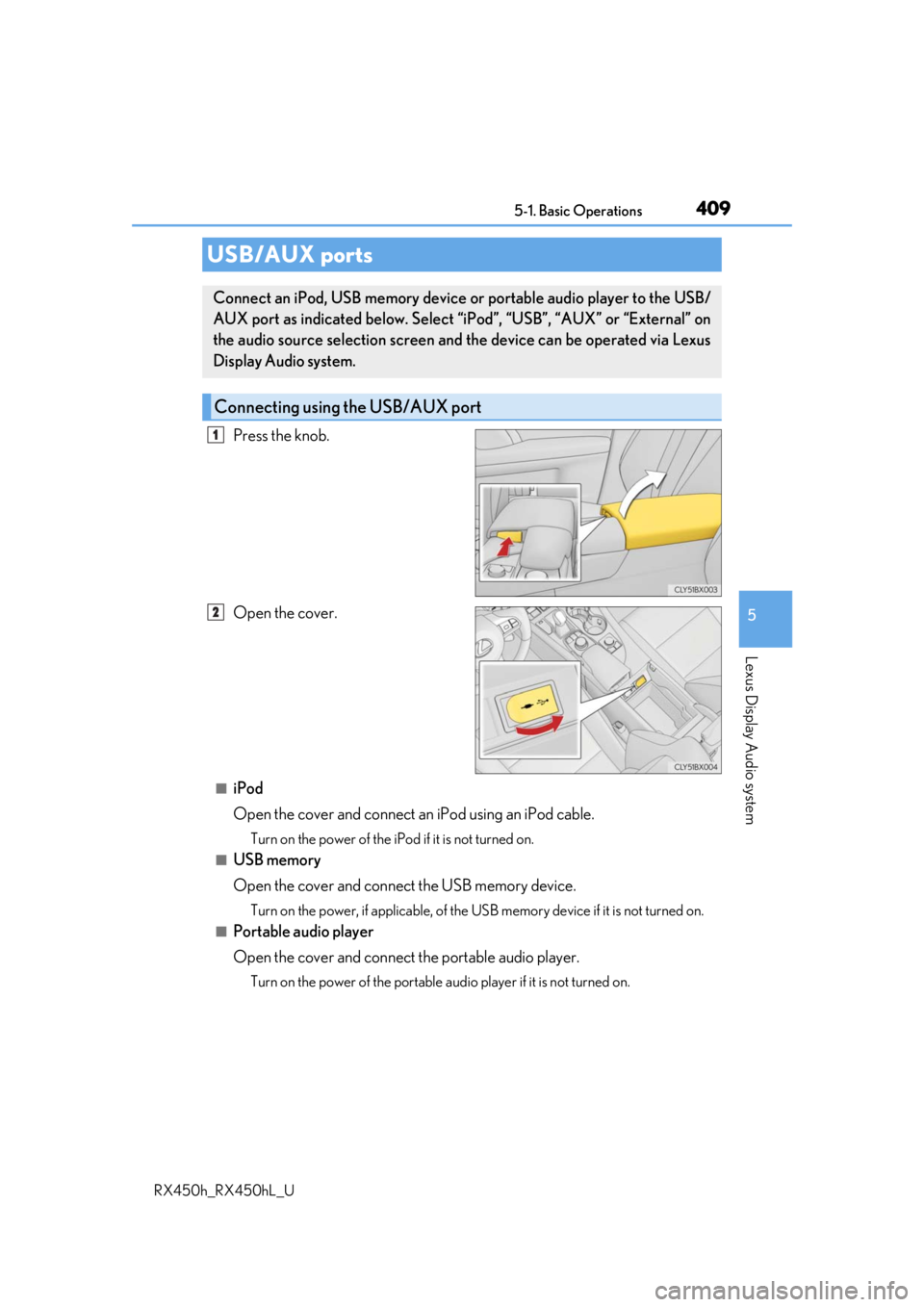
Press the knob.
Open the cover.
■iPod
Open the cover and connect an iPod using an iPod cable.
Turn on the power of the iPod if it is not turned on.
■USB memory
Open the cover and connect the USB memory device.
Turn on the power, if applicable, of the US B memory device if it is not turned on.
■Portable audio player
Open the cover and connect the portable audio player.
Turn on the power of the portable audio player if it is not turned on.
USB/AUX ports
Connect an iPod, USB memory device or portable audio player to the USB/
AUX port as indicated below. Select “iPod”, “USB”, “AUX” or “External” on
the audio source selection screen and the device can be operated via Lexus
Display Audio system.
Connecting using the USB/AUX port
1
2
Page 448 of 792
4485-6. Using an external device
RX450h_RX450hL_U
P. 409
Pressing the “MEDIA” button displays the top screen from any screen of the
selected source.
■Menu screen
P. 423
■Operating portable players co nnected to the audio system
Volume can be adjusted using the vehicle’s audio controls. All other adjustments must be
made on the portable player itself.
■When using a portable player connected to the power outlet
Noise may occur during playback. Use the power source of the portable player.
Using the AUX port
To use the AUX port, connect a portable player, press the “MEDIA” button or
select “AUX” or “External” on the “Source” screen.
Connecting a portable player
Top screen
NOTICE
■To prevent damage to the port able player or its terminal
●Depending on the size and shape of the port able player that is connected to the sys-
tem, the console box may not close fully. In th is case, do not forcibly close the console
box as this may damage the portab le player or the terminal, etc.
●Do not leave portable player in the vehicle. The temperature inside the vehicle may
become high.
●Do not push down on or apply unnecessary pressure to the portable player while it is
connected.
●Do not insert foreign objects into the port.
Page 453 of 792

4535-7. Connecting Bluetooth®
5
Lexus Display Audio system
RX450h_RX450hL_U
When a registered Bluetooth® audio player is in standby for a connection, it will
automatically connect to the system when the power switch is turned to ACCES-
SORY or ON mode.
When automatic connection priority is set to on and there is more than one reg-
istered Bluetooth
® audio player available, the system will automatically connect
to the Bluetooth® audio player with the highest priority. ( P. 456)
Operate the portable player and connect it to the Bluetooth
® audio system.
Go to “Bluetooth
*1 Setup”: “MENU” button “Setup” “Bluetooth*1”
Select the device to connect.
Select “Connect XX
*2” or “Connect as an Audio Player”.
If the desired Bluetooth
® device is not displayed, register the device.
( P. 451)
*1: Bluetooth is a registered trademark of Bluetooth SIG, Inc.
*2: XX represents the selected device name.
Connecting a Bluetooth® audio player
There are 2 portable audio player conne ction settings available: connecting
from the vehicle and connectin g from the portable player.
Connecting method is set to “Vehicle”
Connecting method is set to “Device”
1
2
3
Page 454 of 792

4545-7. Connecting Bluetooth®
RX450h_RX450hL_U
When you register a phone, auto connection will be activated. It is recom-
mended to have the system set to this mode and leave the Bluetooth® phone in a
place where a good connection can be established.
When the power switch is turned to ACCESSORY or ON mode, the system will
search for a nearby cellular phone you have registered.
Next, the system automatically connects with the most recent phone that was
connected. The connected result is displayed.
When automatic connection priority is set to on and there is more than one reg-
istered Bluetooth
® phone available, the system will automatically connect to the
Bluetooth® phone with the highest priority. ( P. 456)
When auto connection has failed or “Bluetooth
*1 Power” is turned off, you must
connect the Bluetooth® device manually.
Go to “Bluetooth
*1 Setup”: “MENU” button “Setup” “Bluetooth*1”
Select the device to connect.
Select “Connect XX
*2”, “Connect as a Phone” or “Connect as an Audio
Player”.
If the desired Bluetooth
® device is not displayed, register the device.
( P. 451)
*1: Bluetooth is a registered trademark of Bluetooth SIG, Inc.
*2: XX represents the selected device name.
■Reconnecting a Bluetooth® phone
If the system cannot connect due to poor signal strength with the power switch in
ACCESSORY or ON mode, the system will automatically attempt to reconnect.
■Connecting a phone while Bluetooth® audio is playing
●Bluetooth® audio will stop temporarily.
●It may take time to connect.
Connecting a Bluetooth® phone
There are two connecting methods available: automatic and manual.
Auto connection
Manual connection
1
2
3
Page 484 of 792

4845-11. Bluetooth®
RX450h_RX450hL_U
■Compatible models
The Bluetooth® audio system supports portable audio players with the following specifi-
cations
●Bluetooth® specifications:
Ver. 2.0 or higher (Recommend ed: Ver. 3.0 +EDR or higher)
●Profiles:
• A2DP (Advanced Audio Distribution Profile) Ver. 1.0, or higher
(Recommended: Ver. 1.3 or higher)
This is a profile to transmit stereo audio or high quality sound to the audio system.
• AVRCP (Audio/Video Remote Control Profile) Ver. 1.0 or higher (Recommended: Ver. 1.5 or higher)
This is a profile to allow re mote control the A/V equipment.
However, please note that some functions may be limited depending on the type of por-
table audio player connected.
The hands-free system supports cellular ph ones with the following specifications.
●Bluetooth® specification:
Ver. 2.0 or higher (Recommend ed: Ver. 3.0 +EDR or higher)
●Profiles:
• HFP (Hands Free Profile) Ver. 1.0 or higher (Recommended: Ver. 1.6 or higher)
This is a profile to allow hands-free phone calls using a cellular phone or head set. It
has outgoing and incoming call functions.
• OPP (Object Push Profile) Ver. 1.1 or higher (Recommended: Ver. 1.2) This is a profile to transfer phonebook data. When a Bluetooth
® compatible cellular
phone has both PBAP and OPP, OPP cannot be used.
• PBAP (Phone Book Access Profile) Ver. 1.0 or higher (Recommended: Ver. 1.1) This is a profile to transfer phonebook data.
• MAP (Message Access Pr ofile) Ver.1.0 or higher
This is a profile to using phone message.
If the cellular phone does not support HFP, yo u cannot register it with the hands-free sys-
tem. OPP, PBAP or MAP services must be selected individually.
■Reconnecting the portable audio player
If the portable audio player is disconnected due to poor reception when the power
switch is in ACCESSORY or ON mode, the system automatically reconnects the porta-
ble audio player.
If you have switched off the portable audio player yourself, follow the instructions below
to reconnect:
●Select the portable audio player again
●Enter the portable audio player
■When you sell your car
Be sure to delete your personal data. ( P. 415)