Page 290 of 792
2904-5. Using the driving support systems
RX450h_RX450hL_U
■Enabling/disabling the pre-collision system
The pre-collision system can be enabled/disabled on ( P. 108) of the
multi-information display.
The system is automatically enabled each time the power switch is turned to ON
mode.
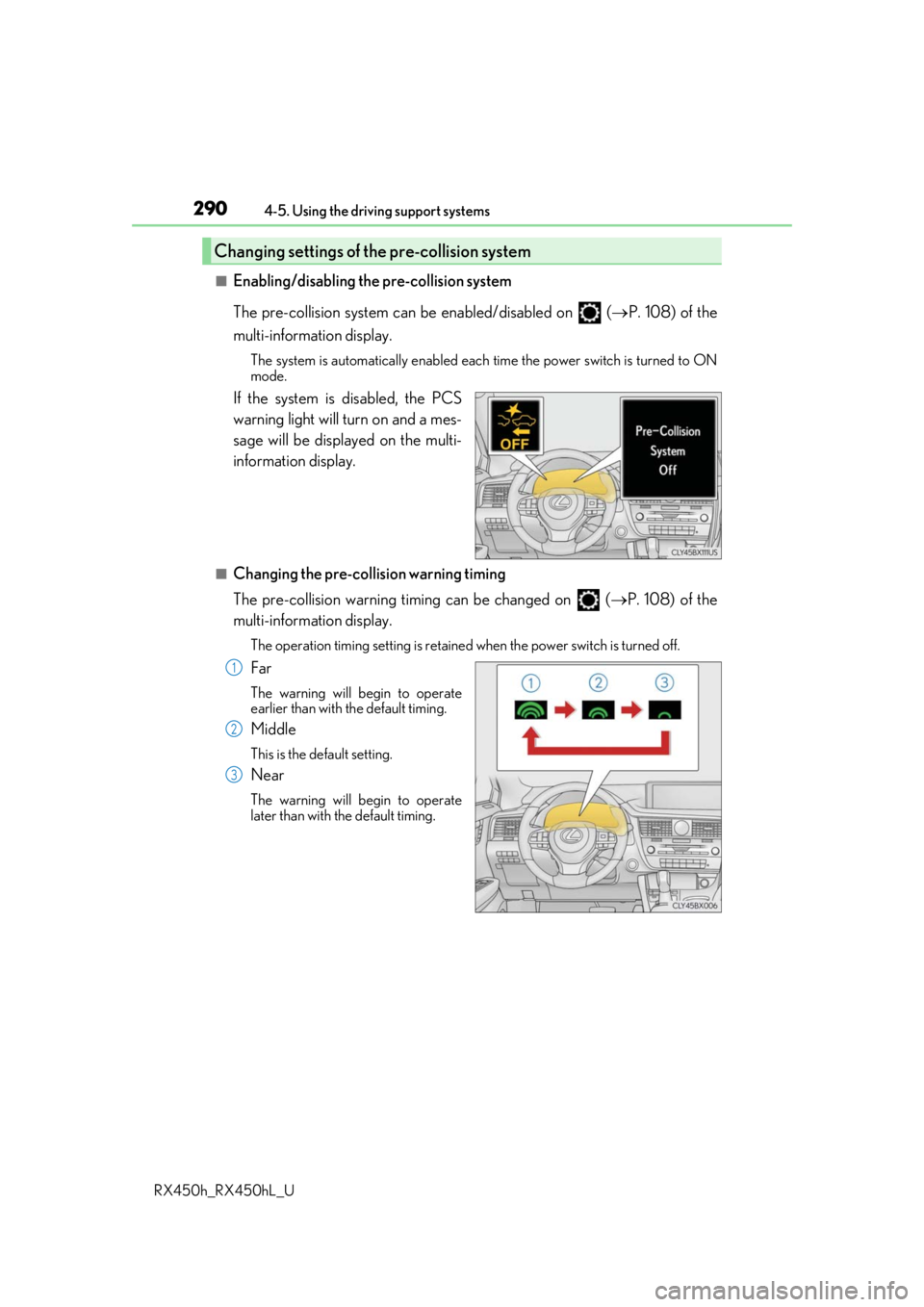
If the system is disabled, the PCS
warning light will turn on and a mes-
sage will be displayed on the multi-
information display.
■Changing the pre-collision warning timing
The pre-collision warning timi ng can be changed on (P. 108) of the
multi-information display.
The operation timing settin g is retained when the power switch is turned off.
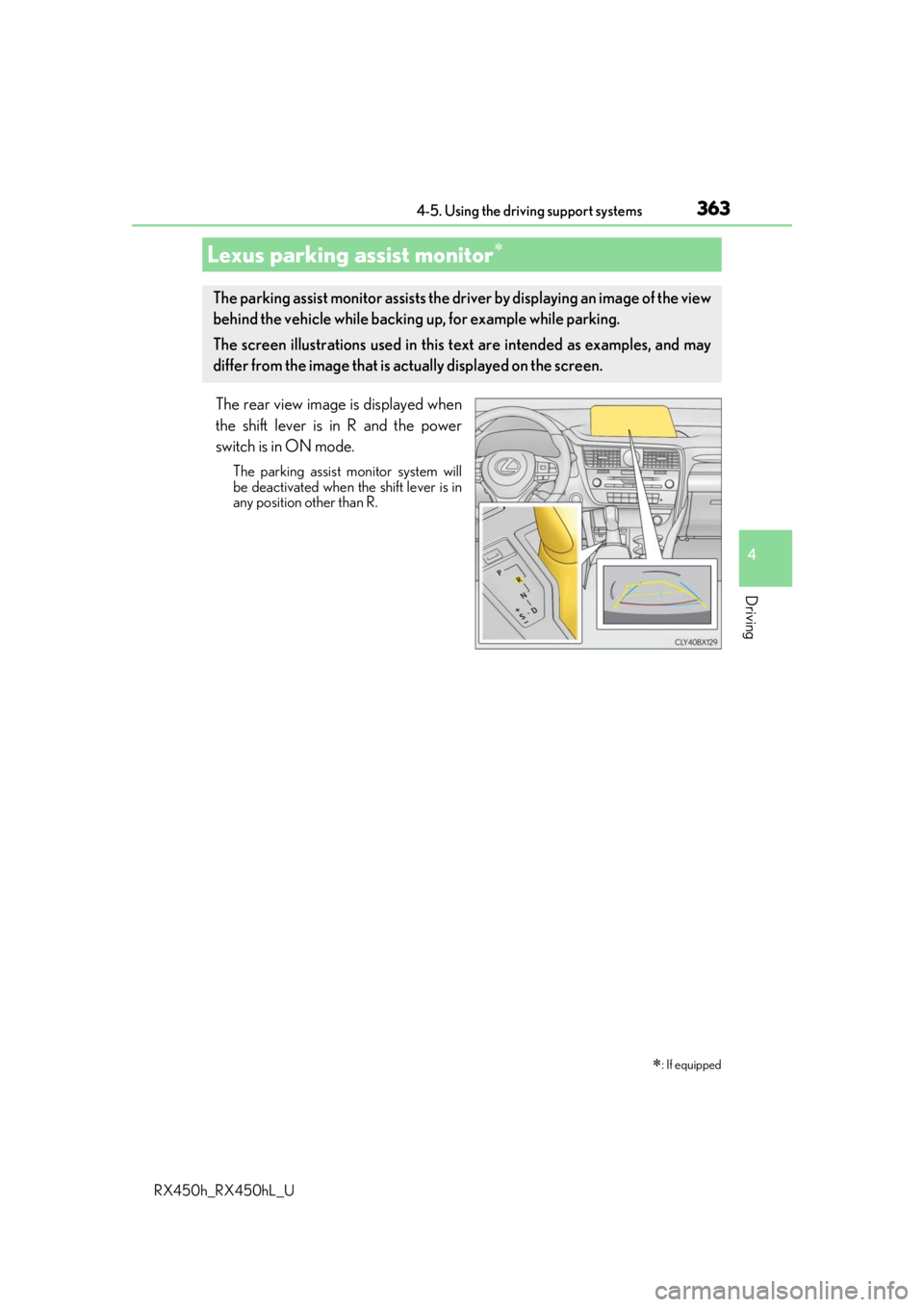
Far
The warning will begin to operate
earlier than with the default timing.
Middle
This is the default setting.
Near
The warning will begin to operate
later than with the default timing.
Changing settings of the pre-collision system
1
2
3
Page 293 of 792
2934-5. Using the driving support systems
4
Driving
RX450h_RX450hL_U• When there is a metal object (manhole cover, steel plate, etc.), steps, or a protrusion
on the road surface or roadside
• When rapidly closing on an electric toll ga te barrier, parking area barrier, or other
barrier that opens and closes
• When using an automatic car wash
• When the vehicle is hit by water, sn ow, dust, etc. from a vehicle ahead
• When driving through steam or smoke
• When there are patterns or paint on the road or a wall that may be mistaken for a
vehicle or pedestrian
• When driving near an object that reflects radio waves, such as a large truck or
guardrail
• When driving near a TV tower, broadcasting station, electric power plant, or other
location where strong radio waves or electrical noise may be present
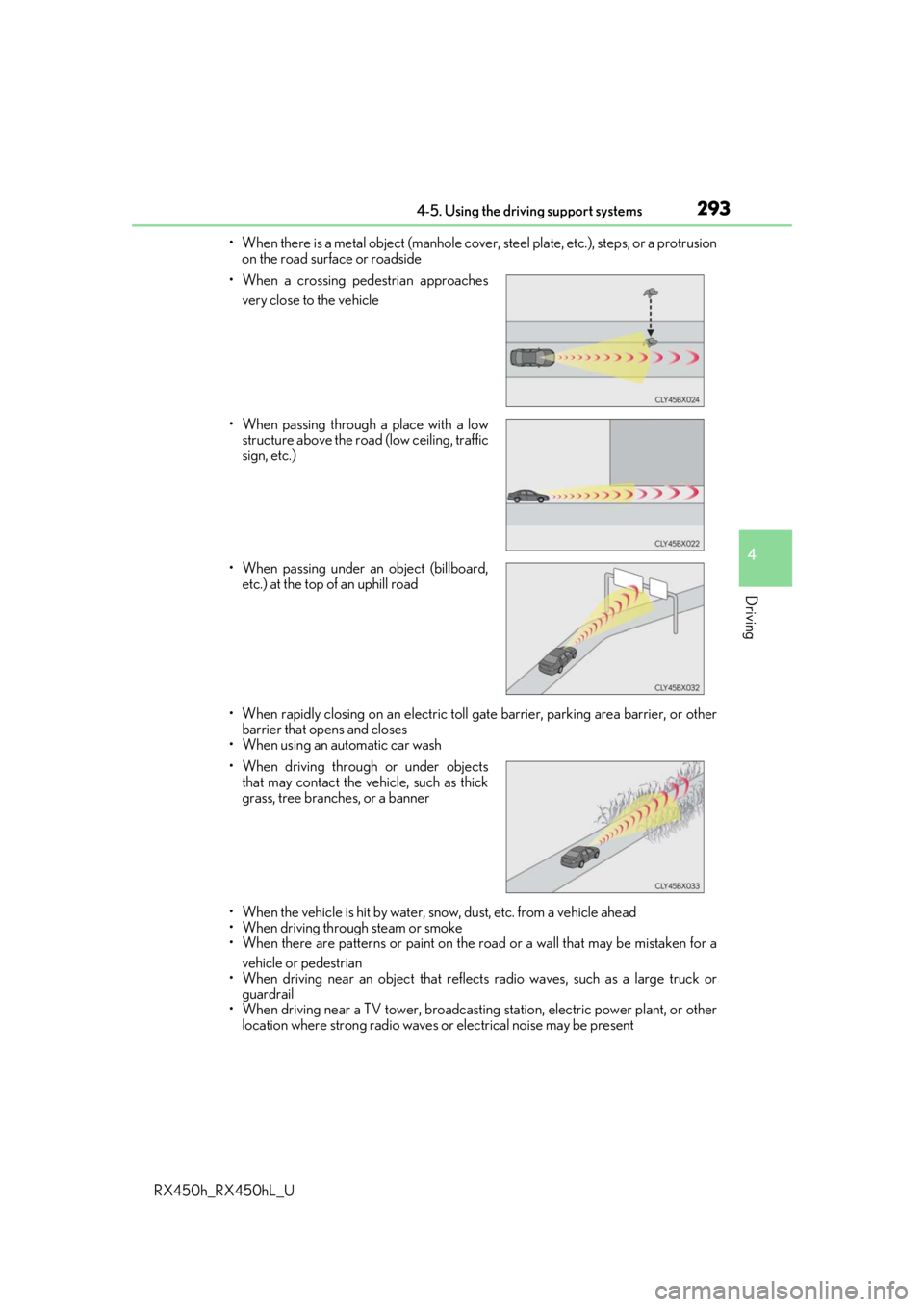
• When a crossing pedestrian approaches
very close to the vehicle
• When passing through a place with a low structure above the road (low ceiling, traffic
sign, etc.)
• When passing under an object (billboard, etc.) at the top of an uphill road
• When driving through or under objects that may contact the vehicle, such as thick
grass, tree branches, or a banner
Page 312 of 792
3124-5. Using the driving support systems
RX450h_RX450hL_U
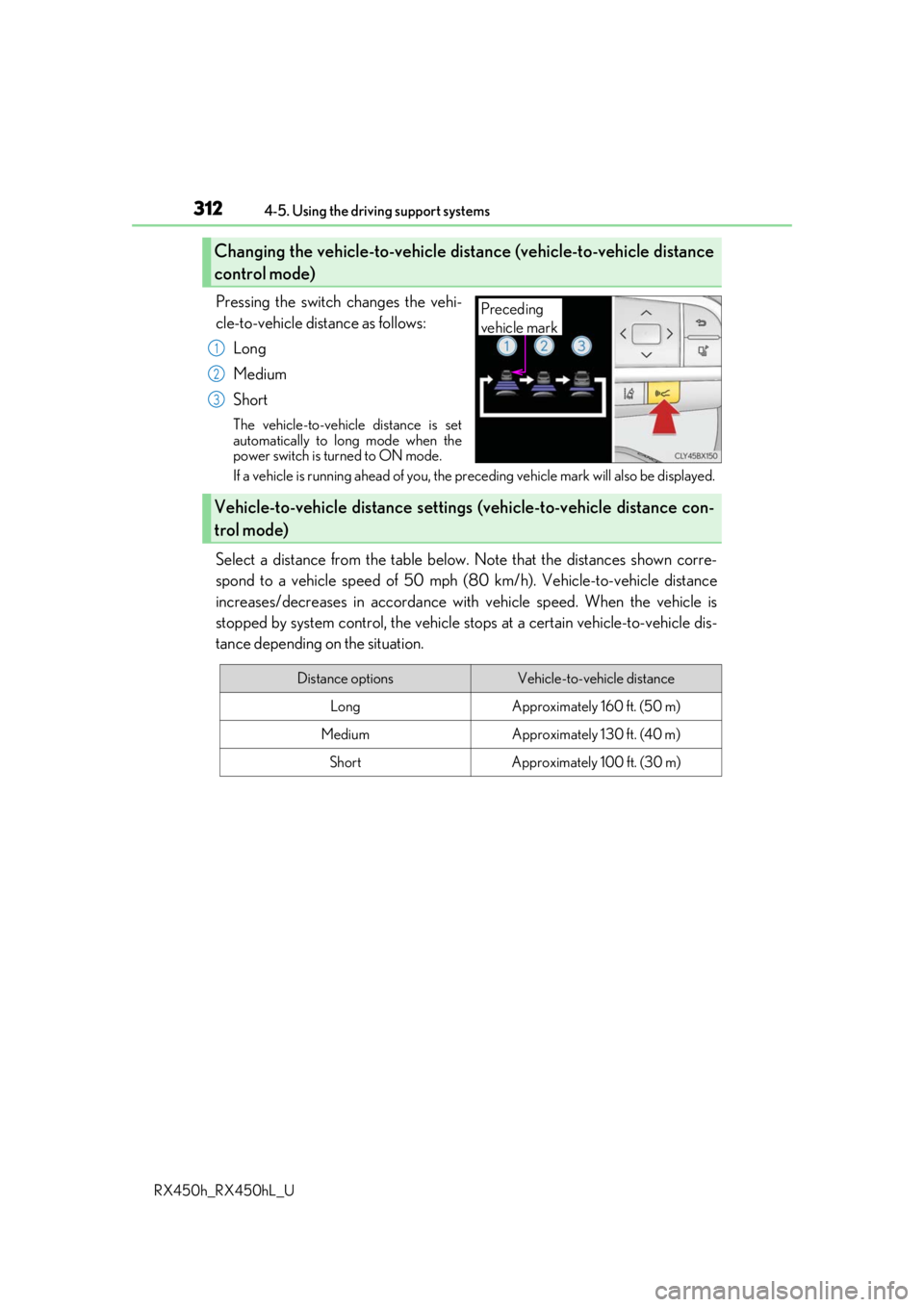
Pressing the switch changes the vehi-
cle-to-vehicle distance as follows: Long
Medium
Short
The vehicle-to-vehicle distance is set
automatically to long mode when the
power switch is turned to ON mode.
If a vehicle is running ahead of you, the pr eceding vehicle mark will also be displayed.
Select a distance from the table below. Note that the distances shown corre-
spond to a vehicle speed of 50 mph (8 0 km/h). Vehicle-to-vehicle distance
increases/decreases in accordance with vehicle speed. When the vehicle is
stopped by system control, the vehicle st ops at a certain vehicle-to-vehicle dis-
tance depending on the situation.
Changing the vehicle-to-vehicle distance (vehicle-to-vehicle distance
control mode)
Preceding
vehicle mark
1
2
3
Vehicle-to-vehicle distance settings (vehicle-to-vehicle distance con-
trol mode)
Distance optionsVehicle-to-vehicle distance
LongApproximately 160 ft. (50 m)
MediumApproximately 130 ft. (40 m)
ShortApproximately 100 ft. (30 m)
Page 338 of 792
3384-5. Using the driving support systems
RX450h_RX450hL_U
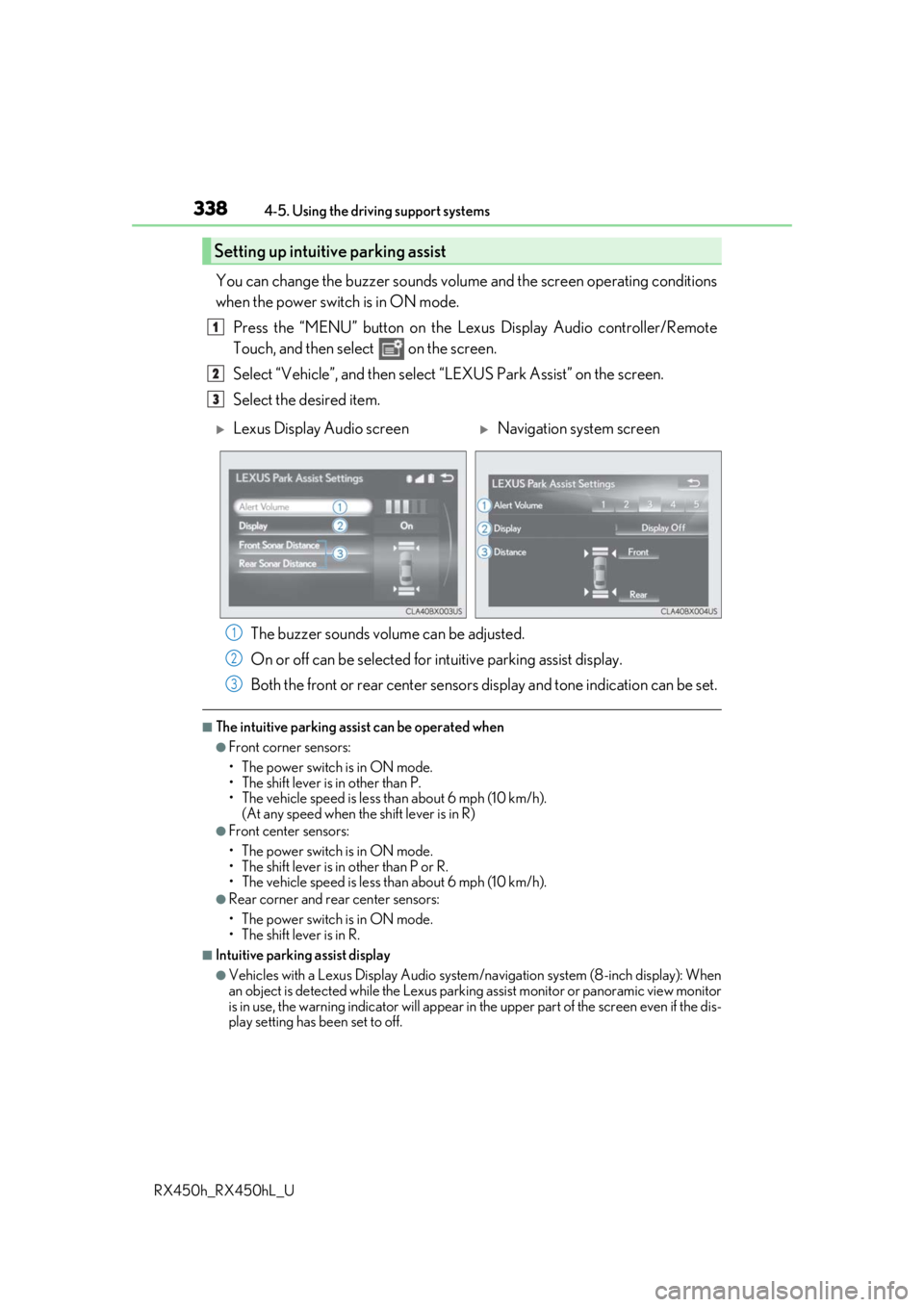
You can change the buzzer sounds volu me and the screen operating conditions
when the power switch is in ON mode.
Press the “MENU” button on the Le xus Display Audio controller/Remote
Touch, and then select on the screen.
Select “Vehicle”, and then select “LEXUS Park Assist” on the screen.
Select the desired item.
The buzzer sounds volume can be adjusted.
On or off can be selected for intuitive parking assist display.
Both the front or rear center sensors display and tone indication can be set.
■The intuitive parking assist can be operated when
●Front corner sensors:
• The power switch is in ON mode.
• The shift lever is in other than P.
• The vehicle speed is less than about 6 mph (10 km/h).
(At any speed when the shift lever is in R)
●Front center sensors:
• The power switch is in ON mode.
• The shift lever is in other than P or R.
• The vehicle speed is less than about 6 mph (10 km/h).
●Rear corner and rear center sensors:
• The power switch is in ON mode.
• The shift lever is in R.
■Intuitive parking assist display
●Vehicles with a Lexus Display Audio system/navigation system (8-inch display): When
an object is detected while the Lexus parking assist monito r or panoramic view monitor
is in use, the warning indicator will appear in the upper part of the screen even if the dis-
play setting has been set to off.
Setting up intuitive parking assist
1
2
3
Lexus Display Audio screenNavigation system screen
1
2
3
Page 345 of 792
3454-5. Using the driving support systems
4
Driving
RX450h_RX450hL_U
Select on the multi-information
display.
Press or of the meter con-
trol switch and select “ICS”.
Press of the meter control
switch.
Select the “Yes” and push .
When the Intelligent Clearance Sonar is disabled, the ICS OFF indicator illu-
minates.
To re-enable the system when it was disabled, select on the multi-informa-
tion display, select “ICS” and then “On”. If disabled using this method, the sys-
tem will not be re-enabled by turning the power switch off and then to ON
mode.
Types of sensors
Except F SPORT modelsF SPORT models
Front corner sensors
Front center sensors
Rear corner sensors
Rear center sensors
Turning the Intelligent Cle arance Sonar system on/off
1
2
3
4
1
2
3
4
Page 350 of 792

3504-5. Using the driving support systems
RX450h_RX450hL_U
■Re-enabling the Intelligent Clearance Sonar system
To re-enable the Intelligent Clearance Sonar system when it is disabled due to operation
of the Intelligent Clearance Sonar function, either enable the system again ( P. 345), or
turn the power switch off an d then back to ON mode.
Additionally, if the object becomes no longer in the traveling direction of the vehicle or if
the traveling direction of the vehicle change s (such as changing from moving forward to
backing up, or from backing up to moving fo rward), the system will be re-enabled auto-
matically.
■Objects that the Intelligent Clearance Sonar function may not detect
The sensors may not be able to detect certain objects, such as the following.
●Cotton cloth, snow, and other materials that are poor reflectors of ultrasonic waves.
(People may also not be detected depending on the type of clothing they are wearing.)
●Objects which are not perpendicular to the ground, are not perpendicular to the travel-
ing direction of the vehicle, are uneven or are waving.
●Low objects
●Thin objects such as wires, fences, ropes and signposts
●Objects that are extremely close to the bumper
■Intuitive parking assist buzzer
Regardless of whether the in tuitive parking assist system is enabled or not ( P. 332), if
the Intelligent Clearance Sonar system is enabled ( P. 345), the front or rear sensors
detect an object and brake control is performed, the intuitive parking assist buzzer will
sound to notify the driver of the approximate distance to the object.
Page 359 of 792

3594-5. Using the driving support systems
4
Driving
RX450h_RX450hL_U
■Re-enabling the Rear Cross Traffic Auto Brake function
To re-enable the Rear Cross Traffic Auto Brake function when it is disabled during opera-
tion of the Rear Cross Traffic Auto Brake function, either enable the system again (P.
345), or turn the power switch off and then back to ON mode.
Additionally, if there is no longer a vehicle ap proaching from the right or left at the rear of
the vehicle, or if the traveling direction of the vehicle changes (such as changing from
moving forward to backing up or from backin g up to moving forward), the system will be
re-enabled automatically.
■Conditions under which the Rear Cross Traffic Auto Brake function will not detect a
vehicle
The Rear Cross Traffic Auto Brake function is not designed to detect the following types
of vehicles and/or objects:
●Vehicles approaching from directly behind
●Vehicles backing up in a parkin g space next to your vehicle
●Guardrails, walls, signs, parked vehi cles and similar stationary objects*
●Small motorcycles, bicycles, pedestrians, etc.*
●Vehicles moving away from your vehicle
●Vehicles approaching from the parking spaces next to your vehicle*
*: Depending on the conditions, detection of a vehicle and/or object may occur.
■RCTA function buzzer
Regardless of whether the RCTA function is enabled or not ( P. 321), if the Rear Cross
Traffic Auto Brake function is enabled and brake control is performed, a buzzer will
sound to notify the driver.
●Vehicles that the sensors cannot detect due
to obstructions
●Vehicles which suddenly accelerate or decel-
erate near your vehicle
Page 363 of 792
3634-5. Using the driving support systems
4
Driving
RX450h_RX450hL_U
The rear view image is displayed when
the shift lever is in R and the power
switch is in ON mode.
The parking assist monitor system will
be deactivated when the shift lever is in
any position other than R.
Lexus parking assist monitor
: If equipped
The parking assist monitor assists the driv er by displaying an image of the view
behind the vehicle while backing up, for example while parking.
The screen illustrations used in this text are intended as examples, and may
differ from the image that is ac tually displayed on the screen.