2019 LEXUS RX450H turn
[x] Cancel search: turnPage 316 of 792

3164-5. Using the driving support systems
RX450h_RX450hL_U
■Dynamic radar cruise control with full-speed range can be set when
●The shift lever is in D or range 4 or higher of S has been selected.
●Range 4 or higher has been selected by using the paddle shift switch.
(vehicles with padd le shift switches)
●Vehicle speed is at or abov e approximately 30 mph (50 km/h). However, when a pre-
ceding vehicle is detected, the dynamic ra dar cruise control with full-speed range can
be set even if the vehicle speed is below approximately 30 mph (50 km/h).
■Accelerating after setting the vehicle speed
The vehicle can accelerate by operating the accelerator pedal. After accelerating, the
set speed resumes. However, during vehicle-to-vehicle distance control mode, the vehi-
cle speed may decrease below the set speed in order to maintain the distance to the pre-
ceding vehicle.
■When the vehicle stops while follow-up cruising
●Pushing the lever up while the vehicle ahead stops will resume follow-up cruising if the
vehicle ahead starts off within approximat ely 3 seconds after the switch is pressed.
●If the vehicle ahead starts off within 3 seco nds after your vehicle stops, follow-up cruis-
ing will be resumed.
■Automatic cancelation of vehicle- to-vehicle distance control mode
Vehicle-to-vehicle distance control mode is automatically canceled in the following situ-
ations.
●Actual vehicle speed falls below approximately 25 mph (40 km/h) when there are no
vehicles ahead.
●The preceding vehicle leaves the lane when yo ur vehicle is following at a vehicle speed
at or below approximately 25 mph (40 km/h ). Otherwise, the sensor cannot properly
detect the vehicle. (“Radar Cruise Contro l Not Available No Preceding Vehicles” is
displayed on the multi-information display)
●VSC is activated.
●TRAC is activated for a period of time.
●When the VSC or TRAC system is turned off.
●The sensor cannot detect correctly because it is covered in some way.
●Pre-collision braking is activated.
●The parking brake is operated.
●The vehicle is stopped by system control on a steep incline.
●The following are detected when the vehicle has been stopped by system control:
• The driver is not wearing a seat belt.
• The driver’s door is opened.
• The vehicle has been stopped for about 3 minutes
If vehicle-to-vehicle distance control mode is automatically canceled for any other rea-
son, there may be a malfunction in th e system. Contact your Lexus dealer.
Page 317 of 792

3174-5. Using the driving support systems
4
Driving
RX450h_RX450hL_U
■Automatic cancelation of constant speed control mode
Constant speed control mode is automatica lly canceled in the following situations:
●Actual vehicle speed is more than approxim ately 10 mph (16 km/h) below the set vehi-
cle speed.
●Actual vehicle speed falls below approximately 25 mph (40 km/h).
●VSC is activated.
●TRAC is activated for a period of time.
●When the VSC or TRAC system is turned off.
●Pre-collision braking is activated.
If constant speed control mode is automati cally canceled for any other reason, there may
be a malfunction in the system . Contact your Lexus dealer.
■Warning messages and buzzers for dynamic radar cruise control with full-speed range
Warning messages and buzzers are used to indicate a system malfunction or to inform
the driver of the need for ca ution while driving. If a warning message is shown on the
multi-information display, read the message and follow the instructions.
■When the sensor may not be correctly detecting the vehicle ahead
In the case of the following and depending on the conditions, operate the brake pedal
when deceleration of the system is insuff icient or operate the accelerator pedal when
acceleration is required.
As the sensor may not be able to correctly detect these types of vehicles, the approach
warning ( P. 314) may not be activated.
●Vehicles that cut in suddenly
●Vehicles traveling at low speeds
●Vehicles that are not moving in the same lane
●Vehicles with small rear ends (traile rs with no load on board, etc.)
Page 320 of 792
3204-5. Using the driving support systems
RX450h_RX450hL_U
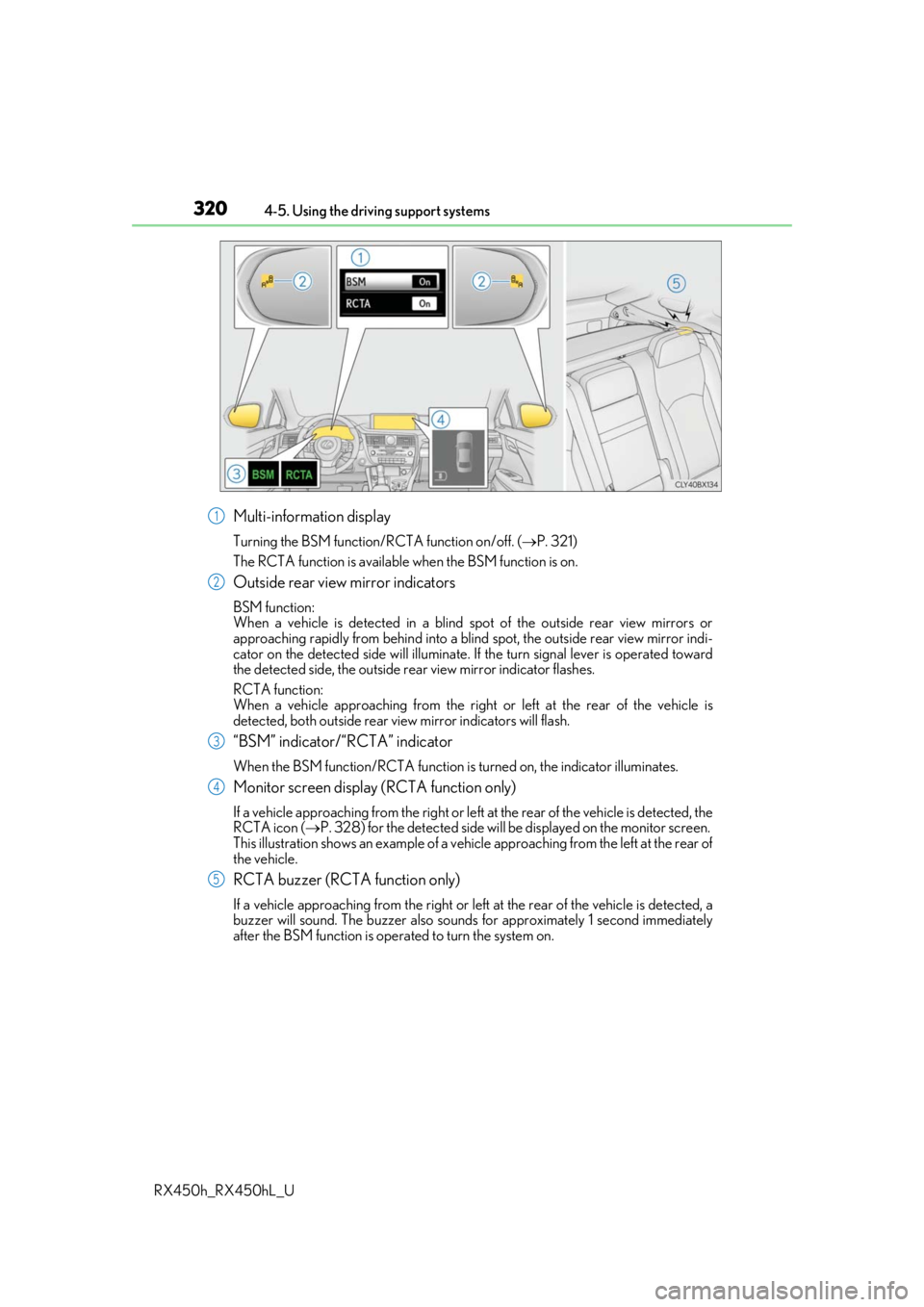
Multi-information display
Turning the BSM function/RCTA function on/off. ( P. 321)
The RCTA function is available when the BSM function is on.
Outside rear view mirror indicators
BSM function:
When a vehicle is detected in a blind spot of the outside rear view mirrors or
approaching rapidly from behind into a blin d spot, the outside rear view mirror indi-
cator on the detected side will illuminate. If the turn signal lever is operated toward
the detected side, the outside rear view mirror indicator flashes.
RCTA function:
When a vehicle approaching from the right or left at the rear of the vehicle is
detected, both outsid e rear view mirror indicators will flash.
“BSM” indicator/“RCTA” indicator
When the BSM function/RCTA function is turned on, the indicator illuminates.
Monitor screen display (RCTA function only)
If a vehicle approaching from the right or left at the rear of the vehicle is detected, the
RCTA icon ( P. 328) for the detected side will be displayed on the monitor screen.
This illustration shows an example of a vehi cle approaching from the left at the rear of
the vehicle.
RCTA buzzer (RCTA function only)
If a vehicle approaching from the right or left at the rear of the vehicle is detected, a
buzzer will sound. The buzzer also sounds for approximately 1 second immediately
after the BSM function is operated to turn the system on.
1
2
3
4
5
Page 321 of 792

3214-5. Using the driving support systems
4
Driving
RX450h_RX450hL_U
Press “” or “ ” of the meter control switches, select .
Press “ ” or “ ” of the meter control switches, select “BSM”.
Press “ ” or “ ” of the meter control switch es, select “BSM” or “RCTA”.
■Outside rear view mirror indicator visibility
In strong sunlight, the outside rear view mirror indicator may be difficult to see.
■Hearing the RCTA buzzer
The RCTA buzzer may be difficult to hear over loud noises, such as if the audio system
volume is high.
■When there is a malfunction in the Blind Spot Monitor
If a system malfunction is detected due to any of the following, a warning message will be
displayed: ( P. 667)
●A sensor is malfunctioning
●A sensor is dirty or covere d with snow or a sticker
●The outside temperature is extremely high or low
●Sensor voltage is abnormal
●A sensor is misaligned
■Certification for the Blind Spot Monitor
For vehicles sold in the U.S.A.
For vehicles sold in Canada
Turning the BSM function/RCTA function on/off
1
2
3
Page 326 of 792

3264-5. Using the driving support systems
RX450h_RX450hL_U
■Conditions under which the BSM function may not function correctly
●The BSM function may not detect vehicles correctly in the following situations:
• When the sensor is misaligned due to a stro ng impact to the sensor or its surround-
ing area
• When mud, snow, ice, a sticke r, etc. is covering the sensor or surrounding area on
the rear bumper
• When driving on a road surf ace that is wet with standing water during bad weather,
such as heavy rain, snow, or fog
• When multiple vehicles are approaching wi th only a small gap between each vehicle
• When the distance between your vehicle and a following vehicle is short
• When there is a significant difference in speed between your vehicle and the vehicle that enters the detection area
• When the difference in speed between your vehicle and another vehicle is changing
• When a vehicle enters a detection area traveling at about the same speed as your vehicle
• As your vehicle starts from a stop, a vehicle remains in the detection area
• When driving up and down cons ecutive steep inclines, such as hills, dips on the road,
etc.
• When driving on roads with sharp bends, consecutive curves, or uneven surfaces
• When vehicle lanes are wide, or when driving on the edge of a lane, and the vehicle in an adjacent lane is far away from your vehicle
• When towing a trailer (vehicles with towing package)
• When items such as a bicycle carrier are installed on the rear of the vehicle
• When there is a significant difference in height between your vehicle and the vehicle that enters the detection area
• Immediately after the BSM function is turned on
●Instances of the BSM function unnecessarily detecting a vehicle and/or object may
increase in the following situations:
• When the sensor is misaligned due to a stro ng impact to the sensor or its surround-
ing area
• When the distance between your vehicle and a guardrail, wall, etc. that enters the detection area is short
• When driving up and down cons ecutive steep inclines, such as hills, dips on the road,
etc.
• When vehicle lanes are narrow, or when driv ing on the edge of a lane, and a vehicle
traveling in a lane other than the ad jacent lanes enters the detection area
• When driving on roads with sharp bends, consecutive curves, or uneven surfaces
• When the tires are slipping or spinning
• When the distance between your vehicle and a following vehicle is short
• When a bicycle carrier or other accessory is installed to the rear of the vehicle
• When towing a trailer (vehicles with towing package)
Page 331 of 792

3314-5. Using the driving support systems
4
Driving
RX450h_RX450hL_U• Immediately after the RCTA function is turned on
• Immediately after the hybrid system is started with the RCTA function on
●Instances of the RCTA function unnecessari
ly detecting a vehicle and/or object may
increase in the following situations:
• When a vehicle passes by th e side of your vehicle
• When the distance between your vehicle and metal objects, such as a guardrail,
wall, sign, or parked vehicle, which may re flect electrical waves toward the rear of
the vehicle, is short
You can change the BSM function/RCTA function settings.
Press the “MENU” button on the Remote Touch, and then select on the
screen.
Select “Vehicle”, and then select “Blind Spot Monito r Settings” on the screen.
Select the desired setting. ( P. 745)
• When backing out of a shallow angle park-
ing spot
• When the sensors cannot detect a vehicle due to obstructions
• When the parking space faces a street and vehicles are being driven on the street
Setting up BSM function/RCTA function
1
2
3
Page 332 of 792

3324-5. Using the driving support systems
RX450h_RX450hL_U
Press “ ” or “ ” of the meter control
switches, select .
Press “ ” or “ ” of the meter control
switches, select “Parking Assist”.
When on, the indicator light comes on
to inform the driver that the system is
operational.
Intuitive parking assist
: If equipped
The distance from your vehicle to a ne arby wall or other stationary object
when parallel parking or maneuvering into a garage is measured by the sen-
sors and communicated via the displays and a buzzer. Always check the sur-
rounding area when using this system.
Types of sensors
Except F SPORT modelsF SPORT models
Front corner sensors
Front center sensors
Rear corner sensors
Rear center sensors
Turning the intuitive parking assist on/off
1
2
3
4
1
2
Page 340 of 792

3404-5. Using the driving support systems
RX450h_RX450hL_U
■If “Clean Parking Assist Sensor” is di splayed on the multi-information display
A sensor may be dirty or covered with snow or ic e. In such cases, if it is removed from the
sensor, the system should return to normal.
Also, due to the sensor being frozen at low temperatures, a malfunction display may
appear or an object may not be detected. If the sensor thaws out, the system should
return to normal.
■If “Parking Assist Malfunction” is di splayed on the multi-information display
Depending on the malfunction of the sensor, the device may not be working normally.
Have the vehicle inspected by your Lexus dealer.
■Certification
For vehicles sold in Canada
This ISM device complies with Canadian ICES-001.
Cet appareil ISM est conforme a la norme NMB-001 du Canada.
■Customization
Some functions can be customized. ( P. 338, 736)
WARNING
■When using the intuitive parking assist
Observe the following precautions.
Failing to do so may result in the vehicle be ing unable to be driven safely and possibly
cause an accident.
●Do not use the sensor at speeds in excess of 6 mph (10 km/h).
●The sensors’ detection areas and reaction ti mes are limited. When moving forward or
reversing, check the areas surrounding the vehicle (especially the sides of the vehi-
cle) for safety, and drive slowly, using the brake to control the vehicle’s speed.
●Do not install accessories within the sensors’ detection areas.
●The vehicle is equipped with a fender pole or wireless antenna.
●The front or rear bumper or a se nsor receives a strong impact.
●A non-genuine Lexus suspension (lower ed suspension, etc.) is installed.
●Towing eyelets are installed.
●A backlit license plate is installed.
■When using intuitive parking assist
In the following situations, the system may not function correctly due to a sensor mal-
function, etc. Have the vehicle checked by your Lexus dealer.
●The intuitive parking assist operation disp lay flashes, and a buzzer sounds when no
obstacles are detected.
●If the area around a sensor co llides with something, or is subjected to strong impact.
●If the bumper collides with something.
●If the display shows continuously without beeping, except when the buzzer mute
switch has been turned on.
●If a display error occurs, first check the sensor.
If the error occurs even if there is no ice, sn ow or mud on the sensor, it is likely that the
sensor is malfunctioning.