2019 LEXUS RX450H ECO
[x] Cancel search: ECOPage 255 of 792
2554-2. Driving procedures
4
Driving
RX450h_RX450hL_U
■Parking brake indicator light and parking brake light
●Depending on the power switch mode, the parking brake indicator light and parking
brake light will turn on and stay on as described below:
ON mode: Comes on until the parking brake is released.
Not in ON mode: Stays on for approximately 15 seconds.
●When the power switch is turned off with th e parking brake set, the parking brake indi-
cator light and parking brake light will stay on for about 15 seconds. This does not indi-
cate a malfunction.
■Changing the mode
When changing the automatic mode on/off , the message will be shown on the multi-
information display and the buzzer sounds.
■Parking brake engaged warning buzzer
A buzzer will sound if the vehicle is driv en with the parking brake engaged. “Release
Parking Brake” is displayed on the multi-information display.
■Warning messages and buzzers
Warning messages and buzzers are used to indicate a system malfunction or to inform
the driver of the need for caution. If a warn ing message is shown on the multi-information
display, read the message and follow the instructions.
■If the brake system warning light comes on
P. 660
■Usage in winter time
P. 391
WARNING
■When parking the vehicle
Do not leave a child in the vehicle alone. The parking brake may be released uninten-
tionally and there is the danger of the ve hicle moving that may lead to an accident
resulting in death or serious injury.
■Parking brake switch
Do not set any objects near the parking br ake switch. Objects may interfere with the
switch and may lead the parking brake to unexpectedly operate.
NOTICE
■When parking the vehicle
Before you leave the vehicle, shift the shif t lever to P, set the parking brake and make
sure that the vehicle does not move.
■When the system malfunctions
Stop the vehicle in a safe place and check the warning messages.
■When the parking brake cannot be released due to a malfunction
Driving the vehicle with the parking brake se t will lead to brake components overheat-
ing, which may affect bra king performance and increase brake wear. Contact your
Lexus dealer immediately if this occurs.
Page 260 of 792

2604-3. Operating the lights and wipers
RX450h_RX450hL_U
■Daytime running light system
●The daytime running lights illuminate using th e same lights as the parking lights and illu-
minate brighter than the parking lights.
●To make your vehicle more visible to other drivers during daytime driving, the daytime
running lights turn on automatically when a ll of the following conditions are met. (The
daytime running lights are not designed for use at night.)
• The hybrid system is started
• The parking brake is released
• The headlight switch is in the (Canada only), or
* position
*: When the surroundings are bright
The daytime running lights remain on after they illuminate, even if the parking brake is set
again.
●For the U.S.A.: Daytime running lights can be turned off by operating the switch.
●Compared to turning on the headlights, the daytime running light system offers greater
durability and consumes less electricity, so it can help improve fuel economy.
■Cornering lights (if equipped)
When the cornering lights are on for more than 30 minutes, they will turn off automati-
cally.
■Headlight control sensor
■Automatic light off system
●When the headlights come on: The headlights and tail lights turn off 30 seconds after a
door is opened and closed if the power switch is turned to ACCESSORY mode or
turned off. (The lights turn off immediately if on the key is pre ssed after all the doors
are locked.)
●When only the tail lights come on: The tail lights turn off automatically if the power
switch is turned to ACCESSORY mode or tu rned off and the driver’s door is opened.
To turn the lights on again, turn the power switch to ON mode, or turn the light switch off
once and then back to or .
■Automatic headlight leve ling system (if equipped)
The level of the headlights is automatically adjusted accordi ng to the number of passen-
gers and the loading condition of the vehicle to ensure that the headlights do not inter-
fere with other road users.
■Light reminder buzzer
A buzzer sounds when the power switch is turned off or turned to ACCESSORY mode
and the driver’s door is opened while the lights are turned on. The sensor may not function properly if an
object is placed on the sensor, or anything that
blocks the sensor is affixed to the windshield.
Doing so interferes with the sensor detecting
the level of ambient light and may cause the
automatic headlight system to malfunction.
Page 261 of 792

2614-3. Operating the lights and wipers
4
Driving
RX450h_RX450hL_U
■Welcome lighting
If the headlight switch is turned to and the surrounding area is dark, unlocking the
doors using the smart access system with pu sh-button start or wireless remote control
will turn the parking lights and tail lights on automatically.
■Windshield wiper linked headlight illumination
When driving during daytime with the headlight switch turned to , if the windshield
wipers are used, the headlights will turn on automatically after several seconds to help
enhance the visibility of your vehicle.
■12-volt battery-saving function
In order to prevent the 12-volt battery of the vehicle from discharging, if the headlights
and/or tail lights are on when the power switch is turned off the 12-volt battery saving
function will operate and automatically turn off all the lights after approximately 20 min-
utes. When the power switch is turned to ON mode, the 12-volt battery-saving function
will be disabled.
When any of the following are performed, the 12-volt battery-saving function is canceled
once and then reactivated. All the lights will turn off automa tically 20 minutes after the
12-volt battery-saving function has been reactivated:
●When the headlight switch is operated
●When a door is opened or closed
■Customization
Some functions can be customized. ( P. 736)
NOTICE
■To prevent 12-volt battery discharge
Do not leave the lights on longer than ne cessary when the hybrid system is off.
Page 264 of 792

2644-3. Operating the lights and wipers
RX450h_RX450hL_U
■Conditions to turn the high beams on/off automatically
●When all of the following conditions are met, the high beams will be turned on automat-
ically (after approximately 1 second):
• The vehicle speed is approximately 21 mph (34 km/h) or more.
• The area ahead of the vehicle is dark.
• There are no vehicles ahead with headlights or tail lights turned on.
• There are few streetlights on the road ahead.
●If any of the following condit ions is met, the high beams will turn off automatically:
• The vehicle speed is below ap proximately 17 mph (27 km/h).
• The area ahead of the vehicle is not dark.
• Vehicles ahead have th eir headlights or tail lights turned on.
• There are many streetlights on the road ahead.
■Camera sensor detection information
●The high beams may not be automatically turned off in the following situations:
• When a vehicle suddenly appears from around a curve
• When the vehicle is cut in front of by another vehicle
• When vehicles ahead cannot be detected du e to repeated curves, road dividers or
roadside trees
• When vehicles ahead appear in a faraway lane on a wide road
• When the lights of vehicles ahead are not on
●The high beams may be turned off if a vehicl e ahead that is using fog lights without its
headlights turned on is detected.
●House lights, street lights, traffic signals, and illuminated billboards or signs and other
reflective objects may cause the high beams to change to the low beams, or the low
beams to remain on.
●The following factors may affect the amount of time taken for the high beams to turn on
or off:
• The brightness of the headlights, fog lights, and tail lights of vehicles ahead
• The movement and direction of vehicles ahead
• When a vehicle ahead only has operational lights on one side
• When a vehicle ahead is a two-wheeled vehicle
• The condition of the road (gradient, cu rve, condition of the road surface, etc.)
• The number of passengers and amount of luggage in the vehicle
●The high beams may turn on or off unexpectedly.
●Bicycles or similar vehicles may not be detected.
Page 265 of 792

2654-3. Operating the lights and wipers
4
Driving
RX450h_RX450hL_U
●In the following situations the system may not be able to correctly detect the surround-
ing brightness level. This may cause the low beams to remain on or the high beams to
flash or dazzle pedestrians or vehicles ahead. In such a case, it is necessary to manually
switch between the high and low beams.
• When driving in inclement weather (heavy rain, snow, fog, sandstorms, etc.)
• When the windshield is obscured by fog, mist, ice, dirt, etc.
• When the windshield is cracked or damaged
• When the camera sensor is deformed or dirty
• When the temperature of the camera sensor is extremely high
• When the surrounding brightness level is equal to that of headlights, tail lights or fog
lights
• When headlights or tail lights of vehicles ahead are turned off, dirty, changing color,
or not aimed properly
• When the vehicle is hit by water, snow, dust, etc. from a preceding vehicle
• When driving through an area of intermittently changing brightness and darkness
• When frequently and repeated ly driving ascending/descending roads, or roads with
rough, bumpy or uneven surfaces (such as stone-paved roads, gravel roads, etc.)
• When frequently and repeatedly taking curves or driving on a winding road
• When there is a highly reflective object ahea d of the vehicle, such as a sign or mirror
• When the back of a preceding vehicle is highly reflective, such as a container on a truck
• When the vehicle’s headlights are damaged or dirty, or are not aimed properly
• When the vehicle is listing or titling due to a flat tire, a trailer being towed, etc.
• When the headlights are changed between the high beams and low beams repeat-
edly in an abnormal manner
• When the driver believes that the high beams may be flashing or dazzling pedestri- ans or other drivers
■Temporarily lowering sensor sensitivity
The sensitivity of the sensor can be temporarily lowered.
Turn the power switch off while the following conditions are met.
• The headlight switch is in or .
• The headlight switch lever is in high beam position.
• Automatic High Beam switch is on.
Turn the power switch to ON mode.
Within 30 seconds after , repeat pulling th e headlight switch lever to the original
position then pushing it to the high beam position quickly 10 times, then leave the lever
in high beam position.
If the sensitivity is changed, the Automatic High Beam indicator is turn on and off 3
times.
Automatic High Beam (headlights) may turn on even when the vehicle is stopped.
1
2
32
4
Page 269 of 792

2694-3. Operating the lights and wipers
4
Driving
RX450h_RX450hL_U
■Front door opening linked windshield wiper stop function
When “AUTO” is selected and the windshield wipers are operating, if a front door is
opened, the operation of the windshield wipers will be stopped to prevent anyone near
the vehicle from being sprayed by water from the wipers, provided the vehicle is stopped
with the parking brake applied or the shift lever in P. When the front door is closed, wiper
operation will resume.
■Customization
Some functions can be customized. ( P. 736)
WARNING
■Caution regarding the use of windshield wipers in AUTO mode
The windshield wipers may operate unexpectedly if the sensor is touched or the wind-
shield is subject to vibration in AUTO mode. Take care that your fingers, etc. do not
become caught in the windshield wipers.
■Caution regarding the use of washer fluid
When it is cold, do not use the washer fl uid until the windshield becomes warm. The
fluid may freeze on the windshield and cause lo w visibility. This may lead to an accident,
resulting in death or serious injury.
NOTICE
■When the windshield is dry
Do not use the wipers, as they may damage the windshield.
■When the washer fluid tank is empty
Do not operate the switch continually as the washer fluid pump may overheat.
■When a nozzle becomes blocked
In this case, contact your Lexus dealer.
Do not try to clear it with a pin or other object. The nozzle will be damaged.
Page 270 of 792
2704-3. Operating the lights and wipers
RX450h_RX450hL_U
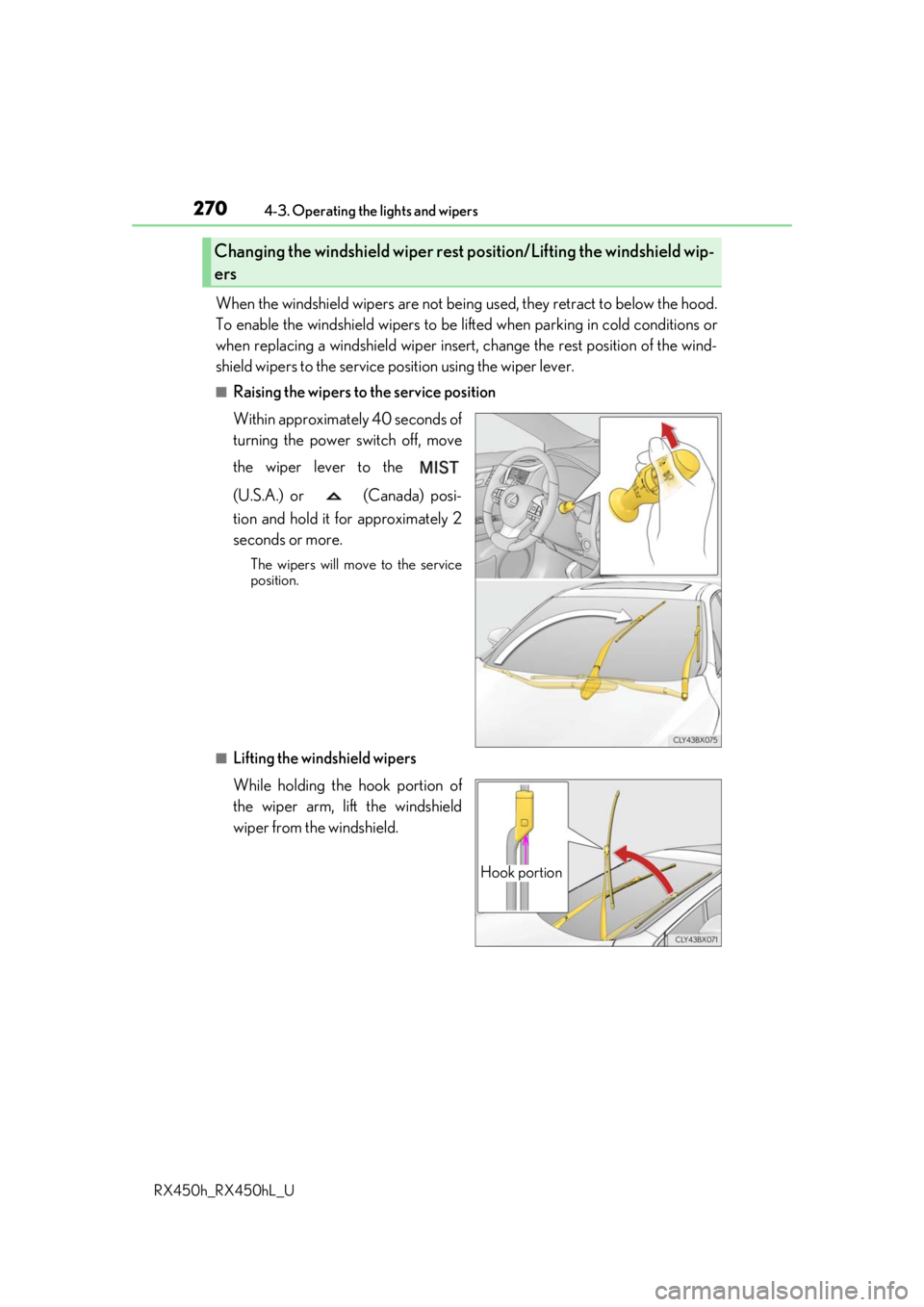
When the windshield wipers are not bein g used, they retract to below the hood.
To enable the windshield wi pers to be lifted when parking in cold conditions or
when replacing a windshield wiper insert, change the rest position of the wind-
shield wipers to the service position using the wiper lever.
■Raising the wipers to the service position
Within approximately 40 seconds of
turning the power switch off, move
the wiper lever to the
(U.S.A.) or (Canada) posi-
tion and hold it for approximately 2
seconds or more.
The wipers will move to the service
position.
■Lifting the windshield wipers
While holding the hook portion of
the wiper arm, lift the windshield
wiper from the windshield.
Changing the windshield wiper rest position/Lifting the windshield wip-
ers
Hook portion
Page 273 of 792

2734-3. Operating the lights and wipers
4
Driving
RX450h_RX450hL_U
■The rear window wiper and washer can be operated when
The power switch is in ON mode.
■If no washer fluid sprays
Check that the washer nozzle is not blocked if there is washer fluid in the washer fluid
tank.
NOTICE
■When the rear window is dry
Do not use the wiper, as it may damage the rear window.
■When the washer fluid tank is empty
Do not operate the switch continually as the washer fluid pump may overheat.
■When a nozzle becomes blocked
In this case, contact your Lexus dealer.
Do not try to clear it with a pin or other object. The nozzle will be damaged.