2019 LEXUS RX450H automatic
[x] Cancel search: automaticPage 383 of 792

3834-5. Using the driving support systems
4
Driving
RX450h_RX450hL_U
◆EPS (Electric Power Steering)
Employs an electric motor to reduce the amount of effort needed to turn the
steering wheel
◆E-Four
Electronic On-Demand AWD system. Automatically switches from front-
wheel drive to all-wheel drive (AWD) according to the driving conditions,
helping to ensure reliable handling and st ability. Examples of conditions where
the system will switch to AWD are when cornering, going uphill, starting off or
accelerating, and when the road surface is slippery due to snow, rain, etc.
◆Adaptive Variable Suspension System (if equipped)
Controls the damping force of the shock absorber of each wheel according to
the road and driving conditions, helpin g achieve a comfortable ride, excellent
driveability and a high level of stability.
If SPORT S+ mode is selected using the driving mode select switch, the
damping force will become more su itable for sporty driving. (P. 380)
◆VDIM (Vehicle Dynamics Integrated Management)
Provides integrated control of the ABS, brake assist, TRAC, VSC, hill-start
assist control and EPS systems
Helps to maintain vehicle stability when swerving on slippery road surfaces by
controlling the brakes and hybrid system output
Page 385 of 792

3854-5. Using the driving support systems
4
Driving
RX450h_RX450hL_U
■Turning off both TRAC VSC and Trailer Sway Control systems
To turn the TRAC VSC and Trailer Sway Co ntrol systems off, press and hold for
more than 3 seconds whil e the vehicle is stopped.
The VSC OFF indicator light will come on an d the “Traction Control Turned Off” will be
shown on the multi-information display.
*
Press again to turn the systems back on.
*: On vehicles with PCS (Pre-Collision Sy stem), pre-collision brake assist and pre-
collision braking will also be disabled. The PCS warning light will come on and a
message will be displa yed on the multi-information display. (P. 296)
■When the message is displayed on the mu lti-information display showing that TRAC
has been disabled even if has not been pressed
TRAC cannot be operated. Contact your Lexus dealer.
■Operating conditions of hill-start assist control
When the following four conditions are met, the hill-start assist control will operate:
●The shift lever is in a position other than P or N (when starting off forward/backward on
an upward incline).
●The vehicle is stopped
●The accelerator pedal is not depressed
●The parking brake is not engaged
■Automatic system cancelation of hill-start assist control
The hill-start assist control will turn off in any of the following situations:
●The shift lever is shifted to P or N
●The accelerator pedal is depressed
●The parking brake is engaged
●2 seconds at maximum elapsed after the brake pedal is released
■Sounds and vibrations caused by the ABS, brake assist, VSC, Trailer Sway Control,
TRAC and hill-start assist control systems
●A sound may be heard from the engine compartment when the brake pedal is
depressed repeatedly, when the hybrid system is started or just after the vehicle begins
to move. This sound does not indicate that a malfunction has occurred in any of these
systems.
●Any of the following conditions may occur when the above systems are operating.
None of these indicates that a malfunction has occurred.
• Vibrations may be felt through the vehicle body and steering.
• A motor sound may be heard also after the vehicle comes to a stop.
Page 386 of 792
3864-5. Using the driving support systems
RX450h_RX450hL_U
■ECB operating sound
ECB operating sound may be heard in the followi ng cases, but it does not indicate that a
malfunction has occurred.
●Operating sound heard from the engine compartment when the brake pedal is oper-
ated.
●Motor sound of the brake system heard from the front part of the vehicle when the
driver’s door is opened.
●Operating sound heard from the engine compartment when one or two minutes
passed after the stop of the hybrid system.
■EPS operation sound
When the steering wheel is operated, a motor sound (whirring sound) may be heard.
This does not indicate a malfunction.
■Automatic reactivation of TRAC, Tr ailer Sway Control and VSC systems
After turning the TRAC, Trailer Sway Contro l and VSC systems off, the systems will be
automatically re-enabled in the following situations:
●When the power switch is turned off
●If only the TRAC system is turned off, the TRAC will turn on when vehicle speed
increases
If both the TRAC and VSC systems are turned off, automatic re-enabling will not
occur when vehicle speed increases.
■Reduced effectiveness of the EPS system
The effectiveness of the EPS system is reduced to prevent the system from overheating
when there is frequent steering input over an extended period of time. The steering
wheel may feel heavy as a result . Should this occur, refrain from excessive steering input
or stop the vehicle and turn the hybrid system off. The EPS system should return to nor-
mal within 10 minutes.
WARNING
■The ABS does not operate effectively when
●The limits of tire gripping performance have been exceeded (such as excessively
worn tires on a snow covered road).
●The vehicle hydroplanes while driving at high speed on wet or slick roads.
■Stopping distance when the ABS is operating may exceed that of normal conditions
The ABS is not designed to shorten the vehi cle’s stopping distance. Always maintain a
safe distance from the vehicle in front of you, especially in the following situations:
●When driving on dirt, grav el or snow-covered roads
●When driving with tire chains
●When driving over bumps on the road
●When driving over roads with potholes or uneven surfaces
■TRAC/VSC may not operate effectively when
Directional control and power may not be achievable wh ile driving on slippery road
surfaces, even if the TRAC/VSC system is op erating. Drive the vehicle carefully in con-
ditions where stability and power may be lost.
Page 389 of 792

3894-6. Driving tips
4
Driving
RX450h_RX450hL_U
◆Delays
Repeated acceleration and deceleration, as well as long waits at traffic lights,
will lead to bad fuel economy. Check traffic reports before leaving and avoid
delays as much as possible. When drivin g in a traffic jam, gently release the
brake pedal to allow the vehicle to move forward slightly while avoiding over-
use of the accelerator pedal. Doing so can help control excessive gasoline
consumption.
◆Highway driving
Control and maintain the vehicle at a co nstant speed. Before stopping at a toll
booth or similar, allow plenty of ti me to release the accelerator and gently
apply the brakes. A greater amount of electrical energy can be regenerated
when slowing down.
◆Air conditioning
Use the air conditioning only when necessary. Doing so can help reduce
excessive gasoline consumption.
In summer: When the ambient temperature is high, use the recirculated air
mode. Doing so will help to reduce the burden on the air conditioning system
and reduce fuel consumption as well.
In winter: Because the gasoline engine will not automatically cut out until it
and the interior of the vehicle are warm , it will consume fuel. Also, fuel con-
sumption can be improved by av oiding overuse of the heater.
◆Checking tire inflation pressure
Make sure to check the tire inflation pr essure frequently. Improper tire infla-
tion pressure can cause poor fuel economy.
Also, as snow tires can cause large amou nts of friction, their use on dry roads
can lead to poor fuel economy. Use tires that are appropriate for the season.
◆Luggage
Carrying heavy luggage will lead to poor fuel economy. Avoid carrying
unnecessary luggage. Installing a large roof rack will also cause poor fuel
economy.
◆Warming up before driving
Since the gasoline engine starts up an d cuts out automatically when cold,
warming up the engine is unnecessary. Moreover, frequently driving short dis-
tances will cause the engine to repeated ly warm up, which can lead to excess
fuel consumption.
Page 391 of 792
3914-6. Driving tips
4
Driving
RX450h_RX450hL_U
Accelerate the vehicle slowly, keep a safe distance between you and the vehicle
ahead, and drive at a reduced spee d suitable to road conditions.
●Park the vehicle and move the shift lever to P without setting the parking
brake. The parking brake may freeze up, preventing it from being released. If
the vehicle is parked without setting the parking brake, make sure to block the
wheels.
Failure to do so may be dangerous because it may cause the vehicle to move
unexpectedly, possibly leading to an accident.
When the parking brake is in automatic mo de, release the parking brake after shifting
the shift lever to P. ( P. 253)
●If the vehicle is parked without setting the parking brake, confirm that the shift
lever cannot be moved out of P
*.
*: The shift lever will be locked if it is atte mpted to be shifted from P to any other posi-
tion without depressing the brake pedal. If the shift lever can be shifted from P, there
may be a problem with the shift lock sy stem. Have the vehicle inspected by your
Lexus dealer immediately.
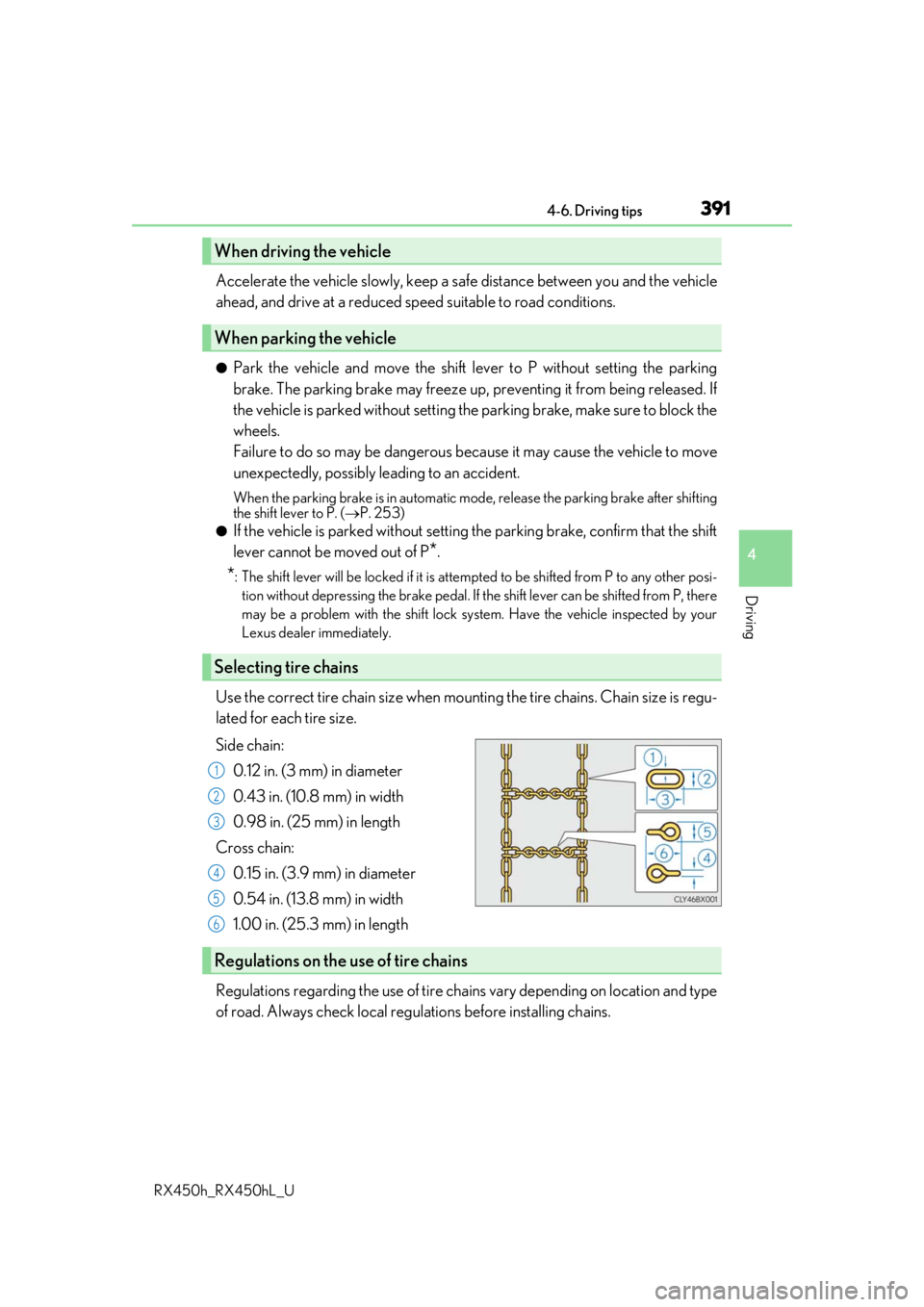
Use the correct tire chain size when mounti ng the tire chains. Chain size is regu-
lated for each tire size.
Side chain:
0.12 in. (3 mm) in diameter
0.43 in. (10.8 mm) in width
0.98 in. (25 mm) in length
Cross chain: 0.15 in. (3.9 mm) in diameter
0.54 in. (13.8 mm) in width
1.00 in. (25.3 mm) in length
Regulations regarding the use of tire chains vary depending on location and type
of road. Always check local regu lations before installing chains.
When driving the vehicle
When parking the vehicle
Selecting tire chains
1
2
3
4
5
6
Regulations on the use of tire chains
Page 407 of 792

4075-1. Basic Operations
5
Lexus Display Audio system
RX450h_RX450hL_U
Press and hold the off hook switch
until you hear the beeps that indicate
the system is listening.
The Mobile Assistant can be used
only when the neighboring screen is
displayed.
To cancel the Mobile Assistant, select
“Cancel”, or press and hold the off hook
switch.
To restart the Mobile Assistant for addi-
tional commands, press the off hook
switch. Mobile Assistant can only be
restarted after the sy stem responds to a
voice command. After some phone and
music commands, the Mobile Assistant
feature will automatically end to com-
plete the requested action.
Mobile Assistant
The Mobile Assistant feature will activate Apple’s Siri Eyes Free mode via
the steering wheel switches. To operate the Mobile Assistant, a compatible
cellular phone must be registered and connected to this system via
Bluetooth
. ( P. 449)
1
2
Page 419 of 792
4195-3. Using the audio system
5
Lexus Display Audio system
RX450h_RX450hL_U
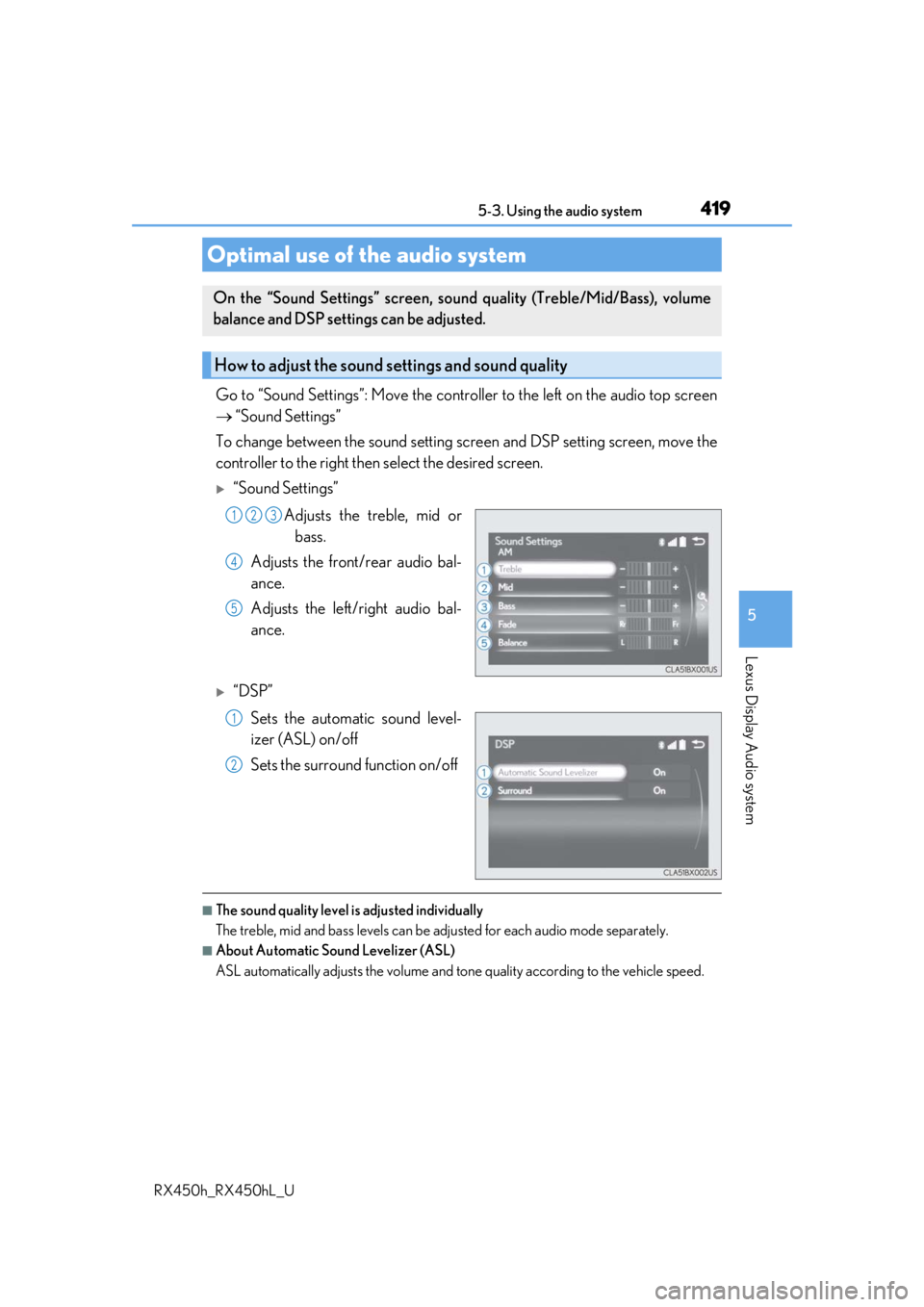
Go to “Sound Settings”: Move the controller to the left on the audio top screen
“Sound Settings”
To change between the sound setting screen and DSP setting screen, move the
controller to the right then select the desired screen.
“Sound Settings”
Adjusts the treble, mid orbass.
Adjusts the front/rear audio bal-
ance.
Adjusts the left/right audio bal-
ance.
“DSP”
Sets the automatic sound level-
izer (ASL) on/off
Sets the surround function on/off
■The sound quality level is adjusted individually
The treble, mid and bass levels can be adjusted for each audio mode separately.
■About Automatic Sound Levelizer (ASL)
ASL automatically adjusts the volume and to ne quality according to the vehicle speed.
Optimal use of the audio system
On the “Sound Settings” screen, sound quality (Treble/Mid/Bass), volume
balance and DSP settings can be adjusted.
How to adjust the sound settings and sound quality
123
4
5
1
2
Page 432 of 792
4325-4. Using the radio
RX450h_RX450hL_U
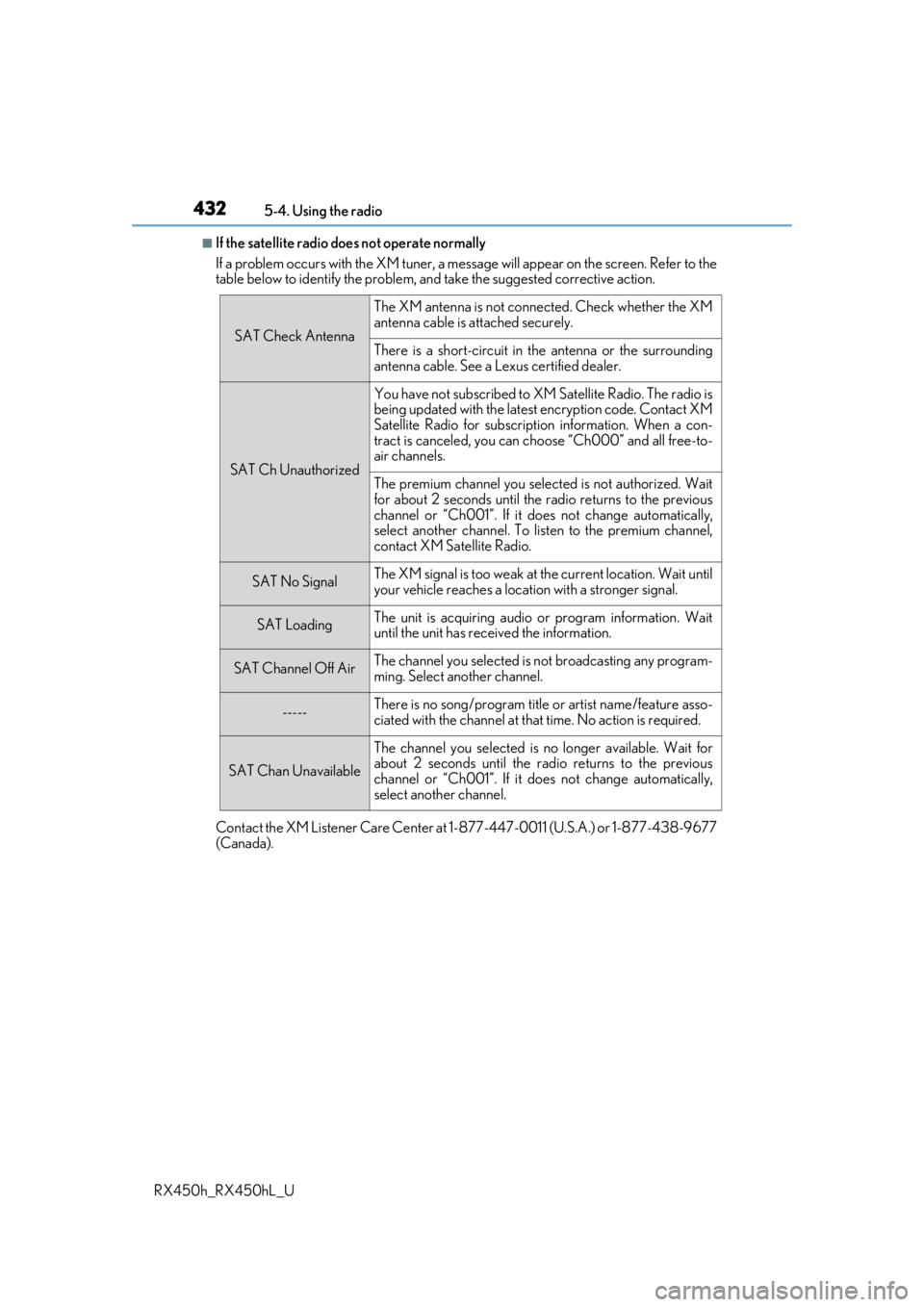
■If the satellite radio does not operate normally
If a problem occurs with the XM tuner, a message will appear on the screen. Refer to the
table below to identify the problem, an d take the suggested corrective action.
Contact the XM Listener Care Center at 1-877-447-0011 (U.S.A.) or 1-877-438-9677
(Canada).
SAT Check Antenna
The XM antenna is not connected. Check whether the XM
antenna cable is attached securely.
There is a short-circuit in the antenna or the surrounding
antenna cable. See a Lexus certified dealer.
SAT Ch Unauthorized
You have not subscribed to XM Satellite Radio. The radio is
being updated with the latest encryption code. Contact XM
Satellite Radio for subscripti on information. When a con-
tract is canceled, you can choose “Ch000” and all free-to-
air channels.
The premium channel you selected is not authorized. Wait
for about 2 seconds until the radio returns to the previous
channel or “Ch001”. If it does not change automatically,
select another channel. To listen to the premium channel,
contact XM Satellite Radio.
SAT No SignalThe XM signal is too weak at the current location. Wait until
your vehicle reaches a location with a stronger signal.
SAT LoadingThe unit is acquiring audio or program information. Wait
until the unit has rece ived the information.
SAT Channel Off AirThe channel you selected is not broadcasting any program-
ming. Select another channel.
-----There is no song/program title or artist name/feature asso-
ciated with the channel at that time. No action is required.
SAT Chan Unavailable
The channel you selected is no longer available. Wait for
about 2 seconds until the radio returns to the previous
channel or “Ch001”. If it does not change automatically,
select another channel.