Page 463 of 777

462 5-9. Bluetooth ®
Phone
RX350/RX350L_U
Phone number containing a “w” symbol
When the “w” symbol is dialed in an outgoing call, you need to go to the
“Release Tones” screen to dial the following digits. Move the controller to the
left and then select “Release Tones”.
Select “Handset Mode” to change from a hands-free call to a cellular phone call
or vice versa.
Press the on-hook switch on the steering wheel or select .
When a call is interrupted by a third pa rty while talking, an incoming call mes-
sage will be displayed.
To talk with the other party:
Press the off-hook sw itch on the steer-
ing wheel or select .
To refuse the call:
Press the on-hook switch on the steer-
ing wheel or select . Every time you press the off-hook switch on the steering wheel or select during
call waiting, you will be sw itched to the other party.■
Transferring calls ●
It is not possible to transfer from hand s-free to the cellular phone while driving.●
If you transfer from the cellular phone to ha nds-free, the hands-free screen will be dis-
played, and you can operate the system using the screen. ●
Transfer method and operation may vary according to the cellular phone used. ●
For operation of the cellular phone in use, see the phone’s manual.■
Call waiting operation
Call waiting operation may di ffer depending on your phone company and cellular
phone.To transfer a call
To hang up
Call waiting
Page 466 of 777
4655-9. Bluetooth ®
Phone
5
Lexus Display Audio system
RX350/RX350L_U Volume switch
During an incoming call: Adjusts the
ring tone volume
During speaking on the phone:
Adjusts in call volume The voice guidance volume cannot be
adjusted using this button.
Talk switch
Press: Turns the voice command system on
Press and hold: Turns the voice command system off
On-hook switch
• End call
•Refuse call
Off-hook switch
• Start call
• Receiving
• Phone top screen displayUsing the steering wheel switches The steering wheel switches can be used to operate a connected cellular
phone.
Operating a phone using the steering wheel switches 1
2
3
4
Page 495 of 777
494
RX350/RX350L_U 6-1. Basic operation of the
Remote Touch screen
Remote Touch............................. 496
12.3-inch display ....................... 500
6-2. Using the air conditioning
system and defogger
Lexus Climate
Concierge..................................502
Front automatic air
conditioning system ...............503
Rear automatic air
conditioning system ................ 518
Heated steering wheel/
seat heaters/
seat ventilators .......................... 521
6-3. Using the interior lights
Interior lights list ......................... 524
• Interior lights .......................... 525
• Personal lights ....................... 526
6Interior features
Page 522 of 777

5216-2. Using the air conditioning system and defogger
6
Interior features
RX350/RX350L_UHeated steering wheel
/seat heaters
/seat ventila-
tors
: If equippedHeated steering wheel and seat heaters heat the side grips of the steering
wheel and seats, respectively. Seat vent ilators maintain good ventilation using
a fan built into the seats. WARNING ●
Care should be taken to prevent injury if anyone in the following categories comes in
contact with the steering wheel and seats when the heater is on:
• Babies, small children, the elderly, the sick and the ph ysically challenged
• Persons with sensitive skin
• Persons who are fatigued
• Persons who have taken alcohol or drugs that induce sleep (sleeping drugs, cold
remedies, etc.) ●
Observe the following precautions to prevent minor burns or overheating:
• Do not cover the seat with a blanket or cushion when using the seat heater.
• Do not use seat heater more than necessary.
NOTICE ●
Do not put heavy objects that have an unev en surface on the seat and do not stick
sharp objects (needles, nails, etc.) into the seat. ●
To prevent battery discharge, do not us e the functions when the engine is off.
Page 523 of 777
522 6-2. Using the air conditio ning system and defogger
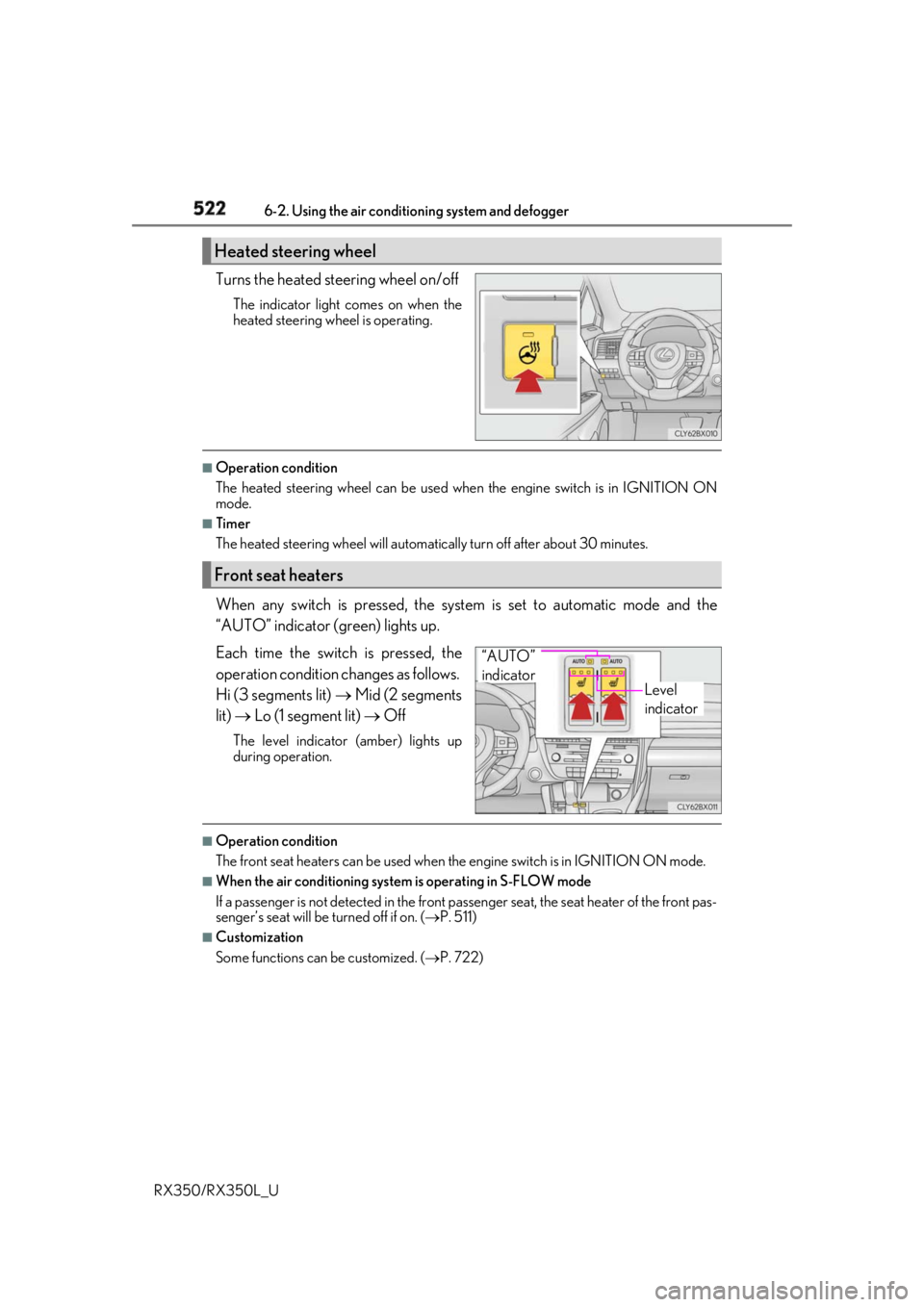
RX350/RX350L_U Turns the heated steering wheel on/off The indicator light comes on when the
heated steering wheel is operating. ■
Operation condition
The heated steering wheel can be used when the engine switch is in IGNITION ON
mode. ■
Timer
The heated steering wheel will automati cally turn off after about 30 minutes.
When any switch is pressed, the system is set to automatic mode and the
“AUTO” indicator (green) lights up.
Each time the switch is pressed, the
operation cond ition changes as follows.
Hi (3 segments lit) Mid (2 segments
lit) Lo (1 segment lit) OffThe level indicator (amber) lights up
during operation.
■
Operation condition
The front seat heaters can be used when the engine switch is in IGNITION ON mode. ■
When the air conditioning system is operating in S-FLOW mode
If a passenger is not detected in the front pa ssenger seat, the seat he ater of the front pas-
senger’s seat will be turned off if on. ( P. 511)■
Customization
Some functions can be customized. ( P. 722)Heated steering wheel
Front seat heaters
Level
indicator“AUTO”
indicator
Page 588 of 777
5877-2. Maintenance
7
Maintenance and care
RX350/RX350L_U * : Vehicles with single-beam headlightsVehicle interior Items Check points
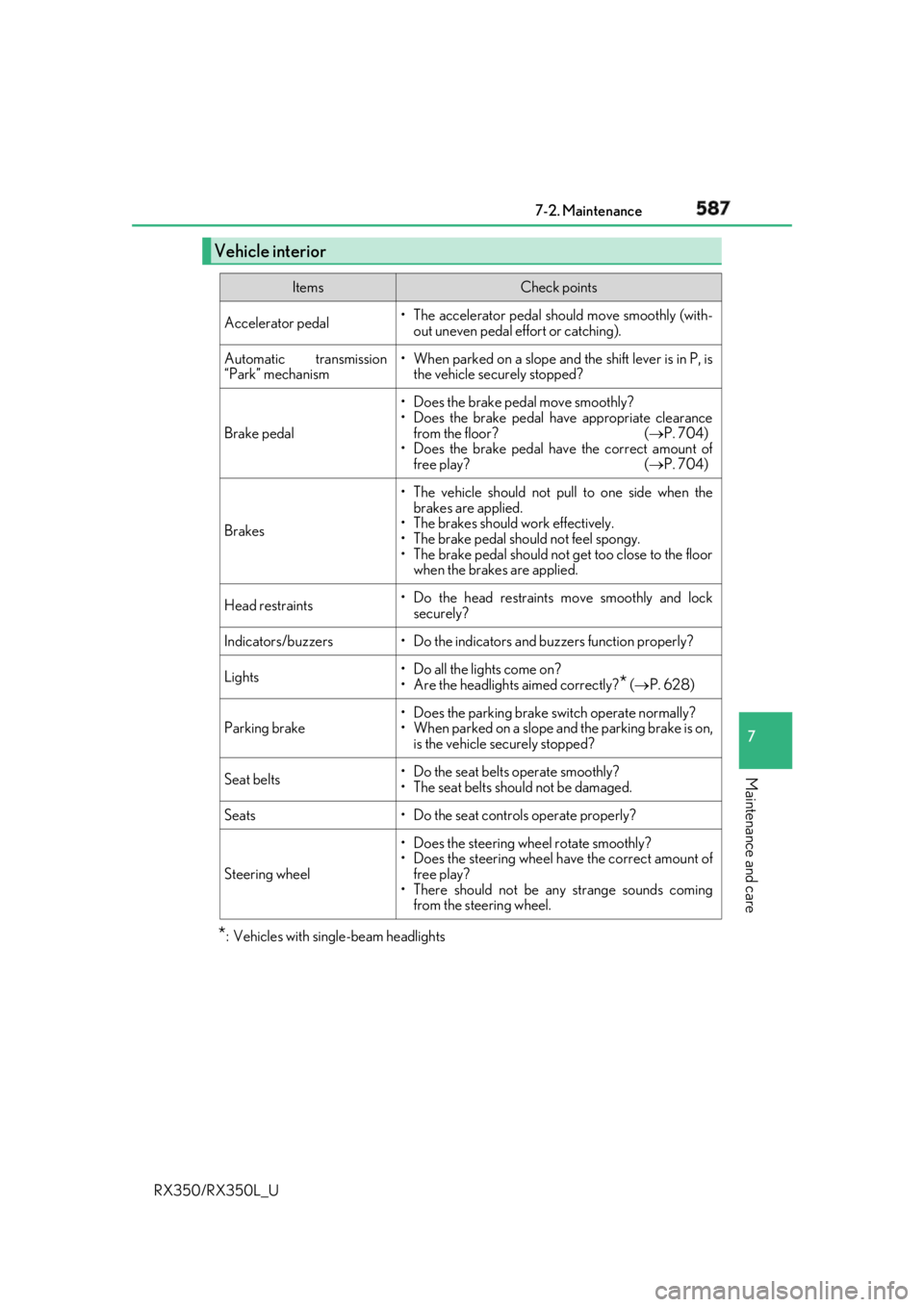
Accelerator pedal • The accelerator pedal sh ould move smoothly (with-
out uneven pedal effort or catching).
Automatic transmission
“Park” mechanism • When parked on a slope and the shift lever is in P, is
the vehicle securely stopped?
Brake pedal • Does the brake pedal move smoothly?
• Does the brake pedal have appropriate clearance
from the floor? ( P. 704)
• Does the brake pedal have the correct amount of
free play? ( P. 704)
Brakes • The vehicle should not pull to one side when the
brakes are applied.
• The brakes should work effectively.
• The brake pedal should not feel spongy.
• The brake pedal should no t get too close to the floor
when the brakes are applied.
Head restraints • Do the head restraints move smoothly and lock
securely?
Indicators/buzzers • Do the indicators and buzzers function properly?
Lights • Do all the lights come on?
• Are the headlights aimed correctly?
* ( P. 628)
Parking brake • Does the parking brake switch operate normally?
• When parked on a slope and the parking brake is on,
is the vehicle securely stopped?
Seat belts • Do the seat belts operate smoothly?
• The seat belts should not be damaged.
Seats • Do the seat controls operate properly?
Steering wheel • Does the steering wheel rotate smoothly?
• Does the steering wheel have the correct amount of
free play?
• There should not be any strange sounds coming
from the steering wheel.
Page 634 of 777
6337-3. Do-it-yourself maintenance
7
Maintenance and care
RX350/RX350L_U ■
Front side marker lights (vehicle s with single-beam headlights)
To ensure enough space to per-
form work, turn the steering
wheel to rotate the front wheel
away from the bulb to be
replaced.
Remove the 3 fender liner clips. Turn the steering wheel to the left
when replacing the right side light
bulb, and turn the steering wheel to
the right when replacing the left side
light bulb.
When removing a fender liner clip,
use a flathead screwdriver to pry the
center portion out and then remove
the whole clip.
Pull back the fender liner until the
connector is visible.
Partially remove the fender liner
and turn the bulb base counter-
clockwise and remove it.Replacing light bulbs 1
8 2
3
Page 636 of 777
6357-3. Do-it-yourself maintenance
7
Maintenance and care
RX350/RX350L_U ■
Front turn signal lights (vehic les with single-beam headlights)
To ensure enough space to per-
form work, turn the steering
wheel to rotate the front wheel
away from the bulb to be
replaced.
Remove the 3 fender liner clips. Turn the steering wheel to the left
when replacing the right side light
bulb, and turn the steering wheel to
the right when replacing the left side
light bulb.
When removing a fender liner clip,
use a flathead screwdriver to pry the
center portion out and then remove
the whole clip.
Pull back the fender liner until the
connector is visible.
Partially remove the fender liner
and turn the bulb base counter-
clockwise and remove it. 1
8 2
3