Page 483 of 777
482
RX350/RX350L_U 5-12. Other function
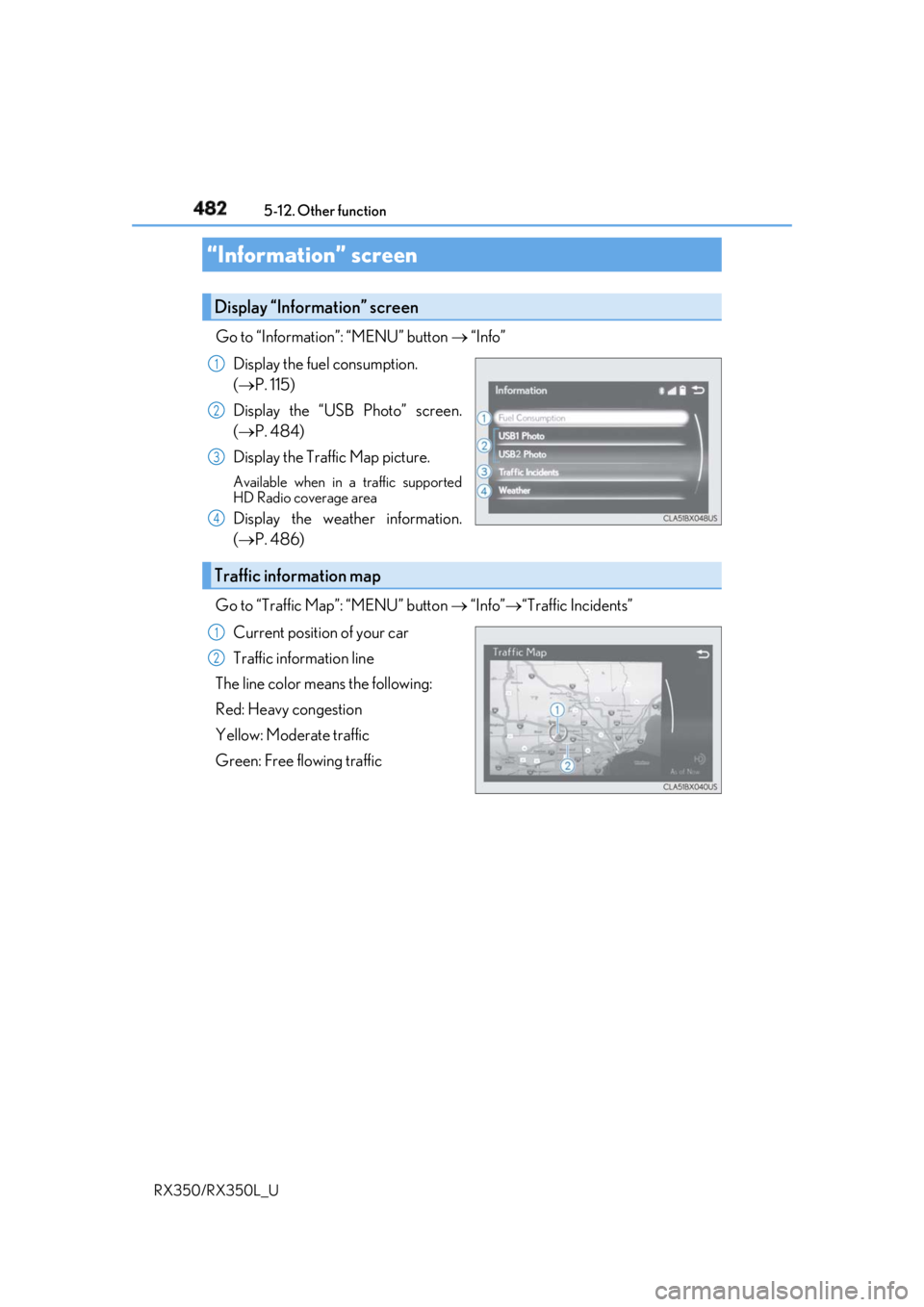
Go to “Information”: “MENU” button “Info”
Display the fuel consumption.
( P. 115)
Display the “USB Photo” screen.
( P. 484)
Display the Traffic Map picture. Available when in a traffic supported
HD Radio coverage area
Display the weather information.
( P. 486)
Go to “Traffic Map”: “MENU” button “Info” “Traffic Incidents”
Current position of your car
Traffic information line
The line color means the following:
Red: Heavy congestion
Yellow: Moderate traffic
Green: Free flowing traffic“Information” screen Display “Information” screen 1
2
3
4
Traffic information map 1
2
Page 485 of 777
484 5-12. Other function
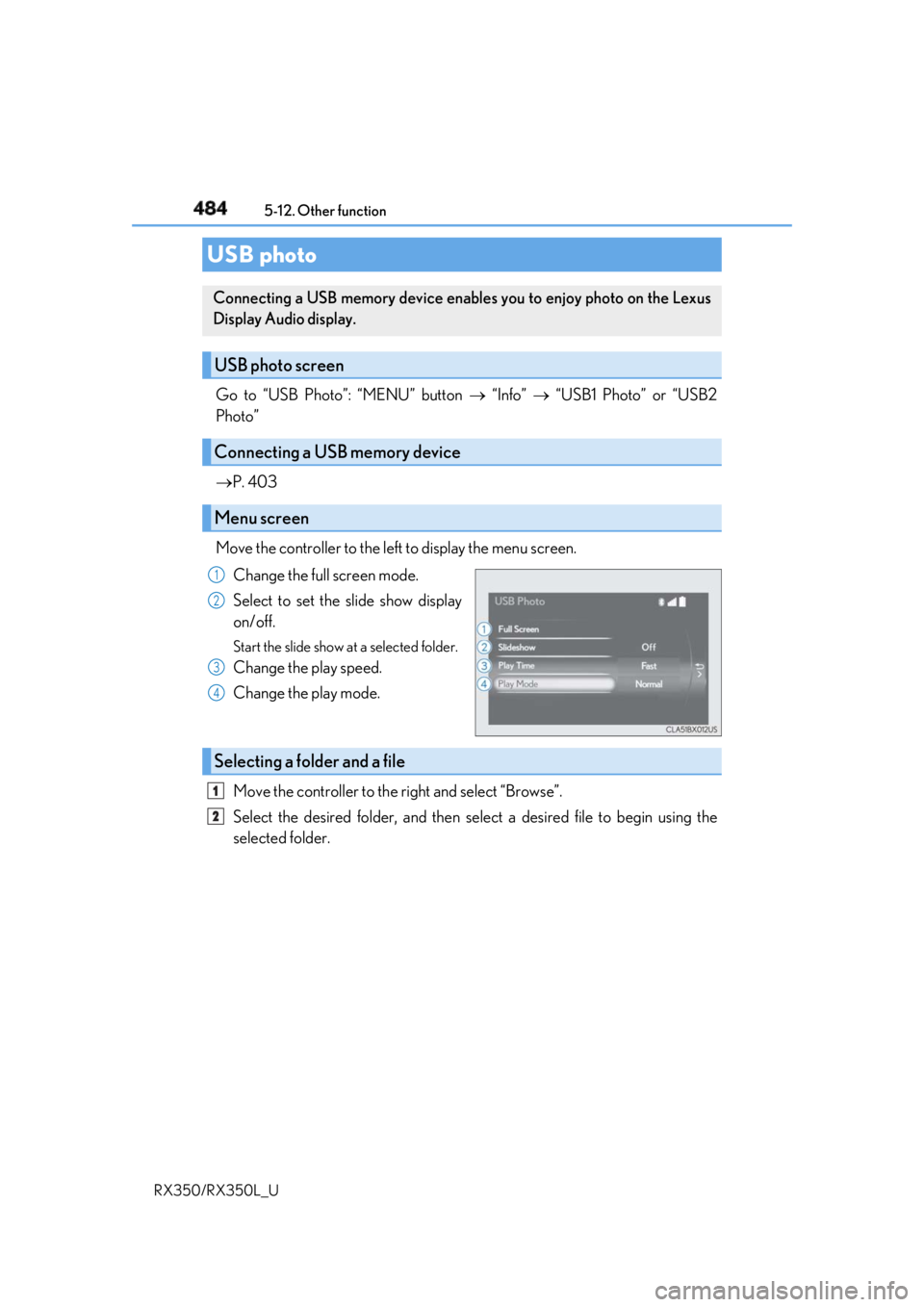
RX350/RX350L_U Go to “USB Photo”: “MENU” button “Info” “USB1 Photo” or “USB2
Photo”
P. 403
Move the controller to the left to display the menu screen.
Change the full screen mode.
Select to set the slide show display
on/off. Start the slide show at a selected folder.
Change the play speed.
Change the play mode.
Move the controller to the right and select “Browse”.
Select the desired folder, and then sele ct a desired file to begin using the
selected folder.USB photo Connecting a USB memory device enables you to enjoy photo on the Lexus
Display Audio display.
USB photo screen
Connecting a USB memory device
Menu screen 1
2
3
4
Selecting a folder and a file 1
2
Page 486 of 777
4855-12. Other function
5
Lexus Display Audio system
RX350/RX350L_U ■
USB memory functions
P. 439 ■
USB memory ●
Compatible devices
USB memory device that can be used for JPEG display.●
Compatible device formats
The following device format can be used:
• USB communication format: USB2.0 FS (480 Mbps)
• File system format: FAT16/32 (Windows)
• Correspondence class: Mass storage class●
JPEG file compatibility
• Compatible image size: Maximum 10MB
• Compatible pixel size: Maximum 10,000,000 pixels
NOTICE ■
To prevent damage to the USB me mory device or its terminals
P. 441
Page 489 of 777

488 5-12. Other function
RX350/RX350L_U ■
Microphone
P. 456 ■
When using the microphone ●
It is unnecessary to speak directly into the microphone when giving a command.●
Wait for the confirmation beep before speaking a command.●
Voice commands may not be recognized if:
• Spoken too quickly.
• Spoken at a low or high volume.
• The roof or windows are open.
• Passengers are talking while voice commands are spoken.
• The air conditioning speed is set high.
• The air conditioning vents are turned towards the microphone.●
In the following conditions, the system ma y not recognize the command properly and
using voice commands may not be possible:
• The command is incorrect or unclear. No te that certain words, accents or speech
patterns may be difficult for the system to recognize.
• There is excessive background noise, such as wind noise. ■
When searching for a track ●
A USB memory or iPod must be connected to enable track searching and playback.
( P. 403) ●
When a USB memory or iPod is connected, recognition data is created so tracks can
be searched using voice commands. ●
Recognition data is updated un der the following conditions:
• When the USB memory or iPod data has changed.
• When the voice recognition language is changed. ( P. 407)●
While the recognition data is being created or being updated, a track search cannot be
performed using a voice command. ■
The Gracenote ®
media database
Page 496 of 777

495
6Interior features
RX350/RX350L_U 6-4. Using the storage features
List of storage features............ 528
• Glove box .............................. 530
• Console box .......................... 530
• Cup holders............................. 531
• Door pockets ........................ 533
• Bottle holders ....................... 533
• Coin box ..................................534
• Auxiliary boxes..................... 535
Luggage compartment
features........................................536 6-5. Using the other interior
features
Other interior features ............ 543
• Sun visors ................................ 543
• Vanity mirrors ....................... 543
• Clock ........................................ 544
• Wireless charger ................. 544
• Power outlets.......................... 551
• USB charging ports ............553
• Front passenger
footwell hooks .......................554
• Rear door sunshades .........554
• Armrest ....................................555
• Assist grips..............................556
• Coat hooks .............................556
Garage door opener ............... 557
Compass ....................................... 564
LEXUS Enform Safety
Connect ......................................568
LEXUS Enform Remote ......... 573
LEXUS Enform Service
Connect ...................................... 574
Page 554 of 777
5536-5. Using the other interior features
6
Interior features
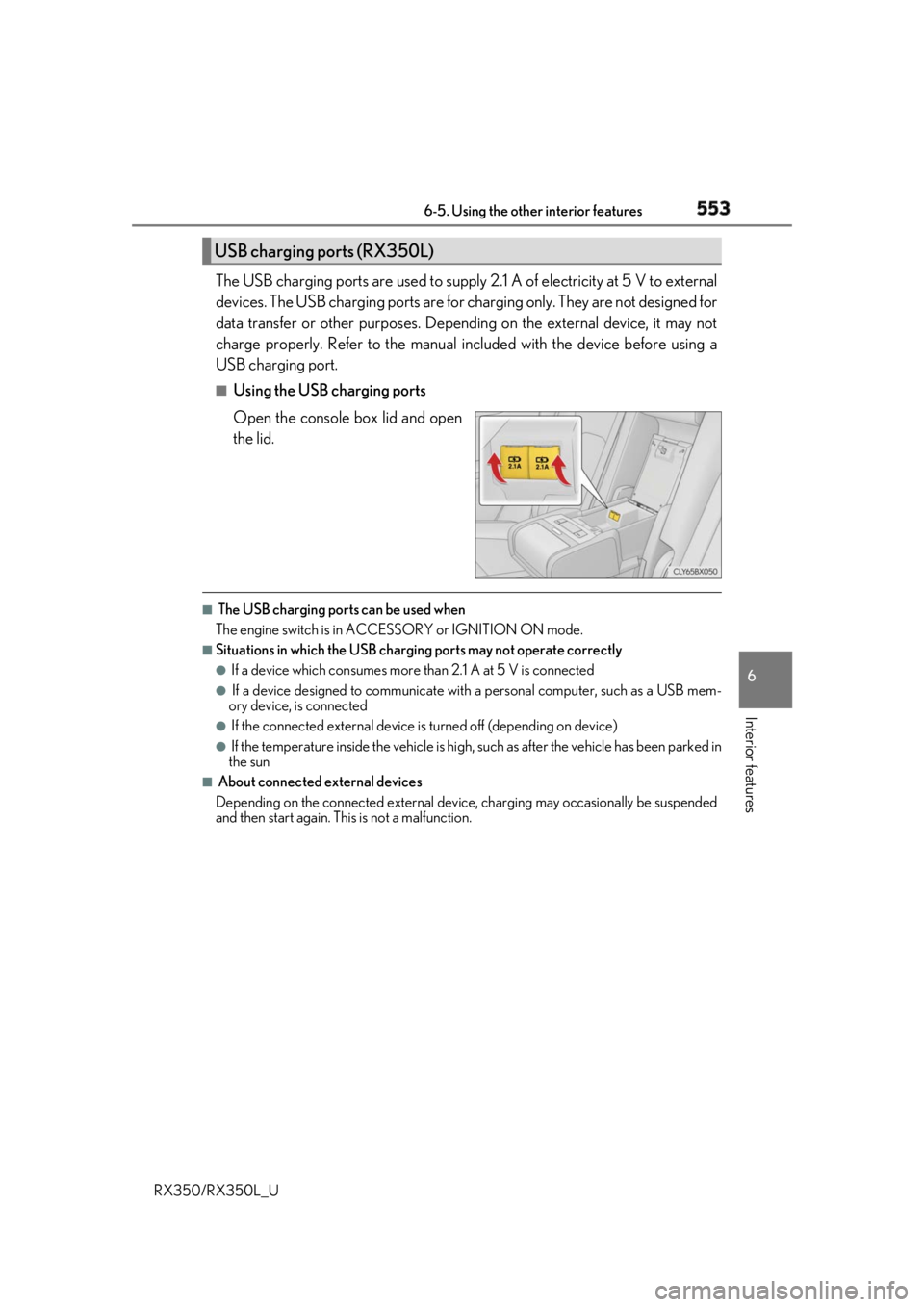
RX350/RX350L_U The USB charging ports are used to supply 2.1 A of electricity at 5 V to external
devices. The USB charging ports are for charging only. They are not designed for
data transfer or other purposes. Depending on the external device, it may not
charge properly. Refer to the manual in cluded with the device before using a
USB charging port. ■
Using the USB charging ports
Open the console box lid and open
the lid. ■
The USB charging ports can be used when
The engine switch is in ACCESSORY or IGNITION ON mode. ■
Situations in which the USB charging ports may not operate correctly ●
If a device which consumes more than 2.1 A at 5 V is connected●
If a device designed to communicate with a personal computer, such as a USB mem-
ory device, is connected ●
If the connected external device is turned off (depending on device)●
If the temperature inside the vehicle is high, such as after the vehicle has been parked in
the sun ■
About connected external devices
Depending on the connected external device , charging may occasionally be suspended
and then start again. This is not a malfunction.USB charging ports (RX350L)
Page 555 of 777
554 6-5. Using the other interior features
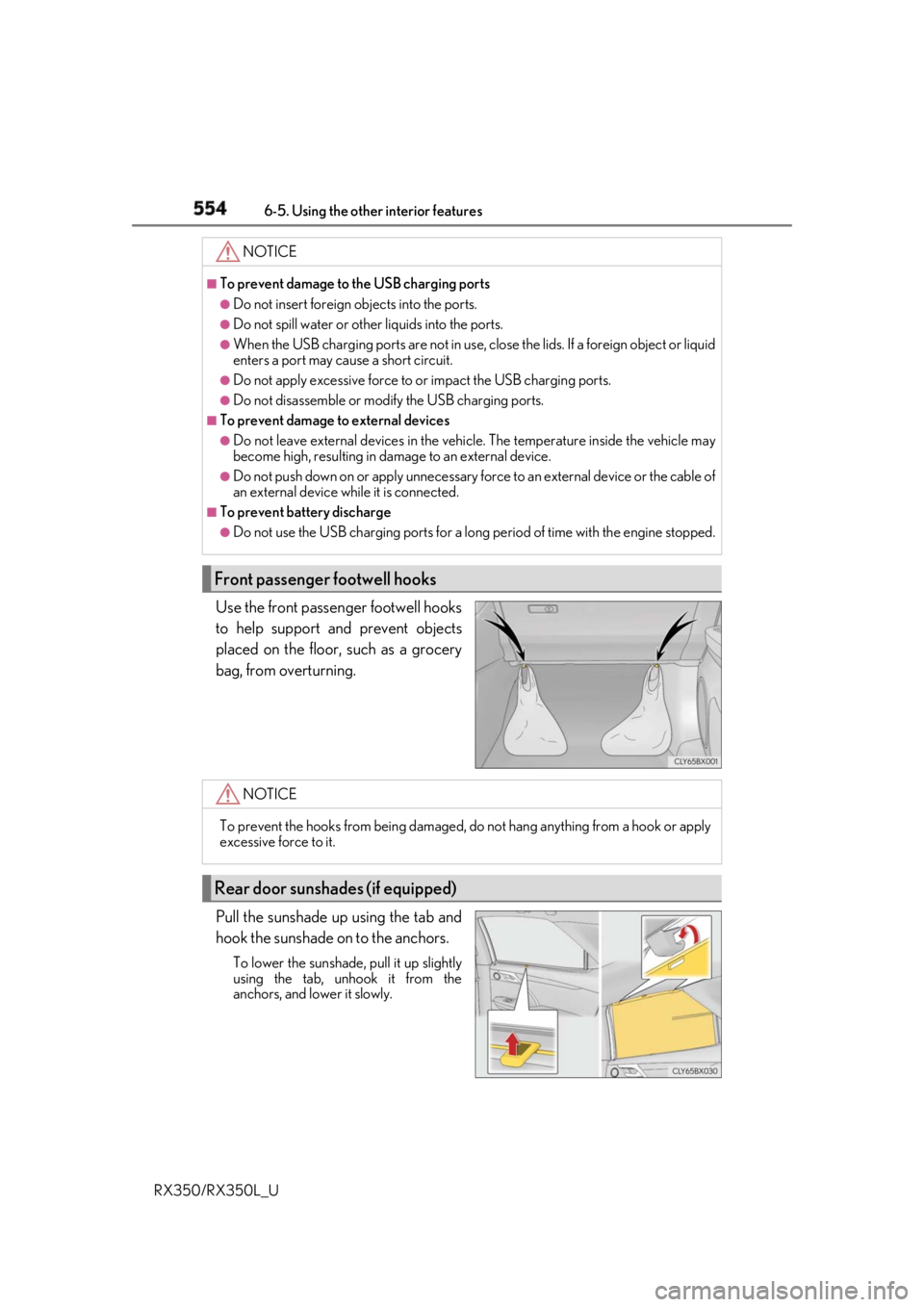
RX350/RX350L_U Use the front passenger footwell hooks
to help support and prevent objects
placed on the floor, such as a grocery
bag, from overturning.
Pull the sunshade up using the tab and
hook the sunshade on to the anchors. To lower the sunshade, pull it up slightly
using the tab, unhook it from the
anchors, and lower it slowly. NOTICE ■
To prevent damage to the USB charging ports●
Do not insert foreign objects into the ports. ●
Do not spill water or othe r liquids into the ports.●
When the USB charging ports are not in use, close the lids. If a foreign object or liquid
enters a port may cause a short circuit. ●
Do not apply excessive force to or impact the USB charging ports.●
Do not disassemble or modi fy the USB charging ports.■
To prevent damage to external devices●
Do not leave external devices in the vehicle. The temperature inside the vehicle may
become high, resulting in damage to an external device. ●
Do not push down on or appl y unnecessary force to an exte rnal device or the cable of
an external device while it is connected. ■
To prevent battery discharge ●
Do not use the USB charging ports for a long period of time with the engine stopped.
Front passenger footwell hooks
NOTICE
To prevent the hooks from being damaged, do not hang anything from a hook or apply
excessive force to it.
Rear door sunshades (if equipped)
Page 758 of 777

757Alphabetical index
RX350/RX350L_U Alarm ............................................................. 77
All-wheel drive lock mode ................377
Anchor brackets ...................................... 57
Antenna
Radio ........................................................ 423
Smart access system
with push-button start ................... 146
Anti-lock Brake System (ABS)....... 378
Warning light ...................................... 654
Approach warning...............................308
Armrest .................................................... 555
Assist grips .............................................. 556
Audio system (with Lexus
Display Audio System) ................... 394
Antenna .................................................. 423
Audio input........................................... 403
AUX port.............................................. 403
Bluetooth ®
audio ..............................453
CD player .............................................. 427
iPod ...........................................................434
MP3/WMA disc ............................... 427
Optimal use ........................................... 413
Portable music player ...................... 442
Radio ........................................................420
Setup menu .......................................... 406
Steering wheel audio
switches .............................................. 400
USB memory ...................................... 438 Audio system
(with navigation system)
* Automatic air conditioning
system .......................................... 503, 518
Air conditioning filter ........................ 618
S-FLOW mode..................................... 511
Automatic headlight leveling
system .....................................................254
Automatic High Beam ....................... 256
Automatic light control system .......252
Automatic transmission.......... 236, 240
If the shift lever cannot be
shifted from P ....................... 239, 244
M mode .................................................. 242
Paddle shift switches.............. 241, 242
S mode.....................................................237
AUX port ................................................ 403
Auxiliary boxes ......................... 535, 540
* : Refer to the “NAVIGATION SYSTEM OWNER’S MANUAL”.