2019 LEXUS RX350 engine
[x] Cancel search: enginePage 546 of 777
5456-5. Using the other interior features
6
Interior features
RX350/RX350L_U ■
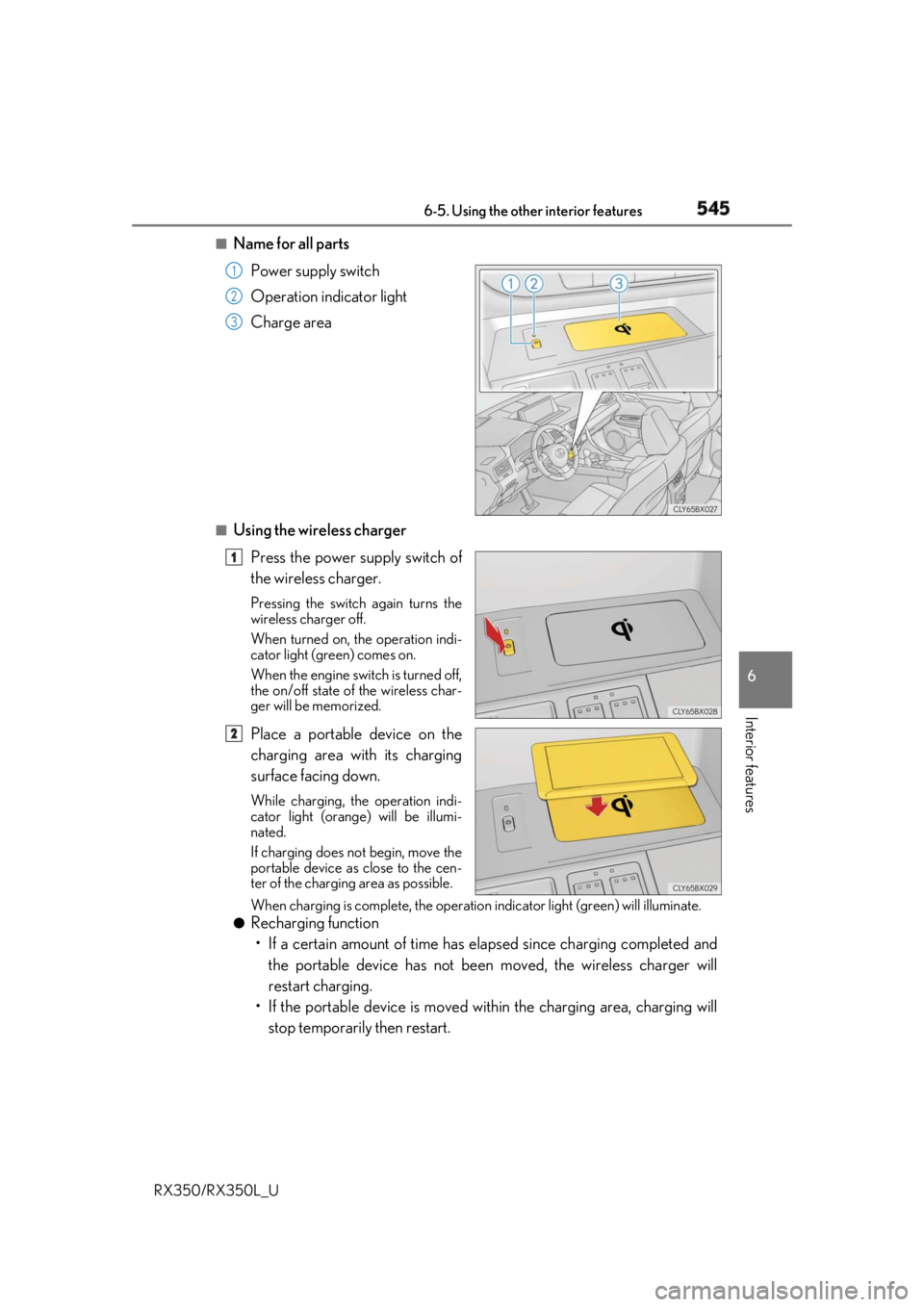
Name for all parts
Power supply switch
Operation indicator light
Charge area
■
Using the wireless charger
Press the power supply switch of
the wireless charger. Pressing the switch again turns the
wireless charger off.
When turned on, the operation indi-
cator light (green) comes on.
When the engine switch is turned off,
the on/off state of the wireless char-
ger will be memorized.
Place a portable device on the
charging area with its charging
surface facing down. While charging, the operation indi-
cator light (orange) will be illumi-
nated.
If charging does not begin, move the
portable device as close to the cen-
ter of the charging area as possible.
When charging is complete, the operatio n indicator light (g reen) will illuminate.●
Recharging function
• If a certain amount of time has elapsed since charging completed and
the portable device has not been moved, the wireless charger will
restart charging.
• If the portable device is moved with in the charging area, charging will
stop temporarily then restart. 1
2
3
1
2
Page 547 of 777
546 6-5. Using the other interior features
RX350/RX350L_U ■
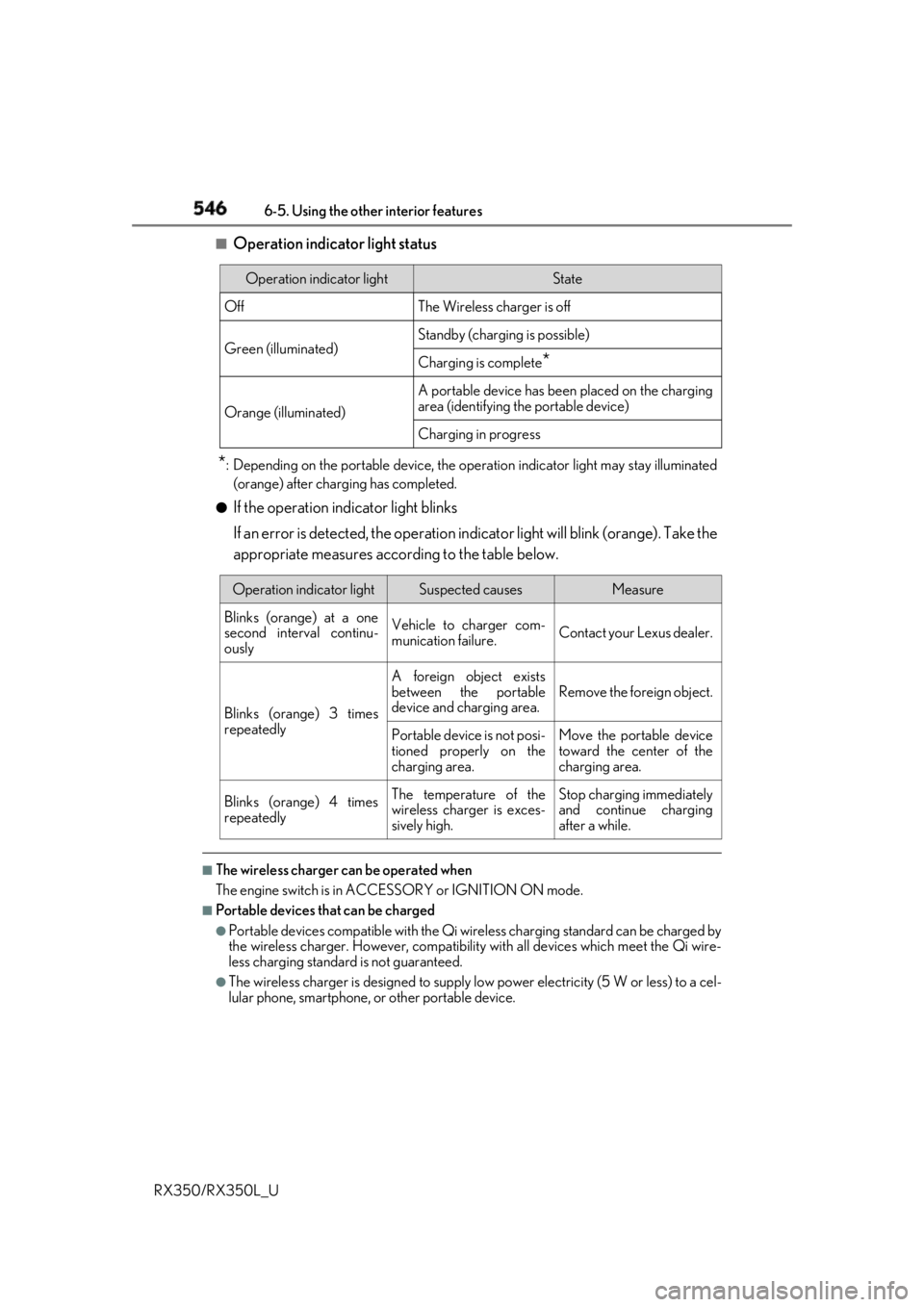
Operation indicator light status
* : Depending on the portable device, the oper ation indicator light may stay illuminated
(orange) after charging has completed.●
If the operation indicator light blinks
If an error is detected, the operation in dicator light will blink (orange). Take the
appropriate measures according to the table below.
■
The wireless charger can be operated when
The engine switch is in ACCESSORY or IGNITION ON mode. ■
Portable devices t hat can be charged●
Portable devices compatible with the Qi wireless charging standard can be charged by
the wireless charger. However, compatibility with all devices which meet the Qi wire-
less charging standard is not guaranteed. ●
The wireless charger is designed to supply low power electricity (5 W or less) to a cel-
lular phone, smartphone, or other portable device.Operation indicator light State
Off The Wireless charger is off
Green (illuminated) Standby (charging is possible)
Charging is complete
*Orange (illuminated) A portable device has been placed on the charging
area (identifying the portable device)
Charging in progress
Operation indicator light Suspected causes Measure
Blinks (orange) at a one
second interval continu-
ously Vehicle to charger com-
munication failure. Contact your Lexus dealer.
Blinks (orange) 3 times
repeatedly A foreign object exists
between the portable
device and charging area. Remove the foreign object.
Portable device is not posi-
tioned properly on the
charging area. Move the portable device
toward the center of the
charging area.
Blinks (orange) 4 times
repeatedly The temperature of the
wireless charger is exces-
sively high. Stop charging immediately
and continue charging
after a while.
Page 551 of 777
550 6-5. Using the other interior features
RX350/RX350L_U NOTICE ■
Conditions in which the wireless charger may not operate correctly
In the following situations, the wire less charger may not operate correctly:●
When a portable device is fully charged ●
When there is a foreign object between the charging area and portable device●
When a portable device becomes hot while charging●
When a portable device is placed on the wireless area with its charging surface fac-
ing up ●
When a portable device is not centered on the charging area ●
When the vehicle is near a TV tower, electric power plant, gas station, radio station,
large display, airport or other facility that generates stro ng radio waves or electrical
noise ●
When the portable device is in contact with, or is covered by any of the following
metallic objects:
• Cards to which aluminum foil is attached
• Cigarette boxes that ha ve aluminum foil inside
• Metallic wallets or bags
•Coins
•Metal hand warmers
• Media such as CDs and DVDs ●
When wireless keys (that emit radio waves) other than those of your vehicle are being
used nearby.
If in situations other than above the wirele ss charger does not operate properly or the
operation indicator light is blinking, the wireless charge r may be malfunctioning. Con-
tact your Lexus dealer. ■
To prevent failure or damage to data ●
Do not bring magnetic cards, such as a cr edit card, or magnetic recording media,
close to the wireless charger while charging. Otherwise, data may be erased due to
the influence of magnetism.
Additionally, do not bring pr ecision instruments such as wrist watches, close to the
wireless charger, as such objects may malfunction. ●
Do not leave portable devices in the cab in. The temperature inside the cabin may
become high when parked in the sun, and cause damage to the device. ■
To prevent battery discharge
Do not use the wireless charger for a long pe riod of time with the engine is stopped.
Page 553 of 777
552 6-5. Using the other interior features
RX350/RX350L_U ●
The power outlets can be used when the engine switch is in ACCESSORY or
IGNITION ON mode.
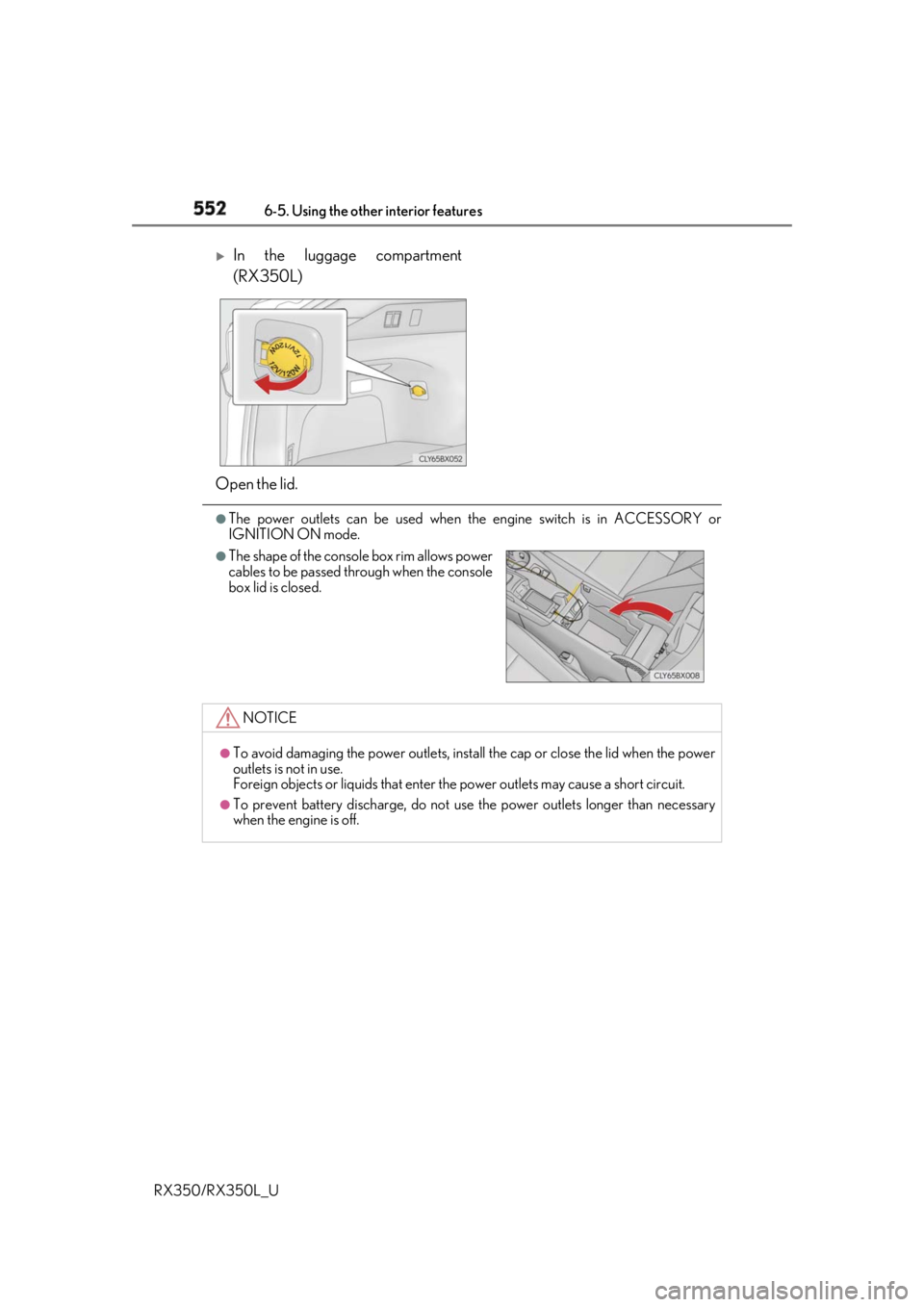
In the luggage compartment
(RX350L)
Open the lid. ●
The shape of the console box rim allows power
cables to be passed through when the console
box lid is closed.
NOTICE ●
To avoid damaging the power outlets, insta ll the cap or close the lid when the power
outlets is not in use.
Foreign objects or liquids that enter the power outlets may cause a short circuit. ●
To prevent battery discharge, do not use the power outlets longer than necessary
when the engine is off.
Page 554 of 777
5536-5. Using the other interior features
6
Interior features
RX350/RX350L_U The USB charging ports are used to supply 2.1 A of electricity at 5 V to external
devices. The USB charging ports are for charging only. They are not designed for
data transfer or other purposes. Depending on the external device, it may not
charge properly. Refer to the manual in cluded with the device before using a
USB charging port. ■
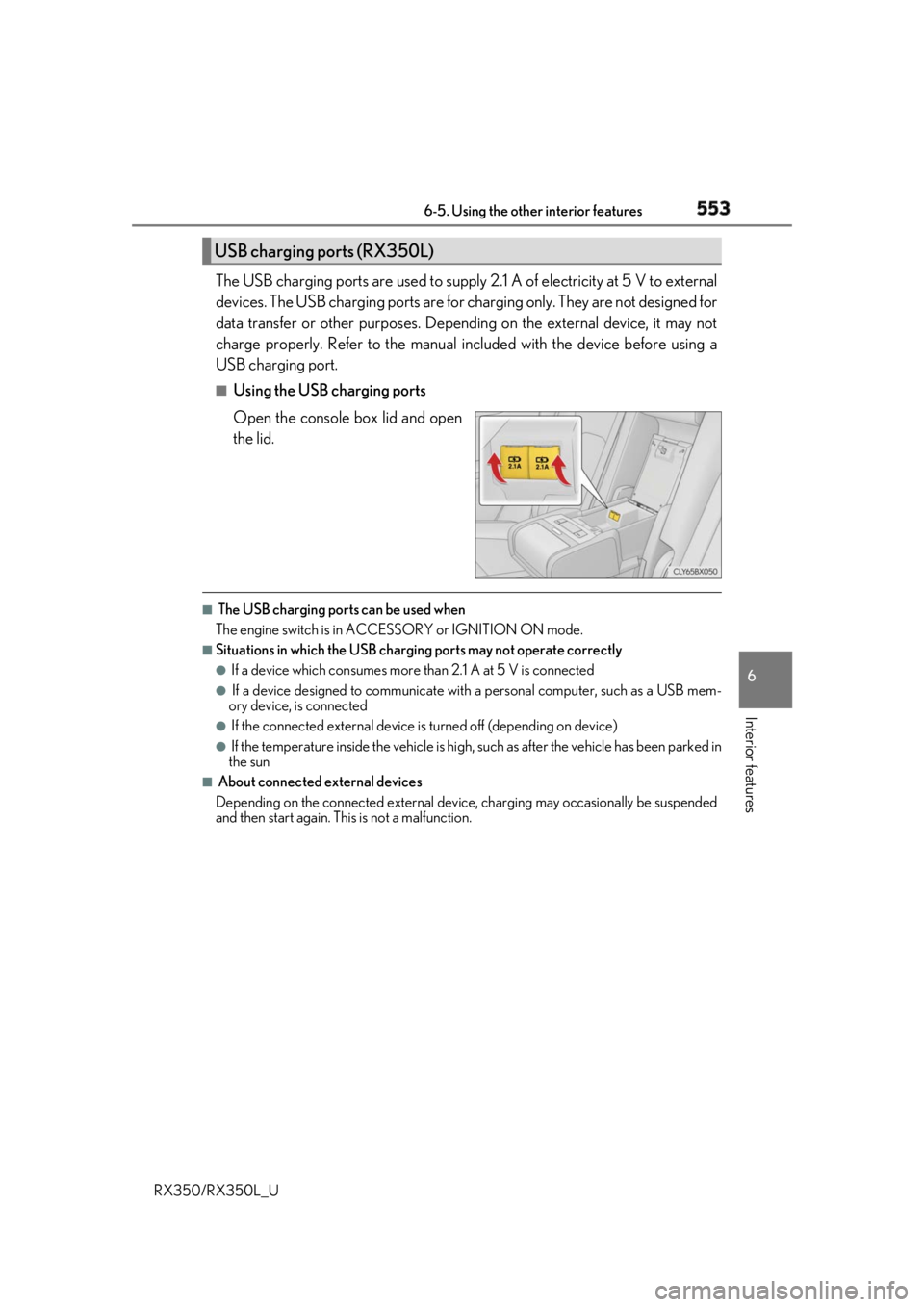
Using the USB charging ports
Open the console box lid and open
the lid. ■
The USB charging ports can be used when
The engine switch is in ACCESSORY or IGNITION ON mode. ■
Situations in which the USB charging ports may not operate correctly ●
If a device which consumes more than 2.1 A at 5 V is connected●
If a device designed to communicate with a personal computer, such as a USB mem-
ory device, is connected ●
If the connected external device is turned off (depending on device)●
If the temperature inside the vehicle is high, such as after the vehicle has been parked in
the sun ■
About connected external devices
Depending on the connected external device , charging may occasionally be suspended
and then start again. This is not a malfunction.USB charging ports (RX350L)
Page 555 of 777
554 6-5. Using the other interior features
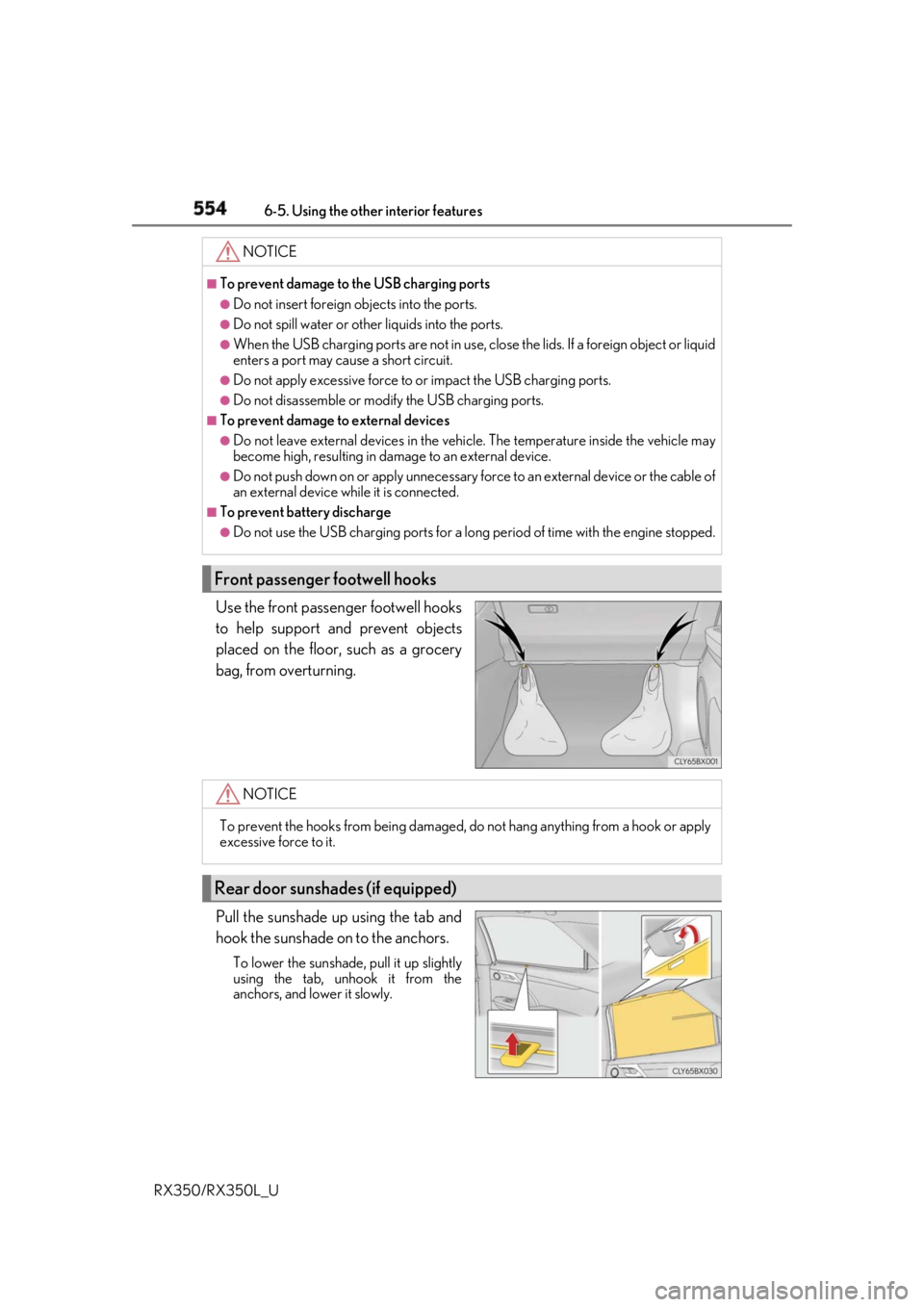
RX350/RX350L_U Use the front passenger footwell hooks
to help support and prevent objects
placed on the floor, such as a grocery
bag, from overturning.
Pull the sunshade up using the tab and
hook the sunshade on to the anchors. To lower the sunshade, pull it up slightly
using the tab, unhook it from the
anchors, and lower it slowly. NOTICE ■
To prevent damage to the USB charging ports●
Do not insert foreign objects into the ports. ●
Do not spill water or othe r liquids into the ports.●
When the USB charging ports are not in use, close the lids. If a foreign object or liquid
enters a port may cause a short circuit. ●
Do not apply excessive force to or impact the USB charging ports.●
Do not disassemble or modi fy the USB charging ports.■
To prevent damage to external devices●
Do not leave external devices in the vehicle. The temperature inside the vehicle may
become high, resulting in damage to an external device. ●
Do not push down on or appl y unnecessary force to an exte rnal device or the cable of
an external device while it is connected. ■
To prevent battery discharge ●
Do not use the USB charging ports for a long period of time with the engine stopped.
Front passenger footwell hooks
NOTICE
To prevent the hooks from being damaged, do not hang anything from a hook or apply
excessive force to it.
Rear door sunshades (if equipped)
Page 571 of 777

570 6-5. Using the other interior features
RX350/RX350L_U ■
Safety Connect Serv ices Information●
Phone calls using the vehicles Bluetooth ®
technology will not be possible during Safety
Connect. ●
Safety Connect is available be ginning Fall 2009 on select Lexus models (in the contig-
uous United States only). Contact with th e Safety Connect respon se center is depen-
dent upon the telematics device being in operative condition, cellular connection
availability, and GPS sa tellite signal receptio n, which can limit the ability to reach the
response center or receive emergency se rvice support. Enro llment and Telematics
Subscription Service Agreement required. A va riety of subscription terms is available;
charges vary by subscription term selected and location. ●
Automatic Collision Notification, Emergenc y Assistance and Stolen Vehicle Location
will function in the United States, includin g Hawaii and Alaska, Puerto Rico and in Can-
ada, and Enhanced Roadside Assistance will function in the United States, Puerto Rico
and in Canada. ●
Automatic Collision Notification, Emergency Assistance, Stolen Vehicle Location and
Enhanced Roadside Assistance will not func tion in the United States Virgin Islands.
No Safety Connect services will function outs ide of the United States in countries other
than Canada.
For vehicles first sold in the USVI, no Safety Connect services will function in and out-
side the United States Virgin Islands. ●
Safety Connect services are not subject to section 255 of the Telecommunications Act
and the device is not TTY compatible. ■
Languages
The Safety Connect response ce nter will offer support in mu ltiple languages. The Safety
Connect system will offer voice prompts in English, Spanish and French. Please indicate
your language of ch oice when enrolling.■
When contacting the response center
You may be unable to contact the resp onse center if the network is busy.
When the engine switch is turned to IGNITION ON mode, the red indicator
light comes on for 2 seconds then turns off. Afterward, the green indicator light
comes on, indicating that the service is active.
The following indicator light patterns indicate specific system usage conditions: ●
Green indicator light on = Active service ●
Green indicator light flashing = Safety Connect call in process●
Red indicator light (except at vehicle start-up) = System malfunction (contact
your Lexus dealer) ●
No indicator light (off) = Safety Connect service not activeSafety Connect LED light Indicators
Page 573 of 777

572 6-5. Using the other interior features
RX350/RX350L_U Important! Read this information abou t exposure to radio frequency signals
before using Safety Connect;
The Safety Connect system installed in your vehicle is a low-power radio trans-
mitter and receiver. It receives and also sends out radio frequency (RF) signals.
In August 1996, the Federal Communications Commission (FCC) adopted RF
exposure guidelines with safety levels for mobile wireless phones. Those guide-
lines are consistent with the safety standards previously set by the following U.S.
and international standards bodies. ●
ANSI (American National Stan dards Institute) C95.1 [1992]●
NCRP (National Council on Radiation Protection and Measurement) Report
86 [1986] ●
ICNIRP (International Commission on Non-Ionizing Radiation Protection)
[1996]
Those standards were based on comprehensive and periodic evaluations of the
relevant scientific literatur e. Over 120 scientists, engineers, and physicians from
universities, and government health agen cies and industries reviewed the avail-
able body of research to deve lop the ANSI Standard (C95.1).
The design of Safety Connect complies wi th the FCC guidelines in addition to
those standards. ■
Certification for Lexus Enform
FCC ID: O6Y-CDMRF101
FCC ID: XOECDMRF101B
FCC ID: N7NGTM2
FCC WARNING:
This equipment complies with FCC radiation ex posure limits set forth for an uncontrolled
environment and meets the FCC radio frequenc y (RF) Exposure Guidelines in Supple-
ment C to OET65. This equipment should be installed and operat ed keeping the radia-
tor at least 20cm or more away from person’s body (excluding extremities: hands, wrists,
feet and ankles).Safety information for Safety Connect