2019 LEXUS RX350 sport
[x] Cancel search: sportPage 106 of 777

1052. Instrument cluster
2
Instrument cluster
RX350/RX350L_U Displays suggestions to the driver in the following situations. To select a response
to a displayed suggestion, use the meter control switches. The suggestion function can be turned on/off. (Customizable features: P. 723)■
Suggestion to enable the power back door
If the power back door system is disabled (setting on set to off) and the
power back door switch on the instru ment panel is operated, a suggestion
message will be displayed asking if yo u wish to enable the power back door
system. To enable the power back door system, select “Yes”. After enabling the power back door syst em, press the power back door switch
again to open or close the power back door.■
Suggestion to turn off the headlights
If the headlights are left on for a certai n amount of time after the engine switch
has been turned off, a su ggestion message will be displayed asking if you wish
to turn the headlights off. To turn the headlights off, select “Yes”.If a front door is opened after the engine switch is turned off, this suggestion mes-
sage will not be displayed.■
Eco Driving Indicator
Eco Driving Indicator will not operate under the following conditions: ●
The shift lever is in any position other than D. ●
A paddle shift sw itch (if equipped) is operated.●
Sport mode is selected. ●
The driving mode is set to customized mode and the powertrain control is set to power
( P. 373) ●
The vehicle speed is approximately 80 mph (130 km/h) or higher.Suggestion function
Eco Driving Indicator Light
During Eco-friendly acceleration (Eco driv-
ing), the Eco Driving Indicator Light will turn
on. When the acceleration exceeds the Zone
of Eco driving, or when the vehicle is stopped,
the light turns off.
Eco Driving Indicator Zone Display
Suggests the Zone of Eco driving with current
Eco driving ratio based on acceleration.
Eco driving ratio based on acceleration
If the acceleration exceeds the Zone of Eco
driving, the right side of the Eco Driving Indi-
cator Zone Display will illuminate.
Zone of Eco driving 1
2
3
4
Page 107 of 777

106 2. Instrument cluster
RX350/RX350L_U ■
Background color of the indicator/shift posi tion display area (except F SPORT models)
The background color of the indicator/shift po sition display area is changed according to
the driving mode as follows ( P. 373):●
Eco drive mode: Blue ●
Sport mode: Red ■
G-force display (if equipped) ●
The G-force values may not be zero even when the vehicle is parked, such as when it is
parked on an incline. ●
Depending on the vehicle usage conditions, the brake fluid pressure display may not
reach its maximum reading even though the brake pedal is fully depressed. ●
If a battery terminal is disconnected and reconnected, the steering amount display may
be disabled temporarily. Afte r driving the vehicle for a while , the display will be enabled.■
Suspension of the settings display ●
Some settings cannot be changed while driv ing. When changing settings, park the
vehicle in a safe place. ●
If a warning message is displa yed, operation of the settin gs display will be suspended.■
Tire pressure ●
It may take a few minutes to display the tire inflation pressure after the engine switch is
turned to IGNITION ON mode. It may also take a few minutes to display the tire infla-
tion pressure after inflation pressure has been adjusted.●
“---” may be displayed if the tire position information cannot be determined due to
unfavorable radio wave conditions. ●
Tire inflation pressure changes with temperat ure. The displayed values may also be dif-
ferent from the values measured using a tire pressure gauge. ■
Liquid crystal display
Small spots or light spots may appear on the display. This phenomenon is characteristic
of liquid crystal displays, and there is no problem continuing to use the display. ■
Customization
Some functions can be customized. ( P. 97, 722)
Page 204 of 777

2034-1. Before driving
4
Driving
RX350/RX350L_U With the brake pedal depressed, shift the shift lever to D. ( P. 240)
Pull the parking brake switch and parking brake is set manually. ( P. 248)
Release the brake pedal and gently de press the accelerator pedal to acceler-
ate the vehicle.
Press the parking brake switch and pa rking brake is released manually.
( P. 248) ■
When starting off on a uphill
The hill-start assist control will activate. ( P. 378)■
Driving in the rain ●
Drive carefully when it is ra ining, because visibility will be reduced, the windows may
become fogged-up, and the road will be slippery. ●
Drive carefully when it starts to rain, beca use the road surface will be especially slip-
pery. ●
Refrain from high speeds when driving on an expressway in the rain, because there may
be a layer of water between the tires and th e road surface, preventing the steering and
brakes from operating properly. ■
Engine speed while driving
In the following conditions, th e engine speed may become high while driving. This is due
to automatic up-shifting control or down-shi fting implementation to meet driving condi-
tions. It does not indica te sudden acceleration.●
The vehicle is judged to be driving uphill or downhill ●
When the accelerato r pedal is released●
When the brake pedal is depressed while sport mode is selected ■
Restraining the engine output (Brake Override System)●
When the accelerator and brake pedals are depressed at the same time, the engine
output may be restrained. ●
A warning message is displayed on the mult i-information display while the system is
operating. If a warning messa ge is shown on the multi-in formation display, read the
message and follow the instructions. ■
Restraining sudden start (Drive-Start Control)●
When the following unusual operation is performed, the engine output may be
restrained.
• When the shift lever is shifted from R to D, D to R, N to R, P to D, or P to R (D
includes M or S) with the accelerator pedal depressed, a warning message appears
on the multi-information display. If a wa rning message is shown on the multi-infor-
mation display, read the messa ge and follow the instructions.
• When the accelerator pedal is depressed t oo much while the vehicle is in reverse.●
While Drive-Start Control is being activated, your vehicle may have trouble escaping
from the mud or fresh snow. In such case, deactivate TRAC ( P. 380) to cancel
Drive-Start Control so that the vehicle ma y become able to escape from the mud or
fresh snow.Starting off on a uphill 1
2
3
4
Page 245 of 777
244 4-2. Driving procedures
RX350/RX350L_U ■
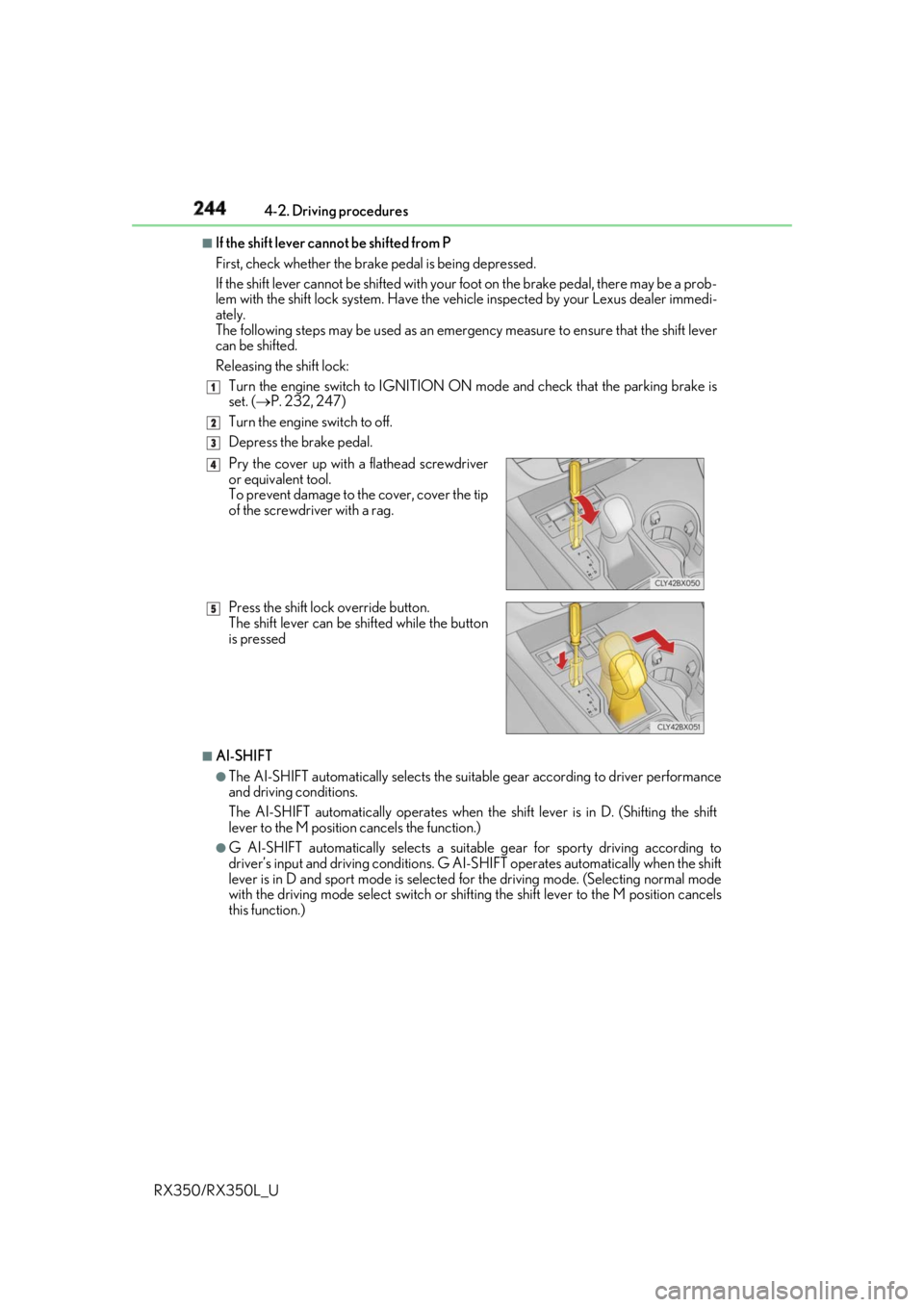
If the shift lever cannot be shifted from P
First, check whether the brak e pedal is being depressed.
If the shift lever cannot be shifted with your foot on the brake pedal, there may be a prob-
lem with the shift lock system. Have the vehi cle inspected by your Lexus dealer immedi-
ately.
The following steps may be used as an emergency measure to ensure that the shift lever
can be shifted.
Releasing the shift lock:
Turn the engine switch to IGNITION ON mode and check that the parking brake is
set. ( P. 232, 247)
Turn the engine switch to off.
Depress the brake pedal.
■
AI-SHIFT ●
The AI-SHIFT automatically selects the suitab le gear according to driver performance
and driving conditions.
The AI-SHIFT automatically operates when th e shift lever is in D. (Shifting the shift
lever to the M position cancels the function.) ●
G AI-SHIFT automatically selects a suitable gear for sporty driving according to
driver’s input and driving conditions. G AI-S HIFT operates automatically when the shift
lever is in D and sport mode is selected for the driving mode. (Selecting normal mode
with the driving mode select switch or shifting the shift lever to the M position cancels
this function.) 1
2
3
Pry the cover up with a flathead screwdriver
or equivalent tool.
To prevent damage to the cover, cover the tip
of the screwdriver with a rag.
Press the shift lock override button.
The shift lever can be shifted while the button
is pressed 4
5
Page 284 of 777

2834-5. Using the driving support systems
4
Driving
RX350/RX350L_U WARNING ■
When to disable the pre-collision system
In the following situations, di sable the system, as it may not operate properly, possibly
leading to an accident resultin g in death or serious injury:●
When the vehicle is being towed ●
When your vehicle is towing another vehicle ●
When transporting the vehicle via truck, bo at, train or similar means of transportation●
When the vehicle is raised on a lift with the engine running and the tires are allowed to
rotate freely ●
When inspecting the vehicle using a drum tester such as a chassis dynamometer or
speedometer tester, or when using an on vehicle wheel balancer ●
When a strong impact is applied to the fron t bumper or front grille, due to an accident
or other reasons ●
If the vehicle cannot be driven in a stable manner, such as when the vehicle has been
in an accident or is malfunctioning ●
When the vehicle is driven in a sporty manner or off-road●
When the tires are not properly inflated ●
When the tires are very worn ●
When tires of a size other than specified are installed ●
When tire chains are installed ●
When a compact spare tire or an emergency tire puncture repair kit is used ●
If equipment (snow plow, etc.) that may obstruct the radar sensor or camera sensor is
temporarily installed to the vehicle
Page 327 of 777

326 4-5. Using the driving support systems
RX350/RX350L_U Front corner sensors
Front center sensors
Rear corner sensors
Rear center sensors
Press “ ” or “ ” of the meter control
switches, select .
Press “ ” or “ ” of the meter control
switches, select “Parking Assist”.
When on, the indicator light comes on
to inform the driver that the system is
operational.Intuitive parking assist
: If equippedThe distance from your vehicle to a ne arby wall or othe r stationary object
when parallel parking or maneuvering into a garage is measured by the sen-
sors and communicated via the displays and a buzzer. Always check the sur-
rounding area when using this system.
Types of sensors
Except F SPORT models
F SPORT models
Turning the intuitive parking assist on/off 1
2
3
4
1
2
Page 340 of 777

3394-5. Using the driving support systems
4
Driving
RX350/RX350L_U Front corner sensors
Front center sensors
Rear corner sensors
Rear center sensors
Select on the multi-information
display.
Press or of the meter con-
trol switch and select “ICS”.
Press of the meter control
switch.
Select the “Yes” and push . When the Intelligent Clearance Sonar is di sabled, the ICS OFF indicator illuminates.
To re-enable the system when it was disabl ed, select on the multi-information dis-
play, select “ICS” and then “On”. If disabled using this method, the system will not be
re-enabled by turning the engine switch off and then to IGNITION ON mode.Types of sensors
Except F SPORT models
F SPORT models
1
2
3
4
Turning the Intelligent Cle arance Sonar system on/off1
2
3
4
Page 350 of 777

3494-5. Using the driving support systems
4
Driving
RX350/RX350L_U NOTICE ■
To prevent the system from malfunctioning ●
If the area around a sensor is subjected to an impact, the system may not operate
properly due to the sensor being misaligned. Have the vehicle inspected by your
Lexus dealer. ●
When using a high pressure washer to wa sh the vehicle, do not spray the sensors
directly, as doing so may cause a sensor to malfunction. ●
When using steam to clean the vehicle, do not direct steam too close to the sensors
as doing so may cause a sensor to malfunction. ■
To prevent a radar sensor from malfunctioning ●
If the area around a radar sensor is subjected to an impact, the system may not oper-
ate properly due to a sensor malfunction. Have the vehicle inspected by your Lexus
dealer. ●
Observe the radar sensor handling precautions. ( P. 316)■
To prevent unnecessary operation of the Intelligent Clearance Sonar system
In the following situations, disable the Inte lligent Clearance Sonar system as the system
may operate even though there is no possibility of a collision.●
When inspecting the vehicle using a chassi s roller, chassis dynamo or free roller●
When loading the vehicle onto a boat, truck or other transport vessel ●
If the suspension has been modified or tires of a size other than specified are installed●
If the front of the vehicle is raised or lowered due to the carried load ●
If towing eyelets are installed