Page 434 of 777
4335-5. Playing an audio CD and MP3/WMA/AAC discs
5
Lexus Display Audio system
RX350/RX350L_U NOTICE ■
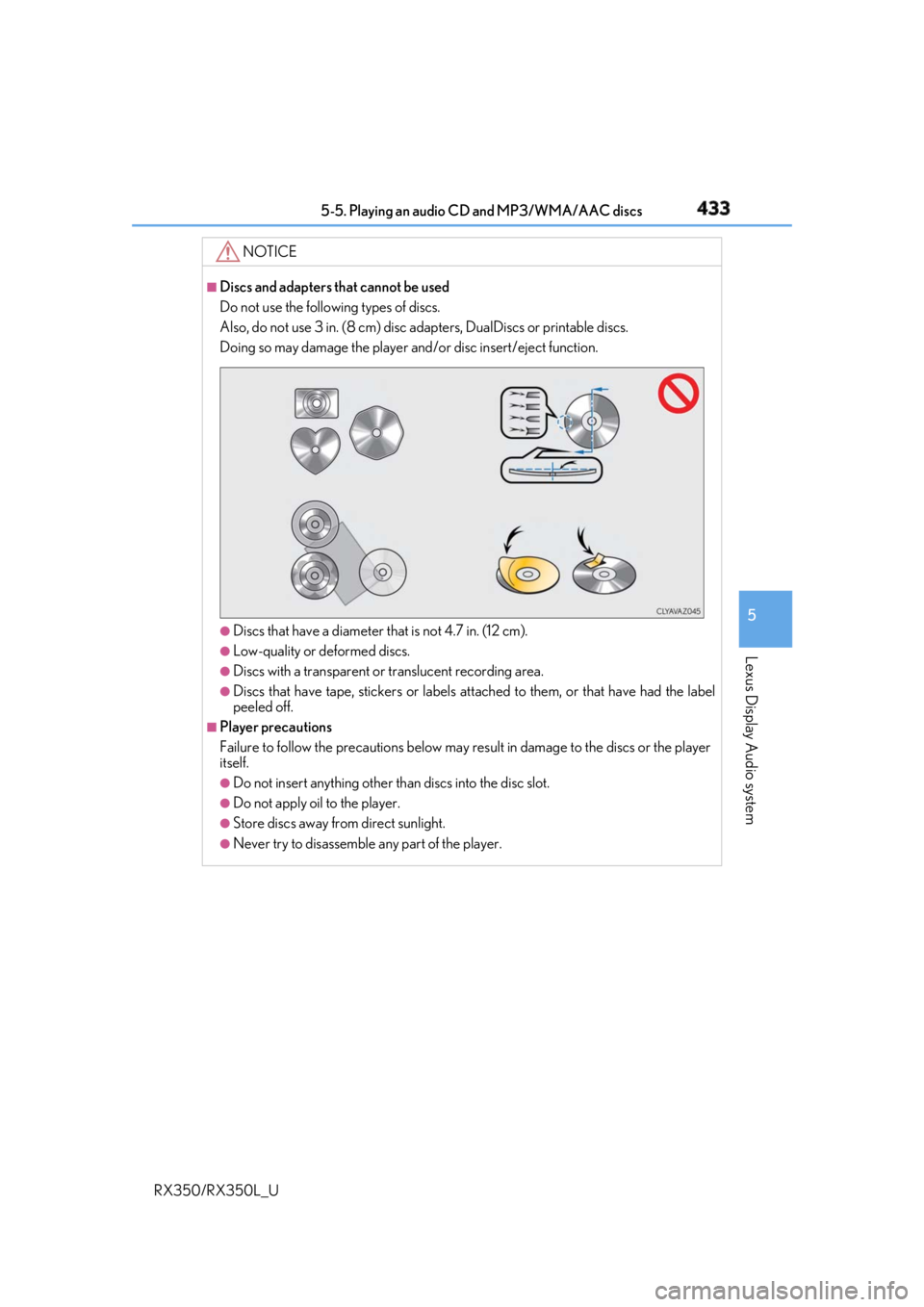
Discs and adapters that cannot be used
Do not use the following types of discs.
Also, do not use 3 in. (8 cm) disc ad apters, DualDiscs or printable discs.
Doing so may damage the player and/or disc insert/eject function.
●
Discs that have a diameter that is not 4.7 in. (12 cm). ●
Low-quality or deformed discs. ●
Discs with a transparent or translucent recording area.●
Discs that have tape, stickers or labels attached to them, or that have had the label
peeled off. ■
Player precautions
Failure to follow the precautions below may re sult in damage to the discs or the player
itself. ●
Do not insert anything other than discs into the disc slot. ●
Do not apply oil to the player. ●
Store discs away from direct sunlight. ●
Never try to disassemble any part of the player.
Page 443 of 777
442 5-6. Using an external device
RX350/RX350L_U P. 403
Pressing the “MEDIA” button displays the top screen from any screen of the
selected source. ■
Menu screen
P. 417 ■
Operating portable players co nnected to the audio system
Volume can be adjusted using the vehicle’s audio controls. All othe r adjustments must be
made on the portable player itself. ■
When using a portable player connected to the power outlet
Noise may occur during playback. Use the power source of the portable player.Using the AUX port To use the AUX port, connect a portable player, press the “MEDIA” button or
select “AUX” or “External” on the “Source” screen.
Connecting a portable player
Top screen
NOTICE ■
To prevent damage to the port able player or its terminal●
Depending on the size and shape of the port able player that is connected to the sys-
tem, the console box may not close fully. In th is case, do not forcibly close the console
box as this may damage the portab le player or the terminal, etc.●
Do not leave portable player in the vehicle. The temperature inside the vehicle may
become high. ●
Do not push down on or apply unnecessary pressure to the portable player while it is
connected. ●
Do not insert foreign objects into the port.
Page 444 of 777
443
5
Lexus Display Audio system
RX350/RX350L_U 5-7. Connecting Bluetooth ®
Steps for using Bluetooth ®
devicesThe following can be performed using Bluetooth ®
wireless communication:■
A portable audio player can be operated and listened to via the Lexus
Display Audio system ■
Hands-free phone calls can be made via a cellular phone
In order to use wireless communication, register and connect a Bluetooth ®
device by performing the following procedures.
Device registration/connection flow 1. Register the Bluetooth ®
device to be used with Lexus Display
Audio system ( P. 445)
2. Select the Bluetooth ®
device to be used
( P. 446)
Audio Hands-free phone
3. Start Bluetooth ®
connec-
tion ( P. 447) 3. Start Bluetooth ®
connec-
tion ( P. 448)
4. Check connection status
( P. 456)4. Use Bluetooth ®
audio
( P. 453)
5. Use Bluetooth ®
phone
( P. 457)
Page 446 of 777

4455-7. Connecting Bluetooth ®
5
Lexus Display Audio system
RX350/RX350L_U Turn the Bluetooth ®
connection setting of your device set to on.
Go to “Bluetooth
* Setup”: “MENU” button “Setup” “Bluetooth
* ”
Move the controller to the left and then select “Add Device”.
When this screen is displayed,
search for the device name dis-
played on this screen on your
Bluetooth ®
device.For operation of the Bluetooth ®
device,
see the manual that comes with your
Bluetooth ®
device.
Register the Bluetooth ®
device
using your Bluetooth ®
device.A PIN code are not required for SSP (Secur e Simple Pairing) compatible Bluetooth ®
devices. Depending on the device, you may need to select Yes to register, or No to
cancel on the device.
If an error message is disp layed, follow the guidance on the screen to try again.
* : Bluetooth is a registered trademark of Bluetooth SIG, Inc.
Go to “Bluetooth
* Setup”: “MENU” button “Setup” “Bluetooth
* ”
Move the controller to the left and then select “Remove Device”.
Select the device to remove.
* : Bluetooth is a registered trademark of Bluetooth SIG, Inc.Registering a Bluetooth ®
deviceBluetooth ®
compatible phones (HFP) and portable audio players (AVP) can
be registered simultaneously. You can register up to 5 Bluetooth ®
devices.
How to register a Bluetooth ®
device1
2
3
4
5
Removing a Bluetooth ®
device 1
2
3
Page 447 of 777
446 5-7. Connecting Bluetooth ®
RX350/RX350L_U Go to “Bluetooth
* 1
Setup”: “MENU” button “Setup” “Bluetooth
* 1
”
Select the device to connect.
Select “Connect XX
* 2
”, “Connect as a Phone” or “Connect as an Audio
Player”.
“Connect XX
* 2
” means connect both the phon e and audio functions of one
device.
If the desired Bluetooth ®
device is not displayed, register the device.
( P. 445)
* 1
: Bluetooth is a registered trademark of Bluetooth SIG, Inc.
* 2
: XX represents the selected device name.Selecting a Bluetooth ®
deviceIf multiple Bluetooth ®
devices are registered, follow the procedure below to
select the Bluetooth ®
device to be used. You ma y only use one device at a
time.
How to select a Bluetooth ®
device1
2
3
Page 448 of 777

4475-7. Connecting Bluetooth ®
5
Lexus Display Audio system
RX350/RX350L_U When a registered Bluetooth ®
audio player is in standby for a connection, it will
automatically connect to the system wh en the engine switch is turned to
ACCESSORY or IGNITION ON mode.
When automatic connection priority is se t to on and there is more than one reg-
istered Bluetooth ®
audio player available, the system will automatically connect
to the Bluetooth ®
audio player with the highest priority. ( P. 450)
Operate the portable player and connect it to the Bluetooth ®
audio system.
Go to “Bluetooth
* 1
Setup”: “MENU” button “Setup” “Bluetooth
* 1
”
Select the device to connect.
Select “Connect XX
* 2
” or “Connect as an Audio Player”.
If the desired Bluetooth ®
device is not displayed, register the device.
( P. 445)
* 1
: Bluetooth is a registered trademark of Bluetooth SIG, Inc.
* 2
: XX represents the selected device name.Connecting a Bluetooth ®
audio playerThere are 2 portable audio player conne ction settings available: connecting
from the vehicle and connectin g from the portable player.
Connecting method is set to “Vehicle”
Connecting method is set to “Device” 1
2
3
Page 449 of 777

448 5-7. Connecting Bluetooth ®
RX350/RX350L_U When you register a phone, auto conn ection will be activated. It is recom-
mended to have the system set to this mode and leave the Bluetooth ®
phone in a
place where a good connection can be established.
When the engine switch is turned to ACCESSORY or IGNITION ON mode,
the system will search for a nearby cellular phone you have registered.
Next, the system automatically connects with the most recent phone that was
connected. The connected result is displayed.
When automatic connection priority is se t to on and there is more than one reg-
istered Bluetooth ®
phone available, the system will automatically connect to the
Bluetooth ®
phone with the highest priority. ( P. 450)
When auto connection has failed or “Bluetooth
* 1
Power” is turned off, you must
connect the Bluetooth ®
device manually.
Go to “Bluetooth
* 1
Setup”: “MENU” button “Setup” “Bluetooth
* 1
”
Select the device to connect.
Select “Connect XX
* 2
”, “Connect as a Phone” or “Connect as an Audio
Player”.
If the desired Bluetooth ®
device is not displayed, register the device.
( P. 445)
* 1
: Bluetooth is a registered trademark of Bluetooth SIG, Inc.
* 2
: XX represents the selected device name. ■
Reconnecting a Bluetooth ®
phone
If the system cannot connect due to poor signal strength with the engine switch in
ACCESSORY or IGNITION ON mode, the syst em will automatically attempt to recon-
nect. ■
Connecting a phone while Bluetooth ®
audio is playing●
Bluetooth ®
audio will stop temporarily.●
It may take time to connect.Connecting a Bluetooth ®
phoneThere are two connecting methods available: automatic and manual.
Auto connection
Manual connection 1
2
3
Page 450 of 777
4495-7. Connecting Bluetooth ®
5
Lexus Display Audio system
RX350/RX350L_U Go to “Bluetooth
* Setup”: “MENU” button “Setup” “Bluetooth
* ”
Select the desired device and then select “Device Info”.
Change the name of the device
Change the connection method “Vehicle”: Connect the audio system
to the portable audio player.
“Device”: Connect the portable
audio player to the audio system
Device address
Device phone number Depending on the model of phone, the number may not be displayed.
Compatibility profile of the device
* : Bluetooth is a registered trademark of Bluetooth SIG, Inc. ■
Restoring the default settings
Move the controller to the left and select “D efault” on the “Device Information” screen.Displaying a Bluetooth ®
device detailsYou can confirm and change th e registered device details.
Bluetooth ®
device registration status 1
2
1
2
3
4
5