2019 LEXUS RC350 tire pressure
[x] Cancel search: tire pressurePage 1 of 390

RC350AWD_RC350_RC300AWD_RC300_OM_(U)_1810
1
2
3
4
5
6
7
8
9
Pictorial indexSearch by illustration
For safety
and securityMake sure to read through them
(Main topics: Child seat, theft deterrent system)
Vehicle status
information and
indicatorsReading driving-related information
(Main topics: Meters, multi-information display)
Before drivingOpening and closing the doors and windows,
adjustment before driving
(Main topics: Keys, doors, seats)
DrivingOperations and advice which are necessary for driving
(Main topics: Starting engine, refueling)
Interior featuresUsage of the interior features
(Main topics: Air conditioner, storage features)
Maintenance
and careCaring for your vehicle and maintenance procedures
(Main topics: Interior and exterior, light bulbs)
When trouble
arisesWhat to do in case of malfunction and emergency
(Main topics: Battery discharge, flat tire)
Vehicle
specificationsVehicle specifications, customizable features
(Main topics: Fuel, oil, tire inflation pressure)
For ownersReporting safety defects for U.S. owners, and seat belt,
SRS airbag and headlight aim instructions for Canadian
owners
IndexSearch by symptom
Search alphabetically
Page 3 of 390

3TABLE OF CONTENTS
RC350AWD_RC350_RC300AWD_RC30
0_OM_(U)_1810
1
2
3
4
5
6
7
8
9
4-2. Driving procedures Engine (ignition) switch .............. 125
Automatic transmission.............. 128
Turn signal lever............................. 133
Parking brake ................................. 134
ASC (Active Sound Control) .. 134
4-3. Operating the lights and wipers Headlight switch ............................ 136
Automatic High Beam ................ 138
Windshield wipers and washer ............................................................. 141
4-4. Refueling Opening the fuel tank cap......... 148
4-5. Using the driving support systems Lexus Safety System + ................. 151
PCS (Pre-Collision System)..... 154
LDA (Lane Departure Alert with steering control) .......................... 161
Dynamic radar cruise control ............................................................ 168
Intuitive parking assist ................. 176
BSM (Blind Spot Monitor) ........ 182
Driving mode select switch....... 190
Driving assist systems .................. 192
4-6. Driving tips Winter driving tips ........................ 196
5-1. Remote Touch/Display Remote Touch ............................... 200
Center Display .............................. 202
5-2. Using the air conditioning system Automatic air conditioning system .205 Heated steering wheel/seat heat-
ers/seat ventilators..................... 212
5-3. Using the interior lights Interior lights list ............................. 215
5-4. Using the storage features List of storage features ................ 217
Trunk features ................................. 219
5-5. Using the other interior features Other interior features .............. 220
Garage door opener .................. 222
Compass .......................................... 227
6-1. Maintenance and care Cleaning and protecting the vehi-cle exterior.................................... 232
Cleaning and protecting the vehi- cle interior .................................... 235
6-2. Maintenance Maintenance re quirements .....238
General maintenance................ 239
Emission inspection and mainte- nance (I/M) programs ............. 242
6-3. Do-it-yourself maintenance Do-it-yourself service precautions.243
Hood ................................................. 245
Positioning a floor jack .............. 245
Engine compartment .................. 247
Tires ................................................... 255
Tire inflation pressure................... 261
Wheels ............................................. 263
Air conditioning
filter ................. 264
Electronic key battery ................ 265
5Interior features
6Maintenance and care
Page 12 of 390

12Pictorial index
RC350AWD_RC350_RC300AWD_RC30
0_OM_(U)_1810
Windshield wipers ................................................................................................... P.141
Precautions for winter season .. .................................................................................... P.196
To prevent freezing (windshield wiper de-icer)
*.................................................P.209
Precautions against car wash ...................................................................................... P.233
Fuel filler door ..........................................................................................................P.148
Refueling method .............................................................................................................. P .148
Fuel type/fuel tank capacity ...... .................................................................................... P.318
Tires.......................................................................................................................... ..P.255
Tire size/inflation pressure ........................................................................................... P.322
Winter tires/tire chain ..................................................................................................... P.1 96
Checking/rotation/tire pressure warning system.............................................. P.255
Coping with flat tires........................................................................................................ P .294
Hood ..........................................................................................................................P.245
Opening ........................................................................................................................ ....... P.245
Engine oil ..................................................................................................................... .......... P.318
Coping with overheating ...............................................................................................P.309
Warning messages ..........................................................................................................P.290
Headlights ................................................................................................................. P.13 6
Parking lights/daytime running lights............................................................... P.136
Turn signal lights ......................................................................................................P.133
Cornering lights ...................................................................................................... P.136
Side marker lights ................................................................................................... P.136
Tail lights .................................................................................................................... P.136
Stop lights
Back up light
Shifting the shift lever to R ...............................................................................................P.1 29
License plate lights ................................................................................................. P.136
*:If equipped
Light bulbs of the exterior lights for driving
(Replacing method: P.270, Watts: P.326)
D
E
F
G
H
I
J
K
L
M
N
O
Page 16 of 390
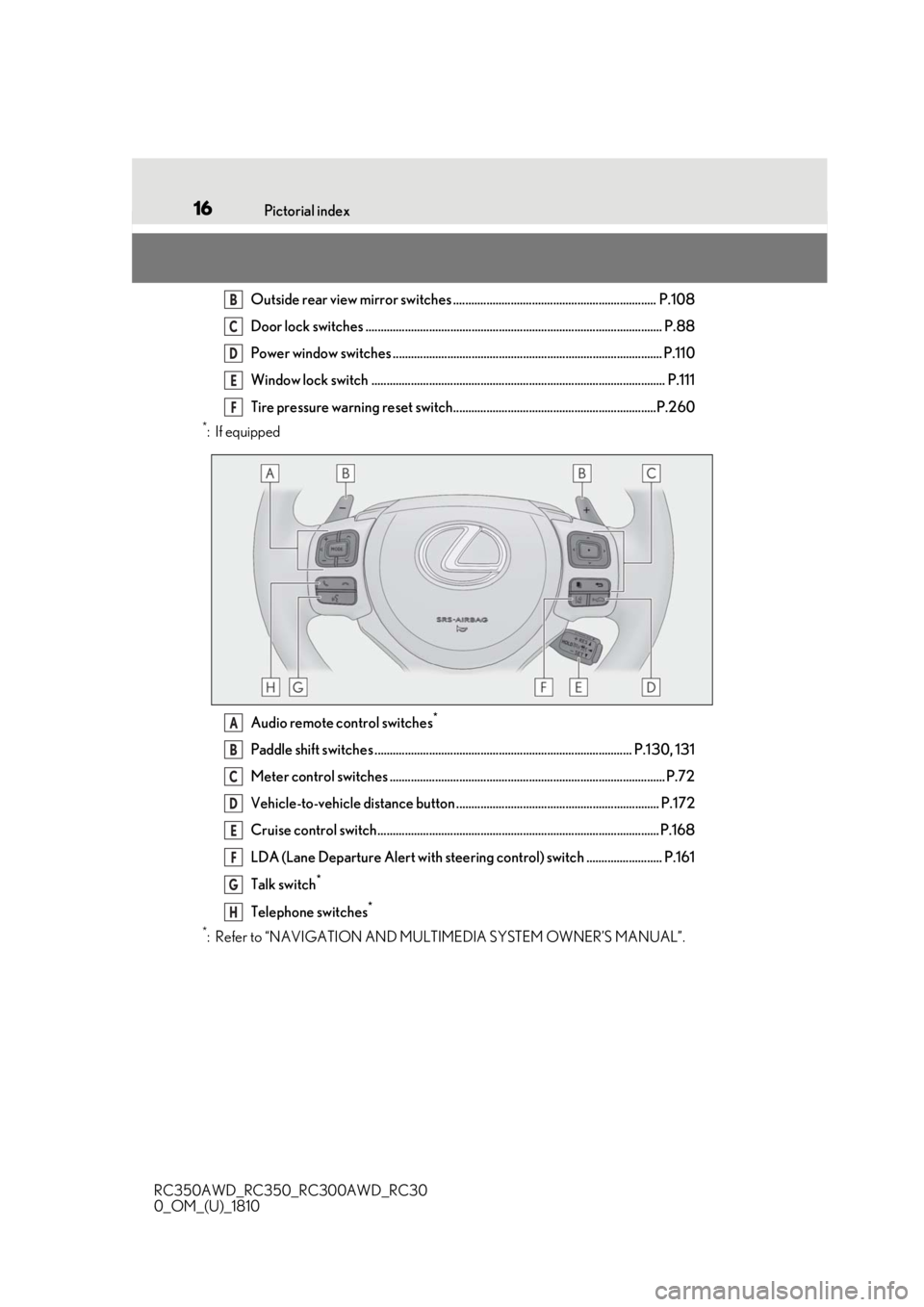
16Pictorial index
RC350AWD_RC350_RC300AWD_RC30
0_OM_(U)_1810
Outside rear view mirror switches ................................................................... P.108
Door lock switches .................................................................................................. P.88
Power window switches ......................................................................................... P.110
Window lock switch ................................................................................................. P.111
Tire pressure warning reset switch...................................................................P.260
*:If equipped Audio remote control switches
*
Paddle shift switches ..................................................................................... P.130, 131
Meter control switches ........................................................................................... P.72
Vehicle-to-vehicle distance button ................................................................... P.172
Cruise control switch............................................................................................. P.168
LDA (Lane Departure Alert with steering control) switch ......................... P.161
Talk switch
*
Telephone switches*
*
: Refer to “NAVIGATION AND MULTIMEDIA SYSTEM OWNER’S MANUAL”.
B
C
D
E
F
A
B
C
D
E
F
G
H
Page 63 of 390

632-1. Instrument cluster
RC350AWD_RC350_RC300AWD_RC30
0_OM_(U)_1810
2
Vehicle status information and indicators
Warning lights inform the driver of mal-
functions in the indicated vehicle sys-
tems.
*1: These lights turn on when the engine switch is turned to IGNITION ON
mode to indicate that a system check is
being performed. They will turn off after
the engine is started, or after a few sec-
onds. There may be a malfunction in a
system if a light does not come on, or
turn off. Have the vehicle inspected by
your Lexus dealer.
*2: This light illuminates on the multi-infor-mation display.
*3: Except F SPORT models: This light illu-minates on the multi-information dis-
play.
F SPORT models: This light illuminates
on the meter.
*4: This light illuminates on the center panel.
Warning lights
(U.S.A.)
Brake system warning light*1
( P.282)
(Canada)
Brake system warning light*1
( P.282)
High coolant temperature
warning light
*2 ( P.282)
Charging system warning
light
*3 ( P.282)
Low engine oil pressure warn-
ing light
*2 ( P.283)
(U.S.A.)
Malfunction indicator lamp*1
( P.283)
(Canada)
Malfunction indicator lamp*1
( P.283)
SRS warning light
*1 ( P.283)
(U.S.A.)
ABS warning light*1 ( P.283)
(Canada)
ABS warning light*1 ( P.283)
(U.S.A.)
Parking brake warning light
( P.284)
(Canada)
Parking brake warning light
( P.284)
Brake Override System warn-
ing light/Drive-Start Control
warning light
*2 ( P.284)
Electric power steering system
warning light
*1 ( P.284)
(orange)
LDA (Lane Departure Alert)
indicator ( P.285)
(flashes or
illuminates)PCS warning light*1 ( P.285)
Slip indicator
*1 ( P.285)
Open door warning light
( P.285)
Low fuel level warning light
( P.286)
Driver’s and front passenger’s
seat belt reminder light
( P.286)
Rear passenger’s seat belt
reminder lights
*4 ( P.286)
Master warning light
*1
( P.287)
Tire pressure warning light
*1
( P.287)
Page 75 of 390

752-1. Instrument cluster
RC350AWD_RC350_RC300AWD_RC30
0_OM_(U)_1810
2
Vehicle status information and indicators
guideline. Depending on factors such
as the road surface condition, tem-
perature and vehicle speed, the display
may not show the actual condition of
the vehicle.
Resetting the record of maximum
G-forces
Press and hold to reset the record.
Peak hold function
If lateral G-forces of 0.5 G or greater are
generated, the G-forc e value display will
turn amber and be held for 2 seconds.
*: For F SPORT models, this item is not available when the ma in meter is in the
center position.
■Tire pressure
P.258
■Vehicle sway warning*
Detects the sway of the vehicle within a
lane, which is often associated with a
decrease in the driver’s attention level,
and displays the decrease in attention
using a bar display.
The shorter the bar length, the more
the driver may need to rest.
This display is a part of the LDA (Lane
Departure Alert with steering control) sys-
tem.The display is enabled when the oper-
ating conditions of the vehicle sway
warning are met. ( P.162)
*: For F SPORT models, this item is not
available when the ma in meter is in the
center position.
■Gear positions
Displays the current gear position
when the shift lever is in D or M.
■Units (if equipped) *
The units of measure used can be
changed while driving.
Unlike the units sett ing performed on ,
the units setting performed on can be
changed while driving.
*: For F SPORT models, this item is not available when the main meter is in the
right-side position.
■Blank (No items)
Displays no drive information contents.
■Tire pressure
●It may take a few minutes to display the
tire inflation pressu re after the engine
switch is turned to IGNITION ON mode.
It may also take a few minutes to display
the tire inflation pressure after inflation
pressure has b een adjusted.
●“---” may be displayed if the tire informa-
tion cannot be determined due to unfa-
vorable radio wave conditions.
●Tire inflation pressure changes with tem-
perature. The displaye d values may also
be different from the values measured
using a tire pressure gauge.
Select to display the following naviga-
tion system-linked information.
Route guidance
Compass display (heading-up dis-
play)
Select to enable se lection of an audio
source or track on the display using the
meter control switches.
Navigation system-linked dis-
play (if equipped)
Audio system-linked display
Page 160 of 390

1604-5. Using the driving support systems
RC350AWD_RC350_RC300AWD_RC30
0_OM_(U)_1810• The vehicle is wobbling.
• The vehicle is being driven at extremely
high speeds.
• When driving on a hill
• If the radar sensor or camera sensor is misaligned
●In some situations such as the following,
sufficient braking force may not be
obtained, preventing the system from
performing properly:
• If the braking functions cannot operate to
their full extent, such as when the brake
parts are extremely cold, extremely hot,
or wet
• If the vehicle is not properly maintained (brakes or tires are excessively worn,
improper tire inflation pressure, etc.)
• When the vehicle is being driven on a gravel road or other slippery surface
●Some pedestrians such as the following
may not be detected by the radar sensor
and camera sensor, preventing the sys-
tem from operating properly:
• Pedestrians shorter than approximately 3.2 ft. (1 m) or tall er than approximately
6.5 ft. (2 m)
• Pedestrians wearing oversized clothing (a rain coat, long skir t, etc.), making their
silhouette obscure
• Pedestrians who are carrying large bag- gage, holding an umbrella, etc., hiding
part of their body
• Pedestrians who are bending forward or squatting
• Pedestrians who are pushing a stroller, wheelchair, bicycle or other vehicle
• Groups of pedestrians which are close
together
• Pedestrians who are wearing white and look extremely bright
• Pedestrians in the dark, such as at night or while in a tunnel
• Pedestrians whose clothing appears to
be nearly the same co lor or brightness as
their surroundings
• Pedestrians near walls , fences, guardrails,
or large objects
• Pedestrians who are on a metal object (manhole cover, steel plate, etc.) on the
road
• Pedestrians who are walking fast
• Pedestrians who are changing speed abruptly • Pedestrians running out from behind a
vehicle or a large object
• Pedestrians who are extremely close to
the side of the vehicle (outside rear view
mirror, etc.)
■If the PCS warning light flashes or illumi-
nates and a warning message is dis-
played on the multi-information display
The pre-collision system may be temporar-
ily unavailable or there may be a malfunc-
tion in the system.
●In the following situations, the warning
light will turn off, the message will disap-
pear and the system will become opera-
tional when normal operating conditions
return:
• When the radar sensor or camera sensor
or the area around either sensor is hot,
such as in the sun
• When the radar sensor or camera sensor
or the area around either sensor is cold,
such as in an extremely cold environment
• When a front sensor is dirty or covered
with snow, etc.
• When the part of the windshield in front of the camera sensor is fogged up or cov-
ered with condensation or ice
(Defogging the windshield: P.209)
• If the camera sensor is obstructed, such
as when the hood is open or a sticker is
attached to the windshield near the cam-
era sensor
●If the PCS warning light continues to flash
or remains illuminated or the warning
message does not disappear even
though the vehicle has returned to nor-
mal, the system may be malfunctioning.
Have the vehicle inspected by your Lexus
dealer immediately.
■If VSC is disabled
●If VSC is disabled ( P.192), the pre-col-
lision brake assist and pre-collision brak-
ing functions are also disabled.
●The PCS warning light will turn on and
“VSC Turned Off Pre-Collision Brake
System Unavailable” will be displayed on
the multi-information display.
Page 166 of 390

1664-5. Using the driving support systems
RC350AWD_RC350_RC300AWD_RC30
0_OM_(U)_1810brightness changes suddenly, such as at
the entrances and exits of tunnels, etc.
●Light from the headlights of an oncoming
vehicle, the sun, etc. enters the camera.
●The vehicle is driven where the road
diverges, merges, etc.
●The vehicle is driven on a slope.
●The vehicle is driven on a road which tilts
left or right, or a winding road.
●The vehicle is driven on an unpaved or
rough road.
●The vehicle is driven around a sharp
curve.
●The traffic lane is ex
cessively narrow or
wide.
●The vehicle is extremely tilted due to car-
rying heavy luggage or having improper
tire pressure.
●The distance to the preceding vehicle is
extremely short.
●The vehicle is moving up and down a
large amount due to road conditions
during driving (poor roads or road
seams).
●The headlight lenses are dirty and emit a
faint amount of light at night, or the beam
axis has deviated.
●The vehicle is struck by a crosswind.
●The vehicle has just changed lanes or
crossed an intersection.
●Snow tires, etc. are equipped.
■Warning message
If the following warning messag e is displayed on the multi-information display and the LDA
indicator illuminates in orange, follow th e appropriate troubleshooting procedure.
Warning messageDetails/Actions
“Lane Departure Alert Malfunction
Visit Your Dealer”The system may not be operating properly.
Have the vehicle inspected at your Lexus dealer.
“Front Camera Unavailable Remove
Debris On Windshield”
Dirt, rain, condensation, ice, snow, etc. are present
on the windshield in front of the camera sensor.
Turn the LDA system off, remove any dirt, rain,
condensation, ice, snow, et c. from the windshield,
and then turn the LDA system back on.
“Front Camera Unavailable”
The operation conditions of the camera sensor
(temperature, etc.) are not met.
When the operation conditions of the camera
sensor (temperature, etc.) are met, the LDA system
will become available. Turn the LDA system off, wait
for a little while, and then turn the LDA system back
on.
“Lane Departure Alert Unavailable”
The LDA system is temporarily canceled due to a
malfunction in a sensor other than the camera sen-
sor.
Turn the LDA system off and follow the appropri-
ate troubleshooting procedures for the warning
message. Afterward, drive the vehicle for a short
time, and then turn the LDA system back on.