2019 LEXUS RC350 fold
[x] Cancel search: foldPage 11 of 390

11Pictorial index
RC350AWD_RC350_RC300AWD_RC30
0_OM_(U)_1810
Pictorial index
■ Exterior
The shape of the headlights may differ depending on the grade, etc.
Doors .......................................................................................................................... ..P.86
Locking/unlocking .............................................................................................................. P.86
Opening/closing the side windows .............................................................................P.110
Locking/unlocking by using th e mechanical key ................................................P.304
Warning lights/warning messages ............................................................... P.285, 290
Trunk .......................................................................................................................... .. P.89
Opening from inside the cabin ...................................................................................... P.90
Opening from outside ....................................................................................................... P.90
Opening by using the mechanical key ....................................................................P.304
Warning lights/warning messages ............................................................... P.285, 290
Outside rear view mirrors................................................................................... P.108
Adjusting the mirror angle ............................................................................................. P.108
Folding the mirrors ............................................................................................................ P.109
Driving position memory
*.............................................................................................. P.100
Defogging the mirrors ....................................................................................................P.209
A
B
C
Page 48 of 390
481-1. For safe use
RC350AWD_RC350_RC300AWD_RC30
0_OM_(U)_1810
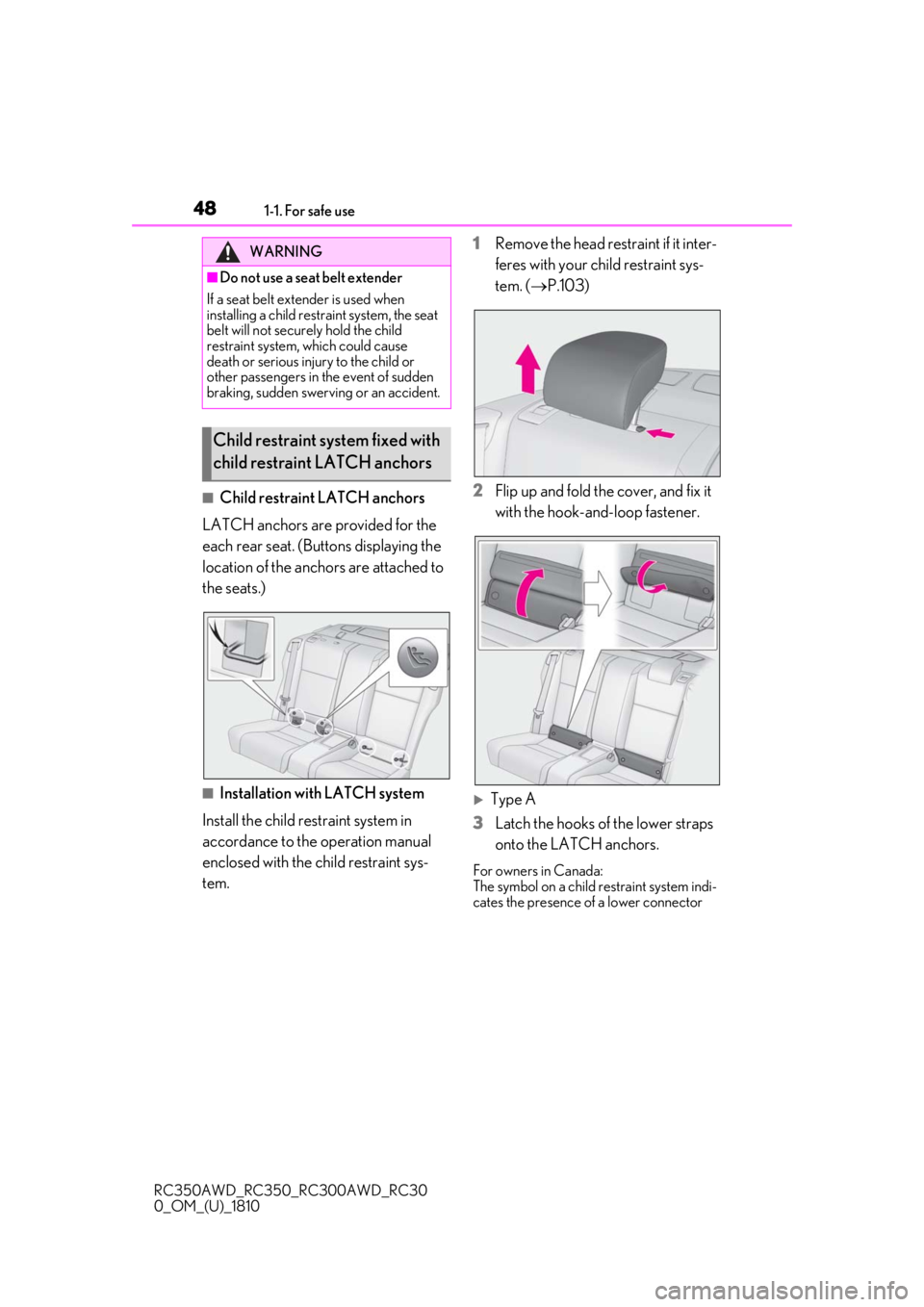
■Child restraint LATCH anchors
LATCH anchors are provided for the
each rear seat. (Buttons displaying the
location of the anchors are attached to
the seats.)
■Installation with LATCH system
Install the child restraint system in
accordance to the operation manual
enclosed with the child restraint sys-
tem. 1
Remove the head restraint if it inter-
feres with your child restraint sys-
tem. (
P.103)
2
Flip up and fold the cover, and fix it
with the hook-and-loop fastener.
Type A
3
Latch the hooks of the lower straps
onto the LATCH anchors.
For owners in Canada:
The symbol on a child restraint system indi-
cates the presence of a lower connector
WARNING
■Do not use a seat belt extender
If a seat belt extender is used when
installing a child restra int system, the seat
belt will not securely hold the child
restraint system, which could cause
death or serious injury to the child or
other passengers in the event of sudden
braking, sudden swervi ng or an accident.
Child restraint system fixed with
child restraint LATCH anchors
Page 92 of 390

923-2. Opening, closing and locking the doors and trunk
RC350AWD_RC350_RC300AWD_RC30
0_OM_(U)_1810
■If the smart access system with
push-button start or the wireless remote
control does not operate properly
Use the mechanical key to unlock the trunk.
( P.304)
Replace the key battery with a new one if it
is depleted. ( P.265)
■If a symbol indicating the trunk opens is
shown on the multi-information display
P.88
■Customization
Some functions can be customized.
( P.339)
To protect luggage stored in the trunk
against theft, the luggage security sys-
tem can be set to on.
1 Move the luggage security system
levers to the lock position.
To lock a luggage security system lever
from inside the cabin, fold the rear seat-
back forward, move the lever to the lock
position, and return the seatback to its
original position.
2To disable the trunk opener, turn
the main switch in the glove box off.
On
Off
When the main switch is off, the trunk lid
cannot be opened even with the wireless
remote control or entry function.
■When leaving a key to the vehicle with a
parking attendant
P.85
Luggage security system
A
B
Page 97 of 390
973-3. Adjusting the seats
RC350AWD_RC350_RC300AWD_RC30
0_OM_(U)_1810
3
Before driving
3-3.Adjusting the seats
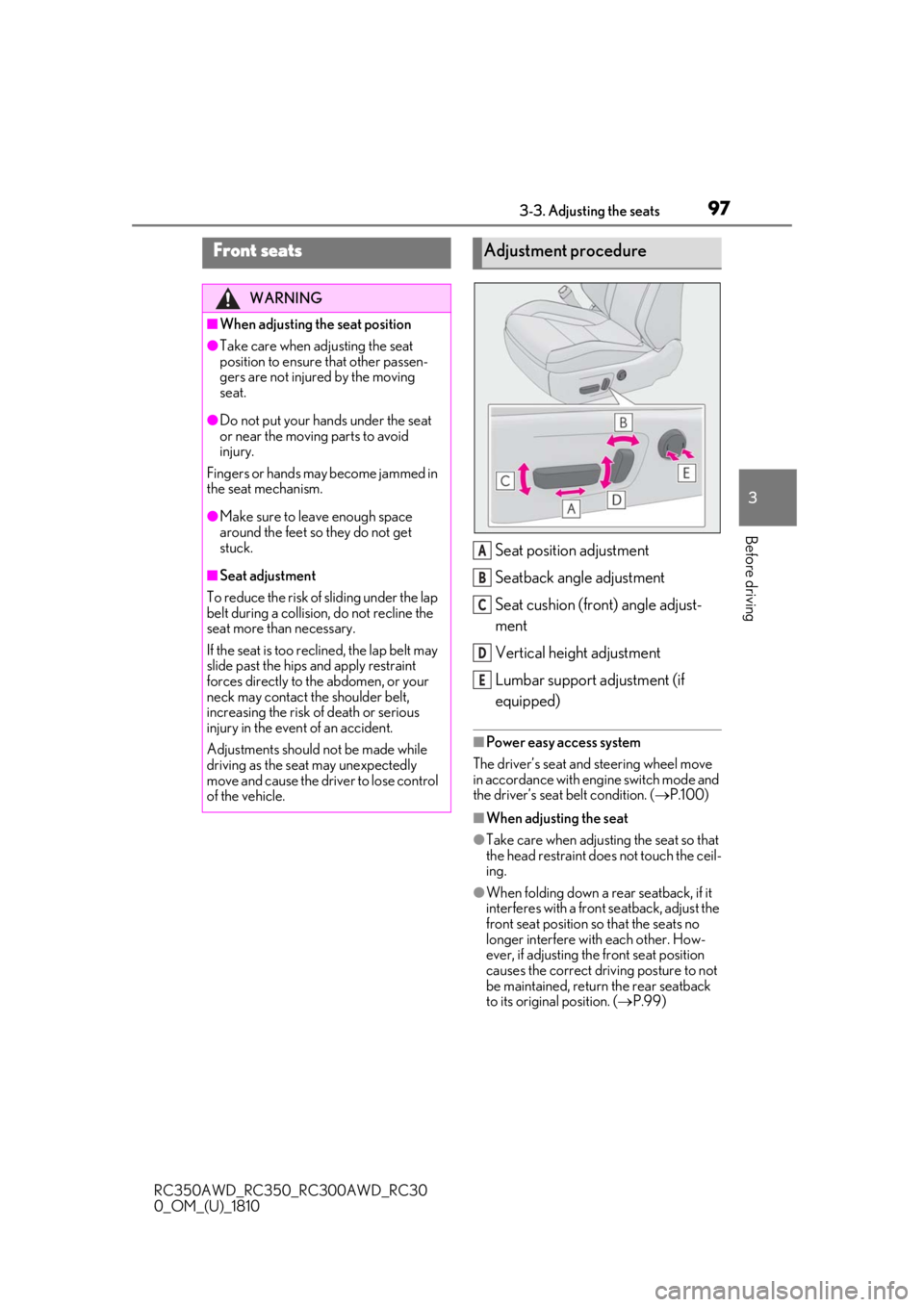
Seat position adjustment
Seatback angle adjustment
Seat cushion (front) angle adjust-
ment
Vertical height adjustment
Lumbar support adjustment (if
equipped)
■Power easy access system
The driver’s seat and steering wheel move
in accordance with engine switch mode and
the driver’s seat belt condition. ( P.100)
■When adjusting the seat
●Take care when adjusting the seat so that
the head restraint does not touch the ceil-
ing.
●When folding down a rear seatback, if it
interferes with a front seatback, adjust the
front seat position so that the seats no
longer interfere with each other. How-
ever, if adjusting the front seat position
causes the correct driving posture to not
be maintained, return the rear seatback
to its original position. ( P.99)
Front seats
WARNING
■When adjusting the seat position
●Take care when ad justing the seat
position to ensure that other passen-
gers are not injured by the moving
seat.
●Do not put your hands under the seat
or near the moving parts to avoid
injury.
Fingers or hands may become jammed in
the seat mechanism.
●Make sure to leave enough space
around the feet so they do not get
stuck.
■Seat adjustment
To reduce the risk of sliding under the lap
belt during a collision, do not recline the
seat more than necessary.
If the seat is too reclined, the lap belt may
slide past the hips and apply restraint
forces directly to the abdomen, or your
neck may contact the shoulder belt,
increasing the risk of death or serious
injury in the event of an accident.
Adjustments should not be made while
driving as the seat may unexpectedly
move and cause the driver to lose control
of the vehicle.
Adjustment procedure
A
B
C
D
E
Page 98 of 390
983-3. Adjusting the seats
RC350AWD_RC350_RC300AWD_RC30
0_OM_(U)_1810
■Before entering/exiting the rear
seats
Remove the seat belt from the seat belt
guide. ( P.26)
■Entering/exiting the rear seat
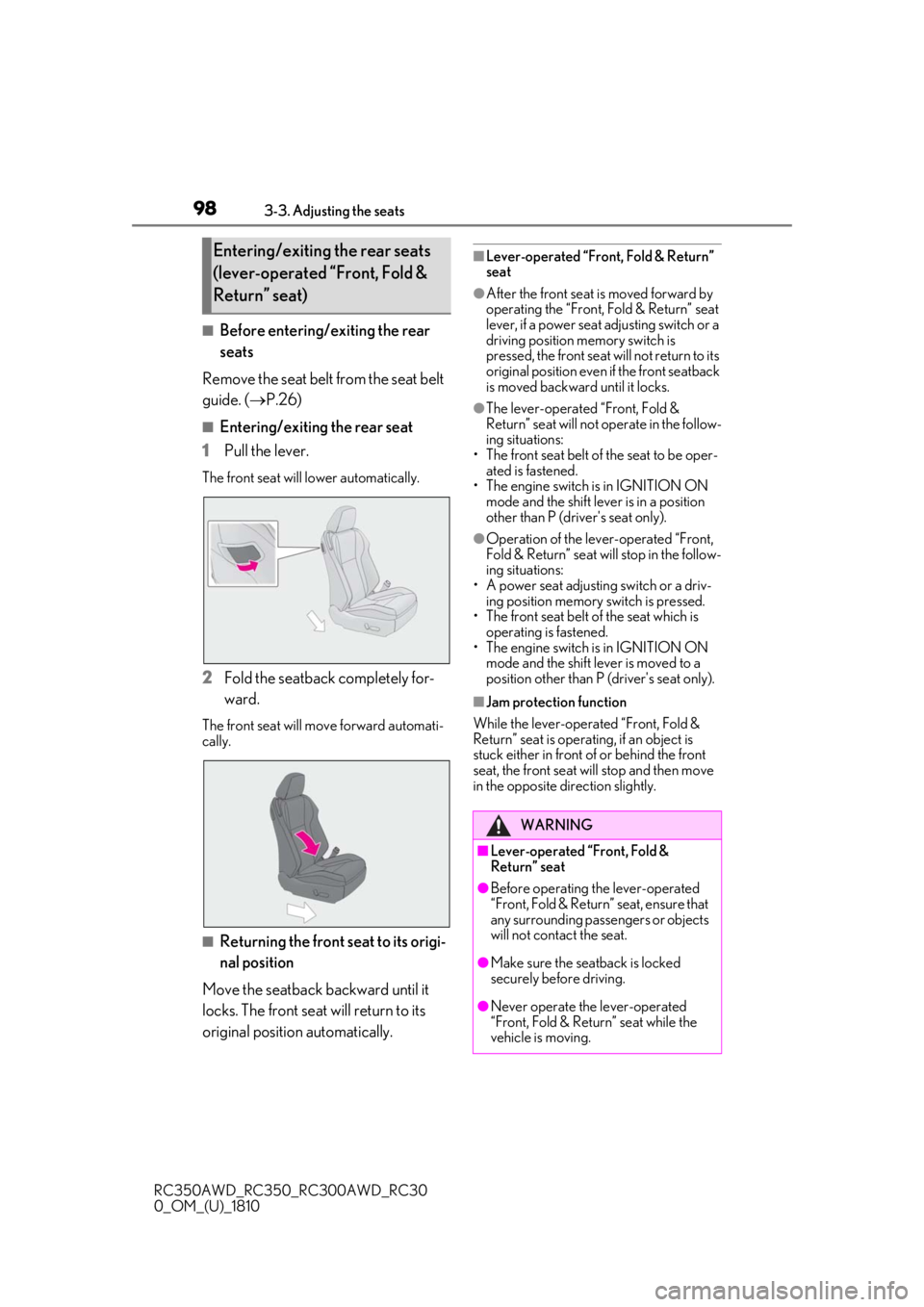
1
Pull the lever.
The front seat will lower automatically.
2Fold the seatback completely for-
ward.
The front seat will move forward automati-
cally.
■Returning the front seat to its origi-
nal position
Move the seatback backward until it
locks. The front seat will return to its
original position automatically.
■Lever-operated “Front, Fold & Return”
seat
●After the front seat is moved forward by
operating the “Front, Fold & Return” seat
lever, if a power seat adjusting switch or a
driving position memory switch is
pressed, the front seat will not return to its
original position even if the front seatback
is moved backward until it locks.
●The lever-operated “Front, Fold &
Return” seat will not operate in the follow-
ing situations:
• The front seat belt of the seat to be oper- ated is fastened.
• The engine switch is in IGNITION ON
mode and the shift lever is in a position
other than P (driver's seat only).
●Operation of the lever-operated “Front,
Fold & Return” seat will stop in the follow-
ing situations:
• A power seat adjusting switch or a driv- ing position memory switch is pressed.
• The front seat belt of the seat which is
operating is fastened.
• The engine switch is in IGNITION ON mode and the shift lever is moved to a
position other than P (driver's seat only).
■Jam protection function
While the lever-operated “Front, Fold &
Return” seat is operatin g, if an object is
stuck either in front of or behind the front
seat, the front seat will stop and then move
in the opposite direction slightly.
Entering/exiting the rear seats
(lever-operated “Front, Fold &
Return” seat)
WARNING
■Lever-operated “Front, Fold &
Return” seat
●Before operating th e lever-operated
“Front, Fold & Return” seat, ensure that
any surrounding passengers or objects
will not contact the seat.
●Make sure the seat back is locked
securely before driving.
●Never operate the lever-operated
“Front, Fold & Return” seat while the
vehicle is moving.
Page 99 of 390
993-3. Adjusting the seats
RC350AWD_RC350_RC300AWD_RC30
0_OM_(U)_1810
3
Before driving
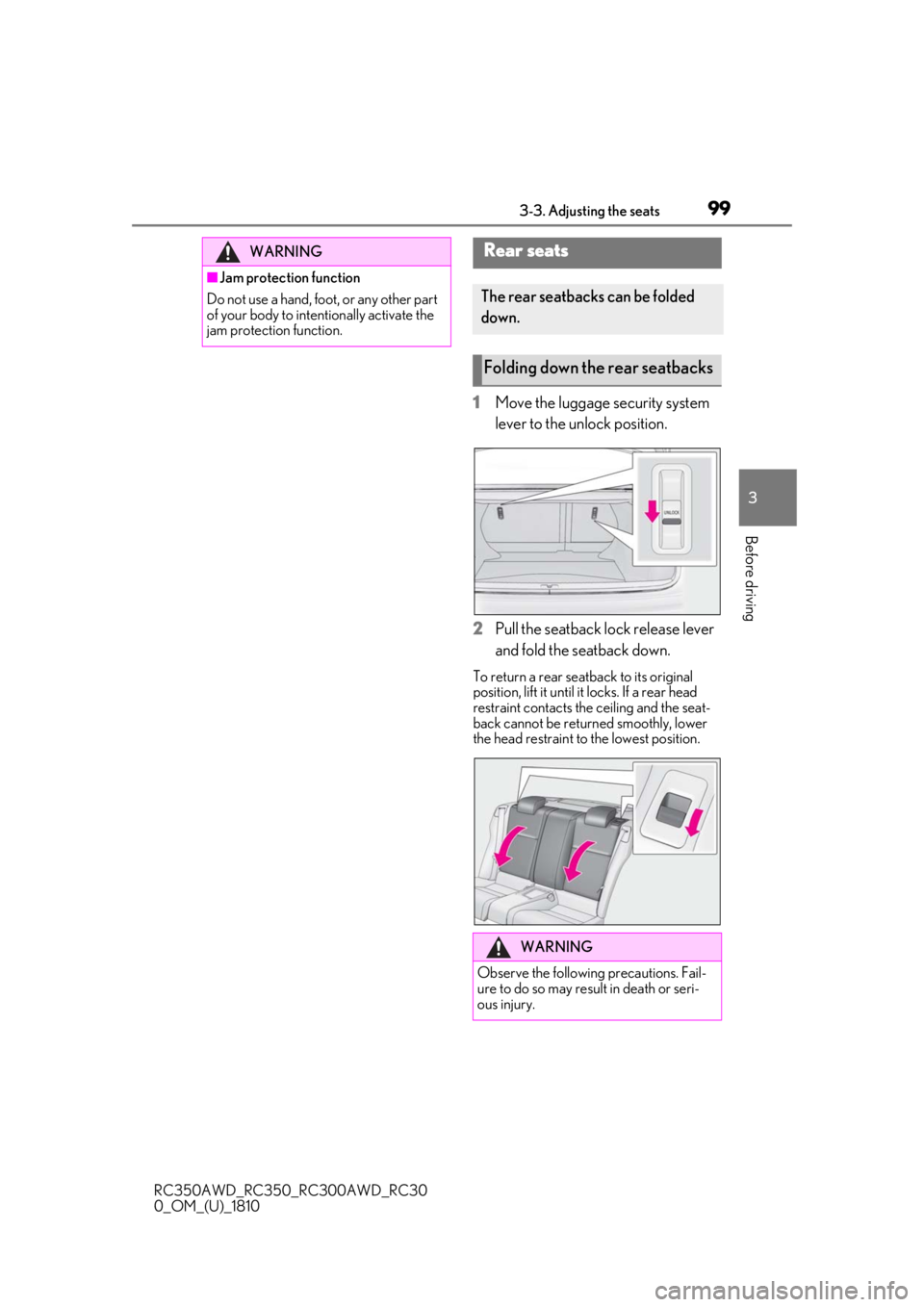
1Move the luggage security system
lever to the unlock position.
2
Pull the seatback lock release lever
and fold the seatback down.
To return a rear seatback to its original
position, lift it until it locks. If a rear head
restraint contacts the ceiling and the seat-
back cannot be returned smoothly, lower
the head restraint to the lowest position.
WARNING
■Jam protection function
Do not use a hand, foot, or any other part
of your body to intentionally activate the
jam protection function.
Rear seats
The rear seatbacks can be folded
down.
Folding down the rear seatbacks
WARNING
Observe the following precautions. Fail-
ure to do so may result in death or seri-
ous injury.
Page 100 of 390

1003-3. Adjusting the seats
RC350AWD_RC350_RC300AWD_RC30
0_OM_(U)_1810
P.92
*: If equipped
The seat and steering wheel* are auto-
matically adjusted to allow the driver to
enter and exit the vehicle easily.
When all of the following have been
performed, the driver’s seat and steer-
ing wheel
* are automatically adjusted
to a position that allows driver to enter
and exit the vehicle easily.
The shift lever has been shifted to P.
The engine switch has been turned
off.
The driver’s seat belt has been
unfastened.
When any of the following has been
performed, the driver’s seat and steer-
WARNING
■When folding the rear seatbacks
down
●Do not fold the seatbacks down while
driving.
●Stop the vehicle on level ground, set
the parking brake and shift the shift
lever to P.
●Do not allow anyone to sit on a folded
seatback or in the trunk while driving.
●Do not allow children to enter the
trunk.
■After returning the rear seatback to
the upright position
●Make sure that the seatback is
securely locked in position by lightly
pushing it back and forth.
If the seatback is not securely locked, the
red marking will be visible on the seat-
back lock release knob. Make sure that
the red marking is not visible.
●Check that the seat belts are not
twisted or caught in the seatback.
Luggage security system
Power easy access sys-
tem/driving position mem-
ory*/memory recall function*
This feature automatically adjusts
the driver’s seat, steering wheel
and outside rear view mirrors to
make entering and exiting the vehi-
cle easier or to suit your prefer-
ences.
Power easy access system
Page 108 of 390

1083-4. Adjusting the steering wheel and mirrors
RC350AWD_RC350_RC300AWD_RC30
0_OM_(U)_1810When the automatic anti-glare function is
in ON mode, the indicator illuminates.
The function will set to ON mode each
time the engine switch is turned to IGNI-
TION ON mode.
Pressing the button turns the function to
OFF mode. (The indicator also turns
off.)
■To prevent sensor error
To ensure that the sensors operate properly,
do not touch or cover them.
1To select a mirror to adjust, press
the switch.
Left
Right
Pressing the same switch again will put the
switch in neutral.
A
A
Outside rear view mirrors
The rear view mirror’s position can
be adjusted to enable sufficient
confirmation of the rear view.
WARNING
■Important points while driving
Observe the following precautions while
driving.
Failure to do so may result in loss of con-
trol of the vehicle and cause an accident,
resulting in death or serious injury.
●Do not adjust the mirrors while driving.
●Do not drive with the mirrors folded.
●Both the driver and passenger side
mirrors must be ex tended and prop-
erly adjusted before driving.
Adjustment procedure
A
B