2019 LEXUS NX300H 104
[x] Cancel search: 104Page 146 of 460

1463-5. Opening, closing the windows and moon roof
LEXUS NX300h Owners Manu-
al_USA_M78287_encloses.
After that tilt up once again and stop at the
completely closed position.
4
Confirm that moon roof has completely
stopped and release the switch.
●If the moon roof can only be closed when
the moon roof is partially opened
3 Press and hold the “DOWN” or
“CLOSE” switch.
Fully close the moon roof, tilt up and open it
close to the fully open position. After that,
fully close the moon r oof and tilt up once
again, then stop the mo on roof in the fully
closed position.
4 Confirm that moon roof has completely
stopped and release the switch.
●When tilt up/down or moon roof opening
and closing can be done but automatic
full opening and closing cannot be done
3 Press the “OPEN” switch and fully
open.
4 Press the “CLOSE” switch and fully
close.
5 Press the “UP” switch and tilt up until
the tilt up stop position.
6 Press the “DOWN” switch and tilt
down.
If the switch is releas ed before any step is
completes, the proced ure will have to be
performed again from the beginning.
If the opening and closing operations or
automatic opening function does not move
as normal, even after performing the above
mentioned operations, have the vehicle
inspected by your Lexus dealer.
■Moon roof open warning buzzer
The buzzer sounds and a message is shown
on the multi-information display in the
instrument cluster when the power switch is
turned off and the driver’s door is opened
with the moon roof open.
■Door lock linked moon roof operation
●The moon roof can be opened and
closed using the mechanical key.*
( P.390)
●The moon roof can be opened using the
wireless remote control.* ( P.104)
*: These settings must be customized at
your Lexus dealer.
WARNING
Observe the following precautions.
Failing to do so may cause death or seri-
ous injury.
■Closing the moon roof
●The driver is responsible for moon roof
opening and closing operations.
In order to prevent accidental opera-
tion, especially by a child, do not let a
child operate the moon roof. It is possi-
ble for children and other passengers
to have body parts caught in the moon
roof.
●Check to make sure that all passen-
gers do not have any part of their body
in a position where it could be caught
when the moon roof is being operated.
●When using the wireless remote con-
trol or mechanical key and operating
the moon roof, operate the moon roof
after checking to make sure that there
is no possibility of any passenger hav-
ing any of their body parts caught in
the moon roof. Also, do not let a child
operate moon roof by the mechanical
key. It is possible for children and other
passengers to get caught in the moon
roof.
●When exiting the vehicle, turn the
power switch off, carry the key and exit
the vehicle along with the child. There
may be accidental operation, due to
mischief, etc., that may possibly lead to
an accident.
■Jam protection function
●Never use any part of your body to
intentionally activa te the jam protec-
tion function.
Page 160 of 460

1604-1. Before driving
LEXUS NX300h Owners Manu-
al_USA_M78287_endriven for over 500 miles (800 km).
After the vehicle has been driven for over
500 miles (800 km), you can start towing.
However, for the next 500 miles (800 km),
drive the vehicle at a speed of less than 50
mph (80 km/h) when towing a trailer, and
avoid full throttle acceleration.
■Maintenance
●If you tow a trailer, your vehicle will
require more frequent maintenance due
to the additional load. (See “Warranty
and Services Guide”, “Owner’s Manual
Supplement” or “Scheduled Mainte-
nance”.)
●Retighten the fixing bolts of the towing
ball and bracket after approximately 600
miles (1000 km) of trailer towing.
■If trailer sway occurs
One or more factors (crosswinds, passing
vehicles, rough roads, etc.) can adversely
affect handling of your vehicle and trailer,
causing instability.
●If trailer swaying occurs:
• Firmly grip the steering wheel. Steer straight ahead.
Do not try to control trailer swaying by
turning the steering wheel.
• Begin releasing the accelerator pedal
immediately but very gradually to reduce
speed.
Do not increase sp eed. Do not apply
vehicle brakes.
If you make no extreme correction with the
steering or brakes, your vehicle and trailer
should stabilize.
●After the trailer swaying has stopped:
• Stop in a safe place. Get all occupants out of the vehicle.
• Check the tires of the vehicle and the trailer.
• Check the load in the trailer.
Make sure the load has not shifted.
Make sure the tongue weight is appropri-
ate, if possible.
• Check the load in the vehicle.
Make sure the vehicle is not overloaded
after occupants get in.
If you cannot find any problems, the speed
at which trailer swaying occurred is beyond
the limit of your particular vehicle-trailer combination. Drive at a lower speed to pre-
vent instability. Reme
mber that swaying of
the towing vehicle-trailer increases as
speed increases.
WARNING
■Trailer towing precautions
To tow a trailer safely, use extreme care
and drive the vehicle in accordance with
the trailer’s characteristics and operating
conditions. Failure to do so could cause
an accident resulting in death or serious
injury. Vehicle stability and braking per-
formance are affected by trailer stability,
brake setting and performance, and the
hitch. Your vehicle will handle differently
when towing a trailer.
■To avoid accident or injury
●Do not exceed the TWR, unbraked
TWR, GCWR, GVWR or GAWR.
●Adjust the tongue weight within the
appropriate range. Place heavier loads
as close to the trailer axle as possible.
●Do not exceed 65 mph (104 km/h),
the posted towing speed limit or the
speed limit for your trailer as set forth
in your trailer owner’s manual, which-
ever is lowest. Slow down sufficiently
before making a turn, in cross winds,
on wet or slippery surface, etc. to help
avoid an accident. If you experience a
vehicle-trailer instability from reduc-
ing a certain speed, slow down and
make sure you keep your vehicle
speed under the speed of which you
experience the instability.
●Do not make jerky, abrupt or sharp
turns.
●Do not apply the brakes suddenly as
you may skid, resulting in jackknifing
and loss of vehicle control. This is
especially true on wet or slippery sur-
faces.
●Do not exceed the trailer hitch assem-
bly weight, gross vehicle weight, gross
axle weight and tra iler tongue weight
capacities.
Page 165 of 460

1654-1. Before driving
LEXUS NX300h Owners Manu-
al_USA_M78287_en
4
Driving
Your vehicle will handle differently
when towing a trailer. Help to avoid an
accident, death or serious injury, keep
the following in mind when towing:
Speed limits for towing a trailer vary
by state or province. Do not exceed
the posted towing speed limit.
Lexus recommends that the vehicle-
trailer speed limit is 65 mph (104
km/h) on a flat, straight, dry road.
Do not exceed this limit, the posted
towing speed limit or the speed limit
for your trailer as set forth in your
trailer owner’s manual, whichever is
lowest. Instability of the towing vehi-
cle-trailer combination (trailer
sway) increases as speed increases.
Exceeding speed limits may cause
loss of control.
Before starting out, check the trailer
lights, tires and the vehicle-trailer
connections. Recheck after driving
a short distance.
Practice turning, stopping and
reversing with the trailer attached in
an area away from traffic until you
become accustomed to the feel of
the vehicle-trailer combination.
Reversing with a tr ailer attached is
difficult and requires practice. Grip
the bottom of the steering wheel
and move your hand to the left to
move the trailer to the left. Move
your hand to the right to move the
trailer to right. (This is generally
opposite to reversing without a
trailer attached.) Avoid sharp or prolonged turning. Have someone
guide you when reversing to reduce
the risk of an accident.
As stopping distance is increased
when towing a trailer, vehicle-to
vehicle distance should be
increased. For each 10 mph (16 km/
h) of speed, allow at least one vehi-
cle and trailer length.
Avoid sudden braking as you may
skid, resulting in the trailer jackknif-
ing and a loss of vehicle control. This
is especially true on wet or slippery
surfaces.
Avoid jerky starts or sudden accel-
eration.
Avoid jerky steering and sharp
turns, and slow down before making
turn.
Note that when making a turn, the
trailer wheels will be closer than the
vehicle wheels to the inside of the
turn. Compensate by making a
wider than normal turning radius.
Slow down before making a turn, in
cross winds, on wet or slippery sur-
faces, etc.
Increasing vehicle speed can desta-
bilize the trailer.
Take care when passing other vehi-
cles. Passing requires considerable
distance. After pass ing a vehicle, do
not forget the length of your trailer,
and be sure you have plenty of room
before changing lanes.
To maintain engine braking effi-
ciency and charging system perfor-
mance when using engine braking,
Trailer towing tips
Page 210 of 460

2104-5. Using the driving support systems
LEXUS NX300h Owners Manu-
al_USA_M78287_en
■Steering control function
When the system determines that the
vehicle might depart from its lane, the
system provides assistance as neces-
sary by operating the steering wheel in
small amounts for a short period of
time to keep the vehicle in its lane.
If the system detect s that the steering
wheel has not been operated for a fixed
amount of time or the steering wheel is not
being firmly gripped, a warning is displayed
on the multi-information display and the
warning buzzer sounds.
■Vehicle sway warning function
When the vehicle is swaying or
appears as if it may depart from its lane
multiple times, the warning buzzer
sounds and a message is displayed on
the multi-information display to alert
the driver.
Page 402 of 460
4028-1. Specifications
LEXUS NX300h Owners Manu-
al_USA_M78287_en
8-1.Specifications
*1:Unladen vehicle
*2: Vehicles with towing package
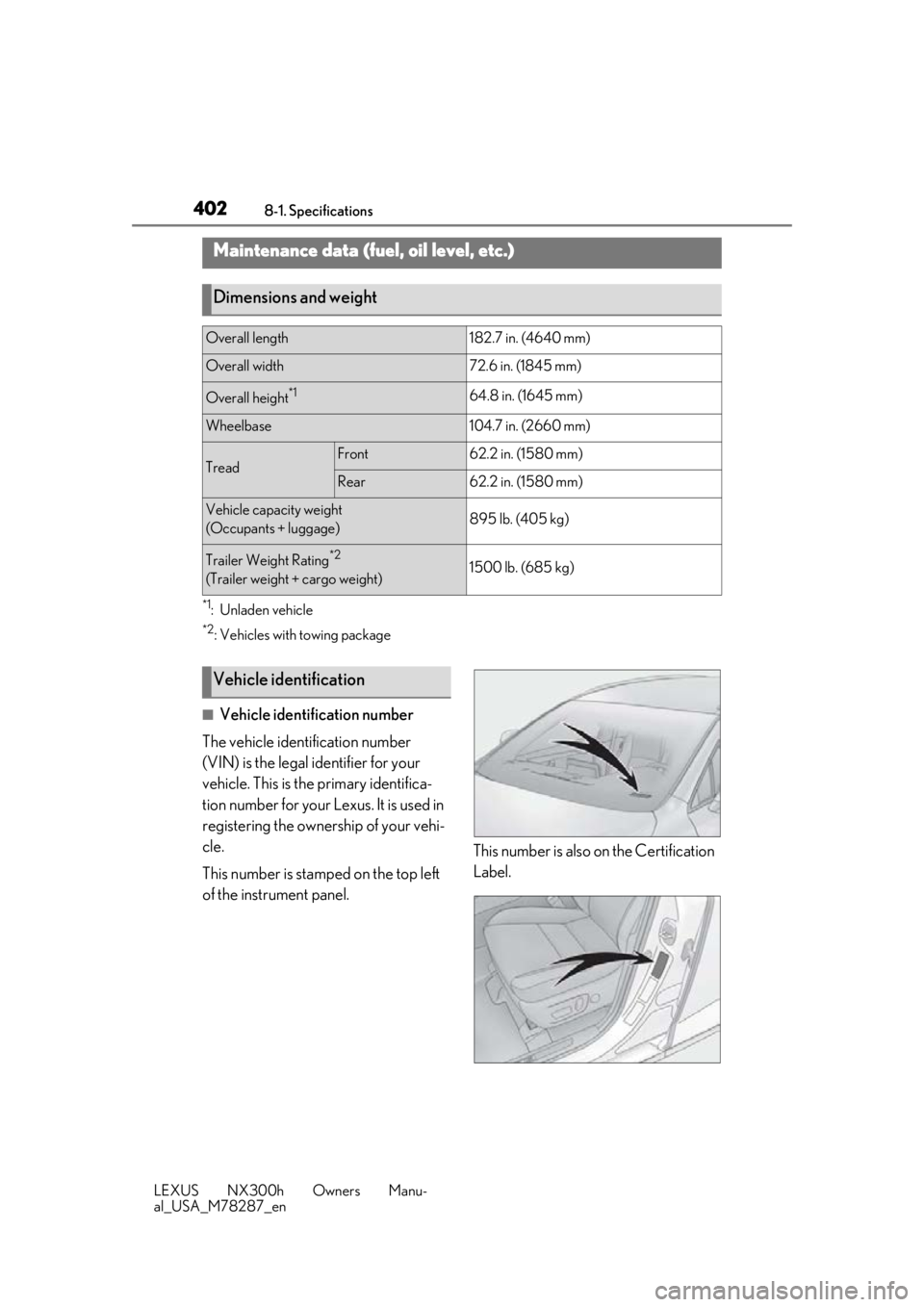
■Vehicle identification number
The vehicle identification number
(VIN) is the legal identifier for your
vehicle. This is the primary identifica-
tion number for your Lexus. It is used in
registering the ownership of your vehi-
cle.
This number is stamped on the top left
of the instrument panel. This number is also on the Certification
Label.
Maintenance data (fuel, oil level, etc.)
Dimensions and weight
Overall length182.7 in. (4640 mm)
Overall width72.6 in. (1845 mm)
Overall height*164.8 in. (1645 mm)
Wheelbase104.7 in. (2660 mm)
TreadFront62.2 in. (1580 mm)
Rear62.2 in. (1580 mm)
Vehicle capacity weight
(Occupants + luggage)895 lb. (405 kg)
Trailer Weight Rating*2
(Trailer weight + cargo weight)1500 lb. (685 kg)
Vehicle identification
Page 409 of 460

4098-1. Specifications
LEXUS NX300h Owners Manu-
al_USA_M78287_en
8
Vehicle specifications
Compact spare tire
A: Wedge base bulbs (clear)
B: Wedge base bulbs (amber)
*:If equipped
Tire sizeT165/80D17 104M
Spare tire inflation pressure
(Recommended cold tire inflation
pressure)
60 psi (420 kPa, 4.2 kgf/cm2 or bar)
Wheel size17 4 T
Wheel nut torque76 ft•lbf (103 N•m, 10.5 kgf•m)
Light bulbs
Light bulbsBulb No.WType
Exterior
Front side marker lights (bulb
type)W5W5A
Front turn signal lights (bulb
type)*585
(WY21W)21B
InteriorVanity lights8A
Page 422 of 460

4228-2. Customization
LEXUS NX300h Owners Manu-
al_USA_M78287_en
Definition of symbols: O = Available, – =Not available
■Door lock (P.104, 389)
■Smart access system with push-butto n start and wireless remote control
( P.104, 120)
FunctionDefault settingCustomized set-
ting
Unlocking using a mechani-
cal key
Driver’s door
unlocked in first
step, all doors
unlocked in sec-
ond step
All doors
unlocked in first
step
——O—
Automatic door locking func-
tionShift position
linked door lock-
ing operationOffO—O—
Speed linked
door locking
operation
O—O—
Automatic door unlocking
function
Shift position
linked door
unlocking opera-
tionOffO—O—
Driver’s door
linked door
unlocking opera-
tion
O—O—
FunctionDefault settingCustomized set-ting
Operation signal (emergency
flashers)OnOffO—O—
Operation buzzer volume5OffO—O—1 to 7
Time elapsed before the auto-
matic door lock function is
activated if a door is not
opened after being unlocked
60 seconds
Off
O—O—30 seconds
120 seconds
Open door reminder buzzer
(When locking the vehicle)OnOff——O—
ABCD
ABCD
Page 423 of 460

4238-2. Customization
LEXUS NX300h Owners Manu-
al_USA_M78287_en
8
Vehicle specifications
■Smart access system with push-button start ( P.120)
■Wireless remote control ( P.104)
■Automatic light control system ( P.182)
FunctionDefault settingCustomized set-
ting
The doors that are unlocked
using the smart access sys-
tem with push-button start
can be selected
Driver’s doorAll the doorsO—OO
Smart access system with
push-button startOnOff——O—
Number of consecutive door
lock operations2 timesAs many as desired——O—
FunctionDefault settingCustomized set- ting
Wireless remote controlOnOff——O—
Unlocking operation
Driver’s door
unlocked in first step, all doors
unlocked in sec- ond step
All doors
unlocked in first
step
O—O—
Panic functionOnOff——O—
The function that validates the
switch of the wireless
remote control when locking
the door ( P.111)
When locking the
doorWhen unlocking
the door——O—
FunctionDefault settingCustomized set-ting
Light sensor sensitivityStandard-2 to 2O—O—
Adjust the time elapsed
before the headlights auto-
matically turn off
30 seconds
Off
O—O—60 seconds
90 seconds
ABCD
ABCD
ABCD