2019 LEXUS LS500H heater
[x] Cancel search: heaterPage 329 of 523

3295-3. Using the air conditioning system and defogger
LS500h_OM_(U)_1809
5
Interior features
■Side display
Vehicles with DUAL-ZONE climate
control Display the front seat heaters/front
seat ventilators control screen
( P.338)
Adjust the left side seat tempera-
ture setting
Adjust the fan speed setting
Adjust the right side seat tempera-
ture setting
Set cooling and dehumidification
function on/off
Adjusting the temperature for
driver and passenger seats sepa-
rately (“DUAL” mode) ( P.332)
Select the air flow mode
Vehicles with 4-ZONE climate con-
trol
Display the front seat heaters/front seat ventilators control screen
(
P.338)
Adjust the left side seat tempera-
ture setting
Adjust the fan speed setting
Adjust the right side seat tempera-
ture setting
Select the left side seat air flow
mode
Set cooling and dehumidification
function on/off
If the “A/C” indicator is turned off, the sys-
tem will blow ambient temperature airor
heated air.
Adjust the temperature for driver,
passenger and rear seats sepa-
rately (“4-ZONE” mode)
( P.332)
Select the right side seat air flow
mode
■Windshield wiper de-icer (if equipped)
This feature is used to prevent ice from
building up on the windshield and wiper
blades.
The windshield de-icer will automatically
turn off after a while.
■Eco air conditioning mode
When Eco drive mode is selected using the
driving mode select switch, eco air condi-
tioning mode turns on.
When a drive mode other than Eco drive
mode is selected, eco air conditioning
mode may turn off.
■Micro dust and pollen filter
Outside air mode switches to
(recirculated air) mode. Pollen is removed
from the air and the air flows to the upper
part of the body.
Usually the system will automatically turn
A
B
C
D
E
F
G
A
B
C
D
E
F
G
H
Page 330 of 523

3305-3. Using the air conditioning system and defogger
LS500h_OM_(U)_1809off after a while.
In order to prevent the windshield from fog-
ging up when the outside air is cold, the
dehumidification function may operate or
the outside/recirculat
ed air mode may not
switch to (recirculated air) mode.
Pollen is filtered even if the micro dust and
pollen filter is turned off.
1 Press the automatic mode switch or
select “AUTO” on the sub function
menu. ( P.326)
2 Press the outside/recirculated air
mode switch to switch to automatic
air intake mode.
The air conditioning system automatically
switches between outside air and recircu-
lated air modes.
3Adjust the temperature setting.
4 To stop the operation, press the off
switch or select “OFF” on the sub
function menu. ( P.326)
If the fan speed settin g or air flow modes
are operated, the automatic mode indica-
tor goes off. However, automatic mode for
functions other than th at operated is main-
tained.
■Using automatic mode
Fan speed is adjusted automatically accord-
ing to the temperature setting and the
ambient conditions.
Therefore, the fan may stop for a while until warm or cool air is ready to flow immedi-
ately after the automatic mode switch is
pressed or “AUTO” is selected.
Cool air may blow around the upper body
even when the heater is on due to sunlight.
■Windshield fog detection function
When automatic mode is set, the humidity
sensor detects fog on the windshield and
controls the air condit ioning system to pre-
vent fog.
■Automatic mode for air intake control
In automatic mode, the system detects
exhaust gas and other pollutants and auto-
matically switches between outside air and
recirculated air modes.
When the dehumidification function is off,
and the fan is operating, turning automatic
mode on will activate the dehumidification
function.
In S-FLOW mode, priority for the air-
WARNING
■To prevent burns (vehicles with wind-
shield wiper de-icer)
Do not touch the glass at lower part of
the windshield or to the side of the front
pillars when the wind shield wiper de-icer
is on.
Using automatic mode
NOTICE
■Humidity sensor
In order to detect fog on the windshield,
a sensor which monitors the temperature
of the windshield, the surround humidity,
etc. is installed.
Follow these points to avoid damaging
the sensor:
●Do not disassemble the sensor
●Do not spray glass cleaner on the sen-
sor or subject it to strong impacts
●Do not stick anything on the sensor
S-FLOW mode
Page 336 of 523
3365-3. Using the air conditioning system and defogger
LS500h_OM_(U)_1809
2To stop the operat ion, select “Rear
off” on the sub function menu.
( P.334)
If the fan speed setting or air flow
modes are operated , the automatic
mode indicator goes off. However,
automatic mode for functions other
than that operated is maintained.
Rear Multi Operation Panel
1 Select “AUTO” on the rear air con-
ditioning control screen. ( P.335)
2 To stop the operation, select “OFF”
on the rear air co nditioning control
screen. ( P.334)
If the fan speed setting or air flow
modes are operated , the automatic
mode indicator goes off. However,
automatic mode for functions other
than that operated is maintained.
■Using automatic mode
Fan speed is adjusted automatically accord-
ing to the temperature setting and the
ambient conditions.
Therefore, the fan may stop for a while until
warm or cool air is ready to flow immedi-
ately after “Rear AUTO” is selected or
“AUTO” is touched.
Cool air may blow around the upper body
even when the heater is on due to sunlight.
The temperature setting of the rear
seats can be adjusted using the follow-
ing methods:
When the “4-ZONE” indicator is
off: Adjust the driv er’s seat tempera-
ture.
Adjust the temperature setting of each
rear seat using the Ce nter Display or Rear
Multi Operation Panel.
Adjust the temperature setting of
each rear seat using the Center Dis-
play (rear air conditioning control
screen) or Rear Multi Operation
Panel.
The temperature setting of each rear seat
can be changed independently.
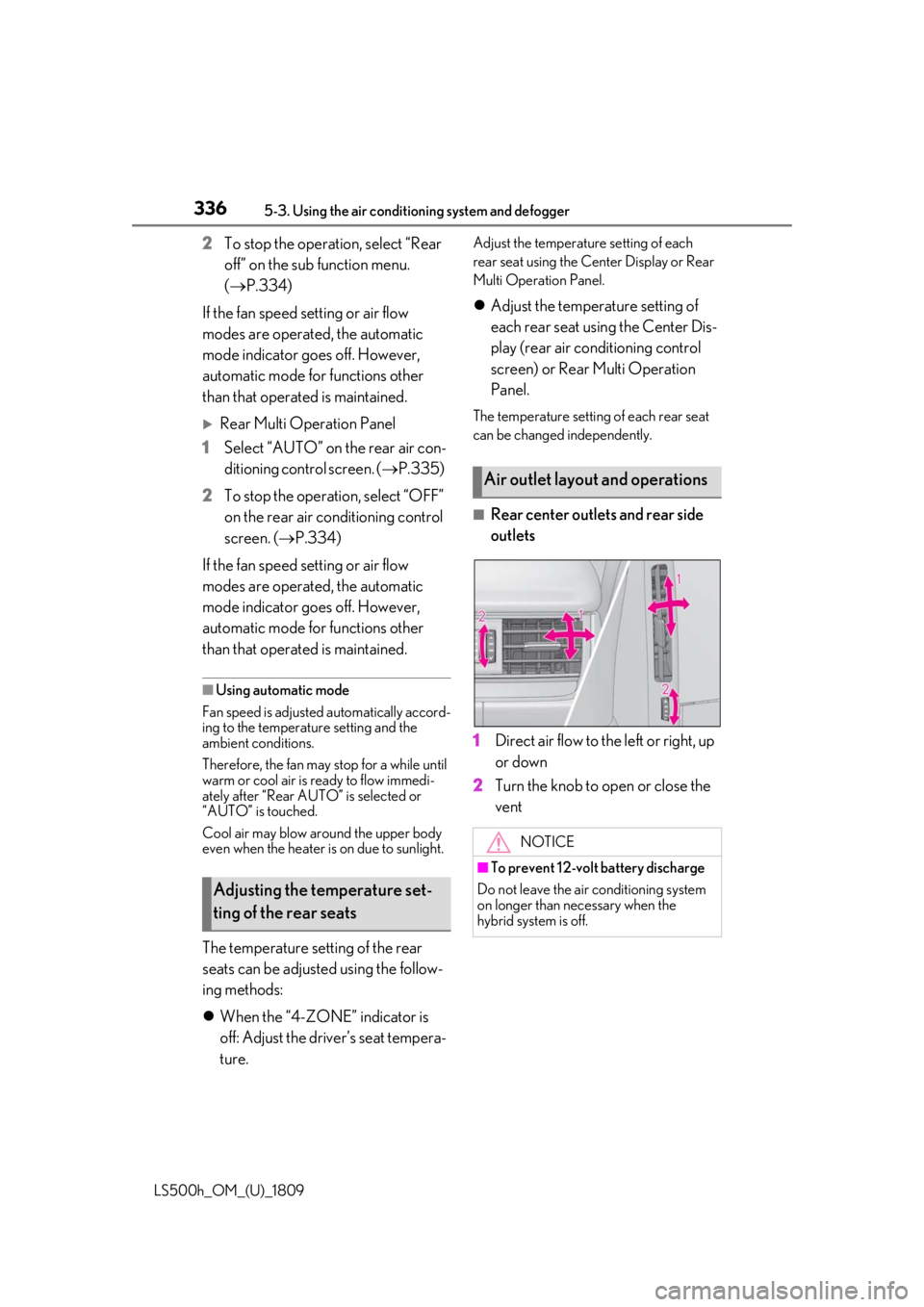
■Rear center outlets and rear side
outlets
1 Direct air flow to the left or right, up
or down
2 Turn the knob to open or close the
vent
Adjusting the temperature set-
ting of the rear seats
Air outlet layout and operations
NOTICE
■To prevent 12-volt battery discharge
Do not leave the air conditioning system
on longer than necessary when the
hybrid system is off.
Page 337 of 523

3375-3. Using the air conditioning system and defogger
LS500h_OM_(U)_1809
5
Interior features
*:If equipped
Heated steering wheel*/seat
heaters/seat ventilators
Heated steering wheel
Warms up the grip of the steering
wheel
Front seat heaters/Rear seat
heaters
Warm up the seat upholstery
Front seat ventilators/Rear seat
ventilators
Maintain good ventilation by pulling
air through the seat upholstery
The Center Display and Rear Multi
Operation Panel/rear control
panel can be used to operate the
heated steering wheel, seat heaters
and seat ventilators as follows:
Center Display
Press the “MENU” button on the
Remote Touch to display the main
menu and move the cursor to to
display the shortcut buttons. Then,
select to display the heated
steering wheel/front seat
heater/front seat ventilator control
screen.
To display the rear seat heater/rear
seat ventilator cont rol screen, select
. (if equipped)
Rear Multi Operation Panel
Touch “Climate” on the home screen
to display the air conditioning con-
trol screen.( P.318)
Touching the shortcut button on the
home screen will display operation
buttons for the rear seat heaters and
rear seat ventilators.
Rear control panel
The rear seat heaters can be oper-
ated.
WARNING
■To prevent minor burn injuries
Care should be taken if anyone in the fol-
lowing categories comes in contact with
the steering wheel or seats when the
heater is on:
●Babies, small children, the elderly, the
sick and the physically challenged
●Persons with sensitive skin
●Persons who are fatigued
Page 338 of 523

3385-3. Using the air conditioning system and defogger
LS500h_OM_(U)_1809
■Center Display
Main screen
Using the touchpad of the Remote
Touch, select the button on the screen.
to can be adjusted by perform-
ing the following operations.
Flick operation: Move the pointer to
the desired item and flick the touchpad
up or down.
The item can be adjusted by one level.
Trace operation: After selecting the
desired item, trace the touchpad sur-
face.
The item can be adjusted by the amount
that you trace.
Trace operation cannot be used while driv-
ing.
Adjust the seat ventilator fan speed
level
The seat ventilator can be adjusted in 3 lev-
els. (Low, Mid or Hi)
Adjust the seat heater temperature
level
The seat heater can be adjusted in 3 levels.
(Low, Mid or Hi)
Adjust the heated steering wheel
temperature level
*
The heated steering wheel can be adjusted
in 2 levels. (Low or Hi)
Automatic mode on/off indicators
When the automatic mode is on, the indi-
cator illuminates on the screen.
Sub function menu
When the sub function button on the
Remote Touch is pressed, the following
functions can be set to automatic mode.
: Left-hand side seat heater/seat
ventilator
: Heated steering wheel
*
: Right-hand side seat heater/seat
ventilator
*: Available on the front seat control screen only
WARNING
●Persons who have taken alcohol or
drugs that induce sleep (sleeping
drugs, cold remedies, etc.)
NOTICE
■To prevent damage to the seat heat-
ers and seat ventilators
Do not put heavy objects that have an
uneven surface on the seat and do not
stick sharp objects (needles, nails, etc.)
into the seat.
■To prevent 12-volt battery discharge
Do not use the functions when the hybrid
system is off.
Control screen
AC
A
B
C
D
E
Page 339 of 523
3395-3. Using the air conditioning system and defogger
LS500h_OM_(U)_1809
5
Interior features
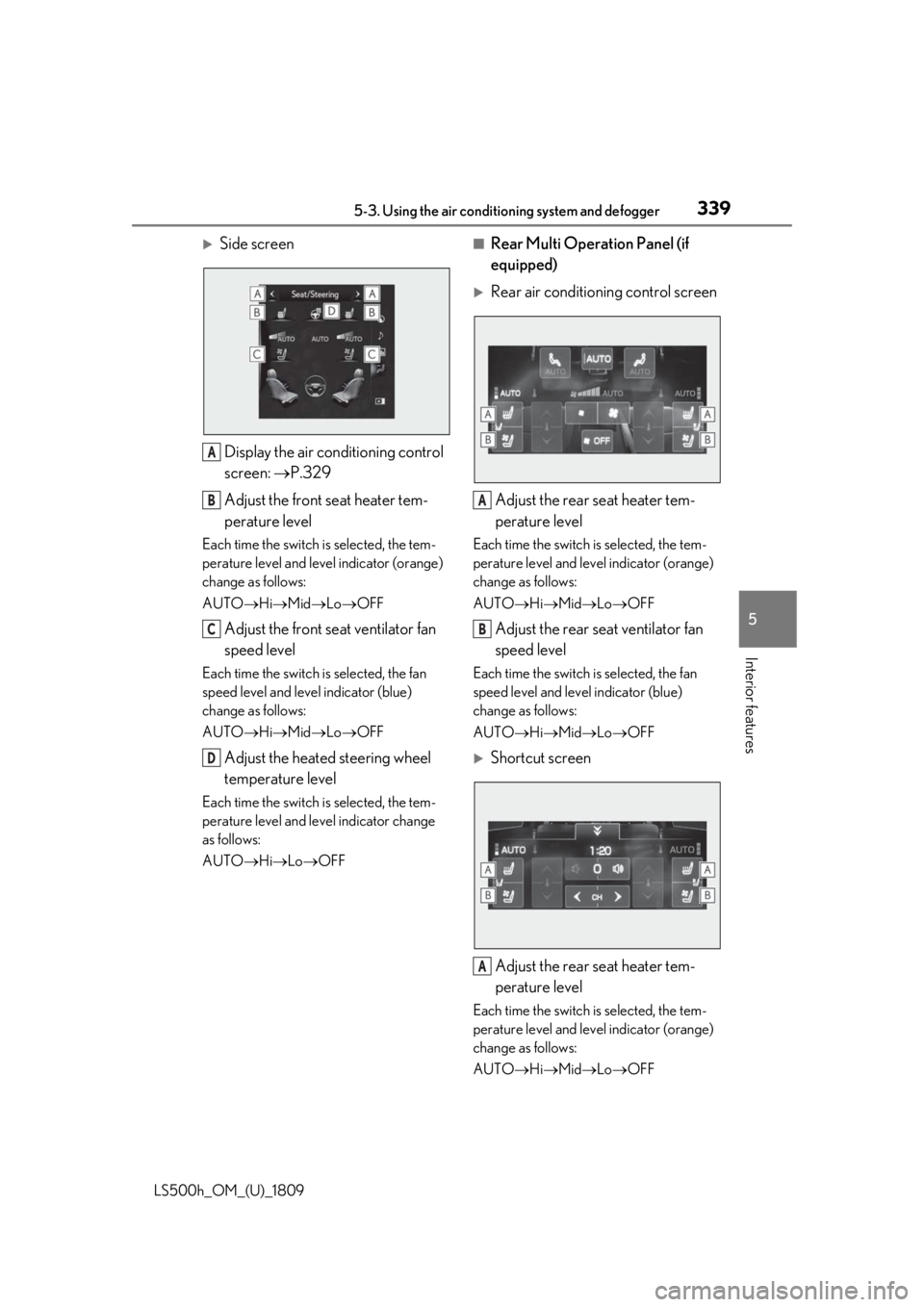
Side screen Display the air conditioning control
screen: P.329
Adjust the front seat heater tem-
perature level
Each time the switch is selected, the tem-
perature level and leve l indicator (orange)
change as follows:
AUTO Hi Mid Lo OFF
Adjust the front seat ventilator fan
speed level
Each time the switch is selected, the fan
speed level and leve l indicator (blue)
change as follows:
AUTO Hi Mid Lo OFF
Adjust the heated steering wheel
temperature level
Each time the switch is selected, the tem-
perature level and le vel indicator change
as follows:
AUTO Hi Lo OFF
■Rear Multi Operation Panel (if
equipped)
Rear air conditioning control screen
Adjust the rear seat heater tem-
perature level
Each time the switch is selected, the tem-
perature level and level indicator (orange)
change as follows:
AUTO Hi Mid Lo OFF
Adjust the rear seat ventilator fan
speed level
Each time the switch is selected, the fan
speed level and level indicator (blue)
change as follows:
AUTO Hi Mid Lo OFF
Shortcut screen
Adjust the rear seat heater tem-
perature level
Each time the switch is selected, the tem-
perature level and level indicator (orange)
change as follows:
AUTO Hi Mid Lo OFF
A
B
C
D
A
B
A
Page 340 of 523
3405-3. Using the air conditioning system and defogger
LS500h_OM_(U)_1809
Adjust the rear seat ventilator fan
speed level
Each time the switch is selected, the fan
speed level and level indicator (blue)
change as follows:
AUTO Hi Mid Lo OFF
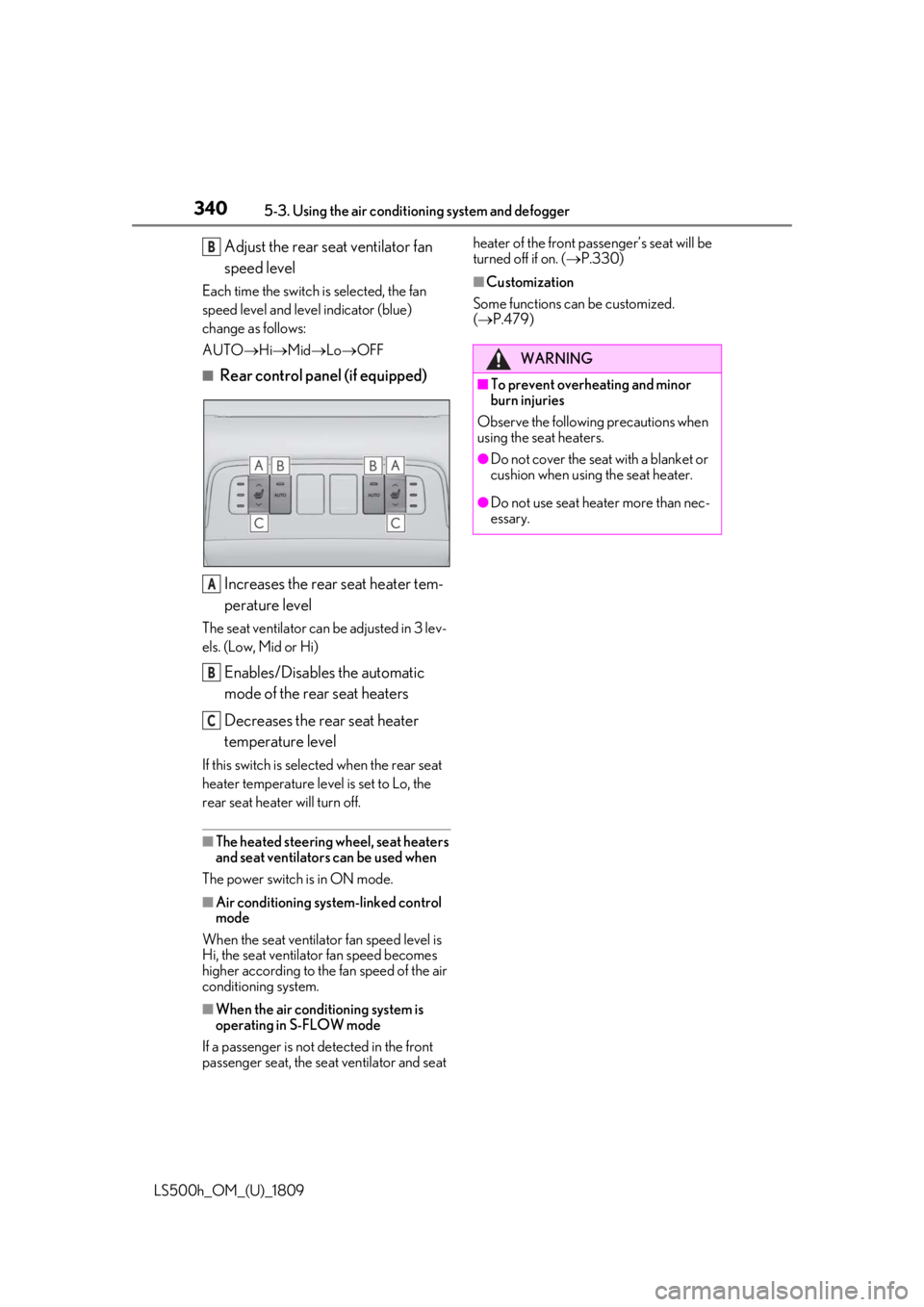
■Rear control panel (if equipped)
Increases the rear seat heater tem-
perature level
The seat ventilator can be adjusted in 3 lev-
els. (Low, Mid or Hi)
Enables/Disables the automatic
mode of the rear seat heaters
Decreases the rear seat heater
temperature level
If this switch is select ed when the rear seat
heater temperature level is set to Lo, the
rear seat heater will turn off.
■The heated steering wheel, seat heaters
and seat ventilators can be used when
The power switch is in ON mode.
■Air conditioning system-linked control
mode
When the seat ventilato r fan speed level is
Hi, the seat ventilator fan speed becomes
higher according to the fan speed of the air
conditioning system.
■When the air conditioning system is
operating in S-FLOW mode
If a passenger is not detected in the front
passenger seat, the seat ventilator and seat heater of the front passenger’s seat will be
turned off if on. (
P.330)
■Customization
Some functions can be customized.
( P.479)
B
A
B
C
WARNING
■To prevent overheating and minor
burn injuries
Observe the following precautions when
using the seat heaters.
●Do not cover the seat with a blanket or
cushion when using the seat heater.
●Do not use seat heater more than nec-
essary.
Page 372 of 523
3726-1. Maintenance and care
LS500h_OM_(U)_1809
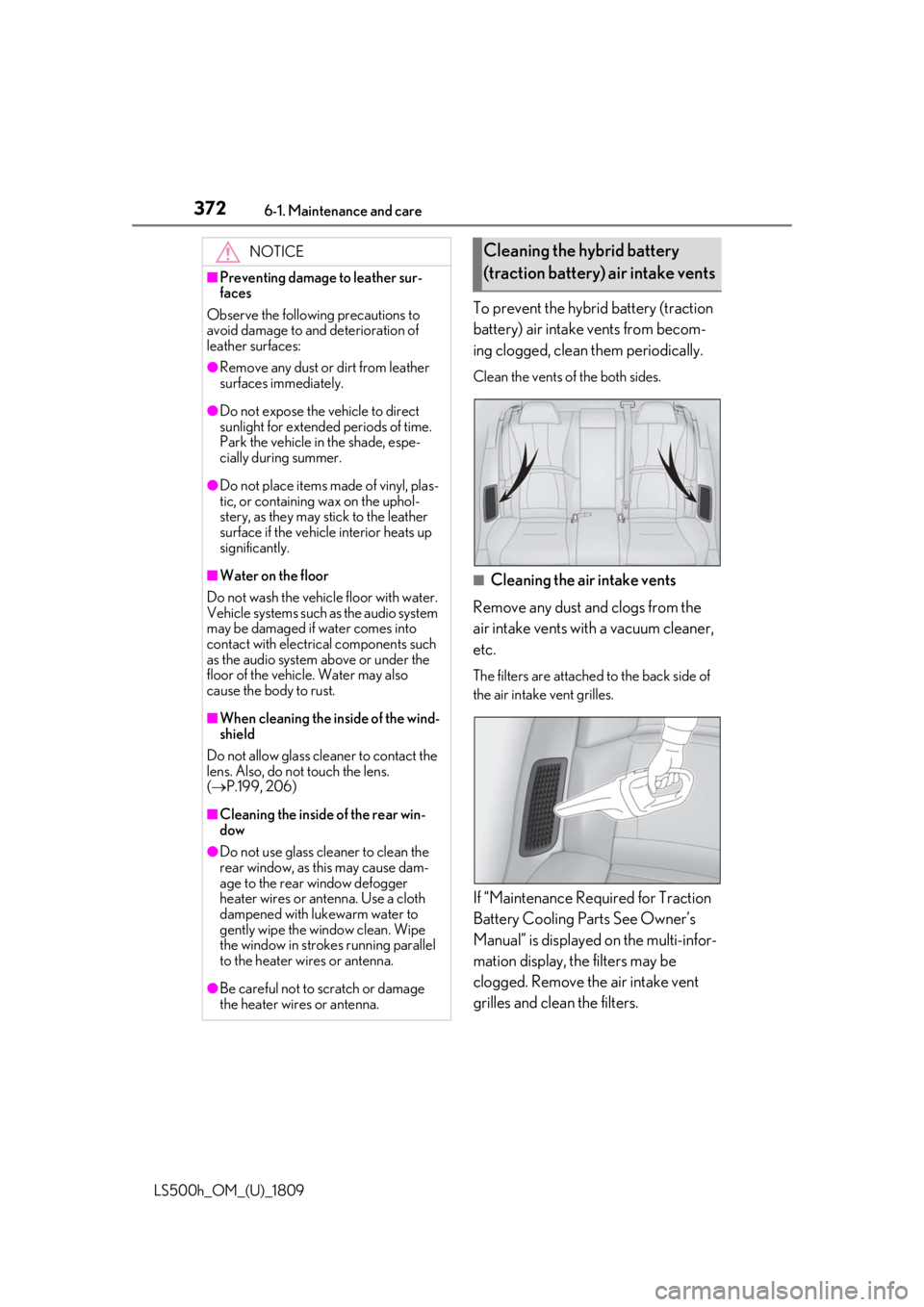
To prevent the hybrid battery (traction
battery) air intake vents from becom-
ing clogged, clean them periodically.
Clean the vents of the both sides.
■Cleaning the air intake vents
Remove any dust and clogs from the
air intake vents with a vacuum cleaner,
etc.
The filters are attached to the back side of
the air intake vent grilles.
If “Maintenance Required for Traction
Battery Cooling Parts See Owner’s
Manual” is displayed on the multi-infor-
mation display, the filters may be
clogged. Remove the air intake vent
grilles and clean the filters.
NOTICE
■Preventing damage to leather sur-
faces
Observe the following precautions to
avoid damage to and deterioration of
leather surfaces:
●Remove any dust or dirt from leather
surfaces immediately.
●Do not expose the vehicle to direct
sunlight for extended periods of time.
Park the vehicle in the shade, espe-
cially during summer.
●Do not place items made of vinyl, plas-
tic, or containing wax on the uphol-
stery, as they may stick to the leather
surface if the vehicle interior heats up
significantly.
■Water on the floor
Do not wash the vehicle floor with water.
Vehicle systems such as the audio system
may be damaged if water comes into
contact with electrical components such
as the audio system above or under the
floor of the vehicle. Water may also
cause the body to rust.
■When cleaning the inside of the wind-
shield
Do not allow glass cleaner to contact the
lens. Also, do not touch the lens.
( P.199, 206)
■Cleaning the inside of the rear win-
dow
●Do not use glass cleaner to clean the
rear window, as this may cause dam-
age to the rear window defogger
heater wires or antenna. Use a cloth
dampened with lukewarm water to
gently wipe the window clean. Wipe
the window in strokes running parallel
to the heater wires or antenna.
●Be careful not to scratch or damage
the heater wires or antenna.
Cleaning the hybrid battery
(traction battery) air intake vents