2019 LEXUS LS500 towing
[x] Cancel search: towingPage 163 of 512
1634-1. Before driving
LS500_OM_(U)_1810 4
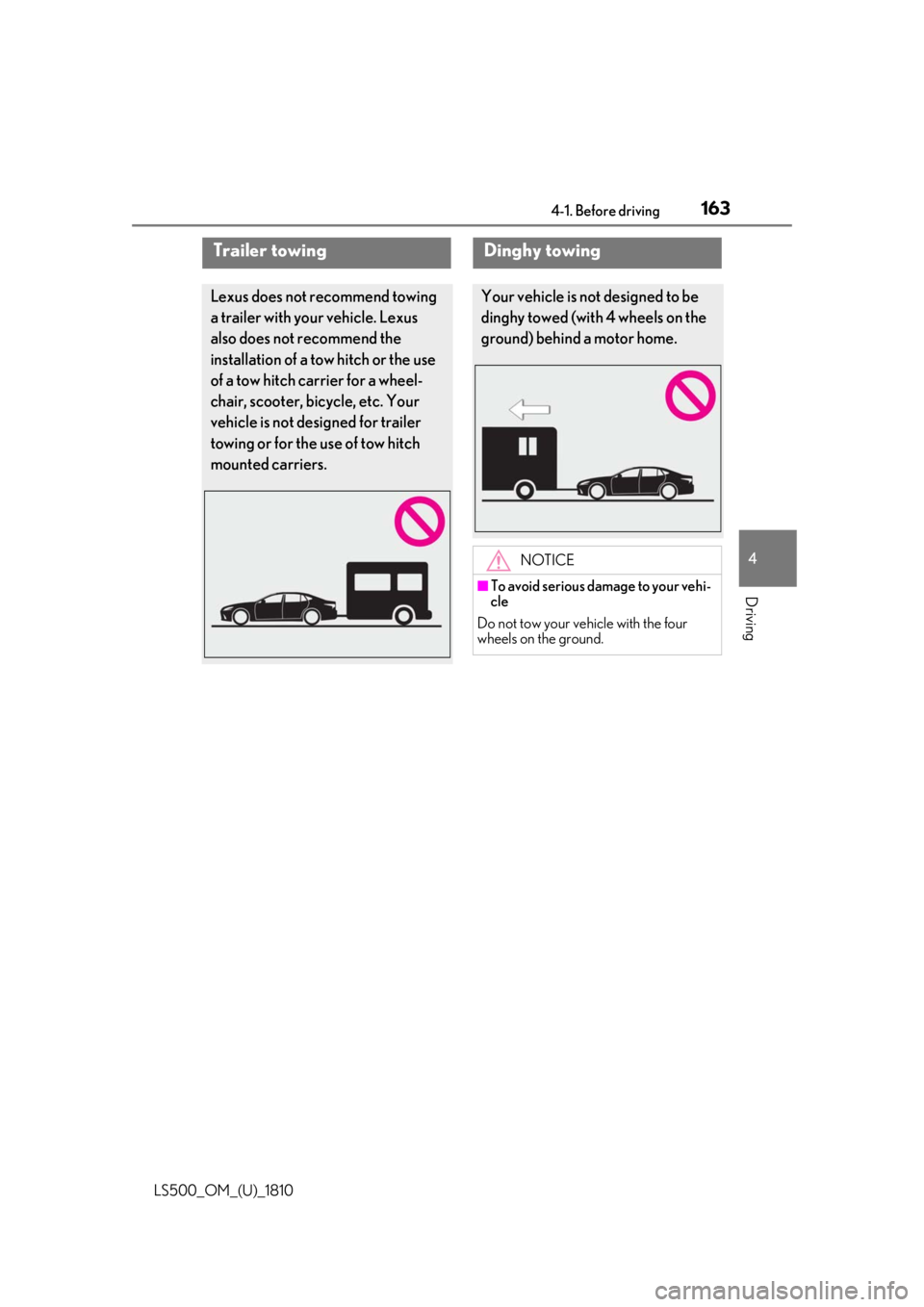
Driving Trailer towing Lexus does not recommend towing
a trailer with your vehicle. Lexus
also does not recommend the
installation of a tow hitch or the use
of a tow hitch carrier for a wheel-
chair, scooter, bicycle, etc. Your
vehicle is not desi gned for trailer
towing or for the use of tow hitch
mounted carriers. Dinghy towing Your vehicle is not designed to be
dinghy towed (with 4 wheels on the
ground) behind a motor home.
NOTICE■
To avoid serious damage to your vehi-
cle
Do not tow your vehicle with the four
wheels on the ground.
Page 207 of 512

2074-5. Using the driving support systems
LS500_OM_(U)_1810 4
Driving ■
Enabling/disabling the pre-colli-
sion system
The pre-collision system can be
enabled/disabled on ( P.80) of
the multi-information display. The system is automa tically enabled each
time the engine switch is turned to IGNI-
TION ON mode.
If the system is disabled, the PCS warn-
ing light will turn on and a message will
be displayed on the multi-information
display.
If the pre-collision sy stem is disabled,
the pedestrian alert system will also be
disabled. At this time, the FCTA (Front
Cross Traffic Alert) ( P.222) system
will also be disabled.
■
Enabling/Disabling the pedestrian
alert system
The pedestrian alert can be
enabled/disabled on ( P.80) of
the multi-information display. At this
time, the FCTA (Front Cross Traffic
Alert) system will also be enabled/dis-
abled.WARNING●
When your vehicle is towing another
vehicle●
When transporting the vehicle via
truck, boat, train or similar means of
transportation●
When the vehicle is raised on a lift with
the engine running and the tires are
allowed to rotate freely●
When inspecting the vehicle using a
drum tester such as a chassis dyna-
mometer or speedometer tester, or
when using an on vehicle wheel bal-
ancer●
When a strong impact has been
applied to the front bumper, rear
bumper or front grille, due to an acci-
dent or other reasons●
If the vehicle cannot be driven in a sta-
ble manner, such as when the vehicle
has been in an accident or is malfunc-
tioning●
When the vehicle is driven in a sporty
manner or off-road●
When the tires are not properly
inflated
●
When the tires are very worn
●
When tires of a size other than speci-
fied are installed
●
When tire chains are installed
●
When a compact spare tire or an
emergency tire puncture repair kit is
used
●
If equipment (snow plow, etc.) that may
obstruct a radar sensor or the front
camera is temporarily installed to the
vehicle Changing settings of the pre-col-
lision system
Page 217 of 512

2174-5. Using the driving support systems
LS500_OM_(U)_1810 4
Driving ■
Enabling/disabling the pre-colli-
sion system
The pre-collision system can be
enabled/disabled on ( P.80) of
the multi-information display. The system is automa tically enabled each
time the engine switch is turned to IGNI-
TION ON mode.
If the system is disabled, the PCS warn-
ing light will turn on and a message will
be displayed on the multi-information
display.
■
Changing the pre-collision warn-
ing timing
The pre-collision warning timing can
be changed on ( P.80) of the
multi-information display. The warning timing setting is retained
when the engine switch is turned off. How-
ever, if the pre-collisio n system is disabled
and re-enabled, the operation timing will
return to the default setting (middle).WARNING●
When your vehicle is towing another
vehicle●
When transporting the vehicle via
truck, boat, train or similar means of
transportation●
When the vehicle is raised on a lift with
the engine running and the tires are
allowed to rotate freely●
When inspecting the vehicle using a
drum tester such as a chassis dyna-
mometer or speedometer tester, or
when using an on vehicle wheel bal-
ancer●
When a strong impact is applied to the
front bumper or front grille, due to an
accident or other reasons●
If the vehicle cannot be driven in a sta-
ble manner, such as when the vehicle
has been in an accident or is malfunc-
tioning●
When the vehicle is driven in a sporty
manner or off-road●
When the tires are not properly
inflated●
When the tires are very worn
●
When tires of a size other than speci-
fied are installed
●
When tire chains are installed
●
When a compact spare tire or an
emergency tire puncture repair kit is
used
●
If equipment (snow plow, etc.) that may
obstruct the radar sensor or front cam-
era is temporarily installed to the vehi-
cle Changing settings of the pre-col-
lision system
Page 226 of 512
226 4-5. Using the driving support systems
LS500_OM_(U)_1810 WARNING■
Before using LTA system
Do not rely solely upon the LTA system.
The LTA system does not automatically
drive the vehicle or reduce the amount of
attention that must be paid to the area in
front of the vehicle. The driver must
always assume full responsibility for driv-
ing safely by paying careful attention to
the surrounding conditions and operat-
ing the steering wheel to correct the path
of the vehicle. Also, the driver must take
adequate breaks when fatigued, such as
from driving for a long period of time.
Failure to perform appropriate driving
operations and pay careful attention may
lead to an accident, resulting in death or
serious injury. ■
Situations unsuitable for LTA system
In the following situations, use the LTA
switch to turn the system off. Failure to do
so may lead to an acc ident, resulting in
death or serious injury. ●
Vehicle is driven on a road surface
which is slippery due to rainy weather,
fallen snow, freezing, etc.●
Vehicle is driven on a snow-covered
road.
●
White (yellow) lines are difficult to see
due to rain, snow, fog, dust, etc.
●
Vehicle is driven in a temporary lane or
restricted lane due to construction
work.
●
Vehicle is driven in a construction
zone.
●
A spare tire, tire chains, etc. are
equipped.
●
When the tires have been excessively
worn, or when the tire inflation pres-
sure is low.
●
When tires of a size other than speci-
fied are installed. ●
Vehicle is driven in traffic lanes other
than that highways and freeways. ●
During emergency towing. ■
Situations in whic h the lane change
assist function should not be used ●
When driving on a one lane road or
road without lane markers ●
When there is no broken white line
between your vehicle and the lane
toward which the turn signal is oper-
ated ■
Preventing LTA system malfunctions
and operations performed by mistake ●
Do not modify the headlights or place
stickers, etc. on the surface of the
lights. ●
Do not modify the suspension etc. If
the suspension etc. needs to be
replaced, contact your Lexus dealer. ●
Do not install or place anything on the
hood or grille. Also, do not install a
grille guard (bull bars, kangaroo bar,
etc.). ●
If your windshield needs repairs, con-
tact your Lexus dealer. ■
Conditions in which functions may
not operate properly
In the following situations, the functions
may not operate properly and the vehicle
may depart from its la ne. Drive safely by
always paying careful attention to your
surroundings and operate the steering
wheel to correct the path of the vehicle
without relying solely on the functions.
Page 239 of 512
2394-5. Using the driving support systems
LS500_OM_(U)_1810 4
Driving WARNING●
Assisting the driver to operate the
vehicle
The dynamic radar cruise control with
full-speed range does not include func-
tions which will prevent or avoid colli-
sions with vehicles ahead of your vehicle.
Therefore, if there is ever any possibility
of danger, the driver must take immedi-
ate and direct control of the vehicle and
act appropriately in order to ensure the
safety of all involved. ■
Situations unsuitable for dynamic
radar cruise control with full-speed
range
Do not use dynamic radar cruise control
with full-speed range in any of the follow-
ing situations. Doing so may result in
inappropriate speed control and could
cause an accident re sulting in death or
serious injury. ●
Roads where there are pedestrians,
cyclists, etc.●
In heavy traffic●
On roads with sharp bends●
On winding roads
●
On slippery roads, such as those cov-
ered with rain, ice or snow
●
On steep downhills , or where there
are sudden changes between sharp up
and down gradients
Vehicle speed may exceed the set
speed when driving down a steep hill.
●
At entrances to freeways and highways
●
When weather conditions are bad
enough that they may prevent the sen-
sors from detectin g correctly (fog,
snow, sandstorm, heavy rain, etc.)
●
When there is rain, snow, etc. on the
front surface of the radar or front cam-
era ●
In traffic conditions that require fre-
quent repeated acceleration and
deceleration ●
During emergency towing ●
When an approach warning buzzer is
heard often
Page 258 of 512

258 4-5. Using the driving support systems
LS500_OM_(U)_1810 When an object is detected, a graphic will
be displayed on the panoramic view moni-
tor (if equipped).
Use the meter control switches to
enable/disable the Lexus parking
assist-sensor. ( P.81)
1 Press or to select .
2 Press or to select “PKSA”
and then press .
3 Press or to select and
then press .
When the intuitive parking assist func-
tion is disabled, the intuitive parking
assist OFF indicator ( P.68) illumi-
nates.
To re-enable the system when it was disabled, select on the multi-infor-
mation display, select and then On.
If disabled using this method, the sys-
tem will not be re-enabled by turning
the engine switch off and then to IGNI-
TION ON mode.
Turning intuitive parking assist
on/off WARNING■
When using the intuitive parking
assist
Observe the following precautions.
Failing to do so may result in the vehicle
being unable to be driven safely and pos-
sibly cause an accident. ●
Do not use the sensor at speeds in
excess of 6 mph (10 km/h). ●
The sensors’ detection areas and reac-
tion times are limited. When moving
forward or reversin g, check the areas
surrounding the vehicle (especially the
sides of the vehicl e) for safety, and
drive slowly, using the brake to control
the vehicle’s speed. ●
Do not install accessories within the
sensors’ detection areas. ●
The area directly under the bumpers is
not detected.
■
When to disable the function
In the following situations, disable the
function as it may operate even though
there is no possibility of a collision. ●
The vehicle is equipped with a fender
pole, wireless antenna or fog lights.
●
The front or rear bumper or a sensor
receives a strong impact.
●
A non-genuine Lexus suspension
(lowered suspension, etc.) is installed.
●
Towing eyelets are installed.
●
A backlit licence pl ate is installed.
Page 266 of 512

266 4-5. Using the driving support systems
LS500_OM_(U)_1810 ■
The RCTA function is operational when
The RCTA function operates when all of the
following conditions are met: ●
The engine switch is in IGNITION ON
mode.●
The RCTA function is on.●
The shift position is in R.●
The vehicle speed is less than approxi-
mately 5 mph (8 km/h).●
The approaching vehicle speed is
between approximately 5 mph (8 km/h)
and 18 mph (28 km/h).■
Setting the buzzer volume
The buzzer volume can be adjusted on the
multi-information display. ( P.256)■
Conditions under which the RCTA func-
tion will not detect a vehicle
The RCTA function is not designed to
detect the following types of vehicles and/or
objects: ●
Vehicles approaching from directly
behind●
Vehicles backing up in a parking space
next to your vehicle●
Vehicles that the sensors cannot detect
due to obstructions
●
Guardrails, walls, signs, parked vehicles
and similar stationary objects *
●
Small motorcycles, bicycles, pedestrians,
etc. *
●
Vehicles moving away from your vehicle
●
Vehicles approaching from the parking
spaces next to your vehicle *
*
: Depending on the conditions, detection
of a vehicle and/or object may occur. ■
Conditions under which the RCTA func-
tion may not function correctly ●
The RCTA function may not detect vehi-
cles correctly in the following situations:
• When a sensor is misaligned due to a
strong impact to the sensor or its sur-
rounding area
• When mud, snow, ice, a sticker, etc. is
covering a sensor or its surrounding area
on the rear bumper
• When driving on a road surface that is
wet with standing water during bad
weather, such as heavy rain, snow, or fog
• When multiple vehicles are approaching
with only a small gap between each vehi-
cle
• If a vehicle is approaching the rear of
your vehicle rapidly
• When a towing eyelet is installed to the
rear of the vehicle.
• When backing up on a slope with a sharp
change in grade
• When backing out of a shallow angle
parking spot
• Immediately after the RCTA function is
turned on
• Immediately after the engine is started
Page 267 of 512

2674-5. Using the driving support systems
LS500_OM_(U)_1810 4
Driving with the RCTA function on
• When the sensors cannot detect a vehi-
cle due to obstructions
●
Instances of the RCTA function unneces-
sarily detecting a vehicle and/or object
may increase in the following situations:
• When a vehicle passes by the side of your
vehicle
• When the parking space faces a street
and vehicles are being driven on the
street
• When the distance between your vehicle
and metal objects, such as a guardrail,
wall, sign, or parked vehicle, which may
reflect electrical waves toward the rear of
the vehicle, is short
• When a towing eyelet is installed to the
rear of the vehicle *
: If equipped
Pedestrian detection icon Displayed automatically when a pedestrian
is detected.
RCD OFF icon When the RCD function is disabled, the
RCD OFF icon illuminates. (Each time the
engine switch is turned off then changed to
IGNITION ON mode, the RCD function
will be enabled automatically.)
Use the meter control switches to
enable/disable the RCD function.
( P.81)
1 Press or to select .RCD (Rear Camera Detec-
tion) function *
When the vehicle is backing up, the
rear camera detection function can
detect pedestrians in the detection
area behind the vehicle. If a pedes-
trian is detected, a buzzer will
sound and an icon will be displayed
on the Center Display to inform the
driver of the pedestrian.
Center Display
Turning the RCD function on/off A
B