2019 LEXUS LS500 oil
[x] Cancel search: oilPage 160 of 512

160 4-1. Before driving
LS500_OM_(U)_1810 Cargo capacity depends on the total
weight of the occupants.
(Cargo capacity) = (Total load capac-
ity) — (Total weight of occupants)
Steps for Determining Correct Load
Limit —
(1) Locate the statement “The com-
bined weight of occupants and cargo
should never exceed XXX kg or XXX
lbs.” on your vehicle’s placard.
(2) Determine the combined weight of
the driver and passengers that will be
riding in your vehicle.
(3) Subtract the combined weight of
the driver and passengers from XXX
kg or XXX lbs.
(4) The resulting figure equals the
available amount of cargo and luggage
load capacity.
For example, if the “XXX” amount
equals 1400 lbs. and there will be five
150 lb passengers in your vehicle, the
amount of available cargo and luggage
load capacity is 650 lbs. (1400 − 750
(5 150) = 650 lbs.)
(5) Determine the combined weight of
luggage and cargo being loaded on
the vehicle. That weight may not safely
exceed the available cargo and lug-NOTICE
Information on what to do in case of a flat
tire ( P.429)■
When encountering flooded roads
Do not drive on a road that has flooded
after heavy rain etc. Doing so may cause
the following serious damage to the vehi-
cle: ●
Engine stalling●
Short in electrical components●
Engine damage caused by water
immersion
In the event that you drive on a flooded
road and the vehicle is flooded, be sure
to have your Lexus dealer check the fol-
lowing: ●
Brake function●
Changes in quantity and quality of oil
and fluid used for the engine, transmis-
sion, transfer (AWD models), differen-
tial, etc.●
Lubricant condition for the propeller
shaft, bearings and suspension joints
(where possible), and the function of
all joints, bearings, etc.
If the shift control system is damaged by
flooding, it may not be possible to shift
the shift position to P, or from P to other
positions. In this case, contact your Lexus
dealer.
■
When parking the vehicle
Always set the parking brake, and shift
the shift position to P. Failure to do so
may cause the vehicle to move or the
vehicle may accelerate suddenly if the
accelerator pedal is accidentally
depressed. Cargo and luggage Take notice of the following infor-
mation about storage precautions,
cargo capacity and load:
Capacity and distribution
Page 193 of 512

1934-5. Using the driving support systems
LS500_OM_(U)_1810 4
Driving WARNING●
Keep the radar sensors and their sur-
rounding areas on the front bumper
clean at all times.
If a radar sensor or its surrounding area
on the front bumper is dirty or covered
with snow, the system may not operate
and a warning message ( P.428) will be
displayed.
If this occurs, clean off the dirt or snow
and drive the vehicle for approximately
10 minutes.
If the warning message does not disap-
pear, have your vehicle inspected by your
Lexus dealer. ●
Do not attach accessories, stickers
(including transparen t stickers), alumi-
num tape or other items to the radar
sensors or their surrounding area.
●
Do not subject a radar sensor or its
surrounding area on the front bumper
to a strong impact.
If a radar sensor is moved even slightly
off position, the system may malfunction
and vehicles may not be detected cor-
rectly.
In the following situations, have your
vehicle inspected by your Lexus dealer.
• If a radar sensor or its surrounding
area is subject to a strong impact
• If the area on the front bumper around
a radar sensor is scratched or dented,
or the front bumper has become par-
tially disengaged ●
Do not disassemble the radar sensors. ●
Do not modify the radar sensors or
their surrounding area on the front
bumper. ●
If a radar sensor or the front bumper
needs to be removed and installed, or
replaced, contact your Lexus dealer. ●
Do not paint the front bumper any
color other than an official Lexus color. ■
To avoid malfunction of the front cam-
era
Observe the following precautions.
Otherwise, the front camera may not
operate properly, possibly leading to an
accident resulting in death or serious
injury. ●
Keep the windshield clean at all times.
• If the windshield is dirty or covered
with an oily film, water droplets, snow,
etc., clean the windshield.
• As some glass coating agents may
affect the detection performance of
the front camera, consult your Lexus
dealer when using a glass coating
agent.
• If a glass coating agent is applied to the
windshield, it will still be necessary to
use the windshield wipers to remove
water droplets, etc. from the area of
the windshield in front of the front
camera.
• If the inner side of the windshield
where the front camera is installed is
dirty, contact your Lexus dealer.
Page 199 of 512
1994-5. Using the driving support systems
LS500_OM_(U)_1810 4
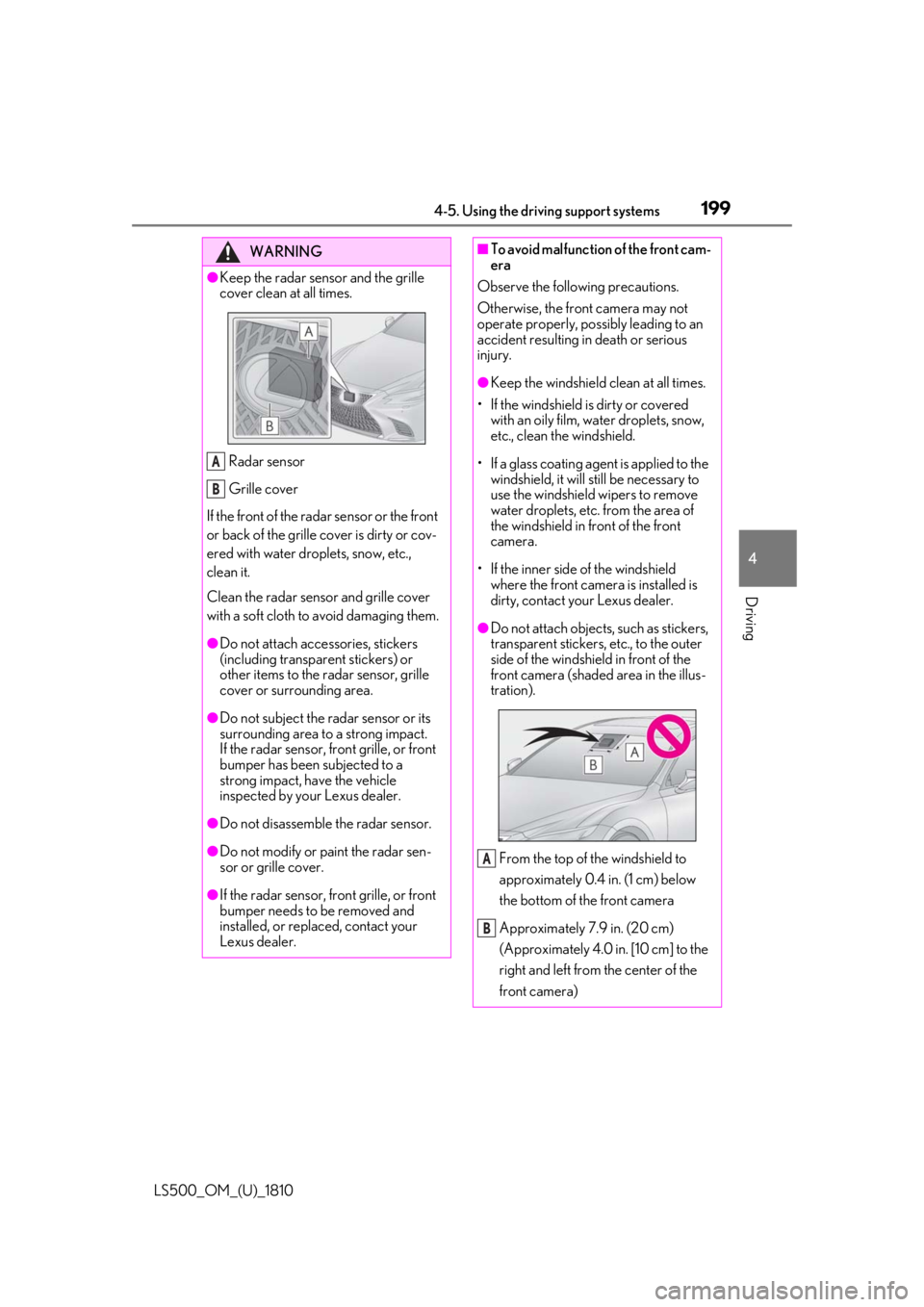
Driving WARNING●
Keep the radar sensor and the grille
cover clean at all times.
Radar sensor
Grille cover
If the front of the rada r sensor or the front
or back of the grille cover is dirty or cov-
ered with water droplets, snow, etc.,
clean it.
Clean the radar sensor and grille cover
with a soft cloth to avoid damaging them. ●
Do not attach accessories, stickers
(including transpar ent stickers) or
other items to the radar sensor, grille
cover or surrounding area.●
Do not subject the radar sensor or its
surrounding area to a strong impact.
If the radar sensor, front grille, or front
bumper has been subjected to a
strong impact, have the vehicle
inspected by your Lexus dealer.
●
Do not disassemble the radar sensor.
●
Do not modify or paint the radar sen-
sor or grille cover.
●
If the radar sensor, front grille, or front
bumper needs to be removed and
installed, or replaced, contact your
Lexus dealer. A
B ■
To avoid malfunction of the front cam-
era
Observe the following precautions.
Otherwise, the front camera may not
operate properly, possibly leading to an
accident resulting in death or serious
injury. ●
Keep the windshield clean at all times.
• If the windshield is dirty or covered
with an oily film, water droplets, snow,
etc., clean the windshield.
• If a glass coating agent is applied to the
windshield, it will still be necessary to
use the windshield wipers to remove
water droplets, etc. from the area of
the windshield in front of the front
camera.
• If the inner side of the windshield
where the front camera is installed is
dirty, contact your Lexus dealer. ●
Do not attach objects, such as stickers,
transparent stickers, etc., to the outer
side of the windshield in front of the
front camera (shaded area in the illus-
tration).
From the top of the windshield to
approximately 0.4 in. (1 cm) below
the bottom of the front camera
Approximately 7.9 in. (20 cm)
(Approximately 4.0 in. [10 cm] to the
right and left from the center of the
front camera) A
B
Page 225 of 512

2254-5. Using the driving support systems
LS500_OM_(U)_1810 4
Driving ■
If the PCS warning light illuminates and
a message is displayed on the
multi-information display
The system may be temporarily unavailable
or may be malfunctioning.
LTA (Lane Tracing Assist) When driving on highways and
freeways with white (yellow) lane
lines, this function alerts the driver
when the vehicle might depart from
its lane or course *
and provides
assistance by operating the steer-
ing wheel to keep the vehicle in its
lane or course *
. Furthermore, the
system provides steering assistance
when dynamic radar cruise control
with full-speed range is operating
to keep the vehicle in its lane and
when changing lanes (vehicles with
Lexus Safety System + A).
The LTA system recognizes white
(yellow) lane lines or a course *
using the front camera. Addition-
ally, it detects preceding and sur-
rounding vehicles (vehicles with
Lexus Safety System + A) using the
front camera and radar. *
: Boundary between asphalt and the
side of the road, such as grass, soil, or
a curb
Page 228 of 512

228 4-5. Using the driving support systems
LS500_OM_(U)_1810 ■
Lane departure alert function
When the system determines that the
vehicle might depart from its lane or
course *
, a warning is displayed on the
multi-information display, and either a
warning buzzer will sound or the steer-
ing wheel will vibrate to alert the driver.
When the warning buzzer sounds or
the steering wheel vibrates, check the
area around your vehicle and carefully
operate the steering wheel to move the
vehicle back to the center of the lane.
When the system determines that the
vehicle might depart from its lane and
that the possibility of a collision with an
overtaking vehicle in the adjacent lane
is high, the lane departure alert will
operate even if the turn signals are
operating. *
: Boundary between asphalt and the side
of the road, such as grass, soil, or a curbWARNING●
The traffic lines are yellow (which may
be more difficult to recognize than
lines that are white).●
The white (yellow) lines cross over a
curb, etc.●
The vehicle is driven on a bright sur-
face, such as concrete.●
If the edge of the road is not clear or
straight.●
The vehicle is driven on a surface that
is bright due to reflected light, etc.●
The vehicle is driven in an area where
the brightness changes suddenly, such
as at the entrances and exits of tunnels,
etc.●
Light from the headlights of an oncom-
ing vehicle, the sun, etc. enters the
camera.●
The vehicle is driven on a slope.●
The vehicle is driven on a road which
tilts left or right, or a winding road.●
The vehicle is driven on an unpaved or
rough road.
●
The traffic lane is excessively narrow
or wide.
●
The vehicle is extremely tilted due to
carrying heavy luggage or having
improper tire pressure.
●
The distance to the preceding vehicle
is extremely short.
●
The vehicle is moving up and down a
large amount due to road conditions
during driving (poor roads or road
seams).
●
When driving in a tunnel or at night
with the headlights off or when a head-
light is dim due to its lens being dirty or
it being misaligned.
●
The vehicle is struck by a crosswind. ●
The vehicle is affected by wind from a
vehicle driven in a nearby lane. ●
The vehicle has just changed lanes
through operation of the steering
wheel by the driver or crossed an
intersection. ●
Tires which differ by structure, manu-
facturer, brand or tread pattern are
used. ●
Snow tires, etc. are equipped. ●
The vehicle is being driven at
extremely high speeds.
Functions included in LTA system
Page 229 of 512

2294-5. Using the driving support systems
LS500_OM_(U)_1810 4
Driving ■
Steering assist function
When the system determines that the
vehicle might depart from its lane or
course *
, the system provides assis-
tance as necessary by operating the
steering wheel in small amounts for a
short period of time to keep the vehicle
in its lane. If the system detect s that the steering
wheel has not been operated for a fixed
amount of time or the steering wheel is not
being firmly gripped, the steering assist
function may be canceled temporarily, a
warning message may be displayed on the
multi-information display and a warning
buzzer may sound. If the steering assist
function is canceled, release the steering
wheel and then grip it again to enable the
function.
When the system determines that the vehi-
cle might depart from its lane and that the
possibility of a collision with an overtaking
vehicle in the adjacent lane is high, the
steering assist function will operate even if the turn signals are operating. *
: Boundary between asphalt and the side
of the road, such as grass, soil, or a curb
■
Vehicle sway warning function
When the vehicle is swaying within a
lane, the warning buzzer will sound and
a message will be displayed on the
multi-information display to alert the
driver.
Page 232 of 512

232 4-5. Using the driving support systems
LS500_OM_(U)_1810 Illuminated in white: LTA system is operat-
ing.
Illuminated in green: Steering wheel assis-
tance of the steering assi st function or lane
centering function is operating.
Flashing in orange: Lane departure alert
function is operating.
Operation display of steering
wheel operation supportDisplayed when the mu lti-information dis-
play is switched to the driving assist system
information screen.
Indicates that steering wheel assistance of
the steering assist func tion or lane center-
ing function is operating.
Both outer sides of the lane are displayed:
Indicates that steering wheel assist of the
lane centering function is operating.
One outer side of the lane is displayed:
Indicates that steering wheel assist of the
steering assist function is operating.
Both outer sides of the lane are flashing:
Alerts the driver that their input is neces-
sary to stay in the center of the lane (lane
centering function).
Lane departure alert function dis-
playDisplayed when the mu lti-information dis-
play is switched to the driving assist system
information screen.
Inside of displayed white lines is
white Indicates that the system is recognizing
white (yellow) lines or a course *
. When the
vehicle departs from it s lane, the white line
displayed on the side the vehicle departs
from flashes orange.
Inside of displayed white lines is
black
Indicates that the system is not able to rec-
ognize white (yellow) lines or a course *
or
is temporarily canceled. *
: Boundary between asphalt and the side
of the road, such as grass, soil, or a curb
Follow-up cruising display Displayed when the multi-information dis-
play is switched to th e driving assist system
information screen.
Indicates that steering assist of the lane
centering function is operating by monitor-
ing the position of a preceding vehicle.
When the follow-up cruising display is dis-
played, if the preceding vehicle moves,
your vehicle may move in the same way.
Always pay careful attention to your sur-
roundings and operate the steering wheel
as necessary to correct the path of the
vehicle and ensure safety.
■
Lane change assist function (vehi-
cles with Lexus Safety System + A)
Lane change assist displayB
C D
Page 234 of 512

234 4-5. Using the driving support systems
LS500_OM_(U)_1810 cle speed is less than approximately 32
mph (50 km/h) when the lane center-
ing function is operating. *2
: Boundary between asphalt and the side
of the road, such as grass, soil, or a curb●
Steering assist function
This function operates when all of the fol-
lowing conditions are me t in addition to the
operation conditions for the lane depar-
ture alert function.
•Setting for “Steering Assist” in of the
multi-information display is set to “ON”.
( P.80)
• Vehicle is not accelerated or decelerated
by a fixed amount or more.
• Steering wheel is not operated with a
steering force level su itable for changing
lanes.
• ABS, VSC, TRAC and PCS are not oper-
ating.
• TRAC or VSC is not turned off.
• Hands off steering wheel warning is not
displayed. ( P.236)●
Vehicle sway warning function
This function operates when all of the fol-
lowing conditions are met.
• Setting for “Sway Warning” in of the
multi-information display is set to “ON”.
( P.80)
• Vehicle speed is approximately 32 mph
(50 km/h) or more.
• Width of traffic lane is approximately 9.8
ft. (3 m) or more.
• No system malfunctions are detected.
( P.237)
●
Lane centering function
This function operates when all of the fol-
lowing conditions are met.
• LTA is turned on.
• Setting for “Steering Assist” and “Lane
Center” in of the multi-information
display are set to “ON”. ( P.80)
• This function recognizes white (yellow)
lane lines or the position of a preceding
vehicle (except when the preceding vehi-
cle is small, such as a motorcycle).
• The dynamic radar cruise control with full-speed range is operating in vehi-
cle-to-vehicle distance control mode.
• Width of traffic lane is approximately 10
to 13 ft. (3 to 4 m).
• Turn signal lever is not operated.
• Vehicle is not being driven around a
sharp curve.
• No system malfunctions are detected.
( P.237)
• Vehicle does not ac celerate or deceler-
ate by a fixed amount or more.
• Steering wheel is not operated with a
steering force level su itable for changing
lanes.
• ABS, VSC, TRAC and PCS are not oper-
ating.
• TRAC or VSC is not turned off.
• Hands off steering wheel warning is not
displayed. ( P.236)
• The driver has one or both hands on the
steering wheel.
• The vehicle is being driven in the center
of a lane.
• Steering assist function is not operating. ●
Lane change assist fu nction (vehicles with
Lexus Safety System + A)
This function will operate when all of the
following conditions are met:
• The lane centering function is operating.
• “Lane Change Assist” is set to “ON” in
of the multi-information dis-
play.( P.80)
• The vehicle speed is between approxi-
mately 57 and 85 mph (90 and 140
km/h).
• White (yellow) lane lines are detected by
the system.
• A broken white line is detected between
your vehicle and the lane toward which
the turn signal is operated.
• The turn signal lever is held partway (lane
change position) for approximately 1 sec-
ond.
• A vehicle is not overtaking your vehicle
or detected in the lane toward which the
turn signal is operated.
• The vehicle is being driven straight or
around a slight curve.
• The vehicle is not a ccelerating or decel-
erating more than a certain amount.
• The steering wheel is not being turned
sufficiently to perf orm a lane change.