Page 522 of 600

5227-2. Steps to take in an emergency
GS450h_300h_OM_OM30F92E_(EE)
NOTICE
■When performing an emergency repair
●Perform the emergency repair without removing the nail or screw that has punctured the tread of the tire. If the object that has punctured the tire is removed, repair by the
emergency tire puncture repair kit may not be possible.
●The repair kit is not waterproof. Make sure that the repair kit is not exposed to water, such as when it is being used in the rain.
●Do not put the repair kit directly onto dusty ground such as sand at the side of theroad. If the repair kit vacuums up dust etc., a malfunction may occur.
■Handling the emergency tire puncture repair kit
●The repair kit power source should be 12 V DC suitable for vehicle use. Do not con- nect the repair kit to any other source.
●If gasoline splatters on the repair kit, the repair kit may deteriorate. Take care not to
allow gasoline to contact it.
●Store the emergency tire puncture repair kit in the trunk. The kit may be thrown around during sudden braking and so forth, damaging the kit.
●Store the repair kit in the trunk out of reach of children.
●Do not disassemble or modify the repair kit. Do not subject parts such as the air pres- sure indicator to impacts. This may cause a malfunction.
■To avoid damage to the tire pressure warning valves and transmitters (vehicles withthe tire pressure warning system)
When a tire is repaired with liquid sealants, the tire pressure warning valve and trans-
mitter may not operate properly. If a liquid sealant is used, contact any authorized Lexus retailer or Lexus authorized repairer, or any reliable repairer or other qualified service shop as soon as possible. After use of liquid sealant, make sure to replace the
tire pressure warning valve and transmitte r when repairing or replacing the tire. ( P. 418)
Page 525 of 600
525
7
7-2. Steps to take in an emergency
When trouble arises
GS450h_300h_OM_OM30F92E_(EE)
If the parking brake cannot be released
●Shift the shift lever to P.
●Turn the power switch off.
●Check that the parking brake indicator is off.
●Chock the tires.
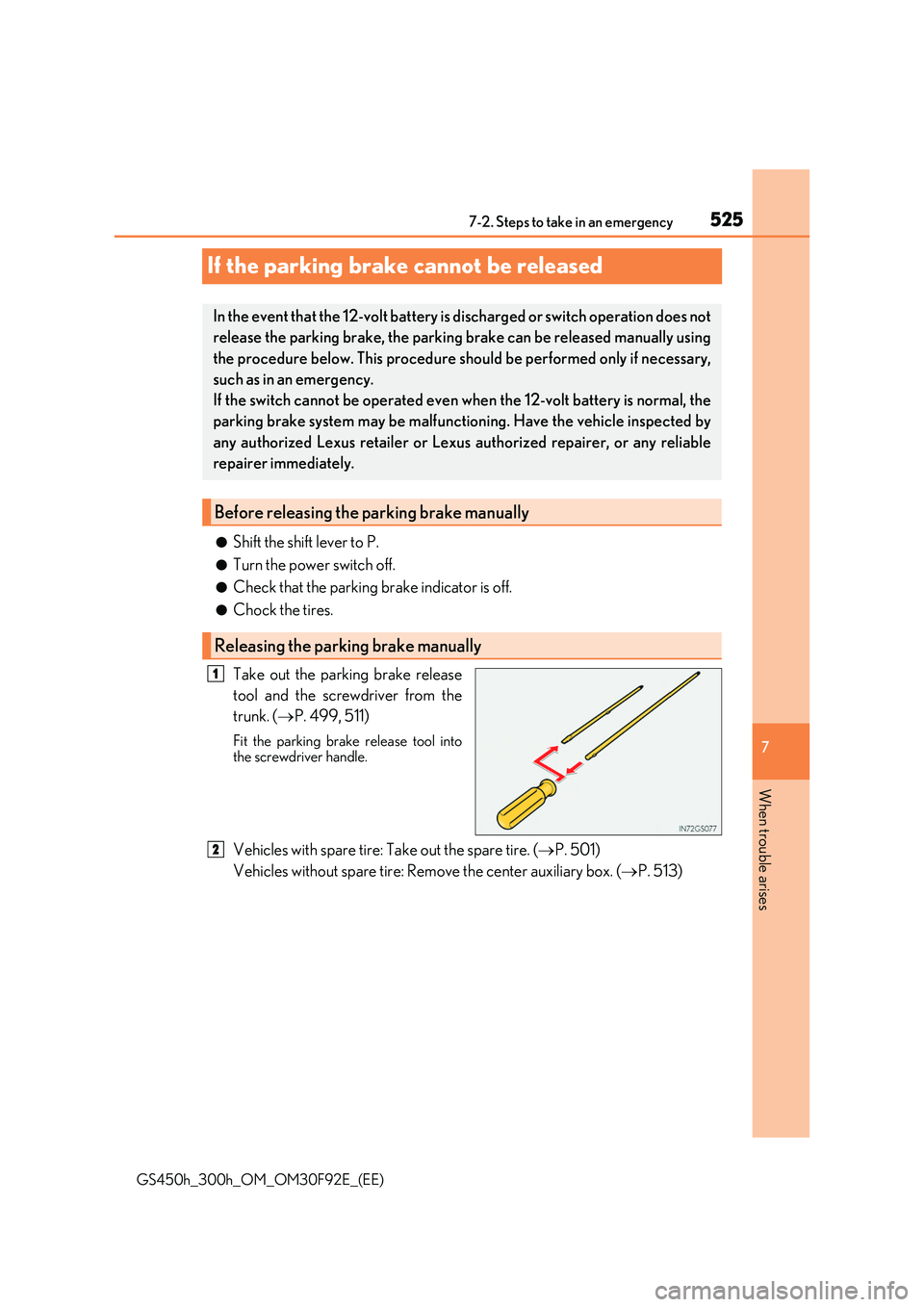
Take out the parking brake release
tool and the screwdriver from the
trunk. ( P. 499, 511)
Fit the parking brake release tool into the screwdriver handle.
Vehicles with spare tire: Take out the spare tire. ( P. 501)
Vehicles without spare tire: Remove the center auxiliary box. ( P. 513)
In the event that the 12-volt battery is discharged or switch operation does not
release the parking brake, the parking brake can be released manually using
the procedure below. This procedure should be performed only if necessary,
such as in an emergency.
If the switch cannot be operated even when the 12-volt battery is normal, the
parking brake system may be malfunctioning. Have the vehicle inspected by
any authorized Lexus retailer or Lexus authorized repairer, or any reliable
repairer immediately.
Before releasing the parking brake manually
Releasing the parking brake manually
1
2
Page 527 of 600
527
7
7-2. Steps to take in an emergency
When trouble arises
GS450h_300h_OM_OM30F92E_(EE)
If the electronic key does not operate properly
■Doors
Use the mechanical key ( P. 135)
in order to perform the following
operations:
Locks all the doors
Closes the windows and moon
roof (turn and hold)*
Unlocks all the doors
Opens the windows and moon
roof (turn and hold)*
*: This setting must be customized at any authorized Lexus retailer or Lexus autho-
rized repairer, or any reliable repairer.
■Trunk
Turn the mechanical key clockwise
to open.
If communication between the electronic key and vehicle is interrupted
( P. 155) or the electronic key cannot be used because the battery is
depleted, the smart entry & start system and wireless remote control can-
not be used. In such cases, the d oors and trunk can be opened and the
hybrid system can be started by following the procedure below.
Locking and unlocking the doors, unlocking the trunk and key linked
functions
1
2
3
4
Page 528 of 600

5287-2. Steps to take in an emergency
GS450h_300h_OM_OM30F92E_(EE)
Ensure that the shift lever is in P and depress the brake pedal.
Touch the Lexus emblem side of the
electronic key to the power switch.
When the electronic key is detected, a buzzer sounds and the power switch willturn to ON mode.
When the smart entry & start system is deactivated in customization setting, thepower switch will turn to ACCESSORY
mode.
Firmly depress the brake pedal and ch eck that is shown on the multi-
information display.
Press the power switch.
In the event that the hybrid system still cannot be started, contact any authorized
Lexus retailer or Lexus authorized repairer, or any reliable repairer.
■Stopping the hybrid system
Shift the shift lever to P and press the power switch as you normally do when stopping the hybrid system.
■Replacing the key battery
As the above procedure is a temporary measure, it is recommended that the electronic key battery be replaced immediately when the battery is depleted. ( P. 435)
■Alarm (if equipped)
Using the mechanical key to lock the doors or trunk will not set the alarm system. If a door or trunk are unlocked using the me chanical key when the alarm system is set,
the alarm may be triggered. ( P. 91)
■Changing power switch modes
Release the brake pedal and press the power switch in step above.
The hybrid system does not start and modes will be changed each time the switch is pressed. ( P. 218)
■When the electronic key does not work properly
●Make sure that the smart entry & start system has not been deactivated in the customi- zation setting. If it is off, turn the function on. (Customizable features: P. 561)
●Check if battery-saving mode is set. If it is set, cancel the function. (P. 154)
Starting the hybrid system
1
2
3
4
3
Page 558 of 600
5588-1. Specifications
GS450h_300h_OM_OM30F92E_(EE)
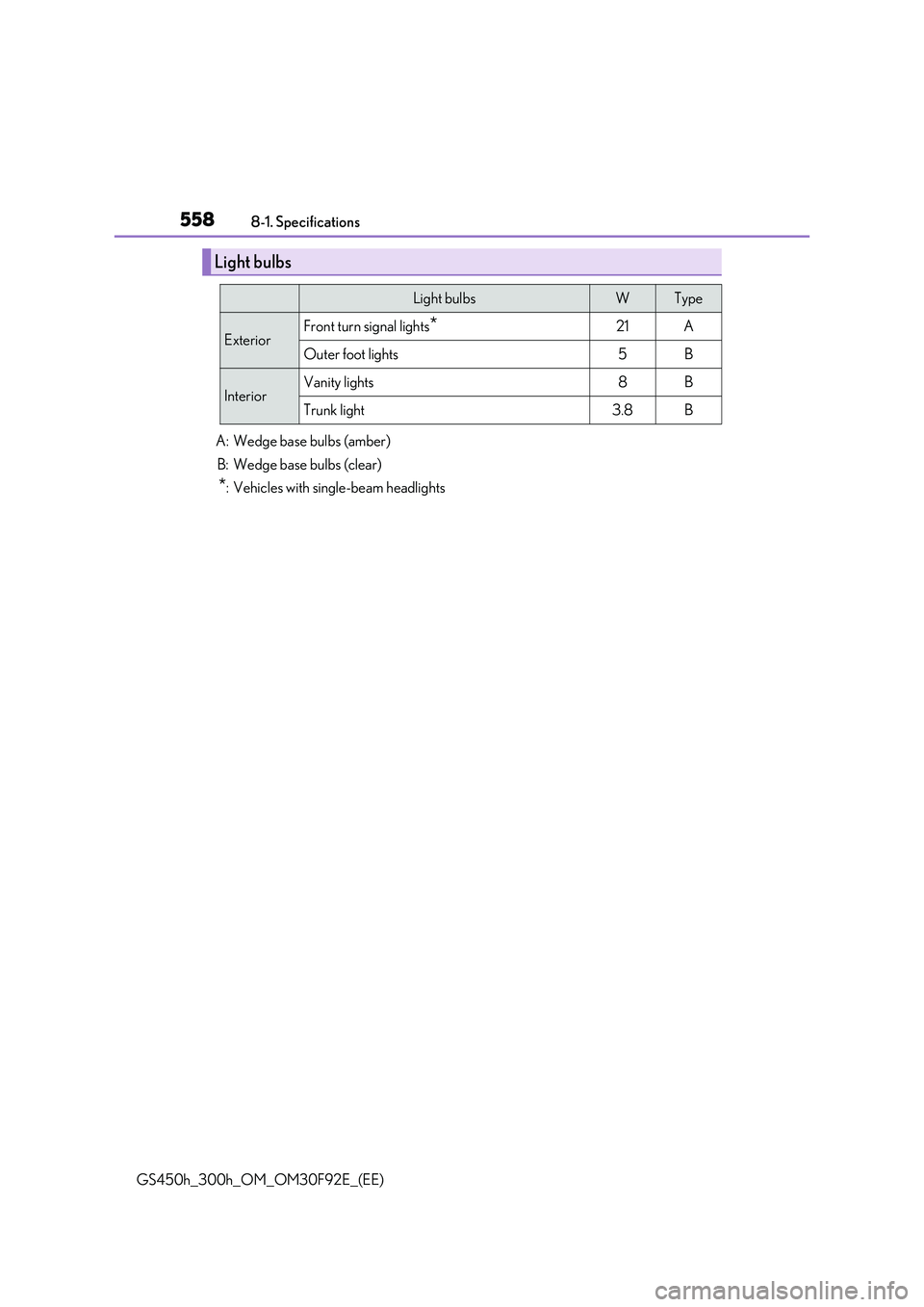
Light bulbs
Light bulbsWType
ExteriorFront turn signal lights*21A
Outer foot lights5B
InteriorVanity lights8B
Trunk light3.8B
A: Wedge base bulbs (amber)
B: Wedge base bulbs (clear)
*: Vehicles with single-beam headlights
Page 566 of 600
5668-2. Customization
GS450h_300h_OM_OM30F92E_(EE)
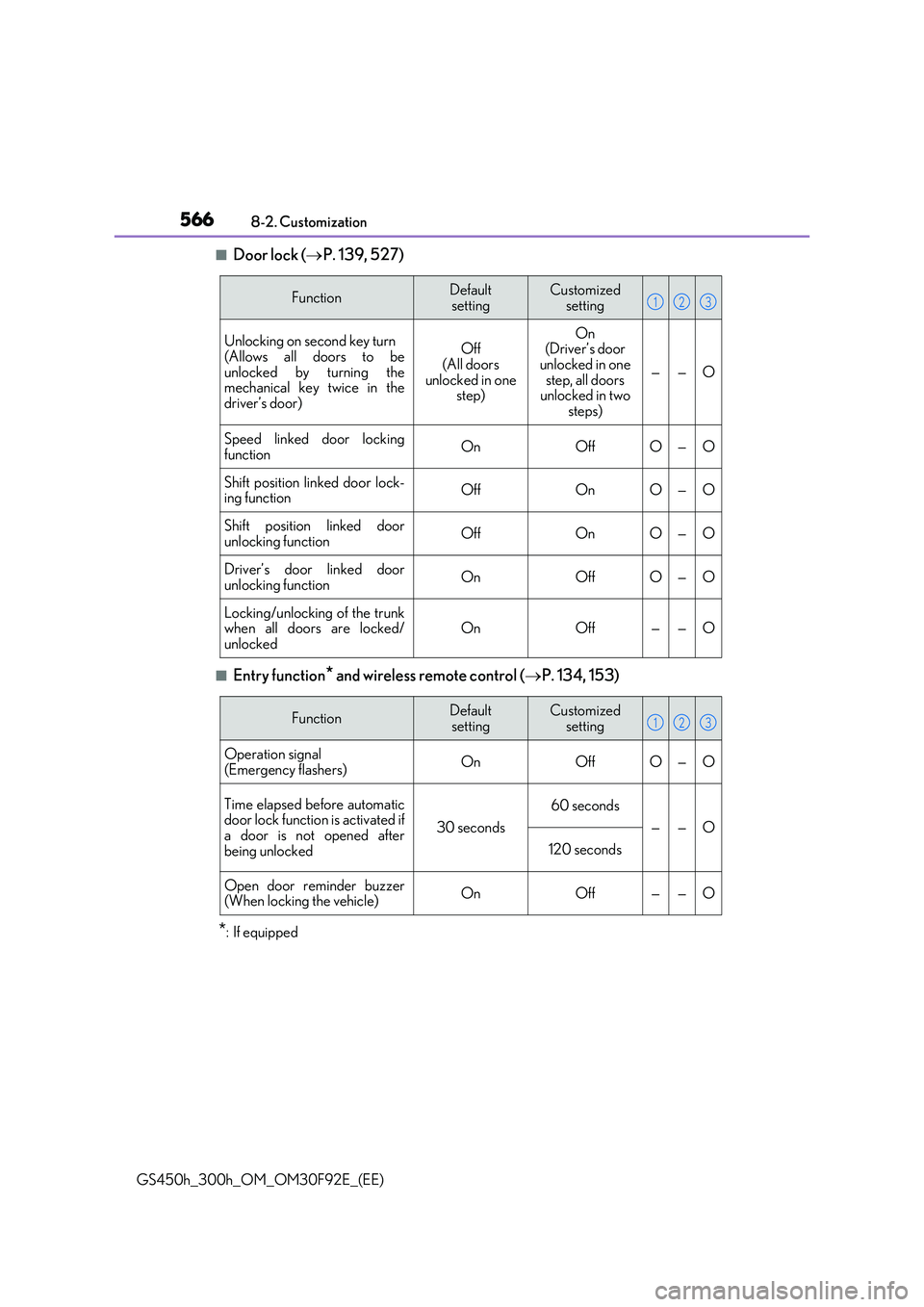
■Door lock ( P. 139, 527)
■Entry function* and wireless remote control (P. 134, 153)
*: If equipped
FunctionDefault
setting
Customized
setting
Unlocking on second key turn
(Allows all doors to be unlocked by turning themechanical key twice in the
driver’s door)
Off (All doors
unlocked in one step)
On(Driver’s door unlocked in one
step, all doors unlocked in two steps)
——O
Speed linked door locking
functionOnOffO—O
Shift position linked door lock- ing functionOffOnO—O
Shift position linked doorunlocking functionOffOnO—O
Driver’s door linked door
unlocking functionOnOffO—O
Locking/unlocking of the trunk when all doors are locked/unlockedOnOff——O
123
FunctionDefaultsettingCustomized setting
Operation signal
(Emergency flashers)OnOffO—O
Time elapsed before automatic door lock function is activated ifa door is not opened after
being unlocked
30 seconds
60 seconds
——O
120 seconds
Open door reminder buzzer (When locking the vehicle)OnOff——O
123
Page 567 of 600
567
8
8-2. Customization
Vehicle specifications
GS450h_300h_OM_OM30F92E_(EE)
■Entry function* ( P. 153)
*: If equipped
■Wireless remote control (P. 134)
■Front seats (P. 175)
FunctionDefault
setting
Customized
setting
Smart entry & start systemOnOffO—O
Unlocking operationAll the doorsDriver’s doorO—O
Number of consecutive door lock operationsAs many as desired2 times——O
123
FunctionDefault
setting
Customized
setting
Wireless remote controlOnOff——O
Unlocking operation
Off
(All doors unlocked in one step)
On (Driver’s door unlocked in one step, all doors
unlocked in two steps)
O—O
Trunk unlocking operationPress and hold
(short)
One short press
——O
Push twice
Press and hold
(long)
Off
123
FunctionDefault settingCustomized setting
Driver’s seat movement whenexiting the vehicleStandardOffO—OPartial
Selecting the door linking driv-
ing position memory with door unlock operationDriver’s doorAll doors——O
123
Page 579 of 600

579What to do if... (Troubleshooting)
GS450h_300h_OM_OM30F92E_(EE)
●The function to prevent the electronic key from being left inside the trunk will
operate and you can open the trunk as usual. Take the key out from the trunk.
( P. 148)
●Did you press the power switch while firmly depressing the brake pedal?
( P. 217)
●Is the shift lever in P? (P. 219)
●Is the electronic key anywhere detectable inside the vehicle? (P. 153)
●Is the steering wheel unlocked? (P. 219)
●Is the electronic key battery weak or depleted?
In this case, the hybrid system can be started in a temporary way. ( P. 528)
●Is the 12-volt battery discharged? (P. 530)
●Is the power switch in ON mode?
If you cannot release the shift lever by depressing the brake pedal with the
power switch in ON mode ( P. 229)
●It is locked automatically to prevent theft of the vehicle. (P. 219)
The trunk lid is closed with the electronic key left inside
If you think som ething is wrong
The hybrid system does not start
The shift lever cannot be shifted fr om P even if you depress the brake
pedal
The steering wheel cannot be turned after the hybrid system is stopped