Page 42 of 98
42
ES300h_QG_OM06179U_(U)
Press the “MENU” button on the Remote Touch to display the menu screen.
12.3-inch display model
Select to display the destination screen. (P.50)
Select to display the audio control screen. (P.58)
Select to display the hands-free control screen.
*1, 2 (P.54)
Select to display the “Apps” screen
*1, 2
When an Apple CarPlay connection is established and this button displays “Apple Car-
Play”, select to display the home screen of Apple CarPlay.
*1, 3
Select to display the energy monitor or fuel consumption screen. (P.47)
Select to display the general settings screen.
*3, 4
Select to display the air conditioning control screen. (P.67)
*1: This function is not made available in some countries or areas.
*2: The Lexus Enform App Suite 2.0 screen may not be displayed when an Apple CarPlay
connection is established.
*3: Refer to the “NAVIGATION AND MULTIMEDIA SYSTEM OWNER’S MANUAL”.
*4: Refer to the “OWNER’S MANUAL”.
Menu screen
A
B
C
D
E
F
G
H
Page 44 of 98

44
ES300h_QG_OM06179U_(U)
8-inch display model (Type B)
Select to display the audio control screen. (P.58)
Select to display the hands-free control screen. When an Apple CarPlay connection is
established, select to display the Phone app screen.
*1 (P.54)
Select to display the “Apps” screen.
*1, 2, 3
When an Apple CarPlay connection is established and this button displays
“Apple CarPlay”, select to display the home screen of Apple CarPlay.
*1, 2
Select to display the energy monitor or fuel consumption screen. (P.47)
Select to display the general settings screen.
*1, 4
Select to display the air conditioning control screen. (P.67)
Select to adjust the contrast and brightness of the screens, turn the screen off, etc.
*1
*1: Refer to the “NAVIGATION AND MULTIMEDIA SYSTEM OWNER’S MANUAL”.
*2: This function is not made available in some countries or areas.
*3: The Lexus Enform App Suite 2.0 screen may not be displayed when an Apple CarPlay
connection is established.
*4: Refer to the “OWNER’S MANUAL”
A
B
C
D
E
F
G
H
Page 57 of 98
57
ES300h_QG_OM06179U_(U)
Select “Answer” or press the switch on the steering wheel to talk on the phone.
“Decline”: Select to refuse to receive the call.
TEL switch
• Start talking
• End talking
•End dialing
• If the switch is pressed when an
Apple CarPlay connection is estab-
lished, the Apple CarPlay phone
application will be displayed on the
system screen.*
Volume control switch
• Press the “+” side to increase the volume.
• Press the “-” side to decrease the volume.
Talk switch
• Press the talk switch to start the voice command system.
• To cancel voice recognition, press and hold the talk switch.
*:If equipped
Receiving a call
Main displaySide display (12.3-inch display model)
Steering switches
A
B
C
Page 59 of 98
59
ES300h_QG_OM06179U_(U)
Some parts of the audio/visual system can be adjusted using the switches on the steering
wheel.
Volume control switch
“MODE” switch
switch
■Volume control switch
●Press: Volume up/down
●Press and hold (0.8 sec. or more): Volume up/down continuously
■“MODE” switch
AM, FM, SXM
●Press: Change audio modes
●Press and hold (0.8 sec. or more): Mute
*1 (Press and hold again to resume the sound.)
AUX
●Press: Change audio modes
●Press and hold (0.8 sec. or more): Mute
CD, MP3/WMA/AAC disc, DVD
*2, USB*3, iPod, Bluetooth® audio*3, APPS*3
●Press: Change audio modes
●Press and hold (0.8 sec. or more): Pause
*1: If cached radio is enabled, pressing and holding the “MODE” switch pauses the broad-
cast. (Press and hold again to play back the cached radio program.)
*2: 12.3-inch display model
*3: When an Apple CarPlay connection is established, this function will be unavailable.
Steering switch operation
A
B
C
Page 60 of 98

60
ES300h_QG_OM06179U_(U)
■ switch
AM, FM, HD
●Press: Preset station up/down
●Press and hold (0.8 sec. or more): Seek up/down
●Press and hold (1.5 sec. or more): Seek up/down continuously while the switch is being
pressed
SXM
●Press: Preset channel up/down
●Press and hold (0.8 sec. or more): Seek for stations in the relevant program type/channel
category
●Press and hold (1.5 sec. or more): Seek for the channel while the switch is being pressed
CD
●Press: Track up/down
●Press and hold (0.8 sec. or more): Fast forward/rewind
MP3/WMA/AAC disc
●Press: File up/down
●Press and hold (0.8 sec. or more): Fast forward/rewind
DVD
*1
●Press: Chapter up/down
●Press and hold (0.8 sec. or more): Fast forward/rewind
USB
*2
●Press: File/Track up/down
●Press and hold (0.8 sec. or more): Fast forward/rewind
iPod
●Press: Track up/down
●Press and hold (0.8 sec. or more): Fast forward/rewind
Bluetooth
® audio*2
●Press: Track up/down
●Press and hold (0.8 sec. or more): Fast forward/rewind
*1: 12.3-inch display model
*2: When an Apple CarPlay connection is established, this function will be unavailable.
Page 64 of 98
64
ES300h_QG_OM06179U_(U)
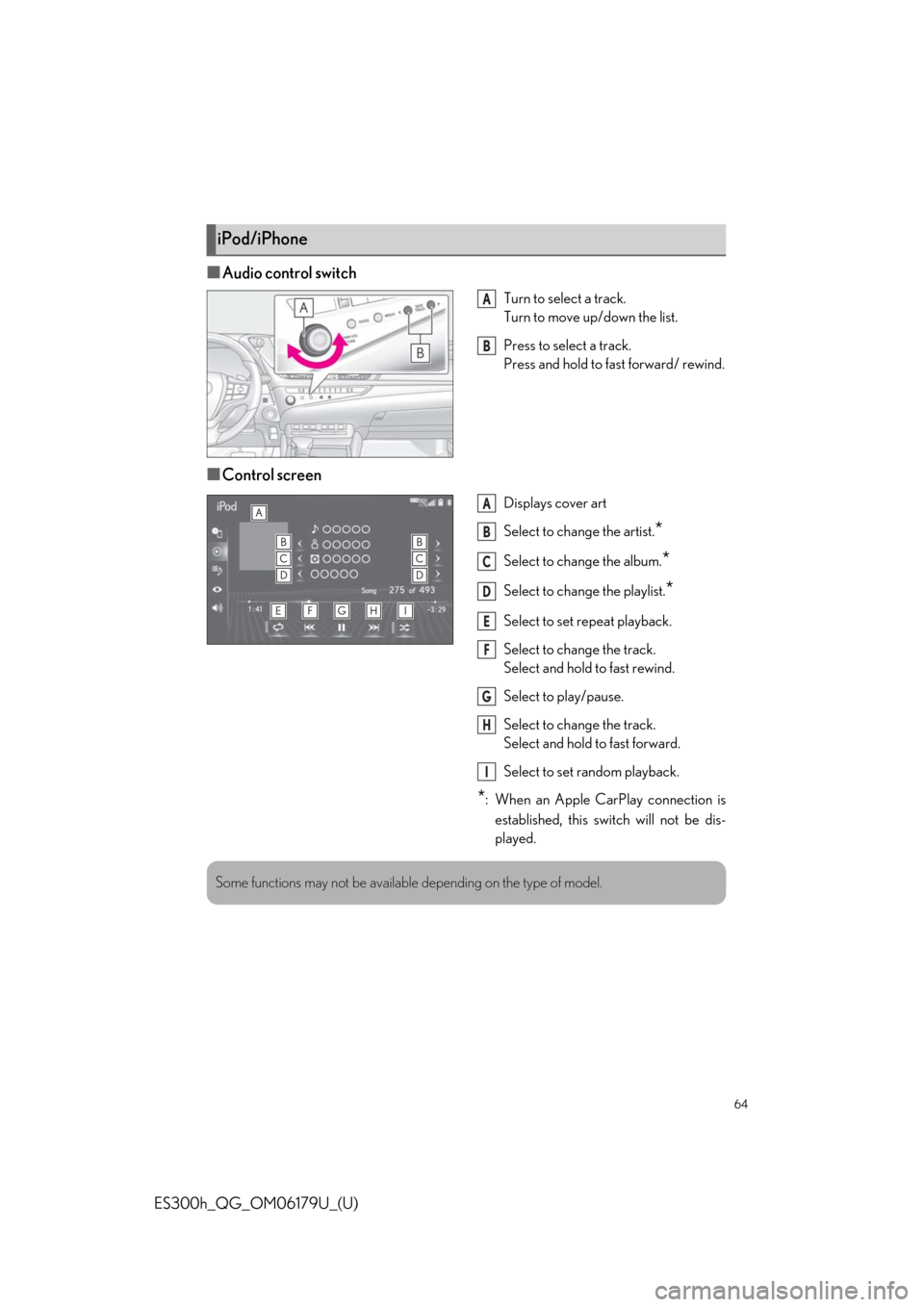
■Audio control switch
Turn to select a track.
Turn to move up/down the list.
Press to select a track.
Press and hold to fast forward/ rewind.
■Control screen
Displays cover art
Select to change the artist.
*
Select to change the album.*
Select to change the playlist.*
Select to set repeat playback.
Select to change the track.
Select and hold to fast rewind.
Select to play/pause.
Select to change the track.
Select and hold to fast forward.
Select to set random playback.
*: When an Apple CarPlay connection is
established, this switch will not be dis-
played.
iPod/iPhone
A
B
A
B
C
D
E
F
G
H
I
Some functions may not be available depending on the type of model.
Page 73 of 98
73
ES300h_QG_OM06179U_(U)
■Phone*1
*1: When an Apple CarPlay connection is established, this voice commands will be unavail-
able.
*2: If the system does not recognize the name of a contact, create a voice tag.
■While in a phone call*
*
: When an Apple CarPlay connection is established, this voice commands will be unavail-
able.
CommandAction
“Call ”*2Places a call to the specified contact from the phone
book
“Call ”*2Places a call to the specified phone type of the contact
from the phone book
“Dial ”Places a call to the specified phone number
“Redial”Places a call to the phone number of the latest outgo-
ing call
“Call Back”Places a call to the phone number of latest incoming
call
“Show Recent Calls”Displays the call history screen
“Send a message to ”Sends a text message to specified contact from the
phone book
CommandAction
“Send ”Sends DTMF tones has specified
“Mute”Mutes the microphone (far side cannot hear the con-
versation)
“Unmute”Unmutes the microphone
Page 74 of 98

74
ES300h_QG_OM06179U_(U)
■While incoming message notification is displayed*1, 2
*1: Full screen message notification must be turned on within the phone settings.
*2: When an Apple CarPlay connection is established, this voice commands will be unavail-
able.
■Radio
*1: A station list must be built first using the radio screen
*2: Requires a satellite radio subscription
CommandAction
“Read Message”Reads the incoming message over the vehicle speak-
ers
“Ignore”Ignores the incoming message notification
“Reply”Initiates sending a reply to the incoming message
“Call”Places a call to the phone number of incoming mes-
sage
CommandAction
“Tune to AM”Changes the radio to the specified AM frequency
“Tune to FM”Changes the radio to the specified FM frequency
“Play a station”Changes the radio to an FM station of the specified
genre
*1
“Tune to preset <1-36>”Changes the radio to the specified preset radio station
“Tune to a satellite sta-
tion”Changes the radio to a satellite radio channel of the
specified genre
*2
“Tune to
name>”Changes the radio to the satellite radio channel with
the specified name
*2
“Tune to channel on
XM”Changes the radio to a satellite radio channel of the
specified number
*2