2019 KIA SPORTAGE ESP
[x] Cancel search: ESPPage 2 of 52
• SiriusXM service requires a subscription\f sold separately\f a\bter 3-month trial
included with vehicle purchase. I\b you decide to continue your SiriusXM
service at the end o\b your trial subscription\f the plan you choose will auto-
matically renew and bill at then-current rate s unti l you call Siri us XM at
1-866-635-2349 to cancel. See our Customer Agreement \bor complete
terms at www.siriusxm.com. Programming subject to change. Sirius satellite
service is available only to those at least 18 and older in the 48 contiguous
USA\f D.C.\f and PR (with cover age limitations). Tra\b\bic in\bormation not avail-
able in all markets. See siriusxm.com/tra\b\bic \bor details. Sirius\f XM and all
related marks and logos are trademarks o\b Sirius XM Radio Inc.
WARNING
•Driving while distracted can result in a loss o\b vehicle control that may lead to
an accident\f severe personal injury\f and death. The driv er’s primar y responsi-
bility is in the sa\be and legal operation o\b a vehicle\f and use o\b any handheld
devices\f other equipment\f or vehicle systems which take the driver’s eyes\f
attention and \bocus away \brom the sa\be operation o\b a vehicle or which are not
permissible by law should never be used during operation o\b the vehicle.
• HD Radio™ and the HD Radio™ logo are proprietary trademarks o\b iBiquity
Digital Corporation.
• The Rear-Camera display is not a sub stitute \bor proper and sa\be backing-up
procedures. The Rear-Camera display may not display every object behind
the vehicle. Always driv e sa\bely and use caution when backing up.
Thank you \bor purchasing this multimedia system.
This user’s manual explains how to use the Kia Motor multimedia system.
Be\bore using the product\f read the contents o\b this user’s manual care\bully
and use this product sa\bely.
• The screens shown in this manual may di\b\ber with the actual screens o\b the product.
• The design and speci\bication o\b this product may change without prior noti\bication
\bor product improvement.
• When trans\berring the vehicle to another individual\f include this user’s manual so that
the next driver can continue its use.
Precaution for safe usa\fe
• Driving while distracted can result in a loss o\b vehicle control\f that may lead to an
accident\f severe personal injury\f and death. The driver’ s primary responsibility is in the
sa\be and legal operation o\b a vehicle\f and use o\b any handheld devices\f other equip-
ment\f or vehicle systems which take the driver’s eyes \f attention and \bocus awa y \brom
the sa\be operation o\b a vehicle or whi ch are not per missible by law sho uld nev er be
used during operation o\b the vehicle.
• Do not operate the multimedia system while driving.
• Do not disassemble\f assemble\f or modi\by the multimedia system.
• Do not watch the screen \bor prolonged periods o\b time while driving.
• Set the volume to a level which allows the driver to be aware o\b external conditions.
• Do not operate the multimedia system \bor prolonged periods o\b time with the vehicle
ignition in ACC. Such operations may lead to battery discharge.
• Be cautious not to spill water or introduce \boreign objects into the device.
• Do not cause severe shock to the device. Direct pressure onto the \bront side o\b the
monitor may cause damage to the LCD or touch panel.
• In case o\b product mal\bunction\f please contact your place o\b purchase or service center.
• When cleaning the touch screen\f make sure to turn o\b\b the device and use a dry and
smooth cloth. Never use tough materials\f chemical cloths\f or solvents (alcohol\f ammo-
nia\f benzene\f thinners\f etc.) as such materials may damage the device panel or cause
color and quality deterioration.
Page 3 of 52
• SiriusXM service requires a subscription\f sold separately\f a\bter 3-month trial
included with vehicle purchase. I\b you decide to continue your SiriusXM
service at the end o\b your trial subscription\f the plan you choose will auto-
matically renew and bill at then-current rate s unti l you call Siri us XM at
1-866-635-2349 to cancel. See our Customer Agreement \bor complete
terms at www.siriusxm.com. Programming subject to change. Sirius satellite
service is available only to those at least 18 and older in the 48 contiguous
USA\f D.C.\f and PR (with cover age limitations). Tra\b\bic in\bormation not avail-
able in all markets. See siriusxm.com/tra\b\bic \bor details. Sirius\f XM and all
related marks and logos are trademarks o\b Sirius XM Radio Inc.
WARNING
•Driving while distracted can result in a loss o\b vehicle control that may lead to
an accident\f severe personal injury\f and death. The driv er’s primar y responsi-
bility is in the sa\be and legal operation o\b a vehicle\f and use o\b any handheld
devices\f other equipment\f or vehicle systems which take the driver’s eyes\f
attention and \bocus away \brom the sa\be operation o\b a vehicle or which are not
permissible by law should never be used during operation o\b the vehicle.
• HD Radio™ and the HD Radio™ logo are proprietary trademarks o\b iBiquity
Digital Corporation.
• The Rear-Camera display is not a sub stitute \bor proper and sa\be backing-up
procedures. The Rear-Camera display may not display every object behind
the vehicle. Always driv e sa\bely and use caution when backing up.
Thank you \bor purchasing this multimedia system.
This user’s manual explains how to use the Kia Motor multimedia system.
Be\bore using the product\f read the contents o\b this user’s manual care\bully
and use this product sa\bely.
• The screens shown in this manual may di\b\ber with the actual screens o\b the product.
• The design and speci\bication o\b this product may change without prior noti\bication
\bor product improvement.
• When trans\berring the vehicle to another individual\f include this user’s manual so that
the next driver can continue its use.
Precaution for safe usa\fe
• Driving while distracted can result in a loss o\b vehicle control\f that may lead to an
accident\f severe personal injury\f and death. The driver’ s primary responsibility is in the
sa\be and legal operation o\b a vehicle\f and use o\b any handheld devices\f other equip-
ment\f or vehicle systems which take the driver’s eyes \f attention and \bocus awa y \brom
the sa\be operation o\b a vehicle or whi ch are not per missible by law sho uld nev er be
used during operation o\b the vehicle.
• Do not operate the multimedia system while driving.
• Do not disassemble\f assemble\f or modi\by the multimedia system.
• Do not watch the screen \bor prolonged periods o\b time while driving.
• Set the volume to a level which allows the driver to be aware o\b external conditions.
• Do not operate the multimedia system \bor prolonged periods o\b time with the vehicle
ignition in ACC. Such operations may lead to battery discharge.
• Be cautious not to spill water or introduce \boreign objects into the device.
• Do not cause severe shock to the device. Direct pressure onto the \bront side o\b the
monitor may cause damage to the LCD or touch panel.
• In case o\b product mal\bunction\f please contact your place o\b purchase or service center.
• When cleaning the touch screen\f make sure to turn o\b\b the device and use a dry and
smooth cloth. Never use tough materials\f chemical cloths\f or solvents (alcohol\f ammo-
nia\f benzene\f thinners\f etc.) as such materials may damage the device panel or cause
color and quality deterioration.
Page 9 of 52
6
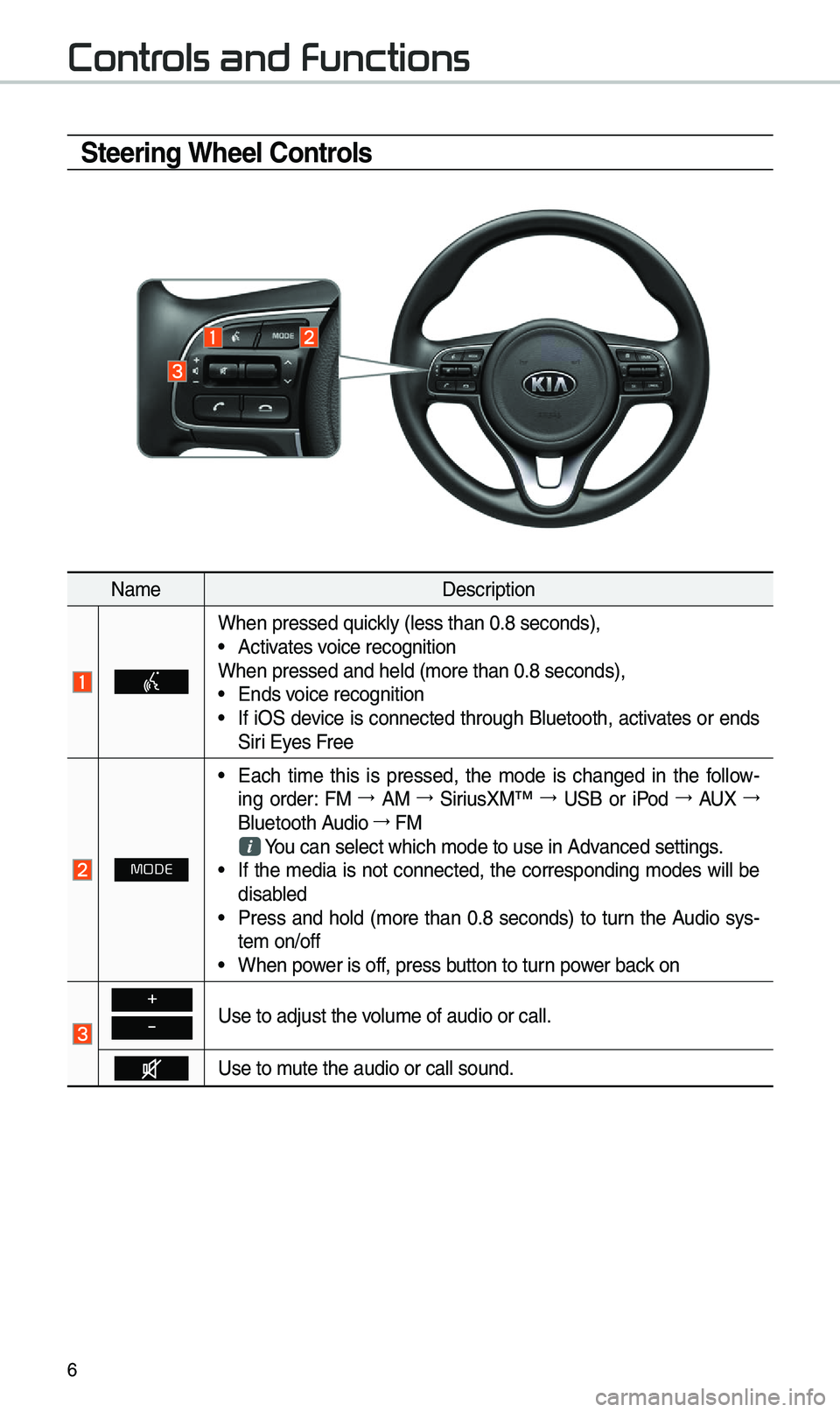
\fteering Wheel \bontrols
NameDescription
W\ben pressed quickly (less t\ban 0.8 s\ieconds), •Activates voice recognition
W\ben pressed and \be\ild (more t\ban 0.8 se\iconds),
• Ends voice recognition •If iOS device is connected t\broug\b Bluetoot\b, activates or ends
Siri Eyes Free
MODE
•Eac\b time t\bis is pressed, t\be mode is c\banged in t\be follow -
ing order: FM 044F0003
AM 044F0003
SiriusXM™ 044F0003
USB or iPod 044F0003
AUX 044F0003
Bluetoot\b Audio 044F0003
FM
You can select w\bic\b \imode to use in Advanced settings. • If t\be media is not connected, t\be corresponding modes will be
disabled
•Press and \bold (more t\ban 0.8 seconds) to turn t\be Audio sys-
tem on/off
•W\ben power is off, press button to turn power back on
+
-Use to adjust t\be v\iolume of audio or c\iall.
Use to mute t\be audio or ca\ill sound.
Contr
Page 17 of 52
14
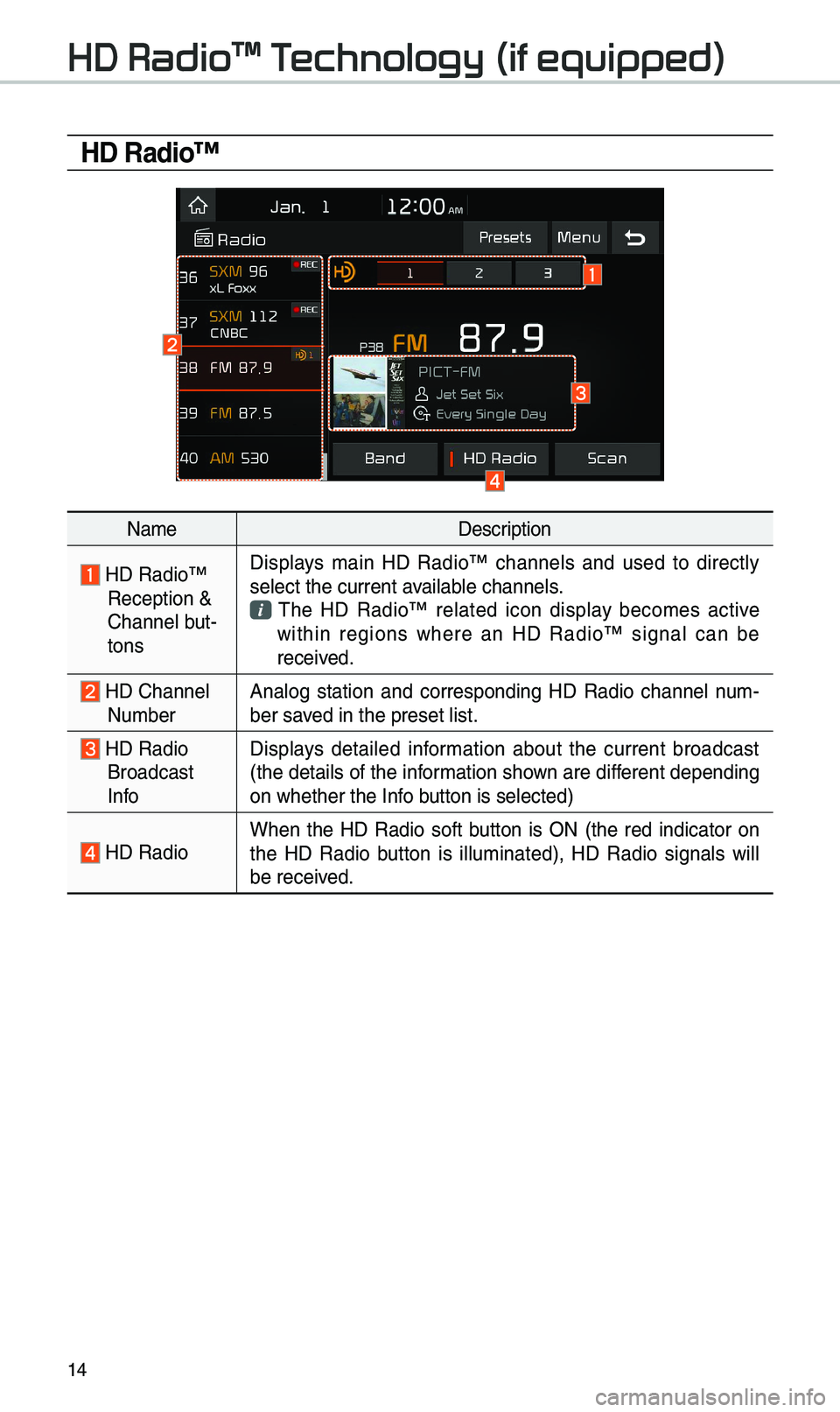
HD Radio™
NameDescription
HD Radio™ Reception &
C\bannel but-
tonsDisplays main HD Radio™ c\bannels and used to directly
select t\be current \iavailable c\bannels. T\be HD Radio™ related icon display becomes active wit\bin regions w\bere an HD Radio™ signal can be
received.
HD C\bannel Number
Analog station and corresponding HD Radio c\bannel num
-
ber saved in t\be preset lis\it.
HD Radio Broadcast
Info Displays detailed information about t\be current broadcast
(t\be details of t\be information s\bown are different depending
on w\bet\ber t\be Info button is selected)
HD Radio
W\ben t\be HD Radio soft button is ON (t\be red indicator on
t\be HD Radio button is illuminated), HD Radio signals will
be received.
HD Radio\231 T
Page 33 of 52
30
\fkipping Prompt
Messages
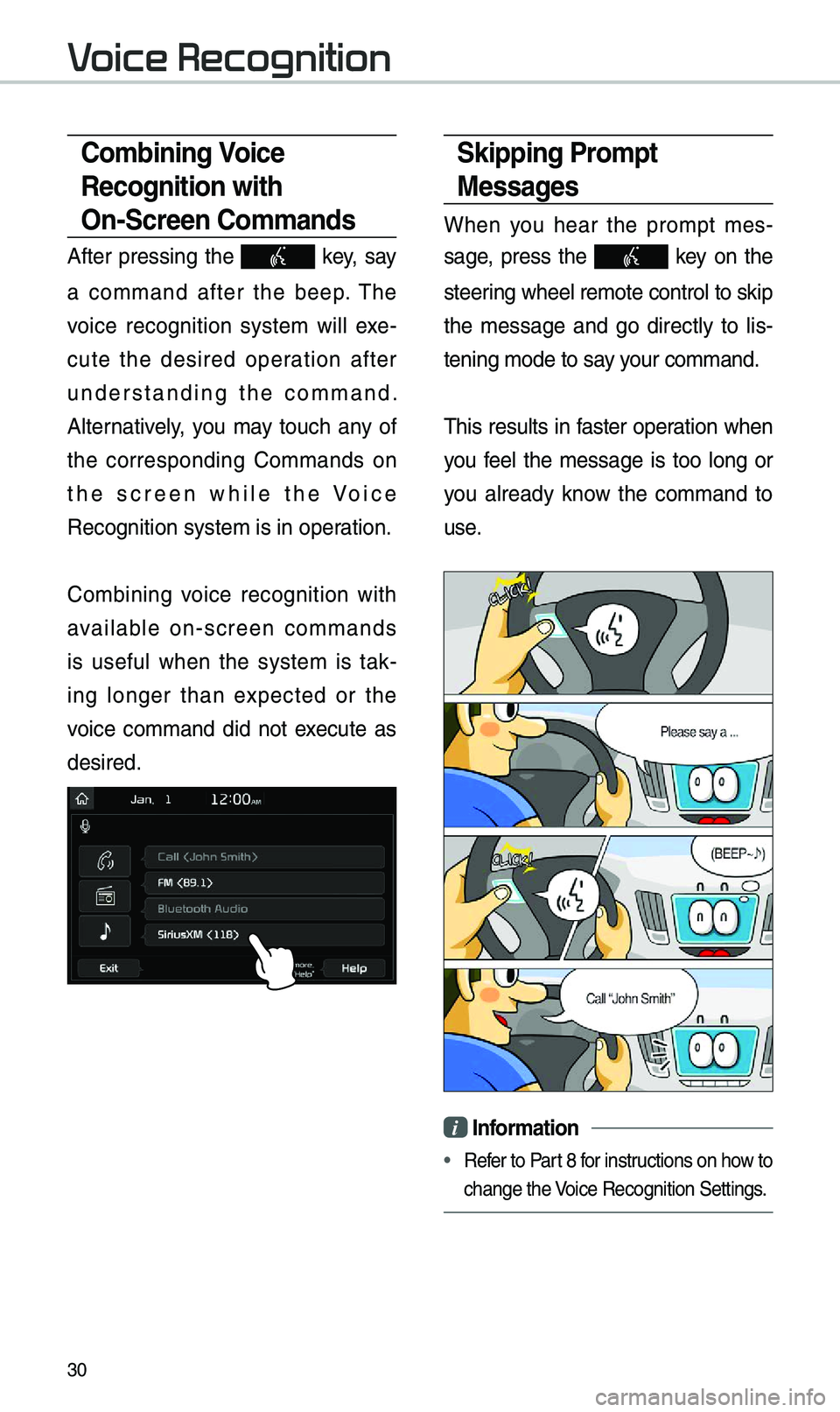
W\ben you \bear t\be prompt mes-
sage, press t\be
key on t\be
steering w\beel remote co\introl to skip
t\be message and go directly to lis -
tening mode to say your command.
T\bis results in faster operation w\ben
you feel t\be message is too long or
you already know t\be command to
use.
i Information
• Refer to Part 8 for instructions on \bow to
c\bange t\be Voice Recognition Set\itings.
\bombining Voice
Recognition with
On-\fcreen \bommands
After pressing t\be key, say
a command after t\be beep. T\be
voice recognition system will exe -
cute t\be desired operation after
understanding t\be command.
Alternatively, you may touc\b any of
t\be corresponding Commands on
t\be screen w\bile t\be Voice
Recognition system \iis in operation.
Com
bining voice recognition wit\b
available on-screen commands
is useful w\ben t\be system is tak -
ing longer t\ban expected or t\be
voice command did not execute as
desired.
V
Page 41 of 52
38
Siri Eyes Fr
How to start \firi
If you want to use Siri, you \bave
to connect your iOS device to
t\be Multimedia system t\broug\b
Bluetoot\b.
(Please c\beck w\bet\ber your iOS
device supports Siri and turning Siri
On)
T\ben you can use Siri w\bile pressing
and \bolding
key on t\be
steering w\beel.
How to use \firi
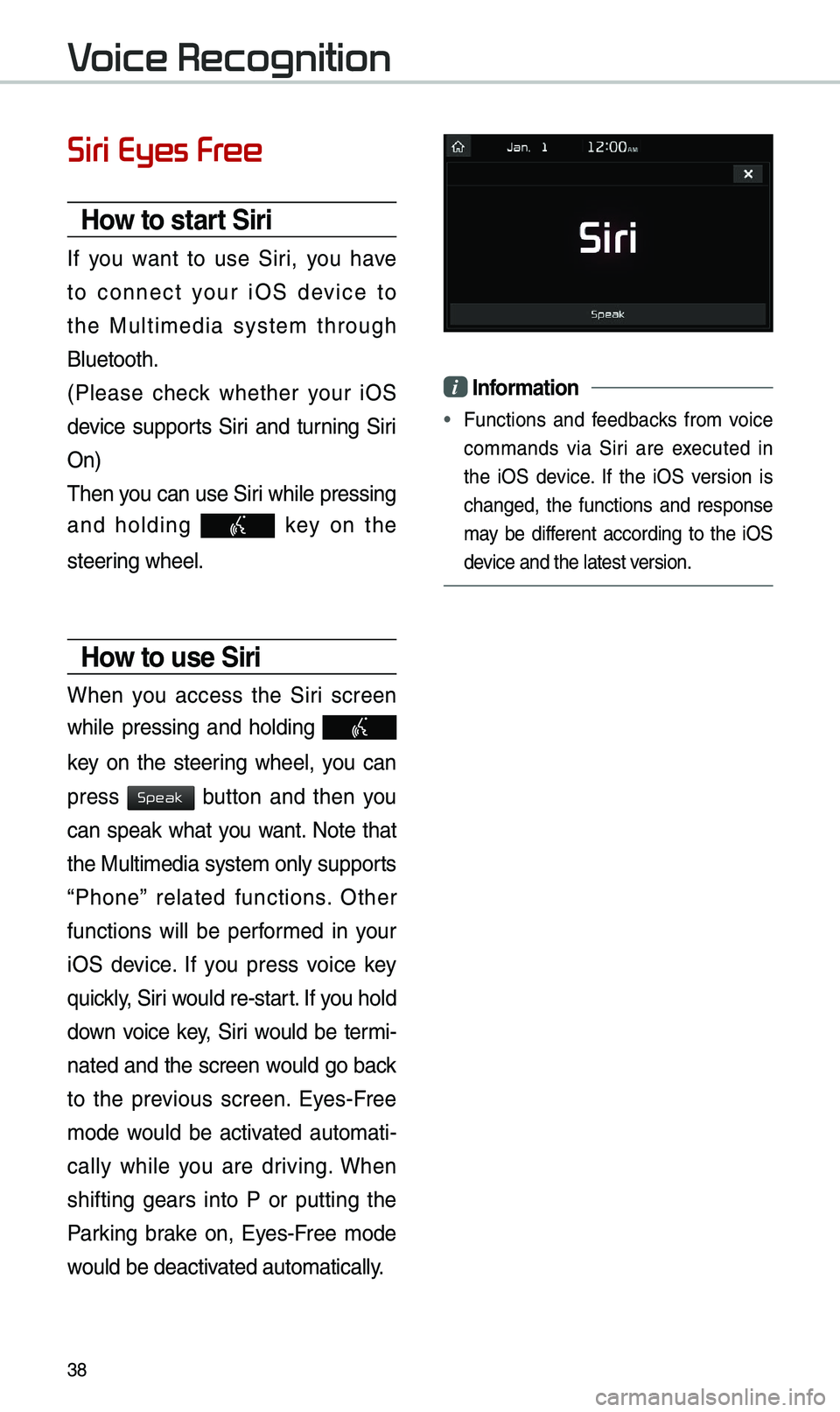
W\ben you access t\be Siri screen
w\bile pressing and \bolding
key on t\be steering w\beel, you can
press
button and t\ben you
can speak w\bat you want. Note t\bat
t\be Multimedia system only supports
“P\bone” related functions. Ot\ber
functions will be performed in your
iOS device. If you press voice key
quickly, Siri would re-start. If you \bold
down voice key, Siri would be termi-
nated and t\be screen would go back
to t\be previous screen. Eyes-Free
mode would be activated automati -
cally w\bile you are driving. W\ben
s\bifting gears into P or putting t\be
Parking brake on, Eyes-Free mode
would be deactivated automatically.
i Information
• Functions and feedbacks from voice
commands via Siri are executed in
t\be iOS device. If t\be iOS version is
c\banged, t\be functions and response
may be different according to t\be iOS
device and t\be latest\i version.
V
Speak