2019 KIA SPORTAGE door handle
[x] Cancel search: door handlePage 15 of 607
Your vehicle at a glance
42
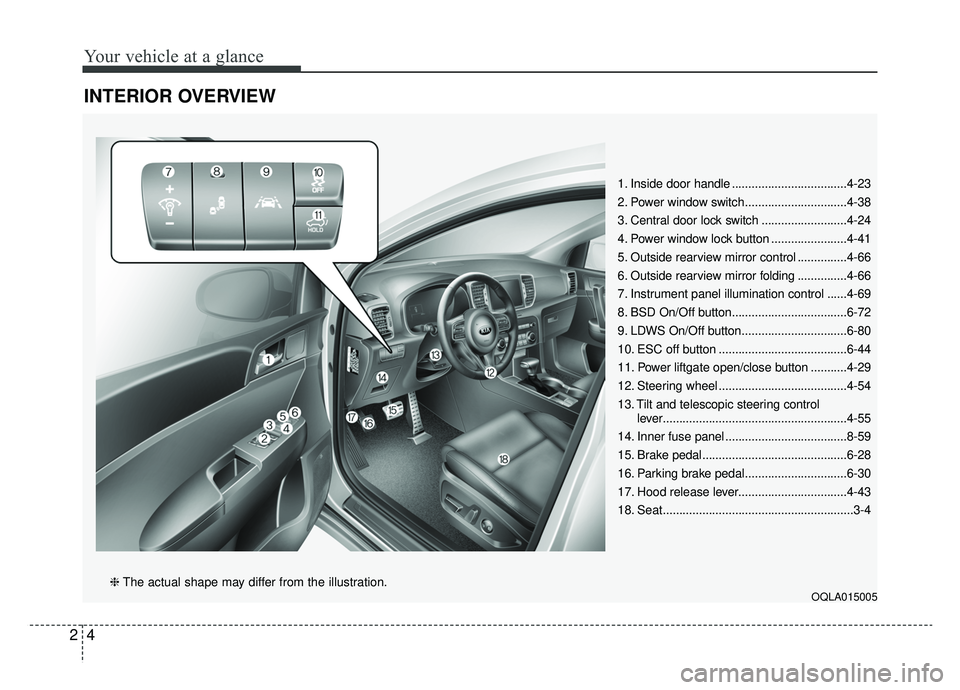
INTERIOR OVERVIEW
1. Inside door handle ...................................4-23
2. Power window switch...............................4-38
3. Central door lock switch ..........................4-24
4. Power window lock button .......................4-41
5. Outside rearview mirror control ...............4-66
6. Outside rearview mirror folding ...............4-66
7. Instrument panel illumination control ......4-69
8. BSD On/Off button...................................6-72
9. LDWS On/Off button................................6-80
10. ESC off button .......................................6-44
11. Power liftgate open/close button ...........4-29
12. Steering wheel .......................................4-54
13. Tilt and telescopic steering controllever........................................................4-55
14. Inner fuse panel .....................................8-59
15. Brake pedal............................................6-28
16. Parking brake pedal...............................6-30
17. Hood release lever.................................4-43
18. Seat..........................................................3-4
OQLA015005❈ The actual shape may differ from the illustration.
Page 93 of 607
Features of your vehicle
64
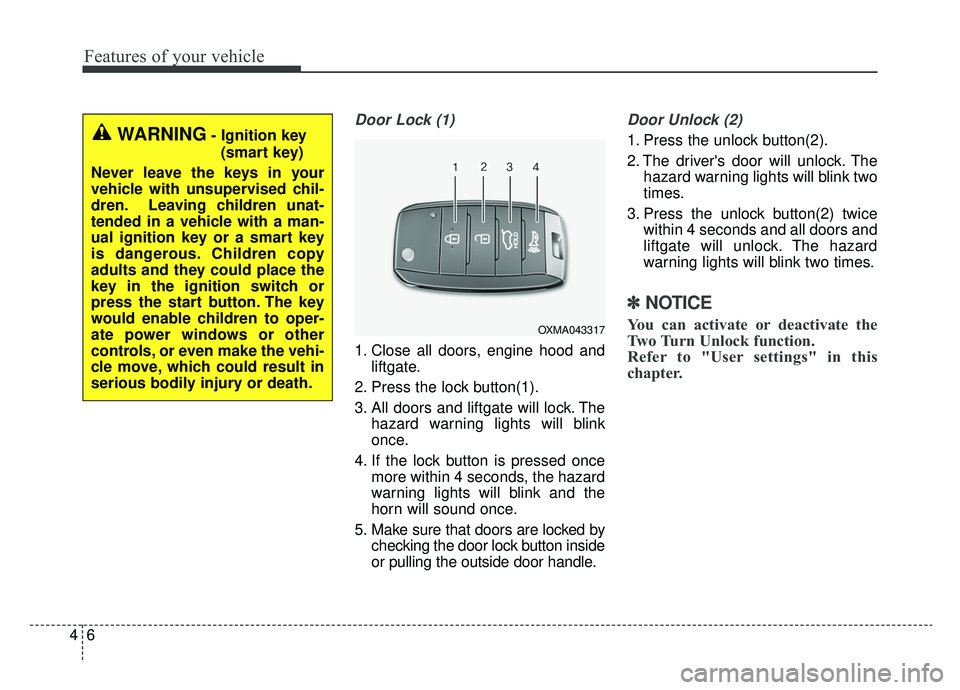
Door Lock (1)
1. Close all doors, engine hood andliftgate.
2. Press the lock button(1).
3. All doors and liftgate will lock. The hazard warning lights will blink
once.
4. If the lock button is pressed once more within 4 seconds, the hazard
warning lights will blink and the
horn will sound once.
5. Make sure that doors are locked by checking the door lock button inside
or pulling the outside door handle.
Door Unlock (2)
1. Press the unlock button(2).
2. The driver's door will unlock. Thehazard warning lights will blink two
times.
3. Press the unlock button(2) twice within 4 seconds and all doors and
liftgate will unlock. The hazard
warning lights will blink two times.
✽ ✽NOTICE
You can activate or deactivate the
Two Turn Unlock function.
Refer to "User settings" in this
chapter.
WARNING- Ignition key
(smart key)
Never leave the keys in your
vehicle with unsupervised chil-
dren. Leaving children unat-
tended in a vehicle with a man-
ual ignition key or a smart key
is dangerous. Children copy
adults and they could place the
key in the ignition switch or
press the start button. The key
would enable children to oper-
ate power windows or other
controls, or even make the vehi-
cle move, which could result in
serious bodily injury or death.
OXMA043317
Page 100 of 607
413
Features of your vehicle
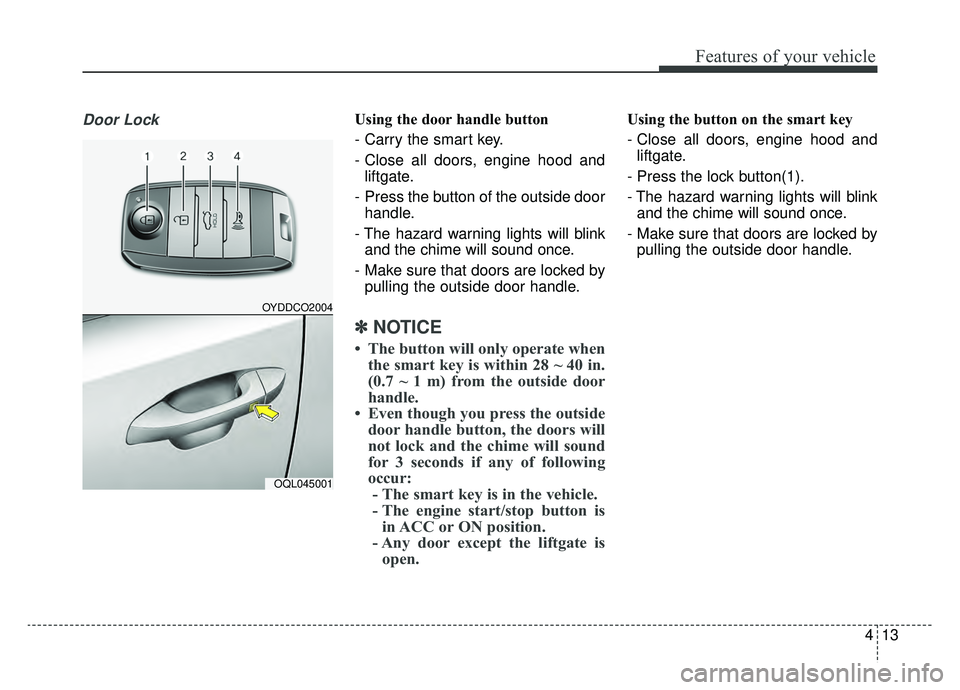
Door LockUsing the door handle button
- Carry the smart key.
- Close all doors, engine hood andliftgate.
- Press the button of the outside door handle.
- The hazard warning lights will blink and the chime will sound once.
- Make sure that doors are locked by pulling the outside door handle.
✽ ✽ NOTICE
• The button will only operate when
the smart key is within 28 ~ 40 in.
(0.7 ~ 1 m) from the outside door
handle.
• Even though you press the outside door handle button, the doors will
not lock and the chime will sound
for 3 seconds if any of following
occur:- The smart key is in the vehicle.
- The engine start/stop button is in ACC or ON position.
- Any door except the liftgate is open.
Using the button on the smart key
- Close all doors, engine hood and
liftgate.
- Press the lock button(1).
- The hazard warning lights will blink and the chime will sound once.
- Make sure that doors are locked by pulling the outside door handle.
OYDDCO2004
OQL045001
Page 101 of 607
Features of your vehicle
14
4
Unlocking
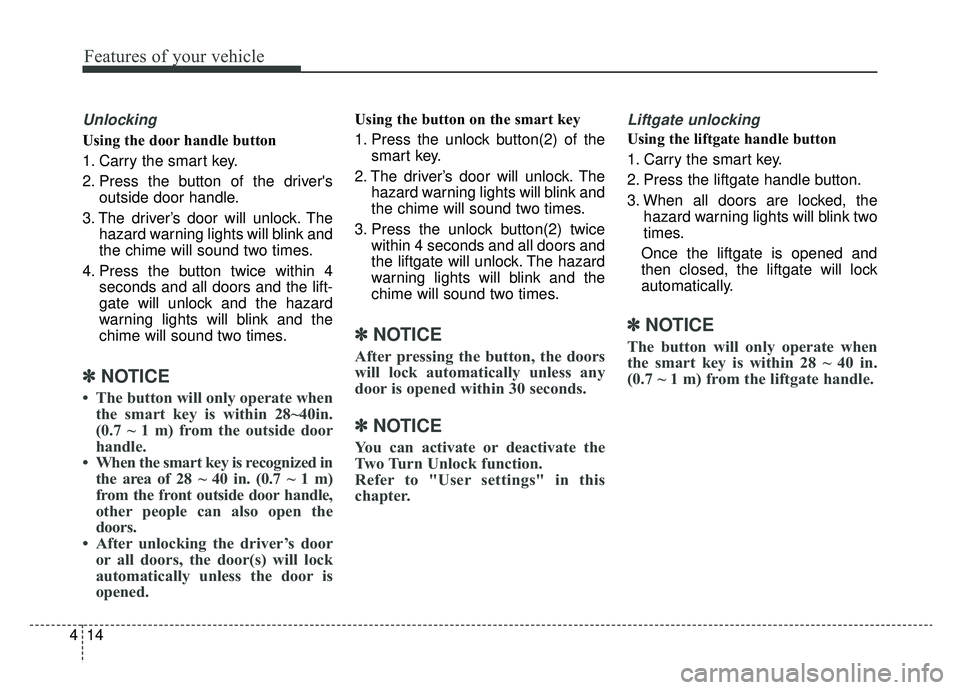
Using the door handle button
1. Carry the smart key.
2. Press the button of the driver's
outside door handle.
3. The driver’s door will unlock. The hazard warning lights will blink and
the chime will sound two times.
4. Press the button twice within 4 seconds and all doors and the lift-
gate will unlock and the hazard
warning lights will blink and the
chime will sound two times.
✽ ✽NOTICE
• The button will only operate when
the smart key is within 28~40in.
(0.7 ~ 1 m) from the outside door
handle.
• When the smart key is recognized in the area of 28 ~ 40 in. (0.7 ~ 1 m)
from the front outside door handle,
other people can also open the
doors.
• After unlocking the driver’s door or all doors, the door(s) will lock
automatically unless the door is
opened.
Using the button on the smart key
1. Press the unlock button(2) of the
smart key.
2. The driver’s door will unlock. The hazard warning lights will blink and
the chime will sound two times.
3. Press the unlock button(2) twice within 4 seconds and all doors and
the liftgate will unlock. The hazard
warning lights will blink and the
chime will sound two times.
✽ ✽NOTICE
After pressing the button, the doors
will lock automatically unless any
door is opened within 30 seconds.
✽ ✽NOTICE
You can activate or deactivate the
Two Turn Unlock function.
Refer to "User settings" in this
chapter.
Liftgate unlocking
Using the liftgate handle button
1. Carry the smart key.
2. Press the liftgate handle button.
3. When all doors are locked, the
hazard warning lights will blink two
times.
Once the liftgate is opened and
then closed, the liftgate will lock
automatically.
✽ ✽ NOTICE
The button will only operate when
the smart key is within 28 ~ 40 in.
(0.7 ~ 1 m) from the liftgate handle.
Page 109 of 607
Features of your vehicle
22
4
Operating door locks from
outside the vehicle
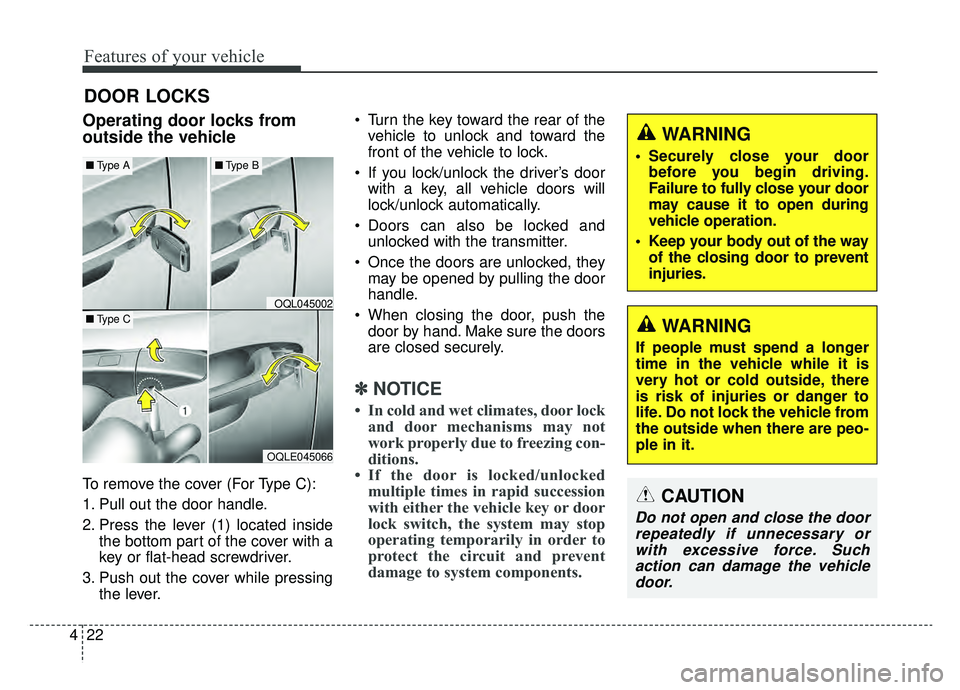
To remove the cover (For Type C):
1. Pull out the door handle.
2. Press the lever (1) located inside
the bottom part of the cover with a
key or flat-head screwdriver.
3. Push out the cover while pressing the lever. Turn the key toward the rear of the
vehicle to unlock and toward the
front of the vehicle to lock.
If you lock/unlock the driver’s door with a key, all vehicle doors will
lock/unlock automatically.
Doors can also be locked and unlocked with the transmitter.
Once the doors are unlocked, they may be opened by pulling the door
handle.
When closing the door, push the door by hand. Make sure the doors
are closed securely.
✽ ✽ NOTICE
• In cold and wet climates, door lock
and door mechanisms may not
work properly due to freezing con-
ditions.
• If the door is locked/unlocked multiple times in rapid succession
with either the vehicle key or door
lock switch, the system may stop
operating temporarily in order to
protect the circuit and prevent
damage to system components.
DOOR LOCKS
OQLE045066
OQL045002
■ Type A■Type B
■Type CWARNING
If people must spend a longer
time in the vehicle while it is
very hot or cold outside, there
is risk of injuries or danger to
life. Do not lock the vehicle from
the outside when there are peo-
ple in it.
WARNING
• Securely close your door
before you begin driving.
Failure to fully close your door
may cause it to open during
vehicle operation.
Keep your body out of the way of the closing door to prevent
injuries.
CAUTION
Do not open and close the doorrepeatedly if unnecessary orwith excessive force. Suchaction can damage the vehicledoor.
Page 110 of 607
423
Features of your vehicle
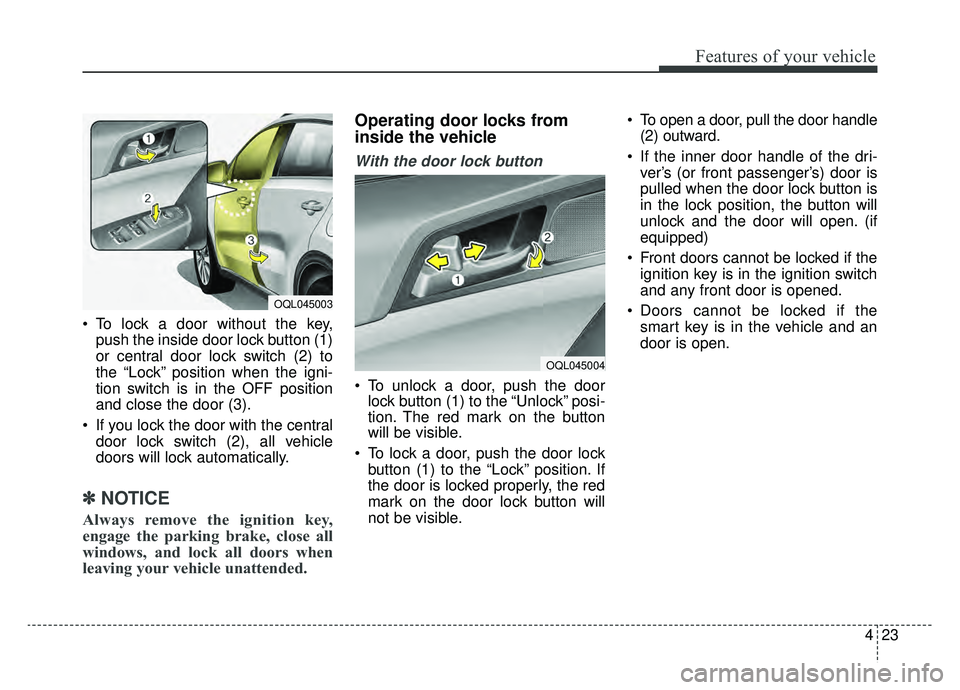
To lock a door without the key,push the inside door lock button (1)
or central door lock switch (2) to
the “Lock” position when the igni-
tion switch is in the OFF position
and close the door (3).
If you lock the door with the central door lock switch (2), all vehicle
doors will lock automatically.
✽ ✽ NOTICE
Always remove the ignition key,
engage the parking brake, close all
windows, and lock all doors when
leaving your vehicle unattended.
Operating door locks from
inside the vehicle
With the door lock button
To unlock a door, push the door
lock button (1) to the “Unlock” posi-
tion. The red mark on the button
will be visible.
To lock a door, push the door lock button (1) to the “Lock” position. If
the door is locked properly, the red
mark on the door lock button will
not be visible. To open a door, pull the door handle
(2) outward.
If the inner door handle of the dri- ver’s (or front passenger’s) door is
pulled when the door lock button is
in the lock position, the button will
unlock and the door will open. (if
equipped)
Front doors cannot be locked if the ignition key is in the ignition switch
and any front door is opened.
Doors cannot be locked if the smart key is in the vehicle and an
door is open.
OQL045004
OQL045003
Page 111 of 607
Features of your vehicle
24
4
If a power door lock ever fails to func-
tion while you are in the vehicle, try
one or more of the following tech-
niques to exit:
Operate the door unlock feature
repeatedly (both electronic and
manual) while simultaneously
pulling on the door handle.
Operate the other door locks and handles, front and rear.
Lower a front window and use the key to unlock the door from out-
side.With central door lock switch
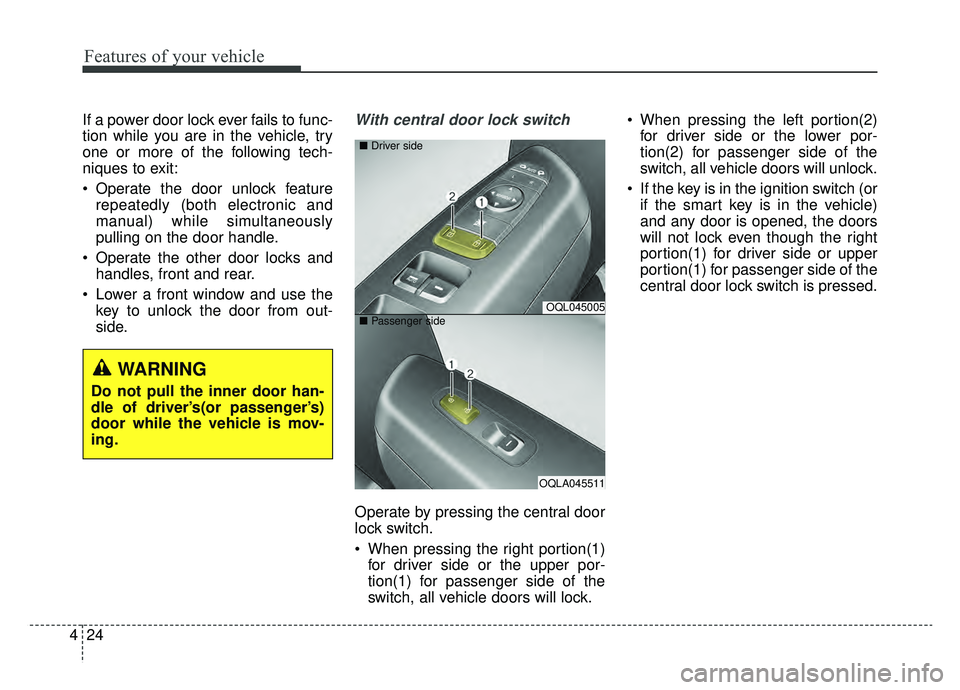
Operate by pressing the central door
lock switch.
When pressing the right portion(1)for driver side or the upper por-
tion(1) for passenger side of the
switch, all vehicle doors will lock. When pressing the left portion(2)
for driver side or the lower por-
tion(2) for passenger side of the
switch, all vehicle doors will unlock.
If the key is in the ignition switch (or if the smart key is in the vehicle)
and any door is opened, the doors
will not lock even though the right
portion(1) for driver side or upper
portion(1) for passenger side of the
central door lock switch is pressed.
OQL045005
OQLA045511
■
Driver side
■ Passenger side
WARNING
Do not pull the inner door han-
dle of driver’s(or passenger’s)
door while the vehicle is mov-
ing.
Page 113 of 607
Features of your vehicle
26
4
Child-protector rear door lock
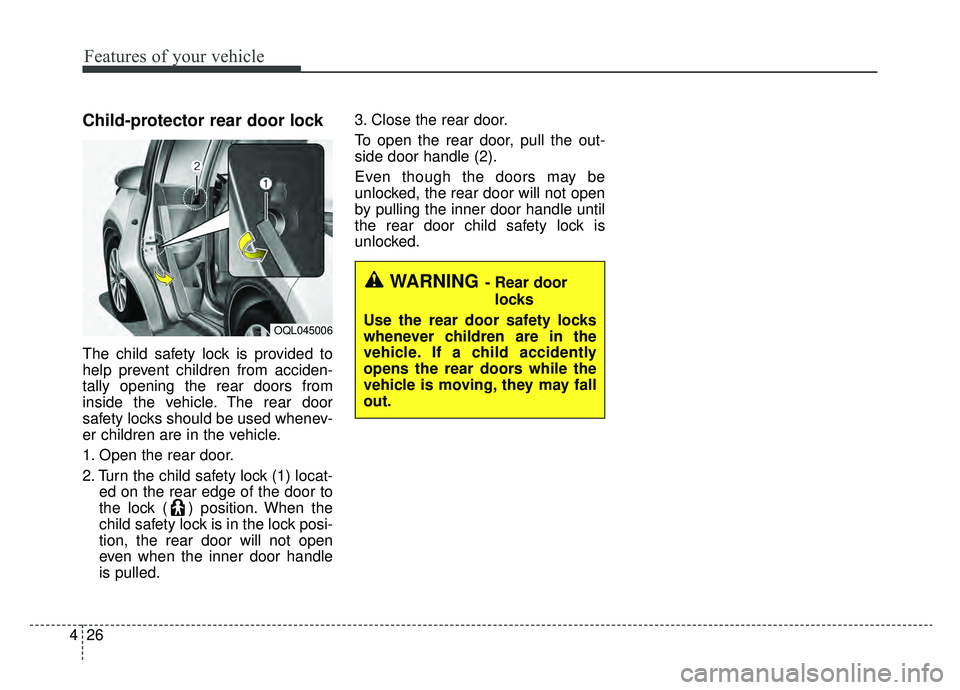
The child safety lock is provided to
help prevent children from acciden-
tally opening the rear doors from
inside the vehicle. The rear door
safety locks should be used whenev-
er children are in the vehicle.
1. Open the rear door.
2. Turn the child safety lock (1) locat-
ed on the rear edge of the door to
the lock ( ) position. When the
child safety lock is in the lock posi-
tion, the rear door will not open
even when the inner door handle
is pulled. 3. Close the rear door.
To open the rear door, pull the out-
side door handle (2).
Even though the doors may be
unlocked, the rear door will not open
by pulling the inner door handle until
the rear door child safety lock is
unlocked.
OQL045006
WARNING- Rear door
locks
Use the rear door safety locks
whenever children are in the
vehicle. If a child accidently
opens the rear doors while the
vehicle is moving, they may fall
out.