2019 KIA SOUL Dash
[x] Cancel search: DashPage 68 of 564

Safety features of your vehicle
50
3
Main components of the occu-
pant detection system
A detection device located within the front passenger seat cushion.
An electronic system which deter- mines whether the passenger air
bag systems should be activated
or deactivated.
A indicator light located on the instrument panel which illuminates
the words PASSENGER AIR BAG
“OFF” indicating the front passen-
ger air bag system is deactivated.
The instrument panel air bag warn- ing light is interconnected with the
occupant detection system. If the front passenger seat is occupied
by a person that the system deter-
mines to be of appropriate size, and
he/she sits properly (sitting upright
with the seatback in an upright posi-
tion, centered on the seat cushion with
their seat belt on, legs comfortably
extended and their feet on the floor),
the PASSENGER AIR BAG “OFF”
indicator will turn off and the front pas-
senger's air bag will be able to inflate,
if necessary, in frontal crashes.
You will find the PASSENGER AIR
BAG “OFF” indicator on the center
facia panel. This system detects the
conditions 1~4 in the following table
and activates or deactivates the front
passenger air bag based on these
conditions.
Always be sure that you and all vehicle
occupants are seated and restrained
properly (sitting upright with the seat in
an upright position, centered on the
seat cushion, with the person’s legs
comfortably extended, feet on the floor,
and wearing the safety belt properly)
for the most effective protection by the
air bag and the safety belt. The ODS (Occupant Detection
System) may not function properly if
the passenger takes actions which
can defeat the detection system.
These include:
(1) Failing to sit in an upright position.
(2) Leaning against the door or cen- ter console.
(3) Sitting towards the sides or the front of the seat.
(4) Putting legs on the dashboard or resting them on other locations
which reduce the passenger
weight on the front seat.
(5) Improperly wear ing the safety
belt.
(6) Reclining the seat back.
(7) Wearing a thick cloth like ski wear or hip protection wear.
(8) Placing on the seat an additional thick cushion.
Page 70 of 564

Safety features of your vehicle
52
3
(Continued)
- Do not place feet on the front
passenger seatback.
- Never sit with hips shifted towards the front of the seat.
(Continued)(Continued)
- Never excessively recline thefront passenger seatback.
- Never place feet on the dash- board.
(Continued)(Continued)
- Never lean on the door or cen-ter console.
- Never sit on one side of the front passenger seat.
(Continued)
OVQ036014N1KMN3662
1KMN36631KMN3665
1KMN3664
Page 75 of 564
357
Safety features of your vehicle
These sensors provide the ability to
control the SRS deployment based on
whether or not the seat belts are fas-
tened, and how severe the impact is.
The advanced SRS offers the ability
to control the air bag inflation with
two levels. A first stage level is pro-
vided for moderate-severity impacts.
A second stage level is provided for
more severe impacts.
The passenger’s front air bag is
designed to help reduce the injury of
children sitting close to the instru-
ment panel in low speed collisions.
However, children are safer if they
are restrained in the rear seat.According to the impact severity and
seat belt usage, the SRSCM (SRS
Control Module) controls the air bag
inflation. Failure to properly wear seat
belts can increase the risk or severity of
injury in an accident.
Additionally, your vehicle is equipped
with an occupant detection system in
the front passenger's seat. The occu-
pant detection system detects the pres-
ence of a passenger in the front pas-
senger's seat and will turn off the front
passenger's air bag under certain con-
ditions. For more detail, see "Occupant
detection system" in this section.
Modification to the seat structure can
cause the air bag to deploy at a dif-
ferent level than should be provided.
Manufacturers are required by gov-
ernment regulations to provide a
contact point concerning modifica-
tions to the vehicle for persons with
disabilities, which modifications may
affect the vehicle’s advanced air bag
system. That contact is Kia's toll-free
Customer Experience Department at
1-877-KIA-AUTO (1-877-542-2886).
However, Kia does not endorse nor
will it support any changes to any
part or structure of the vehicle that
could affect the advanced air bag
system, including the occupant
detection system.
WARNING- Replacement /
Modifications
The front passenger seat, dash-
board or door should not be
replaced except by an authorized
Kia dealer using original Kia parts
designed for this vehicle and
model. Any other such replace-
ment or modification could
adversely affect the operation of
the occupant detection system
and your advanced air bags.
Page 194 of 564
Features of your vehicle
108
4
Mode selection
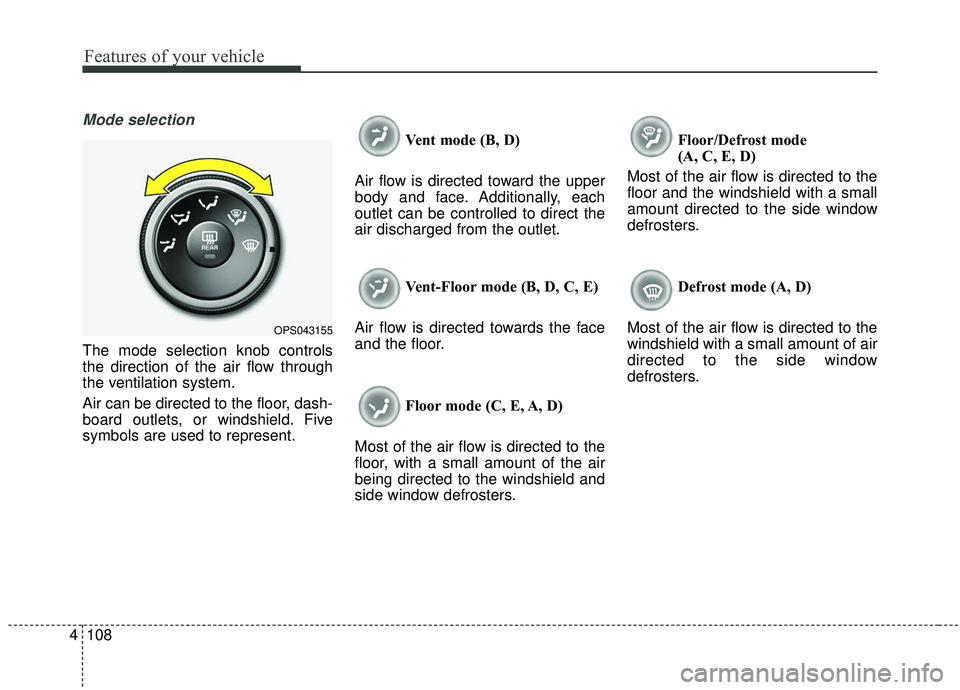
The mode selection knob controls
the direction of the air flow through
the ventilation system.
Air can be directed to the floor, dash-
board outlets, or windshield. Five
symbols are used to represent. Vent mode (B, D)
Air flow is directed toward the upper
body and face. Additionally, each
outlet can be controlled to direct the
air discharged from the outlet.
Vent-Floor mode (B, D, C, E)
Air flow is directed towards the face
and the floor.
Floor mode (C, E, A, D)
Most of the air flow is directed to the
floor, with a small amount of the air
being directed to the windshield and
side window defrosters. Floor/Defrost mode
(A, C, E, D)
Most of the air flow is directed to the
floor and the windshield with a small
amount directed to the side window
defrosters.
Defrost mode (A, D)
Most of the air flow is directed to the
windshield with a small amount of air
directed to the side window
defrosters.
OPS043155
Page 253 of 564
Audio system
15
5
✽ ✽
NOTICE
Refrain from use if the screen is
blank or no sound can be heard as
these signs may indicate product
malfunction. Continued use in this
condition may further damage the
system.
WARNING- Antenna
Do not touch the antenna dur-
ing thunder or lightning
because such an act may cause
electric shock.
CAUTION- LCD Monitor
Do not subject the device to
severe shock or impact. Direct
pressure onto the front side of
the monitor may cause damage
to the LCD or touch screen.
CAUTION
When cleaning the device, make sure to turn off theaudio system and use a dryand smooth cloth.
Do not place beverages close to the audio system. Spillingbeverages may lead to systemmalfunction.
Never use rough materials, chemical cloths, or solvents(alcohol, benzene, thinners,etc.) as such materials maydamage the device panel orcause color/quality deteriora-tion.
Prevent caustic solutions such as perfume and cosmetic oilfrom contacting the dashboardbecause they may cause dam-age or discoloration.
CAUTION
Adjust the volume to levels that allow the driver to hearsounds from outside of thevehicle. Driving in a statewhere external sounds cannotbe heard may lead to acci-dents.
Pay attention to the volume setting when turning thedevice on. A sudden output ofextreme volume upon turningthe device on could lead tohearing impairment. (Adjustthe volume to a suitable levelsbefore turning off the device.)
(Continued)
(Continued) Turn on the car engine before using this device. Do not oper-ate the audio system for longperiods of time only with theignition turned on as suchoperations may lead to batterydischarge.
In case of product malfunc- tion, please contact your placeof purchase or After Servicecenter.
Placing the audio system within an electromagneticenvironment may result innoise interference.
Page 345 of 564
655
Driving your vehicle
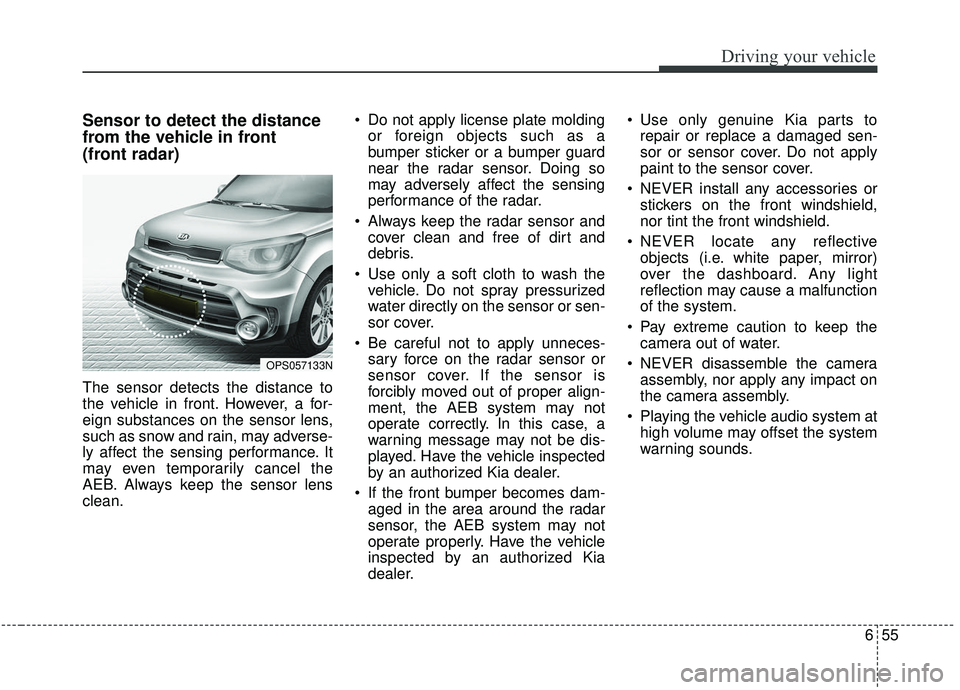
Sensor to detect the distance
from the vehicle in front
(front radar)
The sensor detects the distance to
the vehicle in front. However, a for-
eign substances on the sensor lens,
such as snow and rain, may adverse-
ly affect the sensing performance. It
may even temporarily cancel the
AEB. Always keep the sensor lens
clean. Do not apply license plate molding
or foreign objects such as a
bumper sticker or a bumper guard
near the radar sensor. Doing so
may adversely affect the sensing
performance of the radar.
Always keep the radar sensor and cover clean and free of dirt and
debris.
Use only a soft cloth to wash the vehicle. Do not spray pressurized
water directly on the sensor or sen-
sor cover.
Be careful not to apply unneces- sary force on the radar sensor or
sensor cover. If the sensor is
forcibly moved out of proper align-
ment, the AEB system may not
operate correctly. In this case, a
warning message may not be dis-
played. Have the vehicle inspected
by an authorized Kia dealer.
If the front bumper becomes dam- aged in the area around the radar
sensor, the AEB system may not
operate properly. Have the vehicle
inspected by an authorized Kia
dealer. Use only genuine Kia parts to
repair or replace a damaged sen-
sor or sensor cover. Do not apply
paint to the sensor cover.
NEVER install any accessories or stickers on the front windshield,
nor tint the front windshield.
NEVER locate any reflective objects (i.e. white paper, mirror)
over the dashboard. Any light
reflection may cause a malfunction
of the system.
Pay extreme caution to keep the camera out of water.
NEVER disassemble the camera assembly, nor apply any impact on
the camera assembly.
Playing the vehicle audio system at high volume may offset the system
warning sounds.
OPS057133N
Page 378 of 564
Driving your vehicle
88
6
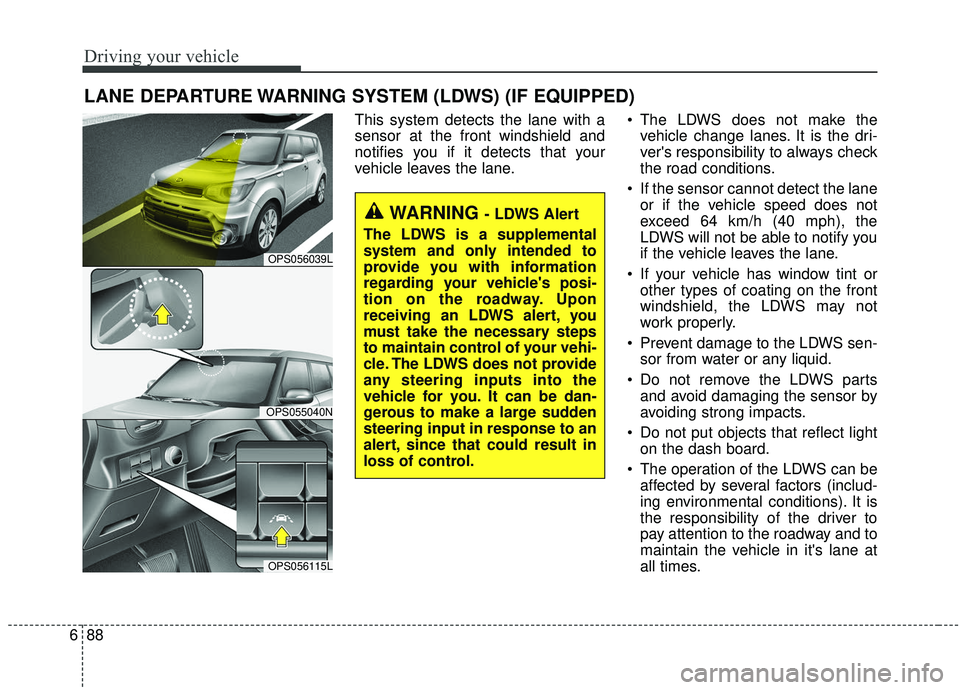
This system detects the lane with a
sensor at the front windshield and
notifies you if it detects that your
vehicle leaves the lane. The LDWS does not make the
vehicle change lanes. It is the dri-
ver's responsibility to always check
the road conditions.
If the sensor cannot detect the lane or if the vehicle speed does not
exceed 64 km/h (40 mph), the
LDWS will not be able to notify you
if the vehicle leaves the lane.
If your vehicle has window tint or other types of coating on the front
windshield, the LDWS may not
work properly.
Prevent damage to the LDWS sen- sor from water or any liquid.
Do not remove the LDWS parts and avoid damaging the sensor by
avoiding strong impacts.
Do not put objects that reflect light on the dash board.
The operation of the LDWS can be affected by several factors (includ-
ing environmental conditions). It is
the responsibility of the driver to
pay attention to the roadway and to
maintain the vehicle in it's lane at
all times.
LANE DEPARTURE WARNING SYSTEM (LDWS) (IF EQUIPPED)
WARNING - LDWS Alert
The LDWS is a supplemental
system and only intended to
provide you with information
regarding your vehicle's posi-
tion on the roadway. Upon
receiving an LDWS alert, you
must take the necessary steps
to maintain control of your vehi-
cle. The LDWS does not provide
any steering inputs into the
vehicle for you. It can be dan-
gerous to make a large sudden
steering input in response to an
alert, since that could result in
loss of control.
OPS056039L
OPS055040N
OPS056115L
Page 382 of 564
Driving your vehicle
92
6
Putting something on the dash-
board.
Driving with the sun in front of you.
Driving in areas under construc- tion.
The lane line is more than two in either side (Left/Right)Outside rearview mirror may not
alert the driver when:
- The outside rearview mirror hous- ing is severely polluted
- The window is severely polluted
- The windows are severely tinted. This device complies with
Industry Canada licence-exempt
RSS standard(s).
Operation is subject to the following
two conditions:
(1) This device may not cause inter-
ference, and
(2) This device must accept any
interference, including interfer-
ence that may cause undesired
operation of the device.