2019 KIA SOUL ESP
[x] Cancel search: ESPPage 347 of 564
657
Driving your vehicle
✽ ✽NOTICE
• In certain instances and under cer-
tain driving conditions, the AEB
system may activate prematurely.
This initial warning message
appears on the LCD display with a
warning chime.
Also, in certain instances the front
radar sensor or camera recogni-
tion system may not detect the
vehicle or pedestrian ahead. The
AEB system may not activate and
the warning message will not be
displayed.
✽ ✽ NOTICE
• If there is a malfunction with the
AEB system, the automatic emer-
gency braking is not applied even
though it is operating normally.
• The AEB system may not activate if the driver applies the brake
pedal to avoid a collision.WARNING
The AEB is only a supplemental
system for the driver's conven-
ience. It is the driver's responsi-
bility of the driver to control the
vehicle. Do not solely depend
on the AEB system. Rather,
maintain a safe braking dis-
tance, and, if necessary,
depress the brake pedal to
reduce the driving speed.
WARNING
Always maintain a safe dis- tance between your vehicle
and the vehicle in front of you.
If the vehicle in front stops
suddenly, you may have less
control of the brake system.
Always keep loose objects secured. The AEB system
may activate during braking
and the vehicle may stop sud-
denly causing those loose
objects to become dangerous
projectiles within the vehicle
and increase the risk of
injuries to vehicle occupants.
The AEB system cannot detect the driver approaching
the side view of a parked vehi-
cle (for example on a dead
end street.) In these cases,
you must maintain a safe
braking distance, and if nec-
essary, depress the brake
pedal to reduce the driving
speed in order to maintain a
safe distance to avoid an acci-
dent.
Page 351 of 564
661
Driving your vehicle
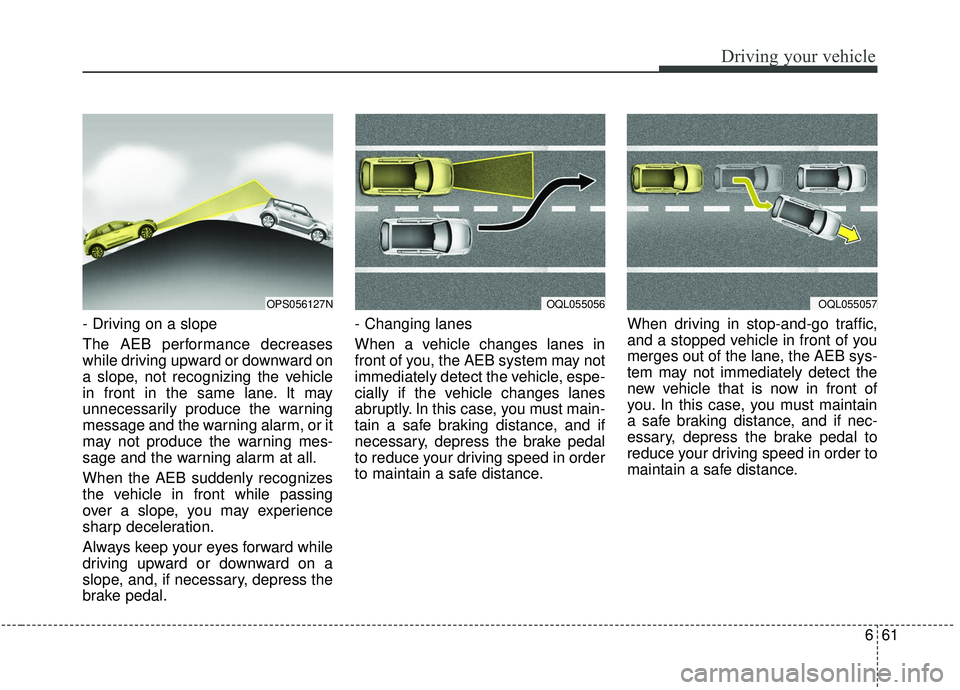
- Driving on a slope
The AEB performance decreases
while driving upward or downward on
a slope, not recognizing the vehicle
in front in the same lane. It may
unnecessarily produce the warning
message and the warning alarm, or it
may not produce the warning mes-
sage and the warning alarm at all.
When the AEB suddenly recognizes
the vehicle in front while passing
over a slope, you may experience
sharp deceleration.
Always keep your eyes forward while
driving upward or downward on a
slope, and, if necessary, depress the
brake pedal.- Changing lanes
When a vehicle changes lanes in
front of you, the AEB system may not
immediately detect the vehicle, espe-
cially if the vehicle changes lanes
abruptly. In this case, you must main-
tain a safe braking distance, and if
necessary, depress the brake pedal
to reduce your driving speed in order
to maintain a safe distance.
When driving in stop-and-go traffic,
and a stopped vehicle in front of you
merges out of the lane, the AEB sys-
tem may not immediately detect the
new vehicle that is now in front of
you. In this case, you must maintain
a safe braking distance, and if nec-
essary, depress the brake pedal to
reduce your driving speed in order to
maintain a safe distance.
OQL055057OPS056127NOQL055056
Page 359 of 564
669
Driving your vehicle
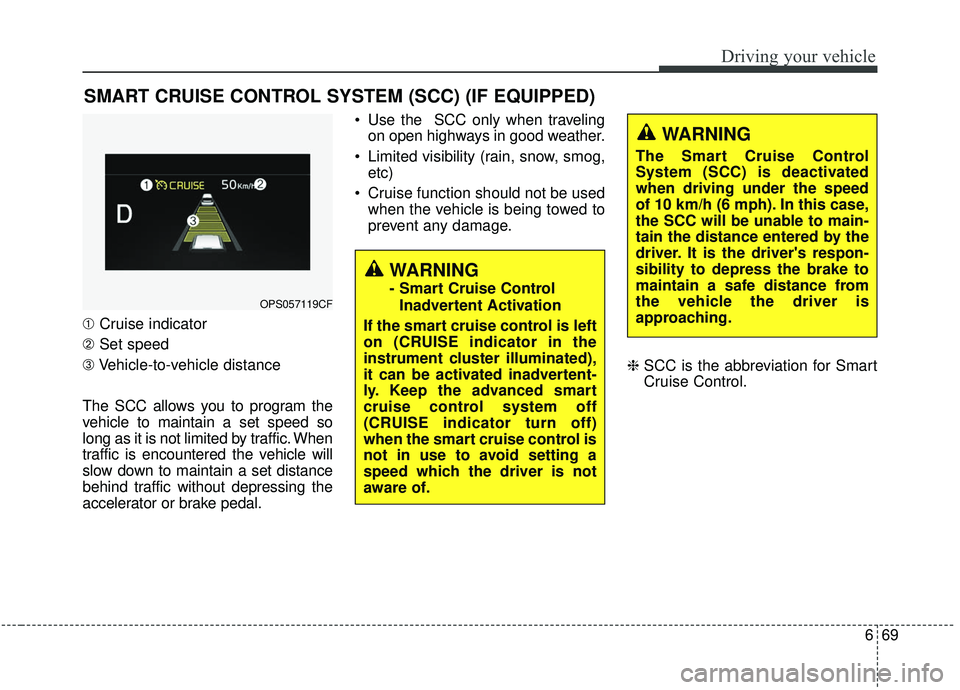
➀Cruise indicator
➁ Set speed
\b Vehicle-to-vehicle distance
The SCC allows you to program the
vehicle to maintain a set speed so
long as it is not limited by traffic. When
traffic is encountered the vehicle will
slow down to maintain a set distance
behind traffic without depressing the
accelerator or brake pedal. Use the SCC only when traveling
on open highways in good weather.
Limited visibility (rain, snow, smog, etc)
Cruise function should not be used when the vehicle is being towed to
prevent any damage.
❈SCC is the abbreviation for Smart
Cruise Control.
SMART CRUISE CONTROL SYSTEM (SCC) (IF EQUIPPED)
WARNING
- Smart Cruise Control
Inadvertent Activation
If the smart cruise control is left
on (CRUISE indicator in the
instrument cluster illuminated),
it can be activated inadvertent-
ly. Keep the advanced smart
cruise control system off
(CRUISE indicator turn off)
when the smart cruise control is
not in use to avoid setting a
speed which the driver is not
aware of.OPS057119CF
WARNING
The Smart Cruise Control
System (SCC) is deactivated
when driving under the speed
of 10 km/h (6 mph). In this case,
the SCC will be unable to main-
tain the distance entered by the
driver. It is the driver's respon-
sibility to depress the brake to
maintain a safe distance from
the vehicle the driver is
approaching.
Page 360 of 564
Driving your vehicle
70
6
(Continued)
- Slippery road with rain, ice,or snow
- Abrupt curved road
- Steep hills
- Windy roads
- Off roads
- Roads under construction
- Rumble strip
- The sensing ability decreas- es if the level of front and rear
vehicle is changed from the
factory.
- When driving near crash bar- riers
- When driving on a sharp curve
- When driving with limited view (possibly due to bad
weather, such as fog, snow,
rain or sandstorm)
(Continued)WARNING
- Smart Cruise ControlLimitations
The smart cruise control is a supplemental system and is
not a substitute for safe driv-
ing practices. It is the respon-
sibility of the driver to always
check the speed and distance
to the vehicle ahead.
Do not use the smart cruise control when it may not be
safe to keep the car at a con-
stant speed. For instance.
- Highway interchange andtollgate
- Road surrounded by multi- ple steel con-structions
(subway con-struction, steel
tunnel, etc)
- Parking lot
- Lanes beside guard rail on a road
(Continued)
(Continued)
Always pay attention to theroad and driving conditions to
prevent unexpected situa-
tions from occurring even
while the SCC is operating.
The smart cruise control sys- tem cannot recognize a
stopped vehicle, pedestrians
or an oncoming vehicle.
Always look ahead cautiously
to prevent unexpected and
sudden situations from occur-
ring.
Use the smart cruise control system only when traveling
on open highways in good
weather conditions.
Page 361 of 564
671
Driving your vehicle
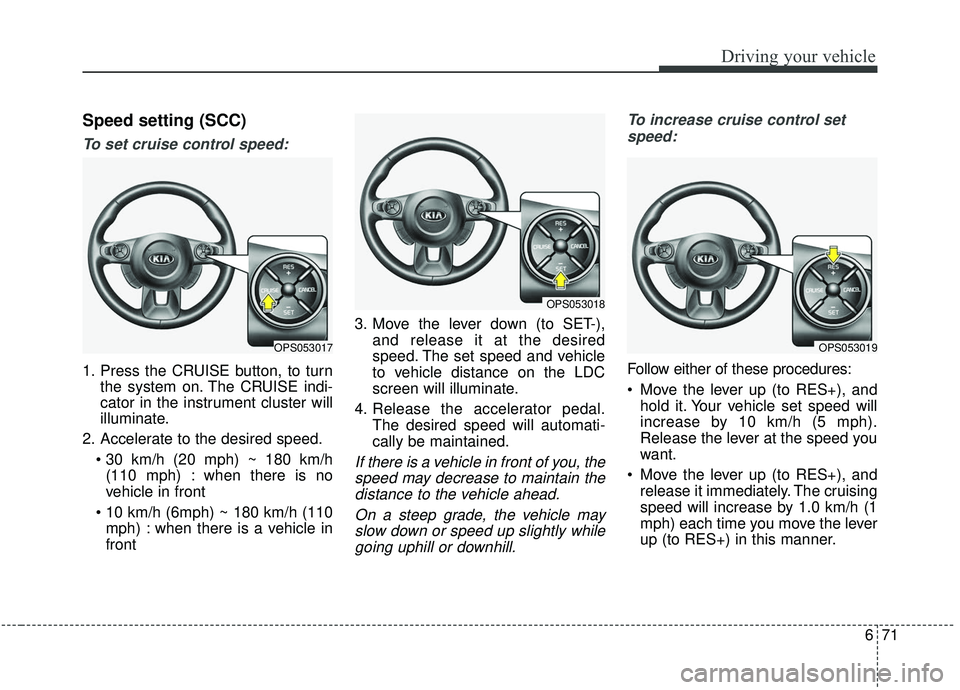
Speed setting (SCC)
To set cruise control speed:
1. Press the CRUISE button, to turnthe system on. The CRUISE indi-
cator in the instrument cluster will
illuminate.
2. Accelerate to the desired speed. (110 mph) : when there is no
vehicle in front
mph) : when there is a vehicle in
front 3. Move the lever down (to SET-),
and release it at the desired
speed. The set speed and vehicle
to vehicle distance on the LDC
screen will illuminate.
4. Release the accelerator pedal. The desired speed will automati-
cally be maintained.
If there is a vehicle in front of you, thespeed may decrease to maintain thedistance to the vehicle ahead.
On a steep grade, the vehicle mayslow down or speed up slightly whilegoing uphill or downhill. To increase cruise control set
speed:
Follow either of these procedures:
Move the lever up (to RES+), and hold it. Your vehicle set speed will
increase by 10 km/h (5 mph).
Release the lever at the speed you
want.
Move the lever up (to RES+), and release it immediately. The cruising
speed will increase by 1.0 km/h (1
mph) each time you move the lever
up (to RES+) in this manner.
OPS053017
OPS053018
OPS053019
Page 378 of 564
Driving your vehicle
88
6
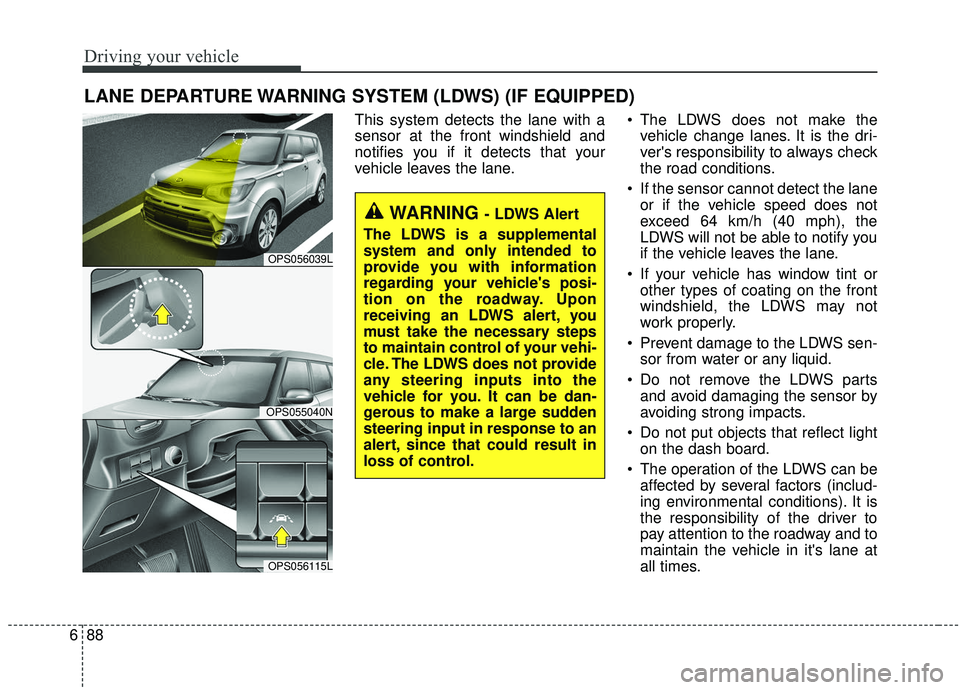
This system detects the lane with a
sensor at the front windshield and
notifies you if it detects that your
vehicle leaves the lane. The LDWS does not make the
vehicle change lanes. It is the dri-
ver's responsibility to always check
the road conditions.
If the sensor cannot detect the lane or if the vehicle speed does not
exceed 64 km/h (40 mph), the
LDWS will not be able to notify you
if the vehicle leaves the lane.
If your vehicle has window tint or other types of coating on the front
windshield, the LDWS may not
work properly.
Prevent damage to the LDWS sen- sor from water or any liquid.
Do not remove the LDWS parts and avoid damaging the sensor by
avoiding strong impacts.
Do not put objects that reflect light on the dash board.
The operation of the LDWS can be affected by several factors (includ-
ing environmental conditions). It is
the responsibility of the driver to
pay attention to the roadway and to
maintain the vehicle in it's lane at
all times.
LANE DEPARTURE WARNING SYSTEM (LDWS) (IF EQUIPPED)
WARNING - LDWS Alert
The LDWS is a supplemental
system and only intended to
provide you with information
regarding your vehicle's posi-
tion on the roadway. Upon
receiving an LDWS alert, you
must take the necessary steps
to maintain control of your vehi-
cle. The LDWS does not provide
any steering inputs into the
vehicle for you. It can be dan-
gerous to make a large sudden
steering input in response to an
alert, since that could result in
loss of control.
OPS056039L
OPS055040N
OPS056115L
Page 391 of 564
6101
Driving your vehicle
Your vehicle's fuel economy depends
mainly on your style of driving, where
you drive and when you drive.
Each of these factors affects how
many kilometers (miles) you can get
from a liter (gallon) of fuel. To operate
your vehicle as economically as pos-
sible, use the following driving sug-
gestions to help save money in both
fuel and repairs:
Drive smoothly. Accelerate at amoderate rate. Don't make "jack-
rabbit" starts or full-throttle shifts
and maintain a steady cruising
speed. Don't race between stop-
lights. Try to adjust your speed to
the traffic so you don't have to
change speeds unnecessarily.
Avoid heavy traffic whenever pos-
sible. Always maintain a safe dis-
tance from other vehicles so you
can avoid unnecessary braking.
This also reduces brake wear.
Drive at a moderate speed. The faster you drive, the more fuel your
vehicle uses. Driving at a moderate
speed, especially on the highway,
is one of the most effective ways to
reduce fuel consumption. Don't "ride" the brake or clutch
pedal. This can increase fuel con-
sumption and also increase wear
on these components. In addition,
driving with your foot resting on the
brake pedal may cause the brakes
to overheat, which reduces their
effectiveness and may lead to
more serious consequences.
Take care of your tires. Keep them inflated to the recommended pres-
sure. Incorrect inflation, either too
much or too little, results in unnec-
essary tire wear. Check the tire
pressures at least once a month.
Be sure that the wheels are aligned correctly. Improper align-
ment can result from hitting curbs
or driving too fast over irregular
surfaces. Poor alignment causes
faster tire wear and may also result
in other problems as well as
greater fuel consumption. Keep your vehicle in good condi-
tion. For better fuel economy and
reduced maintenance costs, main-
tain your vehicle in accordance
with the maintenance schedule in
section 8. If you drive your vehicle
in severe conditions, more frequent
maintenance is required (see sec-
tion 8 for details).
Keep your vehicle clean. For maxi- mum service, your vehicle should
be kept clean and free of corrosive
materials. It is especially important
that mud, dirt, ice, etc. not be
allowed to accumulate on the
underside of the vehicle. This extra
weight can result in increased fuel
consumption and also contribute to
corrosion.
Travel lightly. Don't carry unneces- sary weight in your vehicle. Weight
reduces fuel economy.
Don't let the engine idle longer than necessary. If you are waiting
(and not in traffic), turn off your
engine and restart only when
you're ready to go.
ECONOMICAL OPERATION
Page 395 of 564
6105
Driving your vehicle
The ESC system should be turned
OFF prior to rocking the vehicle.
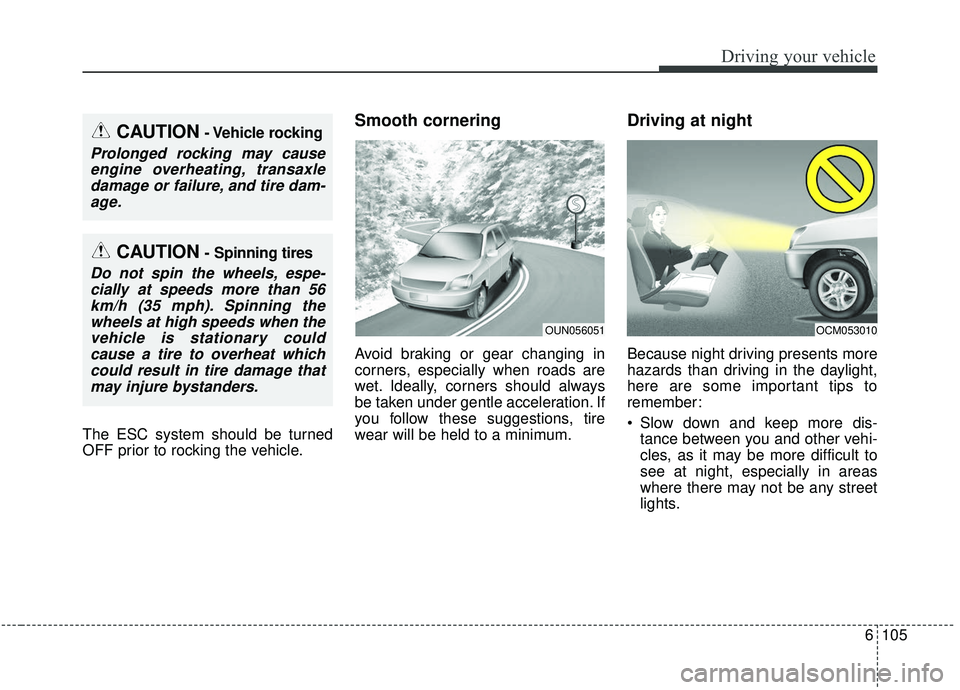
Smooth cornering
Avoid braking or gear changing in
corners, especially when roads are
wet. Ideally, corners should always
be taken under gentle acceleration. If
you follow these suggestions, tire
wear will be held to a minimum.
Driving at night
Because night driving presents more
hazards than driving in the daylight,
here are some important tips to
remember:
Slow down and keep more dis-tance between you and other vehi-
cles, as it may be more difficult to
see at night, especially in areas
where there may not be any street
lights.
OUN056051OCM053010
CAUTION- Vehicle rocking
Prolonged rocking may causeengine overheating, transaxledamage or failure, and tire dam-age.
CAUTION- Spinning tires
Do not spin the wheels, espe-cially at speeds more than 56km/h (35 mph). Spinning thewheels at high speeds when thevehicle is stationary couldcause a tire to overheat whichcould result in tire damage thatmay injure bystanders.