2019 KIA SOUL bluetooth
[x] Cancel search: bluetoothPage 275 of 564
![KIA SOUL 2019 Owners Manual Audio system
37
5
If there are connected devices
Press the [PHONE] button on the
audio system ➟ Select [Settings] ➟
Select [Connections] ➟Select
Bluetooth®Wireless Technology device
to connect](/manual-img/2/40387/w960_40387-274.png "KIA SOUL 2019 Owners Manual Audio system
37
5
If there are connected devices
Press the [PHONE] button on the
audio system ➟ Select [Settings] ➟
Select [Connections] ➟Select
Bluetooth®Wireless Technology device
to connect")
Audio system
37
5
If there are connected devices
Press the [PHONE] button on the
audio system ➟ Select [Settings] ➟
Select [Connections] ➟Select
Bluetooth®Wireless Technology device
to connect ➟ Select [Connect] ➟
Connect
Bluetooth®Wireless Technology.
✽ ✽ NOTICE
• Only one Bluetooth®Wireless
Technology device can be connect-
ed at a time.
• When a Bluetooth
®Wireless
Technology device is connected,
other devices cannot be paired.
Accepting/rejecting phone calls
Receiving phone calls with
Bluetooth®Wireless Technology con-
nected.
(1) Caller name: If the caller number is in your contacts, the correspon-
ding name is displayed.
(2) Incoming phone number: Incoming phone number is displayed.
(3) Accept: Accept call.
(4) Reject: Reject call.
✽ ✽ NOTICE
• When the incoming call screen is
displayed, audio mode and the set-
tings screen cannot be shown.
Only call volume control is sup-
ported.
• Some Bluetooth
®Wireless Technology
devices may not support the call
reject function.
• Some Bluetooth
®Wireless Technology
devices may not support the phone
number display function.
Page 276 of 564
![KIA SOUL 2019 Owners Manual Audio system
538
Operation during calls
Incoming call with Bluetooth®
Wireless Technology connected ➟
Select [Accept].
(1) Display Call duration: Call duration display.
(2) Caller name: If the cal](/manual-img/2/40387/w960_40387-275.png "KIA SOUL 2019 Owners Manual Audio system
538
Operation during calls
Incoming call with Bluetooth®
Wireless Technology connected ➟
Select [Accept].
(1) Display Call duration: Call duration display.
(2) Caller name: If the cal")
Audio system
538
Operation during calls
Incoming call with Bluetooth®
Wireless Technology connected ➟
Select [Accept].
(1) Display Call duration: Call duration display.
(2) Caller name: If the caller number is in your contacts, the corresponding
name is displayed.
(3) Incoming phone number: Incoming phone number is displayed.
(4) Keypad: Number keypad for Automatic Response Service input
is displayed.
(5) Private: Call is transferred to a cell phone.
(6) Outgoing Volume: Adjust outgo- ing voice volume.
(7) End: End call.
✽ ✽ NOTICE
• Some Bluetooth®Wireless Technology
devices may not support the
Private function.
• The outgoing voice volume may vary depending on the type of
Bluetooth
®Wireless Technology
device. If the outgoing voice vol-
ume is too high or low, adjust the
Microphone Outgoing Volume.
Favorites
Press the [PHONE] button on the
audio system ➟ Select [Favorites] ➟
Favorites list displayed.
(1) Favorites list: A list of paired favorites is displayed.
Connect a call when selected.
(2) Add to Favorites: Add a down- loaded phone number to favorites.
(3) Delete: Delete a saved favorites.
Page 277 of 564
Audio system
39
5
✽ ✽
NOTICE
• Up to 20 favorites can be saved for
each connected Bluetooth®
Wireless Technology device.
• Favorites can be accessed when the Bluetooth
®Wireless Technology
device they were paired from is
connected.
• The audio system does not down- load favorites from Bluetooth
®
Wireless Technology devices.
Favorites must be newly saved
before use.
• To add to favorites, contacts must be downloaded first.
• Saved favorites are not updated even if the contacts of the connected
Bluetooth
®Wireless Technology
device are changed. In this case,
favorites need to be deleted and
added again.
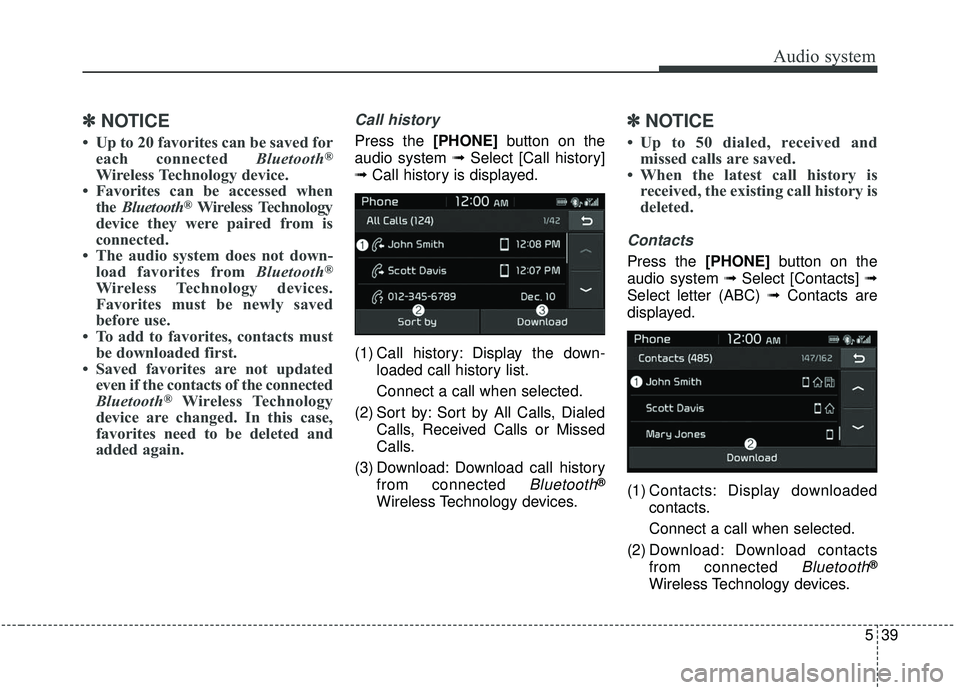
Call history
Press the [PHONE] button on the
audio system ➟ Select [Call history]
➟ Call history is displayed.
(1) Call history: Display the down- loaded call history list.
Connect a call when selected.
(2) Sort by: Sort by All Calls, Dialed Calls, Received Calls or Missed
Calls.
(3) Download: Download call history from connected
Bluetooth®
Wireless Technology devices.
✽ ✽NOTICE
• Up to 50 dialed, received and
missed calls are saved.
• When the latest call history is received, the existing call history is
deleted.
Contacts
Press the [PHONE] button on the
audio system ➟ Select [Contacts] ➟
Select letter (ABC) ➟ Contacts are
displayed.
(1) Contacts: Display downloaded contacts.
Connect a call when selected.
(2) Download: Download contacts from connected
Bluetooth®
Wireless Technology devices.
Page 278 of 564
Audio system
540
✽ ✽NOTICE
• Only supported contacts format
can be downloaded and displayed
from the Bluetooth
®Wireless
device, contacts from some appli-
cations will not be included.
• Up to 2,000 contacts can be saved.
• In some cases, additional confir- mation from your Bluetooth
®
Wireless Technology device is nec-
essary when downloading con-
tacts. If downloading of contacts is
unsuccessful, consult your
Bluetooth
®Wireless Technology
device's settings or the audio
screen to approve the download.
• Contacts without phone numbers are not displayed.
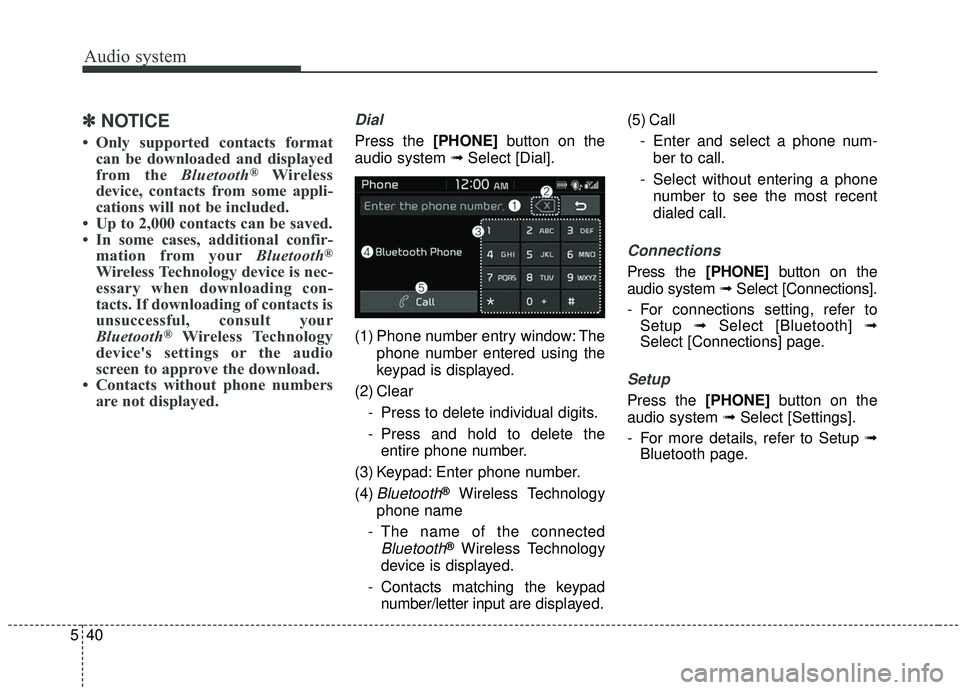
Dial
Press the [PHONE] button on the
audio system ➟ Select [Dial].
(1) Phone number entry window: The phone number entered using the
keypad is displayed.
(2) Clear - Press to delete individual digits.
- Press and hold to delete theentire phone number.
(3) Keypad: Enter phone number.
(4)
Bluetooth®Wireless Technology
phone name
- The name of the connected
Bluetooth®Wireless Technology
device is displayed.
- Contacts matching the keypad number/letter input are displayed.(5) Call
- Enter and select a phone num-ber to call.
- Select without entering a phone number to see the most recent
dialed call.
Connections
Press the [PHONE] button on the
audio system ➟ Select [Connections].
- For connections setting, refer to Setup ➟Select [Bluetooth] ➟
Select [Connections] page.
Setup
Press the [PHONE] button on the
audio system ➟ Select [Settings].
- For more details, refer to Setup ➟ Bluetooth page.
Page 283 of 564
Audio system
45
5
(6) Help: Available voice commands
displayed in stages.
(7) Exit: End voice recognition.
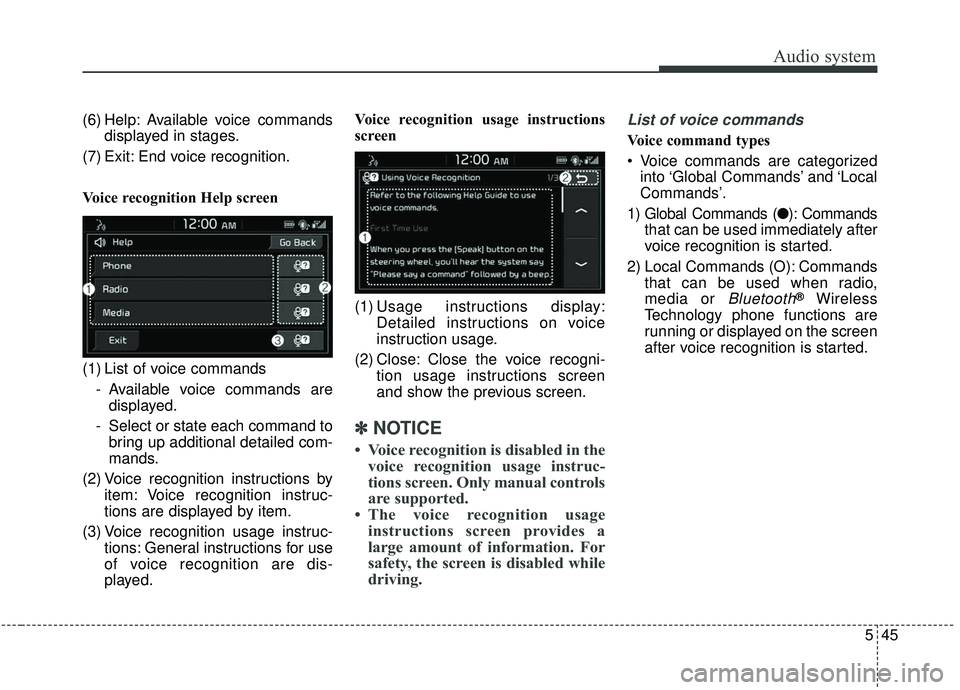
Voice recognition Help screen
(1) List of voice commands - Available voice commands aredisplayed.
- Select or state each command to bring up additional detailed com-
mands.
(2) Voice recognition instructions by item: Voice recognition instruc-
tions are displayed by item.
(3) Voice recognition usage instruc- tions: General instructions for use
of voice recognition are dis-
played. Voice recognition usage instructions
screen
(1) Usage instructions display:
Detailed instructions on voice
instruction usage.
(2) Close: Close the voice recogni- tion usage instructions screen
and show the previous screen.
✽ ✽NOTICE
• Voice recognition is disabled in the
voice recognition usage instruc-
tions screen. Only manual controls
are supported.
• The voice recognition usage instructions screen provides a
large amount of information. For
safety, the screen is disabled while
driving.
List of voice commands
Voice command types
Voice commands are categorized
into ‘Global Commands’ and ‘Local
Commands’.
1) Global Commands (● ): Commands
that can be used immediately after
voice recognition is started.
2) Local Commands (O): Commands that can be used when radio,
media or
Bluetooth®Wireless
Technology phone functions are
running or displayed on the screen
after voice recognition is started.
Page 284 of 564

Audio system
546Phone voice commands
Voice commands associated with phone functions can
be used after a
Bluetooth®Wireless Technology device
has been connected.
To use voice commands using contact names, such as ‘Call John Smith’, download contacts beforehand.
After contacts are downloaded over
Bluetooth®
Wireless Technology, some time may be required for
conversion of contact info into voice data. During this
conversion, phone calls cannot be made by saying con-
tact names. The time required for contact info conver-
sion depends on the number of entries in Contacts.
When the ‘Call
friend with the name ‘John Smith’ is saved to Contacts
under the nickname ‘Buddy’, ‘Call John Smith’ is not
recognized as a valid command. Instead, ‘Call Buddy’ is
recognized.
✽ ✽ NOTICE
When dialing by name, if there are similar names or
multiple subentries (mobile, work, home, other), you
may be prompted to select the contact desired from a
list.
CommandFeatures
●CallDownloaded contacts are shown on-screen.
Dial by stating the name of the desired contact.
●Call historyRecent call history is shown on the screen.
State the number of the item on the screen to
dial.
●RedialImmediately redial the last outgoing phone
number in Call History.
CommandFeatures
●Call
Immediately dial the phone number under
E.g. Call
●Call
MobileImmediately dial the number saved under
‘mobile’ for
E.g. Call
●Call
WorkImmediately dial the number saved under
‘work’ for
E.g. Call
●Call
HomeImmediately dial the number saved under
‘home’ for
E.g. Call
●Call
Other
Immediately dial the number saved under
‘other’ and not ‘cell, home, or work’ for
in downloaded contacts
.
E.g. Call
●Dial NumberDisplay a screen enabling you to say a phone
number to dial.
Page 285 of 564
Audio system
47
5
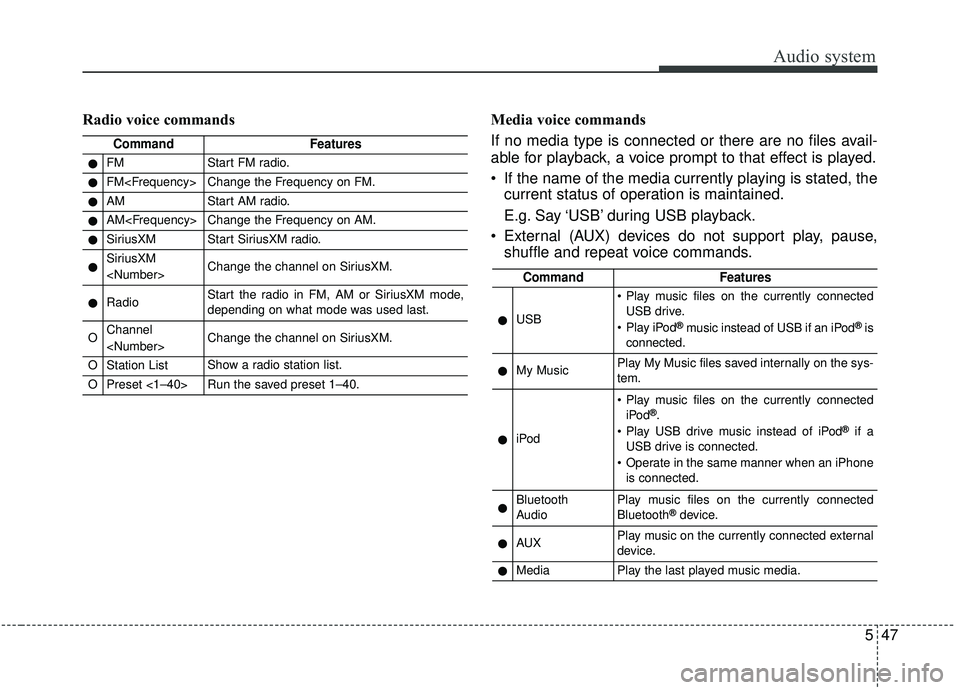
Radio voice commands Media voice commands
If no media type is connected or there are no files avail-
able for playback, a voice prompt to that effect is played.
If the name of the media currently playing is stated, the current status of operation is maintained.
E.g. Say ‘USB’ during USB playback.
External (AUX) devices do not support play, pause, shuffle and repeat voice commands.
CommandFeatures
●FMStart FM radio.
●FM
●AMStart AM radio.
●AM
●SiriusXMStart SiriusXM radio.
●SiriusXM
●RadioStart the radio in FM, AM or SiriusXM mode,
depending on what mode was used last.
OChannel
OStation ListShow a radio station list.
OPreset <1–40>Run the saved preset 1–40.
CommandFeatures
●USB
Play music files on the currently connected
USB drive.
Play iPod
®music instead of USB if an iPod®is
connected.
●My MusicPlay My Music files saved internally on the sys-
tem.
●iPod
Play music files on the currently connected iPod®.
Play USB drive music instead of iPod®if a
USB drive is connected.
Operate in the same manner when an iPhone is connected.
●Bluetooth
AudioPlay music files on the currently connected
Bluetooth®device.
●AUXPlay music on the currently connected external
device.
●MediaPlay the last played music media.
Page 286 of 564
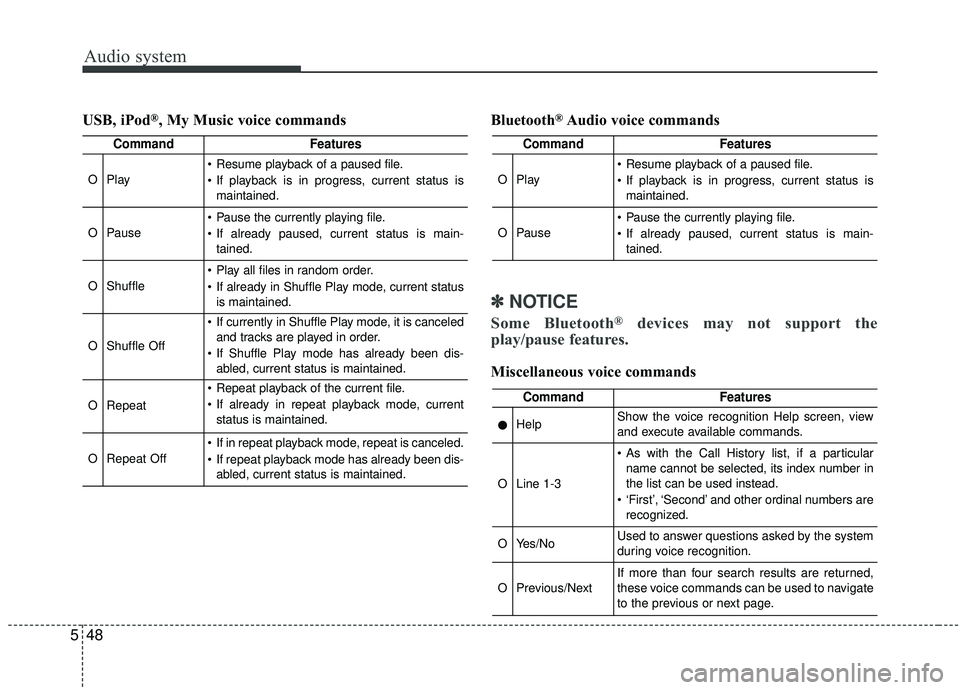
Audio system
548USB, iPod
®, My Music voice commands
Bluetooth®Audio voice commands
✽ ✽
NOTICE
Some Bluetooth®devices may not support the
play/pause features.
Miscellaneous voice commands
CommandFeatures
OPlay
Resume playback of a paused file.
If playback is in progress, current status is
maintained.
OPause
Pause the currently playing file.
If already paused, current status is main-tained.
OShuffle
Play all files in random order.
If already in Shuffle Play mode, current statusis maintained.
OShuffle Off
If currently in Shuffle Play mode, it is canceledand tracks are played in order.
If Shuffle Play mode has already been dis- abled, current status is maintained.
ORepeat
Repeat playback of the current file.
If already in repeat playback mode, currentstatus is maintained.
ORepeat Off
If in repeat playback mode, repeat is canceled.
If repeat playback mode has already been dis-abled, current status is maintained.
CommandFeatures
OPlay
Resume playback of a paused file.
If playback is in progress, current status ismaintained.
OPause
Pause the currently playing file.
If already paused, current status is main-tained.
CommandFeatures
●HelpShow the voice recognition Help screen, view
and execute available commands.
OLine 1-3
As with the Call History list, if a particularname cannot be selected, its index number in
the list can be used instead.
‘First’, ‘Second’ and other ordinal numbers are recognized.
OYes/NoUsed to answer questions asked by the system
during voice recognition.
OPrevious/NextIf more than four search results are returned,
these voice commands can be used to navigate
to the previous or next page.