Page 102 of 564
Features of your vehicle
16
4
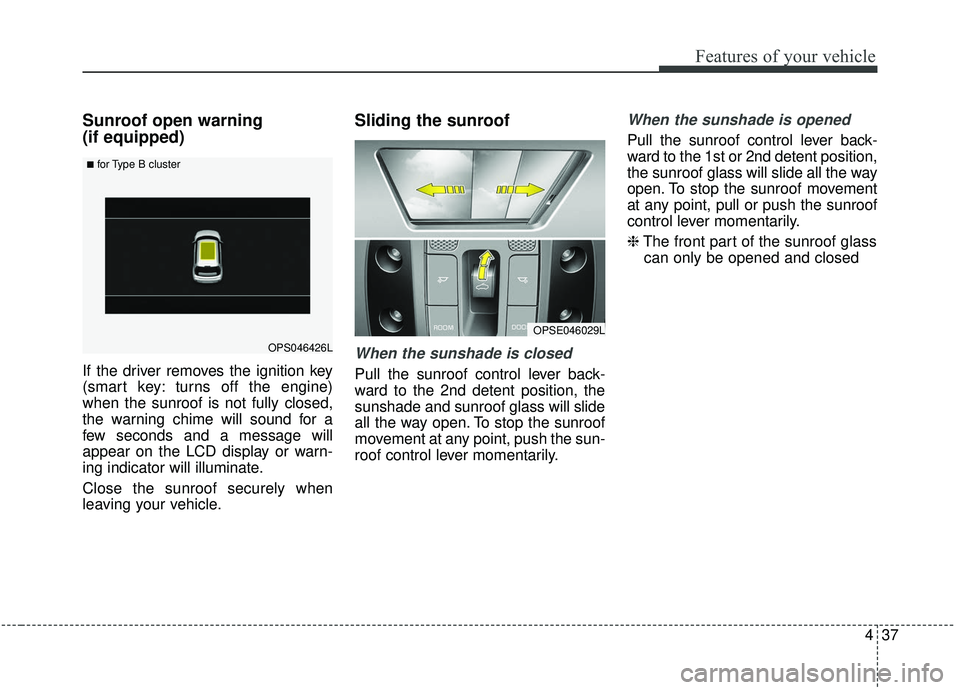
Battery replacement
A smart key battery should last for
several years, but if the smart key is
not working properly, try replacing
the battery with a new one. If you are
unsure how to use your smart key or
replace the battery, contact an
authorized Kia dealer.
1.Remove the mechanical key.
2.Pry open the rear cover.
3.Replace the battery with a new
battery (CR2032). When replacing
the battery, make sure the battery
position. 4.Install the battery in the reverse
order of removal.
The smart key is designed to give you years of trouble-free use, how-
ever it can malfunction if exposed
to moisture or static electricity. If
you are unsure how to use or
replace the battery, contact an
authorized Kia dealer.
Using the wrong battery can cause the smart key to malfunction. Be
sure to use the correct battery.
To avoid damaging the smart key, don't drop it, get it wet, or expose it
to heat or sunlight.
An inappropriately disposed battery can be harmful to
the environment and human
health. Dispose the battery
according to your local
law(s) or regulation.
OPS043002
CAUTION - Smart key
damage
Do not drop, get wet or exposethe smart key to heat or sun-light, or it will be damaged.
IC WARNING
This device complies with
Industry Canada licence-
exempt RSS standard(s).
Operation is subject to the fol-
lowing two conditions: (1) this
device may not cause interfer-
ence, and (2) this device must
accept any interference, includ-
ing interference that may cause
undesired operation of the
device.
Page 103 of 564
417
Features of your vehicle
DOOR LOCKS
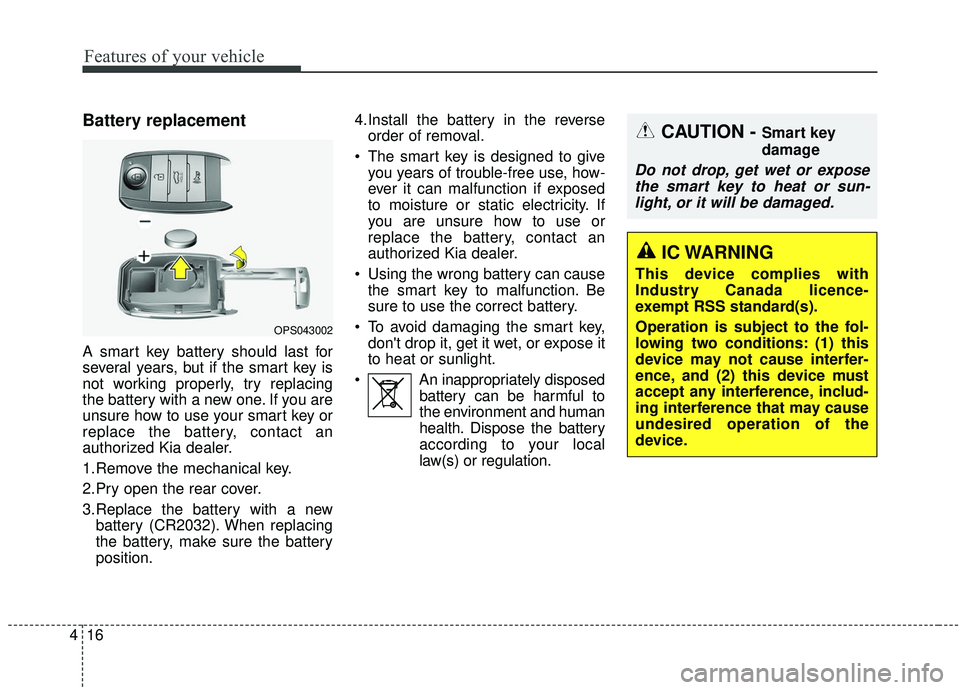
.Operating door locks from
outside the vehicle
Turn the key clockwise to lock andcounterclockwise to unlock.
If you lock the driver's door with a key
- All vehicle doors will lock auto-
matically. (for normal key)
- Only the driver's door will lock. (for folding key, smart key) From the driver's door
- Turn the key to the left once tounlock the door and once more
within 4 seconds to unlock all
doors. (for normal key).
- Turn the key to the left once to unlock the driver's door. (for fold-
ing key, smart key.
Doors can also be locked and unlocked with the transmitter.
Once the doors are unlocked, they may be opened by pulling the door
handle.
When closing the door, push the door by hand. Make sure the doors
are closed securely.
✽ ✽ NOTICE
• In cold and wet climates, door lock
and door mechanisms may not
work properly due to freezing con-
ditions.
• If the door is locked/unlocked multiple times in rapid succession
with either the vehicle key or door
lock switch, the system may stop
operating temporarily in order to
protect the circuit and prevent
damage to system components.
OPS043011
LockLock
Unlock
■ Type A■ Type B
Unlock
WARNING
• Securely close your door
before you begin driving.
Failure to fully close your
door may cause it to open
during vehicle operation.
Keep your body out of the way of the closing door to prevent
injuries.
Page 109 of 564
423
Features of your vehicle
Opening the liftgate
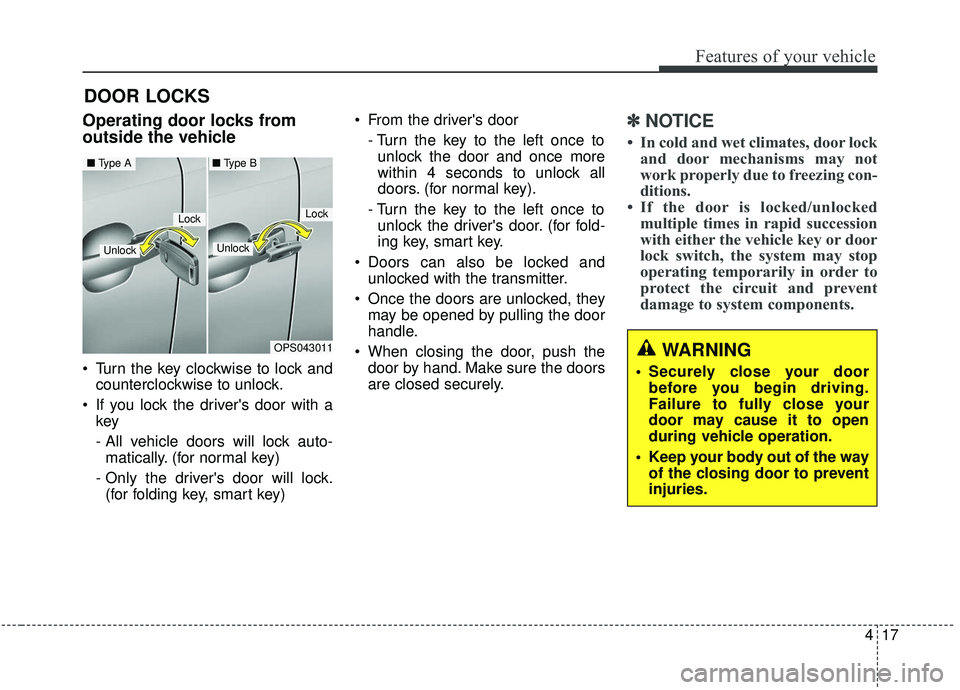
The liftgate is locked or unlockedwhen all doors are locked or
unlocked with the key, transmitter
(or smart key) or central door lock
switch.
If unlocked, the liftgate can be opened by pressing the handle
switch and then pulling the handle
up.
Only the liftgate is unlocked if the liftgate unlock button on the smart
key is pressed (if equipped). Once
the liftgate is opened and then
closed, the liftgate is locked auto-
matically.
✽ ✽ NOTICE
In cold and wet climates, door lock
and door mechanisms may not work
properly due to freezing conditions.
The liftgate swings upward. Make
sure no objects or people are near
the rear of the vehicle when opening
the liftgate.
Closing the liftgate
To close the liftgate, lower and push
down the liftgate firmly. Make sure
that the liftgate is securely latched.
Make sure your hands, feet and
other parts of your body are safely
out of the way before closing the lift-
gate.
LIFTGATE
CAUTION- Liftgate lift
Make certain that you close the
liftgate before driving your vehi-cle. Possible damage may occurto the liftgate lift cylinders andattached hardware if the liftgateis not closed prior to driving.OPS046017LOPS043018L
Page 123 of 564
437
Features of your vehicle
Sunroof open warning
(if equipped)
If the driver removes the ignition key
(smart key: turns off the engine)
when the sunroof is not fully closed,
the warning chime will sound for a
few seconds and a message will
appear on the LCD display or warn-
ing indicator will illuminate.
Close the sunroof securely when
leaving your vehicle.
Sliding the sunroof
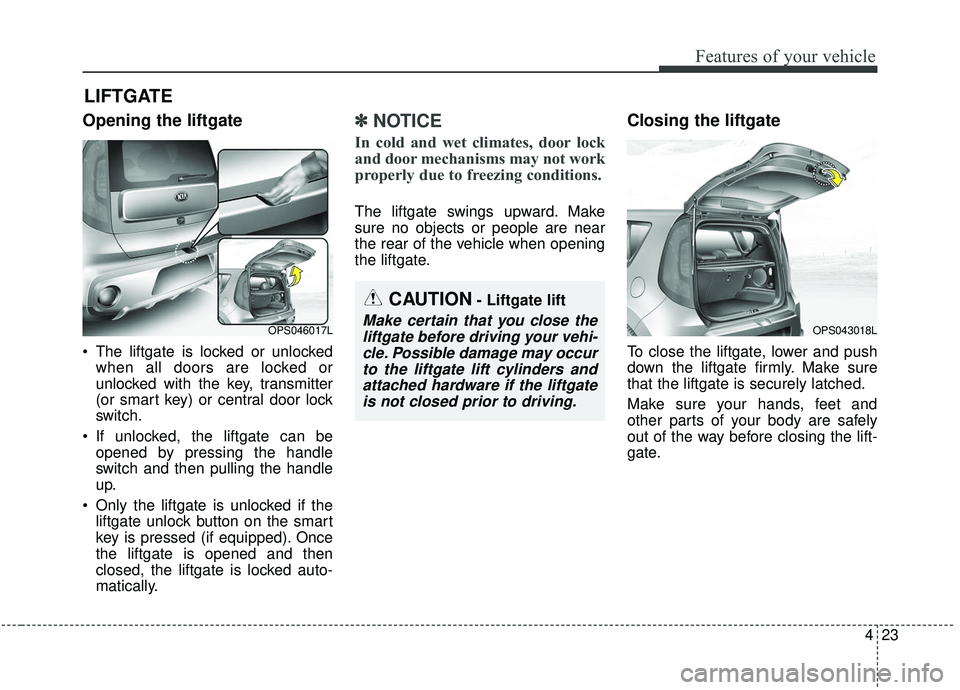
When the sunshade is closed
Pull the sunroof control lever back-
ward to the 2nd detent position, the
sunshade and sunroof glass will slide
all the way open. To stop the sunroof
movement at any point, push the sun-
roof control lever momentarily.
When the sunshade is opened
Pull the sunroof control lever back-
ward to the 1st or 2nd detent position,
the sunroof glass will slide all the way
open. To stop the sunroof movement
at any point, pull or push the sunroof
control lever momentarily.
❈The front part of the sunroof glass
can only be opened and closed
OPSE046029L
OPS046426L
■for Type B cluster
Page 136 of 564
Features of your vehicle
50
4
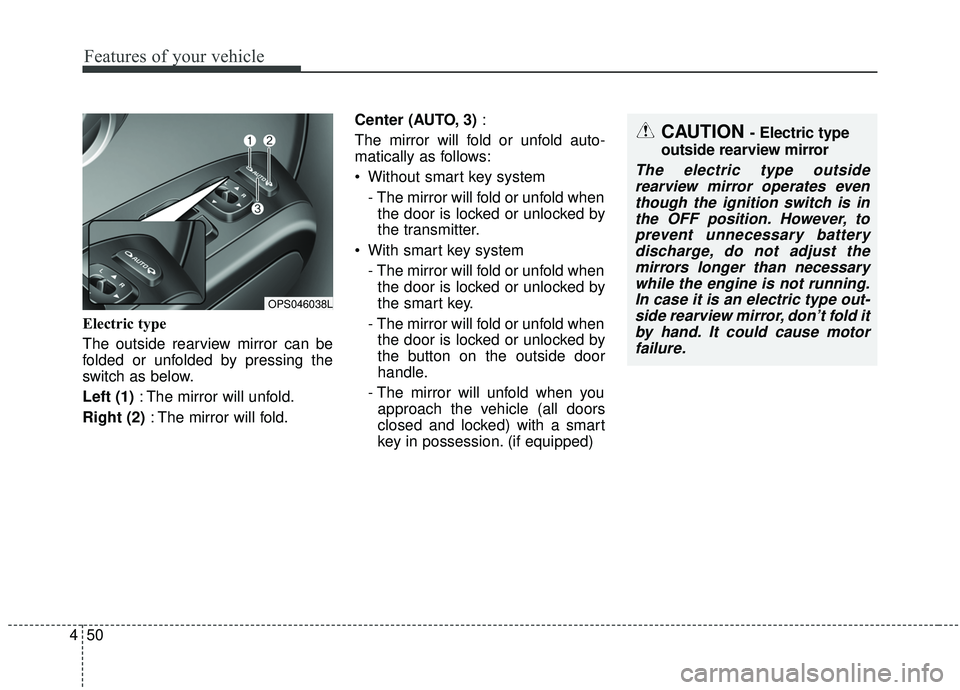
Electric type
The outside rearview mirror can be
folded or unfolded by pressing the
switch as below.
Left (1) : The mirror will unfold.
Right (2) : The mirror will fold. Center (AUTO, 3)
:
The mirror will fold or unfold auto-
matically as follows:
Without smart key system - The mirror will fold or unfold whenthe door is locked or unlocked by
the transmitter.
With smart key system - The mirror will fold or unfold whenthe door is locked or unlocked by
the smart key.
- The mirror will fold or unfold when the door is locked or unlocked by
the button on the outside door
handle.
- The mirror will unfold when you approach the vehicle (all doors
closed and locked) with a smart
key in possession. (if equipped)
OPS046038L
CAUTION - Electric type
outside rearview mirror
The electric type outside rearview mirror operates eventhough the ignition switch is inthe OFF position. However, toprevent unnecessary batterydischarge, do not adjust themirrors longer than necessarywhile the engine is not running.In case it is an electric type out-side rearview mirror, don’t fold itby hand. It could cause motorfailure.
Page 153 of 564
467
Features of your vehicle
Service Interval
On this mode, you can activate the
service interval function with mileage
(km or mi.) and period (months).
Turn By Turn Mode (if equipped)
This mode displays the state of the
navigation.
Warning Messages
Shift to “P” position (for smart keysystem and automatic transaxle)
This warning message illuminates if you try to turn off the engine with-
out the shift lever in P (Park) posi-
tion.
At this time, the Engine Start/Stop Button turns to the ACC position (If
you press the Engine Start/Stop
Button once more, it will turn to the
ON position).
Low Key Battery
(for smart key system)
This warning message illuminates if the battery of the smart key is
discharged when the Engine
Start/Stop Button changes to the
OFF position.
OPS046436LOPS046440L
Page 154 of 564
Features of your vehicle
68
4
Press brake pedal to start engine
(for smart key system and auto-matic transaxle)
This warning message illuminates if the Engine Start/Stop Button
changes to the ACC position twice
by pressing the button repeatedly
without depressing the brake
pedal.
It means that you should depress the brake pedal to start the engine.
Press clutch pedal to start engine
(for smart key system and manualtransaxle)
This warning message illuminates if the Engine Start/Stop Button
changes to the ACC position twice
by pressing the button repeatedly
without depressing the clutch
pedal.
It means that you should depress the clutch pedal to start the engine.
Key not in vehicle
(for smart key system)
This warning message illuminates if the smart key is not in the vehicle
while the door is opened or closed
with the ignition switch in the ACC
position or engine is running.
It means that you should always have the smart key with you.
Key not detected
(for smart key system)
This warning message illuminates if the smart key is not detected
when you press the Engine
Start/Stop Button.
Press start button again
(for smart key system)
This warning message illuminates if you can not operate the Engine
Start/Stop Button when there is a
problem with the Engine Start/Stop
Button system.
It means that you could start the engine by pressing the Engine
Start/ Stop Button once more.
If the warning illuminates each time you press the Engine
Start/Stop Button, have your vehi-
cle inspected by an authorized Kia
dealer.
Page 155 of 564
469
Features of your vehicle
Press start button with smart key (for smart key system)
This warning message illuminates if you press the Engine Start/Stop
Button while the warning message
“Key not detected” is illuminating.
At this time, the immobilizer indica- tor light blinks.
Check fuse “BRAKE SWITCH”
(for smart key system and auto-matic transaxle)
This warning message illuminates if the brake switch fuse is discon-
nected.
It means that you should replace the fuse with a new one. If that is
not possible, you can start the
engine by pressing the Engine
Start/Stop Button for 10 seconds in
the ACC position.
Shift to “P” or “N” to start engine
(for smart key system and auto-matic transaxle)
This warning message illuminates if you try to start the engine with
the shift lever not in the P (Park) or
N (Neutral) position.
✽ ✽ NOTICE
You can start the engine with the
shift lever in the N (Neutral) posi-
tion. But, for your safety, we recom-
mend that you start the engine with
the shift lever in the P (Park) posi-
tion.
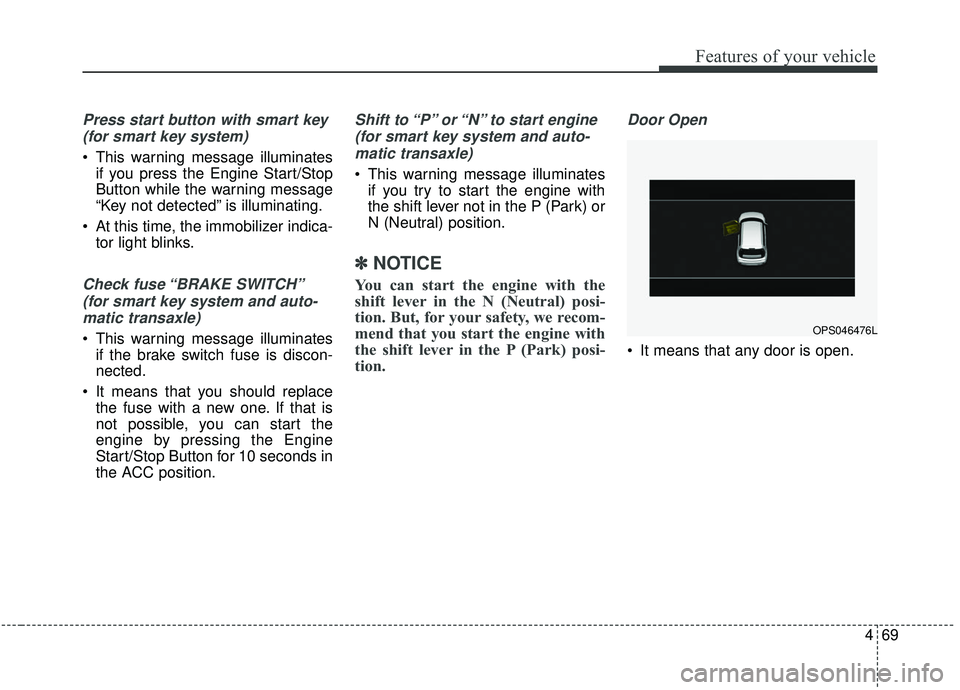
Door Open
It means that any door is open.
OPS046476L