Driving your vehicle
82
6
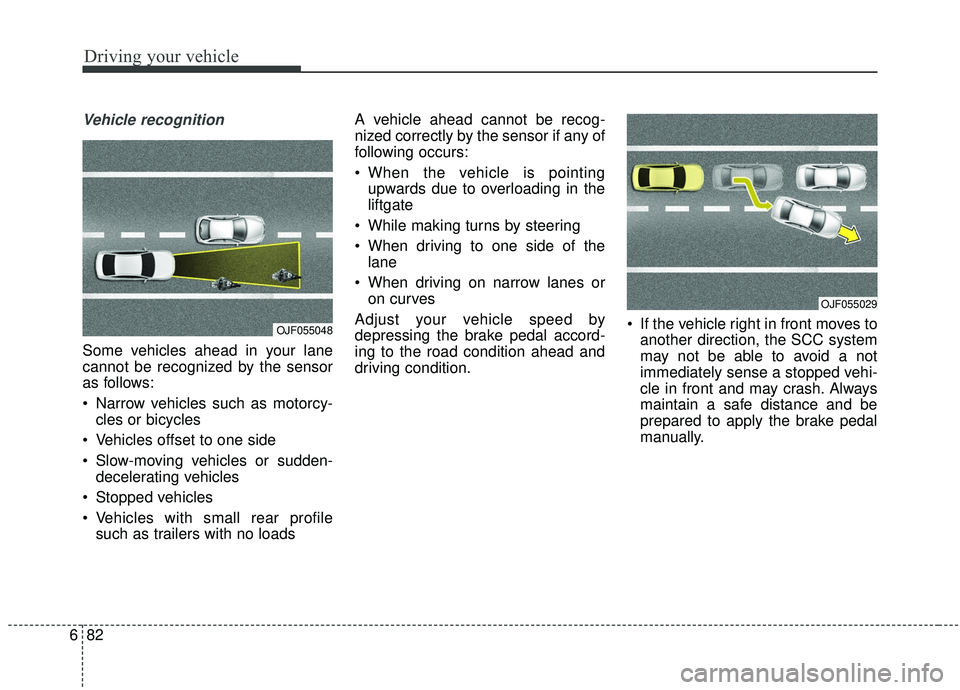
Vehicle recognition
Some vehicles ahead in your lane
cannot be recognized by the sensor
as follows:
Narrow vehicles such as motorcy-
cles or bicycles
Vehicles offset to one side
Slow-moving vehicles or sudden- decelerating vehicles
Stopped vehicles
Vehicles with small rear profile such as trailers with no loads A vehicle ahead cannot be recog-
nized correctly by the sensor if any of
following occurs:
When the vehicle is pointing
upwards due to overloading in the
liftgate
While making turns by steering
When driving to one side of the lane
When driving on narrow lanes or on curves
Adjust your vehicle speed by
depressing the brake pedal accord-
ing to the road condition ahead and
driving condition. If the vehicle right in front moves to
another direction, the SCC system
may not be able to avoid a not
immediately sense a stopped vehi-
cle in front and may crash. Always
maintain a safe distance and be
prepared to apply the brake pedal
manually.
OJF055048
OJF055029
Driving your vehicle
84
6
When using the Smart Cruise
Control take the following precau-
tions:
If an emergency stop is necessary,
you must apply the brakes. The
vehicle cannot be stopped at every
emergency situation by using the
Smart Cruise Control System.
Keep a safe distance according to road conditions and vehicle speed.
If the vehicle to vehicle distance is
too close during a high-speed driv-
ing, a serious collision may result.
Always maintain sufficient braking distance and decelerate your vehi-
cle by applying the brakes if neces-
sary.
The Smart Cruise Control System cannot recognize a stopped vehi-
cle, pedestrians or an oncoming
vehicle. Always look ahead cau-
tiously to prevent unexpected and
sudden situations from occurring. Vehicles moving in front of you with
a frequent lane change may cause
a delay in the system's reaction or
may cause the system to react to a
vehicle actually in an adjacent
lane. Always drive cautiously to
prevent unexpected and sudden
situations from occurring.
Always be aware of the selected speed and vehicle to vehicle dis-
tance. The driver should not solely
rely on the system but always pay
attention to driving conditions and
control your vehicle speed.
The Smart Cruise Control System may not recognize complex driving
situations so always pay attention
to driving conditions and control
your vehicle speed.
Make sure to be well informed of the owner's manual and practice
using the smart cruise control sys-
tem to ensure the safe use of the
system.
After an engine start, please stop for several seconds. If system ini-
tialization is not completed, the
SCC does not normally operate. After an engine start, if any objects
are not detected or the sensor
cover is obscured with foreign sub-
stances, there is a possibility that
the SCC system may not work.
The following conditions may cause a malfunction: over-loading
the liftgate, suspension modifica-
tion, tire replacement with unau-
thorized tires or tires with different
tread wear and pressure levels.
Index
2I
Air bag - advanced supplemental restraint system . . . . 3-42Adding equipment to or modifying your air bag-equipped vehicle . . . . . . . . . . . . . . . . . . . . 3-68
Air bag warning label. . . . . . . . . . . . . . . . . . . . . . . . 3-68
Air bag warning light . . . . . . . . . . . . . . . . . . . . . . . . 3-45
Curtain air bag . . . . . . . . . . . . . . . . . . . . . . . . . . . . . 3-61
Driver's and passenger's front air bag . . . . . . . . . . . 3-56
How does the air bag system operate. . . . . . . . . . . . 3-43
Occupant Detection System (ODS) . . . . . . . . . . . . . 3-49
Side air bag. . . . . . . . . . . . . . . . . . . . . . . . . . . . . . . . 3-59
SRS Care . . . . . . . . . . . . . . . . . . . . . . . . . . . . . . . . . 3-67
SRS components and functions . . . . . . . . . . . . . . . . 3-46
Air cleaner . . . . . . . . . . . . . . . . . . . . . . . . . . . . . . . . . . 8-36\
Filter replacement. . . . . . . . . . . . . . . . . . . . . . . . . . . 8-36
Air conditioning system . . . . . . . . . . . . . . . . . . . . . . . 9-6
Appearance care . . . . . . . . . . . . . . . . . . . . . . . . . . . . . . 8-94 Exterior care . . . . . . . . . . . . . . . . . . . . . . . . . . . . . . . 8-94
Interior care . . . . . . . . . . . . . . . . . . . . . . . . . . . . . . . 8-99
Audio (with Touch Screen). . . . . . . . . . . . . . . . . . . . . . 5-10 Feature of Your Audio . . . . . . . . . . . . . . . . . . . . . . . 5-11
Media . . . . . . . . . . . . . . . . . . . . . . . . . . . . . . . . . . . . \
5-21
Phone . . . . . . . . . . . . . . . . . . . . . . . . . . . . . . . . . . . . \
5-32
Radio . . . . . . . . . . . . . . . . . . . . . . . . . . . . . . . . . . . . \
5-17
Setup . . . . . . . . . . . . . . . . . . . . . . . . . . . . . . . . . . . . \
. 5-50
Siri . . . . . . . . . . . . . . . . . . . . . . . . . . . . . . . . . . . . \
. . 5-49 SiriusXM . . . . . . . . . . . . . . . . . . . . . . . . . . . . . . . . . 5-19
Voice Recognition . . . . . . . . . . . . . . . . . . . . . . . . . . 5-41
Audio System . . . . . . . . . . . . . . . . . . . . . . . . . . . . . . . . . 5-2 Antenna . . . . . . . . . . . . . . . . . . . . . . . . . . . . . . . . . . . 5-\
2
Audio remote control . . . . . . . . . . . . . . . . . . . . . . . . . 5-3
AUX and USB port . . . . . . . . . . . . . . . . . . . . . . . . . . 5-4
How vehicle audio works . . . . . . . . . . . . . . . . . . . . . . 5-6
Speaker lights . . . . . . . . . . . . . . . . . . . . . . . . . . . . . . . 5-4
Automatic climate control system . . . . . . . . . . . . . . . 4-117 Automatic heating and air conditioning. . . . . . . . . 4-118
Checking the amount of air conditioner refrigerant and compressor lubricant . . . . . . . . . . . . . . . . . . . . . . 4-129
Climate control air filter. . . . . . . . . . . . . . . . . . . . . 4-129
Manual heating and air conditioning . . . . . . . . . . . 4-119
System operation . . . . . . . . . . . . . . . . . . . . . . . . . . 4-127
Automatic transaxle . . . . . . . . . . . . . . . . . . . . . . . . . . . 6-19 Automatic transaxle operation . . . . . . . . . . . . . . . . . 6-19
Good driving practices . . . . . . . . . . . . . . . . . . . . . . . 6-25
Autonomous Emergency Braking (AEB) . . . . . . . . . . . 6-50 Brake operation . . . . . . . . . . . . . . . . . . . . . . . . . . . . 6-54
Limitations of the system . . . . . . . . . . . . . . . . . . . . . 6-58
Sensor to detect the distance from the vehicle in front (Front radar) . . . . . . . . . . . . . . . . . . . . . . . . . . . . . . 6-55
System malfunction . . . . . . . . . . . . . . . . . . . . . . . . . 6-56
System setting and activation . . . . . . . . . . . . . . . . . . 6-50
A