Page 310 of 573

533
Driving your vehicle
EPB (electronic parking brake) may
be automatically applied when:
The EPB is overheated
Requested by other systems
✽ ✽NOTICE
If the driver turns the engine off by
mistake while Auto Hold is operat-
ing, EPB will be automatically
applied. (Vehicles equipped with
Auto Hold)
System warning
If you try to drive off depressing the
accelerator pedal with the EPB
applied, but the EPB doesn't
release automatically, a warning
will sound and a message will
appear.
If the driver's seat belt is not fas- tened and the engine hood, driver's
door or trunk is opened, a warning
will sound and a message will
appear.
If there is a problem with the vehi- cle, a warning may sound and a
message may appear. If the above situation occurs, depress
the brake pedal and release EPB by
pressing the EPB switch.
OUMA058401
WARNING- Parking
Brake Use
All vehicles should always have
the parking brake fully engaged
when parked to avoid inadver-
tent movement of the car which
can injure occupants or pedes-
trians.
Page 314 of 573
537
Driving your vehicle
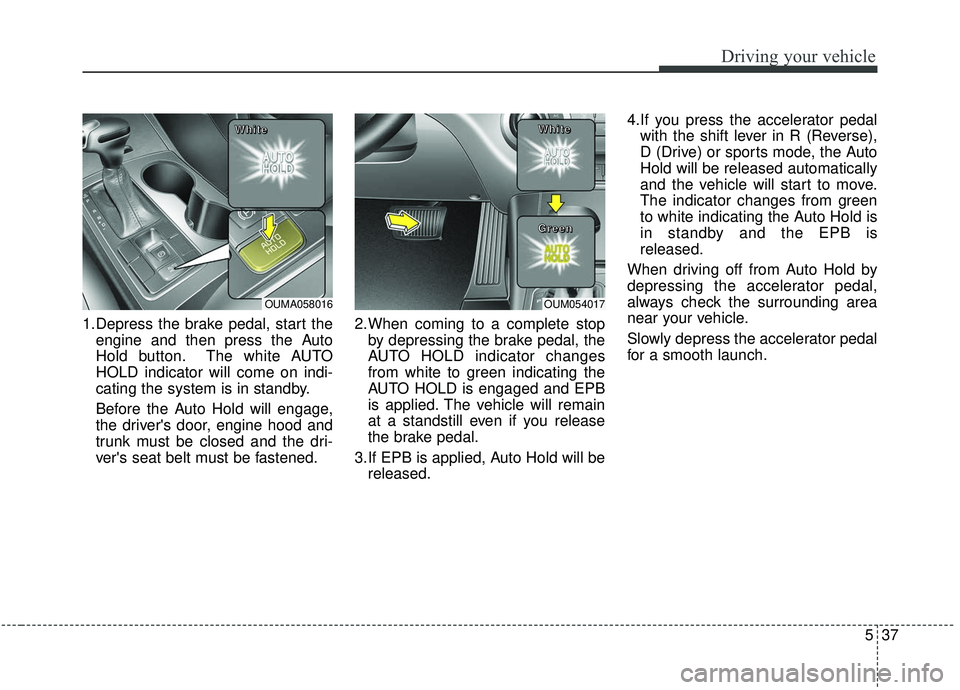
1.Depress the brake pedal, start theengine and then press the Auto
Hold button. The white AUTO
HOLD indicator will come on indi-
cating the system is in standby.
Before the Auto Hold will engage,
the driver's door, engine hood and
trunk must be closed and the dri-
ver's seat belt must be fastened. 2.When coming to a complete stop
by depressing the brake pedal, the
AUTO HOLD indicator changes
from white to green indicating the
AUTO HOLD is engaged and EPB
is applied. The vehicle will remain
at a standstill even if you release
the brake pedal.
3.If EPB is applied, Auto Hold will be released. 4.If you press the accelerator pedal
with the shift lever in R (Reverse),
D (Drive) or sports mode, the Auto
Hold will be released automatically
and the vehicle will start to move.
The indicator changes from green
to white indicating the Auto Hold is
in standby and the EPB is
released.
When driving off from Auto Hold by
depressing the accelerator pedal,
always check the surrounding area
near your vehicle.
Slowly depress the accelerator pedal
for a smooth launch.
OUMA058016
W W
W W
h h
h h
i i
i i
t t
t t
e e
e eOUM054017
W W
W W
h h
h h
i i
i i
t t
t t
e e
e e
G G
G G
r r
r r
e e
e e
e e
e e
n n
n n
Page 315 of 573

Driving your vehicle
38
5
Cancel
To cancel the Auto Hold operation,
press the Auto Hold switch. The
AUTO HOLD indicator will go out.
To cancel the Auto Hold operation
when the vehicle is at a standstill,
press the Auto Hold switch while
depressing the brake pedal.
✽ ✽
NOTICE
• The following are conditions when
the Auto Hold will not engage
(Auto Hold light will not turn
green and the Auto Hold system
remains in stand by):
- The driver's seat belt is unfas-tened and driver's door is opened
- The engine hood is opened
- The trunk is opened
- The shift lever is in P (Park)
- The EPB is applied
• For your safety, the Auto Hold automatically switches to EPB
under any of the following condi-
tions (Auto Hold light remains
white and the EPB automatically
applies):
- The driver's seat belt is unfas-tened and driver's door is opened
- The engine hood is opened
- The trunk is opened
- The vehicle is in a standstill for more than 10 minutes
- The vehicle is standing on a steep slope
- The vehicle moved several times (Continued)(Continued)
In these cases, the brake warning
light comes on, the AUTO HOLD
indicator changes from green to
white, and a warning sounds and a
message will appear to inform you
that EPB has been automatically
engaged. Before driving off again,
press foot brake pedal, check the
surrounding area near your vehi-
cle and release parking brake
manually with the EPB switch.
• If the AUTO HOLD indicator lights up yellow, the Auto Hold is
not working properly. Take your
vehicle to an authorized Kia deal-
er and have the system checked.
OUMA058018
L L
L L
i i
i i
g g
g g
h h
h h
t t
t t
o o
o o
f f
f f
f f
f f
Page 329 of 573
Driving your vehicle
52
5
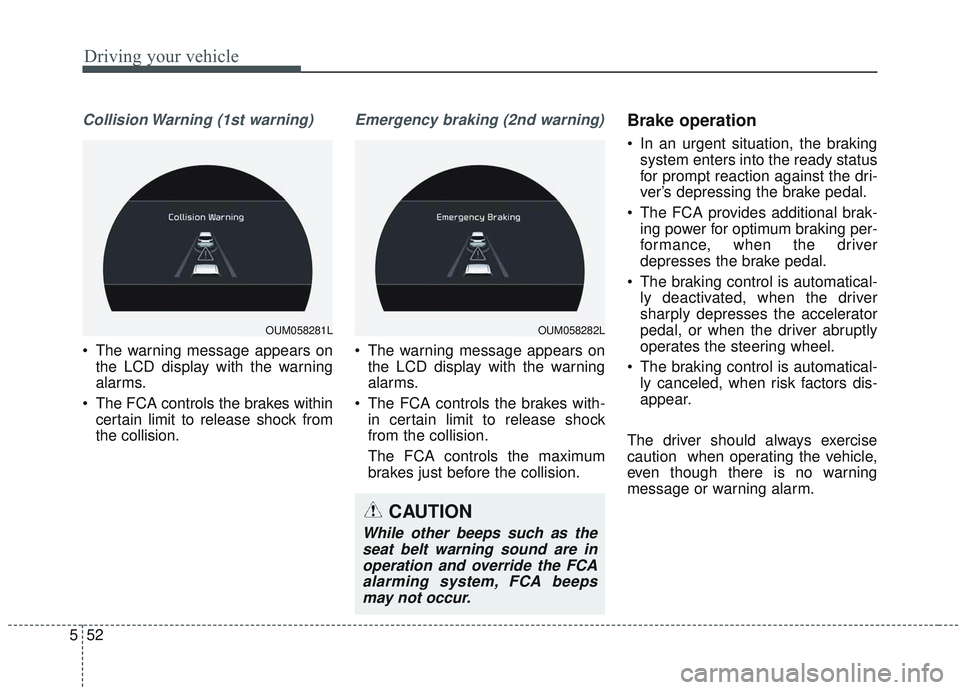
Collision Warning (1st warning)
• The warning message appears on
the LCD display with the warning
alarms.
The FCA controls the brakes within certain limit to release shock from
the collision.
Emergency braking (2nd warning)
The warning message appears onthe LCD display with the warning
alarms.
The FCA controls the brakes with- in certain limit to release shock
from the collision.
The FCA controls the maximum
brakes just before the collision.
Brake operation
In an urgent situation, the brakingsystem enters into the ready status
for prompt reaction against the dri-
ver’s depressing the brake pedal.
The FCA provides additional brak- ing power for optimum braking per-
formance, when the driver
depresses the brake pedal.
The braking control is automatical- ly deactivated, when the driver
sharply depresses the accelerator
pedal, or when the driver abruptly
operates the steering wheel.
The braking control is automatical- ly canceled, when risk factors dis-
appear.
The driver should always exercise
caution when operating the vehicle,
even though there is no warning
message or warning alarm.
OUM058281LOUM058282L
CAUTION
While other beeps such as the seat belt warning sound are inoperation and override the FCAalarming system, FCA beepsmay not occur.
Page 353 of 573
Driving your vehicle
76
5
The vehicle will maintain the set
speed, when the lane ahead is
clear.
The vehicle will slow down or speed up within selected speed to
maintain the selected distance,
when there is a vehicle ahead of
you in the lane. (A vehicle will
appear in front of your vehicle in
the LCD display only when there is
an actual vehicle in front of you)
If the vehicle ahead speeds up, your vehicle will travel at a steady
cruising speed after accelerating to
the selected speed.
The warning chime sounds and LCD display blinks if it is hard to
maintain the selected distance to
the vehicle ahead.
If the warning chime sounds, actively adjust the vehicle speed by
depressing the brake pedal
according to the road condition
ahead and driving condition.
Even if the warning chime is not acti- vated, always pay attention to the
driving conditions to prevent danger-
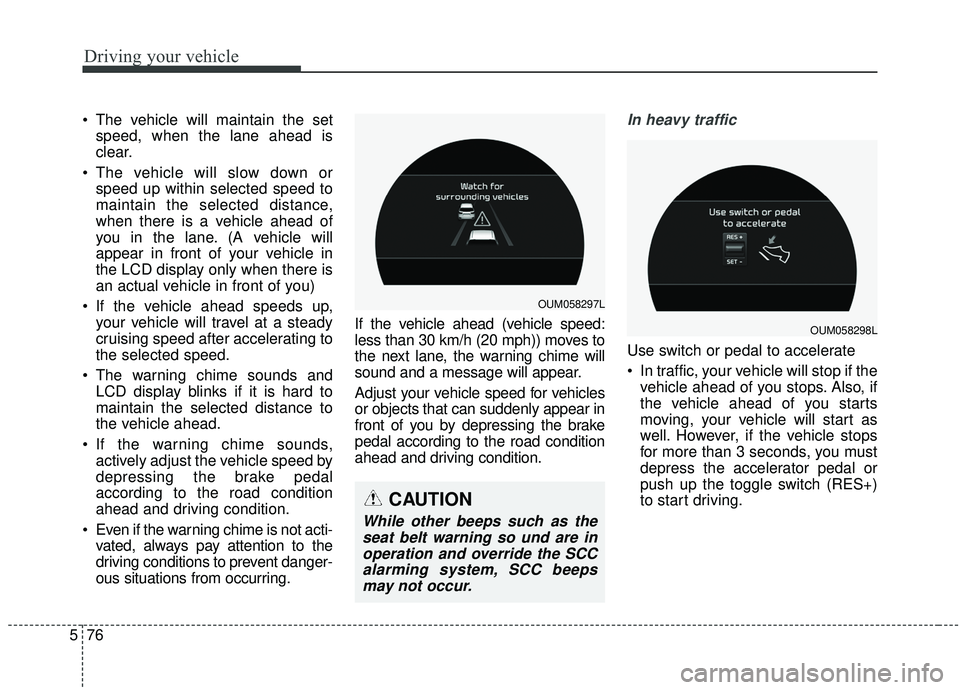
ous situations from occurring. If the vehicle ahead (vehicle speed:
less than 30 km/h (20 mph)) moves to
the next lane, the warning chime will
sound and a message will appear.
Adjust your vehicle speed for vehicles
or objects that can suddenly appear in
front of you by depressing the brake
pedal according to the road condition
ahead and driving condition.In heavy traffic
Use switch or pedal to accelerate
In traffic, your vehicle will stop if the
vehicle ahead of you stops. Also, if
the vehicle ahead of you starts
moving, your vehicle will start as
well. However, if the vehicle stops
for more than 3 seconds, you must
depress the accelerator pedal or
push up the toggle switch (RES+)
to start driving.
OUM058297L
OUM058298L
CAUTION
While other beeps such as theseat belt warning so und are inoperation and override the SCCalarming system, SCC beepsmay not occur.
Page 371 of 573
Driving your vehicle
94
5
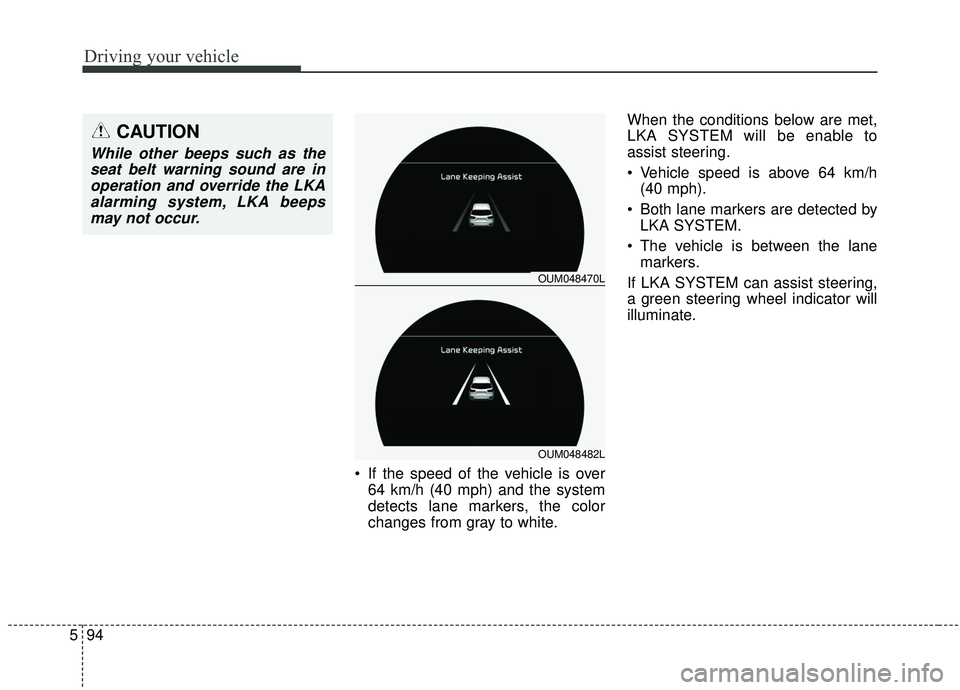
If the speed of the vehicle is over
64 km/h (40 mph) and the system
detects lane markers, the color
changes from gray to white. When the conditions below are met,
LKA SYSTEM will be enable to
assist steering.
Vehicle speed is above 64 km/h
(40 mph).
Both lane markers are detected by LKA SYSTEM.
The vehicle is between the lane markers.
If LKA SYSTEM can assist steering,
a green steering wheel indicator will
illuminate.
OUM048470L
OUM048482L
CAUTION
While other beeps such as the seat belt warning sound are inoperation and override the LKAalarming system, LKA beepsmay not occur.
Page 381 of 573
Driving your vehicle
104
5
- The second stage alarm may be
deactivated.
To activate the alarm: Go to the User Settings Mode →
Driver Assistance and select
“Blind-Spot Collision Warning” on
the LCD display.
To deactivate the alarm: Go to the User Settings Mode →
Driver Assistance and deselect
“Blind-Spot Collision Warning” on
the LCD display.
✽ ✽
NOTICE
The alarm function helps alert the
driver. Deactivate this function only
when it is necessary
RCCW (Rear Cross-Traffic
Collision Warning)
When your vehicle moves backwards
from a parking position, the sensor
detects approaching vehicles to the
left or right side direction and gives
information to the driver.
Detecting sensor
The sensors are located inside of the
rear bumper.
Always keep the rear bumper clean
for the system to work properly.
OUMA058030
OYP054026K
CAUTION
While other beeps such as the
seat belt warning sound are inoperation and override the BCWalarming system, BCW beepsmay not occur.
Page 382 of 573

5105
Driving your vehicle
Operating conditions
Select RCCW (Rear Cross-TrafficCollision Warning) in “User
Settings” under “Driver Assistance”
on the instrument cluster. The sys-
tem will turn on and standby to
activate.
Select RCCW again, to turn the system off.
If the vehicle is turned off, the RCCW system will remember the
last settings upon restart. Always
turn the RCCW system off when
not in use.
The system operates when the vehicle speed is below 10 km/h (6
mph) with the shift lever in R
(Reverse).
The RCCW (Rear Cross-Traffic Collision Warning) detecting range
is 1.6 feet ~ 65 feet based on the
side direction. If the approaching
vehicle speed is
4 km/h (2.5 mph) ~ 36 km/h (22
mph) within sensing range, it is
detected. However, the system
sensing range can vary based on
conditions. Always pay attention to
your surroundings.
Warning type If the vehicle detected by sensorsapproaches your vehicle, the warn-
ing chime will sound and the warn-
ing light will blink on the outside
rearview mirror.
If the detected vehicle is out of detection range, moving away in the
opposite direction or moving slow,
or if the vehicle is right behind your
vehicle, if the direction of the other
vehicle is not heading towards your
vehicle, the warning is cancelled.
The system may not operate prop- erly due to other factors or circum-
stances. Always pay attention to
your surroundings.
OUM058312L
OYG056144L
OUM058311L
CAUTION
While other beeps such as theseat belt warning sound are inoperation and override theRCCW alarming system, RCCWbeeps may not occur.