2019 KIA SORENTO shield
[x] Cancel search: shieldPage 252 of 573
Features of your vehicle
164
4
For maximum defrosting, set the
temperature control to the extreme
right/hot position and the fan speed
control to the highest speed.
If warm air to the floor is desired while defrosting or defogging, set
the mode to the floor-defrost posi-
tion.
Before driving, clear all snow and ice from the windshield, rear win-
dow, outside rear view mirrors, and
all side windows.
Clear all snow and ice from the hood and air inlet in the cowl grill to
improve heater and defroster effi-
ciency and to reduce the probabili-
ty of fogging up the inside of the
windshield.Manual climate control system
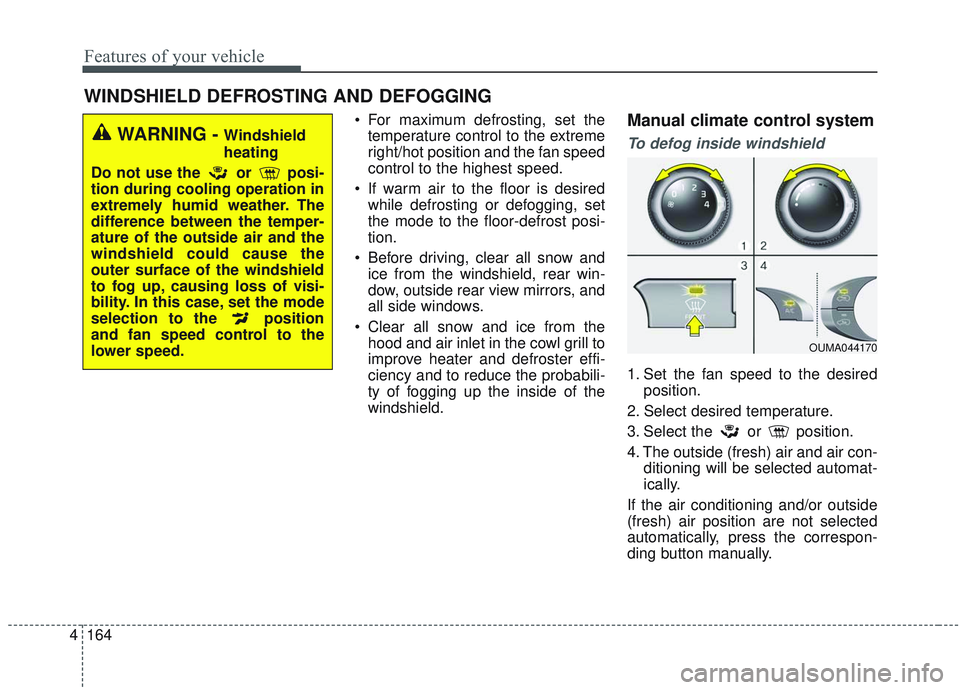
To defog inside windshield
1. Set the fan speed to the desired position.
2. Select desired temperature.
3. Select the or position.
4. The outside (fresh) air and air con- ditioning will be selected automat-
ically.
If the air conditioning and/or outside
(fresh) air position are not selected
automatically, press the correspon-
ding button manually.
WINDSHIELD DEFROSTING AND DEFOGGING
WARNING - Windshield
heating
Do not use the or posi-
tion during cooling operation in
extremely humid weather. The
difference between the temper-
ature of the outside air and the
windshield could cause the
outer surface of the windshield
to fog up, causing loss of visi-
bility. In this case, set the mode
selection to the position
and fan speed control to the
lower speed.
OUMA044170
Page 253 of 573
4165
Features of your vehicle
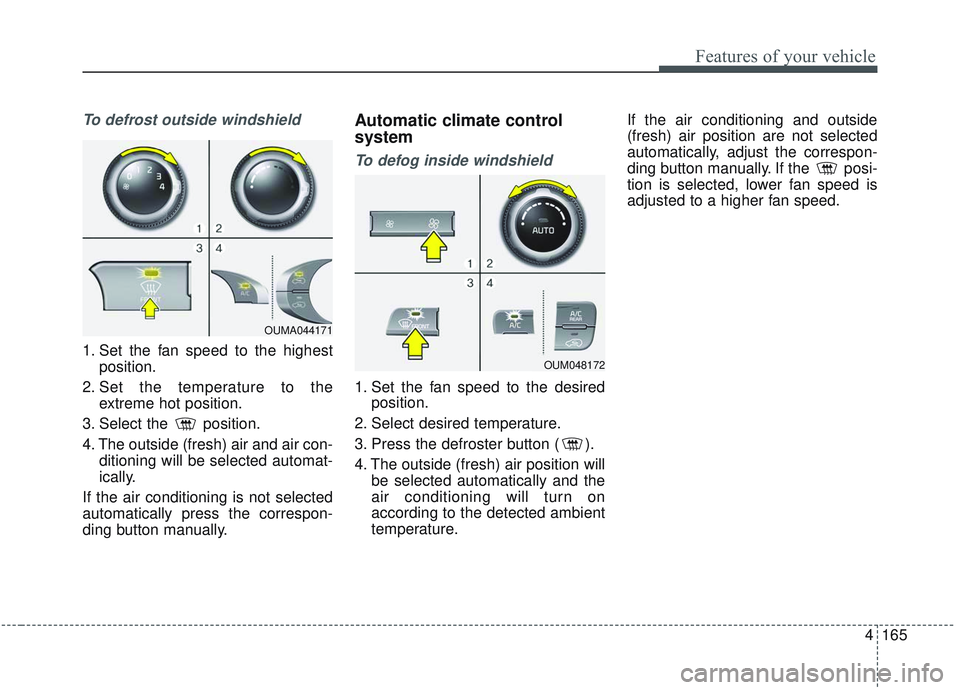
To defrost outside windshield
1. Set the fan speed to the highestposition.
2. Set the temperature to the extreme hot position.
3. Select the position.
4. The outside (fresh) air and air con- ditioning will be selected automat-
ically.
If the air conditioning is not selected
automatically press the correspon-
ding button manually.
Automatic climate control
system
To defog inside windshield
1. Set the fan speed to the desired position.
2. Select desired temperature.
3. Press the defroster button ( ).
4. The outside (fresh) air position will be selected automatically and the
air conditioning will turn on
according to the detected ambient
temperature. If the air conditioning and outside
(fresh) air position are not selected
automatically, adjust the correspon-
ding button manually. If the posi-
tion is selected, lower fan speed is
adjusted to a higher fan speed.
OUM048172
OUMA044171
Page 254 of 573
Features of your vehicle
166
4
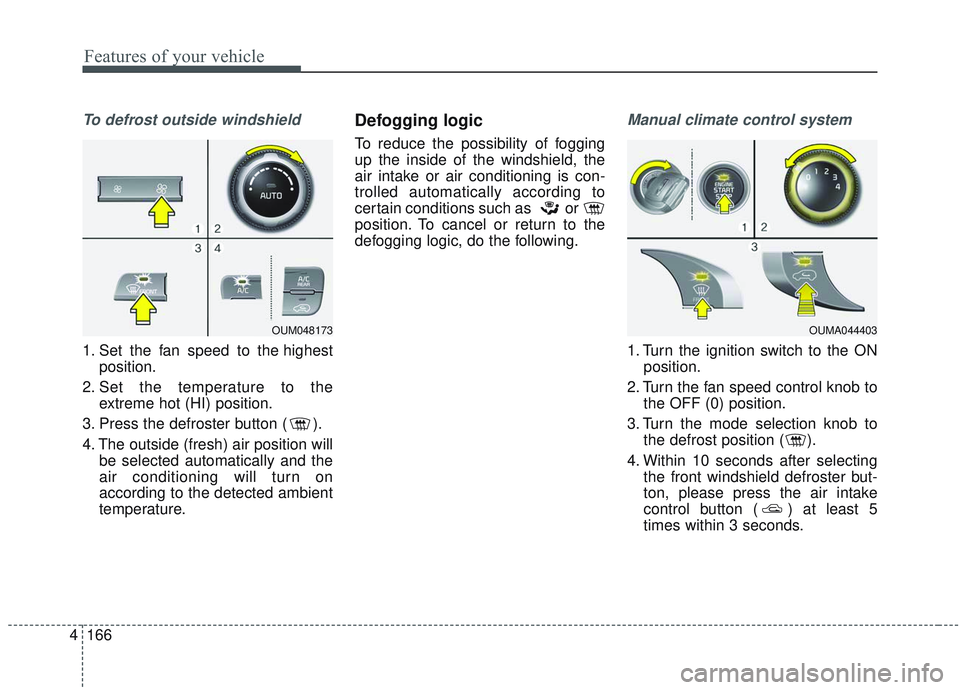
To defrost outside windshield
1. Set the fan speed to the highest
position.
2. Set the temperature to the extreme hot (HI) position.
3. Press the defroster button ( ).
4. The outside (fresh) air position will be selected automatically and the
air conditioning will turn on
according to the detected ambient
temperature.
Defogging logic
To reduce the possibility of fogging
up the inside of the windshield, the
air intake or air conditioning is con-
trolled automatically according to
certain conditions such as or
position. To cancel or return to the
defogging logic, do the following.
Manual climate control system
1. Turn the ignition switch to the ONposition.
2. Turn the fan speed control knob to the OFF (0) position.
3. Turn the mode selection knob to the defrost position ( ).
4. Within 10 seconds after selecting the front windshield defroster but-
ton, please press the air intake
control button ( ) at least 5
times within 3 seconds.
OUM048173OUMA044403
Page 256 of 573

Features of your vehicle
168
4
Auto defogging system
(if equipped)
Auto defogging reduces the probabil-
ity of fogging up the inside of the
windshield by automatically sensing
the moisture of inside the windshield.
The auto defogging system operates
when the heater or air conditioning is
on. This indicator illuminates
when the auto defogging
system senses the mois-
ture on the inside of the
windshield and operates.
If more moisture is in the vehicle,
higher steps operate as follow. For
example if auto defogging does not
defog inside the windshield at step 1
Outside air position, it tries to defog
again at step 2 Blowing air toward
the windshield.
Step 1 : Outside air position
Step 2 :Blowing air toward the wind-
shield
Step 3 : Increasing air flow toward the windshield
Step 4 : Operating the air conditioning
Step 5 : Maxim izing the air condi-
tioning To cancel or reset the Auto Defogging
System
Press the front windshield defroster
button for 3 seconds when the igni-
tion switch is in the ON position.
When the Auto Defogging System is
canceled, ADS OFF symbol will blink
3 times and the ADS OFF will be dis-
played on the climate control infor-
mation screen.
When the Auto Defogging System is
reset, ADS OFF symbol will blink 6
times without a signal.
✽ ✽
NOTICE
If the A/C off or recirculated air
position is manually selected while
the auto defogging system is on, the
auto defogging indicator will blink 3
times to give notice that manual
operation is canceled.
Do not remove the sensor cover
located on the upper end of the pas-
senger side windshield glass.
Damage to the system parts could
occur and may not be covered by
your vehicle warranty.
OUMA044405
Page 263 of 573
4175
Features of your vehicle
Sunvisor
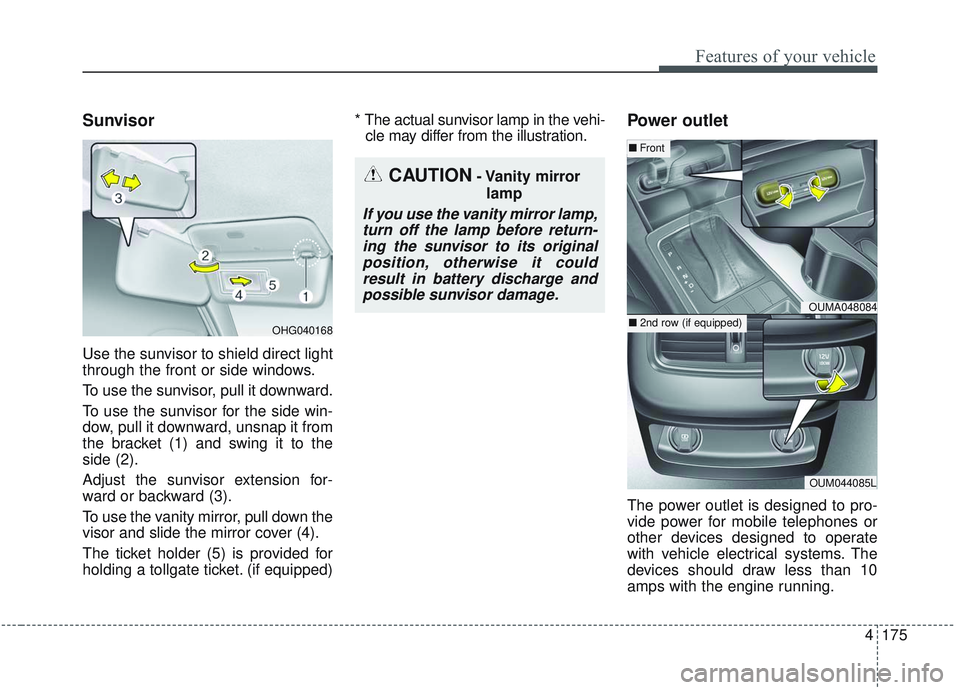
Use the sunvisor to shield direct light
through the front or side windows.
To use the sunvisor, pull it downward.
To use the sunvisor for the side win-
dow, pull it downward, unsnap it from
the bracket (1) and swing it to the
side (2).
Adjust the sunvisor extension for-
ward or backward (3).
To use the vanity mirror, pull down the
visor and slide the mirror cover (4).
The ticket holder (5) is provided for
holding a tollgate ticket. (if equipped)* The actual sunvisor lamp in the vehi-
cle may differ from the illustration.
Power outlet
The power outlet is designed to pro-
vide power for mobile telephones or
other devices designed to operate
with vehicle electrical systems. The
devices should draw less than 10
amps with the engine running.
OHG040168
CAUTION- Vanity mirror
lamp
If you use the vanity mirror lamp,turn off the lamp before return-ing the sunvisor to its originalposition, otherwise it couldresult in battery discharge andpossible sunvisor damage.
OUMA048084
OUM044085L
■ Front
■ 2nd row (if equipped)
Page 334 of 573
557
Driving your vehicle
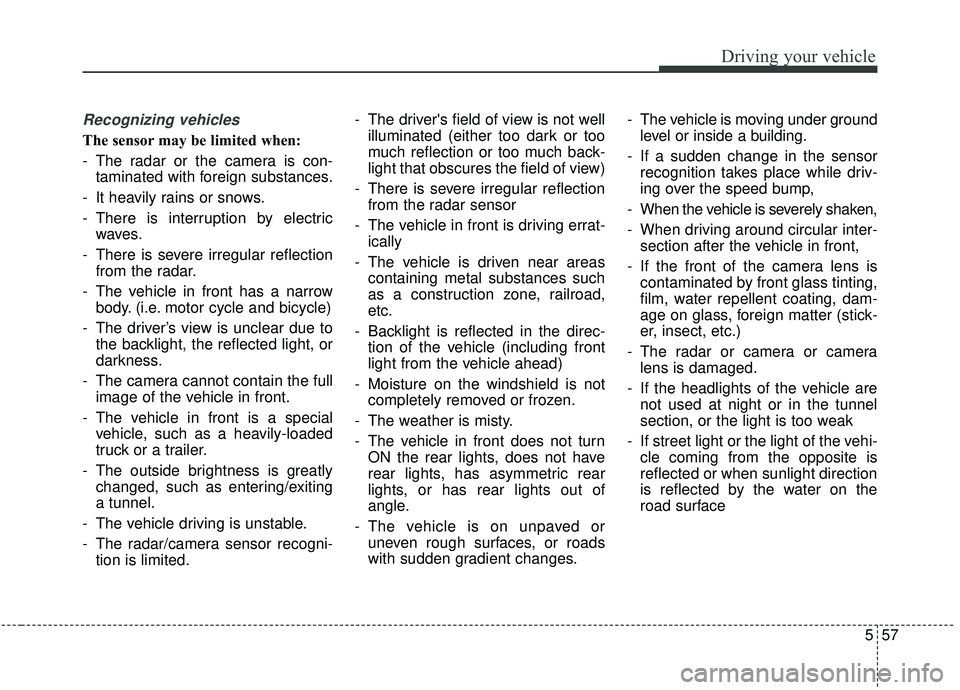
Recognizing vehicles
The sensor may be limited when:
- The radar or the camera is con-taminated with foreign substances.
- It heavily rains or snows.
- There is interruption by electric waves.
- There is severe irregular reflection from the radar.
- The vehicle in front has a narrow body. (i.e. motor cycle and bicycle)
- The driver’s view is unclear due to the backlight, the reflected light, or
darkness.
- The camera cannot contain the full image of the vehicle in front.
- The vehicle in front is a special vehicle, such as a heavily-loaded
truck or a trailer.
- The outside brightness is greatly changed, such as entering/exiting
a tunnel.
- The vehicle driving is unstable.
- The radar/camera sensor recogni- tion is limited. - The driver's field of view is not well
illuminated (either too dark or too
much reflection or too much back-
light that obscures the field of view)
- There is severe irregular reflection from the radar sensor
- The vehicle in front is driving errat- ically
- The vehicle is driven near areas containing metal substances such
as a construction zone, railroad,
etc.
- Backlight is reflected in the direc- tion of the vehicle (including front
light from the vehicle ahead)
- Moisture on the windshield is not completely removed or frozen.
- The weather is misty.
- The vehicle in front does not turn ON the rear lights, does not have
rear lights, has asymmetric rear
lights, or has rear lights out of
angle.
- The vehicle is on unpaved or uneven rough surfaces, or roads
with sudden gradient changes. - The vehicle is moving under ground
level or inside a building.
- If a sudden change in the sensor recognition takes place while driv-
ing over the speed bump,
- When the vehicle is severely shaken,
- When driving around circular inter- section after the vehicle in front,
- If the front of the camera lens is contaminated by front glass tinting,
film, water repellent coating, dam-
age on glass, foreign matter (stick-
er, insect, etc.)
- The radar or camera or camera lens is damaged.
- If the headlights of the vehicle are not used at night or in the tunnel
section, or the light is too weak
- If street light or the light of the vehi- cle coming from the opposite is
reflected or when sunlight direction
is reflected by the water on the
road surface
Page 338 of 573

561
Driving your vehicle
Recognizing pedestrians
The sensor may be limited when:
- The pedestrian is not fully detectedby the camera recognition system,
for example, if the pedestrian is
leaning over or is not fully walking
upright
- The pedestrian is moving very quickly or appears abruptly in the
camera detection area
- The pedestrian is wearing clothing that easily blends into the back-
ground, making it difficult to be
detected by the camera recogni-
tion system
- The outside lighting is too bright (e.g. when driving in bright sunlight
or in sun glare) or too dark (e.g.
when driving on a dark rural road
at night) - There is an item similar to a per-
son's body structure
- The pedestrian is small
- The pedestrian has impaired mobility
- The sensor recognition is limited
- It is difficult to detect and distin- guish the pedestrian from other
objects in the surroundings, for
example, when there is a group of
pedestrians or a large crowd
- If a sudden change in the sensor recognition takes place while driv-
ing over the speed bump,
- When the vehicle is severely shak- en,
- When driving around circular inter- section after the vehicle in front,
- If the front of the camera lens is contaminated by front glass tinting,
film, water repellent coating, dam-
age on glass, foreign matter (stick-
er, insect, etc.) - The radar or camera or camera
lens is damaged.
- If the headlights of the vehicle are not used at night or in the tunnel
section, or the light is too weak
- If street light or the light of the vehi- cle coming from the opposite is
reflected or when sunlight is
reflected by the water on the road
surface
- When the back light is projected in the direction of the vehicle's motion
(including the headlights of vehi-
cles)
- Road sign, shadow on the road, tunnel entrance, toll gate, partial
pavement
- If the moisture on the front wind- shield is not entirely removed or it
is frozen
- The weather is foggy
- The radar/camera sensor recogni- tion is limited.
Page 339 of 573
Driving your vehicle
62
5
✽ ✽
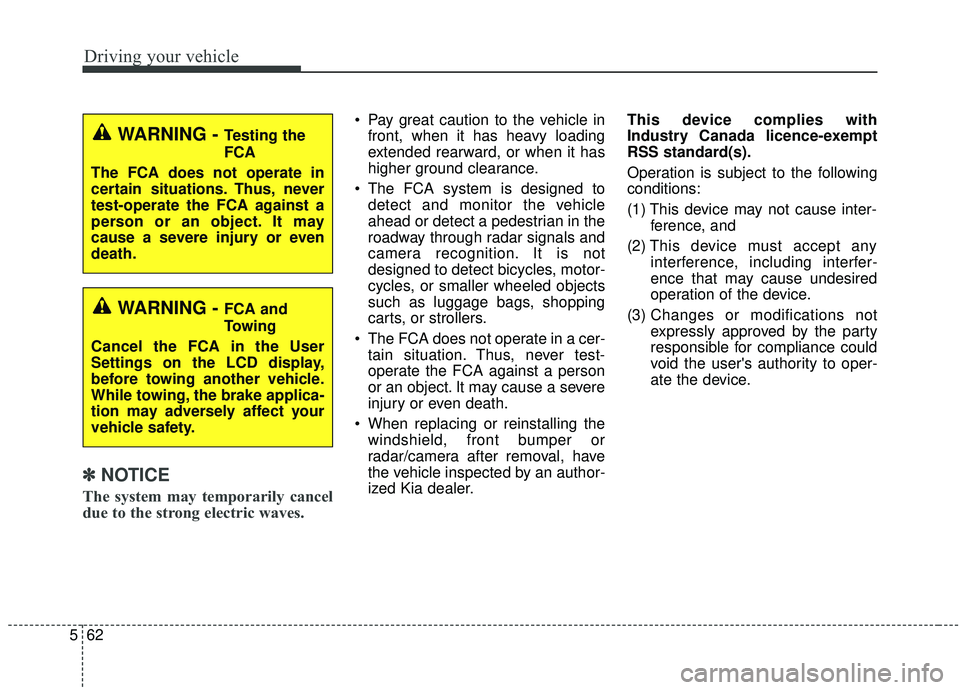
NOTICE
The system may temporarily cancel
due to the strong electric waves.
Pay great caution to the vehicle in
front, when it has heavy loading
extended rearward, or when it has
higher ground clearance.
The FCA system is designed to detect and monitor the vehicle
ahead or detect a pedestrian in the
roadway through radar signals and
camera recognition. It is not
designed to detect bicycles, motor-
cycles, or smaller wheeled objects
such as luggage bags, shopping
carts, or strollers.
The FCA does not operate in a cer- tain situation. Thus, never test-
operate the FCA against a person
or an object. It may cause a severe
injury or even death.
When replacing or reinstalling the windshield, front bumper or
radar/camera after removal, have
the vehicle inspected by an author-
ized Kia dealer. This device complies with
Industry Canada licence-exempt
RSS standard(s).
Operation is subject to the following
conditions:
(1) This device may not cause inter-
ference, and
(2) This device must accept any
interference, including interfer-
ence that may cause undesired
operation of the device.
(3) Changes or modifications not
expressly approved by the party
responsible for compliance could
void the user's authority to oper-
ate the device.
WARNING - Testing the
FCA
The FCA does not operate in
certain situations. Thus, never
test-operate the FCA against a
person or an object. It may
cause a severe injury or even
death.
WARNING - FCA and
Towing
Cancel the FCA in the User
Settings on the LCD display,
before towing another vehicle.
While towing, the brake applica-
tion may adversely affect your
vehicle safety.