2019 KIA SORENTO cruise control
[x] Cancel search: cruise controlPage 357 of 573
Driving your vehicle
80
5
Limitations of the system
The smart cruise control system may
have limits to its ability to detect dis-
tance to the vehicle ahead due to
road and traffic conditions.
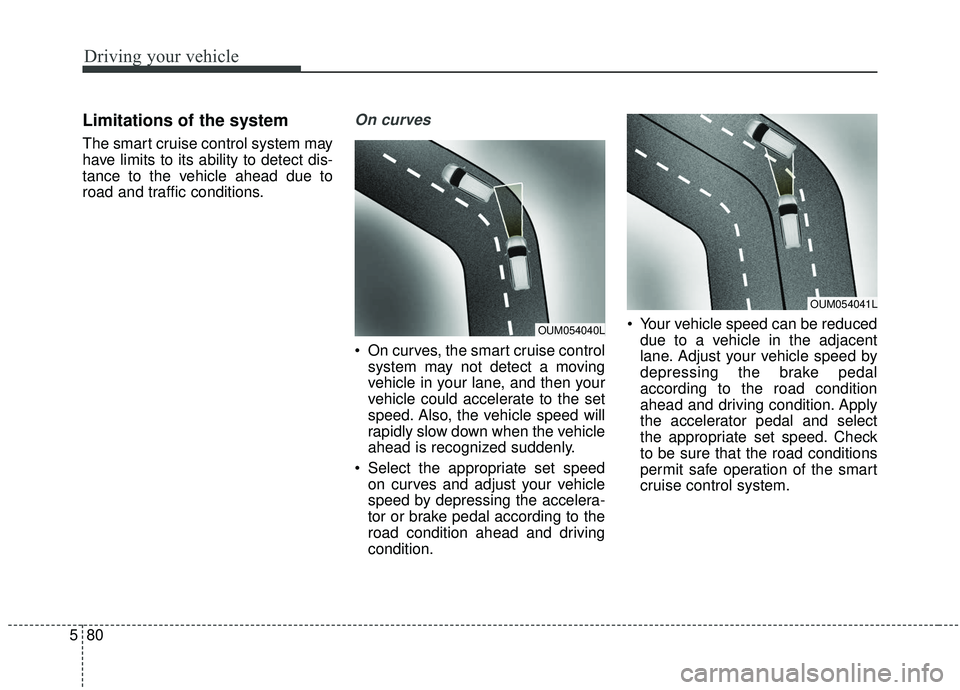
On curves
On curves, the smart cruise control
system may not detect a moving
vehicle in your lane, and then your
vehicle could accelerate to the set
speed. Also, the vehicle speed will
rapidly slow down when the vehicle
ahead is recognized suddenly.
Select the appropriate set speed on curves and adjust your vehicle
speed by depressing the accelera-
tor or brake pedal according to the
road condition ahead and driving
condition. Your vehicle speed can be reduced
due to a vehicle in the adjacent
lane. Adjust your vehicle speed by
depressing the brake pedal
according to the road condition
ahead and driving condition. Apply
the accelerator pedal and select
the appropriate set speed. Check
to be sure that the road conditions
permit safe operation of the smart
cruise control system.
OUM054041L
OUM054040L
Page 358 of 573

581
Driving your vehicle
On inclines
During uphill or downhill driving, thesmart cruise control system may
not detect a moving vehicle in your
lane, and cause your vehicle to
accelerate to the set speed. Also,
the vehicle speed will rapidly slow
down when the vehicle ahead is
recognized suddenly.
Select the appropriate set speed on inclines and adjust your vehicle
speed by depressing the accelera-
tor or brake pedal according to the
road condition ahead.
Lane changing
A vehicle which moves into yourlane from an adjacent lane cannot
be recognized by the sensor until it
is in the sensor's detection range.
The sensor may not detect imme- diately when a vehicle cuts in sud-
denly. Always pay attention to the
traffic, road and driving conditions.
If a vehicle which moves into your lane is slower than your vehicle,
your speed may decrease to main-
tain the distance to the vehicle
ahead. If a vehicle which moves into your
lane is faster than your vehicle,
your vehicle will accelerate to the
selected speed.
OUM054043LOUM054042L
Page 361 of 573

Driving your vehicle
84
5
- After an engine start, please stop
for several seconds. If system ini-
tialization is not completed, the
smart cruise control system does
not normally operate.
- After an engine start, if any objects are not detected or the sensor
cover is obscured with foreign sub-
stances, there is a possibility that
the smart cruise control system
system may not work.
- The following conditions may cause a malfunction: over-loading
the liftgate, suspension modifica-
tion, tire replacement with unau-
thorized tires or tires with different
tread wear and pressure levels.
- The smart cruise control system cannot guarantee the stop for
every emergency situation.
If an emergency stop is necessary,
you must apply the brakes.
- Keep a safe distance according to road conditions and vehicle speed.
If the vehicle to vehicle distance is
too close during a high-speed driv-
ing, a serious collision may result.
WARNING - Inclines &
Towing
Do not use smart cruise control
system on steep inclines or
when towing another vehicle or
trailer since such extreme load-
ing can interfere with your vehi-
cle's ability to maintain the
selected speed.WARNING
- Safe Use of smart cruise control system
The smart cruise control system
can provide you with an addition-
al level of safety and fatigue
reduction. However you must
maintain careful observation of
the roadway in front and around
you and maintain control of your
vehicle and spacing around
other vehicles as you normally
would. For example, this will
require you to apply the brakes
as needed when coming upon a
slower moving vehicle, or when a
vehicle from another lane drives
quickly in front of you.
Page 362 of 573
585
Driving your vehicle
- The smart cruise control systemcannot recognize a stopped vehi-
cle, pedestrians or an oncoming
vehicle. Always look ahead cau-
tiously to prevent unexpected and
suddensituations from occurring.
- When other vehicles are changing lanes in front of you frequently, the
smart cruise control system may
not operate appropriately. Always
look ahead cautiously to prevent
unexpected and sudden situations
from occurring.
- The smart cruise control system is not a substitute for safedriving
practices but a convenience func-
tion only. It is the responsibility of
the driver to always check the
speed and the distance to the vehi-
cle ahead.
- Always be aware of the selected speed and vehicle to vehicle dis-
tance.
- Always maintain sufficient braking distance and decelerate your vehi-
cle by applying the brakes if neces-
sary. This device complies with Industry
Canada licence-exempt RSS stan-
dard(s).
Operation is subject to the following
three conditions:
(1) This device may not cause inter-
ference, and
(2) This device must accept any
interference, including interfer-
ence that may cause undesired
operation of the device.
(3) Changes or modifications not
expressly approved by the party
responsible for compliance could
void the user’s authority to oper-
ate the device.
Page 365 of 573
Driving your vehicle
88
5
Various driving situations, which you
may encounter in SMART mode
The driving mode automatically
changes to ECO mode after a cer-
tain period of time, when you gen-
tly depress the accelerator pedal
(Your driving is categorized to be
mild.).
The driving mode automatically changes from SMART ECO mode
to SMART COMFORT mode after
a certain period of time, when you
sharply or repetitively depress the
accelerator pedal.
The driving mode automatically changes to SMART COMFORT
mode with the same driving pat-
terns, when the vehicle starts to
drive on an upward slope of a cer-
tain angle. The driving mode auto-
matically returns to SMART ECO
mode, when the vehicle enters a
leveled road. The driving mode automatically
changes to SMART SPORT, when
you abruptly accelerate the vehicle
or repetitively operate the steering
wheel (Your driving is categorized
to be sporty.). In this mode, your
vehicle drives in a lower gear for
abrupt accelerating/decelerating
and increases the engine brake
performance.
You may still sense the engine brake performance, even when you
release the accelerator pedal in
SMART SPORT mode. It is
because your vehicle remains to
be in a lower gear over a certain
period of time for next acceleration.
Thus, it is a normal driving situa-
tion, not indicating any malfunc-
tion.
The driving mode automatically changes to SMART SPORT mode
only in harsh driving situations. In
most of the normal driving situa-
tions, the driving mode sets to be
either in SMART ECO mode or in
SMART COMFORT mode. Limitation of SMART mode
The SMART mode may be limited in
following situations. (The OFF indica-
tor illuminates in those situations.)
The driver manually moves the
shift lever : It deactivates SMART
mode. The vehicle drives, as the
driver manually moves the shift
lever.
The cruise control is activated : The cruise system may deactivate
the SMART mode. When a higher
system is set by the cruise system,
it starts to control vehicle speed
and deactivates SMART mode.
(SMART mode is not deactivated
just by activing the cruise system.)
The transmission oil temperature is either extremely low or extremely
high : The SMART mode can be
active in most of the normal driving
situations. However, an extremely
high/ low transmission oil tempera-
ture may temporarily deactivate the
SMART mode, because the trans-
mission condition is out of normal
operation condition.
Page 391 of 573

Driving your vehicle
114
5
✽ ✽
NOTICE
The Driver Attention Warning sys-
tem utilizes the camera sensor on the
front windshield for its operation.
To keep the camera sensor in the
best condition, you should observe
the followings:
- Do not disassemble camera tem-
porarily for tinted window or
attaching any types of coatings and
accessories. If you disassemble a
camera and assemble it again, take
your vehicle to an authorized Kia
dealer and have the system
checked to need a calibration.
- Do not locate any reflective objects (i.e. white paper, mirror)
over the dashboard. Any light
reflection may cause a mal-func-
tion of the Driver Attention
Warning (DAW) system.
- Pay extreme caution to keep the camera sensor out of water.
- Do not arbitrarily disassemble the camera assembly, nor apply any
impact on the camera assembly.
• Playing the vehicle audio system at high volume may offset the
Driver Attention Warning system
warning sounds
✽ ✽ NOTICE
The Driver Attention Warning sys-
tem may not properly operate with
limited alerting in the following situ-
ations:
• The lane detection performance is
limited. (For more information,
refer to “Lane Keeping Assist
System (LKA system)” in this
chapter.)
• The vehicle is violently driven or is abruptly turned for obstacle
avoidance (e.g. construction area,
other vehicles, fallen objects,
bumpy road).
• Forward drivability of the vehicle is severely undermined (possibly
due to wide variation in tire pres-
sures, uneven tire wear-out, toe-
in/toe-out alignment). (Continued)(Continued)
• The vehicle drives on a curvy road.
• The vehicle drives on a bumpy
road.
• The vehicle drives through a windy area.
• The vehicle is controlled by the fol- lowing driver assistance systems:
- Lane Keeping Assist System(LKA system)
- forward collision-avoidance assist (FCA) System.
- Smart Cruise Control (SCC) System
Page 509 of 573

Maintenance
66
7
DescriptionFuse ratingProtected component
ABS 3 7.5AESC Control Module, Multipurpose Check Connector
ECU 1 10APCM
IG 2 40ARLY. 4 (Start Relay), PDM (IG2) Relay, Ignition Switch
POWER
OUTLET 1 20AFront Power Outlet & Cigarette Lighter
SENSOR 6 7.5AGCU
POWER
OUTLET 2 20AFront Power Outlet
MODULE7.5ASmart Cruise Control Radar
ECU 4 20A[Theta II 2.4L Engine] PCM (E-CVVT Relay)
WIPER 125AWiper Low Relay
DEICER 15AFront Deicer Relay
ECU 5 20A[Theta II 2.4L Engine] PCM (E-CVVT Relay)
IG 1 40APDM (IG1) Relay, PDM (ACC) Relay, Ignition Switch
SENSOR 4 10A[Theta II 2.4L Engine] Oxygen Sensor (Up/Down)
[Lambda II 3.3L Engine] PCM, Oxygen Sensor #1/#2/#3/#4
SENSOR 5 15A[Theta II 2.4L Engine] PCM
Page 561 of 573
Index
4I
Child restraint system . . . . . . . . . . . . . . . . . . . . . . . . . . 3-38Using a child restraint system . . . . . . . . . . . . . . . . . 3-39
Placing a passenger seat belt into the auto lock mode . . . . . . . . . . . . . . . . . . . . . . . . . . . . . . . . . . . . \
3-40
Securing a child restraint seat with tether anchor system. . . . . . . . . . . . . . . . . . . . . . . . . . . . . 3-43
Securing a child restraint seat with child seat lower anchor system. . . . . . . . . . . . . . . . . . . . . . . . . . . . . 3-44
Child-protector rear door lock . . . . . . . . . . . . . . . . . . . 4-25
Climate control air filter . . . . . . . . . . . . . . . . . . . . . . . . 7-29 Filter inspection . . . . . . . . . . . . . . . . . . . . . . . . . . . . 7-29
Closing the sunroof. . . . . . . . . . . . . . . . . . . . . . . . . . . . 4-55
Coat hook . . . . . . . . . . . . . . . . . . . . . . . . . . . . . . . . . . 4-18\
2
Combined instrument, see instrument cluster . . . . . . . 4-75
Consumer assistance . . . . . . . . . . . . . . . . . . . . . . . . . . . 8-12
Coolant . . . . . . . . . . . . . . . . . . . . . . . . . . . . . . . . . . . . \
. 7-21
Cooling fluid, see engine coolant . . . . . . . . . . . . . . . . . 7-21
Crankcase emission control system . . . . . . . . . . . . . . 7-100
Cruise control system . . . . . . . . . . . . . . . . . . . . . . . . . . 5-63 To set cruise control speed . . . . . . . . . . . . . . . . . . . . 5-63
To increase cruise control set speed. . . . . . . . . . . . . 5-64
To decrease the cruising speed. . . . . . . . . . . . . . . . . 5-65
To temporarily accelerate with the cruise control on5-65
To cancel cruise control . . . . . . . . . . . . . . . . . . . . . . 5-65
To resume cruising speed at more than approximately 30 km/h (20mph) . . . . . . . . . . . . . . . . . . . . . . . . . . 5-66
To turn cruise control off . . . . . . . . . . . . . . . . . . . . . 5-66 Cup holder . . . . . . . . . . . . . . . . . . . . . . . . . . . . . . . . . 4-172
Curtain air bag . . . . . . . . . . . . . . . . . . . . . . . . . . . . . . . 3-63
Dashboard illumination, see instrument panel
illumination . . . . . . . . . . . . . . . . . . . . . . . . . . . . . . 4-76
Dashboard, see instrument cluster . . . . . . . . . . . . . . . . 4-75
Day/Night rearview mirror . . . . . . . . . . . . . . . . . . . . . . 4-61
Daytime running light. . . . . . . . . . . . . . . . . . . . . . . . . 4-123
Defogging (Windshield) . . . . . . . . . . . . . . . . . . . . . . . 4-164
Defroster (Rear window) . . . . . . . . . . . . . . . . . . . . . . 4-140
Defrosting (Windshield) . . . . . . . . . . . . . . . . . . . . . . . 4-164
Digital speedometer . . . . . . . . . . . . . . . . . . . . . . . . . . . 4-86
Dimensions . . . . . . . . . . . . . . . . . . . . . . . . . . . . . . . . . . . 8-\
2
Display illumination, see instrument panel illumination . . . . . . . . . . . . . . . . . . . . . . . . . . . . . . . 4-76
Displays, see instrument cluster . . . . . . . . . . . . . . . . . . 4-75
Distance to empty . . . . . . . . . . . . . . . . . . . . . . . . . . . . . 4-89
Do not use methanol . . . . . . . . . . . . . . . . . . . . . . . . . . . . 1-4
Door lock button . . . . . . . . . . . . . . . . . . . . . . . . . . . . . . 4-23
Door locks. . . . . . . . . . . . . . . . . . . . . . . . . . . . . . . . . . . 4-\
22 From outside the vehicle . . . . . . . . . . . . . . . . . . . . . 4-22
From inside the vehicle . . . . . . . . . . . . . . . . . . . . . . 4-23
Door lock button . . . . . . . . . . . . . . . . . . . . . . . . . . . 4-23
Central door lock switch . . . . . . . . . . . . . . . . . . . . . 4-24
Child-protector rear door lock . . . . . . . . . . . . . . . . . 4-25
Drinks holders, see cup holders . . . . . . . . . . . . . . . . . 4-172
D